
How to automate onboarding with onboarding automation software, no Zapier required
By Lauren Burns, COO at Blink · Published 19 June 2026 · Last updated 14 July 2026
Think about the last person who joined your frontline team. Someone was meant to send the welcome, set up their equipment, chase the mandatory read, and check in at day 30. Some of it happened. Most of it happened late, or not at all. Not because anyone stopped caring, but because the whole process lived in one manager's head, and that manager was covering a shift. Onboarding rarely fails on purpose. It fails because nothing remembered to make it happen.
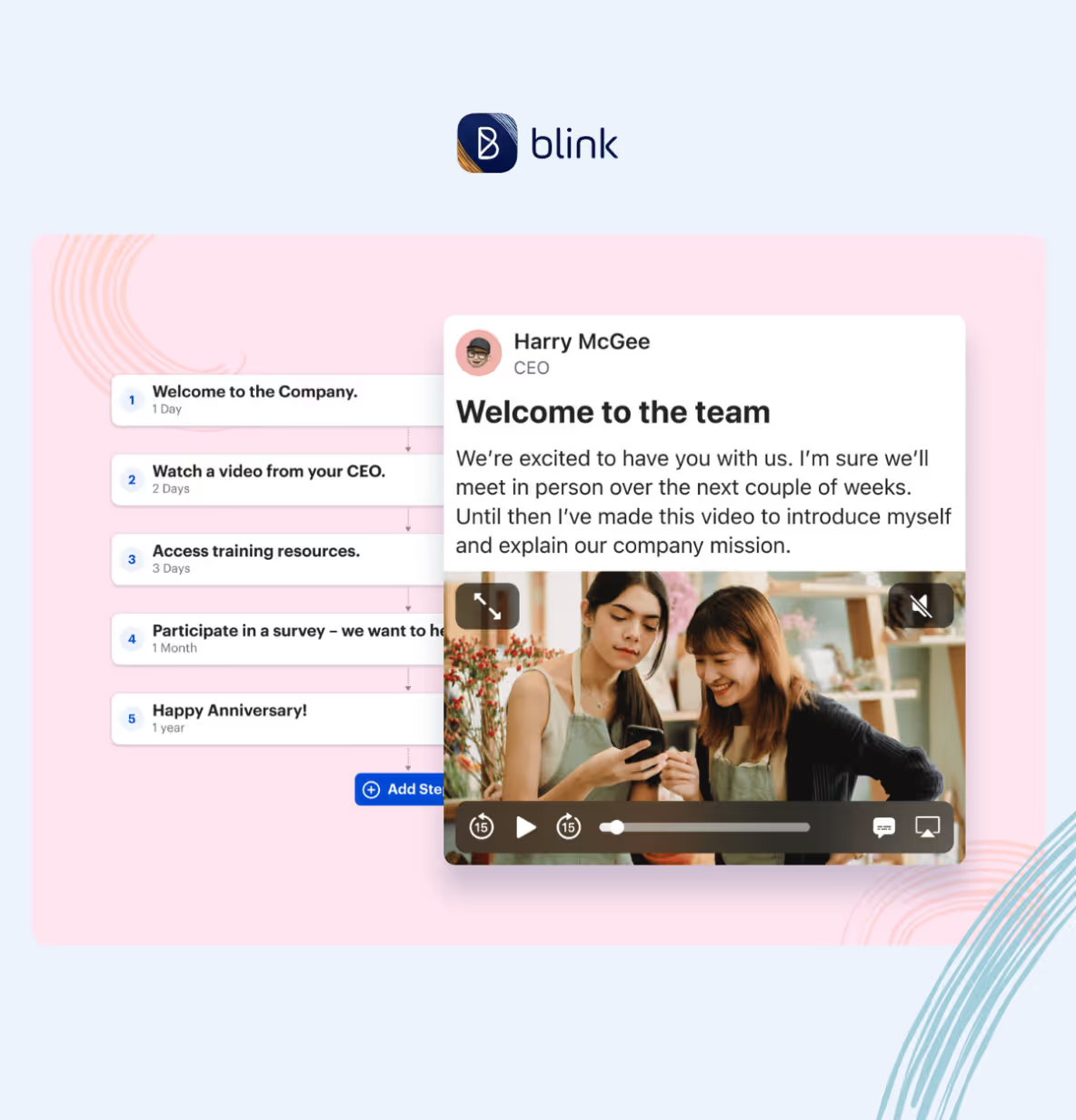
Automated employee onboarding uses software to trigger sequences of tasks, communications, forms, and surveys based on employee milestones, from pre-boarding through day 90. Instead of a manager remembering what comes next, the system fires the right content at the right moment: welcome messages on day one, mandatory reads and digital forms in week one, training in week two, milestone check-ins at 30, 60, and 90 days. The triggers are dates: registration date, start date, and day offsets. Everything else ladders off those.
The earliest weeks are also where new hires decide whether to stay, which makes a dropped step in week one more costly than it looks.
Most onboarding automation was built for desk workers with company email and a laptop on day one. It needs a corporate email to send the invite, and most frontline and hourly workers don't have one. If your team is hourly, mobile-first, or scattered across sites, most of those tools don't work. A lot of teams patch the gap with a Zapier workflow stitched between an HRIS, a messaging tool, and a spreadsheet, until a field in Workday gets renamed and the whole chain breaks silently, with nobody noticing until a new hire shows up to an empty welcome channel. This guide is how to automate onboarding for a frontline workforce without that duct tape.
Why manual onboarding falls over
Every people team has an onboarding process. It usually lives in a shared drive or a Notion doc. Some managers follow it, some don't.
Managers forget. They're running a shift, covering an absence, fixing a schedule gap. The welcome video meant for 10am on day one lands three days later.
Consistency slips. A new hire at one store gets a five-touchpoint onboarding. The same role at another location gets two.
Compliance shows up in an audit. The mandatory-read policy sits in someone's inbox with no acknowledgment trail.
New hires disengage. The first two weeks decide whether someone stays. The drop-off is expensive.
Manual onboarding assumes the manager is a system. Automated onboarding accepts they're a person, and moves the reliable parts to software.
The 5 stages you should automate
Onboarding is a five-stage arc from offer to day 90. Each stage has a trigger, content that fires, and a recipient. Build all five and the manager only gets involved where their input actually matters.
1. Pre-boarding (offer to day 1)
Trigger: Registration date onto your onboarding platform, not start date. If you can only trigger on start date, everything happens on or after their first shift, and the new hire spends the intervening week waiting.
What fires: A welcome video from the CEO or founder. A message from their line manager. Practical first-day logistics: where to park, what time to arrive, who to ask for, what to wear, what to bring. A short "meet the team" post so they know a face when they walk in.
Who receives what: New hire gets everything. Manager gets a nudge two days before start date to confirm the intro post is ready and any equipment is booked.
Pre-boarding kills first-day anxiety before it starts. ID Logistics triggers Journeys on registration date via Day -X journeys, X days before start date, so welcome content, paperwork, and manager intros land days or weeks before day 1.
2. Day 1 (start date trigger)
Trigger: Start date at the company.
What fires: A welcome sequence in the app, written in the new hire's own name and signed off by a named manager or buddy rather than sent as a system notification. Mandatory-read policies with an acknowledge button for an audit trail. Digital forms for IT setup, uniform, tax forms, and emergency contacts. Buddy assignment: the new hire is paired with a peer who can answer the questions a manager doesn't have time for.
Who receives what: New hire gets the sequence in-app. Manager gets a day-one check-in nudge. HR gets a completion signal when reads and forms are done.
3. Days 2 to 14 (rolling from start date)
Trigger: Days offset from start date.
What fires: Deliver role-specific training as micro-content. A manager check-in nudge in week one and again in week two, so a real conversation happens on schedule. The first pulse survey around day 14.
Who receives what: New hire gets training and survey. Manager gets the check-in prompt. Team leads see survey results at site or store level, so they can act locally.
The micro-content shift is the biggest quality win. Frontline workers finish six two-minute modules on their commute or between shifts. They don't finish a two-hour classroom session.
4. Days 15 to 30
Trigger: Day offset from start date.
What fires: Deeper role and product training. The first milestone survey at day 30 covering training quality, team support, system enablement, and job confidence. An invite to relevant communities so the new hire connects beyond their immediate team.
Who receives what: New hire gets training and survey. HR gets aggregate survey data. Local leaders see their own site or store data, so they can spot problems before day 90.
5. Days 31 to 90
Trigger: Day offsets at 60 and 90.
What fires: Milestone check-ins at 60 and 90. A performance-conversation prompt for the manager. Ongoing engagement content: recognition posts, community activity, and company news filtered to role and location.
Who receives what: New hire gets the check-ins and content. Manager gets the performance prompt. HR gets a rolling view of 30/60/90 sentiment across the cohort.
By day 90, you should know whether this hire will stay a year. Automated onboarding shows you who's at risk before day 90, so you can intervene.
How to build this in Blink
Here's how the five stages translate into an actual journey inside Blink. Journeys are Blink's automation engine for lifecycle content. If you can describe your onboarding as "on date X, send Y to person Z," Journeys will run it.
Step 1: Open Composer and create the journey
Give the journey a name that reflects the audience (for example, "Retail onboarding, store teams"). Most teams start with a single company-wide journey and split it out later as audience-specific needs surface.
Step 2: Choose the trigger
Two triggers to choose from:
- Start date at the company. Everything runs on or after their first shift.
- Registration date onto Blink. Everything can run before their first shift.
If you want pre-boarding, use registration date. Otherwise, start date is fine. Most teams use both: a registration-triggered journey for the pre-boarding week, then a start-date journey for everything after.
The pre-boarding lever. Registration-date triggering is the reason onboarding can start before day one. Add a new hire to Blink the week before they arrive, and the welcome video, the manager intro, and the first-day logistics fire on schedule without anyone lifting a finger. ID Logistics built their entire pre-boarding sequence on this trigger.
Step 3: Set the audience
Audience targeting decides who receives the journey. In Blink, you can target by role, team, location, or a custom field. Custom fields matter because frontline workforces don't map cleanly onto a corporate org chart. A store associate at one location may need different first-week comms to the same role at another, even on the same team.
Step 4: Build the content blocks
Each stage is one or more content blocks. Blink gives you five block types:
- Feed posts for regular comms (welcome messages, buddy intros, community invites)
- Priority posts for pinned content that has to be seen (first-day logistics, policy summary)
- Mandatory reads for policy documents that require an acknowledge, with an audit trail per user
- Digital forms for anything the new hire needs to complete (IT setup, uniform, tax forms)
- Survey links for milestone surveys at day 14, 30, 60, and 90
Drag each block onto the timeline. Set the day offset. Assign the recipient. Most onboarding journeys have 15 to 25 blocks across the 90 days.
Step 5: Publish and monitor
Once live, the journey runs automatically for every new hire matching the audience rules. As it runs, you see which blocks each hire has completed, which surveys they've answered, and where they might be stuck. When a cohort's day-30 sentiment scores dip, you'll spot it before it shows up as turnover.
The heaviest lift is deciding what content goes where, not the technical build. Teams that already have a written onboarding checklist tend to move fastest, because the journey is really just that checklist translated into triggers.
Real teams doing this today
Stagecoach runs automated 30/60/90-day check-ins for its drivers, with milestone surveys across themes including training quality, system enablement, team support, and job confidence. Garage managers get direct access to their garage's data. What was once a central HR black box is now a shared, transparent process. Stagecoach has seen up to a 26% reduction in frontline turnover since rolling out Blink.
ID Logistics built their onboarding around registration-date triggering. New hires get Blink the week before they start, and the pre-boarding sequence fires without a manager remembering to send anything.
Elara Caring runs automated onboarding for caregivers across dispersed home-care teams. Their caregivers aren't in a distribution center or a store, they're in patients' homes. Onboarding via app is the only way this works at scale.
One ops manager at a transport customer summed up the shift like this: Journeys gave their new team a consistent onboarding experience and kept the whole workforce reminded of key information, like handbooks and safety protocols, without anyone having to chase it manually.
The metrics you'll see move
New hires get onboarded inside the same app they'll use every shift, so day one doesn't need a separate login. Automate onboarding well, and several numbers change. Track them from the day you turn the journey on.
Time to productivity. Days or weeks from start date to a new hire hitting full role performance. Micro-content training compresses the learning curve.
Early attrition. Voluntary leavers in the first 90 days. The number to watch.
Manager time on onboarding admin. Should approach zero for the reliable parts.
Training completion rates. Should climb sharply when training moves to mobile micro-content vs classroom.
New-hire engagement score. Sentiment at day 14, 30, 60, and 90. A rising cohort trend means the journey is working. A dip in a specific site or store tells you where to intervene.
Onboarding is the first thing a new hire experiences of your company. It's the difference between a hire who stays a year and a hire who's gone in a month.
Ready to build yours?
Automated onboarding is a milestone-triggered journey that runs itself. One platform, mobile-first, audit trail baked in.
Start your 14-day free trial, or book a demo to see Blink Journeys in action first. You can also read more in our guide to employee experience software.