Introducing Journeys from Blink: Elevate your employee experience from day one
Introducing Journeys from Blink: a powerful new way to meet employee attrition and engagement challenges head-on.
Jess DeVore
Published:
September 6, 2023
Last updated:
September 17, 2023
What we'll cover
Blink. And your frontline is set up for success.
Introducing Journeys from Blink: a powerful new way to meet employee attrition and engagement challenges head-on.
Journeys lets you personalize employee interactions at scale.
Did you know that a third of employees quit within their first 90 days? All that time and effort invested in sourcing, recruiting, and onboarding new team members can so quickly go to waste. That's why it's crucial to equip your business with the right tools to keep employees engaged from the day they join.
Foster a personal connection with your employees from day one, and you'll gain control over frontline employee engagement — setting you up in the short term to reduce new starter attrition, and in the long run a happier, more engaged workforce.
What is Journeys?
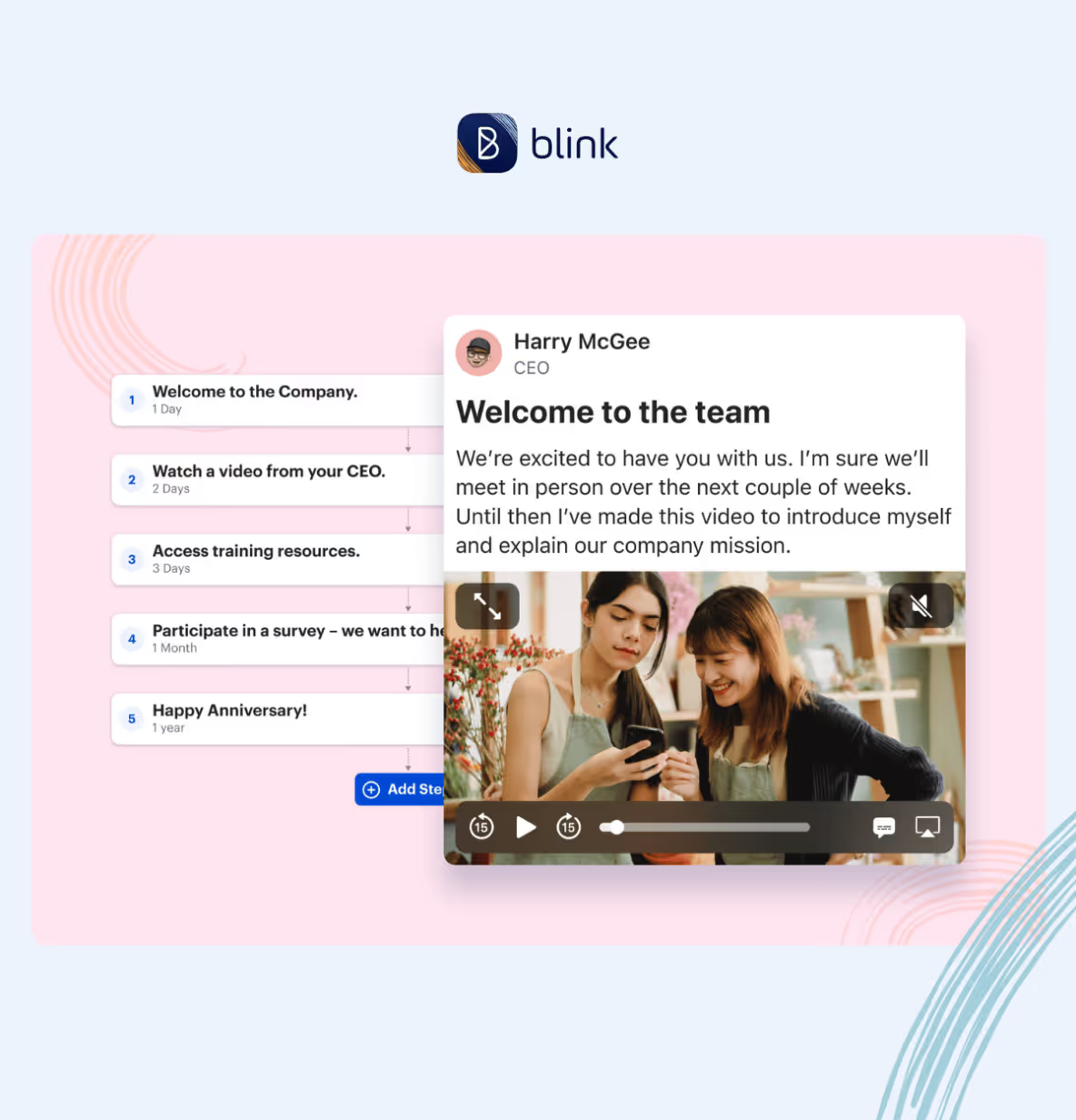
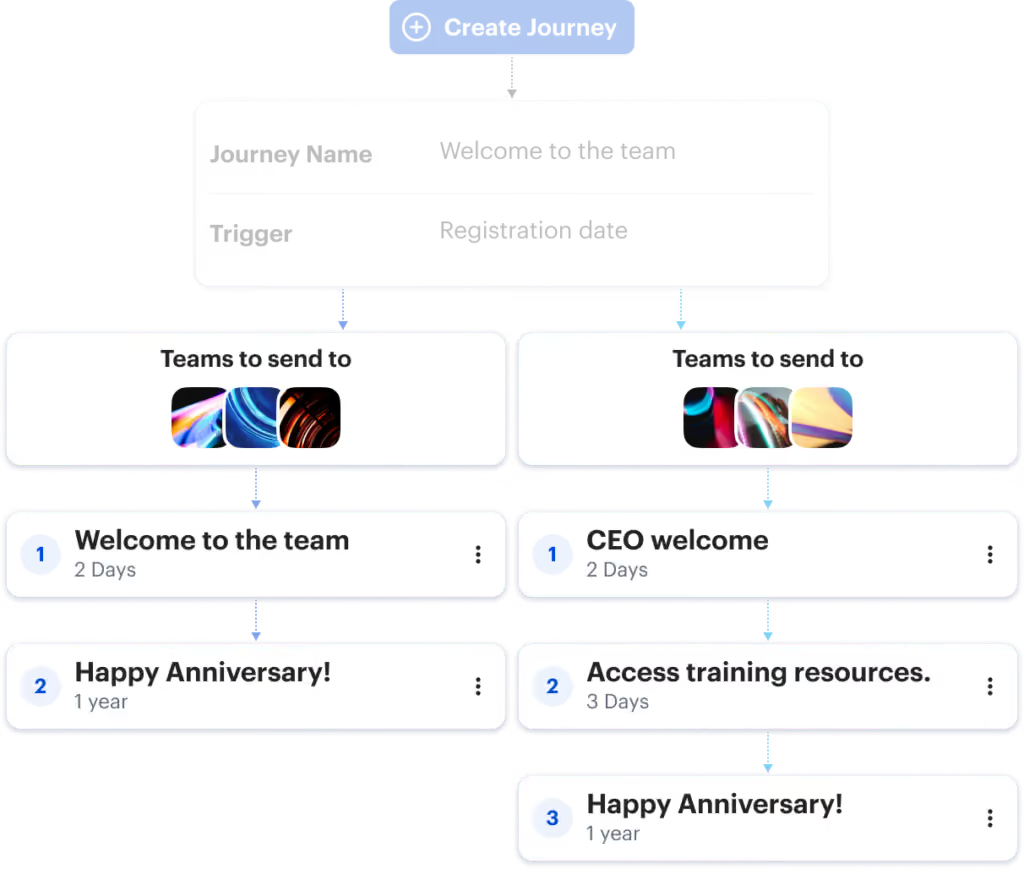
Journeys is a new way to set up personalized content paths for every employee. Each new Journey helps businesses deliver and scale an engaging employee experience.
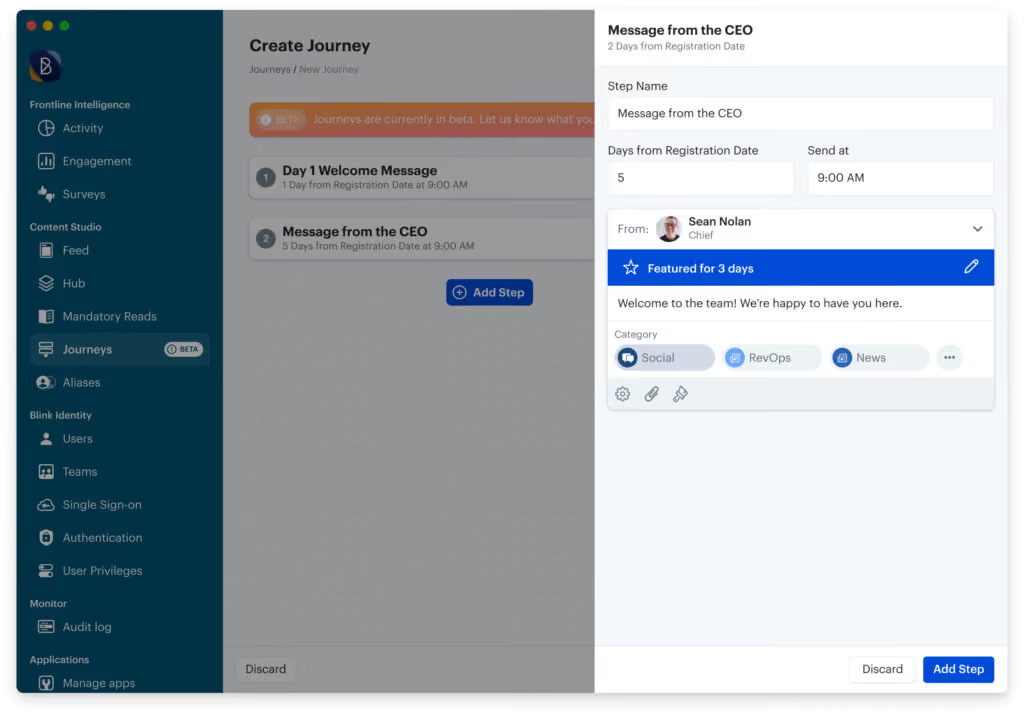
It's quick and easy to create Journeys that deliver meaningful interactions with your team.
Businesses using Journeys can:
✅ Boost employee happiness and retention by cultivating a sense of belonging and engagement within their workforce
✅ Personalize for the frontline — effortlessly. With Journeys, delivering personalized experiences to every frontline worker is quick and easy
✅ Streamline onboarding: The entire employee onboarding process is simplified by Journeys, saving valuable time and effort while accelerating employee ramp-up time
✅ Create a winning employee experience: In just a few minutes, you'll have created a tailored sequence of posts that align with your employees' needs
"Journeys has been perfect for giving our new team a great onboarding experience, as well as keeping the whole team reminded of key information such as our handbook and safety protocols. But this only scratches the surface: there are a ton of opportunities here."
Katie Palmatier, Operations Manager at Lifeline Ambulance Service
Ways organizations are using Journeys
Onboarding 👋 Effortlessly guide new starters through your induction process, welcoming them to Blink, sharing key onboarding documents and tools, and introducing them to key people who will support them in their roles.
Collecting feedback 💬 Keep your finger on the pulse throughout your employee lifecycle by linking to forms and surveys.
Celebrating work milestones 🎉 Ensure no work anniversary goes overlooked or unrecognized.
Training and compliance 🎓 Distribute key policies and learning and development resources, then send timely reminders for employees to act.
Organizations using Blink Journeys are benefitting from:
Time and effort saved in managing people operations
Improved employee engagement at scale, leading to better productivity and happiness
Reduced new employee churn, thanks to informative and well-timed onboarding communications
Decreased current employee churn through automated touch points and milestones
What's next?
Ready to transform your employee experience with Journeys and Blink? Reach out to us to learn more about Journeys and how it can elevate your employee experience. Get in touch today.
Blink. And your frontline is set up for success.
Introducing Journeys from Blink: a powerful new way to meet employee attrition and engagement challenges head-on.
Journeys lets you personalize employee interactions at scale.
Did you know that a third of employees quit within their first 90 days? All that time and effort invested in sourcing, recruiting, and onboarding new team members can so quickly go to waste. That's why it's crucial to equip your business with the right tools to keep employees engaged from the day they join.
Foster a personal connection with your employees from day one, and you'll gain control over frontline employee engagement — setting you up in the short term to reduce new starter attrition, and in the long run a happier, more engaged workforce.
What is Journeys?
Journeys is a new way to set up personalized content paths for every employee. Each new Journey helps businesses deliver and scale an engaging employee experience.
It's quick and easy to create Journeys that deliver meaningful interactions with your team.
Businesses using Journeys can:
✅ Boost employee happiness and retention by cultivating a sense of belonging and engagement within their workforce
✅ Personalize for the frontline — effortlessly. With Journeys, delivering personalized experiences to every frontline worker is quick and easy
✅ Streamline onboarding: The entire employee onboarding process is simplified by Journeys, saving valuable time and effort while accelerating employee ramp-up time
✅ Create a winning employee experience: In just a few minutes, you'll have created a tailored sequence of posts that align with your employees' needs
"Journeys has been perfect for giving our new team a great onboarding experience, as well as keeping the whole team reminded of key information such as our handbook and safety protocols. But this only scratches the surface: there are a ton of opportunities here."
Katie Palmatier, Operations Manager at Lifeline Ambulance Service
Ways organizations are using Journeys
Onboarding 👋 Effortlessly guide new starters through your induction process, welcoming them to Blink, sharing key onboarding documents and tools, and introducing them to key people who will support them in their roles.
Collecting feedback 💬 Keep your finger on the pulse throughout your employee lifecycle by linking to forms and surveys.
Celebrating work milestones 🎉 Ensure no work anniversary goes overlooked or unrecognized.
Training and compliance 🎓 Distribute key policies and learning and development resources, then send timely reminders for employees to act.
Organizations using Blink Journeys are benefitting from:
Time and effort saved in managing people operations
Improved employee engagement at scale, leading to better productivity and happiness
Reduced new employee churn, thanks to informative and well-timed onboarding communications
Decreased current employee churn through automated touch points and milestones
What's next?
Ready to transform your employee experience with Journeys and Blink? Reach out to us to learn more about Journeys and how it can elevate your employee experience. Get in touch today.
What we'll cover
Start your free trial today
See how Blink helps frontline teams stay connected, informed, and engaged.
Employee appreciation ideas aren’t just a nice thing to do. They’re common business sense.
71% of highly engaged organizations recognize employees for a job well done, but only 41% of less engaged organizations do the same. Meanwhile, Gartner suggests that a well-designed employee recognition program can lead to an increase in average employee performance.
The numbers don’t lie – employee recognition is vital, now more than ever. You don’t need to spend a lot on employee appreciation ideas for them to be effective either, and some of the best employee recognition strategies are completely free.
Here’s how to start showing your employees how much you appreciate them, and some staff appreciation ideas to get you started.
Why are employee appreciation ideas so important?
Everyone likes to be recognized for the work they put in. For staff appreciation, ‘thank you’ is everything.
In fact, feeling underappreciated at work is one of the most common reasons why employees leave a role. A recent study of UK and US workers by Workhuman found that employees who had been thanked for their work in the last month are:
Half as likely to look for a new job (24% vs 48%)
More than twice as likely to be engaged in their work (48% vs 21%)
More than three times as likely to see a path to grow in the organization (59% vs 19%)
All that, just from two short but meaningful words! Imagine the boost more developed employee appreciation ideas could achieve.
And, with the Great Resignation in full swing, the power of ‘thank you’ has never been more apparent, or commercially essential. Around 4.5 million Americans quit their job in March 2022, enticed by rising wages and more flexible working options.
Appreciating your employees for all the hard work they put in is vital in encouraging them to stay put. The great news is that this isn’t a difficult task at all! All it takes is the willingness to listen and some creative thinking on your part.
How to start recognizing your employees’ achievements
Employee recognition isn’t just a top-down thing.
Sure, your senior execs can and should take the lead in calling out great performance – it makes it much easier for everyone else to follow. The issue is that senior managers can only be in so many places at once. They can’t recognize everything worthy of being recognized.
Instead, it’s all about building a culture of continuous recognition from the ground upwards, encompassing both informal and formal recognition methods. This could include:
An employee app that lets managers share great performance with the wider organization
A quarterly awards ceremony to recognize employees who have gone above and beyond
Peer to peer recognition apps to encourage colleagues to support each other
Training all of your employees in how to recognize their peers
That last point is important. In a recent survey, two thirds of businesses said that they trained their managers in employee recognition but only one third offered employees training in colleague recognition. To build a positive culture, it’s important that everyone knows how to offer praise, and its impact on creating an engaged workplace. Don’t leave it to chance.
It’s also essential to build employee preferences into this process. Some people might love receiving an award in front of all their colleagues; for others, this might seem more like a punishment! Ask your teams (or ensure your line managers do) what their ideal way of being thanked looks like. It's an employee engagement best practice worth following.
6 great staff appreciation ideas
1. Salary rise
Almost two-thirds of U.S. private sector payroll workers work in industries where the average weekly wage in the second quarter of 2021 was at least 5% higher than it was in the second quarter of 2020, according to the Bureau of Labor Statistics.
If your rates of pay haven’t budged since pre-pandemic, they’re likely no longer competitive. Show your staff you're serious about your long-term relationship by bringing them up to market rate – or higher! Costs of living are rising rapidly right now, and your team will appreciate it.
2. Public shoutouts
Use your employee app or intranet to shout about individual and team successes. As well as the warmth of public recognition, this helps your employees build their networks in your organization and get noticed by those who could help them progress. .
3. Fun benefits and perks
There’s nothing wrong with offering your employees a little treat every now and then. It won’t make or break employee engagement (a decent salary and day-to-day appreciation are far more important considerations), but it’s definitely a great addition.
Spa days, vouchers for department stores, team days out, gym memberships and personal development funds are all great ways to do this – you might have some ideas of your own.
4. Identify and celebrate key milestones
What we don’t mean: only celebrating 10-year milestones and giving your employees a watch on retirement. Things have moved on since the 1950s.
What we do mean: finding milestones that are meaningful to your business and celebrating little and often. Passing probation, completing advanced training, promotions and getting that first landmark sale are all worthy of celebration. Identify some that are meaningful to your workforce.
5. Individual and team specific
On some level, you’ll have to rely on your line managers to ensure employees feel appreciated on a day-to-day basis. Train them to express their appreciation frequently, and give them a budget for treats like team socials and post-project meals out. It’ll make all the difference.
6. Employee Appreciation Day
Dedicate a day to saying thank you to your employees! In the US, the official Employee Appreciation Day is celebrated on the first Friday of March, but you could hold your own staff appreciation day whenever suits you best.
Employee Appreciation Day ideas include running an awards ceremony to recognize all the effort your employees have put in over the year, followed by a few hours of fun to celebrate these achievements. Fire up the grill (or hire a food truck), plan some fun activities and let everyone have a great time.
On a budget?
It’s not all about the fancy extras. Some of the most effective employee appreciation ideas are free:
Creating a ‘wall of fame’ for great achievements
Celebrating employees’ birthdays, marriages and other life events
Putting effort into feedback, so that employees can develop their skills
Providing opportunities that will help build experience, such as shadowing other roles
Working remotely?
This doesn’t need to stop you! Try using an employee app that will allow you to share your appreciation virtually. You could also try the following employee appreciation ideas:
Early finish Fridays, especially in summer
Celebrations and awards ceremonies via Zoom or similar
Constant engagement and feedback via Slack or your other messaging channels
Treats (food, vouchers, care packages) via post. Everyone loves surprise mail!
Staff appreciation quotes
What you say and how you say it matters! Use these ideas as templates so that you really get the message across.
Every day: “Thank you”
Often, it doesn’t have to get much more complicated than this.
“Thank you for getting that report to me so promptly.”
“Thank you for stepping in last minute – we were really short.”
“Thank you for all your hard work this week – it’s been a long one.”
For small, day-to-day actions that have made everyone’s working lives a little easier, there’s no better alternative.
Recognizing consistently good performance: “I’ve noticed that…”
All too often, it’s large, one-off actions that get noticed rather than consistently good performance that keeps the organization running. Avoid this trap with the “I’ve noticed…” approach.
“I’ve noticed that you always make sure the shop’s tidy before locking up, even though that’s not your role.”
“I’ve noticed that you always hit deadlines without fuss, and it makes it so much easier for everyone else.”
“I’ve noticed that you always take the early shift to make life easier for colleagues with kids.”
Follow up with thanks, by passing on this info to higher ups in the business and potentially with a token of your appreciation – lunch on the company, an early finish this weekend or a large box of baked goods can all work, depending on the situation.
One-off actions: “That really made a difference”
For those times where an employee knocks it out the park, it’s always worth emphasizing the impact of their actions. Employees want their work to be meaningful, and this lets them know
“That report gave senior management a real insight into some of the issues we’re facing, and really made a difference in how we’re going to approach them.”
“That big deal you landed made a huge difference in us meeting our quarterlies. You should be very proud.”
“The new processes you suggested save us so much time. They’ve really made a difference to employee wellbeing.”
Again, follow up with an appropriate reward for maximum impact, whether that’s an award, a bonus or something similar.
Employee appreciation ideas: final thoughts
People like to feel appreciated, so a quick ‘thank you’ here and there works wonders for employee retention.
And, now that your employees can walk out of the job and be reasonably certain of finding another one pretty quickly, ‘thank you’ is a must. If your employees don’t feel appreciated, they will leave.
It’s all about the basics here. A fair wage, regular appreciation and long-term support will go further than doling out a few Amazon Prime vouchers once every quarter. Employee recognition should be a constant process that’s built into the heart of your business.
That’s not to say additional treats aren’t motivating. Rewards and bonuses of all kinds can be fantastic tactics as part of an employee engagement strategy, and they will make your staff feel appreciated. They are, essentially, the cherry on the top of your rewards program. Get the foundations right first for best results.
Blink helps you show employees the appreciation they deserve. Get your free demo today.
Stephen has been with Go North East since 2013. He has spent time as both a PCV driver and Depot Detailer, and works at the Percy Main depot in Newcastle. Stephen goes above and beyond to help staff everyday, despite the inherent challenges of the job. He spent over 23 of his earlier career with the Royal Air Force, and this strong work ethic and focus on teamwork carries through to everything he does. He never fails to maintain a high level of quality and professionalism in his work, helping to provide a best-in-class service to the people of Newcastle.
Employee experience (EX) is how your organization makes workers feel at every stage of the employee journey. EX impacts employee engagement, employee productivity, and retention — which means that building a consistently positive employee experience makes a big difference to your business.
Positive EX is particularly important for frontline employees. These people are the face of your organization. The frontline experience directly affects product quality and customer satisfaction.
But the frontline employee experience is falling short:
A recent Quinyx report found that 1 in 2 frontline workers have thought about quitting their jobs in the past year due to low pay, stress, and irregular working hours.
O.C. Tanner research reveals that 2 in 5 frontline employees say they’re viewed as inferior by employees in the office, and more than a third say their work is not valued as highly as office work.
Frontline employees are hard to reach. Working in isolation, away from HQ, they often feel disconnected from company culture and comms — and don’t get access to the same tech tools as their desk-based peers.
The demands of shift work. A sense of inequality. A feeling of disconnection. There are lots of barriers getting in the way of a positive frontline employee experience. To overcome these barriers, you need a targeted approach that keeps frontline needs front of mind.
The good news is that there are actionable steps you can begin taking today to create a positive employee experience across your frontline — ultimately helping your organization boost employee engagement, productivity, and retention.
8 steps to building a positive employee experience for your frontline workforce
To create a positive employee experience for frontline workers, consider these eight areas of opportunity:
Develop an employee experience strategy
Create a positive company culture
Give employees development and growth opportunities
Establish effective communication channels
Recognize employee achievements
Improve the physical and digital work environment
Hone onboarding and offboarding
Ask for employee feedback
Let’s take a closer look at each of these actions.
In the most successful organizations, employee experience and employee engagement sit at the center of company strategy, informing how they hire, onboard, and develop talent. It also informs how they motivate their teams, set goals, and communicate to their employees.
Achieving this holistic approach is easier when you have a thoughtfully crafted employee experience strategy — one that tackles all five stages of the employee lifecycle:
Attraction
Recruitment
Onboarding
Development
Separation
To create a strategy suited to each of these employee journey stages, use employee feedback to help you uncover weaknesses at each stage. You can then set EX goals that align with organizational goals — and develop initiatives that will help you achieve them.
Step 2: Create a more positive company culture
A positive company culture supports a positive employee experience. So what can you do to improve the culture within your organization?
Define core values and incorporate them into the workplace
When you get clear on your company’s core values, you unite employees behind one definitive version of company culture and establish how people should work together and the goals you’re all working towards.
Once you’ve defined your values, think about how you’ll express them across every stage of your employee journey. Also, weave them into your internal communications regularly to reinforce their importance.
Foster a supportive and inclusive environment
Employees who feel that they belong at an organization are 5.3 times more likely to feel empowered to perform their best work. So to build a positive and productive workplace culture, you need to ensure that everyone feels supported and included.
That might mean taking an in-depth look at your diversity, equity, and inclusion policies and how they are lived across the employee journey. It might mean working to create a culture of psychological safety and open communication, where everyone feels able to share their ideas and concerns.
For frontline teams, it could mean ensuring employees get opportunities to build relationships with co-workers — and that they get access to the same tools and resources as their desk-based peers.
Promote wellbeing and work-life balance
Another characteristic of strong and resilient workplace cultures is an emphasis on wellbeing in work and in life. Companies that show concern for the holistic wellbeing of employees — caring about them as people, not just workers — are more likely to create a more engaging employee experience.
Gym memberships, mental health support, financial planning, and volunteer days can all improve the physical and mental wellbeing of employees. For many employees, work-life balance is another key factor — and there are various strategies you can use to bring flexibility to frontline work.
You can share frontline worker shifts at least two weeks in advance, giving them more time to plan their out-of-work lives. You can give them access to shift-swapping tools so they can exchange shifts with co-workers without manager involvement.
Or follow the example of the Principality Building Society, which made the decision to shut their branches half an hour before the end of retail employee shifts. This allows employees to finish tasks and leave on time, without having to serve customers for those last minutes of the day.
Step 3: Give employees development and growth opportunities
Frontline workers are often overlooked when it comes to training and career progression. McKinsey research shows that 65% of frontline workers are unaware or unsure of how to achieve advancement. Only 32% say that they receive education or training in the workplace.
But training and development can have a big impact on the employee experience. McKinsey also revealed that frontline employees rank job growth or promotion above pay and benefits. In fact, it’s their top priority in the workplace.
Make it easy for frontline employees to access development resources by choosing training programs that can be accessed via mobile devices. Micro-learning features are also a good idea, allowing employees to complete short lessons, fitting learning around their busy schedules.
Communication is key, too. The connection between a frontline role and opportunities elsewhere in the organization isn’t always clear. Managers need to make employees aware — very early in the employee journey — of the career progression options available to them.
Step 4: Establish effective communication channels
Good internal communication is the foundation of employee engagement and any successful employee experience strategy. But frontline employees are more likely to miss out on vital and culture-building communications if they’re put on a noticeboard or sent via email.
Frontline workers need communication channels that they can access on the go, on their smartphones. They need streamlined channels, so they know exactly where to find the information they’re looking for. To ensure engagement, they should also only receive content that is relevant to them.
Communication channels should allow frontline workers to connect with co-workers, too. The 32,000 frontline care workers at Elara Caring, working alone in clients’ homes, often felt isolated and lonely. This harmed employee satisfaction.
Now, with the help of Blink, the team can communicate easily over a dedicated company app. This means more knowledge sharing, stronger co-worker relationships, and a more positive employee experience.
Step 5: Recognize employee achievements
Employees experience more job satisfaction when they receive recognition from managers and peers. The act of giving recognition is also good for staff morale.
You can recognize an employee on their birthday or a work anniversary. You can highlight project success or how an employee has demonstrated company values.
But giving rewards and recognition to frontline workers requires more intention: Because frontline employees don’t work in the office, there’s less opportunity for informal thanks.
This is where digital recognition tools can help. By sharing praise and rewards on your digital communication channels, you make recognition a more visible part of company culture — even for your frontline. So you get to boost employee productivity, motivation, and satisfaction across the board.
Step 6: Improve the physical and digital work environment
Design a safe and comfortable workplace
The physical work environment has a big impact on employee wellbeing and productivity. You need to ensure the workplace is safe and comfortable and doesn’t put undue physical strain on your workers.
To improve frontline workplace safety and comfort, you should:
Provide the necessary personal protective equipment
Conduct regular mandatory training so everyone knows safety protocols
Provide channels where employees can communicate safety concerns quickly
Run regular safety audits
A well-designed work environment prevents accidents and injuries, reduces stress, and improves job satisfaction.
Use tools to streamline processes and improve efficiency
Only 10% of frontline workers say they have high access to the tools, tech, and opportunities they need to connect and advance in their workplace. But the digital employee experience is crucial to your overall EX.
Give employees too many tools — or tools that add friction to their workday — and you risk creating frustration and disengagement. Avoid using any tech tools and you’re left with inefficient paper processes. Either way, you end up harming employee satisfaction.
When choosing tools for a frontline workforce, look for:
Mobile-first tools, that don’t require a company email address and are available on employee smartphones
A tool that brings all company software into one hub, so employees don’t have to remember lots of logins and passwords
The best employee apps are built with the frontline in mind. They’re intuitive to use and offer a host of useful features. They allow workers to chat with co-workers, get company updates, select their benefits, view pay slips, complete the onboarding process, and sign up for shifts — all via their mobile device.
Step 7: Hone onboarding and offboarding
To build a better employee experience for your frontline, you need to consider every stage of the employee journey:
Craft an effective onboarding process for new employees
Onboarding is a process that should start before an employee’s first day at your organization and last for at least three months. It should incorporate regular recognition and two-way feedback, along with goal setting, team building, and skills development.
For frontline employees, it makes sense to make onboarding resources available via smartphone. That way, they can read FAQs, complete mandatory training, and learn about company policies at a time and place that suits them.
Conduct exit interviews
Exit interviews are another integral part of any employee experience strategy.
First, because when you treat employees fairly and positively even as they leave your organization, you show other employees that you value the person, not just the worker.
Second, because exit interviews can reveal areas for employee experience improvement. Whether it’s progression opportunities, pay and benefits, company culture, or internal communication, finding out what prompted an employee to leave can give you lots of food for thought.
Step 8: Ask for employee feedback
Offboarding feedback is important. But don’t wait until employees are leaving your organization to ask what they think of their employee experience. Schedule regular employee surveys to get feedback and learn t how they think and feel about your organization.
Use employee surveys
You can use quarterly employee experience surveys to assess employee sentiment. By asking the same employee survey questions every quarter, you can benchmark your performance and see which of your employee experience initiatives are making the most difference. You can then update goals in your employee experience strategy.
You can also use pulse surveys to get a snapshot of your employee experience at any given moment. This helps to ensure any employee experience issues are identified and dealt with promptly.
For either type of survey, be sure to ask demographic questions. These allow you to segment survey responses by employee journey stage, department, or team — revealing more detailed insights without compromising employee anonymity.
Follow survey best practices
To get the most from your employee surveys, follow survey best practices by:
Allowing employees to respond to surveys anonymously. That way, you get honest and valuable answers.
Sending employee surveys in a format that’s accessible to everyone. Mobile-first survey software ensures every member of staff — whether they’re working in the office, at home, or on the frontline of your organization — gets to give their opinion.
Developing a survey communication strategy. Keep employees in the loop, thanking them for their feedback and clearly communicating how you plan to act upon it. This ensures ongoing engagement with the feedback process.
The role of technology in the frontline employee experience
The digital employee experience is a big part of the employee experience. But it’s particularly important for frontline workers who don’t spend their days at a desk.
With the right technology, you connect everyone — including hard-to-reach frontline employees — to internal communication, co-workers, and vital workplace resources. This helps improve EX, boosting employee productivity and retention in the process.
Many workplace tech tools are designed for office staff. They work beautifully for your team at HQ. But don’t provide the same features and level of functionality for your frontline workers.
To prevent tech from widening the gap between the frontline and desk-based worker experience, you need tech tools and employee experience software with the following features:
An easy-to-use, intuitive interface with a minimal learning curve
A mobile-first design, so all features are accessible via an employee’s smartphone
Single sign-on security, so employees can log into all workplace software with one set of login details
No email required — some frontline workers don’t have a company email address so it’s important that workplace tech works without them
Blink’s employee app ticks all these boxes and more.
It provides a news feed, group chat, and 1:1 messaging for easy communication. It gives managers EX-boosting tools, like recognition and employee surveys. Blink also integrates with other workplace tech, creating a one-stop shop for your frontline team.
“Using Blink, Abellio bus drivers can access a system of simple pathways that makes it easy for them to report issues, start a conversation with management or colleagues, or go about their day-to-day tasks such as checking shifts and accessing payslips, reconnecting them back to the organization they work for via one simple, easy-to-use app.”
“Operations keeps the lights on, strategy provides a light at the end of the tunnel, but project management is the train engine that moves the organization forward.” — Joy Gumz
Keeping that train on the right track is the job of a project manager. You have to look at project deadlines, budgets, and deliverables. Then, craft a project plan that achieves the desired project outcomes.
But projects can be derailed by any number of issues. Poor communication. Changing stakeholder expectations. Unidentified risks. Ineffective workplace tools.
So preparation is key. Every good project manager tries to identify and avoid potential pitfalls. That’s why, in this article, we help project managers prepare for their next project.
Read on to discover our ten tips for successful project management.
How do you manage a project effectively?
Effective project management means setting a clear project plan and using the right tools to monitor progress. The best project managers can manage setbacks while keeping the company's goals and workflow on track.
Here are five tips for successful project management:
1. Foster clear and effective communication
The Project Management Institute (PMI) 2023 Pulse of the Profession report reveals a range of “power skills” for project management, as agreed by project managers.
Top of the list? Communication. 68% of survey respondents say that communication is critical to achieving organizational objectives.
Effective project management relies on communication — and not just any kind of communication. To be successful, projects require open communication. Information needs to flow freely between all relevant parties to ensure timely project progress.
Without this type of communication, your project team becomes inefficient. Collaboration is near impossible. You find it hard to share updates with key stakeholders. Motivation and engagement are likely to dip, too.
With that in mind, here’s how to establish effective communication during projects:
Hold regular meetings with team members to ensure everyone is on the same page. Clarify deliverables and deadlines. Use these meetings as an open forum, where the project team can share any concerns or ideas.
Use communication tools — like Blink’s super app — to communicate over messages and in real-time, even when your project team isn’t working face-to-face.
Send project reports to relevant stakeholders regularly, making them aware of any project changes or new developments.
Be a good listener. Consider multiple points of view, not just your own. That way, you use all of the skills and expertise within the project team to come up with the best possible solutions.
2. Set clear goals for your project
A great project manager starts by setting goals. Clear goals keep your team focused and aligned. They aid productivity and decision-making.
Well-defined goals also help you decide what project success looks like, making it easier to assess your project once it’s finished.
So before you dive into tasks, ensure you understand the overall mission and objectives of the project. Set the parameters of your project, too. You need to know which tasks you’ll be tackling and which deliverables are expected, along with the timeframe and budget allocated.
With projects becoming more complex, you might like to go further, setting SMART (Specific, Measurable, Achievable, Relevant, and Time-bound) goals. You should end up with something like this:
An understanding of your project goals and how they align with stakeholder expectations
Project SMART goals and associated metrics
A clear definition of what return on investment (ROI) means for this project
Once you’ve established your overarching project goals, you can break these down into smaller, more manageable tasks.
3. Create a schedule
A thoughtfully crafted schedule helps a project to run more smoothly. It guides your team to complete project tasks on time, while managing stakeholder expectations, too. It also reveals which tasks are dependent on others, helping you to allocate resources effectively.
To create a project schedule, you need to put all project tasks into a logical sequence, taking into account any dependencies between tasks. You can use project management tools (or just a stack of sticky notes) to visualize project progress.
Next, estimate the duration of each task, using historical data or the past experiences of your project team. You can then identify the longest path of dependent tasks — also called the critical path. This is the project’s shortest completion time.
From this point, you need to:
Assign resources — including team members, equipment, and materials — adjusting your schedule if resources are needed in two places at once
Establish milestones and deliverables so you can make sustained progress toward your final project deadline
Communicate the schedule, sharing it with the project team and key stakeholders
Use project management tools with features like Gantt charts, time tracking, and Kanban boards to help your team track their progress
4. Use the right tools to monitor progress
It's easier for your team to operate efficiently with the right project management software. Nothing slips through the cracks because everyone can see what needs to be done. If any of your team is working remotely, then this type of tech is critical to project success.
It provides a centralized location for project documents, files, and communication. It allows easy assignment and tracking of tasks. The best software also provides reports and dashboards that summarize project information and facilitate better decision-making.
When selecting a project management software, here’s what to look out for:
Features that match the complexity of your project and can scale with you as you grow. That way, you're not forced to switch to another software further down the line.
A streamlined solution. You need a tool that integrates with the workplace software you already use so teams don’t have to log in and out of multiple accounts.
A platform that’s available on your teams’ preferred devices. If your team members are working remotely, make sure there's an employee app available for mobile devices.
A clean, modern design that minimizes distractions and a user-friendly dashboard that involves little to no learning curve for your project team
5. Assemble a multi-skilled team
A project is only as good as the people who work on it. You need the right mix of personalities and skills to aid productivity and minimize friction. Get it right and you’ll improve project efficiency and outcomes.
So what traits should you be looking for when selecting project team members?
They must have excellent communication skills and be able to interact with lots of different people
They should have basic knowledge of project management methodologies such as Agile and Waterfall
They must be highly organized so they can keep on top of tasks and meet deadlines even under significant pressure
They should be familiar with project management software — and happy to use your chosen platform
Remember that the most skilled employees may need some training to thrive as part of a project team. So be willing to invest in their personal and professional development to cultivate those essential soft skills.
6. Motivate your project team members
Skilled project managers know there are times when Waterfall diagrams, Gantt charts, and work breakdown structures aren’t enough to get your team over the finish line. These things definitely help. But the best teams have something else in their favor — motivation.
Gallup research shows that motivated, engaged employees make fewer mistakes. They’re also 17% more productive than their less motivated peers.
Of course, project managers don’t have complete control over employee motivation. But there are some things you can do to increase motivation and employee engagement.
Recognize the effort and achievements of your team, praising them publicly on shared communication channels
Create a supportive culture, where all people and their contributions are valued and where work-life balance is respected
Reduce friction by giving teams the tools and resources they need to communicate and complete tasks effectively
Don’t micromanage — trust teams to get the work done and encourage team members to share ideas and suggestions
7. Identify and plan for risks
Risk management is a crucial aspect of project management. That’s because unidentified risks can derail a project. They cause unexpected problems that impact budgets, deadlines, and deliverables.
In the planning stage, project managers need to recognize and assess project risks. By building these risks into your project plan, you’ll find it easier to keep the project on track.
To plan for risks in project management:
Identify risks. Review past projects and brainstorm with your project team to list potential risks.
Use SWOT analysis. Identify strengths, weaknesses, opportunities, and threats in relation to each risk.
Determine the probability and impact of each risk, giving each risk a score.
Prioritize risks with the highest score, finding ways to mitigate or avoid these risks where possible
Once your project has ended, take the time to identify and document any lessons learned. It could be that unexpected risks in this project help you to avoid similar risks in the next one.
8. Identify and interact with key stakeholders
Stakeholders are the people who have a vested interest in your project and those who are affected by project outcomes. Some will be directly involved in the project, some will influence decisions, and some just need to be kept in the loop.
Nurturing stakeholder relationships helps your project to run more smoothly. It ensures that you get stakeholder support, with vested interests understanding and agreeing to your project plans.
Here’s what you need to do to create strong relationships with stakeholders:
Communicate with stakeholders early in the project to establish trust
Find out how stakeholders want to receive information. Which communication channels do they prefer? Do they want you to provide high-level summaries or in-depth reports?
Tailor communications to the interests and concerns of each individual stakeholder and resolve any issues proactively
Engage stakeholders with regular meetings and clear channels for feedback
9. Be a leading example
As a project manager, you need to lead by example. If you demonstrate the behavior, values, and work ethic you expect from your team, your team is more likely to follow suit. You positively influence their approach to work and bolster your own authority, too.
This type of leadership approach also encourages open communication. When team members see you acting with integrity, they’re more likely to trust you. This makes them feel more confident and comfortable when sharing their ideas or concerns.
The best project leaders are:
Ethical. They treat all team members fairly and communicate transparently and honestly at all times.
A team player. They take responsibility for their own mistakes and share credit with the whole team.
True to their word. They deliver on their promises and meet deadlines.
Proactive. They seek to resolve challenges and conflicts as they arise.
Lead by example and you improve team communication and performance. This helps you achieve project goals more efficiently and effectively.
10. Ask questions
Some leaders like to behave as if they have all the answers. But the best project leaders ask the important questions.
They tap into the collective expertise of their project team so they have all the information they need. They also ask questions of stakeholders so they understand exactly what’s expected.
This approach helps to improve project collaboration and engagement. It also facilitates crystal clear communication. You clear up any doubts, challenge assumptions, and identify potential risks.
With information from all relevant parties — and no questions left unanswered — you’ll find it easier to make decisions and solve problems throughout the course of your project.
What are the most common project management problems?
No project is plain sailing. Here are some common problems to look out for when managing projects.
1. Scope creep
Scope creep is the gradual expansion of a project’s scope beyond its initial objectives. This impacts a team’s ability to complete a project on time, on budget, or in a way that meets project goals. It can also leave everyone — project team and stakeholders — feeling dissatisfied.
A study by the PMI showed that scope creep affects up to 39% of projects. It’s a problem usually caused by stakeholders changing project conditions — things like budget, deadlines, or deliverables. Scope creep can also occur when project scope is not adequately defined or documented at the outset.
To avoid scope creep, you need to proactively engage with stakeholders during the project planning stage. Pin down their requirements and expectations, then get their approval once you’ve put a plan together.
You may also like to establish a change control board or a change request process. This means you have a fixed and logical way to consider and respond to proposed changes.
2. Poor communication
Poor communication is at the core of most project failures. It undermines cohesion and clarity. It opens the door to misunderstandings between your team members and stakeholders. It also serves to erode trust.
This is why it’s so important to establish an open dialogue from the very start of a project. By communicating transparently and collaboratively, you create an environment where everyone shares information and pulls in the same direction.
Communication tools also come in useful. The right internal communication tools helps you to maintain consistent, two-way communication throughout the whole project.
3. Financial setbacks
Wellingtone reports that only 34% of companies mostly or always complete projects while remaining on budget. This is a big issue because a project can only provide the expected ROI if it’s delivered within budget.
So what can you do to keep a project on the right financial track?
We talked a little earlier about project risks. These risks can cause unforeseen costs. So good risk identification and mitigation is crucial.
You also need to ensure the right level of visibility and control over project expenditure. Establish a clear process for tracking and approving expenses to prevent project budgets from spiraling out of control.
Final thoughts on successful project management
We hope that these project management tips help you make a success of your next project. If you take one thing away from this article, let it be this — communication is the foundation of any successful project.
Whether you’re motivating your team, brainstorming risks, or liaising with project stakeholders, frequent, open communication makes your job easier.
It supports positive teamwork and ensures you keep key stakeholders in the loop. It also facilitates informed decision-making and problem-solving.
Luckily, there are lots of communication and collaboration tools that can help.
With the Blink super-app, project teams can communicate seamlessly. They can share critical documents, launch surveys to gather stakeholder feedback, and recognize one another’s hard work.
Blink also integrates with a range of popular project management software. This means your teams can access communication and project management tools from one user-friendly interface. You can streamline the project process and prevent app overwhelm for your teams.
Extroverts get a lot of attention and recognition because they’re the squeaky wheels at your company. The valuable contributions of introverts, on the other hand, may get overlooked.
Because those employees are less likely to fight to get noticed. Sound familiar? Then you may have an employee engagement problem on your hands. And that could cost you a lot of money in the long run.
We tend to value extroversion in the workplace because it looks a lot like passion and dedication. Quiet, thoughtful introverts can look less dedicated at first glance, but are often more productive, better risk-takers, and make great leaders.
It can mean unintentionally alienating a big portion of your workforce.
That’s an expensive mistake to make when you consider the average cost to rehire is equal to 33% of the annual compensation.
It makes more sense to look at employee engagement strategies that can help introverted employees feel more comfortable, more satisfied, and as a result, more loyal to your company.
Below, we’ve put together a big list of employee engagement strategies designed just for introverts in the workplace. But first, we want to talk about what sets your introverted employees apart and why engaging them matters so much.
What makes introverts in the workplace different?
Instead of talking about ‘energy’, let’s look at the science behind introverts and extroverts. Introverts and extroverts quite literally have different brains. When you look at scans of introverts and extroverts, you’ll see a difference in concentrations of gray matter.
And where there’s more gray matter, there are more of certain kinds of skills. Your classic hand-raising, go-getter extrovert will have more gray matter in the medial orbito-frontal cortex area of the brain. Deep-thinking introverts have more gray matter in the prefrontal cortex.
On top of that, introvert brains and extrovert brains respond differently to dopamine. The chemical that motivates us, makes us more talkative, and keeps us alert, among other functions.
Extroverts have more active dopamine receptors. Introverts respond more readily to a chemical called acetylcholine that makes people feel good when they turn inward.
All of this technical stuff means that your introverted employees have great problem-solving skills, amazing memories, and a knack for planning and then following through on long-term projects. They are energized by thinking, reflecting, and mapping out the future.
By common metrics of employee engagement, they can seem unengaged. But if you shift your employee engagement strategies and corporate communications strategies to include activities and tech tools they’ll like? They will become some of your most engaged employees.
Why is employee engagement important for introverts?
The short answer is that engaged employees stick around. Researchers commonly find that 50% would accept another job offer on the spot if the benefits were right.
What’s surprising isn’t that those employees would be willing to go. But rather than the other half are willing to stay even when given the promise of greater pay somewhere else. That’s employee engagement.
When your workforce (introverts and extroverts alike) feel a connection both to the work they are doing and to your company’s larger goals, they’ll be more likely to stick around through thick and thin. That will save you time and money. They’ll also work harder, be more productive, and more likely to go above and beyond the call of duty.
Here’s how to make sure your introverted employees are just as engaged as the extroverts at your company:
Employee engagement strategies for introverted employees
1. Change your interview process
When your goal is to boost employee engagement in introverts, why not start from day one? In job interviews, many extroverts shine because they’re born to pitch.
Introverts will often perform best in job interviews that feel more like one-on-one conversations. Panel-style interviews, where they feel like a product on display, can be stressful. Unless you’re hiring for a high-stress position, you may end up with a broader pool of great candidates this way.
2. Limit team sizes on group projects
Working with huge teams can be extremely stressful for introverts for a variety of reasons. Two heads may be better than one, but once teams get too large productivity can suffer because there is more back and forth happening than actual work.
Introverts tend to prefer less chaotic work environments, and you can cut down on chaos by following Jeff Bezos’ two pizza rule. If you can’t feed a team with two pizzas, it’s probably too big.
3. Make work more flexible
Extroverts may love the hustle and bustle of your busy workspace, but that same energy can drive your introverts crazy.
Create space for uninterrupted work time by instituting flex work and other policies that allow employees to come in earlier or leave later to take advantage of an emptier office.
Allowing employees to work from home when the mood strikes or to disconnect from the company intranet when they’re heads down on a big project can also boost employee engagement in the long run.
4. Have meeting-free days
Regular meeting-free days also cut down on the kinds of interruptions that can leave introverts feeling disconnected from their work.
When there are regular days or times when no meetings can be scheduled, introverts can comfortably immerse themselves in projects at those times because they know their focus won’t be compromised by yet another meeting.
5. Make meetings introvert-friendly
Don’t spring meetings on your introverts who may benefit from time to prepare for each one.
Make sure introverts get a chance to prepare for each meeting in advance and to give their input after all the extroverts have had their say.
Also, be sure that your meetings are relevant to current projects and have structure. You can bet that it’s your introverted employees who are feeling the most annoyed and uncomfortable when a meeting goes off the rails.
6... (Or just have fewer meetings)
Before you schedule that next meeting, ask yourself whether you really need to pull that employee away from their vital tasks for some face-to-face time?
Could you accomplish the same thing with an employee app like Blink that lets you curate and disseminate information in ways that respect your introverted workforce’s valuable time?
7. Update your communications methods
Just because extroverts are the first ones to stand up to deliver project updates in front of the team doesn’t mean introverts have nothing to say.
An app like Blink can help the introverts at your company have more of a voice without forcing them too far outside of their comfort zones. You could use video as an update tool versus requiring all employees to give in-person presentations.
They can connect with their colleagues for collaboration and mentorship right in the app. And it’s a way to recognize and applaud the contributions of introverts without forcing them into the spotlight.
8. Invest in additional training
One of the biggest challenges deskless workers face is feeling like they don’t have the same resources available to them as employees in a traditional office setting do.
This can make them feel less confident in their work—especially if they are introverted and may not feel like they are able to reach out for help.
By offering ongoing training, you will not only help your introverted, deskless employees feel more confident in their work, but you’ll also show them that you are invested in their success.
9. Brainstorm better
Group brainstorming sessions can feel chaotic to a true introvert because there’s little structure and some voices will always drown out others. Brainstorming sessions are easier on introverts when groups are smaller and there is some structure in place guiding the sessions.
That might mean pre-planning when you’ll discuss what topics or asking people to prepare ideas in advance. That will give the introverts in your company time to reflect on what they want to say and as a result, they’ll be more likely to share their great ideas.
10. Give introverts opportunities to get social
The idea that introverts don’t like people or don’t like having fun is a pervasive myth that has unfortunately caused a lot of harm. Introverts are as friendly and as fun as extroverts—and can party just as hard when they want to.
Give your employees a platform like Blink where they can share social events with coworkers and encourage (but don’t require) people to get to know each other inside and outside of work.
11. Rethink the open office
If you’re in a position to contemplate an office redesign, keep in mind that open office spaces aren’t always the collaboration engines they were meant to be.
Between greetings, noisy colleagues, chit chat, and other interruptions, open offices can be very distracting—and not just for introverts who might not want to stop work to talk about last night’s big game.
If a redesign is out of the question, think about creating ‘quiet zones’ outside of communal areas where introverts can get a break from the noise.
12. Put introverts into leadership positions
You might assume that extroverts are more suited for leadership roles, but consider that many of the world’s most capable leaders (e.g., Barack Obama, Mark Zuckerberg, or Warren Buffet) have been introverts.
Why do introverts make good leaders? They tend to be fiercely dedicated, thoughtful decision-makers, and surprisingly strong-willed. Plus, they’re good listeners.
13. Make space for communication
Be sure that you’re giving introverts space to share their ideas and concerns, whether that’s by asking for their opinions in meetings, holding regular open-door hours, or giving them an employee engagement platform like Blink where they can respond anonymously to company-wide polls.
If you get the sense that your introverted employees don’t feel like they’re being heard, ask them to share their thoughts or feelings in writing at their leisure.
14. The right praise and feedback go a long way
Often, deskless and frontline employees don’t have a supervisor observing their day-to-day performance and as a result, may receive little to no praise or feedback from their manager.
While it’s true that praise and feedback are good for all employees, how you deliver praise and feedback is important too — especially when it comes to your introverted employees.
Introverted employees want to be recognized when they do an outstanding job on something, but likely prefer a personal email from their manager, rather than a company-wide shout out.
15. Realize that introversion is a spectrum
Avoid stereotyping the introverts and the extroverts at your company by acknowledging that each individual will fall somewhere on a spectrum.
That way you avoid making the mistake of leaving introverted workers out of employee engagement activities or not giving extroverted employees time for quiet reflection or uninterrupted work.
Ideally, the employee engagement strategies you put in place should address the needs of all the people who work at your company.
There are so many diverse personality types at every company, and that’s a good thing. Everyone who works with you should feel like they have a role to play, whether it’s the thinker, the communicator, the analyzer, the risk-taker, or the seller.
When you make sure that introverts feel just as comfortable and fulfilled at your company as your extroverted employees, you’ll absolutely reap the benefits. Engaging employees across the board should be your ultimate goal.
Blink is an all-in-one employee engagement platform that can change the way your workforce feels about your company. Try it out today!
Thanks to our awesome customers leaving stellar reviews on our G2 profile, we are excited to announce we have gained 5 new G2 Trust Badges for being high performers in various categories, including “Enterprise Employee Communications.”
What is G2 and why does it matter?
G2 is the world’s largest and most trusted software marketplace. More than 90 million people annually — including employees at all Fortune 500 companies — use G2 to make smarter software decisions based on authentic peer reviews.
That means when companies like Blink improve their rankings and earn G2 Trust Badges, it’s because users are actually taking the time to share their experiences with the products.
Blink’s new G2 trust badges for spring 2024
Blink’s CEO Sean Nolan shared his thoughts on the recognition, saying, “For years, frontline communications, and frontline digital enablement more broadly, has challenged companies regardless of industry or location. To see that Blink is helping our customers stay connected in a meaningful way and helping frontline workers thrive like never before, is the best validation of the product and culture we’ve built here. For our product and support to be recognized as high performers and leaders in multiple G2 reports is a testament to the excellence of the entire Blink organization.”
Our product is featured in several Grid categories on G2. G2’s Grid Reports have four categories, with the best being Leader, followed by High Performer, Contenders, and Niche. Here’s a quick synopsis of four of those categories Blink is featured in, how the category is scored, and how Blink fared.
Employee Communications
New G2 trust badges:
Leader in Employee Communications Platforms Overall
High Performer in Enterprise Employee Communications
Notable movement:
Increased by 29 in the Mid-Market Grid® Report for Employee Communications in Spring 2024
Increased by 25 in the Relationship Index for Employee Communications in Spring 2024
Now included in the Enterprise Implementation Index for Employee Communications in Spring 2024
Employee Communications is a critical function for any organization, but it becomes more difficult (and important) to get right as organizations grow their workforce. Keeping employees engaged and informed is no small feat in fast-paced office environments or along the frontlines. Features like Blink’s News Feed help teams deliver internal, top-down communications, while comments, group messages, and surveys help Blink users foster a workplace based on two-way feedback and collaboration.
To be named a Leader in Employee Communications Platforms Overall, Blink needed a minimum number of reviews as well as a high customer Satisfaction score and a large Market Presence compared to the rest of the category.
To be named a High Performer in Enterprise Employee Communications, Blink needed a minimum number of reviews, as well as a high customer Satisfaction scores and a low Market Presence compared to the rest of the category.
According to G2, products included in the Employee Communications category must be able to:
Create internal content campaigns
Personalize distribution of communication
Segment company into designated groups
Allow employees to subscribe to topics or content of interest
Analyze performance of content shared within the application
Frontline Worker Communications
New G2 trust badges:
Leader in Frontline Worker Communications Platforms Overall
Easiest to Use in Mid-Market Frontline Worker Communications Platforms
Notable movement:
Now included in Enterprise Grid® Report for Enterprise Frontline Worker Communications Platforms
Frontline Worker Communications is a unique challenge for each organization trying to improve frontline productivity and collaboration. Depending on the locations, work environments, geographical dispersion, and the needs of the workforce, staying connected to frontline workers requires a mobile-friendly, easy-to-use solution. Simply giving frontline workers access to the same apps and platforms as their office colleagues won’t work—they need access to be seamless, communication to be effortless, information to be readily available, and all in one tool, ideally.
With Blink, a robust suite of built-in features delivers a complete frontline communications solution. Organizations love Secure Chat, which helps workers have one-on-one or group discussions with managers and colleagues, and the Content Hub, which gives workers a convenient place for all their important policies and documents. On top of that, the deep integrations with HRIS, payroll, and IT tools paired with single sign-on access to those tools makes it easier than ever to keep frontline workers engaged and informed.
To be named a Leader in Frontline Worker Communications Platforms Overall, Blink needed a minimum number of reviews as well as a high customer Satisfaction score and a large Market Presence compared to the rest of the category.
According to G2, products included in the Frontline Worker Communications category must be able to:
Provide real-time messaging capabilities, allowing frontline workers to communicate quickly and efficiently with their colleagues and supervisors
Provide the ability to broadcast announcements and updates, such as policy changes or emergency alerts, to specific individuals, groups, or the entire workforce
Enable the sharing of documents, manuals, standard operating procedures (SOPs), and other resources
Provide survey and feedback tools to gather insights from employees
Have a specific and designated use case for frontline and deskless workers
Employee Engagement
New G2 trust badges: Leader in Employee Engagement Platform Overall
Notable movement: Increased by 12 in the Enterprise Relationship Index for Employee Engagement
Employee Engagement is a vital metric for organizations whether the workforce is based in an office or is on the frontlines. By striving to keep employees engaged, organizations can help increase productivity, lower turnover rates, and boost profitability. HR teams often take on the role of employee engagement, working diligently to solicit feedback, keep an eye on employee sentiment, and promote a positive workplace through constant worker recognition.
With Blink, HR teams have greater access to the frontline worker— a group that is notoriously difficult to gauge and suffers from high rates of turnover typically. With built-in Surveys, keeping tabs on the sentiment of mobile workforces is easier than ever. Creating a culture of appreciation and bringing visibility to the achievements of frontline workers is easy with Recognition in Blink, which allows HR teams to send Kudos that mark anything worth celebrating in the Feed in seconds.
To be named a Leader in Employee Engagement Platforms Overall, Blink needed a minimum number of reviews as well as a high customer Satisfaction score and a large Market Presence compared to the rest of the category.
According to G2, products included in the Employee Engagement category must be able to:
Enable users to conduct employee pulse surveys to gauge employee satisfaction
Allow users to design and distribute custom pulse surveys
Organize and maintain data collected from pulse surveys for reporting purposes
Promote employee recognition through internal communication channels
Employee Intranet
New G2 Ttrust badges: High Performer in Employee Intranet Platform Overall
Notable movement: Increased by 10 in the Mid-Market Implementation Index for Employee Intranet in Spring 2024
Employee Intranets have been around for decades, but as companies strive to keep employees everywhere—including frontline workers—informed and engaged, many require modern, mobile-friendly versions. For a long time, frontline organizations were shut out from the intranet because they worked outside the company network or lacked a company email that provided access to it.
With Blink’s take on the modern intranet, companies can deliver a mobile-first experience that includes access to the content andcollaboration tools once only available to their office-based colleagues. Furthermore, companies can personalize the experience based on the individual, the role, or location, to ensure that frontline workers remain focused and enabled with the information they need to succeed.
To be named a High Performer in Employee Intranet Platform Overall, Blink needed a minimum number of reviews, as well as a high customer Satisfaction scores and a low Market Presence compared to the rest of the category.
According to G2, products included in the Employee Intranet category must be able to:
Provide access to, or the ability to create, an online portal with predefined access
Allow for collaboration, communication, and file sharing within defined groups
Be customizable
See what Blink customers had to say
Don’t just take our word (and G2’s) for it. Here are some of the recent user reviews that contributed to our rankings this spring.
“Blink is a really colorful and engaging app that brings all colleagues in every business together. Supported with world-class hyper care by the team (thanks Elly and Maggie), I have been really impressed with the better functionality it provides over alternative platforms such as Yammer. The team are constantly developing the app as well which makes it future proof. There isn't a better engagement app for businesses.”
“Blink has been a fantastic solution to our work 'intranet' needs. As it's like a social media platform, it has familiarity with our staff that makes it simple to use. It's easy to navigate and the hub section is really useful. Its great that it can also be broken down into teams so that the feed doesn't become too overwhelming.”
“Blink links a workforce together and provides a one stop shop that team members can access to complete their work day. The platform provides not only an outlet for communication and for team member camaraderie but also as a workplace hub. Blink is ultra responsive to feedback and uses suggestions to add enhancement and features to the platform. We would be lost without Blink!”
Want to read more reviews of Blink or leave your own? Visit our G2 page today to learn more about what real customers think about our product.
Blink customers love the direction of the product
One of the standout results from our G2 reviews is the fact that users are excited about the direction we’re taking the product. We’re constantly improving our product and innovating in new ways to improve the experience for frontline workers, managers, HR teams, Comms teams, and IT teams.
Here’s a few Blink features our users love that you may have missed!
The power of GenAI is in the palm of your hands and in your Blink Feed.
Blink Assist allows users to leverage the power of AI to improve or write posts, helping improve communications style and making translating messages to connect with a diverse workforce easier than ever.
Blink Assist can help with a post you’ve already written by improving the tone or refining the language. If you’re not sure how to say it, you can have Blink Assist write your post for you based on a prompt you provide. Furthermore, Blink Assist can summarize other posts in the feed, giving you an easy way to highlight items or create a daily digest.
Mandatory Reads give Administrators the ability to create or mark Pages in the Hub that require attention and action from users—no more manually getting colleagues to sign documents to acknowledge that they have read them.
Mandatory Reads give Administrators the ability to distribute updated policies, documents, and training to teams, and receive an acknowledgment that each individual has read the compulsory information.
If individuals have not acknowledged the Mandatory Read, Administrators will be able to find out who hasn't read the information, follow up with reminders, and/or contact individuals directly through the Analytics function.
Learn more about Blink
Is your company struggling to stay connected to frontline workers? Does employee turnover cause you to toss and turn at night? Getting cold feet thinking about employee engagement?
The Blink employee super app is here to solve your biggest frontline workforce challenges. Blink’s mobile-first app was designed for frontline workers to use on the go. No desk, no email, no problem: everything employees need—from a modern intranet and a social media-like Feed for updates to secure chat and single sign-on access to critical HR and IT tools—is all right there within the Blink app.
Simplify frontline communications and engagement with Blink. Get a demo today and in a few short weeks you could be up and running with Blink to revolutionize the frontline experience at your company.