Culture isn’t built in annual town halls or values documents.
It’s built in the hundreds of micro-moments that employees experience every day.
The tiny, human interactions that tell employees what your company stands for and that forge your employee experience.
While you can write your values in a document that employees read during the onboarding process — and (shh!) probably never again — micro-moments are the daily, lived experience of your culture.
Micro-moments can support what’s written in that document — or they can write a completely different story. The best organizations make sure it’s the former. They understand the power of micro-moments. And they use them to create a joined-up understanding of company culture, where daily interactions reflect the kind of organization you want to be.
Here, we take a look at why micro-moments are so important and how to achieve more cultural impact with smaller but no less meaningful employee interactions.
Defining micro-moments in the workplace
So what do we actually mean by a micro-moment? It might help to start with a few examples:
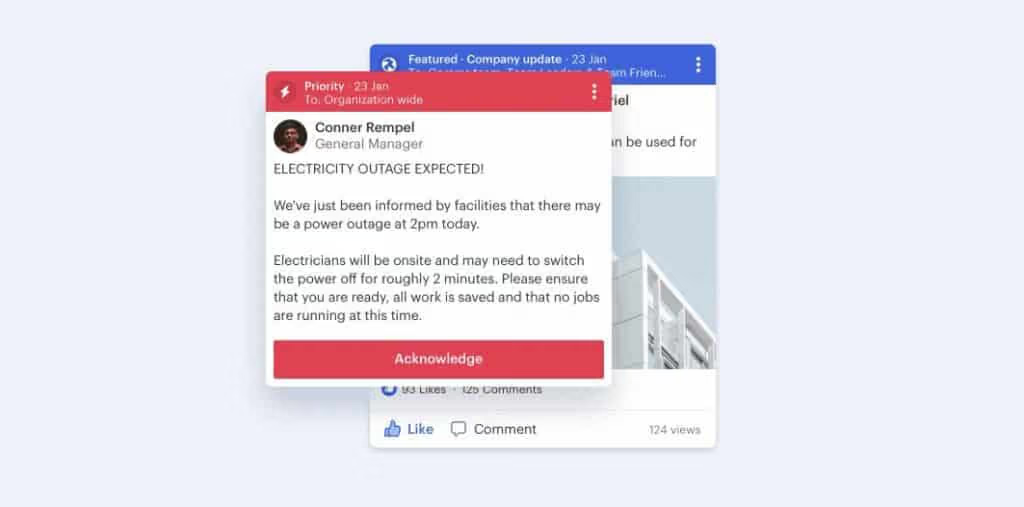
- A shout-out to celebrate an employee's birthday in the news feed.
- A manager checking in to ask how you’re feeling this week over instant messaging.
- A quick story post from the CEO that gives a little insight into their day.
These micro-moments bridge the gap between corporate messaging and real workplace experience. They take that dusty company culture document and turn it into a living, breathing reality.
{{mobile-main="/image"}}
Why micro-moments matter in today’s workplace
These small moments might not seem all that significant on their own. But together — with all the hundreds of other micro-moments employees experience — they form the foundations of your culture. They shape how employees feel, interact, and show up.
Here’s what they do for your workplace:
They keep the conversation flowing. Silence breeds uncertainty. Gaps in communication leave room for rumor, misunderstanding, and disengagement. But micro-moments, in the form of regular internal communication touchpoints, keep employees connected and informed.
The compounding effect. One “good job” message might seem insignificant — but repeated, positive micro-moments create trust and belonging. And each one builds on the last. A few words of encouragement today make it easier for someone else to speak up tomorrow.
Connection in a dispersed workplace. When your team is dispersed, micro-moments replace the hallway chat or the catch-up over coffee. They act as a digital water cooler, bringing frontline, remote, and office-based teams together, and keeping culture alive across time zones and shifts.
It’s what employees expect. Outside of work, we routinely connect over micro-moments. A video story. A WhatsApp message. A voice note. We’re used to short-form, snackable content. Which is why, in the workplace, a simple 10-second video can do more for morale and engagement than a 10-page strategy doc ever could.
They fit into your workflow. Employees — particularly those on the frontlines of your organization — are busy. So culture-building efforts shouldn’t pull them away from their day. Micro-moments integrate seamlessly into the flow of work, making connection quick and easy for everyone.
They signal care and attention. Finally, micro-moments show employees that leaders and peers are paying attention, noticing effort, and valuing contributions. They help to build a culture of open communication and recognition, where employees feel appreciated and encouraged to take part.
{{mobile-recognition-post="/image"}}
How to achieve macro-impact with micro-moments
So how do you harness the potential of micro-moments for your organization? Here are a few practical ways to make the smallest of interactions deliver the biggest possible impact.
Empower managers to create daily connection rituals
Managers are the ones who bring your culture to life. But they’re also sandwiched between employees and the C-suite, juggling expectations and tasks from all sides. That’s why creating small, repeatable rituals is key to micro-moment success. Think:
- A quick message to ask “How’s your day going?”
- A public thank you when someone goes the extra mile
- A follow-up on feedback shared in last week’s meeting
These interactions take seconds but their impact is long-lasting. They show empathy and accountability, which helps managers (and by extension the organization) build trust with employees.
Even better? Make these micro-moments visible. Give recognition and conduct check-ins over shared digital channels to amplify their impact. You’ll spread positivity across the organization and reinforce the culture you want to build.
Balance top-down messages with peer-to-peer moments
The best cultures are built through connection and participation. And that means going beyond traditional top-down messaging to involve everyone in the company conversation. So encourage peer-to-peer connection. Let employees react to posts, respond to news feed questions, add their congratulations to co-worker recognition, and even create their own culture-building content.
By appointing employees as co-creators of your culture, you sprinkle micro-moments throughout the workday. And you ease the load for your comms team, too. Everyone helps keep the conversation going.
Another benefit of this approach? Peer-led moments feel lighter, more organic, and more genuine. They have an energy that draws people in, so they help to build a real sense of community within your organization.
{{mobile-live-stream-poll="/image"}}
Encourage the C-suite to go beyond corporate comms
When the C-suite speaks, everyone tends to listen. So you can create truly impactful micro-moments by getting leaders involved. Of course, a lengthy email newsletter or a polished corporate video isn’t the kind of thing you’re looking for.
Instead, you want leaders to share short, relatable moments in real time. A selfie from a site visit. A post sharing what inspired them that week. A quick note to highlight customer success and the team behind it.
This content shows accessibility and warmth. It tells employees: I see you and I’m part of this too. It’s especially powerful for frontline teams who rarely see leaders face-to-face.
Leaders may need a little coaching in how to deliver these kinds of moments. And you may need to experiment with the formats they feel most comfortable with. But — with the right support from comms — the C-suite can create micro-moments that really resonate.
Prioritize authenticity over polish
The beauty of micro-moments? They don’t need to be overly rehearsed or perfectly produced. In fact, working to get a piece of internal content “just right” can actually dilute its cultural impact.
Use micro-moments to respond to what’s happening right now — a big client win, a project milestone, or even the trending topic that’s on everyone’s lips. Quick, relevant interactions land far better than polished-but-stale content.
That’s because authentic micro-moments show employees that the company is human and that leaders notice what’s happening on the ground. Workers appreciate the authenticity — and they’re far more likely to believe the message.
And for your employee communications team? Removing the pressure to polish every post means content can go out fast, keeping conversations alive, building momentum, and weaving cultural values into every day.
{{mobile-stories="/image"}}
Create digital spaces for every kind of comms
You can only make a success of micro-moments when you have the right ecosystem in place. That means giving employees multiple, connected communication channels where they can share, react, and respond in real time.
Think recognition, polls, team chat, video updates, live streams — each touchpoint surfacing a different side of your company culture. When these channels are available across mobile-first tools, micro-moments reach every member of your workforce, including hard-to-reach frontline employees.
The result? A culture with the power to create positive employee experiences and better employee engagement across the board.
Use analytics to spot engagement opportunities
With intranet analytics, you can spot the times, places, and teams where micro-moments stand to make the most impact.
If participation on the employee intranet drops, if certain teams aren’t responding to updates, or if sentiment in comments starts to shift, these are the early warning signs you need to pay attention to.
By tracking engagement and feedback in real time, you can see what works, spot gaps, and fine-tune your micro-moment strategy. The data helps you step in at the right time — and keep doing more of what actually connects with employees.
{{mobile-activation="/image"}}
Incorporating micro-moments into your organization
The challenge for most organizations isn’t understanding the value of micro-moments.
It’s creating the environment where they happen naturally.
A check-in from a manager. A poll to gauge employee opinion. A quick live stream update. These micro-moments drive trust, belonging, and a sense of purpose. They show employees that yours is a place where open communication and connection are the norm.
So what next? To incorporate micro-moments into your comms strategy, go beyond polished, corporate messaging. And — to make your strategy sustainable — encourage people from across the company to share and amplify micro-moments.
Digital employee experience platforms like Blink makes it easy. You can send a recognition post, launch a poll, share a video story, and even go live with your audience, in just a couple of clicks.
And — because Blink is a mobile-first intranet platform — everyone can take part. From the comms team to the C-suite, your office team to your frontline workers, everyone has the tools they need to access and contribute to workplace culture.
Blink. And take your culture from boring to buzzing.
.png)