Connect Blink and Workday to unify frontline employee data, automate onboarding, and deliver a seamless experience from HR system to employee super app.
Jess DeVore
Published:
December 11, 2024
Last updated:
January 9, 2025
Blink and Workday. Better together.
Employees power your business, but many are often left behind when it comes to workplace tools and technology.
That’s where Blink and Workday come in.
With the industry’s most comprehensive integration between Workday and any employee experience platform, Blink extends Workday’s powerful capabilities to all employees — whether they’re desk-based, remote, or on the frontline. This unmatched integration ensures every employee can access what they need, when they need it — driving engagement, boosting productivity, and helping organizations unlock the full potential of their Workday investment.
Together, Blink and Workday bridge the employee experience gap, offering the entire workforce seamless, one-click access via their smartphones to the tools and information they need.
Let’s take a closer look at how Blink and Workday work hand in hand to revolutionize the employee experience, creating a more connected and engaged workforce.
Blink and Workday: How it works
Blink is a mobile-first employee experience platform that serves as a digital front door for your organization, giving employees access to all the software you use in just a few clicks.
If you’re already a Workday customer, you benefit from our pre-built, out-of-the-box integration. This means we can take Workday user data into Blink and automatically create user accounts.
Employees can download the Blink app from Android or Apple app stores and use their email or phone number to access.
Through single sign-on (SSO), employees can access third-party apps — like Workday — by simply clicking on the relevant icon. Users can also click on deep links that take them straight to specific Workday functions, like payslips or an address update form.
When you partner with Blink and Workday, you make Workday accessible to all of your employees.
Blink and Workday: The benefits
Here’s what you can expect when you use Blink and Workday together.
#1. Improving adoption of Workday (and other third-party tools)
Persuading employees to download multiple workplace apps is a challenge. But with Blink, there’s just one app to download.
The Blink app acts as a centralized hub. With SSO, employees can access all workplace software — including tools like Workday, SharePoint, and ServiceNow — from Blink. Employees don’t have multiple passwords to remember or reset.
{{mobile-hub="/image"}}
This explains why Blink customers enjoy a 5x improvement on adoption of third-party tools. Pair Blink with Workday and you’ll get much more value from your Workday subscription.
#2. Easy identity management
Frontline workers don’t tend to have a corporate email address or device. So these employees are often left behind when it comes to workplace tech tools like Workday.
But with Blink, it’s easy to get hard-to-reach deskless employees onto your systems. That’s because Blink serves as your identity provider.
Deep integration between Workday and Blink allows the transfer of rich employee data to Blink systems. Then, Blink verifies user identities, making it simpler than ever to activate employees.
#3. Streamlining the frontline workforce experience
Together, Blink and Workday makes it easy for frontline workers to access all the tools and resources they need, at a time and place that suits them. This makes workers more efficient and effective.
Via Blink, employees can access Workday Skills Cloud, view pay and benefits, pick up shifts, complete employee surveys, submit paperwork, and report safety concerns.
Putting these tools in the hands of frontline workers means you squeeze all possible value from them. You also make life easier for your frontline workforce — so much easier that Blink users give the app a 9/10 ease rating.
{{mobile-workday-feed="/image"}}
#4. Improving employee communication
Blink takes internal comms beyond the office noticeboard and word-of-mouth messaging. An intuitive news feed gives every employee instant access to up-to-date internal communications, tailored to them.
Admins can use the news feed to highlight Workday-related tasks. You might like to communicate available shifts, signpost training resources, or prompt staff to book their vacation time. You can add links to your posts, directing users to the appropriate place on the Workday app.
Blink’s wide range of employee communication tools supports your workforce in other ways, too. They find it easy to chat with supervisors, coworkers, and leadership. So they feel more connected to your organization and the people within it.
#5. Accessing comprehensive data
When you use Blink and Workday together, you get access to rich analytics and survey data relating to your employees, all via a user-friendly dashboard.
This data reveals how employees are using your workplace tools. It gives you a deeper understanding of employee engagement and staff turnover. It can even help with workforce planning.
Drill down into this data to identify strategic areas for improvement — identifying operational weaknesses and issues with employee experience.
#6. Closing the digital divide
A majority of workers feel disconnected from their organization — and many feel they lack the tools they need to do their jobs effectively.
By improving the digital employee experience, with a combination of Blink and Workday, you close the digital divide. You give all employees equal access to workplace tools and bring them into the company conversation.
This helps to improve employee engagement and satisfaction. It also leads to better staff retention. Blink customers experience a 26% reduction in employee turnover.
Make Workday work harder for your full organization with Blink
Blink helps leading organizations bring Workday to deskless employees. We provide the most comprehensive and effective Workday integration in the industry, which makes for easy setup and a seamless user experience.
You’ve invested in Workday. Rolled it out. Trained your teams. And yet… usage is lagging.
Sound familiar?
You’re not alone — research shows workplace technology users on average use only 40% of available software features, and Workday is no exception. Why? Because people don’t engage with systems that feel disconnected from their daily flow. Especially frontline employees, who rarely check email and are lucky if they remember their login.
Workday is a powerful system of record. But without the right engagement layer — the employee-facing experience that wraps around it — even the best deployment can fall flat.
Here’s the good news: You don’t need to rip and replace anything. You just need to bridge the gap between people and process.
These five strategies help make that happen — improving team collaboration, streamlining employee communication, and getting your employees to not just use Workday… but actually like it.
#1. Sync comms with key Workday moments
The right message at the wrong time? Still the wrong message.
One of the easiest ways to boost employee engagement is by aligning your internal communication with key employee milestones in Workday. Think: performance review deadlines, open enrollment windows, pay stub releases, or timecard due dates. These aren’t just tasks — they’re moments that matter most across the employee lifecycle.
{{mobile-workday-feed="/image"}}
By syncing your engagement platform with Workday’s calendar and events, you can deliver perfectly timed nudges right when action is needed. Not just generic blasts or reminder emails, but targeted alerts that actually get read.
Pro tip: Use features like countdown timers, pop-up alerts, or chatbot reminders via Blink to drive timely action. A pop-up reminder about employee scheduling or a push notification that says, “Your new L&D goal just dropped — tap to complete it in Workday” goes a lot further than a newsletter blurb.
This strategy improves task completion rates, reduces HR follow-ups, and helps employees feel more in control of their work lives — especially when those nudges are sent in real time and on mobile apps.
This kind of proactive, targeted, and effective communication supports better team collaboration and keeps everyone aligned around shared timelines and responsibilities.
#2. Turn super users into Workday Champions
If you’re the only one answering Workday questions, it’s time to build a squad.
Every company has a few people who just “get it.” The ones others ping when they’re stuck trying to change their tax withholding or book vacation time. These internal experts are gold — so why not put them front and center?
Empower your internal “Workday Champions” by giving them visibility and a voice on your employee communications tool. Use Blink to create a space where they can host 5-minute tip sessions, answer FAQs, or even stream quick AMAs (ask me anything) via live video.
This does two things:
Normalizes learning: People are more likely to ask questions when it feels informal and peer-led.
Scales support: Your HR and IT teams will thank you.
When employees see their peers confidently navigating Workday, it makes the system feel less intimidating and more human.
This strategy supports both employee communication and team collaboration as well as builds employee confidence — creating a feedback-friendly, resource-rich environment without adding to the HR workload.
#3. Make Workday training mobile, snackable, and on-demand
No one wants a 52-slide deck on how to submit expenses.
Traditional training content doesn’t cut it — especially for busy, distributed teams. If you want people to actually learn how to use Workday, meet them where they are (hint: it’s on their phones) and make it simple.
Break Workday actions into short, mobile-friendly formats:
60-second walkthrough videos
GIF tutorials
Step-by-step mobile cards
A weekly “Workday Tip of the Week” drop in your internal feed
Not only does this make learning more engaging, but it also ensures your content is reusable and evergreen. Employees can access what they need in the flow of work, when they need it — no login gymnastics required.
With Blink, you can embed these learning moments directly in your employee app, right alongside other comms. It’s Workday training — without the friction.
Helping employees engage with Workday in a modern, mobile-first way reduces the learning curve and makes Workday integration a part of their daily flow.
#4. Eliminate access friction (seriously, just log them in)
If logging in feels like a quest, you’ve already lost.
We’ve seen it time and time again: Workday rollout, check. Training sessions, check. But employees still aren’t engaging. Why?
Because they can’t remember their login. Or the password expired. Or they don’t want to click through six tabs to get to their payslip.
Authentication friction is one of the biggest blockers to Workday adoption — especially for frontline workers or hourly employees. If you want to fix that fast, start with access.
With Blink as your easy-to-use employee app for all, you can simplify Workday user provisioning using features like:
We recommend running a campaign around it — something like “One click. You’re in.” — to show how simple it really is.
And don’t stop there: Track where people drop off, monitor login data, and keep refining your approach. If the front door doesn’t work, no one’s coming inside.
Making Workday user provisioning seamless removes one of the biggest engagement roadblocks and gives your frontline teams easy, secure access to the most important modern tools in your digital workplace.
#5. Build feedback loops that close — not collect dust
If you don’t ask, you won’t know. But if you don’t act, no one will bother telling you.
The final — and arguably most important — tip: Create a feedback loop inside your Workday experience. Don’t wait for the annual engagement survey to find out your time-off workflow is a nightmare. Ask early, and often.
Embed micro-feedback moments directly in the experience:
After a Workday task is completed, prompt a quick emoji reaction or two-question pulse
Drop a “How was that?” prompt after a new feature launches
Create space for open suggestions in your internal communications feed
To boost participation, try light gamification — weekly raffles, team shoutouts, or digital badges for high-response departments.
Employees who feel heard are far more likely to engage with the system. Even more so when they see visible changes based on their feedback.
With Blink, you can launch surveys in seconds, analyze the results, and close the loop without ever leaving the platform.
A feedback-powered employee communication strategy helps optimize your Workday integration strategy and continuously improves system usability.
AI and automation are transforming office work — but what about the frontline?
In today’s rapidly evolving work environment, the need to prioritize employee experience for all workers is more pressing than ever.
Yet despite all the attention paid to desk-based employees, there remains a significant gap in how organizations support their frontline workers. Frontline workers, who make up a significant portion of many organizations, are often left out of conversations surrounding employee experience, culture, and retention strategies.
At the recent Workday Rising 2024 conference, Blink was honored to be included in a pivotal conversation on how HR leaders can close this experience gap. By using technology, organizations can seamlessly enhance frontline initiatives—whether they are focusing on healthcare teams or trying to boost employee engagement in manufacturing.
Marcy Patterson, Vice President of Solutions Consulting at Blink, spoke with Cassie Sam, Vice President of Artificial Intelligence at Workday, at Workday Rising 2024
The short answer: With the right tools and a strategic shift in approach, organizations can keep their frontline employees engaged in their culture — and keep them for good.
5 opportunities for leaders to close the experience gap
Here are five key takeaways for HR and internal communications leaders to factor into their approach to employee experience.
#1. Frontline workers need a tailored employee experience.
Historically, most employee experience initiatives have focused on desk-based workers. However, frontline employees, who are often the face of a company to its customers, deserve the same investment in their work experience.
“It’s up to HR to work cross-functionally with communications, IT, and operations to understand the frontline worker’s experience today and build one that works for the future.” - Marcy Patterson
For HR and internal communications leaders, this means designing tailored experiences that acknowledge the unique challenges frontline workers face, such as limited access to email or intranets, and creating accessible, relevant communications.
#2. Retention starts with a strong onboarding process.
Retention issues are especially pronounced among frontline workers, with turnover rates exceeding 60% in some industries, and 90-day attrition being a common challenge.
To combat this and prioritize employee retention, a streamlined onboarding process is paramount. The goal is to make new hires feel like part of the organization and culture from day one, helping reduce early turnover.
Through modern employee experience platform features that help to support the employee journey, organizations can build a pattern of timely touch points throughout the first year of employment.
By delivering personalized messages and check-ins at key milestones, HR teams can scale onboarding efforts without sacrificing the personal touch — a critical component for frontline workers who may lack regular manager interaction.
#3. Continuous learning and development opportunities matter.
It may be easy to assume that frontline workers prioritize wages above all else — but research and anecdotal feedback tell a different story.
Frontline employees are hungry for growth opportunities, whether through training or career advancement. And if organizations don’t make their people aware of these opportunities, such as internal promotions or open roles, it can be difficult to keep them for the long term.
To address this, HR leaders should focus on giving employees better visibility into opportunities and simplifying the path to advancement. Whether it’s offering clear guidance on necessary certifications or providing easy access to training, companies that invest in the development of their frontline workers will see stronger engagement and retention.
#4. Recognition — especially peer recognition — drives engagement.
One of the biggest drivers of frontline employee engagement is recognition, particularly from peers. While top-down recognition from managers remains important, data insights from Blink show peer-to-peer recognition has a particularly strong impact on engagement.
Organizations can foster this culture of employee recognition by leveraging interactive employee apps or platforms, where employees can easily recognize each other’s achievements. This form of recognition not only boosts morale but also creates a sense of belonging, making employees feel valued by their colleagues.
#5. Targeted, relevant communication is key.
Effective communication with frontline workers requires a thoughtful approach. Many frontline employees don’t have access to traditional communication tools like email, making it harder to share important updates or recognition.
For most organizations, HR and internal comms teams need to be creative and leverage mobile solutions to reach these workers where they are.
“If I’m working in a manufacturing plant in Oklahoma, I don’t want information about a plant in Chicago.” - Marcy Patterson
Equally important is ensuring that communications are relevant and targeted. This highlights the importance of managing communication noise and focusing on delivering the right messages to the right employees at the right time.
Looking ahead: The future of frontline workforce engagement.
The frontline workforce represents both a challenge and an opportunity for HR and internal communications leaders. By applying lessons from marketing — like using analytics to understand employee sentiment and leveraging targeted communications — companies can create a more personalized and engaging experience for their frontline employees.
As we heard at Workday Rising, improving the frontline worker experience isn’t just about improving retention or reducing turnover — it’s about recognizing that these workers are central to the customer experience. By investing in their engagement, development, and recognition, companies can create a workforce that is not only more satisfied but also more capable of driving business success.
For HR leaders looking to improve their frontline engagement strategies, the message is clear: start by understanding the unique needs of your frontline employees, and leverage technology to create meaningful, lasting experiences that drive both employee satisfaction and business outcomes.
Looking for remote employee engagement strategies that take your company culture to the next level? Here are our best tips to engage virtual teams.
Consultants, freelancers, frontline workers, and full-time staff across time zones – they all have one thing in common. And that thing is – no points for guessing – remote work. They're 'WFH' or at a client site.
It’s no secret that remote work offers many benefits to both employees and employers. Employers get access to a global talent pool, and employees get the freedom to work from a convenient location.
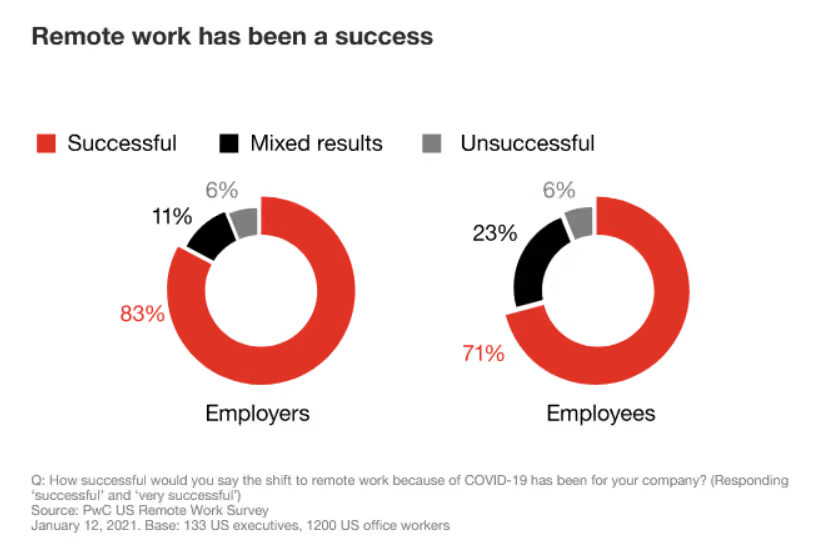
No wonder remote employees are happier than office-based workers. A recent PwC study found that only 8% of remote workers want to work from their employer’s office. On top of that, 83% of employers and 71% of employees view the shift to remote work as a success.
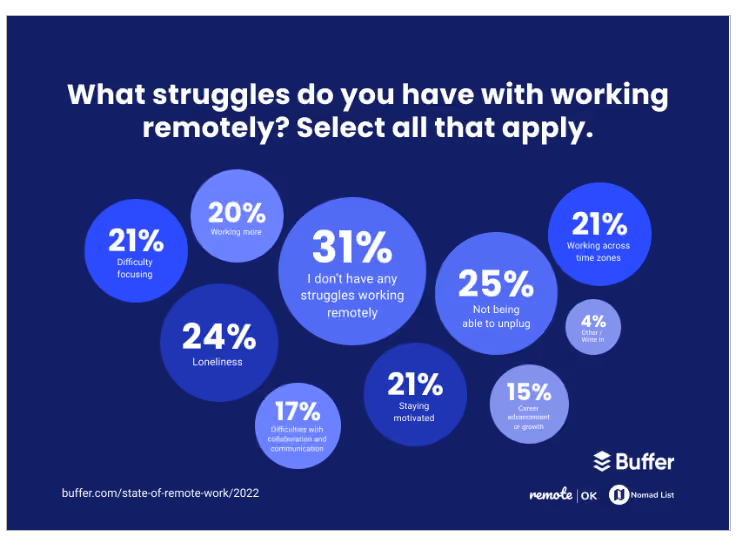
But remote work isn’t all a bed of roses. It has its own challenges, one of which is to engage remote employees. You want to ensure that your employees are dedicated and emotionally invested in your company.
This is easier said than done, since remote teams are physically distant from the company’s main hub of activity. More often than not, they miss out on social events such as birthdays, small talks, and team lunches. Without these opportunities, remote employees can lose their sense of belonging and feel like something is amiss. The result?
Widespread disengagement.
Now as a senior leader in your organization, you can’t afford to let that happen, can you? So in this post, we’ll show you several effective strategies you can use to boost remote employee engagement.
Engaging remote employees 101
Employee engagement: remote working challenges
When looking to engage remote workers and combat this issue, senior leaders must turn to innovative strategies for boosting engagement in the virtual world such as creating meaningful connections through various channels and gathering feedback consistently - something not always possible using traditional methods such as notice boards, phone notifications, and emails due to low reach and effectiveness.
Common blockers to engagement in remote employees include:
Loss of information due to a mix of channels
Noticeboards, letters, and other tools are inefficient
Low reach and effectiveness
No clear way or consistent way to gather feedback.
Why engage remote employees?
While employee engagement may feel like something that doesn't need to be a business priority, it can actually help to improve both employee morale and productivity. And in today’s competitive landscape, these two things are key to success.
In fact, research shows that highly engaged organizations achieve a 23% improvement in profitability, 10% higher customer ratings and 18% higher sales.
In fact, there are a number of reasons why it’s important to engage remote employees:
Increased job satisfaction and employee retention
Improved collaboration between teams
Better productivity, thanks to improved communication and feedback loops
Boosted innovation as a result of cross-functional initiatives
Easier onboarding due to increased visibility into the culture and processes.
So, how can you keep remote employees engaged? Let’s take a look at some of the most effective employee engagement tactics for boosting engagement amongst your remote workers and direct reports.
12 practical tips to engage remote workers
Keeping remote workers engaged should be one of your top priorities. Communication gaps in remote teams lead to disengagement, damaging productivity and morale in the long run. Failure to get your remote employees to work inclusively can also hurt your business’s bottom line.
In contrast, employees who feel engaged are more loyal and motivated. Not to mention 87% less likely to leave their company than unengaged employees. Follow the below best practices to engage remote teams.
1. Keep remote meetings as short as possible.
Remote workers attend more meetings every week as compared to on-site employees. The 2019 State of Remote Work found that 14% of remote employees are giving time to over 10 meetings per week (vs. just 3% of those on-site).
While there’s no denying that team meetings are necessary and beneficial to keep employees aligned, too long and frequent meetings can be frustrating. So much so that this phenomenon has led to the coining of a new term - Zoom Fatigue.
Call a meeting only when it’s absolutely necessary, and try to keep it as short as possible. Consider that a best practice for employee engagement.
Have a clear agenda before every meeting and don’t let a team member prolong it with discussions outside of this agenda.
Another way to reduce the frequency of your Zoom meetings is to provide instant, accessible company updates directly to your workers’ phones. Short, important messages can be delivered via an employee app to minimize wasted time on pointless meetings, which can help both remote and deskless teams stay in-the-know without eating up too much of their valuable time.
2. Make ‘social’ events structured.
Since remote workers don’t have impromptu opportunities to connect with each other, providing those opportunities intentionally is crucial. And a great way to get started is hosting virtual social events that are not related to work.
The social event could be a cocktail-making class, a virtual concert, or a biweekly trivia game.
But here’s the biggest mistake with company-wide social activities — not structuring them. When you host a social event in a way that the talkers keep talking and the quieter ones stay quiet, it’s safe to say that the event has failed its objective.
So make sure to have rules that encourage everyone to participate. For example, a cocktail-making class with a kit will get more engagement from everyone than a simple virtual drinks session.
3. Host informal virtual all-hands.
A transparent culture fosters trust throughout an organization. And since remote teams are physically disconnected from the workplace, they need even more transparency.
Image via ekoapp.
To facilitate the same, you can conduct virtual all-hands from time to time. This event will encourage remote workers to showcase their projects across the company.
The project could be a product update, a new marketing campaign, or a transition to a new business partner. A different team will demonstrate what they are working on each week, ensuring that everyone’s in the loop. Plus, the workers can ask questions and share their thoughts with the presenting team, igniting a sense of inclusiveness.
We get it. Putting your work in front of the entire organization may not be easy. But this little discomfort is a small price to pay for virtual employee engagement, and a warm, better-connected workplace.
4. Say goodbye to email.
Email has its place for simple communication. But it’s not suitable for a lot of quick, back and forth conversations. Your organization should have a dedicated tool in place for real-time instant messaging (also known as live chat).
An employee chat app allows you to facilitate flexible, informal communication that helps remote workers build relationships and get the information they need to do their jobs, wherever they are based.
Communication is a key driver of employee engagement. So whether you have remote teams, frontline employees or in-office workers, you can keep your staff connected and engaged.
Blink, for example, offers a world-class chat feature to bring your company together with groups and one-to-one chats. And it lets your employees share not just text, but also photos, documents, videos, spreadsheets, PDFs, and more without the hassle of email.
5. Create a remote working resources library.
49% of US workers face difficulty in finding documents, as per a Nintex survey. If employees can’t access crucial information at the right time, you can’t blame them for getting disengaged. While this is a key problem for remote workers, this issue is currently plaguing the frontline workforce, too. With workers constantly on the move, they need intuitive, easy-to-access resources that can move with them.
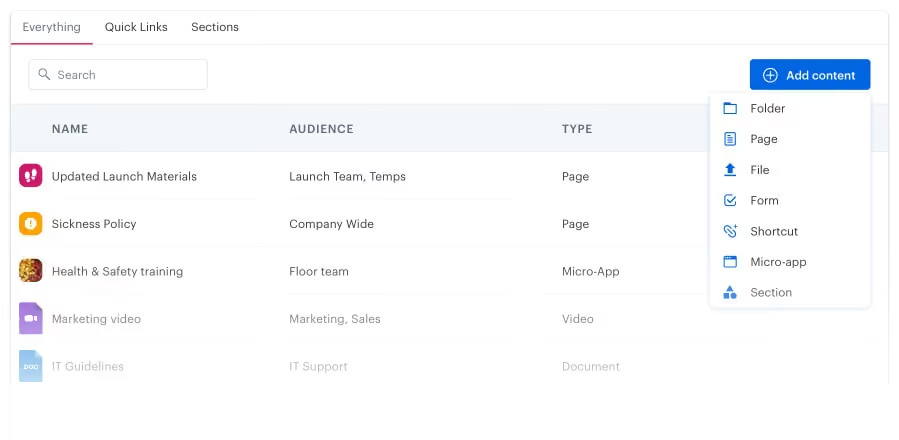
The solution is easy. All of your company’s key information should be saved and accessible from a central hub. This information would include your policies, process manuals, onboarding checklists, and other materials.
The ability to publish content on this portal will not be limited to senior management or the IT department. Every department should be able to access, publish, and share knowledge through this hub.
Sharing their knowledge will help employees feel empowered and realize the value they are adding to the organization.
So by building such a knowledge base, you’ll be able to reduce silos between in-office, remote and deskless departments, improve information sharing, and improve collaboration.
For example, with Hub as a central feature of Blink, remote workers can instantly access policies, procedures, and guides in a single convenient location — leading to a more engaged remote workforce.
On top of that, our built-in text editor gives every employee an effortless way to create, edit, and distribute articles.
6. Make all org-wide updates digital.
Nearly 20% of remote workers feel disconnected from peers due to a lack of communication.
While communication is the key to better remote employee engagement, any type of communication will not solve the problem. It has to have the right channels and the right frequency.
You can’t constantly bombard remote employees with emails, notice board announcements, unnecessary meetings, and expect them to stay engaged.
The best way to conduct effective company-wide communication is to use a single, unobtrusive, digital communication tool. This will help establish expectations and norms without isolating or overwhelming remote workers.
Even if you’re worried about whether key information is reaching your workers, sharing the information repeatedly using multiple channels isn’t the solution. Using the right technology is.
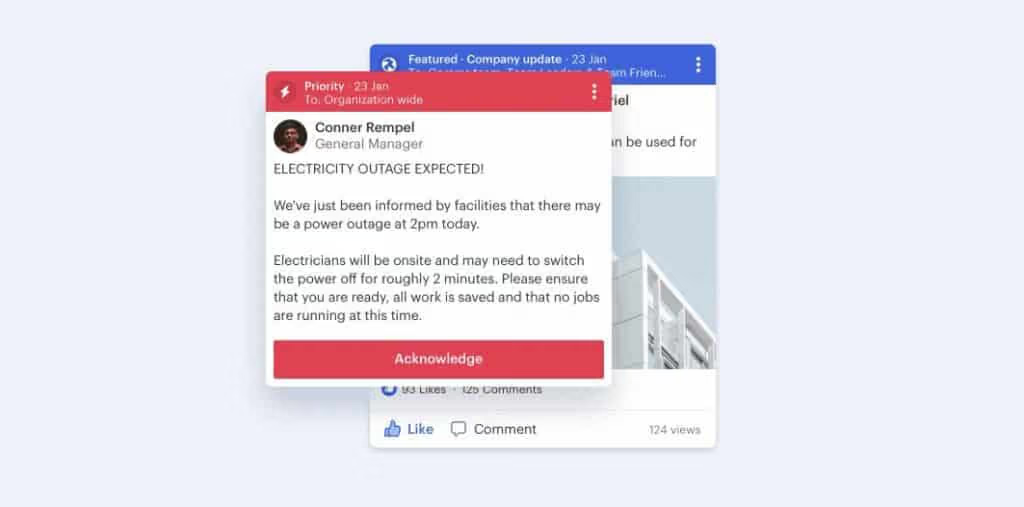
For instance, you can use an employee app that allows you to ‘pin’ information to the top of people’s newsfeed, or has a ‘mandatory read’ option as Blink does.
7. Record all (important) meetings.
When you have multiple remote team members across different time zones, web conferencing can go a long way in reducing geographic limitations and engaging workers virtually.
But even a virtual meeting can’t solve all your problems. Employees can’t attend multiple meetings at the same time, for example. Getting the right folks together for a meeting can still prove to be a bottleneck for a project.
With an increasingly varied workforce seeing a mixture of remote, in-office and frontline workers, the battle to keep everybody on the same page is on.
So a better solution is to conduct a meeting with the people who can attend, and record it for those who couldn’t. Then keep all these recordings in one place for anyone interested in catching up.
Recording video of virtual meetings ensures that no one misses out on an important discussion, along with the visuals presented during the session.
8. Use polls and feed posts.
Most company-wide communication is static, which means that workers simply consume the content by reading, listening, or watching.
The opposite of that is interactive content. It’s a type of content that allows employees to engage and participate.
Using interactive communication from time to time is another step you can take towards remote employee engagement by helping reduce the sense of isolation.
The interactive content could be as simple as a quick poll, a short employee survey, or social media type posts that allow workers to like, comment, and tag their team members. Luckily, all these features are an integral part of Blink.
9. Celebrate employee accomplishments.
Employee Recognition can be implemented in many ways, but remote work makes it hard to carry them out. That’s why you need to put in the extra effort to celebrate contributions and achievements.
Here are some great ways to acknowledge and appreciate remote workers for their hard work:
Giving regular greetings and check-ins on shared communication channels
Conducting employee of the month programs
Thanking workers during a web conferencing session
Acknowledging personal events such as birthdays and anniversaries
Sending thoughtful notes or signed cards from managers and peers
All these activities help remote employee engagement by making workers feel valued. And contributing to everyone’s understanding of what’s happening in different teams and departments. This helps ensure the employee digital experience is a good one.
10. Understand feedback to make improvements.
Most remote employees are hesitant to share feedback, because they’re worried about how it might be perceived. That’s why you need to invest in technology that will make it easier for your workers to share their thoughts, feelings, and opinions in a safe environment.
Digital tools like Blink offer anonymous feedback surveys, which help employees share their thoughts and ideas without fear of judgment. You can use this feedback to modify processes and policies to ensure everyone is engaged and motivated. And this means productive employees.
By understanding the feedback, you’ll be able to make necessary improvements in areas like communication, collaboration, productivity, etc. By showing your virtual team that you value their input, you’ll be able to create a culture of engagement, trust and collaboration, fostering more engagement in future initiatives.
11. Make sure everyone is included in the conversation.
Ensuring that everyone is included in the conversation is an important part of remote employee engagement. Since your workers don’t have the option to physically join meetings and work on projects, they can easily feel left out or ignored.
To make sure no one is ever excluded from a discussion, use employee engagement tools like Blink which come with features like audio-video conferencing, screen sharing and file/group chats.
These features allow your workers to interact with one another in a more meaningful way, making them feel included even when they’re not physically present. Employers should also take part in the conversation regularly, so that employees can understand their objectives and goals better as a team.
12. Provide ample opportunities for team members to network and connect remotely.
When you’re working remotely or on the frontline, it’s easy to feel disconnected from your colleagues and the business in general. So it’s important that employers create the opportunity for employees to network with their peers - without the scrutiny of management’s presence.
Network building activities like virtual happy hours, ice breaker games and mini-conferences can help boost relationships between team members. Employee Resource Groups are also a great way to help the business towards ESG goals while fostering a safe place for under-represented employee groups.
These activities will help your workers build relationships, foster trust, and empower the team to work better together, even when they’re not in the same physical space.
A quick summary of best practices for remote employee engagement…
Keep remote meetings as short as possible.
Make ‘social’ events structured.
Host informal virtual all-hands.
Say goodbye to email.
Create a remote working resources library.
Make all org-wide updates digital.
Record all (important) meetings.
Use polls and feed posts.
Celebrate employee accomplishments.
Final thoughts
If you look at the above strategies carefully, you’ll realize that they all boil down to one simple thing — trying to give remote workers the same communication opportunities they would have had if they were working from an office.
Remote or office-based – the best way to engage remote employees is by giving them a voice. After all, 46% of remote workers believe the best managers are the ones who check in – really frequently.
Making time for employees’ thoughts and concerns, whether through informal small talk or structured feedback, is the golden thread that separates a good organization from a great one.
As long as you keep this basic principle in mind, you’ll not just find it easy to implement these remote employee engagement tactics, but also to generate your own ideas to engage remote workers.
So, give them the opportunity to voice their needs without the added concern of reaching out at an inopportune moment, and see your remote employee engagement levels rise at a steady rate.
And while you’re at it, remember that the right technology can make a world of difference. Blink is an internal communications tool that does everything your intranet does, but better.
Final thoughts: best practice for remote employee engagement
If you look at the above strategies carefully, you’ll realize that they all boil down to one simple thing — trying to give remote workers the same communication opportunities they would have had if they were working from an office.
Remote or office-based – the best way to engage remote employees is by giving them a voice. After all, 46% of remote workers believe the best managers are the ones who check in – really frequently.
Making time for employees’ thoughts and concerns, whether through informal small talk or structured feedback, is the golden thread that separates a good organization from a great one.
As long as you keep this basic principle in mind, you’ll not just find it easy to implement these remote employee engagement tactics, but also to generate your own ideas to engage remote workers.
So, give them the opportunity to voice their needs without the added concern of reaching out at an inopportune moment, and see your remote employee engagement levels rise at a steady rate.
And while you’re at it, remember that the right technology can make a world of difference. Blink is an internal communications tool that does everything your intranet does, but better. Request a free demo to get started.
The Shift went live on Thursday April 20th, hosting an 'Ask Me Anything' session on the topic of frontline stress and wellbeing. Ahead of the event, we asked our audience to send in their questions about burnout on the frontline. The response we got was phenomenal.
Here, we list — and answer — the questions that weren't covered in the live discussion (now available to watch on-demand). These questions are all in search of practical insights: how to help employees who are struggling with burnout, what strategies other managers have had success with, why managers sometimes don't feel confident handling burnout conversations and how to build that muscle.
A big thank you to our 'Ask Me Anything' panel who helped put these answers together:
Chris Stewart, Managing Director of Minding Minds, a Mental Health First Aid training company
Ian Gordon, former President of Administrative Operations at Elara Caring
Burnout can show itself in several ways and, because we're dealing with people, everyone is individual in their responses. That said, the 'warning signs' are usually:
Exhaustion/tiredness — You see this when employees still look tired on a Monday morning; the weekends don't feel long enough and just aren't touching the sides in relieving the fatigue. When tiredness becomes extreme, people will not only feel physically drained, but they'll also lose interest in the tasks they used to find enjoyable. This is also a warning sign for depression.
Difficulty concentrating — Coupled with the above, employees may experience a 'butterfly mind', flitting from one thought to another. They may chase issues or tasks, but never stay on them long enough to make progress.
Preoccupation with work and being overly driven — It might sound counterintuitive, but some people approaching burnout will throw themselves into their work and lose themselves within it...
Presenteeism/drop in productivity — ...And yet, being 'at work' doesn't mean you're getting work done. It takes a person longer to complete their tasks when they start to burn out. 10 hours of work may only reap 2 hours of results; they're working more hours, with less output, and lower quality. Of course, the opposite can be a warning sign too. Some people will do less, attend work less, or leave work early due to a lack of interest or bandwidth.
Loss of motivation or outlook — This can be a very corrosive warning sign, and we should always be looking for changes to someone's regular demeanor. Are they displaying more negativity than usual? Are they becoming more cynical? It's unlikely that the individual will notice this change in outlook as they are already in that belief system. It's a manager's role to notice this change. It's an important 'tell' that something is seriously wrong.
Physical signs — Stress shows itself physically as well. Difficulty sleeping, gastrointestinal issues, aches and pains, low immunity and so higher levels of sickness; if someone is falling ill more often than they used to, burnout may be the root cause.
Q: How can we have an immediate impact on someone who is struggling with mental health?
As mentioned above, everyone's symptoms will be different — and their needs will be too. One thing we can all do is develop the skills to spot the warning signs, approach the person for a conversation, uncover the issues, and respond to their individual needs. There has to be a conversation. That's the most immediate action we can take to help.
Q: Is there a point of no return with frontline burnout or can it be reversed with early identification?
We can think of burnout like an elastic band. You can really stretch it, and though it's under stress, it's still holding. Hold it at a stress point for too long, though, and you'll alter the shape and elasticity of the band forever, even when it's released.
And what happens to an elastic band when we pull it too tight without relieving it? It breaks. You can tie the band back up and it will still serve its function, but it will never regain its original capacity for stretch or stress.
People's capacity for stress never seems to return to their pre-burnout point. Their stress container has shrunk with the experience. But there's a positive within this: when people do return to work post-burnout, they have little choice but to take stress management seriously. People may focus in different ways and manage stress much more effectively.
So, the answer is yes, burnout can be reversed. But given that the warning signs include a preoccupation with work and a drop in productivity or change in emotional outlook, it's up to the organization to have systems and support in place to pick up on these signs and stop them from developing. The individual may not even know they are going through these early or mid stages of burnout.
We have tachographs for lorry drivers and pilots because we know the risks associated with a lack of relief or downtime. The same applies to our people. The company tachograph must look at more than just hours logged, though. Clear and communicated support, with honest feedback sought, and ongoing risk assessment are all essential.
Q: What is the top question you're getting from managers who are on-site and helping lead the frontline?
The biggest question frontline leaders usually have is: "Even if I think there's an issue, how do I broach talking about mental health? I'm not qualified to deal with this. I have enough to deal with already. I am under-supported and under-skilled".
Q: How can you fight and mitigate stress in a mostly remote or deskless work environment? As someone in the corporate office and not close to the frontline, what can I do to help?
Start with communication. This is one of the most powerful ways of fighting and mitigating stress: you have to understand how your frontline is doing and they have to know that you care.
Next, there's advocacy. As a leader, you're either in or close to the seat of power, and you can get buy-in at the top for frontline wellbeing support.
Third, you need to make life easier for the frontline where you can. Reduce the stress that comes from unnecessary cognitive load. Help make them more efficient at work with proper tooling that makes a meaningful difference to their day-to-day.
Q: What can an individual do to support their own mental health?
Check for the warning signs in yourself, where possible, and start to learn what the beginning of stress feels like for you. It's important to take responsibility for your own stress and wellbeing, and to communicate with others when you're feeling the symptoms.
Wellbeing solutions and strategies for frontline teams
Q: Do you have any unique or innovative ways of improving engagement with key wellbeing initiatives? How do you increase morale?
One great example comes from Salutem, a leading care provider in the UK. Like many businesses, Salutem's staff were left feeling stressed and with low morale following the pandemic. The organization was disconnected and disengaged, and Salutem's leaders wanted a new, inspiring way to give employees a voice.
Salutem launched S.E.L.F (the Salutem Employee Listening Forum), with managers using Blink to nominate S.E.L.F Reps using the Feed. These Reps were responsible for moderating Blink Channels for their regions and following up with their teams. Co-workers were encouraged to share their thoughts and have candid conversations regarding their concerns and ideas for improvement.
Given how essential conversation and communication is for promoting wellbeing and mitigating burnout, creating these connections can deliver a lot of impact, fast.
Social and peer proof can also be powerful. There will always be workers who appreciate the importance of taking care of themselves more readily than others. Enlist these people to advocate for your wellbeing initiatives — as fellow frontline workers, they might just be more influential than management.
Q: What are your tips for making stress management accessible and relevant for frontline workers to use in real time? What delivers immediately?
The first truth we need to remember is that what works for desk-based employees typically won't work for the frontline. A frontline worker's 'real time' situations look vastly different compared to someone sitting in head office; they are out in the 'field', on the go, with little access to desktop files. This means that any stress management support we provide has to be easy to access from anywhere, at any time.
Not only that, it has to be easy to access from a usability standpoint too. Adding another platform or tool to the frontline's already unintuitive tool stack will do more harm than good. Don't labor them with another set of log-in details to remember in order to access wellbeing resources.
This is where an 'all through one' employee app like Blink has value.
Q: In healthcare specifically, how do you get people to take care of themselves when they've cared for others all day?
This is the classic 'Caregiver's Dilemma'. Caregivers are amazing people and, by choice, they place their health and wellbeing second to that of the people they care for. And, to be clear, that's not just how they are at work — it's how they are in every aspect of their lives.
We can encourage better self-care in caregivers by helping them realize that poor self-care will only render them unable to care for others. More than that, they may become the one thing they all fear: a burden on the people around them.
You can also run on-site check-up days for caregivers, where other healthcare professionals come in to perform mental health assessments — like a physical health check, but for stress and wellbeing. Doing so not only makes stress awareness more convenient for the caregiver, but you create a dedicated time slot in their otherwise fully-booked days.
Q: How can managers become more confident and comfortable in leading wellbeing conversations with their frontline workforce?
This question was answered during the live event. But given that managers often feel under-qualified, under-skilled, and under-supported when it comes to approaching these topics, it's worth recapping the answer again.
Confidence and comfort come from two-way conversations around stress and wellbeing. Ian referred to this as 'inverting the hierarchy' — managers making themselves vulnerable to open dialogue up, being present, and acting as a 'servant leader'. Chris explained that managers don't have to stand back and pretend they are all well; empathizing with an employee's experience makes everyone feel more at ease.
These conversations are a core part of your job, says Ian. Once you start breaking down those barriers you remove the fear factor for everyone. You're just another person; someone they trust to have their back and whose job it is to support them. Once you've shown that you value your employees, they will feel much more able to open up to you with personal and professional truths, and you will feel more able to start these conversations too.
This wellbeing resource is available whenever you need it
You can watch The Shift LIVE: 'Ask Me Anything' on frontline stress and wellbeing here at any time.
And make sure you're subscribed to The Shift — Blink's fortnightly newsletter for frontline leaders. That way you'll be the first to know about our next 'Ask Me Anything' event, coming soon.
Study after study has shown the importance of collaboration at work. Companies that get collaboration right are more likely to beat competitors and have a highly motivated, engaged workforce.
But fostering collaboration can be a challenge when most of your employees don’t work from the office. If your employees work on the front lines or from their homes, they won’t have the same bonding opportunities as desk-based workers.
What can you do about this? Invest in creative ways to build effective virtual collaboration into your culture and promote teamwork.
One such way is to conduct online collaboration activities. These exercises provide remote employees the chance to socialize with peers whom they rarely get to meet in person.
So in this post, we’ll walk you through some of the best online collaboration activities we have hosted or seen working recently. But before we get to that, let’s see why virtual collaboration is so important.
Why is online collaboration important?
2500% more companies globally are investing in remote collaboration initiatives in response to Covid-19.
The media has bombarded us for years with stories of isolated, self-made geniuses. But whether you’re an individual or a business, you need to work with other people and teams successfully to get positive results.
You and your workers need opportunities to develop rapport, understand each other’s abilities, and communicate effectively as needed.
It’s teamwork that lets employees put out a collective effort and get things done — things that cannot be carried out alone.
But as we said before, remote work deprives people of the chance to interact with their coworkers beyond the scope of work. If you’re part of a dispersed team, there’s little chance that you’ll ever bump into another colleague near the water cooler, or talk about a hobby.
Because of this, virtual teams often lack the human connection that is critical to job satisfaction and employee retention. And without emotional bonds, team members are less likely to be engaged at work.
That’s where online collaboration activities fill the gap. You can use them to enhance relations between employees and boost motivation. The remote collaboration exercises below will help your workers feel closer than ever, improving their overall well-being and happiness.
Online collaboration activities for remote teams
When picking the following online collaboration activities, we have ensured they are easy to implement and effective. And that they can be adapted to remote work environments using any well-known video conferencing tools.
Plus, if an activity requires a whiteboard, you can share your screen and use any online whiteboard or note-sharing software for each person to see a live, editable page. Let’s begin.
What’s on your bucket list?
Sharing our dreams with another person is a great bonding experience. In this online collaboration example, you’ll give each employee a few minutes to think and make a list of their goals.
Specifically, these would be the things they want to do in the next 12 months, or at least once in their lifetime.
Then, every worker will share the list they created in a video conference. If some employees have the same things on their lists, they can continue the conversation offline to discuss and plan together.
Online coffee meeting
Call for a short, stand-up meeting at the start of the day. Each team member finds a coffee shop nearby, or brews a fresh cup on their own if they are home.
During the meeting, they can talk about the work they have planned for the day while enjoying their morning coffee. If mornings are not possible, you can apply the same concept to evening coffee breaks.
Be careful with this activity though. It’s very easy for it to become a strictly formal, work-related conversation. Make sure to keep the chatter light and fun.
Wall of fame
This online collaboration exercise helps employees facilitate clear communication and recognize each others’ strengths.
Divide workers into teams of two. Now ask each employee to take two minutes and share a work-related accomplishment they have had recently. You can set a particular time frame, such as last year, quarter, or week.
These could include successes such as handling a client, reducing the time it takes for a task, or gaining new insights.
After a worker is done speaking, the other person on their team will summarize to make sure they have understood the value of this achievement. Then repeat the same process for everyone in the meeting.
Photo of your life
Ask your distributed employees to take or share a snap of something meaningful from their personal life.
For example, it can be:
A family portrait
A picture from their recent vacation
A shot from their daily routine
Something they recently purchased
Whatever it is, it should shine some light on their personality and interests. Then schedule a video meeting where workers can show and talk about their pictures. They can say why they chose the image and what it means to them.
Memory board
The memory board is an amazing way to bond over past events, and it helps immensely with virtual team building.
Create a list of some work-related subjects and post them as notes on a whiteboard. For example:
My favorite team member
First day at work
Client presentation
You can then have each worker pick a topic and share a memory related to it.
Two truths and a lie
This is a great collaboration example for newly formed remote teams. Typical introductions based on “say something about yourself” can feel awkward, boring, and uncomfortable.
But with this remote team-building activity, you can give workers a fun, alternative way to introduce themselves and improve future communication.
Before calling an introduction meeting, ask employees to prepare three statements — two truths and one lie — about themselves. The lie should be conveyed as realistically as possible. It shouldn’t be easy to spot.
Each worker will then disclose their three statements in the meeting when delivering their introduction. And other team members will guess what’s the lie and what the truths are. Once they are done, the worker will tell the team members if they were right or wrong.
You can also make it more fun by awarding points to people who hid the lie successfully or who guessed it correctly.
Guess the phrase
This team-building activity has gained so much momentum over the years that companies like Hasbro have turned it into an electronic game.
Create a list of words or phrases. These could include celebrities, expressions, objects in the office, or movie names.
Then assign one to each employee. No one should know the word apart from the worker whom it’s assigned to.
Next, ask each employee to describe the word given to them without actually mentioning the word. And other team members will guess what the word is.
Online lunch and learn
Breaking bread together is an obvious connector. And lunch and learns have been one of the classic online training activities to promote collaboration in physical workplaces. So there’s no reason they can’t be adapted to the virtual world.
Get your team members on a video call and invite a subject matter expert to teach something that everyone can use. The topics may include productivity, problem-solving, and of course, working remotely.
You can schedule the event during lunchtime, allowing workers to enjoy their meals while absorbing new knowledge. If budget is not an issue, you can also offer to pay for the food.
Survival on an island
In this virtual team-building activity, give your team a hard situation. For example, let’s say they were going somewhere in a plane and it crashed on a deserted island, or a zombie apocalypse has made its way into their region.
Then share with them a list of objects that might help with their survival and eventual rescue. Next, ask them to rank each item based on its importance, first individually and then as a whole group.
It’s a great way for everyone to reflect and compare their personal decisions with collective choices. And it may give them new perspectives on collaboration.
Online recipe showcase
It’s not just eating. Cooking too can lead to an effective online collaboration exercise. With the popularity of remote work, more and more people are cooking at home.
You can start an online event where workers share their culinary favorites or experiments with food. And you can also run a challenge where employees will try each others’ recipes and take pictures of what they made.
Over to you: 10 online collaboration activities
Online team building doesn’t have to be difficult. It can be just as fun for workers to get to know each other virtually as physically.
As you can see, there are many online collaboration activities that are quick and easy to arrange. And they are essential to creating a digital employee experience fueled by teamwork and positive working relationships.
Not just that.
Online team-building exercises help you leverage the unique strengths and perspectives of each and every employee, resulting in a better output at work. So incorporate them regularly in the virtual workplace, and the harmony you’ll create is bound to help your business excel. Consider it one of the best practices for employee engagement you need to follow.
Plus, having the right technology, like one of the best employee engagement tools or an all-in-one team collaboration platform can foster collaboration to an even greater level. Request a free Blink demo today.
Blink, the leading employee engagement super-app, announced that The Learning Experience, a premier early childhood education provider, has successfully implemented Blink’s employee engagement platform as part of its strategic initiative to improve frontline staff communication, engagement, and retention across its 350 locations.
As The Learning Experience continues its significant growth, finding innovative ways to enhance company culture and ensure effective communication across all locations has become increasingly important. Due to the nature of the work, traditional communication methods aren’t accessible, as most staff members are teachers who do not use email during the day and need a more flexible solution. To address these needs, the organization launched a strategic initiative called Operation Blue Elephant, utilizing Blink’s platform to enhance engagement and streamline internal communication. This effort focuses on unifying the experience for the company’s 10,000 employees, 90% of whom work in franchise-operated centers with limited direct connection to the corporate team.
Blink’s platform, known as the "Happy Hub" within The Learning Experience, has become a key component of its employee engagement strategy. This centralized communication tool offers employees timely access to essential information, core tools, and a platform for feedback, thus enhancing overall engagement and connectivity.
“Blink has been a game-changer on how we communicate and engage with our employees,” said Traci Wilk, Chief People Officer, of The Learning Experience. “By providing a unified platform, we’ve ensured that every team member, from corporate staff to frontline franchise employees, feels connected and valued. This initiative is not just about improving communication-it’s about building a culture where every employee thrives.”
Key highlights of the Happy Hub
Comprehensive benefits program - The Learning Experience introduced "TLE Cares," an affordable benefits package for franchisees to offer their employees.
Reimagined teacher onboarding program - Through the platform, new teachers have the tools they need to succeed from day one, leveraging new technology and resources.
Happiness index -The Learning Experience began running both parent and employee engagement surveys. Viewing these results together gave the organization and franchisees a clearer idea of their performance and how Happiness index scores relate to employee engagement, retention, and family enrollment at centers.
Results
Since the launch of the Happy Hub, there has been a notable improvement in employee retention rates. The streamlined onboarding process has also contributed to this success by boosting new hires' confidence and readiness to lead classes effectively. In addition, the positive reception of the platform, with 99% of franchisees actively participating, highlights its effectiveness in enhancing staff engagement and creating a more supportive work environment.
Sean Nolan, CEO and co-founder of Blink said, “The success of The Learning Experience’s Happy Hub showcases the profound impact of effective frontline connection. In today's competitive market, fostering a strong organizational culture and ensuring employees feel supported is crucial for retention and growth. Other organizations can look to The Learning Experience as a model on how to leverage technology to achieve these goals.”



.avif)