

The best employee experience tools support HR objectives.
They improve employee productivity, engagement, and retention. They streamline HR processes and they help you demonstrate measurable ROI.
So how do you find an employee experience tool that does all the above?
By understanding the platform features that really drive HR impact — and knowing what to do to ensure platform success.
Let’s take a look.
What is employee experience?
Employee experience is the combined impact of every interaction an employee has within your company — from their first day to their last, and everything in between.
It’s shaped by company culture, the quality of workplace communication, learning and development opportunities, compensation, and well-being support.
It’s also shaped by the software and resources employees use to do their jobs — whether that’s a dedicated employee experience platform like Blink or tools that support your operations.
Ultimately, employee experience is not one thing. It’s the accumulation of small, daily moments that determine how employees feel, how hard they work, and how long they stay at your organization. And it has a direct impact on the metrics that matter most to HR.
Why employee experience matters for HR
A positive employee experience improves employee engagement, productivity, retention, and performance — core HR goals.
It helps HR teams to hit their hiring targets. When you’re known as a great place to work, you attract better candidates. It also reduces HR workload because employees can access the resources they need when they need them, and there are fewer avoidable queries.
The organizations that understand this don’t treat employee experience as a culture initiative. They treat it as a business strategy.
Let’s look at some examples.
- Cisco has built an onboarding experience that 90% of employees say exceeds their expectations. Beyond this initial training, the company is committed to helping employees do their best work and progress in their careers.
- Hilton, named the #1 World’s Best Workplace in 2025, has made employee well-being central to its employee value proposition (EVP). With sabbaticals, benefits for caregivers, and mental health support, Hilton has ensured that 85% of its staff feel balanced and healthy at work.
- Elara Caring — a provider of personal care, home health, and hospice services with over 32,000 caregivers — has prioritized internal communication and co-worker connection. After implementing a frontline app, 95% of employees say they feel more connected to the company.
{{blink-and-elara-caring-creating-a-community-of-caregivers="/callouts"}}
Employee experience in frontline organizations: Key considerations
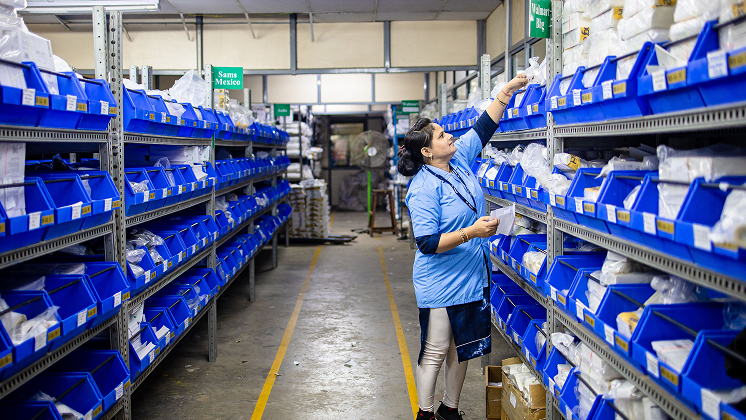
With over 2.7 billion deskless workers globally, the employee experience gap between frontline and desk-based staff is one of the most significant — and most costly — challenges HR leaders face.
Frontline workers are often disconnected from leadership, colleagues, and company culture. They have limited access to desktop-based tools. And they miss out on development opportunities and workplace perks that desk-based employees take for granted.
When their experience is poor, they leave — at rates that consistently outpace desk-based worker attrition.
Closing this gap requires intentional effort — and in most cases, it requires digital tools that every employee can actually access.
10 employee experience platform features that drive HR success
The right employee experience platform gives you the tools to hit your most important HR targets — whether that’s improving retention, driving engagement, streamlining onboarding, or building a culture that people genuinely want to be part of.
But not all platforms are built equal. And for organizations with a large frontline workforce, you need tools that meet staff where they are — serving customers, transporting goods, and keeping your operations on track.
Here are the features that matter most, and how each one connects to your HR goals.
1. Frontline-friendly features
For organizations with a significant frontline workforce, these frontline-friendly features are a baseline. Every other feature on this list only delivers value if frontline employees can actually access and use your platform.
To ensure your EX platform meets the needs of frontline workers, look for:
- Mobile-first design. Platforms that are built for smartphones from the ground up. Not a desktop platform with a mobile app bolted on.
- Offline capabilities. So employees in low-connectivity environments aren’t cut off from the information they need.
- Intuitive, consumer-grade interfaces. Frontline workers won’t adopt tools that feel clunky or slow. The bar is set by the apps they already use in their personal lives.
- No corporate email required. Access is granted via a phone number or employee ID, so every worker can use your systems from day one.
How will this help me meet my goals?
- Ensure your employee experience investment reaches all employees — not just those who sit at a desk.
- Reduce the friction that causes low platform adoption rates and poor ROI.
- Close the experience gap between frontline and desk-based employees that drives disproportionately high frontline attrition.
{{mobile-hub="/image"}}
2. Two-way communication tools
Effective internal communication requires two-way channels that give employees access to leadership updates, co-worker conversations, and company news — and give leadership real visibility into what employees are thinking.
Look for platforms that support instant messaging, a dynamic news feed, live streaming, voice and video calling, and pinned updates.
You also need structured channels for different types of communication, so the right messages reach the right people without everything competing for attention in the same feed.
For frontline organizations specifically, those comms channels need to be available on smartphones. Push notifications and mandatory reads also come in very useful.
How will this help me meet my goals?
- Easily communicate company updates, initiatives, and events to your entire team or specific departments.
- Work toward employee engagement goals by gathering valuable employee feedback through direct one-on-one or group chats.
- Build trust and transparency because employees feel they have a direct line to leaders.
3. Surveys, polls, and real-time feedback
Annual surveys tell you how employees felt twelve months ago. But by the time the results land, the moment to act has usually passed.
Real-time feedback tools — pulse surveys, quick polls, employee sentiment analysis, and manager check-ins — give HR a live picture of how employees are feeling, what’s working, and where action is needed.
This can make the difference between responding to a retention crisis and preventing one.
The best platforms make surveys easy to launch and feedback easy to send. Short, targeted surveys take seconds to complete and get higher response rates — particularly from time-poor frontline workers.
You should also look for analytics and reports that help you make sense of your findings. That way, you can create a plan of action and employees get to see visible change in response to their feedback.
How will this help me meet my goals?
- Surface issues before they impact engagement and retention.
- Get the data to make evidence-based decisions on HR initiatives, rather than relying on instinct.
- Demonstrate to employees that their voice matters, driving engagement and belonging in the process.
{{mobile-survey="/image"}}
4. Audience segmentation tools
While 75% of workplace communicators say tailored messaging is critical, only 20% segment their audiences regularly.
This is a problem. Because a retail associate doesn’t need the same updates as a warehouse operative. A new starter needs different content than a ten-year employee.
When every employee sees everything, the platform becomes noisy — and people stop paying attention.
Audience targeting allows HR and comms teams to deliver the right content to the right people, based on their role, location, department, and tenure. It helps you reduce overwhelm and land messages more effectively.
What’s more, when staff are confident of finding personalized content on your employee experience platform, they keep logging in. So you reach more employees through the same streamlined channels.
When choosing employee experience software, look for tools that allow you to create and manage employee groups, and tools that let you customize dashboards on an employee-by-employee basis.
How will this help me meet my goals?
- Improve message cut-through by ensuring employees only receive content that’s relevant to them.
- Enable more targeted feedback collection — surveying specific teams or locations rather than the whole organization at once.
- Reduce the noise that causes employees to disengage from internal comms and EX platforms entirely.
5. Automated employee journeys
Onboarding is one of the highest-stakes communication challenges in any organization.
When it's inconsistent — when new hires receive different information depending on which manager onboards them or which shift they start on — it shows up in slower ramp-up times, more HR queries, and higher early attrition.
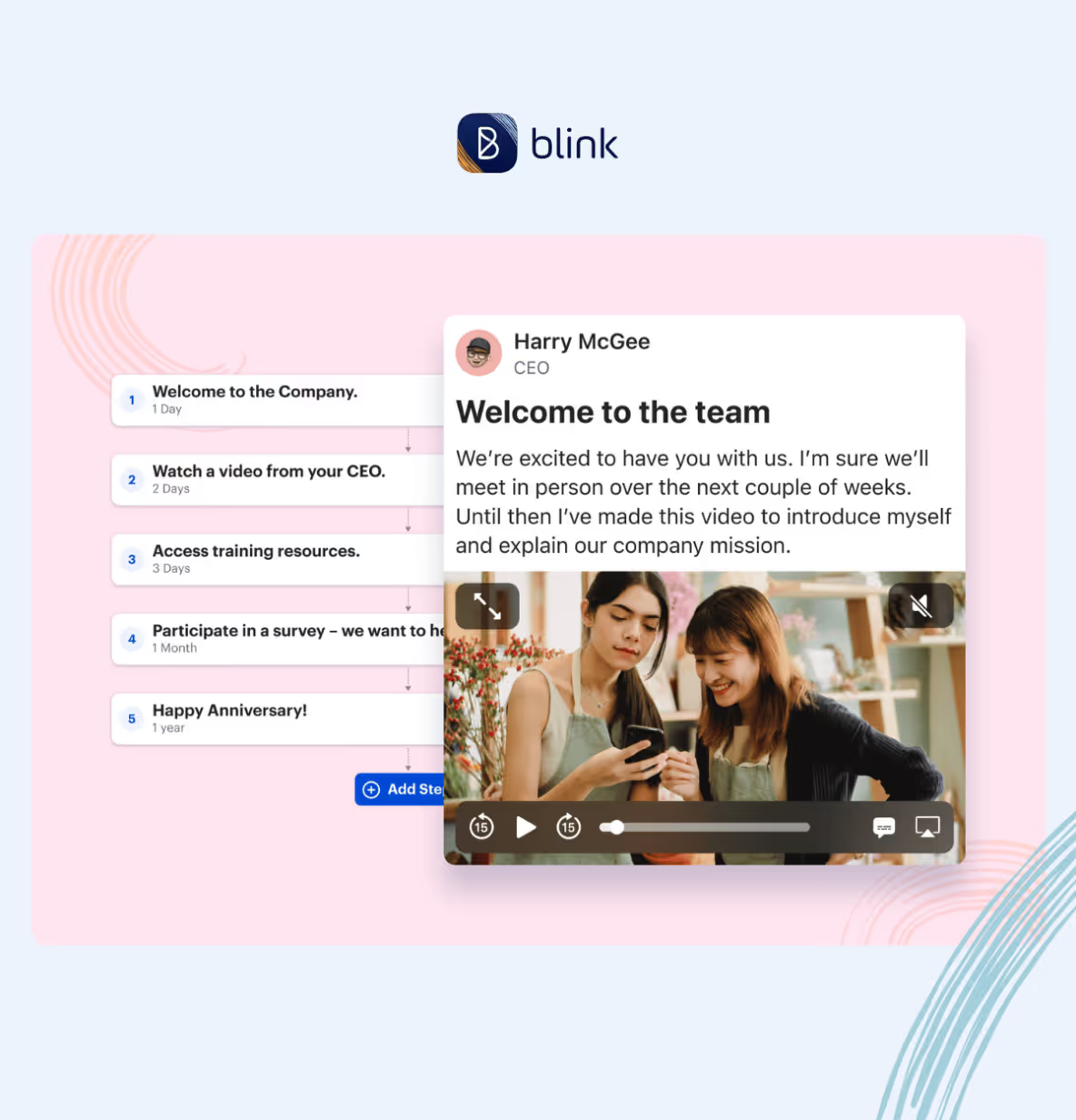
Automated employee journeys solve this by delivering the right content to every employee at the right moment — consistently, regardless of role, location, or manager.
Pre-boarding information before day one. Essential policies and system guides on arrival. Role-specific training in a logical sequence. Check-ins at 30, 60, and 90 days to identify and address early disengagement.
The same logic applies beyond onboarding — to role transitions, promotions, returns from leave — any other moment in the employee lifecycle where timely, consistent communication makes a meaningful difference.
Pick an employee platform that supports content automation — and connects with your HRIS — and staff get a more consistent and comprehensive experience.
How does this help me meet my HR goals?
- Reduce the volume of repetitive onboarding queries that consume HR capacity.
- Ensure every new hire gets the same high-quality experience regardless of manager or location.
- Improve early retention by giving new starters the confidence and information they need to succeed from day one.
{{mobile-kudos="/image"}}
6. Recognition and rewards
Employees who feel recognized perform better and stay longer. But only 61% of desk-based workers feel seen and appreciated at work. And this figure drops to 43% for desk-based teams.
A mobile-first platform with built-in recognition tools changes that. It enables peer-to-peer recognition, manager shoutouts, and company-wide celebrations of employee achievement — visible to everyone, not just the people who happen to be in the office.
The most effective recognition tools fit seamlessly into the work day.
If giving recognition means logging into a separate system and filling out a form, it won't happen consistently. If it takes two taps from the same app employees use for everything else, you embed recognition in company culture.
How does this help me meet my HR goals?
- Drive engagement, belonging, and retention by ensuring every employee — frontline included — feels seen and valued.
- Motivate employees to do their best work, improving performance and productivity.
- Improve the employer brand, making your organization a more appealing place to work.
7. Digital forms and workflows
HR processes are often still paper-based or scattered across disconnected systems — particularly in frontline organizations.
Leave requests, incident reports, onboarding paperwork, equipment sign-offs — each of these small administrative tasks consumes significant HR time when multiplied across a large workforce.
Digital forms, accessible from a smartphone, remove that friction. Employees complete forms in the moment they're needed, on the device they're already using. Submissions are tracked, data is captured cleanly, and HR spends less time chasing paper and more time on work that requires their expertise.
The best platforms let you build, customize, and update forms without IT involvement — so HR can respond to changing processes quickly without adding (another) ticket to the queue.
How does this help me meet my HR goals?
- Reduce HR admin burden by digitizing manual, paper-based processes.
- Improve data quality and compliance by capturing information consistently and in real time.
- Free HR capacity for strategic work by eliminating the time spent chasing, collating, and correcting paper-based submissions.
{{mobile-hub-report="/image"}}
8. Enterprise-wide search
When employees can’t find what they need, their first port of call is often HR. The people team spends a lot of time answering questions that are already answered elsewhere.
The issue? Information is hard to find — because it’s hidden away in an intranet folder, in an outdated handbook, or in a lengthy chat thread. In the case of frontline employees, it’s often because they can’t access company resources from their smartphones.
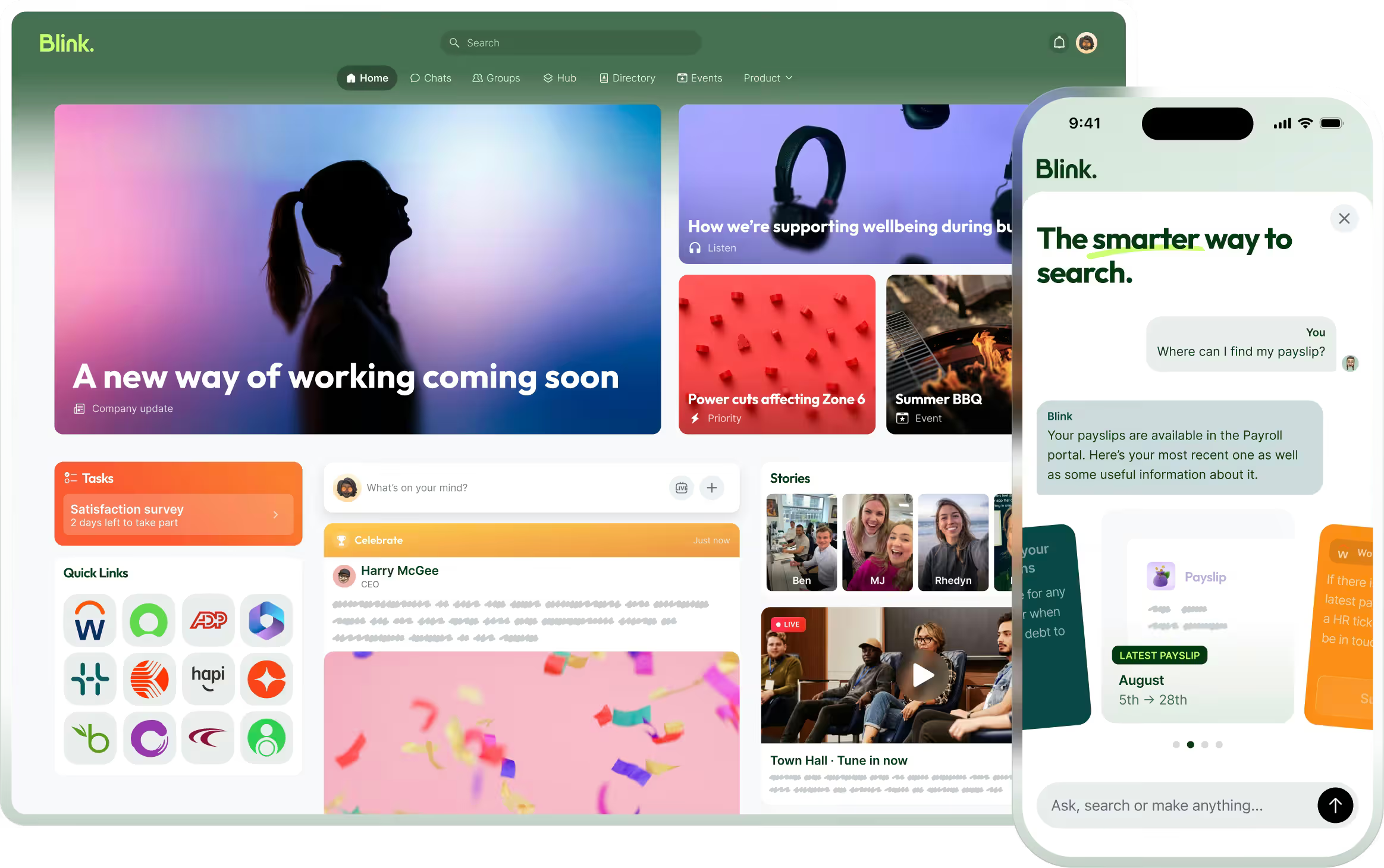
A searchable, centralized, mobile-first knowledge hub — with user-friendly content management tools — reduces unnecessary queries. It also empowers workers, because all the information they need to do their jobs well is right at their fingertips.
With the right EX platform, you put policies, procedures, FAQs, a people directory, and training materials within easy reach — across all devices — so your HR team spends less time fielding questions.
How will this help me meet my goals?
- Reduce the volume of routine process and policy queries that consume HR team time.
- Improve employee productivity by reducing time spent searching for important documents or information.
- Support compliance by ensuring every employee is working from the same, up-to-date version of every document.
9. Integrations with your HRIS
An employee experience platform that doesn't connect to your core HR systems creates more work, not less. Employees end up juggling multiple logins. Data lives in silos. HR spends time manually reconciling information across systems.
The right employee experience platform supports deep HRIS integration. It syncs with your HR system — pulling in employee data, org structures, and role information automatically.
Onboarding journeys trigger on the right day. Audience targeting reflects current team structures. Employees can access payroll, shift swap tools, benefits, learning systems, and leave information without leaving the platform.
Single sign-on (SSO) is essential. But the strongest integrations go further. They provide two-way data sync and automated user provisioning, so you can turn your platform into a digital front door for your entire HR tech stack.
How does this help me meet my HR goals?
- Reduce the manual admin burden of maintaining employee data across multiple systems.
- Give employees a single, trusted place to access HR information and complete HR tasks — reducing queries and improving self-service.
- Improve the ROI of your existing HR tech by increasing adoption through a single, accessible front door.
{{mobile-payslip-hub="/image"}}
10. Reporting & analytics tools
It’s hard to make meaningful improvements to employee experience — or to make the case for HR investment — without reliable data.
An EX tool with strong analytics capabilities gives you real-time visibility into how the platform is being used — who’s engaging, what content is landing, which locations or teams are disengaged, and where communication is falling short.
That data informs better decisions: smarter content strategies, targeted interventions, and a clearer line between HR activity and business outcomes — like retention and productivity.
Look for tools that track a wide range of KPIs and provide customizable dashboards and metrics. AI-powered data insights and data segmentation tools will also prove useful.
How will this help me meet my goals?
- Gain valuable insights into employee experience.
- Inform HR initiatives and decision-making by tracking progress and identifying areas for improvement.
- Demonstrate the ROI of HR and communications investment to leadership and finance.
How to choose the right employee experience tool for your business
Choosing an employee experience platform is a big decision. The right tool can reduce turnover, improve operational performance, and give every employee — including those on the frontline — a reliable connection to the information and culture that keeps them engaged.
The wrong one? Well, it adds to tool sprawl, sits unused, and creates more HR problems than it solves.
We’ve explored the features you should be looking for when choosing an employee experience platform that helps you meet HR goals. But what does the process of finding and implementing a new EX tool really look like?
Here’s a rundown of all the steps involved.
Start with your workforce, not your wishlist
Before evaluating any platform, get clear on what your end users need from a new tool. That means talking to people from across your organization — leadership, different departments, office-based workers, frontline employees.
Ask what bugbears they have with the tech tools you currently use — and what features and functionality they’d be looking for if they were picking a new platform. Quiz them on existing workflows and the places where bottlenecks occur.
Get input from your workforce and you’ll find it easier to draw up a list of platform must-haves. Employee buy-in also helps to ensure adoption and usage once your new tech tool goes live.
Define your HR outcomes
Another task to complete before you sit down to a demo? Establish the two or three key outcomes that matter most to your organization right now.
Is the priority reducing frontline attrition? Fixing onboarding consistency? Getting recognition to employees who currently receive none?
These priorities should drive your evaluation. So if a vendor can’t clearly explain how their platform moves the metrics you care about most — with evidence from organizations similar to yours — proceed with caution.
Assess integrations
Before committing, audit your current tech stack and ask vendors specific integration questions:
- Does it integrate with our HRIS — and how deep does that integration go?
- Does it support single sign-on, so employees don't need another set of credentials?
- Can employees access payroll, scheduling, and benefits tools through the platform — or does it just link out to them?
- What happens when one of our existing systems updates — who manages the integration maintenance?
Deep, maintained integrations are what turn a communication tool into a genuine digital front door and help your organization to avoid tool sprawl.
Don't underestimate the adoption challenge
The most common reason employee experience platforms fail to deliver ROI isn't a bad product choice. It's poor adoption — particularly among frontline workers who’ve learned to be skeptical of tools that promise to make their working lives easier…and then don't.
When evaluating platforms, ask vendors:
- What does a typical frontline rollout look like?
- What adoption rates do your existing customers achieve, and over what timeframe?
- How do you support manager activation — since managers are often the critical link between a platform launch and frontline engagement?
- What onboarding resources and tutorials are available to keep adoption momentum high?
- What other support do you provide during platform launch?
A vendor who can point to concrete adoption data is a vendor worth keeping on your shortlist.
Watch for these red flags
Not every platform that markets itself as an employee experience tool is built for the realities of your organization. Watch for:
- Desktop-first design presented as mobile-ready. There's a significant difference between a platform built with a mobile-first mindset and a desktop platform with a mobile app bolted on. Ask to test the mobile experience before making any decisions.
- Weak or templated analytics. If you can't measure adoption by role, location, and department — and connect communication activity to business outcomes — you can't demonstrate ROI or identify where the platform is falling short.
- Shallow integrations. A platform that integrates with your HRIS in name only, without real data sync or SSO, won't reduce the friction that drives employees to workarounds.
- Rigid workflows. Platforms that can’t adapt to your organization’s culture and processes will slow managers and teams down, instead of helping them. Look for platforms that can be customized and personalized to organization and employee needs.
Pilot before you scale
A full-scale rollout might feel efficient. In practice, it simply hides problems until they're really expensive to fix.
Different employee groups — frontline workers, managers, desk-based staff, new starters — have different needs, habits, and access patterns. What works well for one group may not work for another.
Run a structured pilot with a representative group before rolling out to the full workforce. Track adoption rates, ease of use, and qualitative feedback. Use what you learn to refine your onboarding approach, notification settings, content strategy, and governance before scaling.
A phased rollout reveals friction points early, when they’re still cheap to address.
Measure continuously, not just at launch
Implementation isn’t the finish line. The needs of employees change over time. Business priorities shift. Communication strategies that work well at 500 employees may need adjusting at 2,000.
Build regular platform reviews into your HR calendar. Use analytics to track adoption trends, content engagement, survey participation, and the correlation between communication activity and business metrics like attrition and productivity.
The organizations that get the most from their employee experience platforms are the ones that treat them as living infrastructure — not a one-time rollout.
{{mobile-desktop-main="/image"}}
Next-level employee experience and HR impact
Choosing the right employee experience platform means finding one that works for your people, your processes, and your HR goals.
From frontline-friendly design to analytics, integrations to recognition features, the best platforms make work easier, while improving employee engagement and HR outcomes.
But even the perfect platform won’t deliver ROI on its own. Success comes from understanding your workforce, defining the outcomes that matter most, piloting thoughtfully, and measuring continuously.
Treat your EX tool as living infrastructure, and you’ll see engagement, retention, and productivity rise — making your organization a place employees genuinely want to work.


















-min.jpeg)
.avif)
-min.avif)




.avif)




.avif)

.avif)





.avif)

