Employee hub: what it is and what to look for
A store manager fields the same question four times before lunch: where's the updated time-off schedule, and who do I even ask about it. That's the gap an employee hub closes. It's the one place in a company's app where every employee can find policies, schedules, forms, and colleagues, without digging through email or asking a manager to look something up. Most companies still scatter this information across a shared drive, a scheduling tool, a printed handbook, and whatever group chat happens to be active that week. An employee hub puts it all behind one login, on the device people already carry. This guide covers what belongs in a hub, why the people directory is the feature most teams underrate, what to look for when you're evaluating options, and how Blink's Hub and Directory work in practice.
What is an employee hub?
An employee hub is a centralized, searchable space inside a company's employee app where staff find policies, schedules, pay stubs, forms, links to other systems, and a directory of colleagues. It's built to answer the two questions employees ask most: "where's the document I need?" and "who do I talk to?"
A hub, an intranet, and a portal get used as if they're interchangeable, but they're not quite the same thing:
- A hub is a mobile-first content and workflow layer, built to work as well on a phone in a stockroom as on a laptop at head office.
- An intranet, in its traditional form, is a desktop-first content site that assumes employees are sitting at a computer with a company login.
- A portal, in Blink's view, usually just means a login screen in front of several disconnected systems, HR here, payroll there, scheduling somewhere else, with no real single destination.
A hub is the content and workflow layer. A directory is the people layer. Put them together and you get a front door for the whole workforce, not just the people with a desk.
8 must-have features in a modern intranet platform goes deeper on what separates a hub-style intranet from the static version most companies still run.
What goes in an employee hub?
A working hub holds everything an employee needs to do their job, organized so they can find it without a phone call to HR. That typically means company policies and handbooks, health and safety documentation, shift schedules, pay stubs and benefits information, onboarding materials, training content, forms for requests like time off or incident reporting, and links out to other systems the company runs, like a scheduling tool, a learning platform, or an HRIS. None of it should require a company email address or a desktop login to reach, since many frontline workers have neither.
A hub full of documents still answers one kind of question, not the other. The content tells an employee what the policy says. It doesn't tell them who to ask when the policy doesn't cover their situation. That's the gap a directory closes, and it's worth its own section.
Why does a directory matter for frontline teams?
A directory lets an employee find and reach a colleague by name, role, or site, without needing their email address. Picture a retail associate who needs to ask the regional loss prevention lead a quick question, or a hospital porter trying to reach the on-call maintenance contact at a different building. In a desk-based company, that's a quick email or a Slack search. On the frontline, it's usually a phone call up the chain, a text to a manager, or just not asking at all.
A searchable directory, where someone can look up "maintenance, downtown site" and land directly on the right profile, removes that chain. It's also one of the clearest signs of whether a hub was actually built for deskless teams or just adapted from a desk-based intranet. Directories that only show people in the same department, or that assume everyone can be found the way a desk-based org chart finds them, don't hold up once you have shift workers, contractors, and multi-site staff who move around.
6 ways to create an intranet your frontline workforce will love has more detail on building for that reality rather than retrofitting a desk-first tool.
What features should you look for in an employee hub?
Seven features separate a genuine employee hub from a repackaged file-share. Run through each before you commit to a platform:
- Mobile-first, not mobile-friendly. A responsive website is not the same as an app built for a phone screen and a thumb. Test it on a real device before you buy, not a demo laptop.
- Search that understands roles and sites, not just file names. Someone searching "time-off policy" or "warehouse supervisor, Leeds" should land on the right result first, not page three.
- A people directory with live profiles. Name, role, site, team, and a way to start a conversation from the profile itself, searchable by role or location, not just by name.
- Micro-apps or forms for workflows. Micro-apps are small built-in tools, a shift-swap request, an incident report, a time-off form, so the task happens inside the hub instead of on paper or in a separate system.
- Single sign-on into other platforms. If employees still need five separate logins to reach payroll, scheduling, and training, the hub hasn't actually consolidated anything.
- Offline access. Warehouses, basements, rural routes, and moving vehicles don't guarantee signal. Content that only loads online fails exactly when someone's relying on it.
- Permissions by role, site, and team. Not every policy belongs in front of every employee, and not every profile should be visible to everyone either. Granular control keeps the hub useful instead of noisy, and it's what lets the same hub scale from one site to hundreds without a policy or a profile landing in front of the wrong audience.
Treat this list as a shortlist for vendor demos, not a feature checklist to tick off a spec sheet. Ask to see each one working on a phone, with real content, before you sign anything.
How do Blink's Hub and Directory work?
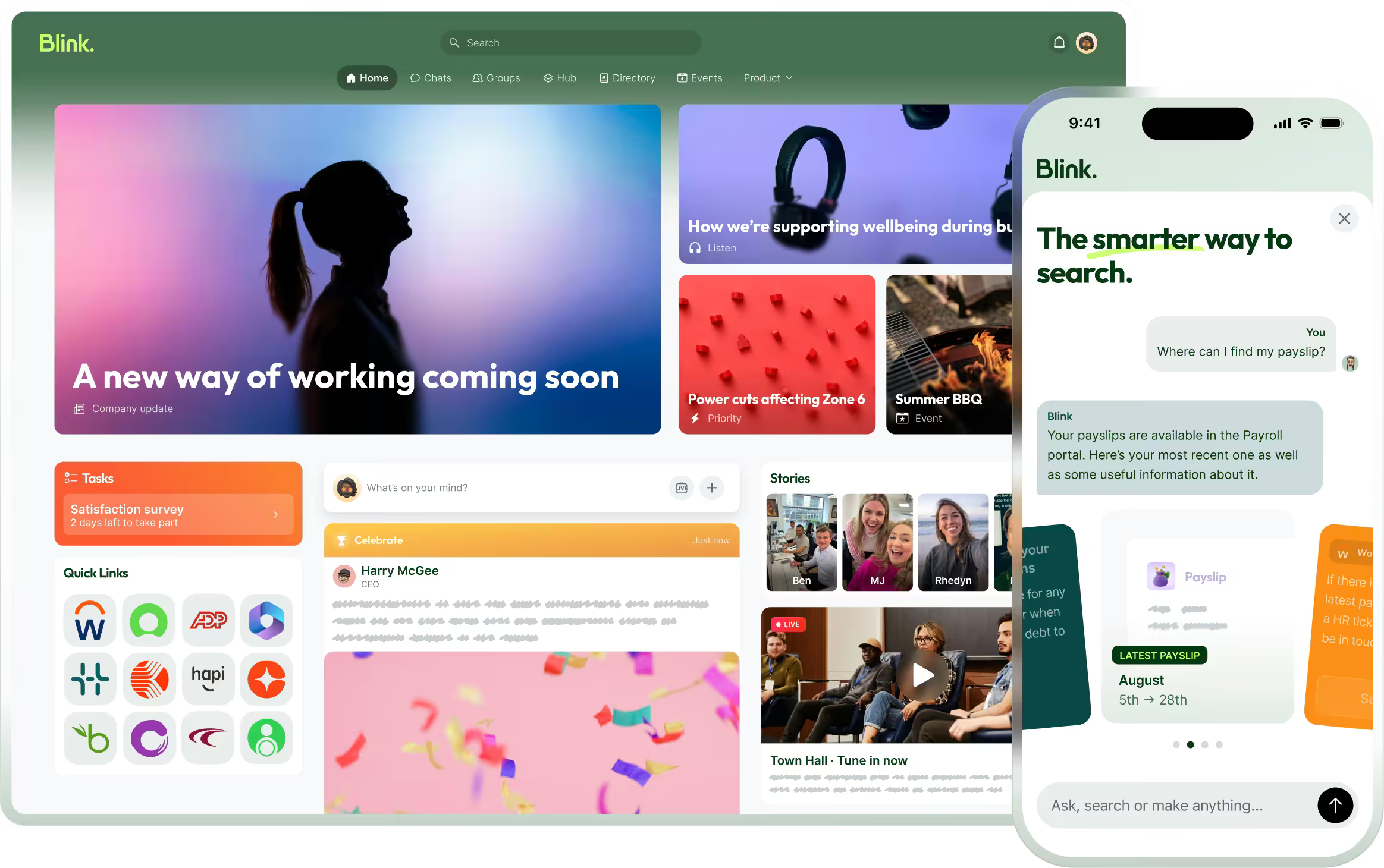
Blink's Hub is a drag-and-drop space: admins build pages, link micro-apps and forms, and organize content by role, site, or team, without needing a developer. They control exactly who sees what with Blink's permissions and sharing settings. The Directory works the way an employee already thinks to search: type a name, a job title, or a site, land on the right profile, and reach that person directly, by chat or call. Profiles carry visibility controls too, so personal details stay private while professional contact information stays reachable. Overall adoption across Blink's customer base is over 90%.
At Rheem Fort Smith, a manufacturer that previously relied on phone lines for absence reporting, recorded overtime schedules, paper time-off requests, and in-person HR visits, moving those processes into Blink's Feed, Hub, and Forms replaced the calls and the paperwork with a self-service flow employees could use from their own phone. At Elara Caring, caregivers reach a similar self-service layer a different way: single sign-on into Workday from inside the hub, plus a landing page where they can update direct deposit, submit a payroll ticket, or request an employment verification letter without going through a supervisor first. Manufacturing and healthcare look nothing alike operationally, but the pattern is the same one: give people a place to find the answer or the person themselves, and the request stops routing through HR or a manager.
See how it comes together on the Content Hub feature page, or explore Blink's approach to a modern intranet.
Getting started: how to choose the right hub for your team
Start by mapping what your employees currently can't find or can't reach, not by starting with a feature list. A few steps that keep the evaluation grounded:
- List the five questions employees ask HR or managers most often. Schedule questions, policy questions, payroll questions, "who do I talk to about X." Your hub needs to answer all five without a phone call.
- Check whether the directory works without a company email. A directory that depends on one will exclude exactly the people you most need to reach.
- Test search on a real phone, in a real location, ideally somewhere with patchy signal, to see what happens offline.
- Confirm single sign-on into the systems you already run, payroll, scheduling, learning, so the hub becomes the front door rather than one more login.
- Ask who can edit the hub. If every update needs a developer or an IT ticket, content will go stale within a month.
A hub that passes all five is one your team opens on its own, without a reminder from a manager or a poster in the break room.
Try Blink's Hub and Directory
Start a 14-day free trial to see it running with your own content, or book a demo to walk through how it fits your current systems.