How Blink uses Blink: the chat feature that runs our whole company
Episode 1 of How Blink uses Blink: I asked Lauren Burns, our COO, why she uses Chat the most.
Justine Gazikian
Published:
August 3, 2026
Last updated:
August 3, 2026
What we'll cover
What is team chat for frontline teams?
Team chat for frontline teams is a mobile-first messaging tool that connects everyone in a company, not just the people at a desk. It gives a shift worker, a store manager, and a head-office exec one place to talk in real time, from a phone, without needing a work email address to log in.
That's the part most tools miss. Email and desk-era chat apps were built for people who sit in front of a screen all day. Frontline chat is built for the 80% of the workforce who don't. Same conversation, same company, everyone included.
We're a software company. We sit at desks. So why do we live in a frontline chat app every working day? Because reaching everyone is a problem every distributed company has, ours included.
Why a desk-based company runs on a frontline app
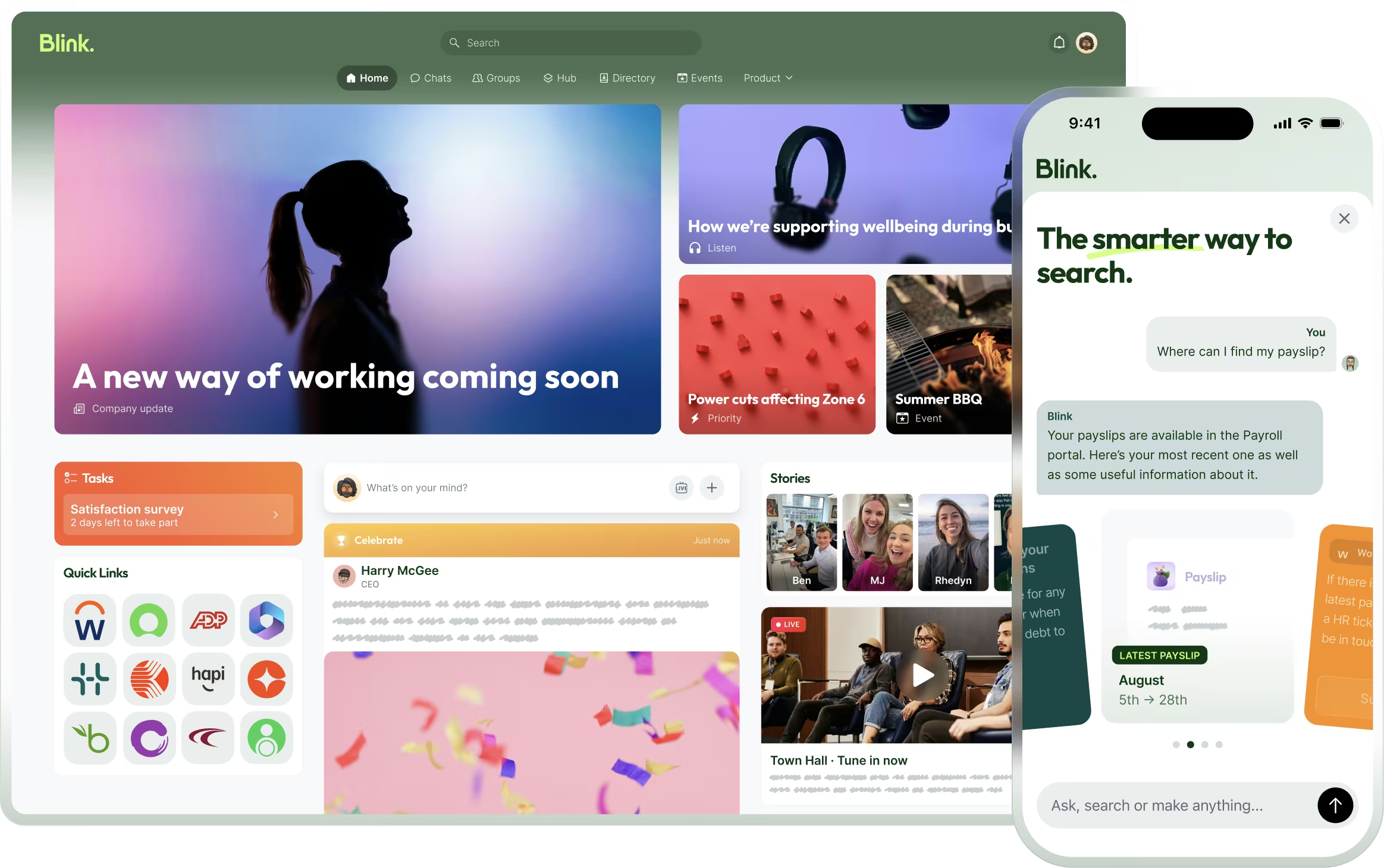
Blink is 132 people across offices in London and Boston, plus remote. We've used our own platform, every working day, for twelve years. That's not a marketing decision. It's how we believe you build good software for the frontline: you live in it yourself.
It also happens to solve our own problem. We have people in two time zones and at home, all needing to stay on the same page. A London designer, a Boston project lead, and a remote engineer working the same website launch shouldn't need three tools and a calendar invite to stay aligned. They need one place. That's chat.
If the "reach everyone, wherever they are" problem sounds familiar, that's because it isn't unique to frontline businesses. It's just sharper there. Which is exactly why living in the product teaches us so much.
You can see both worlds in our own numbers. In the last 30 days, our team opened Blink 211,042 times: 141,610 from desks and 69,432 from phones (thanks to Blink IQ). Head office and people on the move, in the same app, reading the same things at the same moment. That desk-and-pocket split is the whole reason chat has to work brilliantly on a phone, not just tolerate it.
Why our COO sends more chats than anyone else
Here's the counterintuitive part. In a company of 132 people, the person sending the most messages isn't in support or sales. It's the COO.
Lauren's reason is simple: as a leader, you need to get a sense of the bigger picture without bothering people. Chat lets her stay close to what's happening across every team by reading, not interrupting. No status meeting. No "quick catch-up" that eats an afternoon. She scans the channels that matter and she's caught up.
Our data backs the pattern up at the top. Our CEO, Sean, opens the Blink app on his phone more than anyone else in the company. But 58% of his messages are written from a computer. He reads while he's moving, between Boston and London or inside a customer's distribution center, and writes when he's sitting down. Leaders staying close to the work is a behavior you can see, not just hope for.
What can chat do that email or a meeting can't?
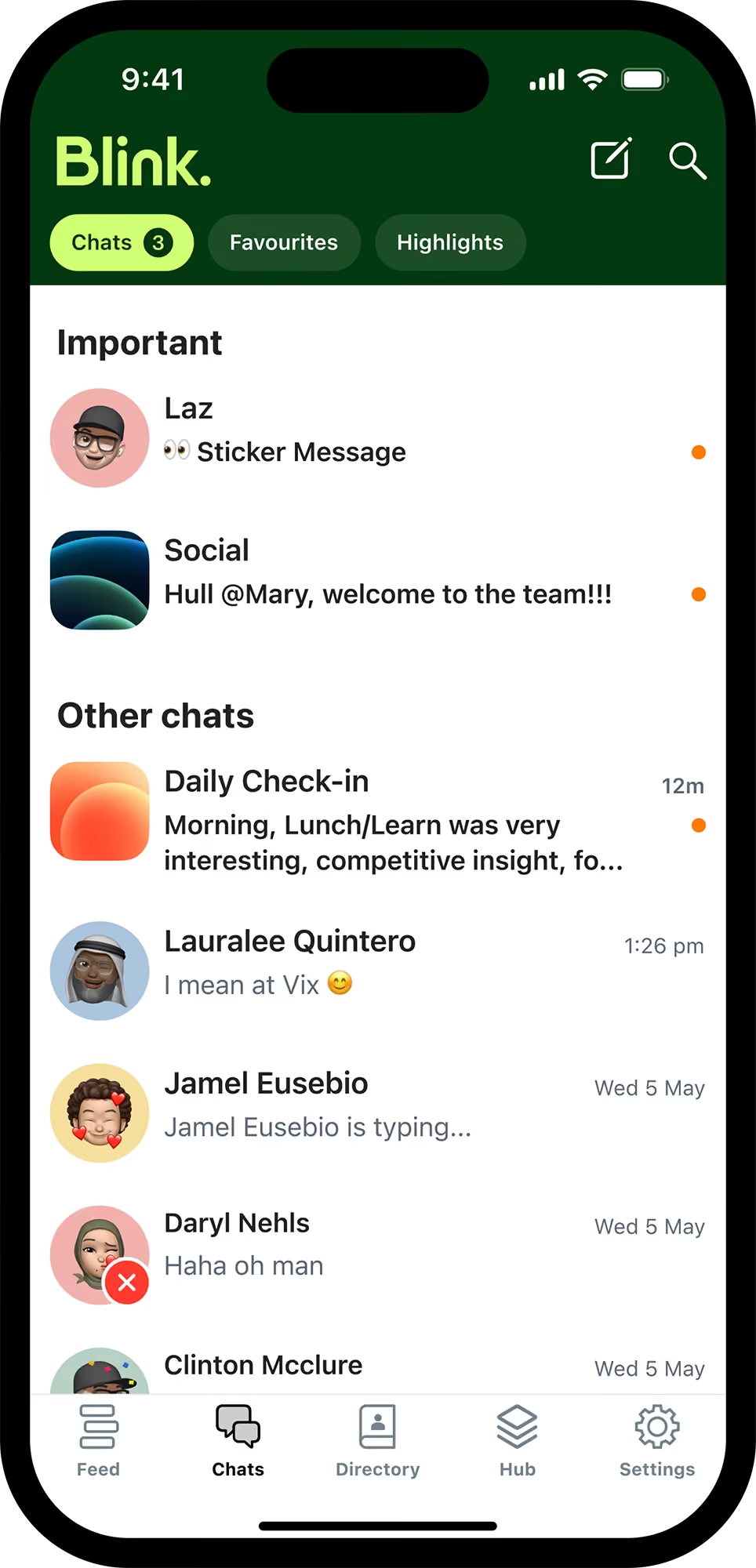
Chat keeps a live conversation in one place, visible to everyone who needs it, searchable forever, with no one left out when they step away. Email buries it and meetings lose it.
Ask Lauren for a concrete example and she'll point to the everyday stuff. This week, it was a website project run across Boston and London.
Email would have meant a thread nobody reads to the end, with the newest person always missing context. A meeting would have meant finding a slot across two time zones, then writing it all up afterward anyway. In chat, the whole project lives in one channel. Decisions are written down. Anyone who steps away comes back and scrolls up. Anyone new gets added and sees the full history.
That's the thing consumer messaging apps can't do at work. In chat, everything is written, which means everything is searchable. You have a record. You can find what you need. You stay in the loop when you're away. Nothing lives in one person's inbox or one person's memory.
What Blink uses chat for, and what it doesn't
Almost everything at Blink happens in chat. 97% of our team actively chats, and last month alone we sent 113,232 messages, in a company of 132 people. We barely use emails. Every team has a channel. Every office has a channel. There are channels for cross-team collaborations, for squads, for specific customers. The whole company is a network of connections, and chat is what holds it together.
You can see it in the data. Our Customer Success and Implementation teams, the two groups that move a customer from signed contract to live and beyond, exchanged 42,223 chat messages in a single year. That's more than any other pair of teams at the company. The handoff between them isn't a moment. It's a constant conversation.
What don't we use chat for? Anything that should happen in person. Difficult conversations, sensitive feedback, the moments that need a face and a voice. Chat is for keeping everyone connected and informed. It isn't a place to hide from the conversations that matter most. Knowing the difference is part of using it well.
What chat features do frontline teams actually use?
{{mobile-teams-call="/image"}}
Four, mostly. Direct messages, channels, video and voice calls, and document sharing. Here's how each one earns its place at Blink:
Direct messages. One-to-one and small group conversations, from any device.
Channels. A space for every team, office, squad, project, and customer. This is where the company-wide network lives.
Video and voice calls. Jump from a message to a call without switching apps or sending a meeting link.
Document sharing. Share files where the conversation is already happening, so context and content stay together.
None of these are exotic. What matters is that they're all in one app, on a phone, available to everyone in the company, not just the people at a desk.
What leaders get wrong about chat
Here's the one thing Lauren wants leaders to understand: chat is not enough on its own.
The mistake is thinking that if you give people a messaging app, you've solved internal communication. You haven't. Chat is the entry point, not the whole thing. You also need a company news feed, where people can post, react, and share what's happening across the business. You need video. And you need a way to recognize good work.
You can see it in how we use Blink ourselves. 97% of us actively chat, 94% use the Hub for resources, 89% use the news feed, and 59% post Stories. Adoption across all of it is the difference between a channel people tolerate and a workplace they live in. Chat gets them in the door. The rest is why they stay.
Because communication at work isn't only about coordination. We're social. We crave connection. We need to feel part of something and to feel seen for the work we do. Chat handles the day-to-day. The rest is what turns a group of people into a culture.
Which is a good place to leave a hint about episode two. Next up, we're opening up the feature we use to highlight great work across the company: recognition. Same couch, different person.
Team chat vs email and Slack for frontline teams
If you're weighing up how to connect a frontline team, here's the short version:
Swipe to see all columns
Email
Desk-era chat
Blink chat
Built for
Desk workers
Desk workers
Everyone, frontline included
Login
Work email required
Usually work email
Phone number, no email needed
Primary device
Laptop
Laptop
Phone
More than messaging
No
Chat only
Chat, news feed, video, recognition
Blink isn't "just another comms tool." Slack and email were built for people at a desk. Blink was built so the person on the shop floor, the driver, and the head-office team are all in the same conversation. And chat is only the front door to a wider employee experience.
Bring your whole team into one chat
We use Blink because it does for us exactly what we built it to do for our customers: connect everyone, wherever they work, in one app on the device they already carry.
You can try it with your own team in a few minutes. Start a free trialand set up your first channel. Everyone can join, including the people who've never had a company email address.
No. Slack was built for desk workers who log in with a work email. Blink is built for frontline and deskless teams who work from their phones, often without a company email address. Chat is also just one part of Blink, alongside a company news feed, video calls, and recognition. At Blink, 97% of our own team actively chats, 94% use the knowledge Hub, and 89% use the news feed. That breadth is what makes it a workplace rather than a single messaging channel.
Can frontline workers without a work email use Blink chat?
Yes. Employees can sign in with a phone number, so people without a company email address are included from day one. That's the whole point of a frontline-first chat app.
Is Blink chat secure for work?
Yes. Blink is used by organizations with over a million frontline workers. Conversations are recorded and searchable inside the platform, which gives you a written record instead of company conversations sitting on personal WhatsApp threads you don't own or control.
What's the difference between Blink chat and the news feed?
Chat is for conversations between people and teams. The news feed is for company-wide updates, posts, and reactions. Most companies need both: chat for coordination, the feed for culture and comms that reach everyone.
How quickly can I get my team on Blink?
You can start a free trial and create your first channel in minutes. Because people join from their phones with a phone number, you can bring in frontline workers who don't have a company email address, not just the head-office team.
What is team chat for frontline teams?
Team chat for frontline teams is a mobile-first messaging tool that connects everyone in a company, not just the people at a desk. It gives a shift worker, a store manager, and a head-office exec one place to talk in real time, from a phone, without needing a work email address to log in.
That's the part most tools miss. Email and desk-era chat apps were built for people who sit in front of a screen all day. Frontline chat is built for the 80% of the workforce who don't. Same conversation, same company, everyone included.
We're a software company. We sit at desks. So why do we live in a frontline chat app every working day? Because reaching everyone is a problem every distributed company has, ours included.
Why a desk-based company runs on a frontline app
Blink is 132 people across offices in London and Boston, plus remote. We've used our own platform, every working day, for twelve years. That's not a marketing decision. It's how we believe you build good software for the frontline: you live in it yourself.
It also happens to solve our own problem. We have people in two time zones and at home, all needing to stay on the same page. A London designer, a Boston project lead, and a remote engineer working the same website launch shouldn't need three tools and a calendar invite to stay aligned. They need one place. That's chat.
If the "reach everyone, wherever they are" problem sounds familiar, that's because it isn't unique to frontline businesses. It's just sharper there. Which is exactly why living in the product teaches us so much.
You can see both worlds in our own numbers. In the last 30 days, our team opened Blink 211,042 times: 141,610 from desks and 69,432 from phones (thanks to Blink IQ). Head office and people on the move, in the same app, reading the same things at the same moment. That desk-and-pocket split is the whole reason chat has to work brilliantly on a phone, not just tolerate it.
Why our COO sends more chats than anyone else
Here's the counterintuitive part. In a company of 132 people, the person sending the most messages isn't in support or sales. It's the COO.
Lauren's reason is simple: as a leader, you need to get a sense of the bigger picture without bothering people. Chat lets her stay close to what's happening across every team by reading, not interrupting. No status meeting. No "quick catch-up" that eats an afternoon. She scans the channels that matter and she's caught up.
Our data backs the pattern up at the top. Our CEO, Sean, opens the Blink app on his phone more than anyone else in the company. But 58% of his messages are written from a computer. He reads while he's moving, between Boston and London or inside a customer's distribution center, and writes when he's sitting down. Leaders staying close to the work is a behavior you can see, not just hope for.
What can chat do that email or a meeting can't?
Chat keeps a live conversation in one place, visible to everyone who needs it, searchable forever, with no one left out when they step away. Email buries it and meetings lose it.
Ask Lauren for a concrete example and she'll point to the everyday stuff. This week, it was a website project run across Boston and London.
Email would have meant a thread nobody reads to the end, with the newest person always missing context. A meeting would have meant finding a slot across two time zones, then writing it all up afterward anyway. In chat, the whole project lives in one channel. Decisions are written down. Anyone who steps away comes back and scrolls up. Anyone new gets added and sees the full history.
That's the thing consumer messaging apps can't do at work. In chat, everything is written, which means everything is searchable. You have a record. You can find what you need. You stay in the loop when you're away. Nothing lives in one person's inbox or one person's memory.
What Blink uses chat for, and what it doesn't
Almost everything at Blink happens in chat. 97% of our team actively chats, and last month alone we sent 113,232 messages, in a company of 132 people. We barely use emails. Every team has a channel. Every office has a channel. There are channels for cross-team collaborations, for squads, for specific customers. The whole company is a network of connections, and chat is what holds it together.
You can see it in the data. Our Customer Success and Implementation teams, the two groups that move a customer from signed contract to live and beyond, exchanged 42,223 chat messages in a single year. That's more than any other pair of teams at the company. The handoff between them isn't a moment. It's a constant conversation.
What don't we use chat for? Anything that should happen in person. Difficult conversations, sensitive feedback, the moments that need a face and a voice. Chat is for keeping everyone connected and informed. It isn't a place to hide from the conversations that matter most. Knowing the difference is part of using it well.
What chat features do frontline teams actually use?
{{mobile-teams-call="/image"}}
Four, mostly. Direct messages, channels, video and voice calls, and document sharing. Here's how each one earns its place at Blink:
Direct messages. One-to-one and small group conversations, from any device.
Channels. A space for every team, office, squad, project, and customer. This is where the company-wide network lives.
Video and voice calls. Jump from a message to a call without switching apps or sending a meeting link.
Document sharing. Share files where the conversation is already happening, so context and content stay together.
None of these are exotic. What matters is that they're all in one app, on a phone, available to everyone in the company, not just the people at a desk.
What leaders get wrong about chat
Here's the one thing Lauren wants leaders to understand: chat is not enough on its own.
The mistake is thinking that if you give people a messaging app, you've solved internal communication. You haven't. Chat is the entry point, not the whole thing. You also need a company news feed, where people can post, react, and share what's happening across the business. You need video. And you need a way to recognize good work.
You can see it in how we use Blink ourselves. 97% of us actively chat, 94% use the Hub for resources, 89% use the news feed, and 59% post Stories. Adoption across all of it is the difference between a channel people tolerate and a workplace they live in. Chat gets them in the door. The rest is why they stay.
Because communication at work isn't only about coordination. We're social. We crave connection. We need to feel part of something and to feel seen for the work we do. Chat handles the day-to-day. The rest is what turns a group of people into a culture.
Which is a good place to leave a hint about episode two. Next up, we're opening up the feature we use to highlight great work across the company: recognition. Same couch, different person.
Team chat vs email and Slack for frontline teams
If you're weighing up how to connect a frontline team, here's the short version:
Swipe to see all columns
Email
Desk-era chat
Blink chat
Built for
Desk workers
Desk workers
Everyone, frontline included
Login
Work email required
Usually work email
Phone number, no email needed
Primary device
Laptop
Laptop
Phone
More than messaging
No
Chat only
Chat, news feed, video, recognition
Blink isn't "just another comms tool." Slack and email were built for people at a desk. Blink was built so the person on the shop floor, the driver, and the head-office team are all in the same conversation. And chat is only the front door to a wider employee experience.
Bring your whole team into one chat
We use Blink because it does for us exactly what we built it to do for our customers: connect everyone, wherever they work, in one app on the device they already carry.
You can try it with your own team in a few minutes. Start a free trialand set up your first channel. Everyone can join, including the people who've never had a company email address.
No. Slack was built for desk workers who log in with a work email. Blink is built for frontline and deskless teams who work from their phones, often without a company email address. Chat is also just one part of Blink, alongside a company news feed, video calls, and recognition. At Blink, 97% of our own team actively chats, 94% use the knowledge Hub, and 89% use the news feed. That breadth is what makes it a workplace rather than a single messaging channel.
Can frontline workers without a work email use Blink chat?
Yes. Employees can sign in with a phone number, so people without a company email address are included from day one. That's the whole point of a frontline-first chat app.
Is Blink chat secure for work?
Yes. Blink is used by organizations with over a million frontline workers. Conversations are recorded and searchable inside the platform, which gives you a written record instead of company conversations sitting on personal WhatsApp threads you don't own or control.
What's the difference between Blink chat and the news feed?
Chat is for conversations between people and teams. The news feed is for company-wide updates, posts, and reactions. Most companies need both: chat for coordination, the feed for culture and comms that reach everyone.
How quickly can I get my team on Blink?
You can start a free trial and create your first channel in minutes. Because people join from their phones with a phone number, you can bring in frontline workers who don't have a company email address, not just the head-office team.
What we'll cover
Start your free trial today
See how Blink helps frontline teams stay connected, informed, and engaged.
Effective workplace communication is clear, consistent, and engaging. It produces the desired result, and it helps you avoid misunderstandings.
Organizations with a successful internal communication style are happier and more productive. But effective employee communication isn’t always easy, especially if you manage a frontline workforce.
There are practical challenges to overcome. Frontline employees don’t have a computer. They don’t always have an employee email address. They have changing shift times and locations. And they often lack access to tools their office-based peers have as standard.
Nevertheless, overcoming these barriers to communication is important. Fail to reach everyone with effective workplace communication and:
critical messages are missed
you struggle to develop a strong company culture
employees end up feeling disconnected, demotivated, and more likely to look for other jobs
Essentially, if communication doesn’t reach every member of your organization, we can’t call it effective.
Here we explore the benefits of effective communication, and offer ideas on how to achieve it at your organization.
Benefits of effective workplace communication
93% of business leaders say that workplace communication is the backbone of business. But 3 in 4 say their company underestimates the cost of poor communication.
Here are the things companies miss out on when their communication isn’t up to scratch.
When teams interact openly and inclusively, they develop a shared understanding of goals and processes. This makes it much easier for them to harness team strengths and work together.
Enhanced employee engagement
Employee engagement is how connected and committed your workers feel to their workplace.
It’s something the majority of business leaders plan to focus on in 2024. That’s because high levels of employee engagement are linked to better productivity and staff retention.
There’s a direct link between workplace communication and employee engagement. Improve the former and you improve the latter.
Conflict resolution
Workplace conflicts are natural and inevitable. But you can’t allow mountains to become molehills. You need to get team members in a room to talk it out.
When teams communicate effectively, you resolve conflicts quickly, collaboratively, and conclusively. Good employee communication also prevents conflicts from developing in the first place.
Improved productivity
What could you do with an extra 7.47 hours per team, per week? That’s the time business leaders say they lose because of poor communication.
Employees rely on the right information to complete tasks. When that information is readily available and easy to find, workers get the job done quicker. And employee productivity sees a considerable uptick.
Improved employee morale
According to a Forbes study, nearly 50% of workers say that ineffective communication harms job satisfaction. And 42% say it makes them more stressed.
When communication is poor, workers also feel less confident professionally. And they’re more likely to look for other jobs.
Ineffective communication damages team morale. But when you adopt good communication practices, you find it easier to motivate and retain staff.
Increased innovation
For the best shot at developing innovative new ideas, you need to enlist the help of as many people in your organization as possible.
People have to bounce ideas off of one another. And you need a way to communicate your culture of innovation to the company at large.
Innovation relies on good communication. So with effective communication strategies, your company will come up with bigger and better ideas.
Better decision-making
When communication flows between all members of an organization, leaders make more effective decisions.
That’s because they don’t make decisions in a silo. They take into account the ideas, opinions, and perspectives of all employees. They base decisions on information, not instinct.
It’s the same for employees. An incredible 28% of workers say they don’t understand their company’s goals. So imagine how much more effective their day-to-day decision-making could be with clear communication from leadership.
Traditionally, messages may have been passed to the frontline via word of mouth, a cluttered team noticeboard, or personal messaging apps.
These communication methods are inefficient and time-consuming. There’s also a big risk in terms of reliability. Employees may get the wrong message – or no message at all.
Technology offers an alternative solution. Today’s best communication tech is designed around the modern workplace. It offers:
Top-down, bottom-up, and peer-to-peer communication: communication moves in all directions thanks to communication channels everyone can contribute to
An intuitive user experience and integrations: it’s easy for employees to find information; tools work well with any other tech you use and don’t add to the noise
Real-time communication:61% of workers prefer real-time communication; moving beyond email, employees get access to instant messaging and video conferencing
Access for every employee – whether they work in the office, on the shop floor, or on the road, all employees get the same access to communications and communication tools
In today’s workplace, communication tech is essential. But the right tech solution looks different for every business.
For desk-based teams, modern company intranets are ticking most boxes. However, frontline teams need a tech tool that isn’t chained to a computer and doesn’t require a company email address for login.
Enter the employee app. For organizations with large frontline teams, an employee app like Blink has all the features and functions you need for effective employee communication.
It’s a mobile-first app so all employees can access Blink from their smartphone. All communication is available in the same place so employees know exactly where to find it.
Blink supports surveys, recognition, and – crucially – allows leadership to communicate with the frontline workforce they’re so often disconnected from.
With leaders and the frontline seeing the value of good tech, implementing this type of tool is one of the primary ways you can improve workplace communication.
7 ways to improve workplace communication
Getting the right tech on your team is central to improving workplace communication. But you can’t stop there. If communication at your workplace is subpar, there’s work to be done.
These tips provide the other pieces of the puzzle. Put them into place and you’ll develop a strong and successful internal communication strategy.
1. Lead by example
Leaders set the tone of your organization. So if you want employees to communicate regularly, openly, and clearly, your leaders have to, too.
Encourage leaders to be active and visible on employee communication channels. And to engage with employees at all levels of the business.
Training may be necessary. There’s a presumption that good communication comes naturally. The truth is it doesn’t. But it can be taught.
By gaining new skills, your leaders can become clear communicators and active listeners. They’ll also find it easier to establish a culture of positive communication.
2. Establish clear communication channels
Lots of noise? Not much being heard?
Channel overload makes it hard for employees to find information that’s relevant to them. This impacts their productivity. It can also lead them to disengage with internal communications.
So establish clear communication channels and consider streamlining, too. When there’s one source of knowledge and information, it’s easier for employees to use it.
Also, share guidelines on how you expect employees to use your chosen channels. Perhaps there’s one space for informal team chat and another for company-wide updates. Maybe some types of messages are only relevant to certain team members.
With clear guidance on where they can find information and how to contribute to the conversation, employees are more likely to get involved.
3. Prioritize two-way communication
Employee communication used to mean leadership speaking to the rest of the organization. But times have changed. And this type of one-way communication now feels outdated.
It’s also ineffective. Organizations with an open communication culture are more inclusive, productive, creative, and collaborative. That’s why the majority of today’s employers strive to give their employees a voice.
To develop a culture of two-way communication, you need:
communication channels that everyone can use easily and intuitively
a company culture where everyone feels able to speak out
When you develop a culture of psychological safety, everyone feels comfortable speaking out. Employees are happy to admit mistakes, ask silly questions, and voice criticism. People say more of what they feel, which aids meaningful communication.
4. Provide regular updates
While two-way communication is important, don’t neglect top-down communication. Regular updates from leadership are still important.
They help employees align their work with organizational goals. They support good decision-making. And they give employees the contextual info they need to do their best work.
In office-based organizations, leaders can share the latest company news in short, face-to-face standups.
But when you’re managing a frontline workforce, company standups aren’t always viable. When people are working different shifts in different locations, it’s nearly impossible to get everyone in the same place at the same time.
This is where your chosen communication tech tool can help. Via a company newsfeed post or a video upload, you can share up-to-the-minute info with your whole workforce and keep everyone on the same page.
5. Establish a feedback loop
According to the Harvard Business Review, around 72% of workers believe their performance would improve if they had open, honest feedback.
But effective employee communication isn’t just about giving feedback. It’s also about encouraging employees to give you theirs.
You can support employees to speak up and give their opinions – on processes, the employee experience, leadership, or anything else – in two key ways.
First, by promoting a culture of psychological safety. And second, by making it easy for employees to have their say.
You can use tech tools to launch surveys. Annual surveys that help you benchmark feedback year on year. And pulse surveys that give a real-time view of your company.
Regular one-to-one meetings also build supportive manager-employee relationships. They’re a safe space in which employees can share any concerns or questions.
However, to make this process truly effective, you need to establish a feedback loop that follows these four stages:
Information gathering – asking your employees for feedback
Analysis – making sense of the data you’ve collected
Action – using the data to make a plan of action
Notification – telling employees what their feedback revealed and what you now plan to do
By creating a feedback loop you keep employees invested in the process. You ensure their participation in future surveys and one-to-ones.
6. Celebrate success
90% of employees find recognition motivating. But celebrating employee success doesn’t just encourage better, harder working.
Peer-to-peer recognition strengthens co-worker relationships. 3 in 4 employees say that the act of giving recognition makes them want to stay at their current organization longer.
And according to Gallup research, employees who regularly get recognition are more engaged, more connected to their culture, and less likely to experience burnout than those who do not.
Gallup also handily outlines the five features of effective recognition. It is:
Fulfilling – appropriate to the accomplishment
Authentic – genuine rather than forced
Personalized – adapted to the preferences of the person being recognized
Equitable – all employees have the chance for recognition
Embedded – it’s part of the value and practices of your organization
For frontline teams, recognition has to be intentional. You can’t always highlight employee work in a company standup or pop by a frontline team member’s desk.
This is another way that a tech tool like Blink can help improve workplace communication. Blink’s recognition feature allows both managers and co-workers to celebrate fellow employees.
They can publish a recognition post in the company newsfeed or send a DM. And wherever an employee is working, they get recognition sent straight to their smartphone app.
7. Address conflict promptly
Workplace conflicts often arise because of miscommunication. So simply putting the other tips on this list into action should reduce the number of disagreements you have to deal with.
But some conflict is inevitable. And how you deal with it is crucial. Unresolved conflict can cause negative workplace relationships – and even a toxic workplace culture.
So it’s always best to recognize and tackle conflict promptly. When managers become aware that a conflict has arisen, they need to get both parties together and bring issues out into the open.
This is another area where tech can make a difference. When you conduct company communication over a tech tool, you get access to lots of data.
This data can help you to visualize workplace relationships. You see where positive and negative relationships lie, who likes to chat and who doesn’t. You can then intervene early to support strained relationships and help everyone feel more connected.
Measuring the effectiveness of workplace communication
As with any initiative, when you want to improve workplace communication, you need a clear way to measure progress.
Start by looking at the qualitative data you gather through employee one-to-ones and surveys. Find out what employees think of workplace communication – and what ideas they have for improving it.
You may also like to track a selection of the following key performance indicators (KPIs):
Content engagement: message open rates; survey response rates; number of post comments and shares
Content channel engagement: communication tool adoption rate; the number of tech tool logins; employee profile completion rate
Business impact: customer satisfaction rates; sales figures; the number of met and overdue milestones; costs saved
Viewed together, these KPIs will show whether new communication channels and strategies are working to improve workplace communication and overall business results. You can then use these findings to optimize your approach going forward.
How Blink can help your organization with effective employee communication
For frontline organizations, it can be hard to find communication tools and strategies that suit your version of the workforce.
Blink is an employee super-app. It allows easy communication between frontline and office-based teams.
With real-time messaging, a company newsfeed, and seamless integrations, Blink is a streamlined communication solution.
Whether you want to ask for employee feedback, notify staff of available shifts, or simply recognize an employee’s hard work, you can do it all within the intuitive Blink interface.
Case study: Elara Caring
Let’s take a look at Elara Caring. They started using Blink because they had a huge communication problem. They were struggling to connect the 32,000 carers who worked for them.
Before Blink:
morale was low
there was no opportunity for peer-to-peer connection
annual staff turnover stood at 65%
managers had to call hundreds of personal phone numbers to book carers onto shifts
Now, 96% of employees say they would recommend Blink. Our app is Elara’s destination for everything – from paystubs to schedules, to the latest company news.
All employees can join the company conversation, receiving critical updates and shift information straight to their smartphones.
They also feel more included in company culture. Employees can connect, share their stories, and learn from each other. They also get regular recognition from peers and managers, plus in-app access to L&D resources.
At Blink, we help companies to improve employee communication. We’re closing the gap between frontline and office-based teams. So organizations can create richer cultures and reach their business goals.
Want to join Elara Caring and lots of frontline businesses like them? Book a personalized demo to see what Blink could do for you.
The company intranet shouldn’t be a place where your documents go to gather digital dust. Done right, an intranet acts as the beating heart of your organization.
That’s because there are so many ways you can use an intranet. Internal communication, project management, personnel services, collaboration – a modern intranet can be the hub for a diverse range of workplace activities.
Too often, however, the company intranet is neglected. Without regular improvement, it becomes irrelevant and unappealing to your employees. Usage drops and you end up paying for something that no one really engages with.
So how do you keep your intranet up to date and in use? If you feel your company intranet has lost its shine, take a look at the list of intranet improvement ideas below. They’ll help you to maximize your intranet – boosting employee engagement, connection, and productivity in the process.
What is a company intranet?
The intranet has changed a lot over the years. So we thought it wise to start with a definition.
A company intranet is a local network, exclusively for you and your employees. Unlike the company website, it’s a place where you can share documents and data privately – without worrying about clients, competitors, or the general public seeing them.
A basic company intranet usually includes:
Internal communication tools
An employee directory
Document sharing
Access to personnel services
That’s how we’d describe a traditional company intranet. But there’s a lot of variation between different intranet software. As we’ll see in a moment, older intranets are a world away from the modern versions many companies use today.
Why is it important to improve your company intranet?
An intranet can boost employee engagement and streamline operations. But if your organization is still using an older style of intranet, you may run into the following problems:
Functionality is limited
Employees don’t like using your intranet
Some employees (for example, your frontline workers) can’t access your intranet
There’s no getting away from it. Older intranets have limitations- they were designed for a version of the workplace that no longer exists. They’re great for sharing information among a desk-based team but traditional intranets aren’t particularly user-friendly or accessible.
In contrast, modern intranet software solutions are built with the needs of today’s digital workplace in mind. They allow easy internal communication and collaboration, even when employees are away from the office. And they provide a hub for workplace essentials, like benefits and payroll.
But remember – whichever type of intranet you’re currently using within your organization, there’s always room for improvement. Technology and employee expectations are constantly changing and your intranet needs to keep pace.
Updates enhance the intranet experience for employees, which means they’re more likely to use the platform. They also bring a greater range of functions under the same intranet umbrella, helping teams to be more productive.
A fully optimized intranet (or a similar tool – like an employee app), puts essential tools at the fingertips of your workforce. Employees are more effective and engaged. And you get the most out of your software investment.
14 ideas to improve your company intranet
An older intranet is sometimes little more than a glorified shared folder. Even modern intranets can quickly fall behind ever-evolving tech trends and employee needs.
By improving your intranet, you create something altogether more useful and exciting. Adopt modern intranet features and you’ll bring your company intranet up-to-date while encouraging employee uptake too.
In this section, we’re going to look at lots of ideas for improving your company intranet.
1. Improve communication channels
2. Personalized user portals
3. Content creation
4. Social networking features
5. Integration of AI and automation
6. Mobile accessibility
7. Rewards and recognition
8. Feedback and surveys
9. Integration with other tools
10. Analytics and reporting
11. Onboarding and training resources
12. Security and data privacy
13. User training and support
14. Commitment to continuous improvement
1. Improve communication channels
Think of the communication tools you use outside the workplace – the apps you use to chat with friends and family.
These apps are appealing and engaging. They facilitate fast and easy communication via instant messaging. They allow you to chat privately or in groups. And they come with an intuitive, user-friendly interface.
Recreate the same experience within your company intranet and you boost both team connection and employee engagement.
So where should you start? The first step to improving intranet communication channels is ensuring everyone has a voice. Conversations should be two-way, not one-way. That means using communication channels that allow information to travel in all directions – peer-to-peer, top-down, and bottom-up.
Once you’ve established these types of communication channels, encourage your teams to use them. Allow employees to create spaces where co-workers can chat and collaborate. Welcome feedback and frontline intel from your workers and use channels to share important news.
When communication channels crisscross your organization in this way, everyone hears and is heard. And important information is a lot less likely to be missed.
2. Personalized user portals
Marketing emails. Grocery store rewards. Netflix recommendations. The best digital experiences are tailored to each individual consumer.
Personalization makes experiences more engaging – and, when we spend our days bombarded with information, it cuts through the noise to ensure that key messages resonate.
We can apply this approach to the company intranet. When an employee logs in and sees a dashboard personalized to their role, their team, and their past intranet interactions, everything becomes much more engaging. An employee gets relevant content front and center.
Whether your intranet provides personalization automatically – or if employees can rearrange the user portal themselves – tailored experiences are another great way to improve your intranet.
3. Content creation
At a minimum, employees should be filling out their employee profile. But you can encourage them to go further. Make your intranet more relevant and engaging by involving all team members in content creation.
Employees can share team news, tutorials, and guides. To ensure cohesion, you can create a content template to support employees with the process, outlining the structure they should follow and the tags they can add.
Of course, employees can also contribute their posts, comments, and reactions on a social-media-style news feed.
4. Social networking features
72.3% of the US population uses social networking sites. So it’s safe to say that most of your employees enjoy hanging out on at least one of the popular social media platforms.
Add a social-media-style news feed to your intranet solution and you make things feel a little less corporate and a little more social. Employees can see and share posts, images, and videos. They can also comment and react to posts published by their co-workers.
A news feed keeps employees in the know. It’s a place to share important workplace updates and events. But not any old news feed will do. If you want high adoption rates, you need a news feed with a user-friendly interface. When a platform is intuitive, employees find it easier to weave it into their work day.
Blink Feed – a feature of the Blink super-app – replicates the experience of popular social network news feeds by prioritizing connection and usability. It offers a range of really useful add-ons, too – like critical messages that sit at the top of the news feed until employees read and acknowledge them.
5. Integration of AI and automation
Love it or loathe it, AI is making work quicker and easier. So incorporating it into your company intranet makes perfect sense.
With the help of AI, you can:
Automate repetitive intranet tasks, like expense report processing and employee onboarding
Give time-strapped content creators inspiration for their posts
Personalize employee portals based on the features they use most often
Send push notifications, drawing employee back to the intranet when new content is posted
Add an AI chatbot to your intranet and you can do even more. This virtual assistant can handle routine inquiries. It can help employees find answers to FAQs, locate relevant resources, or troubleshoot intranet issues.
When AI and automation do some of the heavy lifting, employees complete tasks quickly and easily, and you lighten the load for your personnel and IT teams, too.
6. Mobile accessibility
Back in the day, old intranets worked off a server in the office. You could only log in if you were based on a desktop computer in the same building.
We’ve come a long way. Now, in a world where employees work remotely – and where they’re used to slick digital experiences – most intranets can be accessed via an internet connection. But does this go far enough?
If employees access your intranet solely from a computer or laptop screen, then maybe. But if you’re a frontline organization, probably not. You need a solution with mobile-first design that ensures the same great intranet experience across all devices.
That’s because frontline workers don’t always have access to a desktop or laptop computer. They often don’t even have access to a work email address. And if your intranet offers a sub-standard (or non-existent) mobile experience, these workers can end up cut off from co-workers, comms, and company culture.
A mobile-first intranet ensures every member of your organization – including those working remotely or on the frontline – gets the same information and sense of connection. Your intranet reaches employees wherever they spend their workdays.
7. Rewards and recognition
According to Gallup and Workhuman research, employees who get recognition for their hard work are up to 20 times more engaged than those who don’t.
Praise an employee and you boost their motivation. Give public recognition and that impact grows. You create a positive company culture. And the wider team – seeing that effort is rewarded – are more likely to up their game, too.
If you’re not using your intranet to recognize and reward the employee behaviors you want to see, this is another key area for improvement. You need tools – like Blink’s recognition feature – that help you weave small but meaningful recognition into your every day.
Show employees just how much you value them with instant, personalized messages. And go public, celebrating employee successes with the whole team so everyone benefits.
Aggregate Industries, a manufacturer and supplier in the UK, put this rewards action with their Net Zero campaign that is at a core of their organization.
In an effort to drive awareness about the team’s sustainability efforts, “carbon atoms” were placed throughout the Blink platform for employees to find while engaging with content. Once discovered, each atom held a question related to their Net Zero strategy, and when an employee answered the question correctly, they were entered into a contest for a prize. This ultimately drove incredible engagement with the platform while learning about a key strategy of theirs, and then the employees were rewarded when they engaged.
To learn more about how Aggregate Industries utilizes Blink for their Internal Communications strategy, check out our webinar here.
8. Feedback and surveys
The best intranets have built-in feedback and survey functions that make it easy to discover employee needs, concerns, and expectations.
You promote open, two-way communication with regular requests for feedback. You then have all of the communication tools you need to share findings and a plan of action with employees.
With these tools at your disposal, you can seek feedback on any aspect of the employee experience, including the intranet itself. Perhaps a crucial feature is clunky and difficult to use. Or extra functionality would make a popular tool even more useful.
Launch surveys via Blink’s mobile super-app and it’s super easy for employees to respond – even when using a smartphone. You can discover what employees think of your intranet, and then make data-driven software improvements.
9. Onboarding and training resources
When you use your intranet for onboarding, there are lots of benefits:
You create a standardized process
New hires have a resource they can refer back to
You save manager time because the intranet does some of the training for them
It’s easy to gather feedback and data on the onboarding process
If you aren’t already using your intranet to train new hires, start by putting mandatory training resources, FAQs, and video tutorials onto your portal. Also, encourage new starters to use your employee directory, finding relevant co-workers to connect with.
Introduce new employees to your intranet from the very beginning and you showcase its role within your organization. Employees get to see its features and benefits, and are more likely to use it going forward.
10. Integration with other tools
Company intranets are most useful when they’re a one-stop-shop – a hub for all the technologies, tools, and resources you use within your organization.
Putting everything in one place speeds up and streamlines workflow. Employees don’t waste time logging in and out of different platforms. And they don’t have to familiarize themselves with multiple interfaces. Instead, they access everything they need via your intranet portal.
If you’re currently using a patchwork of different tools, you can improve things by finding out which integrations your intranet software supports.
Alternatively, you can connect tools via a feature like the Blink hub. Here, you can put HR systems, internal communications, project management, employee benefits, and more, in the same accessible place.
11. Analytics and reporting
If your current intranet doesn’t have analytics and reporting features this is another area crying out for improvement. With analytics, you get to see:
See how communication flows around your company so you can identify both positive and negative relationships. Filter employee engagement data by team or date range. Find the most popular news feed posts to learn which content grabs employee attention.
Analytics and reporting functions make intranet data easy to understand and act upon. You can then use your findings to make your intranet even more effective.
12. Security and data privacy
There’s a cyber-attack every 39 seconds. Any digital workplace needs to consider the cyber security risks they face and regularly reassess the safety measures they have in place.
The best intranets provide rock-solid security that keep systems and data safe. So if your intranet security hasn’t been updated in a while, this could be another key area for improvement.
Access control measures prevent unauthorized users from accessing specific intranet sections or features. Encryption and password protection keep sensitive documents from prying eyes. Multi-factor authentication (MFA) is an extra-secure way to verify a user’s identity as they log in to the system.
Employee training is also essential. Everyone needs to understand secure password practices – and how to recognize and respond to security threats. When your teams understand best security practices you can rest easy, knowing that your intranet isn’t putting your business at risk.
13. User training and support
Employee security training is important. So too is intranet training. Too many intranets are underutilized simply because employees aren’t familiar with the range of features they offer.
Of course, the best intranets are intuitive and easy to use. But if you find that your adoption rates aren’t as healthy as you’d like them to be, hone in on training.
Create guides that explain intranet features and how to use them. Consider setting up a dedicated support channel for intranet-related issues and inquiries. Appoint intranet champions – members of staff who get full training on intranet systems and can then share their knowledge with co-workers.
Training and support help employees to understand and see the value in your intranet, while you maximize the impact of intranet features.
14. Continuous improvement
It’s never a case of implementing an intranet solution and then letting it run its own course. To get the best out of an intranet, treat it like a constant work in progress.
The tech tools we use in our personal lives are regularly updated. And your intranet solution needs to move with the times too. To stay relevant and engaging, it has to adapt to changing trends, tech advances, and the needs of your employees.
With surveys, feedback requests, and analytics, you keep your finger on the pulse. You can figure out what’s missing from your intranet and which features need work. You also get the buzz of seeing which changes make the most impact.
Do companies still use intranets?
We’ve just spent a lot of time talking about the improvements you can make to the company intranet. But let’s circle back to an important question – do companies still even use them?
When it comes to the traditional company intranet, not so much. Business leaders have realized that a digital workplace and digitally-savvy employees need something more. They need an intranet that’s agile, user-friendly, and engaging. And traditional intranets don’t tend to tick these boxes.
That’s why many organizations have turned to modern intranet solutions courtesy of today’s top intranet software providers. They use an intranet that employees can access via an internet connection, one that combines lots of useful workplace tools, like project management and personnel services.
But for some organizations, these updated intranets are still falling short. So instead of an intranet solution, they’re choosing to use a mobile-first employee app.
Difference between intranets and employee apps
The intranet has its drawbacks. It doesn’t necessarily work across all devices. Nor does it provide the exceptional user experience that employees now expect. Employee apps – offering many of the same features as a company intranet – remedy these issues.
Everyone in your organization can use the employee app. They don’t have to be sitting at a computer. And they don’t even need their own company email address. This makes employee apps particularly well-suited to frontline organizations.
Imagine a frontline worker – a bus driver who spends the day driving. She spends very little time with co-workers or at company HQ. In the past, when the company used an intranet that she couldn’t access, she relied on the depo notice board for company updates.
But now, thanks to the company’s employee app, she receives internal communication and makes co-worker connections via her smartphone. On her commute or during a break, she can open the app and get up to speed.
Unlike an intranet, an employee app boosts engagement, collaboration, and productivity for all employees. They typically have high rates of user adoption so no one gets left behind.
Preview Blink and learn about the features we offer for frontline teams.
The intranet of the future?
When you make improvements to your intranet, you help it to reach its full potential. You pack it with the features and functionality that make life easy for your employees.
Workers enjoy a user-friendly intranet experience that streamlines their workflow and helps them to connect with co-workers. You get boosted employee engagement and productivity.
Whether you choose to improve your intranet or switch to a mobile-first employee app, it’s all about using this incredibly powerful tool in a way that best meets the needs of your business.
Instant messaging and two-way communication features facilitate conversation across your organization. Integration with AI and other workplace tools makes teams more efficient. Personalized, social-media-style portals ensure employee engagement. Mobile-first solutions bridge the gap between frontline teams and HQ.
Prioritize improvements that match your business goals and you can have an internal communication solution fit for the workforce of today – and tomorrow.
Find out if Blink’s employee app is a good fit for your organization. Book a demo to see our platform in action.
The Shift went live on Thursday April 20th, hosting an 'Ask Me Anything' session on the topic of frontline stress and wellbeing. Ahead of the event, we asked our audience to send in their questions about burnout on the frontline. The response we got was phenomenal.
Here, we list — and answer — the questions that weren't covered in the live discussion (now available to watch on-demand). These questions are all in search of practical insights: how to help employees who are struggling with burnout, what strategies other managers have had success with, why managers sometimes don't feel confident handling burnout conversations and how to build that muscle.
A big thank you to our 'Ask Me Anything' panel who helped put these answers together:
Chris Stewart, Managing Director of Minding Minds, a Mental Health First Aid training company
Ian Gordon, former President of Administrative Operations at Elara Caring
Burnout can show itself in several ways and, because we're dealing with people, everyone is individual in their responses. That said, the 'warning signs' are usually:
Exhaustion/tiredness — You see this when employees still look tired on a Monday morning; the weekends don't feel long enough and just aren't touching the sides in relieving the fatigue. When tiredness becomes extreme, people will not only feel physically drained, but they'll also lose interest in the tasks they used to find enjoyable. This is also a warning sign for depression.
Difficulty concentrating — Coupled with the above, employees may experience a 'butterfly mind', flitting from one thought to another. They may chase issues or tasks, but never stay on them long enough to make progress.
Preoccupation with work and being overly driven — It might sound counterintuitive, but some people approaching burnout will throw themselves into their work and lose themselves within it...
Presenteeism/drop in productivity — ...And yet, being 'at work' doesn't mean you're getting work done. It takes a person longer to complete their tasks when they start to burn out. 10 hours of work may only reap 2 hours of results; they're working more hours, with less output, and lower quality. Of course, the opposite can be a warning sign too. Some people will do less, attend work less, or leave work early due to a lack of interest or bandwidth.
Loss of motivation or outlook — This can be a very corrosive warning sign, and we should always be looking for changes to someone's regular demeanor. Are they displaying more negativity than usual? Are they becoming more cynical? It's unlikely that the individual will notice this change in outlook as they are already in that belief system. It's a manager's role to notice this change. It's an important 'tell' that something is seriously wrong.
Physical signs — Stress shows itself physically as well. Difficulty sleeping, gastrointestinal issues, aches and pains, low immunity and so higher levels of sickness; if someone is falling ill more often than they used to, burnout may be the root cause.
Q: How can we have an immediate impact on someone who is struggling with mental health?
As mentioned above, everyone's symptoms will be different — and their needs will be too. One thing we can all do is develop the skills to spot the warning signs, approach the person for a conversation, uncover the issues, and respond to their individual needs. There has to be a conversation. That's the most immediate action we can take to help.
Q: Is there a point of no return with frontline burnout or can it be reversed with early identification?
We can think of burnout like an elastic band. You can really stretch it, and though it's under stress, it's still holding. Hold it at a stress point for too long, though, and you'll alter the shape and elasticity of the band forever, even when it's released.
And what happens to an elastic band when we pull it too tight without relieving it? It breaks. You can tie the band back up and it will still serve its function, but it will never regain its original capacity for stretch or stress.
People's capacity for stress never seems to return to their pre-burnout point. Their stress container has shrunk with the experience. But there's a positive within this: when people do return to work post-burnout, they have little choice but to take stress management seriously. People may focus in different ways and manage stress much more effectively.
So, the answer is yes, burnout can be reversed. But given that the warning signs include a preoccupation with work and a drop in productivity or change in emotional outlook, it's up to the organization to have systems and support in place to pick up on these signs and stop them from developing. The individual may not even know they are going through these early or mid stages of burnout.
We have tachographs for lorry drivers and pilots because we know the risks associated with a lack of relief or downtime. The same applies to our people. The company tachograph must look at more than just hours logged, though. Clear and communicated support, with honest feedback sought, and ongoing risk assessment are all essential.
Q: What is the top question you're getting from managers who are on-site and helping lead the frontline?
The biggest question frontline leaders usually have is: "Even if I think there's an issue, how do I broach talking about mental health? I'm not qualified to deal with this. I have enough to deal with already. I am under-supported and under-skilled".
Q: How can you fight and mitigate stress in a mostly remote or deskless work environment? As someone in the corporate office and not close to the frontline, what can I do to help?
Start with communication. This is one of the most powerful ways of fighting and mitigating stress: you have to understand how your frontline is doing and they have to know that you care.
Next, there's advocacy. As a leader, you're either in or close to the seat of power, and you can get buy-in at the top for frontline wellbeing support.
Third, you need to make life easier for the frontline where you can. Reduce the stress that comes from unnecessary cognitive load. Help make them more efficient at work with proper tooling that makes a meaningful difference to their day-to-day.
Q: What can an individual do to support their own mental health?
Check for the warning signs in yourself, where possible, and start to learn what the beginning of stress feels like for you. It's important to take responsibility for your own stress and wellbeing, and to communicate with others when you're feeling the symptoms.
Wellbeing solutions and strategies for frontline teams
Q: Do you have any unique or innovative ways of improving engagement with key wellbeing initiatives? How do you increase morale?
One great example comes from Salutem, a leading care provider in the UK. Like many businesses, Salutem's staff were left feeling stressed and with low morale following the pandemic. The organization was disconnected and disengaged, and Salutem's leaders wanted a new, inspiring way to give employees a voice.
Salutem launched S.E.L.F (the Salutem Employee Listening Forum), with managers using Blink to nominate S.E.L.F Reps using the Feed. These Reps were responsible for moderating Blink Channels for their regions and following up with their teams. Co-workers were encouraged to share their thoughts and have candid conversations regarding their concerns and ideas for improvement.
Given how essential conversation and communication is for promoting wellbeing and mitigating burnout, creating these connections can deliver a lot of impact, fast.
Social and peer proof can also be powerful. There will always be workers who appreciate the importance of taking care of themselves more readily than others. Enlist these people to advocate for your wellbeing initiatives — as fellow frontline workers, they might just be more influential than management.
Q: What are your tips for making stress management accessible and relevant for frontline workers to use in real time? What delivers immediately?
The first truth we need to remember is that what works for desk-based employees typically won't work for the frontline. A frontline worker's 'real time' situations look vastly different compared to someone sitting in head office; they are out in the 'field', on the go, with little access to desktop files. This means that any stress management support we provide has to be easy to access from anywhere, at any time.
Not only that, it has to be easy to access from a usability standpoint too. Adding another platform or tool to the frontline's already unintuitive tool stack will do more harm than good. Don't labor them with another set of log-in details to remember in order to access wellbeing resources.
This is where an 'all through one' employee app like Blink has value.
Q: In healthcare specifically, how do you get people to take care of themselves when they've cared for others all day?
This is the classic 'Caregiver's Dilemma'. Caregivers are amazing people and, by choice, they place their health and wellbeing second to that of the people they care for. And, to be clear, that's not just how they are at work — it's how they are in every aspect of their lives.
We can encourage better self-care in caregivers by helping them realize that poor self-care will only render them unable to care for others. More than that, they may become the one thing they all fear: a burden on the people around them.
You can also run on-site check-up days for caregivers, where other healthcare professionals come in to perform mental health assessments — like a physical health check, but for stress and wellbeing. Doing so not only makes stress awareness more convenient for the caregiver, but you create a dedicated time slot in their otherwise fully-booked days.
Q: How can managers become more confident and comfortable in leading wellbeing conversations with their frontline workforce?
This question was answered during the live event. But given that managers often feel under-qualified, under-skilled, and under-supported when it comes to approaching these topics, it's worth recapping the answer again.
Confidence and comfort come from two-way conversations around stress and wellbeing. Ian referred to this as 'inverting the hierarchy' — managers making themselves vulnerable to open dialogue up, being present, and acting as a 'servant leader'. Chris explained that managers don't have to stand back and pretend they are all well; empathizing with an employee's experience makes everyone feel more at ease.
These conversations are a core part of your job, says Ian. Once you start breaking down those barriers you remove the fear factor for everyone. You're just another person; someone they trust to have their back and whose job it is to support them. Once you've shown that you value your employees, they will feel much more able to open up to you with personal and professional truths, and you will feel more able to start these conversations too.
This wellbeing resource is available whenever you need it
You can watch The Shift LIVE: 'Ask Me Anything' on frontline stress and wellbeing here at any time.
And make sure you're subscribed to The Shift — Blink's fortnightly newsletter for frontline leaders. That way you'll be the first to know about our next 'Ask Me Anything' event, coming soon.
Study after study has shown the importance of collaboration at work. Companies that get collaboration right are more likely to beat competitors and have a highly motivated, engaged workforce.
But fostering collaboration can be a challenge when most of your employees don’t work from the office. If your employees work on the front lines or from their homes, they won’t have the same bonding opportunities as desk-based workers.
What can you do about this? Invest in creative ways to build effective virtual collaboration into your culture and promote teamwork.
One such way is to conduct online collaboration activities. These exercises provide remote employees the chance to socialize with peers whom they rarely get to meet in person.
So in this post, we’ll walk you through some of the best online collaboration activities we have hosted or seen working recently. But before we get to that, let’s see why virtual collaboration is so important.
Why is online collaboration important?
2500% more companies globally are investing in remote collaboration initiatives in response to Covid-19.
The media has bombarded us for years with stories of isolated, self-made geniuses. But whether you’re an individual or a business, you need to work with other people and teams successfully to get positive results.
You and your workers need opportunities to develop rapport, understand each other’s abilities, and communicate effectively as needed.
It’s teamwork that lets employees put out a collective effort and get things done — things that cannot be carried out alone.
But as we said before, remote work deprives people of the chance to interact with their coworkers beyond the scope of work. If you’re part of a dispersed team, there’s little chance that you’ll ever bump into another colleague near the water cooler, or talk about a hobby.
Because of this, virtual teams often lack the human connection that is critical to job satisfaction and employee retention. And without emotional bonds, team members are less likely to be engaged at work.
That’s where online collaboration activities fill the gap. You can use them to enhance relations between employees and boost motivation. The remote collaboration exercises below will help your workers feel closer than ever, improving their overall well-being and happiness.
Online collaboration activities for remote teams
When picking the following online collaboration activities, we have ensured they are easy to implement and effective. And that they can be adapted to remote work environments using any well-known video conferencing tools.
Plus, if an activity requires a whiteboard, you can share your screen and use any online whiteboard or note-sharing software for each person to see a live, editable page. Let’s begin.
What’s on your bucket list?
Sharing our dreams with another person is a great bonding experience. In this online collaboration example, you’ll give each employee a few minutes to think and make a list of their goals.
Specifically, these would be the things they want to do in the next 12 months, or at least once in their lifetime.
Then, every worker will share the list they created in a video conference. If some employees have the same things on their lists, they can continue the conversation offline to discuss and plan together.
Online coffee meeting
Call for a short, stand-up meeting at the start of the day. Each team member finds a coffee shop nearby, or brews a fresh cup on their own if they are home.
During the meeting, they can talk about the work they have planned for the day while enjoying their morning coffee. If mornings are not possible, you can apply the same concept to evening coffee breaks.
Be careful with this activity though. It’s very easy for it to become a strictly formal, work-related conversation. Make sure to keep the chatter light and fun.
Wall of fame
This online collaboration exercise helps employees facilitate clear communication and recognize each others’ strengths.
Divide workers into teams of two. Now ask each employee to take two minutes and share a work-related accomplishment they have had recently. You can set a particular time frame, such as last year, quarter, or week.
These could include successes such as handling a client, reducing the time it takes for a task, or gaining new insights.
After a worker is done speaking, the other person on their team will summarize to make sure they have understood the value of this achievement. Then repeat the same process for everyone in the meeting.
Photo of your life
Ask your distributed employees to take or share a snap of something meaningful from their personal life.
For example, it can be:
A family portrait
A picture from their recent vacation
A shot from their daily routine
Something they recently purchased
Whatever it is, it should shine some light on their personality and interests. Then schedule a video meeting where workers can show and talk about their pictures. They can say why they chose the image and what it means to them.
Memory board
The memory board is an amazing way to bond over past events, and it helps immensely with virtual team building.
Create a list of some work-related subjects and post them as notes on a whiteboard. For example:
My favorite team member
First day at work
Client presentation
You can then have each worker pick a topic and share a memory related to it.
Two truths and a lie
This is a great collaboration example for newly formed remote teams. Typical introductions based on “say something about yourself” can feel awkward, boring, and uncomfortable.
But with this remote team-building activity, you can give workers a fun, alternative way to introduce themselves and improve future communication.
Before calling an introduction meeting, ask employees to prepare three statements — two truths and one lie — about themselves. The lie should be conveyed as realistically as possible. It shouldn’t be easy to spot.
Each worker will then disclose their three statements in the meeting when delivering their introduction. And other team members will guess what’s the lie and what the truths are. Once they are done, the worker will tell the team members if they were right or wrong.
You can also make it more fun by awarding points to people who hid the lie successfully or who guessed it correctly.
Guess the phrase
This team-building activity has gained so much momentum over the years that companies like Hasbro have turned it into an electronic game.
Create a list of words or phrases. These could include celebrities, expressions, objects in the office, or movie names.
Then assign one to each employee. No one should know the word apart from the worker whom it’s assigned to.
Next, ask each employee to describe the word given to them without actually mentioning the word. And other team members will guess what the word is.
Online lunch and learn
Breaking bread together is an obvious connector. And lunch and learns have been one of the classic online training activities to promote collaboration in physical workplaces. So there’s no reason they can’t be adapted to the virtual world.
Get your team members on a video call and invite a subject matter expert to teach something that everyone can use. The topics may include productivity, problem-solving, and of course, working remotely.
You can schedule the event during lunchtime, allowing workers to enjoy their meals while absorbing new knowledge. If budget is not an issue, you can also offer to pay for the food.
Survival on an island
In this virtual team-building activity, give your team a hard situation. For example, let’s say they were going somewhere in a plane and it crashed on a deserted island, or a zombie apocalypse has made its way into their region.
Then share with them a list of objects that might help with their survival and eventual rescue. Next, ask them to rank each item based on its importance, first individually and then as a whole group.
It’s a great way for everyone to reflect and compare their personal decisions with collective choices. And it may give them new perspectives on collaboration.
Online recipe showcase
It’s not just eating. Cooking too can lead to an effective online collaboration exercise. With the popularity of remote work, more and more people are cooking at home.
You can start an online event where workers share their culinary favorites or experiments with food. And you can also run a challenge where employees will try each others’ recipes and take pictures of what they made.
Over to you: 10 online collaboration activities
Online team building doesn’t have to be difficult. It can be just as fun for workers to get to know each other virtually as physically.
As you can see, there are many online collaboration activities that are quick and easy to arrange. And they are essential to creating a digital employee experience fueled by teamwork and positive working relationships.
Not just that.
Online team-building exercises help you leverage the unique strengths and perspectives of each and every employee, resulting in a better output at work. So incorporate them regularly in the virtual workplace, and the harmony you’ll create is bound to help your business excel. Consider it one of the best practices for employee engagement you need to follow.
Plus, having the right technology, like one of the best employee engagement tools or an all-in-one team collaboration platform can foster collaboration to an even greater level. Request a free Blink demo today.
If you’re considering switching from Flip, you’re not alone. Flip is a well-known employee app for frontline teams — but it’s not the only solution out there. Whether you’re seeking more robust features, better support, or more flexible pricing, the right Flip alternative can help you connect, engage, and empower your entire workforce.
Below, we break down 10 of the best alternatives to Flip, starting with Blink — an award-winning employee experience platform — and covering other leading options to match a range of budgets and needs.
What to look for in a Flip alternative
Before you choose a Flip alternative, it’s important to think about what your teams really need — and how the right solution can support your daily operations. While Flip is known for its frontline focus and simple messaging, many companies need more than just a basic employee app.
Here are a few key things to look for when comparing Flip alternatives:
Entire workforce coverage: Does the platform connect your entire workforce, including desk-based, frontline, and remote employees, in one place? Some tools focus only on frontline messaging, while others unify everyone under the same app.
All-in-one functionality: Beyond chat, look for built-in features like news feeds, surveys, forms, scheduling, file sharing, and integrations with your HR, payroll, or intranet systems. This cuts down on multiple logins and boosts adoption.
Ease of use & adoption: A communication app is only useful if people actually use it. Make sure your chosen alternative is simple to roll out, easy to learn, and accessible on mobile for maximum engagement.
Compliance & security: Especially for industries with strict data rules, your solution should keep sensitive info safe and ensure that work communication stays separate from personal apps.
Analytics & insights: Advanced tools show who’s engaging with content, which helps internal comms teams measure what works — and fix what doesn’t.
Flexible pricing & support: Look for transparent pricing that fits your team size and includes customer support that scales as your needs grow.
By keeping these essentials in mind, you’ll find a Flip alternative that does more than just replace messages — it empowers your people, saves time for managers, and makes your workforce feel truly connected.
Top alternatives to Flip in 2025
#1. Blink
Blink is an all-in-one employee experience platform trusted by brands like Shake Shack and easyJet to connect frontline, desk-based, and hybrid teams in one place. Unlike Flip, which focuses primarily on frontline communications, Blink is built for your entire workforce — so everyone stays connected and engaged through the same mobile-first app. Beyond secure messaging, Blink combines a social newsfeed, surveys, forms, scheduling, file sharing, and deep integrations — everything your employees need in their daily flow of work.
This all-in-one approach drives higher adoption rates, faster compliance, and measurable productivity gains for both employees and managers. If you’re looking for a modern alternative to Flip that unites every team member — not just the frontline — Blink is a top choice.
{{mobile-desktop-main="/image"}}
G2 Rating: 4.7 / 5
Pricing: available upon request
#2. Beekeeper
Beekeeper focuses on mobile-first communication for frontline employees in industries like hospitality, retail, and manufacturing. It combines secure messaging, automated workflows, and real-time announcements to help employers bridge communication gaps across shifts and locations. Many companies like Beekeeper’s built-in automation and integration options, which make it easier to onboard new staff and sync schedules with payroll tools.
Unlike Flip, Beekeeper also offers checklists and form templates to help digitize daily tasks. Some users note that advanced customizations can require technical support during setup, but once running, it’s praised for simplicity and reliability.
G2 Rating: 4.7/5
Pricing: $3–$5/user/month
#3. Staffbase
Staffbase is a leading internal communications platform used by large global enterprises to deliver news, campaigns, and resources through branded mobile apps and portals. It’s especially powerful for organizations with thousands of employees spread across multiple regions and languages. Compared to Flip, Staffbase’s strong CMS and analytics tools help internal comms teams plan, publish, and measure content more strategically.
Staffbase integrates well with Microsoft 365 and other corporate systems to keep information accessible wherever employees work. While setup can take time for more complex structures, its custom branding and security controls make it a favorite for highly regulated industries.
G2 Rating: 4.7/5
Pricing: $4–$8/user/month
#4. Speakap
Speakap is designed for companies that need a private, secure social network for their frontline teams. Its familiar feed and chat features make it easy for employees to share updates, files, or shout-outs without relying on consumer messaging apps. Speakap also supports custom branding and role-based permissions, which is ideal for multi-site or franchise operations.
While it doesn’t include built-in task or scheduling tools like some Flip alternatives, Speakap integrates with popular workforce management systems to fill those gaps. Companies in retail and hospitality appreciate its GDPR compliance and clear separation from personal channels like WhatsApp.
G2 Rating: 4.4/5
Pricing: $3–$5/user/month
#5. Connecteam
Connecteam is a mobile-first workforce management app that goes beyond chat and announcements to handle daily operations in one place. For companies that want to centralize communication, scheduling, time tracking, and task management, Connecteam can reduce the need for multiple point solutions. Its drag-and-drop scheduling and GPS time clock are especially popular with small and mid-sized businesses.
One standout feature is Connecteam’s flexible pricing — small teams can start for free, and paid plans remain affordable as you grow. Some larger companies do note that advanced reporting and integrations require higher-tier plans, but overall it’s a strong, user-friendly Flip alternative.
G2 Rating: 4.6/5
Pricing: From $29/month (for 30 users)
#6. Workjam
Workjam is a digital frontline workplace designed for industries like retail, hospitality, and healthcare. It combines communications with task management, shift swapping, training, and surveys in one mobile app. For companies that struggle with disconnected scheduling tools and separate comms channels, Workjam can be a real upgrade from Flip’s basic messaging.
Its micro-learning features and compliance tracking help companies keep frontline teams up to date on new processes or safety protocols. Workjam is best suited for larger organizations with complex workforce management needs and can require more implementation support upfront.
G2 Rating: 4.2/5
Pricing: $4–$6/user/month
#7. MangoApps
MangoApps combines an employee intranet, collaboration hub, and comms tool in one customizable platform. Unlike Flip, which is primarily a mobile messaging app, MangoApps offers knowledge libraries, team workspaces, and project management — making it a fit for hybrid organizations that need to connect deskless and desk-based workers alike.
It’s highly configurable, which appeals to companies with unique workflows, but smaller teams may find the setup more complex than plug-and-play solutions. Many users highlight its deep search functionality and document management as standout features for centralizing company knowledge.
G2 Rating: 4.2/5
Pricing: $5–$8/user/month
#8. LumApps
LumApps is a modern intranet and employee experience platform that helps companies share internal news, knowledge, and resources in a personalized way. While it’s broader than Flip’s chat-first approach, LumApps is a good fit for enterprises that need to unify internal comms across multiple departments and locations.
Its integrations with Google Workspace and Microsoft 365 make it easy to keep information consistent and accessible. Many companies like LumApps for its personalization capabilities, which let employees see only the content relevant to their role or location.
G2 Rating: 4.4/5
Pricing: $8–$12/user/month
#9. Firstup
Firstup specializes in delivering targeted, personalized communications to large, distributed workforces. Its smart automation and AI tools help internal comms teams reach the right people with the right message at the best time — something Flip doesn’t offer at the same depth.
Enterprises like its measurement tools, which show exactly how content performs across channels. Firstup is a good fit for companies with mature comms strategies and bigger budgets, and its robust governance controls appeal to regulated industries.
G2 Rating: 4.2/5
Pricing: $10+/user/month
#10. Haiilo
Haiilo blends social intranet features with mobile-first employee communications and advocacy tools. It’s built to help companies share news, encourage interaction, and measure engagement all in one sleek interface. Many employers appreciate Haiilo’s flexibility to tailor features to different departments or use cases.
Its modern look and customizable modules make it a strong Flip alternative for companies that want a social, community-focused feel. Larger organizations may need more IT resources to implement Haiilo’s full stack, but it rewards teams with deeper engagement insights and branding options.
G2 Rating: 4.6/5
Pricing: $5–$7/user/month
Final Thoughts on Choosing a Flip Alternative
The best Flip alternative depends on your specific goals — whether that’s simplifying daily communications, adding workforce management, or scaling global comms. Blink remains a top choice for companies that want an intuitive, mobile-first super-app to unify news, chat, surveys, forms, and scheduling — all with industry-leading ease of use.
Why teams choose Blink over Flip
Flip and Blink compete in the same space — frontline-first employee communication — which makes it worth comparing directly on adoption, features, and pricing rather than taking either vendor's word for it. Blink is used daily by teams at McDonald's, Domino's, and Chick-fil-A, all without requiring a single corporate email address. See how Blink compares.
It's time for your annual internal communications check-up.
You’ve invested in an internal communications platform, so you’re good to go — right?
Not so fast.
The technology landscape has evolved rapidly, and so have employee expectations. In fact, research shows that companies with outdated communication tools experience 23% higher employee turnover and 40% lower engagement compared to those with modern, mobile-friendly employee communication platforms.
Modern internal communication solutions are no longer just message boards or email replacements. They’ve become go-to hubs for connection, collaboration, and engagement. The best ones don’t just help your internal communication strategy survive — they help it thrive by providing features that enhance everything from onboarding to day-to-day tasks.
If your employee communication software hasn’t kept up with the times, it could be holding your business back. How can you tell? Here are five key signs that your internal comms platform might be letting you — and your employees — down.
#1. Your mobile experience is MIA
If your platform is a desktop-only by design, it’s time for a reality check. For deskless and frontline employees, mobile access isn’t just nice to have — it’s a necessity.
Think about it: Frontline workers like delivery drivers, retail associates, and healthcare staff are rarely in front of a computer. If your employee communication software platform doesn’t offer full functionality on mobile devices, you’re potentially excluding a significant part of your workforce from critical updates and engagement opportunities.
A truly effective platform ensures that all employees can easily navigate communication channels, tackle daily operations like shift scheduling, access real-time collaboration tools, and get important resources directly from their smartphones.
The gap between desktop and mobile functionality creates unnecessary barriers. Your remote employees or mobile workforce might feel undervalued or left out, leading to disengagement.
To create equity, your platform must deliver the same robust experience on every device, ensuring that everyone stays in the loop — no matter where or how they work.
{{mobile-main="/image"}}
#2. The 1990s called — they want their static platform back
Does your employee communication tool feel like an old-school bulletin board?
Today’s employees are growing increasingly familiar with dynamic and engaging platforms like Instagram and Facebook. If your platform isn’t offering key features like short-form videos, interactive news feeds, or user-generated content, don’t be surprised if your updates aren’t getting the traction you want.
The modern workforce expects more than a repository for company updates. They want to feel connected, heard, and inspired. Platforms that incorporate a wide range of features inspired by social media — such as stories, polls, and real-time messaging — foster two-way communication and increase employee satisfaction. Consider short-form videos that replace long email threads, or how you can enable user-generated content to allow employees to showcase achievements or share ideas.
An outdated, static system doesn’t just fail to engage — it can actively alienate employees. By mirroring the tools they already use in their personal lives and providing a user-friendly interface, a modern internal communications platform helps bridge the gap between work and life, fostering a sense of familiarity and connection.
{{mobile-story-polls="/image"}}
#3. You’re stuck in a click-a-thon
Ever feel like you need a GPS to navigate between business applications?
If your team has to jump between multiple tools to take employee surveys, respond to polls, fill out forms, or reach the company intranet, you’re wasting time and energy — and so are your employees.
Employees shouldn’t have to open a new app or browser tab every time they need to complete a task. An effective internal communication tool centralizes these capabilities in a single platform, letting users seamlessly deploy and respond to surveys, forms, and polls within the same digital workplace through single sign-on and powerful integrations. Not only does this save time, but it also reduces cognitive load and frustration.
Simply put: The easier it is for employees to engage with company content, the more likely they are to participate. A unified platform creates a frictionless employee experience by streamlining workflows, keeping communications clear, and ensuring that no task gets lost in the shuffle.
{{mobile-workday-feed="/image"}}
#4. Your platform looks like it belongs to someone else
Your internal communication platform should feel like an extension of your brand. If it’s generic and non-customizable, it’s missing a major opportunity to reinforce your company culture.
From colors and logos to tone and messaging, your platform should reflect your organization’s unique identity. A white-labeled solution ensures that employees see your brand — not someone else’s — every time they log in, reinforcing brand familiarity and loyalty over time.
And customization shouldn’t stop at aesthetics. The functionality and usage of your platform should align with your company’s values and communication goals.
When your platform mirrors your brand identity, it fosters a stronger connection and a sense of community between employees and the entire organization. It shows that you care about creating a cohesive, immersive experience that resonates with your workforce.
After all, branding isn’t just for customers — it’s for your employees, too.
{{mobile-nokia-feed="/image"}}
#5. Insights get lost in a black hole
Do you have any idea what’s actually working? If your platform isn’t giving you analytics on employee engagement, sentiment, and reach, you may be winging it with your strategy.
Internal communication software isn’t a one-size-fits-all endeavor. To truly understand your workforce, you need data-driven insights. Advanced analytics can reveal which messages resonate most, which channels drive engagement, and where improvements are needed. Metrics like click-through rates, sentiment scores, and survey responses provide a clear picture of what’s working and what’s not.
Without these insights, you’re essentially shouting into the void. Modern internal communications tools don't just deliver your messages; they also show you how they’re received. With the right data at your fingertips, you can continuously refine your approach and create communications that truly connect.
In a landscape where finding talent is competitive and resources can be limited, a healthy internal communication platform isn’t a luxury — it’s an investment in business success. If these red flags sound all too familiar, it might be time for an upgrade.
With the right internal communication tool, you can help you empower your workforce today and set up your workplace culture for success in 2025 and beyond.