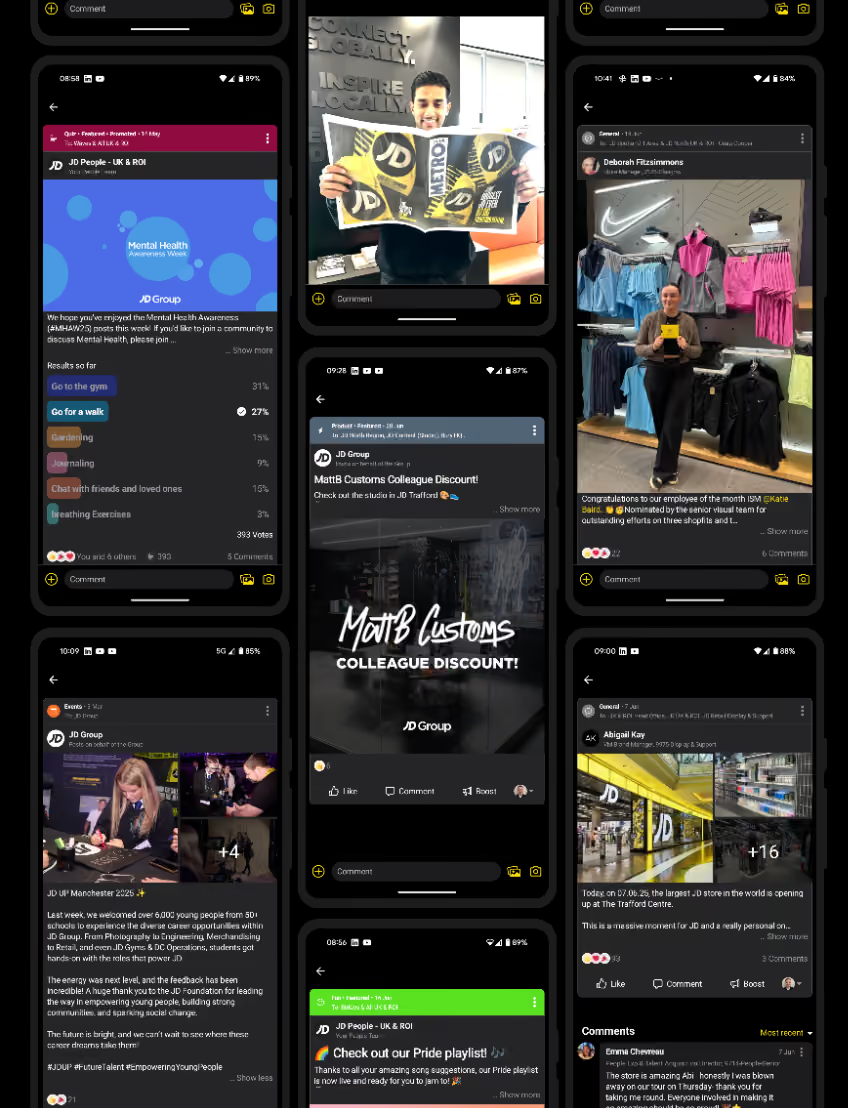
JD Now, powered by Blink, will connect and engage circa 90,000 global workers across JD Group
JD, a leading global omnichannel retailer of sports fashion brands, has partnered with employee experience platform to unveil “JD Now,” a revolutionary employee super-app designed to transform communication and operational efficiency for its entire workforce. The platform is rolling out to circa 90,000 employees across JD Group’s global brands, including JD Sports, Go Outdoors, and Finish Line, marking a significant step forward in the company’s commitment to digital innovation and employee experience.
In the first 10 days following the pilot launch of JD Now, JD saw an incredible 74% adoption rate across the 20,000 initial users, as well as tens of thousands of direct and group messages — showcasing a near-immediate improvement to connection and communication.
Bridging the digital divide
The global retailer launched the platform after identifying opportunities to improve its internal communications and employee engagement. With a rapidly growing workforce, the company recognized that traditional communication methods — including shop-floor huddles, paper magazines, and physical notice boards — were no longer sufficient to maintain the level of connection and operational efficiency required for a business of its scale.
In response to feedback from employees who wanted a higher level of connection across the business, JD Group sought out a cutting-edge solution to unify and streamline its communication channels. Blink was selected for its expertise in frontline employee engagement and its ability to provide a mobile-first, user-friendly platform that could meet the diverse needs of JD’s expansive workforce.
“At JD, we know our people are our greatest asset and we are committed to investing in the tools to ensure they excel,” said Nicola Kowalczuk, chief people officer at JD Group. “The launch of JD Now in partnership with Blink marks an important step forward in enhancing our employees’ work experience and leading the way in retail digital transformation. This platform is not just about communication — it’s about equipping our teams with the resources they need to thrive in a fast-paced retail environment.”
JD Now: Key features and benefits
Unified communication platform: JD Now is an easily accessible platform, simplifying communication and reducing reliance on traditional, inefficient methods.
Enhanced employee engagement: By fostering better interaction between employees and leadership, JD Now is designed to boost morale and reduce attrition, creating a collaborative and engaging team environment.
Employee-generated content: The platform makes it easy for employees to contribute ideas and feedback, encouraging them to be active participants in the brand’s evolution.
Advanced digital transformation: JD Now reflects JD’s dedication to modernizing retail operations and providing employees with the tools needed to excel in a digital age.
Blink, known for its mission to connect frontline teams with the tools they need to thrive, is empowering hundreds of thousands of frontline workers globally with an engaging employee super-app that facilitates an average of seven interactions per day per user and helps to reduce attrition rates by up to 25%.
“Collaborating with JD Group to launch JD Now is a major milestone for Blink,” said Sean Nolan, CEO and co-founder of Blink. “Our mission has always been to bridge the gap between leaders and frontline workers, and JD Now is a testament to our shared vision of transforming employee experience and communication in the retail sector.”
JD Now, powered by Blink, will connect and engage circa 90,000 global workers across JD Group
JD, a leading global omnichannel retailer of sports fashion brands, has partnered with employee experience platform to unveil “JD Now,” a revolutionary employee super-app designed to transform communication and operational efficiency for its entire workforce. The platform is rolling out to circa 90,000 employees across JD Group’s global brands, including JD Sports, Go Outdoors, and Finish Line, marking a significant step forward in the company’s commitment to digital innovation and employee experience.
In the first 10 days following the pilot launch of JD Now, JD saw an incredible 74% adoption rate across the 20,000 initial users, as well as tens of thousands of direct and group messages — showcasing a near-immediate improvement to connection and communication.
Bridging the digital divide
The global retailer launched the platform after identifying opportunities to improve its internal communications and employee engagement. With a rapidly growing workforce, the company recognized that traditional communication methods — including shop-floor huddles, paper magazines, and physical notice boards — were no longer sufficient to maintain the level of connection and operational efficiency required for a business of its scale.
In response to feedback from employees who wanted a higher level of connection across the business, JD Group sought out a cutting-edge solution to unify and streamline its communication channels. Blink was selected for its expertise in frontline employee engagement and its ability to provide a mobile-first, user-friendly platform that could meet the diverse needs of JD’s expansive workforce.
“At JD, we know our people are our greatest asset and we are committed to investing in the tools to ensure they excel,” said Nicola Kowalczuk, chief people officer at JD Group. “The launch of JD Now in partnership with Blink marks an important step forward in enhancing our employees’ work experience and leading the way in retail digital transformation. This platform is not just about communication — it’s about equipping our teams with the resources they need to thrive in a fast-paced retail environment.”
JD Now: Key features and benefits
Unified communication platform: JD Now is an easily accessible platform, simplifying communication and reducing reliance on traditional, inefficient methods.
Enhanced employee engagement: By fostering better interaction between employees and leadership, JD Now is designed to boost morale and reduce attrition, creating a collaborative and engaging team environment.
Employee-generated content: The platform makes it easy for employees to contribute ideas and feedback, encouraging them to be active participants in the brand’s evolution.
Advanced digital transformation: JD Now reflects JD’s dedication to modernizing retail operations and providing employees with the tools needed to excel in a digital age.
Blink, known for its mission to connect frontline teams with the tools they need to thrive, is empowering hundreds of thousands of frontline workers globally with an engaging employee super-app that facilitates an average of seven interactions per day per user and helps to reduce attrition rates by up to 25%.
“Collaborating with JD Group to launch JD Now is a major milestone for Blink,” said Sean Nolan, CEO and co-founder of Blink. “Our mission has always been to bridge the gap between leaders and frontline workers, and JD Now is a testament to our shared vision of transforming employee experience and communication in the retail sector.”
The desktop intranet platform continues to gather dust.
It fails to fit the needs and expectations of the modern workforce. So people avoid using it.
For many employees, especially frontline workers, a desktop intranet might as well not exist at all. Without easy computer access, they rely on paper memos, word of mouth, and unofficial messaging apps to piece together company updates.
But what if there was a way to connect and engage all employees — a place where everyone could access the information, resources, and digital tools they needed to do their jobs well?
Enter the pocket intranet. An intranet platform that meets your workforce where they already live — on their smartphones.
Why the pocket intranet has become essential (not optional)
So why do your employees hate your old intranet? And how does a pocket intranet better meet their needs?
A mobile-first workforce
Frontline employees see the leaps and bounds being made in digital employee experience. But while desk-based staff get sleek tools and streamlined workflows, frontline teams are left with a patchwork of comms channels that don’t reflect the way they actually work.
In retail, hospitality, healthcare, and logistics, people aren’t glued to a desk. Many don’t even have a corporate email address. These employees are on their feet, serving customers and driving your operations.
A pocket intranet platform meets them where they are. It puts coworker connection, crucial updates, and a searchable knowledge hub into the palm of every frontline staff member.
Instant access > buried links
A pocket intranet doesn’t just benefit your deskless workforce. It removes the friction associated with a traditional intranet. So it improves employee communication, engagement, and efficiency across your whole organization.
Imagine accessing company news, payroll, coworker chat, surveys — any workplace tool — in just a tap or two.
The best employee intranets come with an intuitive dashboard, robust search functions, and secure-but-streamlined access to everything your teams need.
Consumer UX has trained employees to expect better
Employees spend their spare time on apps like TikTok, Instagram, and WhatsApp. Consumer-grade experiences have shown employees what good UX looks like.
So that slow, clunky intranet? It feels like a lumbering dinosaur in comparison to those speedy, streamlined interactions.
Employees want scrollable feeds, social media-style content, micro-learning modules, and engaging, real-time comms. A pocket intranet is an easy way to provide all this and more.
{{mobile-main="/image"}}
What a modern pocket intranet looks like
So you’ve heard why a modern employee intranet platform is necessary. But what are the essential components that will help you make a success of your smartphone hub? Let’s take a look.
A personalized feed
A personalized news feed gives employees easy access to company updates and culture, right from their smartphone screen.
Blink’s news feed feature allows you to target content by location and role, so the feed never gets too noisy. You can populate it with engaging multimedia content, like photos, videos, and GIFs.
You can also allow employees to comment, like, leave emoji reactions, and even (depending on your controls) post their own content — turning your feed into a two-way communication channel.
A mobile-friendly intranet isn’t just about scrolling. It’s about easy access to everything your team needs. Policies, handbooks, SOPs, training materials, and digital forms, all within one organized hub.
Blink’s hub keeps content accessible on the go. Employees can view pay slips, submit vacation requests, complete surveys, and access learning resources — from one dashboard with a single login.
Automated translation ensures hub content is available in each user’s preferred language, while powerful search makes finding the right resources a breeze. No more trawling through an outdated intranet or a well-worn paper manual to dig out essential info.
Embedded messaging + collaboration
When employees can reach for a dedicated messaging app, right within your pocket intranet platform, they find it easier to collaborate, share their ups and downs, and feel like part of the team.
The best intranet platforms feature a messaging tool that offers everything the big-hitters (like WhatsApp) are providing, without the security risks.
Blink’s chat tool features voice notes, chat search, voice and video calling, and the option to add multimedia content — including videos, images, and GIFs — to messages. So employees have an easy and engaging way to stay in touch.
Events
Keeping everyone on the same page when people don’t work in the same location — or even the same shifts — can be a challenge.
An employee intranet should bring everyone together. And the pocket intranet is no different. With Blink’s events feature, you can build buzz around an upcoming event.
Whether it’s training, onboarding, live Q&As, town halls, or in-person sessions, employees can RSVP, add events to their calendar, and view the latest event info — all from their smartphones.
{{mobile-events="/image"}}
Real results from organizations that made the shift
Here are three organizations that switched from ineffective comms channels to a modern mobile-first intranet app.
St.Amant. After a cyberattack, St.Amant — a Manitoba-based non-profit — was forced to reassess its intranet solution. Realising that the intranet was clunky, outdated, and failing to reach frontline teams, they adopted Blink as their all-in-one intranet app. Blink is already more than a tool. It’s a part of daily culture — 86% of the organization’s 2,200+ employees are now active users.
Stagecoach. Before Blink, bus company Stagecoach had internal communications scattered across email, a SharePoint intranet, and bulletin boards. Employee satisfaction rates were low, and operational updates weren’t cutting through. Now, thanks to Blink, 86% of drivers open the app daily, and 100% would recommend it to a coworker.
Domino’s. Manager cascades weren’t working for Domino’s, a global leader in the pizza delivery industry. And the company had no central place for staff to access news, tools, or support. By partnering with Blink, Domino’s has transformed internal comms. Today, 94% of store employees have adopted the app, which provides a frontline-friendly platform for comms and connection.
{{future-of-internal-comms-2025="/callouts"}}
How to build a successful pocket intranet: 4 key tasks
Inspired by the examples above? Let’s get to building your pocket intranet. Once you’ve chosen your intranet partner, here’s how to build momentum and get employees checking in daily.
1. Set mobile-first content standards
Content lands differently when it’s viewed on a small smartphone screen versus a laptop. So guide your creators on what good mobile-first intranet content looks like.
Good intranet app content is:
Short — break down complex ideas into bite-sized posts, because quick, digestible info is easier to read and remember.
Visual — catch attention and convey more with images, videos, infographics, and other engaging visuals.
Interactive — you have all the tools you need to start a two-way conversation (so use them!) — pose questions and ask employees to contribute content.
A good starting point? Mirror the format of social content. And steer clear of overly corporate language, walls of text, and dreaded PDFs.
2. Use audience targeting
Your intranet is only useful if employees see content that matters to them.
A delivery driver doesn’t want news about the next office coffee morning. A retail associate isn’t interested in IT changes for head office. And a nurse on the wards won’t benefit from news about the corporate marketing team.
If employees log in and find content that isn’t relevant to their day-to-day work, they’re less likely to return tomorrow.
So segment your audience by team, location, role, and tenure — then use targeting features to deliver a personalized experience. When employees see only relevant, relatable updates, engagement goes up, and your intranet becomes a tool they actually rely on.
3. Run launch campaigns that feel social
A strong launch sets the tone for your intranet and can make or break early adoption. The goal is to make employees feel excited, curious, and motivated to explore the app from day one.
Start weeks before launch by building anticipation. Share teasers in team meetings, internal emails, and on posters in break-out areas. Give intranet ambassadors early access to the app so they can guide coworkers and spark their interest.
On launch day, go big. Make it feel like a celebration. Support employees to get signed up. Offer tutorials and incentives. Create a stream of engaging, scroll-worthy content to keep employees coming back for more.
4. Focus on measurement
From the very beginning, use intranet analytics to understand how people are using your app.
Track who’s logging in, when they’re most active, and which content is performing best. Are employees watching short videos more than they’re reading documents? Which posts generate comments, reactions, or shares?
Dig down into the data to see how your intranet performs among different segments of your workforce. And look for gaps — teams or locations that aren’t engaging, or managers who may need extra intranet guidance.
By keeping a close eye on the data, you can make informed adjustments to your content, launch strategy, and onboarding. You find it easier to achieve high adoption and engagement rates — now and into the future.
{{mobile-hub="/image"}}
Transform your intranet experience with Blink
Mobile-first, modern intranets are becoming the norm. But not all apps are created equal. Many providers simply shrink a desktop intranet onto a smartphone screen, sacrificing usability, features, or functionality in the process.
Blink takes a different approach. Built from the ground up as a mobile-first intranet, it delivers a seamless, consumer-grade experience across both mobile and desktop.
Employees get real-time messaging, a personalized news feed, a searchable content hub, and deep integrations — all in one intuitive platform, and all from their smartphones.
So, with Blink, your intranet becomes more than a repository of documents (that nobody actually checks). It becomes a hub for connection, collaboration, and engagement — a digital water cooler that employees return to regularly.
Simpplr is often seen as a go-to modern intranet solution — but it's not the only option. As organizations evolve, many are searching for alternatives that offer greater flexibility, better engagement, and a more holistic approach to internal communication.
Whether you're looking to replace your intranet entirely or just upgrade to a more dynamic employee experience platform, there’s a growing ecosystem of tools designed to meet the needs of today’s hybrid, remote, and global workforces. From AI-powered internal communication tools to modern intranet software that integrates seamlessly with your existing tech stack, this guide breaks down the best Simpplr alternatives available in 2025.
We’ve reviewed 15 top platforms, each with their own strengths — from company-wide engagement to streamlined communication — so you can find the workplace communication platform that fits your culture and goals.
If you're looking for a solution that combines the best of modern intranet software with real-time communication, analytics, and usability, start with Blink.
Top 15 Simpplr alternatives in 2025
#1. Blink: The all-in-one employee experience platform
Best for: Organizations seeking high engagement, intuitive UX, and centralized internal communications.
Why it's a top Simpplr alternative: Blink goes beyond basic communication by creating a digital home for your entire workforce. It combines powerful communication features with easy access to tools, making it ideal for improving retention, productivity, and employee connection. It’s known for exceptionally high adoption rates and offers a streamlined experience that works across every team and device—no training required. Unlike Simpplr, Blink focuses on delivering measurable impact across your entire workforce, not just pushing content.
Pros:
Unified comms, surveys, task management, and integrations in one platform
Exceptionally high adoption rates
Easy to deploy and scale
Intuitive, mobile-friendly experience
Cons:
Not positioned as a traditional intranet (which may not suit organizations looking for a classic homepage-style hub)
{{watch-video="/callouts"}}
#2. Staffbase
Staffbase is a communications platform designed for large enterprises with dispersed teams. It offers content publishing, multilingual support, and strong mobile access. However, it focuses primarily on top-down communications.
Pros:
Strong mobile capabilities and multilingual support
Deep editorial publishing features
Cons:
Complexity and pricing can be barriers for mid-size orgs
Limited functionality beyond communications
#3. FirstUp
Firstup uses AI and behavioral data to personalize internal communications at scale. It's well suited for organizations wanting to optimize campaigns and target specific employee segments. However, it can be overpowered for teams that just want streamlined comms.
Pros:
AI-driven content targeting
Campaign-level analytics
Cons:
Learning curve for less technical teams High cost and enterprise-heavy approach may not suit leaner teams
#4. Beekeeper
With its strong mobile foundation, BeeKeeper enables companies to connect field teams, streamline workflows, and ensure compliance across distributed locations. It includes tools for shift scheduling and quick updates. It’s not ideal for strategic comms or company-wide engagement.
Pros:
Lightweight and easy to use
Built-in shift communications and checklist tools
Cons:
Not ideal for HQ communications or knowledge management
Limited brand customizations
#5. Haiilo (formerly Smarp)
Haiilo blends internal communications with employee advocacy tools. It’s helpful for promoting company content externally and keeping teams aligned internally. However, it's not a complete employee experience platform.
Pros:
Strong content sharing and social media integration
Advocacy analytics included
Cons:
Less of a comprehensive platform—missing many intranet or HRIS features
Mobile UX could be improved
#6. Interact
Interact is a structured intranet platform focused on knowledge management and content governance. It’s great for compliance-heavy industries that need tight control over documents and approvals. Real-time engagement features are more limited.
Pros:
Strong content governance and compliance features
Enterprise-grade search
Cons:
Dated UI in some areas
Less suited to real-time communication or engagement use cases
#7. Unily
Unily is a Microsoft-friendly intranet solution with a focus on design flexibility and content targeting. It works well for companies heavily invested in Microsoft 365. However, it can be resource-intensive to launch and maintain.
Pros:
Powerful integration with Microsoft tools
Custom branding and theming
Cons:
Can be resource-intensive to launch
Some users report sluggish performance
#8. Workvivo
Known for its user-friendly design, Workvivo blends social engagement with traditional intranet tools. It’s often chosen by organizations looking to foster transparency and a sense of belonging.
Pros:
Strong social feed and employee recognition tools
Now owned by Zoom, with potential future integrations
Cons:
Limited task management and productivity tools
UX can feel cluttered with too many social features for some users
#9. LumApps
LumApps integrates deeply with Google Workspace and offers tools for onboarding, employee journeys, and targeted communications. It's particularly appealing to companies that rely on G Suite. Admin UX can be complex for smaller teams.
Pros:
Strong G Suite integration
Useful for creating targeted employee journeys
Cons:
Less intuitive UX for non-technical admins
Pricing not transparent
#10. Igloo
Igloo is a modular intranet that helps teams build a centralized knowledge base and communications hub. It offers drag-and-drop widgets and customizable layouts. However, it lacks more modern employee experience capabilities like feedback and real-time messaging.
Pros:
Modular intranet features
Knowledge management tools included
Cons:
Feels more like a traditional intranet than a modern EX platform
UI hasn’t evolved as quickly as competitors
#11. Jive (by Aurea)
Jive offers a feature-rich collaboration and knowledge-sharing platform geared toward larger enterprises. It includes deep analytics and social-style engagement. The product has evolved slowly in recent years.
Pros:
Deep collaboration and social functionality
Rich analytics
Cons:
Outdated UI
Acquisition history has slowed innovation
#12. Axero
Axero is a cost-effective intranet platform aimed at mid-sized organizations. It includes core features like document sharing, discussions, and directories. However, the interface can feel dated and the app ecosystem is limited.
Pros:
Offers intranet, collaboration, and HR portal tools
Affordable for mid-market orgs
Cons:
Dated visuals
Limited native integrations
#13. Claromentis
Claromentis offers a modular platform that combines intranet features with workflow apps and e-forms. It’s useful for companies that want to digitize internal processes. Setup requires hands-on customization.
Pros:
Modular platform with customizable apps
Document management included
Cons:
Requires time and resources to configure
UX not as modern as others
#14. Oak Engage
Oak Engage offers a user-friendly internal comms platform with fast onboarding and smart content targeting. It’s ideal for companies looking to modernize without overhauling everything. However, it lacks the breadth of features found in larger platforms.
Pros:
Friendly UI and fast implementation
Content targeting and engagement tracking
Cons:
Smaller partner and integration ecosystem
Not as well known globally
#15. Zoho Connect
Zoho Connect is part of the larger Zoho suite and offers basic internal communication features. It’s best for small businesses already using other Zoho apps. Larger companies may outgrow it quickly.
Pros:
Easy setup and low cost
Works seamlessly with other Zoho apps
Cons:
Limited customization
Less suitable for larger or global organizations
Final thoughts
If Simpplr isn’t meeting your expectations — whether due to limited engagement, lack of flexibility, or just the need for more intuitive tools — there are plenty of powerful alternatives available. Among them, Blink stands out for its modern UX, holistic capabilities, and consistent employee adoption. While many platforms focus on features, Blink focuses on real impact.
Hello! I’m Jess, UK born and (half) bred. I say half because I spent the majority of my childhood in South Africa and Poland - two very different places to live!
I moved back to England to finish school at 15 and then went on to study for a degree in Psychology and a Master’s in Business Management.
Whilst I’ve had part-time and summer jobs in the past, this is my first ever proper job straight out of uni so I am still learning the ropes!
Here at Blink, I am a Talent Sourcer which means I actively seek out awesome employees to join our awesome team.
My main purpose is to scope out the market, find prospective candidates (only the best-of-the-best of course!), reach out to them, tell them all about Blink and convince them why they should come and work for us.
Of course, with any start-up role, there’s a lot more to it than that but that’s my main responsibility in a nutshell.
My absolute FAVOURITE part about Blink is the culture. We value our culture tremendously and it’s something we are all very conscious of maintaining as we grow the team.
Every person at Blink is super approachable, curious, hardworking and collaborative.
We’re a solid team so we trust each other to get our jobs done and we want everyone to collectively succeed. It’s awesome.
In 2020, digital transformation in the manufacturing industry was valued at $263.9 billion USD. This figure is anticipated to reach $767.8 billion USD by 2026. As business leaders in manufacturing, you probably already know all about how DX on your production line can improve your machinery, drive your production rates and refine your overall output.
But what about your day-to-day, run-the-biz systems? How can digital transformation in manufacturing also benefit your wider company operations and employee performance? How can you utilize DX in manufacturing to craft a more meaningful and engaging employee experience, and what other bonuses may you discover along the way?
At Blink, we know a thing or two about transforming the employee experience through the right digital tools and technologies. So with this guide, we are providing you with a comprehensive introduction to the key benefits of digital transformation in manufacturing and why it's essential for your organization right now, with a core focus on the digital employee experience and how you can transform it in your business.
What is digital transformation (DX) in manufacturing?
Digital transformation (DX) in manufacturing is the process of implementing new digital technologies to improve and refine processes in a manufacturing organization. This typically involves a range of procedures, from improving communication and collaboration to adopting new manufacturing methods, or automating tasks.
A digital transformation strategy works to improve the overall efficiency, productivity and profitability of a manufacturing organization by integrating new digital technologies – such as employee engagement tools, Industry 4.0, big data analytics, cloud computing, Internet of Things (IoT), artificial intelligence (AI) and augmented reality (AR) – into company processes.
And while we all know that production machinery and tech makes up a huge part of your company processes, it’s important to see the wider picture, too. DX can actually have a significant impact on the behind the scenes operations of your business, including how you communicate and engage with employees, distribute knowledge and connect teams, recruit new talent, and even support the wider community.
By undergoing DX in all areas of your business and integrating stronger digital employee experience strategies for your workforce, you can in fact unlock a range of surprising benefits for your organization.
Main goals of manufacturing digital transformation
"It's not possible to pick just a short list of technologies and declare them to be the next big thing. Any innovation project is always a combination of different technologies and thoroughly designed processes aiming to achieve business goals."
Max Ivannikov
But what are some of the main goals that manufacturers are focusing on for their digital transformation initiatives? As this industry whitepaper discusses, the main goals of manufacturing digital transformation can be segregated into four broader areas:
Cost reduction: Leveraging digital technologies to reduce costs in areas such as supply chain management, employee performance, production planning and inventory control.
Competitive advantage: Utilizing digital technologies to gain a competitive edge in the market, such as through improved customer/employee experience, product customization and data-driven decision making.
Agility: Increasing flexibility and adaptability in the face of changing market demands, such as through improved supply chain visibility, predictive maintenance and agile business processes.
New business models: This could include refreshing manufacturing processes, investing in digital technology to improve processes company-wide, and otherwise finding new revenue streams through digital transformation initiatives.
Common roadblocks to DX in manufacturing
Some common challenges organizations see when undertaking DX in manufacturing include:
Competitive market: In a highly competitive market, your current digital capabilities and processes may not be enough to stay ahead. And with the swift upturn in DX investments in the market, it can be difficult to keep up with competitors who are already rapidly integrating new digital technologies. While you might feel on the back foot, it's important to remember that digital transformation is a long-term investment, and there are always opportunities for growth and sustainable improvement.
Distributed workforce: It can be difficult to know where to begin with digital transformation, especially for manufacturers who have a distributed workforce and may not have a clear understanding of the specific needs and pain points of their frontline employees. This can make implementing new processes, rolling out communications and combating employee attrition particularly challenging. We'll dive deeper into how to enable DX by empowering your frontline workers later in this post.
Costs and fees: Adopting new digital technologies and processes can be a costly investment, and there may also be additional fees for training and implementing these changes company-wide. It's important to conduct thorough ROI analysis and carefully weigh the potential long-term benefits against the initial costs.
Resistance to change: Change can be difficult, especially for employees who have been working in a certain way for many years. This is why it's important to have clear communication and a strong employee engagement system in place to help employees transition and adapt to the new digital technologies and processes.
Enabling DX by empowering the frontline
As we mentioned, a distributed workforce and lack of visibility into the specific pain points and needs on the frontline can make DX a challenge for manufacturing organizations. But by focusing on empowering your frontline workers, you can not only improve their experience and enable better communication, but also gather valuable insights to inform your digital transformation efforts.
One way to do this is through a mobile-first approach, providing frontline employees with devices and applications that allow them to easily access the information and communication they need, wherever they are on the factory floor. This not only improves productivity, but also allows for better data collection and analysis to inform DX initiatives.
Another key aspect is giving your frontline employees a voice in the digital transformation process, through tactics like regular check-ins and surveys, as well as dedicated onboarding and training programs. By actively seeking their input and understanding their specific needs, they will feel more engaged and empowered in the DX journey.
Frontline specific tech like Blink's employee app allows for better communication, feedback and overall engagement with your frontline workers. This helps to address common DX challenges such as unclear frontline needs and resistance to change, while also improving productivity and efficiency on the manufacturing floor.
With real-time employee engagement analytics, manufacturers can also track the impact, employee satisfaction and ROI of their digital transformation initiatives, supporting cost reduction efforts and decision making.
One great example to illustrate this is our work with JFE. When Canadian manufacturing company JFE approached us, their frontline workforce was disconnected due to outdated technology and communications, and they were facing large shortages in the labor market.
We overhauled their current technology and communications processes with a real-time communication solution by offering channels to funnel information, the ability to communicate with their operating teams through chats and a central hub to give employees access to company information in one place.
As a result, JFE was able to improve their recruitment processes, employee engagement, satisfaction and, crucially, its workers’ safety. With our help, they took the company from 300 to over 450 employees, and were able to promote initiatives in both recruiting and retaining staff to make them a more attractive employer to staff and new recruits.
https://www.youtube.com/embed/z0kAQOx9Ik8"
Interested in seeing how Blink's employee app can support your manufacturing digital transformation efforts? Schedule a free demo today.
6 unforeseen benefits of DX in manufacturing
So, you already know the production benefits of implementing DX in your business, but what about the benefits of DX solutions for the back of house? Here are 6 key benefits of DX in manufacturing that you just might have overlooked in the past.
1. Reduce staff turnover & recruit the right talent
More than 90% of manufacturing leaders believe that DX is important for their success, IDC states. They go on to predict that global DX spend among companies in discrete or process manufacturing industries will total more than $816 billion in 2025.
Hiring and retaining the right people in a competitive market can be a challenge for manufacturers, but DX can help. And with the IDC statistics above, it's more important than ever for manufacturers to keep up with digital transformation efforts in order to stay competitive in the recruitment market and attract top talent.
Adopting new technologies can make a company more attractive to potential employees and improve employee satisfaction and retention. It allows you to modernize, stay competitive and attract the right employees even when competitors are vying for the same pool of skilled workers with high DX spend.
In addition, frontline-specific tech can boost your employer value proposition as a manufacturer. You listen to how the frontline thinks and feels, allowing you to build trust with the entire workforce and reduce churn.
2. Improve worker health & safety
According to the Workplace Safety Index 2020, workplace injuries are a key driver of loss for U.S. businesses, costing more than $1 billion per week and $59 billion annually.
As we mentioned before, the rise of Industry 4.0 in the manufacturing industry has seen various manufacturers investing in new digital technologies to automate, modernize and enhance the entire process.
And with losses like these reported in the WSI, the key aspect of this modernization in the manufacturing industry is safety. By improving traditional manufacturing processes, boosting direct communication and implementing predictive maintenance, manufacturers can improve worker health and safety at the workplace.
With a frontline app like Blink, manufacturers can also gather direct employee feedback on safety concerns and act on them quickly, as well as offer training materials, policies, procedures and updates to ensure a safe work environment.
Additionally, with research showing that engaged workers are more aware of their surroundings and best practices around safety and are more likely to take steps to protect their co-workers, by investing in and driving employee engagement throughout your company, you can improve worker health and safety as a whole.
By promoting a culture where employees feel comfortable to speak up about concerns or risks, actively participate in risk management and adhere to policies and procedures, manufacturers can see a decrease in injury rates and overall improvement in the health and safety of their workforce.
3. Increase your bottom line
The latest data suggests that digital transformation investment for manufacturing companies increases business value. Gartner reports that 36% of manufacturing enterprises realize above-average business value from IT spending in digitalization at a reasonable cost when compared with peers.
Opportunities for driving profit and increasing your bottom line don’t only come from your production line. Keeping the wider picture of DX in mind, you can utilize digital tools to drive business value through improving your run-the-business functions (like finance or human resources)
DX in an organization’s HR function, in particular, have shown increased employee engagement and statistics show that highly engaged organizations benefit from:
18% higher sales
23% difference in profitability
43% difference in turnover.
With employee engagement tools that provide streamlined workflows, real-time frontline communication and intelligence, seamless scheduling and product updates in addition to new production tech like IoT and augmented reality, manufacturers can cut down on extra expenses and improve the overall efficiency of all their operations.
This ultimately drives up profits and revenue and increases business value, with your teams performing at their best by using the latest and greatest technology solutions.
4. Boost Employee Engagement
The digital transformation process can also boost employee engagement. Adopting new, modern technologies can make employees feel more valued and appreciated, improving job satisfaction and retention rates.
Currently, Gallup data notes that industrial manufacturers haven't quite caught up to other industries in terms of adopting digital tools to improve employee engagement, with only 25% of manufacturing employees stating they felt engaged at work.
DX offers new ways for frontline employees to communicate with each other and leadership, improving transparency and overall communication in the workplace – a key component of employee engagement.
With frontline-specific tech designed to engage employees like manufacturers, you can gather key employee feedback and act on it to improve processes and enhance overall employee engagement.
Further, according to the Chron, employee satisfaction is a reliable predictor of employee retention, meaning you can reduce churn and cut recruitment costs at the same time by improving the engagement your employees have with their digital tools.
Simplified, improved communications and streamlined, intuitive workflows means DX can enhance employee satisfaction levels for frontline workers, in turn, boosting their levels of engagement with their new tech and your employee retention rates.
And with the distinct improvement in profitability, sales and turnover that engaged teams provide as we highlighted above, it’s clear that investing in employee engagement initiatives is worth it from an ROI perspective.
5. Improve employee productivity
It’s obvious how traditional digital transformation solutions help improve quality on the production line. But did you know that implementing DX to improve your employees’ engagement can also lead to huge productivity boosts?
In the manufacturing sector, DX is not only about staying competitive or cutting costs – it's also about supporting your current employees; finding innovative ways to drive their motivation and productivity for a better overall business performance.
TechNative tells us that businesses must embrace innovative digital tools to make the employee experience seamless and personalized, creating a stronger emotional connection to the day-to-day experience of work.
Adopting new digital solutions, like frontline intelligence, predictive analytics and real-time communication solutions, allows you to foster connection with your frontline employees and act on their feedback to streamline day-to-day tasks. As such, your employees will feel better supported to be productive and efficient in their roles, and can produce their best work.
These employee technologies also offer product updates that keep everyone aligned with company goals, as well as streamlined workflows and schedules, reducing miscommunications and errors and allowing for maximum productivity.
So, not only does investing in digital transformation for your frontline workforce improve their overall job satisfaction, it also leads to a significant increase in motivation, productivity and output. It’s a win-win!
6. Build a positive brand reputation
In today’s day and age, it’s no secret that a company’s reputation is everything. In fact, the World Economic Forum has stated that a company's reputation can account for a quarter of its market value. Additionally, 87% of executives believe that reputational risks are more pressing than any other strategic risks.
As the digital transformation movement continues to evolve, your reputation as a manufacturing leader hinges on how well you adopt and use technology for success. Investing in new digital solutions for your frontline workforce is not only beneficial for your employees and your bottom line, but also for building a positive brand reputation.
By boosting employee engagement, satisfaction and productivity with technology, you’re not only improving the experience for those within your company, but also for your potential new hires and even your customers. With employees better equipped to provide top-notch service and meet customer demands efficiently, you can create a more positive customer experience and, ultimately, attract new business.
On top of that, adopting digital solutions for your frontline workforce also demonstrates your commitment to innovation and staying ahead of the competition in the manufacturing industry. It shows potential employees, investors, partners and customers that you’re dedicated to improving processes and creating a successful future for your company.
"Business leaders must move away from industry stereotypes, understand technologies, and help firms ride this wave with a competitive advantage by developing a successful transformation roadmap."
A DX roadmap, or digital transformation roadmap, is a plan that outlines the specific steps and timeframes for the adoption of new technologies to achieve your DX goals. This roadmap may be long and contain a number of different steps, but this allows you to stagger your digital transformation initiatives over time, prioritizing the areas that align with your current goals and business requirements.
To create your DX roadmap, you first need to understand the current state of your business. Your KPIs from above will come in handy here. Without knowing your starting point, it is impossible to map out a clear path to your goals. Therefore, knowing where you currently are is essential.
Your DX roadmap should outline key objectives, success metrics, technology investments, roles and responsibilities, and timelines. Begin implementing new technologies, methods, and processes one step at a time, starting with those that will have the biggest impact on your desired goals. And don’t forget to measure and evaluate your progress regularly to ensure you stay on track.
Remember the bigger picture
Remember, digital transformation is a long-term investment, with long-term value. Digital transformation is changing the way people do business.
Great digital leaders sift through the latest technologies to identify which ones will have the biggest impact on their business, and then prioritize those implementations. Keep in mind that digital transformation is not just about adopting new technology, but also about changing processes and culture for maximum efficiency and success.
And even with the relevant new technologies and industry trends to guide your digital transformation, you want to be uniquely positioned from your competitors. So, it's vital that you consider the wider market picture and how your DX transformation fits into it.
Consider your USPs. Can you provide a swift turnaround time based on your unique manufacturing technologies or streamlined business processes? Do you provide a second-to-none customer service journey because your customer-facing employees are always in direct contact with your frontline? You want these to be considered when mapping out your DX journey.
Set, monitor and measure your core transformation goals
To undergo digital transformation in any industry, you need to know your transformation goals. According to Asana, the best way to understand if your digital transformation strategy worked is by monitoring your business success metrics.
For the manufacturing industry, these success metrics might include employee engagement rates, retention of clients or employees, a reduction in accidents and errors, increased efficiency in production, and sustainable business growth.
Make sure to align these goals with your business key performance indicators (KPIs), as this will ensure that the entire company is on the same page about what constitutes success for the digital transformation. Plus, it's important to regularly track and measure your progress towards these goals, adjusting as needed.
To do this, look for DX solutions that allow you to access Frontline Intelligence, providing you with key metrics, analytics and insights into your employee engagement, satisfaction and even retention rates. With handy tools like this included in your DX roadmap, you are set up for success in achieving your core transformation goals.
Communicate well and often
As Mckinsey recommends for those undergoing digital transformation in the manufacturing industry:
“Communicate well and often. Establish an effective engagement plan and regular communication with critical senior stakeholders, site leaders, and a cross-functional core team.”
In short, communication is crucial for the success of your digital transformation. Keep all stakeholders, from top executives to frontline employees, in the loop about your DX roadmap and progress towards goals. This will ensure that everyone knows their role in the transformation and can work together towards success.
And don't forget to communicate with your employees! Driving employee engagement and buy-in for the digital transformation is crucial. They will be the ones driving and implementing these changes, so it's important that they understand the benefits and their role in making them happen.
Effective communication can also help with any potential resistance to change from employees. By keeping them informed and involved with easy-to-use, two-way conversations, you can work towards getting them on board with the transformation.
Accelerate your digital transformation today…
It's clear that leaders in the sector must prioritize DX efforts to ensure they're keeping up with competitors and improving overall satisfaction among their workforce.
From minimizing the time spent switching between apps and logins, to sending real-time communications and vital updates, DX allows manufacturers to improve the employee experience in a modern, digital way, and boost their bottom line in the process.
Designed specifically for industries like the manufacturing industry where workforces don’t have 24/7 access to a computer, or even a company email account, our platform is here to transform how you do business. Our app rethinks outdated frontline tech and offers a modern, digital solution for your frontline employee engagement.
Another week, another Life at Blink! This week we are highlighting Ben Willder, a Senior Sales Development Representative located in our London office. This edition comes just in time to celebrate Ben’s one-year anniversary at Blink. Ben describes Blink as a proactive, collaborative and curious place to work.
Now, let's explore Ben’s path at Blink.
What is your position at Blink?
My focus is working within our Sales team as an Enterprise SDR, identifying some of the more critical employee inclusion and enablement challenges for Blink to solve across the largest organizations.
Another area I’ve started to dig into is our Partnerships team. This is a really fast-evolving function at Blink, and I’ve spent a lot of time building relationships with core partners like Workday in Europe, as well as collaborating closely with some of the leading Meta Consultancies off the back of the news from Workplace. This has been a pretty rewarding passion project and I am excited to have the chance to dive into this more.
What initially attracted you to join Blink?
My previous company also focused on helping frontline employees. I think fundamentally I became aware of the countless challenges facing the frontline worker, and I love how tangible the positive impacts can be.
I want to sell something that I genuinely believe makes a difference. Whilst I know that’s obvious, I do think it’s hugely important, and I love the scope for impact that exists at Blink.
What's a project you are proud of from your time at Blink?
Apart from the incredible work myself and my colleagues have done on reinventing what’s possible with the Lavazza to froth a good coffee, I’m very proud of the Partnerships work we’re doing.
We’ve really encapsulated the people-first approach that’s needed to differentiate ourselves in the market, and it’s set to be incredibly enabling for the company when you think of the scope for support, opportunity and collaboration it provides. More to come here, too!
What's one thing you're excited about for the future of Blink?
In my opinion it would be optimizing our partnerships with venture partners like Workday. There’s so much scope to support these partners with collaboration and co-creation, and I want to leverage this to ensure we maintain our agility in developing the product, extending our reach and getting as many frontline employees digitally enabled as possible.
Can you tell us about a recent initiative or program launched at Blink that you found particularly exciting?
It would have to be our employee intelligence. The scope for businesses to assess business problems at such a granular level through a lens that has never existed (a digitally enabled deskless workforce) is pretty exciting.
As we conclude this edition of Life at Blink, we're inspired by Ben’s dedication to solving critical challenges for enterprise clients and forging impactful partnerships across Europe. Ben's passion for innovation, from redefining coffee experiences to pioneering initiatives like employee intelligence, reflects Blink's commitment to empowering frontline workers. When asked why he works for Blink, he responded with:
“I like selling a product that has a tangible impact that genuinely makes sense to me.”
Here's to celebrating Ben's first year with us and the exciting milestones ahead at Blink!
Join us in shaping the future of technology and impacting lives. Explore career opportunities at Blink today! https://www.joinblink.com/careers
During their first month, employees spend an average of 12.7 hours per week asking coworkers for help. And it doesn’t get much better after the first month. Most workers spend an average of five hours per week waiting to connect with people with the information they need.
If you want to maximize productivity, you need to make information accessible.
That's where knowledge-sharing platforms come in. They facilitate the flow of information and expertise across the board.
What is a knowledge-sharing platform?
A knowledge-sharing platform is a software that enables employees to interact with each other and exchange information. It helps subject matter experts contribute guides, policies, and documents to develop a company's internal knowledge base.
Key features knowledge-sharing tools should have
With many knowledge-sharing tools available, knowing which one to choose depends on your company's goals, budget, size and your workers' specific needs.
Here are four features to look for when choosing a knowledge management system for your organization:
Cross-platform access
Most of your employees use their smartphones even during working hours. Reviews.org shares that Americans spend an average of 2 hours 54 minutes on their phones daily. Even more important is to remember that 80% of the workforce is in frontline roles - in other words, they rarely have access to a desktop computer at all, and are entirely reliant on smartphones.
It's therefore critical that you opt for a knowledge-sharing solution that employees can access from a smartphone, laptop, tablet, or workstation. That'll help your staff perform their tasks efficiently whether they’re in the office or on the move.
Smart search
Panopto shares that 60% of employees find it difficult to get the information they need. To ensure that a knowledge-sharing solution truly solves this, you need a platform that provides intelligent search options.
The platform should enable your employees to organize the shared content by labels and tags, so both your remote and deskless employees can find the relevant information quickly.
Integrations
The right knowledge-sharing tool allows you to deliver access to information without having to uproot your existing systems. Most businesses already have their critical documents housed in multiple areas - a good knowledge management tool will allow you to integrate with those systems to draw those documents through rather than having to move them.
Equally important to consider is how user access is controlled - creating another set of sign-ons for users to have to remember (and invariably, request support and resets for) can potentially be more trouble than it's worth. Explore solutions with Single Sign-On (SSO) capabilities, integrating seamlessly with your existing stack.
Reports and analytics
To know that adoption is going well and that your investment in your new tool was worthwhile, you need ways to measure engagement. That’s even more true if you’ve got deskless and remote workers.
Your knowledge-sharing tool should have reporting features to track how much information is being shared, which content is more popular, and which employees contribute the most. All this data can help you identify knowledge gaps and create strategies to mitigate those gaps.
Best knowledge-sharing platforms
1. Blink
2. Notion
3. Bloomfire
4. Microsoft SharePoint
5. Nuclino
6. Confluence
7. Helpjuice
Here are the six best knowledge-sharing tools to facilitate the flow of information and expertise in your organization:
1. Blink
Blink is an employee experience app that gives frontline and remote workers access to the people, communications, and applications they need to do their job on their personal phone.
You benefit from increased productivity, employee retention, and two-way conversations that bridge the gap between executives, management, and employees.
Blink is ideal for executive teams committed to giving more to their frontline workers. It is flexible, feels like the apps employees use daily, and can be launched in days or weeks.
Key Features:
Powerful Hub dashboard with quick access to policies, rosters, payslips, and apps
Secure group, team, or one-to-one chats for real-time two-way communication
Newsfeed with a personalized stream of bottom-up and top-down multimedia content including news, videos, and pictures
Seamless integration with the apps you already love such as Microsoft 365, Workday, and ADP.
Single Sign On (SSO) — log in to any app without your password
Frontline intelligence — gain powerful insight into what makes your organization tick, from turnover to engagement and sentiment, to stop problems before they start and create a close-knit community.
Micro-apps — get powerful branded apps personalized for your company
Best for:Companies with a large distributed frontline or remote workforce.
Pricing: Starts at $3.40 per person per month (when billed annually).
2. Notion
Notion is a knowledge-sharing platform that combines your internal wiki, projects, and notes in one tool. You can create pages, lists, databases, and tables and interlink them to help your colleagues understand the company-wide web of information.
Many teams and companies globally use Notion to keep their staff informed and collaborate in one place.
Notion creates transparency by centralizing all knowledge and work and making it highly customizable. As a result, it saves time and increases productivity for teams of all sizes.
Key Features:
Content blocks — present information as you want it
Clean, custom, and easy-to-use text editor
Easy linking between documents and pages
Support for multimedia — make your knowledge pages as detailed as possible
Best for:Small technology businesses that manage many documents and projects and want to collaborate easily.
Pricing:Free with limited features. Premium plans start at $8 per user per month (when billed annually).
3. Bloomfire
Bloomfire connects individuals and teams with the information they need to excel at work. It stores relevant information and makes it easily searchable.
This platform powers all departments — from customer support to sales and marketing — with the right information. Your employees can always find the desired information at the right time to make informed decisions that propel them to success.
Bloomfire also uses artificial intelligence (AI) to spark engagement and help your team grow collective intelligence efficiently.
Key Features:
AI-driven search for quick access to information
Flexible user roles and permissions
Custom integrations with open API
Best for:Mid-sized teams, departments, and organizations looking to share knowledge in a meaningful and collaborative way.
Pricing:Premium plans start at $25 per user per month.
4. Microsoft SharePoint
Microsoft SharePoint is a knowledge-sharing platform designed around a traditional intranet structure. It helps teams collaborate effectively by letting them share content, applications, and knowledge.
You can use blocks — including text, videos, forms, and images — to customize page layouts without complex coding. You can also add announcement feeds and news to knowledge pages to ensure they're constantly updated with current information.
Since it’s a Microsoft platform, SharePoint integrates best with other Microsoft tools.
Key Features:
Code-free content customization
News and announcement feeds
Solid integrations with other Microsoft tools
AI-powered content suggestions
Best for:Office-focused companies integrated into the Microsoft ecosystem.
Pricing: Starts at $5 per user per month.
5. Nuclino
Nuclino is a user-friendly, lightweight knowledge management software that empowers teams to collaborate without the chaos of context switching, files and folders, or silos. You can use its simple editor to create rich wiki pages — with text, videos, and images.
You can opt to view data as graphs, lists, or boards to ensure you understand how everything works together. You can also collaborate on every page with team members in real-time, with comments letting you exchange feedback on the spot.
Key Features:
User-friendly interface
Minimal setup time
Real-time content collaboration
Fast and reliable search
Best for:Startups and small teams looking for a lightweight wiki solution.
Pricing:Free with limited features. Premium plans start at $5 per user per month.
6. Confluence
Confluence is a knowledge-sharing solution and intranet owned by Atlassian. The platform lets users create and manage workflows efficiently.
You can use Confluence to capture, organize, and preserve your most valuable assets — project plans, company updates, or other vital information.
The platform’s page tree view and powerful search function make it easy to find the exact file you're looking for.
Key Features
Multiple integrations
Customizable templates for all business needs
Real-time collaborative editing
Real-time notifications and comments
Best for:Mid-size technology companies looking to improve information exchange in functional departments such as project management groups, technical teams, marketing, finance, HR, and legal.
Pricing: Free with limited features. Premium plans start at $5.50 per user per month.
7. Helpjuice
Helpjuice knowledge base software streamlines the process of knowledge sharing for both your team and your customers. The platform is easy to use, with an editor that's straightforward making content creation fast and simple. Their intelligent search feature is designed to allow your customers and team to find the information they need, when they need it.
One notable feature is their decision tree logic which allows you to build step-by-step guides that help direct users to the information or solutions they need, based on their specific circumstances. This can improve the user experience and reduce time spent searching for relevant content.
Helpjuice's platform is also designed to be flexible. You can customize the look of your knowledge base to reflect your brand, making it easy for customers and team members to navigate. The goal is to provide a platform where information is readily accessible, promoting better customer service and efficient internal knowledge sharing.
Key Features:
Intelligent, Google-like instant search
Real-time collaboration features
Easy-to-use editor with multi-language support and decision-tree logic
Fully customizable
Best for: Companies that want an easy-to-use, yet comprehensive knowledge base software solution that’s fully customizable, and capable of fostering effective internal knowledge sharing as well as providing comprehensive external customer support resources.Pricing: Pricing begins at $120 per month, which includes all features and supports up to 4 users.