Those with a significant portion of their workforce on the frontlines — hospitality, retail, and transport — know the unique challenge that comes with ensuring communications reach their employees.
A mobile-focused internal employee communications app is often a great solution to the problem of engaging those employees seamlessly.
But among the many frontline-focused solutions, which one is right for you?
Today we’ll compare Beekeeper vs. Beekeeper to see which one is a fit for your needs.
Beekeeper vs. Blink — quick facts
Both Blink and Beekeeper are employee communication apps highly focused on frontline workers. Their difference lies in their specialities.
Beekeeper specifically targets workers in the hospitality industry. Blink serves a broader range of frontline workers, with an emphasis on transport and healthcare.
In addition, Beekeeper is designed with primarily frontline companies in mind, as they offer a shift scheduling feature as a prominent communication tool within the app.
Those with a mixed workforce of desk-base and mobile employees may find that it “Works best with smartphones; it is not as good on computers.”
How they’re similar
Comparing Beekeeper vs. Blink, there are a few notable similarities:
Mobile content
Both Blink and Beekeeper have optimized their employee experience apps for mobile, with support for both Android and iPhone. Communications and updates are available on a scrolling feed or stream, similar to any other social mobile app.
Frontline focus
Blink and Beekeeper’s software are both mobile-first, designed to provide full functionality and access from just a phone.
Not only are the UI elements in line with consumer mobile apps, but the features included are carefully designed to be more useful to the needs of frontline workers.
Fast implementation
Blink and the Beekeeper app are both designed for ease of use straight out of the box.
Some internal communication platforms require extensive onboarding for employees to understand how to use them. Or they require a lot of IT manpower to make them work for your team. Not so with these apps.
Single Sign-on
Blink and the Beekeeper software both integrate with other existing software through a secure, simple process known as Single Sign-On.
How they’re different
Although both apps aim for the same purpose, their execution differs in several areas.
Social feed
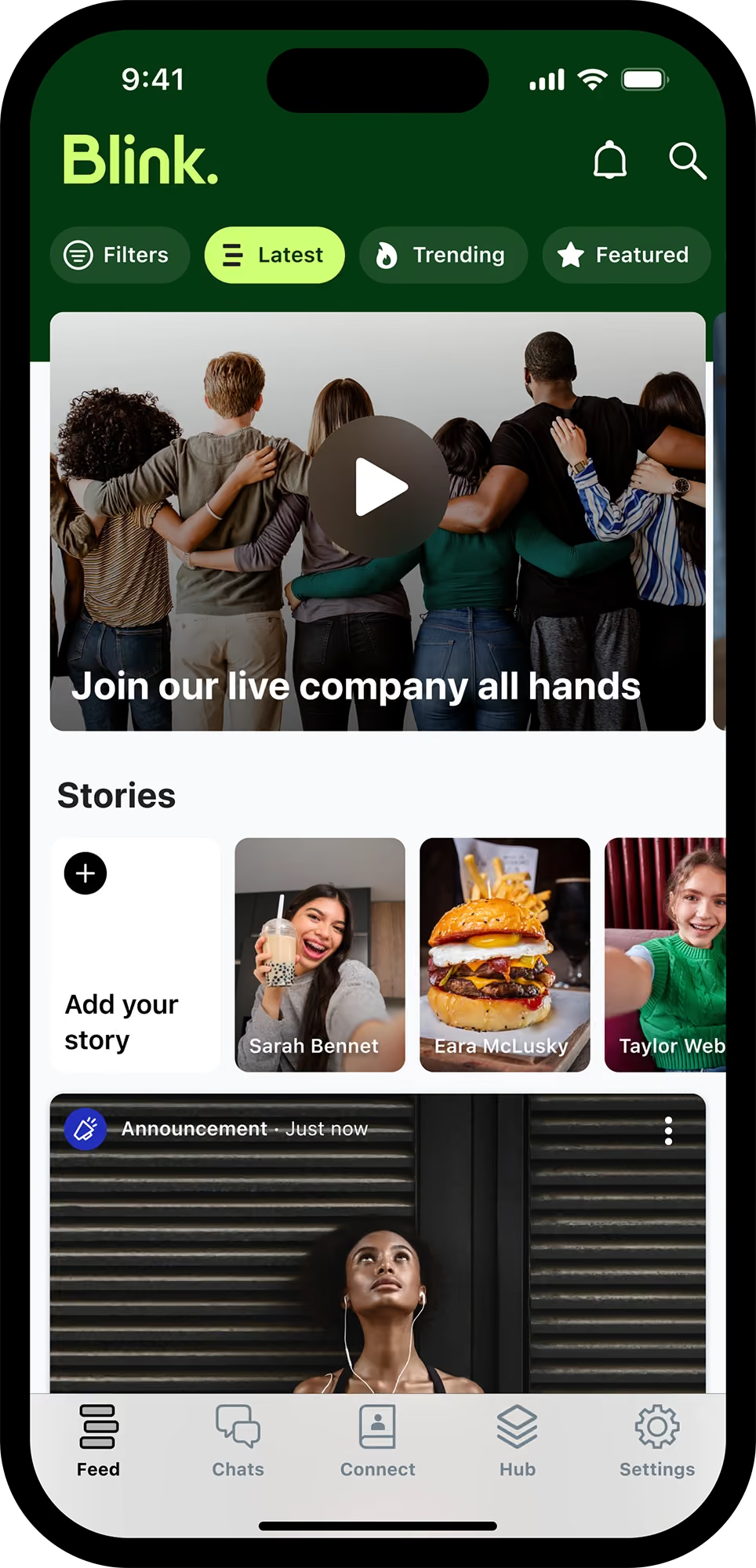
In Blink’s app, the primary source of up-to-date messages, photos, and notifications is called the Feed.
That is a personalized, constantly updated collection of photos, videos, updates, and stories. Users can filter their feeds by teams for an even more specific view.
Beekeeper breaks up their feed into multiple topic-based ‘streams.’ This helps make the information more manageable but adds a layer of effort for the user since there is no aggregated view.
Beekeeper users also say they want to “Improve some functionalities to allow for more personalization, such as more flexibility in choosing streams you want to have or not.”
In comparison, Blink’s feed is more intuitive to use.
CMS
The Blink Hub is an end-to-end content management system that brings the policies, systems, and files your people rely on together on one dashboard.
Employees can find anything they need with the universal search function and save time by previewing the content before opening it.
There is no equivalent to this intranet software feature in Beekeeper, which is one of the reasons why it’s more optimized for entirely mobile teams.
If most of your workforce never needs to upload and manage documents, removing this feature streamlines the employee experience. Users can share basic documents like PDFs, but they are not easily searchable, and the layout options are limited.
Schedules
Beekeeper has a well-built schedule function right in the app. Workers can check when they’re expected and submit time-off requests, and the admins can make sure all the necessary functions are covered.
Blink can serve a similar schedule function, but it requires the use of an additional pre-built app add-on and is not a standard feature.
Automation
While Blink focuses on fostering more authentic real-time connections, Beekeeper is slightly more focused on operational efficiency.
That is evident in Beekeeper’s numerous automated features. It offers onboarding workflows when users first join the app and a chatbot that can answer employees' questions about their benefits and the products.
Organizations can create custom checklists and workflows for frontline employees to use in the app to complete tasks relating to their roles.
Digital signage
Although Blink and Beekeeper are designed to reach employees just about anywhere — only Beekeeper has a feature that can reach employees without phones.
The Beekeeper software allows admins to upload slideshows and push important messages through digital signage in break rooms to reach as many employees as possible. That gives new meaning to the idea of a digital workplace.
Chat function
Blink’s chat is an instant messenger with tons of useful collaboration features.
Users can share documents, save messages, archive chats, search their conversations, and even start a video call from the app. However your team wants to use the app, it can be customized.
In one on one situations, Beekeeper’s chat is also well-rounded. However, its collaboration in group settings does not offer chat deletion, message forwarding, or saving messages.
Beekeeper user reviews say they don’t like that they “Can’t delete old chats or polls.” One advantage over Blink is the in-line translation feature that is especially useful for teams who need to communicate across language barriers.
Integrations
Although both apps offer integrations with other services, Blink integrates directly in the app. Those integrations are brought into the Hub, so the apps are accessible within Blink — without ever having to leave the app or go to the cloud.
Hundreds of apps are available, from Salesforce and Microsoft 365 to niche industry tools.
Beekeeper also offers a wide range of integrations, but they rely on other cloud storage services like Zapier and Google.
That may complicate security assurance for some companies. Users say the Beekeeper is “Focused on communication with a community but more difficult to combine with more functionalities which leads to use of more than one application.”
Both platforms offer custom development integrations with API.
Text formatting tools
Designed to make it as easy as possible to create engaging content intuitively, Blink’s rich feed editor lets you change fonts, headings, add emojis, and embed rich media like video, audio, and images.
Beekeeper offers no dynamic text editing to emphasize or draw attention to new and old posts. Users say, “The desktop version could have some more editing tools for posts (emojis, bold text, picture resize).”
Beekeeper vs. Blink: Systems and pricing
While many employee apps, including Beekeeper, offer varying levels of features, Blink is an all-in-one solution that gives you access to all of its tools right out of the box.
For that reason, Blink sets pricing tiers based on organization size:
Essential: $3.40 per person, per month
Business: Price on application
Enterprise: Price on application
Enterprise Plus: Price on application
Beekeeper bases its pricing model on the features used:
Standard
Professional
Enterprise
Final thoughts: Beekeeper vs. Blink — which should you use in 2023?
If your workforce is primarily on the frontlines, especially in the hospitality industry, and your goal is to make sure they receive vital information and improve your overall operational efficiency, then the Beekeeper app or one like it is probably a good choice for you.
However, if you have a combination of frontline and desk-based workers whose primary goal is to improve employee engagement and efficiency, Blink is the better choice for you.
If you’re still not sure, try out a free demo of Blink to see how our powerful app can transform your organization’s internal communications.
Those with a significant portion of their workforce on the frontlines — hospitality, retail, and transport — know the unique challenge that comes with ensuring communications reach their employees.
A mobile-focused internal employee communications app is often a great solution to the problem of engaging those employees seamlessly.
But among the many frontline-focused solutions, which one is right for you?
Today we’ll compare Beekeeper vs. Beekeeper to see which one is a fit for your needs.
Beekeeper vs. Blink — quick facts
Both Blink and Beekeeper are employee communication apps highly focused on frontline workers. Their difference lies in their specialities.
Beekeeper specifically targets workers in the hospitality industry. Blink serves a broader range of frontline workers, with an emphasis on transport and healthcare.
In addition, Beekeeper is designed with primarily frontline companies in mind, as they offer a shift scheduling feature as a prominent communication tool within the app.
Those with a mixed workforce of desk-base and mobile employees may find that it “Works best with smartphones; it is not as good on computers.”
How they’re similar
Comparing Beekeeper vs. Blink, there are a few notable similarities:
Mobile content
Both Blink and Beekeeper have optimized their employee experience apps for mobile, with support for both Android and iPhone. Communications and updates are available on a scrolling feed or stream, similar to any other social mobile app.
Frontline focus
Blink and Beekeeper’s software are both mobile-first, designed to provide full functionality and access from just a phone.
Not only are the UI elements in line with consumer mobile apps, but the features included are carefully designed to be more useful to the needs of frontline workers.
Fast implementation
Blink and the Beekeeper app are both designed for ease of use straight out of the box.
Some internal communication platforms require extensive onboarding for employees to understand how to use them. Or they require a lot of IT manpower to make them work for your team. Not so with these apps.
Single Sign-on
Blink and the Beekeeper software both integrate with other existing software through a secure, simple process known as Single Sign-On.
How they’re different
Although both apps aim for the same purpose, their execution differs in several areas.
Social feed
In Blink’s app, the primary source of up-to-date messages, photos, and notifications is called the Feed.
That is a personalized, constantly updated collection of photos, videos, updates, and stories. Users can filter their feeds by teams for an even more specific view.
Beekeeper breaks up their feed into multiple topic-based ‘streams.’ This helps make the information more manageable but adds a layer of effort for the user since there is no aggregated view.
Beekeeper users also say they want to “Improve some functionalities to allow for more personalization, such as more flexibility in choosing streams you want to have or not.”
In comparison, Blink’s feed is more intuitive to use.
CMS
The Blink Hub is an end-to-end content management system that brings the policies, systems, and files your people rely on together on one dashboard.
Employees can find anything they need with the universal search function and save time by previewing the content before opening it.
There is no equivalent to this intranet software feature in Beekeeper, which is one of the reasons why it’s more optimized for entirely mobile teams.
If most of your workforce never needs to upload and manage documents, removing this feature streamlines the employee experience. Users can share basic documents like PDFs, but they are not easily searchable, and the layout options are limited.
Schedules
Beekeeper has a well-built schedule function right in the app. Workers can check when they’re expected and submit time-off requests, and the admins can make sure all the necessary functions are covered.
Blink can serve a similar schedule function, but it requires the use of an additional pre-built app add-on and is not a standard feature.
Automation
While Blink focuses on fostering more authentic real-time connections, Beekeeper is slightly more focused on operational efficiency.
That is evident in Beekeeper’s numerous automated features. It offers onboarding workflows when users first join the app and a chatbot that can answer employees' questions about their benefits and the products.
Organizations can create custom checklists and workflows for frontline employees to use in the app to complete tasks relating to their roles.
Digital signage
Although Blink and Beekeeper are designed to reach employees just about anywhere — only Beekeeper has a feature that can reach employees without phones.
The Beekeeper software allows admins to upload slideshows and push important messages through digital signage in break rooms to reach as many employees as possible. That gives new meaning to the idea of a digital workplace.
Chat function
Blink’s chat is an instant messenger with tons of useful collaboration features.
Users can share documents, save messages, archive chats, search their conversations, and even start a video call from the app. However your team wants to use the app, it can be customized.
In one on one situations, Beekeeper’s chat is also well-rounded. However, its collaboration in group settings does not offer chat deletion, message forwarding, or saving messages.
Beekeeper user reviews say they don’t like that they “Can’t delete old chats or polls.” One advantage over Blink is the in-line translation feature that is especially useful for teams who need to communicate across language barriers.
Integrations
Although both apps offer integrations with other services, Blink integrates directly in the app. Those integrations are brought into the Hub, so the apps are accessible within Blink — without ever having to leave the app or go to the cloud.
Hundreds of apps are available, from Salesforce and Microsoft 365 to niche industry tools.
Beekeeper also offers a wide range of integrations, but they rely on other cloud storage services like Zapier and Google.
That may complicate security assurance for some companies. Users say the Beekeeper is “Focused on communication with a community but more difficult to combine with more functionalities which leads to use of more than one application.”
Both platforms offer custom development integrations with API.
Text formatting tools
Designed to make it as easy as possible to create engaging content intuitively, Blink’s rich feed editor lets you change fonts, headings, add emojis, and embed rich media like video, audio, and images.
Beekeeper offers no dynamic text editing to emphasize or draw attention to new and old posts. Users say, “The desktop version could have some more editing tools for posts (emojis, bold text, picture resize).”
Beekeeper vs. Blink: Systems and pricing
While many employee apps, including Beekeeper, offer varying levels of features, Blink is an all-in-one solution that gives you access to all of its tools right out of the box.
For that reason, Blink sets pricing tiers based on organization size:
Essential: $3.40 per person, per month
Business: Price on application
Enterprise: Price on application
Enterprise Plus: Price on application
Beekeeper bases its pricing model on the features used:
Standard
Professional
Enterprise
Final thoughts: Beekeeper vs. Blink — which should you use in 2023?
If your workforce is primarily on the frontlines, especially in the hospitality industry, and your goal is to make sure they receive vital information and improve your overall operational efficiency, then the Beekeeper app or one like it is probably a good choice for you.
However, if you have a combination of frontline and desk-based workers whose primary goal is to improve employee engagement and efficiency, Blink is the better choice for you.
If you’re still not sure, try out a free demo of Blink to see how our powerful app can transform your organization’s internal communications.
Another week, another Life at Blink! This week we are highlighting Ben Willder, a Senior Sales Development Representative located in our London office. This edition comes just in time to celebrate Ben’s one-year anniversary at Blink. Ben describes Blink as a proactive, collaborative and curious place to work.
Now, let's explore Ben’s path at Blink.
What is your position at Blink?
My focus is working within our Sales team as an Enterprise SDR, identifying some of the more critical employee inclusion and enablement challenges for Blink to solve across the largest organizations.
Another area I’ve started to dig into is our Partnerships team. This is a really fast-evolving function at Blink, and I’ve spent a lot of time building relationships with core partners like Workday in Europe, as well as collaborating closely with some of the leading Meta Consultancies off the back of the news from Workplace. This has been a pretty rewarding passion project and I am excited to have the chance to dive into this more.
What initially attracted you to join Blink?
My previous company also focused on helping frontline employees. I think fundamentally I became aware of the countless challenges facing the frontline worker, and I love how tangible the positive impacts can be.
I want to sell something that I genuinely believe makes a difference. Whilst I know that’s obvious, I do think it’s hugely important, and I love the scope for impact that exists at Blink.
What's a project you are proud of from your time at Blink?
Apart from the incredible work myself and my colleagues have done on reinventing what’s possible with the Lavazza to froth a good coffee, I’m very proud of the Partnerships work we’re doing.
We’ve really encapsulated the people-first approach that’s needed to differentiate ourselves in the market, and it’s set to be incredibly enabling for the company when you think of the scope for support, opportunity and collaboration it provides. More to come here, too!
What's one thing you're excited about for the future of Blink?
In my opinion it would be optimizing our partnerships with venture partners like Workday. There’s so much scope to support these partners with collaboration and co-creation, and I want to leverage this to ensure we maintain our agility in developing the product, extending our reach and getting as many frontline employees digitally enabled as possible.
Can you tell us about a recent initiative or program launched at Blink that you found particularly exciting?
It would have to be our employee intelligence. The scope for businesses to assess business problems at such a granular level through a lens that has never existed (a digitally enabled deskless workforce) is pretty exciting.
As we conclude this edition of Life at Blink, we're inspired by Ben’s dedication to solving critical challenges for enterprise clients and forging impactful partnerships across Europe. Ben's passion for innovation, from redefining coffee experiences to pioneering initiatives like employee intelligence, reflects Blink's commitment to empowering frontline workers. When asked why he works for Blink, he responded with:
“I like selling a product that has a tangible impact that genuinely makes sense to me.”
Here's to celebrating Ben's first year with us and the exciting milestones ahead at Blink!
Join us in shaping the future of technology and impacting lives. Explore career opportunities at Blink today! https://www.joinblink.com/careers
Frontline employee engagement is no easy task. Your frontline employees work varying shift patterns and spend limited time at head office. They don’t tend to get much downtime during their working hours. And they aren’t always kept in the loop when it comes to company comms.
These obstacles get in the way when you’re trying to connect frontline workers to company culture — and each other. And it’s why standard team-building activities usually fall short.
To make a success of your employee engagement strategy, you have to tailor activities to your deskless workforce. Otherwise, you risk disengagement, plus the productivity and retention issues that go with it.
That’s why we’ve created this list of 18 employee engagement activities. These ideas are suited to busy frontline workers and their schedules. They’re designed to boost engagement and offer meaningful benefits to your employees.
This can lead to lower levels of productivity. It can also cause increased staff turnover rates, which already tend to be pretty high in frontline organizations.
Employee engagement activities, like the ones we’ve included below, help frontline employees feel more connected to their company, role, and co-workers.
And, according to Gallup, improving your employee engagement rates can lead to a range of business benefits. Besides increased productivity and employee retention, these benefits include:
A reduction in safety incidents
A decrease in absenteeism
An increase in customer loyalty
An increase in profitability
Employee engagement is good for employees — and it’s good for business. So let’s take a look at the activities that will help make it happen.
18 employee engagement activities (that work for a frontline workforce)
To engage your frontline workforce, you can incorporate any of the following employee engagement activities into your work days:
1. Engage with employees from day one
2. Celebrate employee milestones and contributions
3. Incentivize goals
4. Create a mentorship program
5. Offer perks that boost employee wellbeing
6. Give regular feedback
7. Encourage group chat
8. Provide shift swap tools
9. Plan a money management month
10. Launch a poll
11. Create online communities
12. Offer professional development opportunities
13. Launch a competition
14. Use video tools
15. Organize a volunteering day
16. Hand the mic to your leaders
17. Run Lunch and Learn sessions
18. Measure employee engagement
Team engagement ideas for frontline workers are different than for other workers. With their variable schedules, you can’t arrange lunch dates or after-work get-togethers.
Here are a few employee engagement initiatives your frontline workers can benefit from.
You can start with employee engagement activities like:
Introducing new co-workers (digitally if it’s not possible to introduce everyone in person)
Supporting new hires to login and familiarize themselves with your engagement tech tools
Sharing a library of online resources that explain the company, their role, and company culture
Assigning them a buddy or mentor
New hires need regular guidance, especially from managers. So don’t assume your workers are done onboarding after a few days or weeks. Instead, design a process that lasts for at least 90 days.
2. Celebrate employee milestones and contributions
Employee recognition improves engagement. Everyone likes to feel appreciated and valued by their employer.
So make recognition a regular feature on your company intranet or newsletter. Celebrate birthdays, volunteer work, and project milestones. Recognize the hard work and successes of employees.
You can also encourage peer-to-peer recognition. 75% of employees say that giving recognition makes them want to stay at their current organization longer.
Get co-workers to nominate each other for awards, then hold an award ceremony. Or simply get them to appreciate each other by sending a message on the company news feed.
3. Incentivize goals
Gamify the work environment by offering rewards in return for meeting goals. When employees perform well and meet targets, give them a gift you know they’ll like. Company rewards can include gift cards, discounts, cash prizes, an extra day of paid vacation, or the option to give a charitable donation.
But don’t dive right in. Before you announce your reward program, it’s a good idea to survey employees. Ask them which rewards they’d prefer so you can be sure that workers will be motivated by the prizes on offer.
4. Create a mentorship program
Do you want your employees to engage with each other, learn valuable skills, and help each other at the same time? Try rolling out a mentorship program.
Assign frontline workers a mentor within your organization. You can pair people from different departments and different levels of the company.
Then, set a regular schedule of mentor meet-ups. Mentors and mentees might like to conduct meetings online to better suit their work schedules.
Also, offer guidance on how constructive meetings should be run. The aim is for mentees to set workplace goals and come up with a plan for achieving them.
5. Offer perks that boost employee wellbeing
A healthy worker is a productive worker. So encourage fun runs, offer free healthy snacks, and provide discount gym memberships.
Also, try to provide flexible scheduling when possible to give employees a better work-life balance. You’ll reduce employee stress and their risk of burnout.
To ensure frontline employees can access wellbeing activities, you can use a wellbeing app. Via this type of tool, you can provide employee engagement activities. Things like mindfulness and meditation sessions, nutrition planning, and health tracking, all via an employee’s mobile device.
6. Give regular feedback
Gallup research shows that 80% of employees who say they’ve received meaningful feedback in the past week are fully engaged in their work.
So schedule activities where employees receive regular feedback from managers. Make it constructive and useful for employees, so it’s not an appointment they dread.
Also, take a few hours each week to run an online open-door session. This is a time when employees can meet with managers digitally to ask questions and express any concerns.
7. Use the company news feed
A user-friendly employee app with a company news feed acts as a virtual water cooler. It’s a place where frontline workers, who may spend little time with co-workers, get to build stronger workplace relationships.
The comms team can support engagement by using the news feed to share a mix of essential and informal posts. They can announce news, celebrate birthdays, and share tips — encouraging workers to comment, like, and post.
Also, consider these engagement-boosting ideas:
A weekly challenge — a photo contest, a trivia quiz, or a step-count competition
Employee spotlight — highlight a different employee each week, describing their achievements, personal stories, and contributions
A survey — whether the topic is something fun or something more serious, surveys are a great way to engage your workforce
Health and wellness tips — share tips and articles related to physical and mental health, all suited to the demands of frontline roles
8. Provide shift swap tools
Frontline employees want greater levels of flexibility. It’s not always easy for frontline organizations to provide this when there are fixed shifts to fill.
But with shift swap tools, you make it easy for workers to achieve a little more work-life balance. They can swap shifts with co-workers without HR or managers having to get involved.
You can provide other self-serve tools, too. For example, via the Blink interface, employees can access their pay stubs, request time off, and view their shift schedules.
Automating HR tasks like this gives more control to your frontline workers and lightens the load for your HR team.
9. Plan a money management month
Money worries can affect an employee’s wellbeing and their engagement with work. And employee engagement activities are most effective when they provide real value for your workers.
So plan a money management month to help employees make informed financial decisions. Use quizzes and polls to engage employees in the conversation. Challenge employees to a low or no spend day. Provide money advice over 1:1 chats or via your company resource center.
This is exactly what they’ve done at supermarket chain, Tesco, where they recognized the strain that the cost of living crisis has put on employees. In response, they introduced a range of new initiatives:
Skills training activities so employees develop store-wide skills and can pick up extra shifts
A Pay Advance scheme that allows workers to access earned pay ahead of payday
Personalized videos explaining to every worker how much their pension will be worth
10. Launch a poll
Polls give employees a chance to share their ideas and opinions. It’s a way to make their voices heard.
You can launch polls online, with the help of a tool like Blink Surveys. This allows you to quickly and easily find out what frontline employees are thinking about your chosen topic.
You might like to ask questions related to internal communications, company change, employee engagement, or simply the layout of the break room. Using this insight, you can make changes that make a real difference to your employees.
Just be sure to keep them updated with poll findings and your plan of action so they know that you’re really listening to what they have to say.
11. Create online communities
It’s easier to build connections with co-workers when you have something in common with one another. Online communities — based around shared interests — make it easy for frontline workers to find like-minded work friends.
So create space on your intranet for these types of communities. Perhaps you have a group that loves to run in their spare time. A gaggle of gamers. Or a bunch of bookworms. An online community helps bring these co-workers together.
12. Offer professional development opportunities
Training is a great way to improve workplace engagement. 71% of frontline workers have a strong desire for more learning opportunities at work. But a third of workers say that employers don’t invest enough in their growth.
Try to make training more accessible to your frontline workforce. Remember that it doesn’t have to take place in a classroom. You can put training resources into the palm of frontline workers’ hands with the help of the right technology.
You can offer micro-learning modules that workers can complete on mobile devices during a break. And provide fun online courses, with competitive and gamified features.
Also, remember that a lot of worker engagement can be tracked back to your managers. So ensure that managers get the employee engagement training they need, too.
13. Launch a competition
Pit teams of employees against each other with a fun company-wide competition. For an engagement boost, link your competition to company goals and values.
For example, if you’re championing employee wellbeing, set workers a steps or fitness challenge.
If you’re focused on employee development, encourage workers to complete training modules by setting them a training challenge.
To highlight your commitment to a chosen charity, set a fundraising contest.
Alternatively, improve engagement on the company app with a quick photo caption competition.
Pick challenges that can be completed remotely, without teams having to meet up in person. Also, plan rewards for the winners and give regular updates via your comms channels to keep competitors engaged.
14. Use video tools
When you can’t meet face to face, video is the next best thing. You can film leadership updates, company events, and new product demos to give employees more insight into the organization and their roles.
Videos are a great option for town hall meetings. Post the video on your employee news feed and employees who can’t attend in person can watch the video back later.
Similarly, get new hires to film a video to introduce themselves and post it to the news feed. Their co-workers can comment on the post to say hello and help their new co-worker feel more at home.
15. Organize a volunteering day
Offering employees opportunities to volunteer is good for their wellbeing and engagement levels. You can make this activity more appealing to frontline workers by giving them paid time off to volunteer and by giving them flexibility over the days they choose.
Salesforce leads the way on this. They give employees seven business days every year to volunteer for one of the non-profit organizations that Salesforce formally supports — or one of their own choosing.
Jamie Olsen, senior director of Citizen Philanthropy at Salesforce says:
“These are the types of programs that people want and that are attracting them to companies right now. They better the community. They improve people’s happiness.”
You can ensure everyone is on the same page by conducting a virtual Q&A session with one of your leadership team.
This type of event gives employees direct access to leadership. It bridges the gap between the frontline and head office. It also helps employees make their voices heard, which makes them feel valued and motivated.
The prospect of a Q&A can be a little daunting for leaders. But remember, a moderator can facilitate the session, reading out pre-submitted questions and managing live questions.
Also bear in mind that there are huge benefits to be gained. These include frontline insights, improved communication, and a stronger workplace culture.
17. Run lunch and learn sessions
When employees have all the information they need to do their jobs well, they feel more engaged. So give employees access to an online library of resources, transferring any old paper documents to a digital format.
With this library, you can then run virtual Lunch and Learn sessions. This is where a group of employees watches or reads a selected resource. Afterwards, they discuss their reflections either over video call or via group messaging.
18. Measure employee engagement
The last on our list of employee engagement activities is one for your people team, not your frontline employees. And it’s a really important part of any employee engagement strategy.
Find out how you’re doing by tracking employee engagement KPIs. Track your employee net promoter score (eNPS), engagement with your intranet platform, or employee survey results.
You can then set goals and — by drilling down into the data provided by your platform analytics — find actionable areas for improvement.
Final thoughts: employee engagement activities and ideas
To make a success of frontline employee engagement, you need to:
Provide employee engagement activities that offer real benefits for frontline employees
Make these activities accessible to the frontline with the help of flexible, digital solutions
You then create a culture that employees can play an active part in, no matter their schedule or location. You also motivate frontline workers to engage with company culture out of choice, making time for it in their busy days.
Incorporating the activities above into your frontline workplace is much easier when you have the right technology. And an employee engagement app comes in very useful. It’s a way to put all content and communication into the palm of every employee.
By creating online spaces where employees can gather, chat, share knowledge, and connect with company culture, you extend employee engagement to your hardest-to-reach employees — those on the frontline.
Let’s create digital experiences your people will actually enjoy
It takes seven clicks to find your schedule. The training video won’t load on mobile. Your last question to HR? Still sitting in an unread inbox. Welcome to your Monday.
Now flip that:
You open one app. Your schedule’s there. So is your manager’s announcement. You give quick feedback on your shift — and get a response before lunch.
That’s the difference good digital design makes.
In 2025, the user experience employees have with workplace tech is the employee experience.
We use communication tools to message teammates, take training, request time off, and recognize each other. When those tools work well, they reduce friction and boost morale. When they don’t, it shows — in employee engagement, retention, and productivity.
Employee experience (EX) design means applying a thoughtful, human-first design approach to every moment that shapes someone’s experience at work — physical, digital, and cultural.
That includes onboarding and learning, the work environment, feedback loops, employee recognition, collaboration tools and technologies, and even how values show up day to day.
Think of it like UX — but for your people.
At each moment in the employee journey, ask:
Who’s the end user here? A new hire? A frontline shift worker? An overwhelmed manager?
Where does this moment fit in the bigger picture? Is it part of onboarding, communication, or recognition?
What are they feeling — and what do they need right now? Confidence? Clarity? Connection?
How can we make this interaction seamless and satisfying? Whether it’s tech, a conversation, or a checklist.
And how will we know it’s working? What data or feedback loops will tell us?
The goal isn’t just to “optimize” moments — it’s to make them feel intuitive, personal, and friction-free.
By carefully crafting experiences, both big and small, you help your people feel valued and give employee satisfaction a boost.
And because tech tools are a huge part of today’s workplace experience, digital employee experience (DEX) design forms a big part of the picture.
{{mobile-onboarding="/image"}}
What good EX feels like: 5 signs you’re doing it right
When we’re talking about tech tools, good EX looks something like this.
Effortless
People find what they need fast. There’s no need to dig through resources or ping the IT team for help. Systems are designed to be intuitive and free from points of friction.
Example:A restaurant worker views their upcoming shift schedule via a dashboard on the employee app. They don’t have to message their line managers or co-workers to get the latest info.
Personal
Content and tools are personalized to each employee. Employees enjoy experiences that are tailored to their roles, locations, and interests.
Example:Your HR department lead sees a dashboard built for their role, with shortcuts to key tools, relevant company news, and the latest workforce insights.
Connected
Everyone feels part of the same conversation and nobody feels left out. All employees have equitable access to company tech tools.
Example:A warehouse employee doesn’t need to use a communal computer in the break room. Thanks to a mobile-first platform, they can access resources and catch up on company news using their smartphone.
Dependable
Resources are always relevant and up-to-date. Messages are consistent. Tech tools have all the functionality employees need.
Example:Employees use a streamlined selection of tech tools — so messages and experiences are consistent across every touchpoint.
Empowering
Employees can take action, voice opinions through easy feedback channels, or get support in just a couple of clicks.
Example:A retail worker submits feedback via their smartphone, then views updates on workplace improvements over on the company news feed.
{{mobile-community="/image"}}
Barriers to good EX — where it breaks down
So now we know what good EX looks like, time to find out why many organizations struggle to turn their EX ambitions into a reality as part of their digital transformation. Here’s a roundup of the usual suspects.
A fragmented tech stack
“Which tool do we use for that, again?”
A cluttered and disconnected tech stack is overwhelming for employees. They spend their time switching between tabs. They struggle to remember which app performs which task. And that’s before we even get started on all those login details.
If your tech tools aren’t working together, smoothly and efficiently, you’re creating a scattered (and suboptimal) experience for employees.
Over-reliance on email or manager cascade
Email isn’t the best communication channel for every employee. Frontline workers, for example, are unlikely to check their inbox during the work day.
Putting managers in charge of relaying key messages is no better. It’s a sure fire route to an overstretched management team — and inconsistent messaging.
These methods of workplace communication don’t fit the world of fast-paced, modern work we now operate in. And they do nothing for EX.
Top-down comms that don’t invite feedback or interaction
If employees can’t respond, react, chat, or ask questions, you’re not communicating — you’re broadcasting. And this kills employee engagement.
The company intranet is still the backbone of digital employee experience in many organizations. But legacy intranets are often clunky and outdated — and a real drain on EX.
Unless your intranet platform meets the needs of a tech-savvy and highly connected workforce, it’s falling short. You need a modern social intranet that provides an engaging, consumer-grade experience for employees.
Frontline employees excluded at key moments
Are your frontline workers always the last to know company news? And the least likely to use workplace tech?
You can’t make big improvements to EX unless you take the whole organization with you. That includes those hard-to-reach employees working on the frontline of your business.
For that, you need mobile-first tools that provide the same features and functionality across both mobile and desktop versions.
{{mobile-stories="/image"}}
Designing digital experiences your workforce will love
Digital employee experience in need of a reboot? Then here are a couple of guiding principles to bear in mind.
Build with empathy
Of course, the best tech tools support operational efficiency and productivity. But to achieve good EX, you need to move beyond business goals to really empathize with your end users.
That starts with an EX audit. Learn how employees are feeling at each digital and in-person interaction and find out how you can make their journey as smooth and stress-free as possible.
To get reliable data, speak to employees — run focus groups, conduct interviews, and embark on listening tours. Seek employee feedback on touchpoints throughout the working day and the employee life cycle.
Design together
When it comes to employee experience management, a cross-functional team works best. To create a joined up employee experience — and an integrated selection of tech tools — you need stakeholders working together.
The C-suite, HR, internal communications, IT, operations, frontline, and office-based employees should all get a say in what the digital employee experience will look like.
Map user journeys
Frontline employees vs. office-based staff. Hourly vs. salaried workers. New hires vs. long-time leaders.
Each employee persona has different needs — and your tools should reflect that. Aim to provide personalized experiences for employees in different roles, departments, and locations.
With an employee experience tool like Blink, you can create personalized user journeys, segmenting your workforce so they get a tailored experience across the whole platform. This can lead to a massive uptick in employee engagement — as well as employee retention.
Prioritize mobile-first design
Don’t shrink a desktop tool to fit a smartphone screen. Instead, opt for software that’s been designed with the mobile experience front of mind.
An employee app like Blink makes it easy for you to reach your workforce — who, let’s be honest, already live on their phones. It’s also an excellent way to reach frontline employees.
By taking your tech tools mobile, you create an equitable experience for all employees, no matter where or how they access your software.
Make feedback loops part of the design, not an afterthought
The best experiences evolve with employees. So treat EX as an ongoing exercise in empathy.
Use data and employee feedback to iterate and improve systems. Continually reassess how employees use your tech tools — and how you can make experiences even better.
To make this process as easy as possible, embed feedback loops into your tech tools. Ask for employee feedback, right within your software. And ensure leaders have access to the data and analytics they need to make meaningful EX improvements.
{{mobile-live-stream-poll="/image"}}
Upgrade EX to get more from your digital tools — and your workforce
The right tech tools don’t just support EX — they help shape it.
They determine whether employees spend their days in a state of friction-free flow. Or whether frustration and stress color the workplace experience.
A modern intranet. An employee app. An internal comms platform. A dedicated employee experience tool. Whichever platforms you’re using, look at them from the employee perspective.
Tailor tools to their needs. Personalize experiences for each employee. Prioritize interaction, feedback, and mobile-first design to elevate and streamline EX.
In doing so, you’ll delight employees, earning their trust and driving engagement, so you get the very best from your workforce.
5 practical ways to prove internal comms ROI (and finally unlock budget)
If you work in internal communications, you’ve probably been asked some version of:
“But what’s the actual impact?”
Whoever’s asking the question — an executive, a stakeholder, a budget approver — isn’t looking for engagement. Or reach. Or clicks.
They want to see tangible impact of internal comms on the business. And that question exposes a gap. Because, as digital communication and collaboration expert Sharon O’Dea put it in our recent webinar:
“It’s not that leaders don’t care about communication. It’s that the value isn’t always framed in terms they prioritize.”
That’s the real problem.
Of course internal communications drive impact across the business — but too often, the function is positioned in a way that feels disconnected from the outcomes leaders actually care about.
In the session, Sharon unpacked how to close that gap, with a practical framework for connecting comms to real business problems, measurable outcomes, and ultimately, investment.
Here are five takeaways you can apply immediately.
{{the-comms-roi-playbook="/callouts"}}
1. Start with the business problem, not the comms ask
What’s leadership actually worried about?
Hint: It likely isn’t comms metrics, channels, or formats.
What keeps leaders up at night are the things that can make or break the success of the business over the long term.
That’s where your case needs to start. If you lead with a solution, you’re asking for budget. But if you lead with a business problem, you’re positioning comms to solve something that already has a cost attached to it.
This is where many business cases fall down early. They jump straight to the tactic — a new platform, a new channel, a new campaign — without anchoring it in a clear, existing problem.
Sharon’s advice was to slow down and do some light-touch discovery first. What’s actually getting in the way today? Where are people struggling to access information, complete tasks, or understand what’s expected of them?
Sometimes the issue isn’t a lack of tools — it’s a mismatch between what exists and how people actually work.
When you start there, your business case becomes much easier to land.
2. Find the friction — that’s where your ROI is hiding
One of the most practical prompts from Sharon points to one of the biggest unlocks:
“Where are poor comms creating measurable drag?”
Because comms teams know that ROI doesn’t live in dashboards. It lives in the day-to-day friction employees deal with.
You see it in:
Managers repeating or clarifying missed updates
Onboarding that takes longer than it should
Change initiatives that stall or never fully land
Safety issues linked to missed or inaccessible information
This is what good communication actually impacts. And more importantly, this is what the business is already paying for. They’re just not calling it “comms.”
One example Sharon shared brought this to life: An employee who said the only time they read company emails was when they were in the bathroom — because that was the only uninterrupted moment in their day.
That’s not an engagement problem. That’s an access problem.
And when you frame it like that, it becomes much easier to connect communication to productivity, efficiency, and performance.
3. Stop reporting activity, start proving impact
“We improved reach by 20%” isn’t a business case.
It’s a metric. It’s useful. But on its own, it doesn’t mean much.
Instead, Sharon encourages internal comms teams to reframe comms metrics in terms of operational outcomes:
We reduced onboarding time by three days
We cut policy clarification tickets by 18%
We improved shift-fill speed
Now you’re speaking the language of the business — and building credibility for the internal comms function along the way.
This doesn’t mean you need perfect, direct ROI for everything. But it does mean connecting your metrics to something tangible.
If reach improves: What did that enable?
If engagement increases: What changed as a result?
If access gets easier: What friction disappears?
The strongest cases don’t just show what happened. They show why it mattered.
4. Build a case that reflects reality, not assumptions
Comms teams are often more plugged into the business than they realize. Or as Sharon puts it, “You probably know where the bodies are buried.”
You know:
Where people are blocked
What leaders actually care about (even if they don’t say it directly)
Where things break down between HQ and the frontline
But that insight, typically gathered through informal or educational conversations across the business, often remains as a qualitative input.
Building a business case is the perfect opportunity to put this invaluable knowledge to work. Use what you already know, and back it up with real examples. Pair data with lived experience. Combine survey results with actual employee stories.
This is what makes a case land. Not a 40-slide deck, not a long list of features, but a clear picture of what’s happening today — and what it’s costing.
And importantly, this is also how you build alignment across stakeholders.
Internal comms initiatives rarely get approved in isolation. Your case needs to resonate with finance, HR, IT, operations — each with their own priorities. The more grounded your case is in real business challenges, the easier it is to bring those groups with you.
5. Treat comms like infrastructure
“These things are treated as one-off programmes… and then you have to fight for them every time.”
Sound familiar?
A new tool gets funded. A project gets approved. And then two years later, you’re back at square one — rebuilding the case from scratch.
Sharon’s reframe: Good comms should be a staple of business hygiene.
When comms is positioned as a project, it’s easy to cut — but when it’s invested in as infrastructure, it becomes essential.
That shift doesn’t just change how you get budget. It changes how the business sees your role. Internal comms is no longer just a support function, but a part of how work actually gets done.
How to make the move from comms team to business translator
This is the shift.
As Sharon put it, we need to connect what we do to “specific and measurable” impact.
That means:
Translating engagement into performance
Translating comms into operational outcomes
Translating investment into dollars saved
Because the value is already there.
And if you don’t make that shift, the business still pays, just quietly — in lost time, slower onboarding, missed information, and duplicated effort.
That’s the cost of doing nothing.
So the goal isn’t to make comms sound more impressive. It’s to make it visible, measurable, and undeniably fundable.
When you do that, you’re not asking for budget. You’re making a case the business can’t ignore.
Nowadays, most organizations understand the importance of employee engagement. In fact, 75% of CHROs say that improving the employee experience and organizational culture is a top focus for 2024.
There’s plenty of research out there, outlining the benefits employee engagement brings to your business. Increased employee productivity and retention, better customer satisfaction rates, improved business profitability — and that’s just the tip of the iceberg.
It’s clear. Businesses that prioritize employee engagement tend to be more successful than those that don’t. But one important question remains.
Whose responsibility is employee engagement? Who within an organization is tasked with devising an employee engagement strategy — and putting it into action?
In this guide, we explain who should take ownership of employee engagement. We also look at the vital role HR teams play in establishing the strategies, tools, and behaviors that support better engagement in the workplace.
Why does employee engagement matter?
Engaged employees are happier. They’re more likely to interact with company communications and contribute to company culture.
Engaged employees are also more productive and more innovative. They come up with bright ideas, feel invested in their work, and are committed to your organization.
Increase productivity and profitability: Engaged workers outperform their less engaged peers. Gallup’s extensive research into employee engagement reveals that engaged organizations are 17% more productive. They also experience a 23% increase in profitability.
Boost levels of innovation and creativity: An engaged workforce goes beyond the bare minimum. They’re more likely to collaborate — and more likely to demonstrate creative thinking — which spells greater business innovation.
Improve customer experience: Engaged employees care about the customer experience and inspire customer loyalty. Whether they’re serving customers, manufacturing products, or working at HQ, your team is dedicated to customer satisfaction.
Minimize staff turnover: Higher employee engagement levels are linked to higher employee satisfaction. This boosts employee retention and minimizes turnover. In fact, organizations with high levels of engagement can reduce staff turnover by up to 51%.
Why avoid disengagement?
So, we’ve looked at how employee engagement benefits your business. But why is disengagement such a problem?
Disengaged employees are less productive and invested in your organization. They experience more stress, anger, and health problems than their more engaged co-workers — and are more likely to take time off sick.
These employees are also less loyal. They’re more likely to look for a job elsewhere, increasing your recruitment costs. Those who stick around can cause other problems for your organization.
According to McKinsey, quiet quitters account for between a fifth and two-fifths of an organization’s workforce. These workers fulfill minimum job requirements — but no more. Some also act to demoralize and disrupt other members of your team.
It’s also worth bearing in mind that frontline employees are generally even less engaged than their desk-based peers. They’re more likely to feel burned out, three times more likely not to recommend their organization as a good place to work, and twice as likely to leave.
Whatever form it takes, disengagement is costly. According to Gallup’s estimate, low engagement costs the global economy $8.9 trillion in GDP. So finding ways to engage the whole workforce — including your remote, office-based, and frontline employees — is crucial.
Who is actually responsible for employee engagement?
IIt’s clear that high levels of employee engagement are good for an organization. But who within your organization makes that happen? Who’s responsible for employee engagement?
The most successful employee engagement strategies involve everyone within an organization. It’s simply not possible for HR to improve employee engagement significantly without company-wide buy-in.
You need all of the following parties on board:
Leadership. Leadership is responsible for championing employee engagement. Their attitudes and behaviors filter down through an organization. So without C-suite support, employee engagement initiatives are unlikely to be effective.
Management. Managers also play a crucial role. Because they have direct contact with employees, they’re well-placed to develop and sustain employee engagement, implementing the agreed engagement strategies.
Employees. Workers also play a role in the success of employee engagement. They can help by supporting their teammates and by taking part in two-way dialogue with managers and leaders, providing constructive feedback.
HR. None of the above would be possible without HR. The people team is responsible for empowering the rest of the organization. They put in place the strategies, processes, tools, and coaching needed to build a more engaging and engaged workplace.
The HR team is uniquely positioned to drive employee engagement. As the custodians of talent, it’s HR's responsibility to manage employee recruitment, onboarding, development, and retention. For each of these key points in the employee life cycle, they can devise and implement strategies that ensure employees feel valued and engaged.
They can also support the wider organization so they understand what good engagement looks like — and the best ways to achieve it.
In a nutshell: HR and employee engagement go hand-in-hand. But they need buy-in from leadership and management if they’re to improve employee engagement and reap the associated benefits.
The role of HR in employee engagement: 6 key responsibilities
As well as coaching leaders, managers, and employees to adopt effective employee engagement behaviors, HR is responsible for engagement in all the following ways.
1. Recruitment and onboarding
HR can support employee engagement from the very first contact a potential employee has with your organization.
By developing your employer brand and by crafting job descriptions that showcase this brand, you showcase company culture and attract candidates to apply.
Once a new hire starts work, you can continue to engage them with tailored onboarding experiences. Support workers to find resources and forge relationships from day one and they’ll feel part of company culture more quickly.
2. Communication
Internal communications are critical to employee engagement. Relevant, personalized, and timely communications keep employees informed and engaged.
HR teams can use communication tools to regularly remind employees of workplace benefits, perks, and development opportunities. They can also encourage leaders and managers to send their own engagement-boosting comms.
Regular, two-way communication is also key to maintaining a positive relationship with employees. HR should make an effort to communicate with employees often, whether it be through secure chat, 1-2-1 meetings, or the company news feed. This helps employees to feel valued and connected to the company, boosting overall performance.
3. Recognition
Employees feel more engaged when they feel valued by their employer. So praise from a manager or co-workers, bonuses, and rewards programs should be a regular feature of the employee experience.
While it’s up to team leaders to show their appreciation, HR plays an important role in making recognition an integral part of company culture.
Your HR team can establish recognition and reward systems. They can determine which rewards are most appealing to your workforce. They can also implement user-friendly employee recognition tools, which make it quick and easy for managers to recognize the hard work and milestones of their employees.
4. Retention
Another key responsibility for HR teams is talent retention. With employee surveys and exit interviews, you keep a finger on the pulse of your organization. You learn how employees are feeling and what could be done to improve employee engagement.
This data can then be used to make changes that will improve employee engagement levels and drive employee retention, minimizing staff turnover and its costly consequences.
Development and progression are also key to retention. HR teams can keep employees engaged by clarifying progression opportunities and career goals.
They can also ensure easy, online access to training and development programs — so all employees, whether they work on the frontline or in the office, can make progress in their careers.
5. Wellbeing and safety
Employees are more likely to enjoy high levels of engagement when they feel physically and psychologically safe at work.
HR can support this aspect of employee engagement by ensuring good communication around safety. It should be easy for employees to report safety concerns and hazards. Workers should have access to a content hub that stores essential company policies and safety procedures.
For psychological safety, HR can take the lead, promoting transparent communication and an inclusive company culture across all employee touchpoints.
6. Tools and tech
The right tools and tech make employee engagement much easier. So another responsibility for HR is the implementation of tools — like employee engagement apps — which have the power to engage the workforce and amplify company culture.
Via an employee app, employees can access an engaging news feed, employee surveys, training and development, and a content hub — everything they need to feel connected to their roles, co-workers, and the wider organization.
It’s important that these tools are available to all employees to ensure engagement initiatives reach every sector of the workforce.
So look for tech tools that are accessible via a mobile device and that don’t require a company email address. That way, frontline employees enjoy the same access as their desk-based peers.
Searching for the ultimate employee engagement tool? Here’s a quick intro to the Blink employee app.
What can HR do to improve employee engagement?
HR teams play a critical role in employee engagement — and there’s lots that HR can do to improve employee engagement within their organization.
HR can support managers in understanding the 'baseline' or BAU (business as usual) engagement levels within an organization.
This means assessing and tracking metrics like turnover, productivity, and performance over time, as well as identifying any trends or patterns that may be affecting overall engagement levels.
With this information, HR can work with managers to identify the most suitable employee engagement activities. These are interventions that will improve engagement levels in both the short and the long term.
Some useful metrics include retention rate, absenteeism rate, and employee net promoter score (eNPS). You can also use employee surveys, exit interviews, and your employee intranet analytics to assess engagement levels within your organization.
Here's how we measure engagement at Blink:
Retention: Disengaged employees are more likely to quit their jobs so employee retention is a good indicator of engagement. You need to understand why and when employees choose to leave your organization.
Manager performance: Strong managerial support is a key driver of employee engagement, so it's important to assess and improve the performance of your managers. We drill down into the data to identify low-engagement teams and then provide those managers with extra coaching.
Intranet engagement: What do your intranet engagement metrics tell you? By tracking how employees interact with our employee app, our HR team can identify disengagement and dissatisfaction.
Know how to manage for engagement
Managers account for at least 70% of the variance in team engagement and have a huge influence on employee wellbeing.
Ideally, mid-level management supports engagement by providing constructive feedback, giving recognition and rewards, and acknowledging individual strengths and contributions.
HR can support employee engagement by supporting managers. With the right employee engagement tools and guidance, managers are empowered to build happy and engaged teams.
Employee engagement training can also help managers better understand the important role they play in engaging the workforce.
Look for early signs of disengagement
Employees who are becoming disengaged may start to pull back from their work. They might make fewer contributions to the team, their output may decrease, and they might be less likely to speak up in 1-2-1s and meetings.
This disengagement isn’t always obvious to busy managers, particularly when they’re responsible for a dispersed frontline team. So HR can support them by using employee intranet analytics to identify employees who aren’t engaging with the platform.
By looking out for early signs of disengagement, HR and managers can take action to re-engage employees before they impact team morale or decide to leave the organization.
Talk about more than tasks during 1-2-1s
HR should encourage managers to focus more on fostering strong relationships during 1-2-1s.
Of course, they need to discuss work-related tasks and employee performance. But this is also an opportunity to learn about employees’ personal interests, goals, and challenges.
By creating a supportive and open environment where employees feel comfortable sharing their thoughts and concerns, HR can build the trust and connection that is critical for strong employee engagement.
In summary
Improve employee engagement at your organization and you stand to improve productivity, profitability, and employee retention.
HR teams are responsible for employee engagement throughout the employee life cycle. They play a critical role in devising and implementing employee engagement strategies.
But they can’t go it alone.
For employee engagement initiatives to be a success, you need company-wide buy-in. Leaders, managers, and employees — guided by HR — need to see the value in engagement and demonstrate a commitment to creating an engaging workplace culture together.
In today’s modern workplace, you also need the right tech tools. These tools make it easy for everyone to incorporate engagement activities into their every day.
Blink’s employee app provides all the tools you need to improve engagement within your organization:
A personalized news feed: A place where you can build a welcoming company culture, encourage everyone to take part in two-way communication, and prioritize the most relevant information for each employee.
Recognition tools: Our Kudos tool makes it easy for managers to recognize employee milestones and achievements. It allows co-workers to share in the celebration, too
Employee surveys and analytics: Gather employee feedback and view app analytics to understand, track, and make data-based improvements to employee engagement
An integrated content and resource hub:Employees can access all tech tools and resources via a single, user-friendly interface. Just one set of login details and no company email address necessary.
Whether you're looking for a new way to measure employee satisfaction or simply want to provide a more engaging employee experience, Blink has the tools to support and facilitate your success.
Book a personalized demo today to find out how Blink can support employee engagement at your organization.
The Capital District Transport Authority (CDTA) runs the public transit system in Albany, New York. They employ around 800 people.
Most of these employees are drivers and maintenance workers and CDTA was having a tough time staying in touch with them. An intranet. Seat drops. Posters. Digital screens. They tried everything. And it just wasn’t working.
For this webinar, our team sat down with CDTA’s Head of Communication, Jaime Kazlo, and Communications Manager, Emily De Vito.
Two years after launching Blink, they talked about how they went from an ineffective internal communication strategy causing a huge digital divide to an employee app that supports digital inclusion.
They had a high proportion of frontline workers who didn’t sit behind a desk and didn’t have company-issued emails or devices. So it wasn’t easy to share company messages with them.
To communicate with office-based employees, the company was relying on an outdated intranet. For frontline employees, the main methods of communication were:
Noticeboards and digital screens
Emergency SMS
Word of mouth
Seat drop, where posters were left on a bus operator’s seat in time for their shift
But these comms were ineffective. As Jaime pointed out, “A lot of the folks that work at CDTA don’t necessarily come into the office every single day. They may get their bus out on the road. And if they do come into the office, they’re coming in and getting their work at the dispatch window and then immediately leaving”.
So employees weren’t reliably seeing posters and digital screens. They weren’t getting an awful lot of co-worker contact. And teams ended up relying on one-on-one communication, which put a lot of pressure on supervisors.
Focus group feedback made it clear to the CDTA leadership that their comms weren’t cutting through. Frontline employees were missing out on important communications. They were missing out on the fun stuff too, like competitions and giveaways.
This was creating a disconnect between employees and the organization. And it was harming the employee experience. So in 2021, CDTA decided to make a change.
They wanted to overhaul the way they did internal communications. And they needed a way to meet frontline employees where they were at.
Their CEO, says Jaime, is a champion of open communication and certainly didn’t want more than half of the organization missing out on comms. So with his support, they set out to find a solution.
"I know we’re not unique. A lot of organizations struggle with internal communication. It’s just whether or not you’re going to take that next step to really get to the employees, listen to their feedback, and give them what they need so they can also feel that they’re an integral part of the organization.” — Jaime Kazlo, Head of Communication, CDTA
Deciding on a solution
CDTA already had a SharePoint intranet, which they’d tried to revamp. This was a tool that they’d been using for several years. But it was old, outdated, and poorly maintained.
While a handful of employees chose to use the intranet, many stayed away. In fact, it had gotten to the point where comms and HR teams wouldn’t even tell staff about the intranet because they didn’t want them using it.
The intranet didn’t provide relevant information and wasn’t a good representation of the company. Crucially, it was hard for frontline employees to access.
Having gone ahead with a new and improved intranet, the team had some last-minute doubts. As the launch approached, they questioned whether they wanted to roll this tool out to the workforce.
Jaime says that, having taken the intranet as far as it could go, they were still wondering if there wasn’t something better. A tool that would improve employee communication for the whole organization.
So they took the bold decision to shelve the intranet. And started talking seriously about other options. Here’s how they decided that a modern intranet, in the form of an employee app, was the frontline-first solution they were looking for:
They got buy-in from the IT team. The IT team was integral to the process. They made sure the chosen solution was secure, sustainable, and wouldn’t compromise the company network.
They got buy-in from the union. The team worked to ensure the union president and employees would get on board with their chosen solution.
They took a cross-functional approach. The comms team collaborated across different departments. They had conversations with everyone who had a big stake in the solution, including HR, IT, and operations. They gathered co-worker questions, found answers, and learned what each department needed from the company comms tool.
They got buy-in from the CEO. Finally, having decided that an employee app was the best solution, they made their case to the CEO, who gave the go-ahead.
“For our workforce — and the way people consume information in this day and age — it seemed archaic to stick with that intranet tool. So we decided to go to something a little bit more user-friendly and something that is pretty much in the palm of everybody’s hand every day.” — Jaime Kazlo, Head of Communication, CDTA
The comms team started by, again, looping in different departments to find out what modern intranet features they needed.
They asked marketing leaders about their branding requirements. They asked HR how they’d like to use employee information within an app. They spoke to maintenance and transportation teams about the needs of their frontline workers.
This part of the process, says Jaime, was easy. Everyone was on board. Because everyone agreed that internal communications at CDTA needed to change. And because everyone wanted largely the same things:
a product that was user-friendly and easy to use
a product that was easy to download
a product that allowed us to communicate daily company news
a product that made it easy for employees to receive emergency messages
Once internal discussions had taken place, it was time to vet solutions and choose the best software for the job.
This part of the process was led by the IT and communications teams. The IT team knew what CDTA was looking for technically — and in terms of app security. The comms team knew what tools they needed to communicate effectively with the organization.
After speaking with several vendors and viewing app demonstrations, they decided on Blink. It was a speedy process. The team started looking for a solution in January 2022 and launched Blink in June of that year.
They were able to turn this process around in just six months, says Jaime, because the team got clear on their priorities first. By getting their ducks in a row — and knowing exactly what they were looking for in an employee app —finding the right app was quick and easy.
Ensuring success
Finding the right employee app is the first part of the battle. The next? Ensuring success — in the form of employee adoption and engagement — once that app goes live.
So how did the CDTA team tackle this particular challenge? In the webinar, Emily explains what the team did before and after the launch of Blink to maximize its success.
Pre-launch
The CDTA comms team started their pre-launch activities with a group of company leaders. They wanted to establish these people as app ambassadors. So they made sure they understood exactly what the app was for, what it could do, and how they should use it to interact with employees.
The comms team — along with the company’s new app ambassadors — started promoting the app to the wider organization about a month before it launched. They sent letters, put up posters, and advertised the app on digital screens.
Emily emphasizes the importance of speaking to people face to face, too. She and her team hosted information sessions. They also visited staff in break-out rooms, at every company location, to promote the app and field employee questions.
“[We were] letting them know — “Hey, this app is for you, it’s so you know what’s going on in our company and so you’re the first to know what’s going on in our company”.
Contests and giveaways also helped to incentivize employees to download and use the app, both pre-launch and for about a month after. For example, the team launched the app on the first day of summer. So they had an ice cream truck come to each division and people who signed up to Blink got a free cone.
Post-launch
Launch done and dusted, the comms team turned their attention to sustaining app engagement levels. And encouraging late app sign-ups, too.
To achieve high levels of engagement, CDTA has focused on:
Being responsive to employee comments and questions
Using pictures and graphics to grab employee attention
Balancing serious content with fun content
Emily says managing the app and its content doesn’t take up her whole day. And you don’t need someone to do it 24/7.
Her role now involves asking team leaders to send her regular content. She launches surveys. And she posts at least a couple of informal, fun posts each month. That might mean highlighting a member of staff who got a promotion. Or — as CDTA did recently — posting pictures from an Exemplary Attendance Luncheon.
Employees like being able to see pictures of themselves or their teammates, says Emily. They like being recognized for their hard work. And they like being able to comment — congratulating others.
While they see better levels of engagement for fun posts, she says employees like to engage with serious content, too.
For example, CDTA recently did a safety post about cell phone usage on the road. Employees appreciated seeing it on the feed. They like being able to comment and contribute their thoughts. And these posts are a great way to get instant feedback on company policy.
Responding to resistance
CDTA doesn’t require employees to download the Blink app. So it’s up to each individual whether they choose to use it.
Emily acknowledges that some resistance is inevitable. Some employees told her that they didn’t want to see work content on their personal phones. Some simply didn’t see how Blink would benefit them.
But, says Emily, many of these employees have changed their perspectives. “Those people have now come back to me a year later, “Can you send me the invite to Blink again, I wanna download it.””
Part of CDTA’s success in getting employees to come around has been illustrating the personal benefit Blink brings to employees.
Comms team members get in the room with other employees to show them — here’s where you get your tax form, here’s where you see your pay stubs, here’s where you book vacation time.
They’ve also been using Blink’s analytics functions to see which content is working best. By seeing when and where employees are interacting, the team can hone content to make it even more relevant and engaging.
A majority of employees, says Emily, have seen the value of being able to do so much from their smartphones. And now — two years after the launch — adoption is at 80%, just shy of the company’s 85% target, which they hope to meet soon.
Q&A
The webinar ended with a Q&A session. Jaime and Emily provided answers to viewer questions. Here’s a summary of what they discussed.
Do you allow employee comments on the app? And, if so, how do you manage them?
Allowing comments, says Emily, is essential for two-way communication. And the comments they get on the CDTA feed are mostly positive and primarily question-based.
Negative comments, when they do occur, are seen as a jumping-off point.
When the conversation feels constructive, leaders and managers can respond in the app. Alternatively, they go into Blink’s chat feature to say they’re happy to discuss an employee issue in person — and then set up a meeting.
While the admin team can delete comments, Emily says they would only do this if a comment contained profanity or something vulgar. And, thankfully, in two years of using the app, this is a problem they’ve yet to encounter.
It helps that openness is part of CDTA culture. And that company leaders understand that it solves more problems than it creates.
“We have a CEO who is very transparent. He wants to know what the workforce is thinking. He wants them to know what he’s thinking[…]If you’re not transparent it brings up more questions and it creates more angst within your company because people are saying “Why aren’t they answering me” “Why are they being secretive?”.” — Emily De Vito, Communications Manager, CDTA
How do you work alongside your union when rolling out an employee app?
CDTA has a unionized workforce. So it was important for them to work in lockstep with the union president during the whole process — from solution scoping to app launch and beyond.
The comms team made a real effort, says Jaime, to explain to the union why they were implementing the app and to help them understand where they were coming from.
There were some employee concerns about how an app might invade their privacy. But we made it clear that the one and only purpose of the app was to make all employees feel included within the organization.
Now that the app is up and running, Emily highlights the importance of the union president having a profile and using the app. And knowing they can get in touch with the communications team when they want to send a union-related message out to the workforce.
How do you enforce a cell phone policy when you have an employee app?
So you’re promoting a cell phone app. But you have a cell phone policy that means employees shouldn’t be looking at their phones during certain workday hours. What do you do?
For Jaime and Emily, it’s all about education and helping employees understand app features, like Blink’s snooze function.
Employees can set a do-not-disturb function to run automatically during particular times. This means they can pause notifications during work or driving hours. They can then pull out their cell phone during a break or when they’re back at home.
How does an employee app work for team members without a smartphone?
There are very few employees at CDTA, says Jaime, who don’t have a smartphone. These tend to be older employees who aren’t necessarily very tech-savvy.
For these employees, the company has computers in break rooms. These computers are equipped with Blink’s desktop version. And they’re a way for employees who don’t have a phone — or who don’t want to download the app — to check in with their account and company news.
Does each employee have a profile? How do you manage those?
Every employee has their own app profile. They can upload a picture to this profile. But employees don’t have admin capabilities and they can’t edit anything else.
When it comes to creating profiles, the CDTA comms team worked with the HR team to import employee data. The app integrates with most HR software, so profiles can be added and removed automatically.
You can set up a profile with very basic information, including name, location, and job title. You also need an email address or a phone number so the employee can receive an invite to download Blink.
But you have the potential to refine these profiles. Emily is currently working with the CDTA on segmenting employees. She’s working out which employees should be grouped together so they can send the most relevant comms to each individual.
So there you have it. A summary of our webinar — and of CDTA’s journey from a clunky old intranet to a modern employee app.