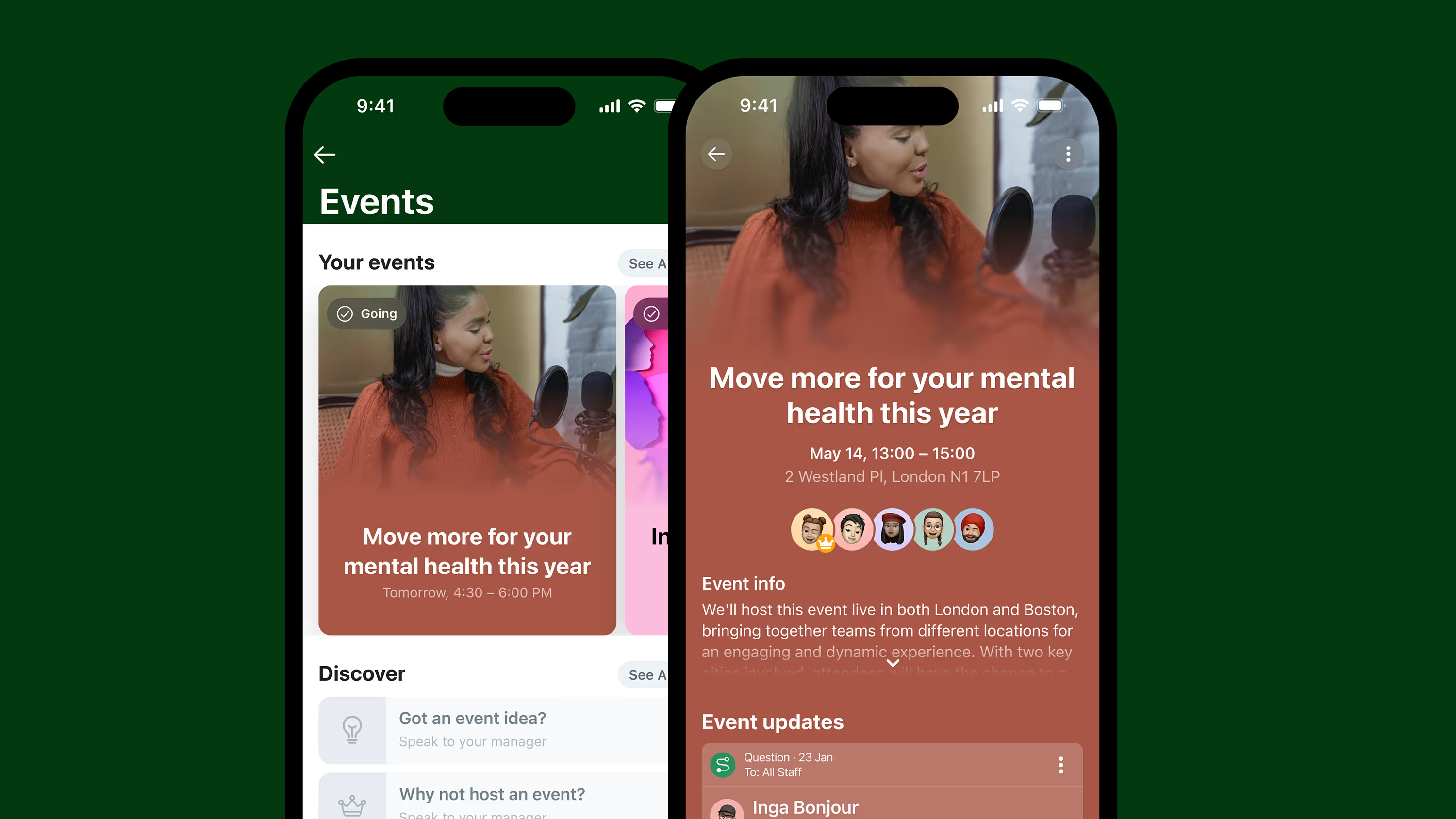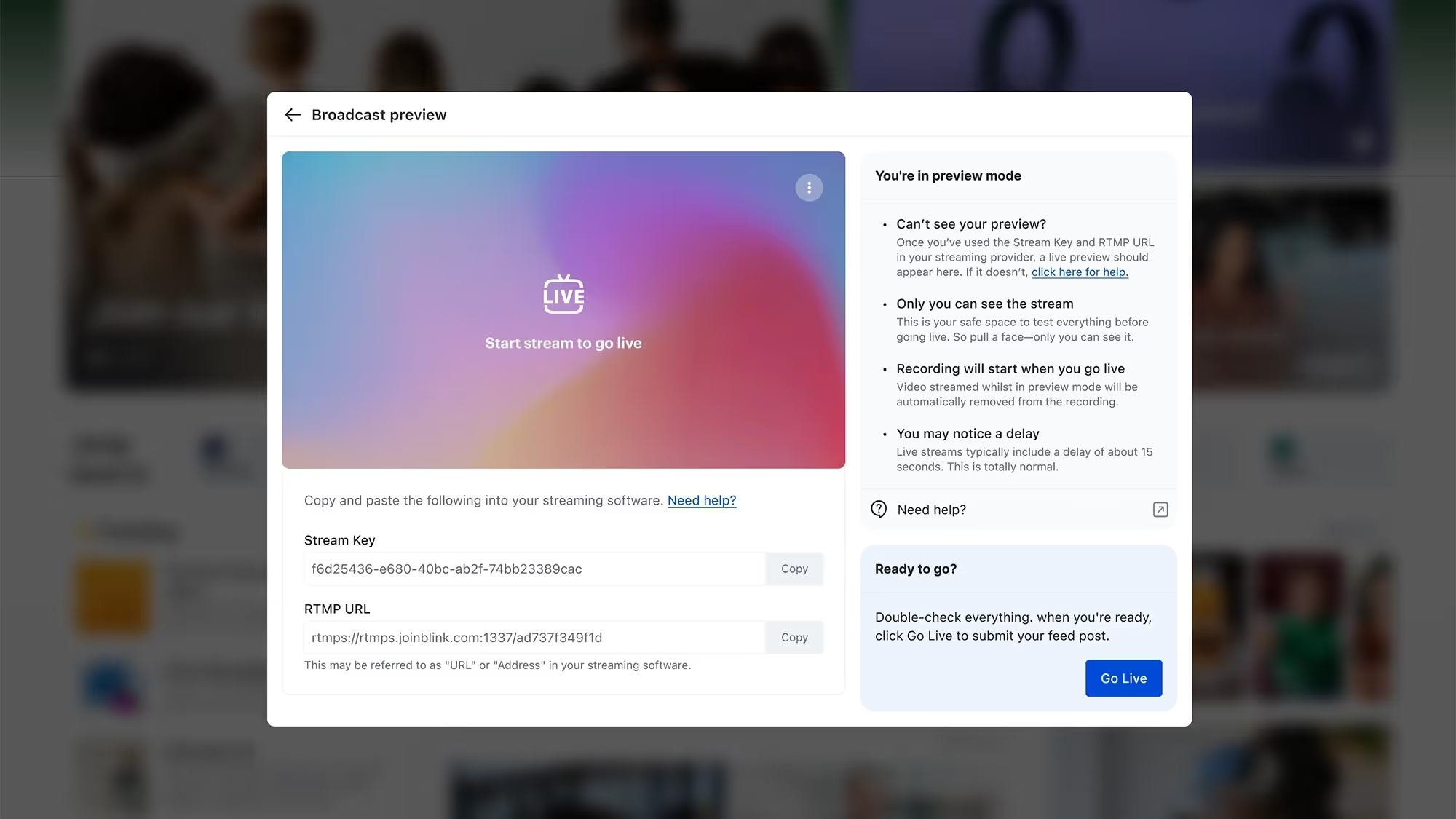
At Blink, we’re constantly evolving our employee experience platform to meet the dynamic needs of organizations and their employees.
As part of our commitment to empowering great employee experiences from the frontline to the front office, we’re excited to announce our latest suite of product features designed to improve the way employees engage with their organization and with each other.
From fostering deeper social connections and real-time interactions, to improving platform security and content protection, discover 6 new features designed to help you create an engaging, reliable, and thriving workplace.
#1. Stories: Share snapshots of your company culture
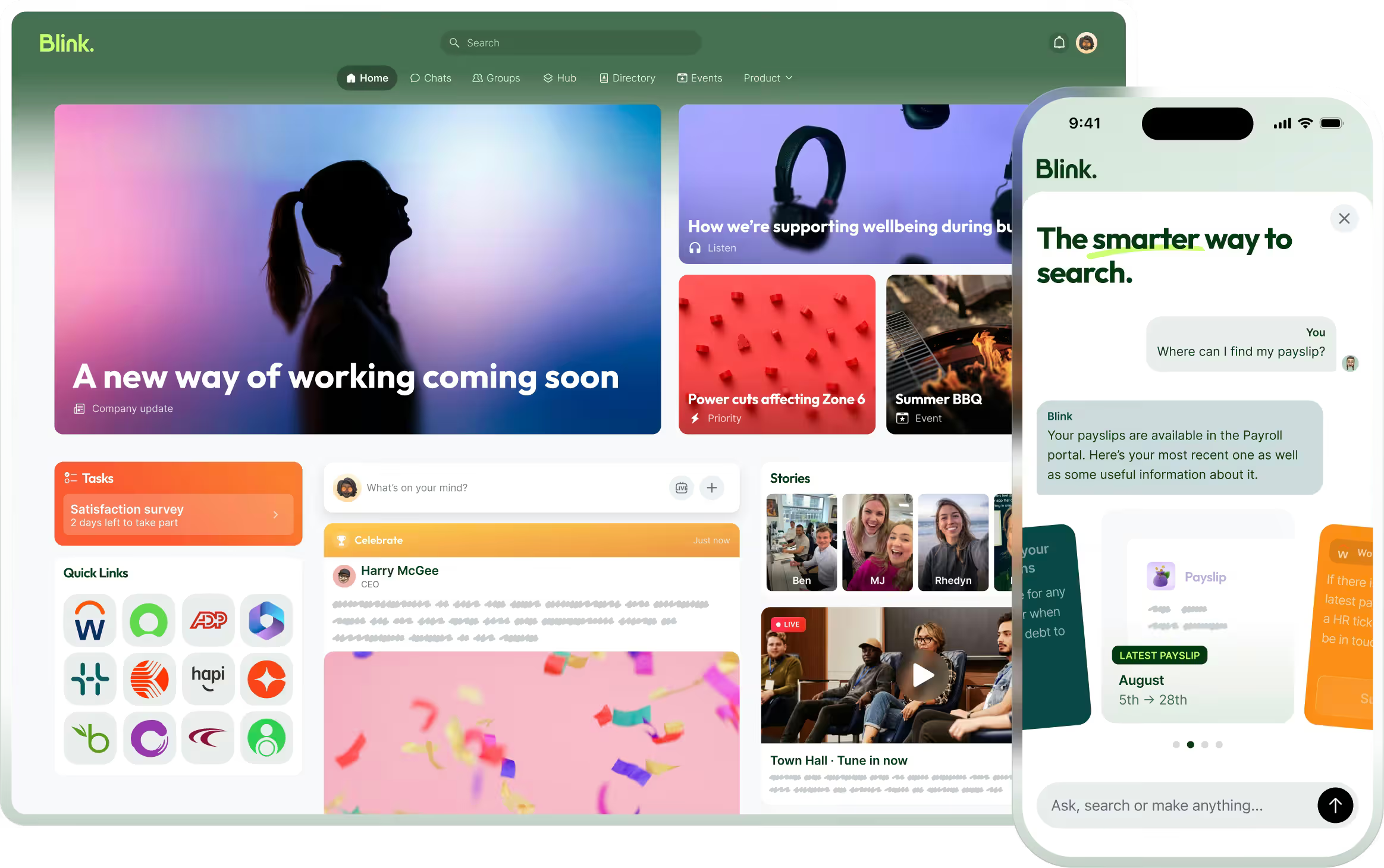
In today’s fast-paced world, the need for real-time connection and engagement has never been more important — and that includes at work. That’s why we’re excited to bring Stories, a first-of-its-kind feature, to Blink. With Stories, teams can easily share moments, celebrate wins, and keep the workplace experience fun and dynamic.
Much like Stories on the social media platforms we know and love, employees and team leaders can share temporary posts that live at the top of the Feed, keeping internal content relevant and up to date.
{{mobile-stories="/image"}}
Why you’ll love it:
Instant sharing: Whether it’s celebrating team achievements, giving updates on project milestones, or sharing everyday moments, Stories offer a personal touch that helps foster a connected culture.
Boost engagement: With the ability to share everyday moments and add a personal touch using image-editing tools, Stories make it easier for employees to connect and engage beyond formal communications.
Keep content fresh: With a 72-hour shelf life, Stories are a great way to share timely messages and encourage frequent, social snapshots of your day.
With Stories, organizations can bring a fresh yet familiar approach to their internal communications strategy, engaging employees not just in critical communications but throughout their everyday work lives.
#2. Communities: Modernize your employee resource groups
As part of the reimagined Connect section, which brings Groups, Teams, and Contacts into one cohesive view, we’re excited to introduce Communities. This new feature allows employees to connect and collaborate over shared interests and hobbies.
With Communities, which are open for anyone to explore and join, employees have an intuitive and interactive digital space to foster deeper connections that go beyond day-to-day work tasks.
{{mobile-community="/image"}}
Key benefits:
Personalized experience: Employees can join Communities based on their interests, passions, or hobbies, creating a more inclusive and engaging workplace.
A dedicated space: Each Community comes with its own unique Feed, Channels, and Resources, creating a dynamic virtual hub for content and communication.
Cross-company connection: Communities provide an opportunity to engage with colleagues across the organization, helping to bridge the gap between teams, departments, and geographies.
From Parents at Work and Home Chefs, to Dog Lovers and LGBTQ+ Crew, Communities open up new opportunities for social connection, workplace collaboration, and community-building.
#3. Moderation: Enhance control over your digital spaces
In order to ensure organizations can create and maintain a positive digital environment, we’ve enhanced our platform moderation tools. Administrators can now better manage and control content in Blink through new reporting and moderation functionalities.
New capabilities:
Report a comment: Users can now report individual comments, in addition to posts, making moderation more precise.
Report reasons: Users can provide specific reasons for reporting content, enabling admins to make more informed decisions and take quick action.
Streamlined admin workflow: Moderation tasks are now part of the admin task list, ensuring that no report goes unnoticed.
These improvements give admins more transparency and control, allowing them to better maintain a respectful and focused communication environment.
#4. Mobile version control: Improve security for frontline teams
We’ve added mobile version control as an additional security measure to help organizations protect sensitive content on Blink’s platform. With this new feature, admins now have the option to require that devices meet a minimum OS version requirement, across iOS and Android, to access specific content and resources.
Why it matters:
Improved data security: By controlling OS versions, companies can add an additional layer of security to any sensitive resources housed in the Content Hub.
Tailored policies: Admins can customize their security settings to include OS version requirements, helping to meet BYOD (bring your own device) policies and ensuring compliance.
Prompted updates: As part of this feature, Blink will alert employees in-app whose devices don’t meet the minimum OS requirements and prompt them to update their device. Blink will let me know I need to update my device’s operating system.
This update is crucial for companies prioritizing security, especially those with frontline, hybrid, or remote workers who often use their personal devices.
#5. Custom profile fields: Tailor your employee inputs
In addition to our 15 out-of-the-box user profile fields like “Name” and “Location,” we’re excited to roll out customizable profile fields.
Admins can now set up custom profile fields to gather the data they need and expand Blink’s usability, paving the way for admins to design a truly tailored Blink experience for their organizations and employees alike.
A closer look:
Customization: Admins can now create custom fields to collect and manage unique user data, offering more tailored experiences for employees.
Scalability: Whether you’re managing teams in retail, healthcare, or any other industry, custom fields make it easy to track data points that matter most to your organization.
Extensibility: This is just the first step! Soon, custom fields will be integrated across more Blink features, making it easier to manage employee information in a way that works for you.
With these customized fields, you can gain deeper insights, streamline processes, and capture workforce data that aligns with your organization’s unique operational needs.
#6. ServiceNow notification integration: Stay on top of IT updates
Lastly, but certainly not least, we’ve expanded our integration capabilities. Our seamless notification integration with ServiceNow enables employees to receive real-time updates on their IT tickets directly within Blink.
How it works:
Real-time notifications: Whenever an IT ticket is updated or resolved in ServiceNow, employees receive instant notifications via the Feed.
Improved efficiency: This integration reduces the need for employees to switch between platforms, keeping everything in one place and ensuring they stay informed about their requests.
Enhanced integrations like these ensure that Blink can continue to be the central hub for all of your employee communications and task management needs.
Bring your consumer-grade employee experience to life.
As workplaces continue to evolve, our goal remains the same: to provide the tools that foster connection, enhance productivity, and create a seamless and exceptional experience for every employee — no matter what they do and where they work.
These product enhancements are our next step in empowering organizations to meet — and exceed — the expectations of a modern and digitally savvy workforce.
At Blink, we’re constantly evolving our employee experience platform to meet the dynamic needs of organizations and their employees.
As part of our commitment to empowering great employee experiences from the frontline to the front office, we’re excited to announce our latest suite of product features designed to improve the way employees engage with their organization and with each other.
From fostering deeper social connections and real-time interactions, to improving platform security and content protection, discover 6 new features designed to help you create an engaging, reliable, and thriving workplace.
#1. Stories: Share snapshots of your company culture
In today’s fast-paced world, the need for real-time connection and engagement has never been more important — and that includes at work. That’s why we’re excited to bring Stories, a first-of-its-kind feature, to Blink. With Stories, teams can easily share moments, celebrate wins, and keep the workplace experience fun and dynamic.
Much like Stories on the social media platforms we know and love, employees and team leaders can share temporary posts that live at the top of the Feed, keeping internal content relevant and up to date.
{{mobile-stories="/image"}}
Why you’ll love it:
Instant sharing: Whether it’s celebrating team achievements, giving updates on project milestones, or sharing everyday moments, Stories offer a personal touch that helps foster a connected culture.
Boost engagement: With the ability to share everyday moments and add a personal touch using image-editing tools, Stories make it easier for employees to connect and engage beyond formal communications.
Keep content fresh: With a 72-hour shelf life, Stories are a great way to share timely messages and encourage frequent, social snapshots of your day.
With Stories, organizations can bring a fresh yet familiar approach to their internal communications strategy, engaging employees not just in critical communications but throughout their everyday work lives.
#2. Communities: Modernize your employee resource groups
As part of the reimagined Connect section, which brings Groups, Teams, and Contacts into one cohesive view, we’re excited to introduce Communities. This new feature allows employees to connect and collaborate over shared interests and hobbies.
With Communities, which are open for anyone to explore and join, employees have an intuitive and interactive digital space to foster deeper connections that go beyond day-to-day work tasks.
{{mobile-community="/image"}}
Key benefits:
Personalized experience: Employees can join Communities based on their interests, passions, or hobbies, creating a more inclusive and engaging workplace.
A dedicated space: Each Community comes with its own unique Feed, Channels, and Resources, creating a dynamic virtual hub for content and communication.
Cross-company connection: Communities provide an opportunity to engage with colleagues across the organization, helping to bridge the gap between teams, departments, and geographies.
From Parents at Work and Home Chefs, to Dog Lovers and LGBTQ+ Crew, Communities open up new opportunities for social connection, workplace collaboration, and community-building.
#3. Moderation: Enhance control over your digital spaces
In order to ensure organizations can create and maintain a positive digital environment, we’ve enhanced our platform moderation tools. Administrators can now better manage and control content in Blink through new reporting and moderation functionalities.
New capabilities:
Report a comment: Users can now report individual comments, in addition to posts, making moderation more precise.
Report reasons: Users can provide specific reasons for reporting content, enabling admins to make more informed decisions and take quick action.
Streamlined admin workflow: Moderation tasks are now part of the admin task list, ensuring that no report goes unnoticed.
These improvements give admins more transparency and control, allowing them to better maintain a respectful and focused communication environment.
#4. Mobile version control: Improve security for frontline teams
We’ve added mobile version control as an additional security measure to help organizations protect sensitive content on Blink’s platform. With this new feature, admins now have the option to require that devices meet a minimum OS version requirement, across iOS and Android, to access specific content and resources.
Why it matters:
Improved data security: By controlling OS versions, companies can add an additional layer of security to any sensitive resources housed in the Content Hub.
Tailored policies: Admins can customize their security settings to include OS version requirements, helping to meet BYOD (bring your own device) policies and ensuring compliance.
Prompted updates: As part of this feature, Blink will alert employees in-app whose devices don’t meet the minimum OS requirements and prompt them to update their device. Blink will let me know I need to update my device’s operating system.
This update is crucial for companies prioritizing security, especially those with frontline, hybrid, or remote workers who often use their personal devices.
#5. Custom profile fields: Tailor your employee inputs
In addition to our 15 out-of-the-box user profile fields like “Name” and “Location,” we’re excited to roll out customizable profile fields.
Admins can now set up custom profile fields to gather the data they need and expand Blink’s usability, paving the way for admins to design a truly tailored Blink experience for their organizations and employees alike.
A closer look:
Customization: Admins can now create custom fields to collect and manage unique user data, offering more tailored experiences for employees.
Scalability: Whether you’re managing teams in retail, healthcare, or any other industry, custom fields make it easy to track data points that matter most to your organization.
Extensibility: This is just the first step! Soon, custom fields will be integrated across more Blink features, making it easier to manage employee information in a way that works for you.
With these customized fields, you can gain deeper insights, streamline processes, and capture workforce data that aligns with your organization’s unique operational needs.
#6. ServiceNow notification integration: Stay on top of IT updates
Lastly, but certainly not least, we’ve expanded our integration capabilities. Our seamless notification integration with ServiceNow enables employees to receive real-time updates on their IT tickets directly within Blink.
How it works:
Real-time notifications: Whenever an IT ticket is updated or resolved in ServiceNow, employees receive instant notifications via the Feed.
Improved efficiency: This integration reduces the need for employees to switch between platforms, keeping everything in one place and ensuring they stay informed about their requests.
Enhanced integrations like these ensure that Blink can continue to be the central hub for all of your employee communications and task management needs.
Bring your consumer-grade employee experience to life.
As workplaces continue to evolve, our goal remains the same: to provide the tools that foster connection, enhance productivity, and create a seamless and exceptional experience for every employee — no matter what they do and where they work.
These product enhancements are our next step in empowering organizations to meet — and exceed — the expectations of a modern and digitally savvy workforce.
Internal communications is the practice of keeping all employees, at every level of an organization, connected and in the loop. The primary goal of an internal communications strategy is to ensure that all members of an organization are well-informed and able to collaborate effectively.
Clear and streamlined communications are an essential factor in the success of any company, whether it has ten employees or one thousand. Over 40% of workers say that their trust in their leadership and team has been compromised due to poor communication.
From frontline workers to admins behind a desk, when each individual has a clear understanding of business goals, values, and guidelines, it makes for a much more connected workflow.
Read on to understand everything you need to know about internal communications, the types of internal communication, and the benefits that come from implementing a solid internal communications strategy.
Understanding internal communications
Internal communications can take a variety of forms – email, intranet, chat apps, newsletters, in-person meetings, bulletin boards, or an app specifically designed to streamline internal communications.
An effective internal communications strategy helps every employee feel connected to the larger company vision, and therefore aware of how their individual roles contribute to the overall success of the organization. A JobsinME poll found that a massive 85% of workers feel more connected to their jobs when there is effective communication in the workplace.
A solid internal communications strategy goes a long way in fostering that engagement – employees feel involved in the company mission and understand the role they play.
Regular communication also helps build trust between employees and leadership, strengthening that sense of belonging. Plus, those open channels of communication allow employees to share their ideas, concerns, and feedback, making them feel valued and empowered.
In frontline organizations, an effective internal communications strategy is even more critical. Deskless employees can be harder to reach through email or memos, as they’re not constantly checking email or messages (or may not even have access to these tools). But these frontline workers are even more in need of clear communications, to mitigate misunderstandings, enhance safety and compliance, and share urgent updates.
An internal communications app, like Blink, is ideal for organizations with frontline workers, connecting everybody and placing everything they need in one place.
This type of internal communication flows from higher levels of management to lower levels. It starts with the C-suite, who makes all the calls, then disseminates their instructions, policies, and decisions to the organization’s employees through managers and leaders.
Within an internal communications strategy, top-down communications are a structured approach that ensures important directives and guidelines are communicated uniformly. Top-down comms not only maintain consistency but also help in disseminating organizational objectives effectively throughout the workforce.
Formal top-down employee communication methods include company-wide emails, official announcements, regular town hall meetings, or memos from upper management.
For example, in a hospital's internal communications strategy, this could look like an all-staff email sharing new patient care protocols. In a manufacturing plant, a bulletin board could display dates for upcoming safety training sessions. Or in retail, a company-wide text message can share information about a new product that management wants workers to upsell.
Pros
It is an efficient way to communicate broad messages.
Messages are controlled and aligned with organizational goals, reducing misunderstandings.
Conveys a sense of professionalism in conveying critical information.
Cons
It doesn’t consider how employees can share feedback.
The passive reception of information may lead to disengagement.
Information flow can be slow, causing delays in decision-making and implementation.
It’s impersonalized, which can give employees a sense of being undervalued.
2. Formal bottom-up communication
This is the process where employees at lower levels of the hierarchy communicate their feedback, suggestions, concerns, and ideas to higher levels of management or leadership.
This type of communication involves conveying information from the "bottom" of the organizational structure upward, allowing employees to have a voice, contribute their insights, and influence decision-making processes.
Three-quarters of employees are more engaged and feel more effective when they feel their voice is heard, Workforce Institute found.
When included as a part of an internal communications strategy, formal bottom-up employee communication not only empowers workers but also fosters a culture of inclusion and innovation within an organization. It's a valuable channel for capturing on-the-ground insights, which can often be missed by higher management. Less than half of employees feel as though they have an easy way to share feedback on key communications; a solid bottom-up communication strategy is one way to mitigate this.
In a frontline organization, there are many ways to implement formal bottom-up communications. Employee surveys are a popular way to gather feedback from an entire team at once, and Blink’s in-app survey tool allows HR teams to get real-time data straight from the mouths of employees.
For example, in a healthcare setting, nurses and medical staff might use formal bottom-up communication to suggest improvements in patient care protocols or to report safety concerns.
Other formats for bottom-up communications include anonymous feedback forms and regular one-on-one meetings between employees and their managers.
By actively encouraging and acting upon this type of feedback, organizations can harness the collective intelligence of their workforce and adapt to the evolving needs of the industry.
Pros
Employees feel heard and valued, leading to higher employee engagement.
A range of diverse perspectives can be gathered, leading to more well-rounded and innovative solutions.
Frontline employees can identify challenges that might not be apparent to higher-level management.
When employees are involved in change processes, they are more likely to support and adapt to new initiatives.
Cons
Gathering, reviewing, and responding to a large volume of employee feedback can be time-consuming.
It can be resource-intensive, requiring specific software.
Not all employee suggestions may align with organizational goals or be feasible to implement.
Formal bottom-up communication may result in inconsistent messaging across teams.
3. Formal horizontal communication
This is the sharing of communications between individuals or departments at the same hierarchical level within the organization, for example, cross-functional meetings or interdepartmental emails.
Unlike the vertical communication we discussed above, which involves information flowing up or down within an organization, formal horizontal communication is between colleagues who hold similar positions within the organization.
Leadership consultancy Fierce, Inc. found that 86% of employees feel that a lack of proper collaboration and miscommunication between teams lead to workplace failures.
Formal horizontal communication helps facilitate the smooth functioning of departments, coordination, collaboration, and information sharing. For instance, in a retail setting, it's crucial for the sales team to communicate effectively with inventory management to ensure products are stocked efficiently.
In frontline organizations, formal horizontal employee communication connects the various cogs that make up the company and keeps it functioning. Within the structured internal communications strategy, it can take many forms, including project reports, regular email updates between departments, and the establishment of specific cross-functional teams.
When done right, formal horizontal communication enables seamless collaboration and makes the company culture one of teamwork and shared goals
The key here is constant communication. Using an internal app with a chat function - whether it’s private messaging or a group chat - will promote regular collaboration. Blink’s chat feature enables seamless conversation, to encourage employees to work together and share ideas.
Pros
Promotes knowledge sharing between peers with different expertise.
Allows teams to align their efforts and activities with each other, avoiding overlap or conflict.
Improves communication within the organization, leading to better company culture.
Allows colleagues to provide feedback on each other's work, which they’re often more receptive to than feedback from above.
Cons
A reliance on formal channels may discourage spontaneous creative interactions between colleagues.
Communication may become siloed within specific departments.
Can sometimes be time-consuming, especially when multiple people need to be involved.
May not adapt well to rapidly changing circumstances or unexpected needs.
4. Informal communication
Unlike other aspects of an organization’s internal communications strategy, informal communication isn’t facilitated or regulated by the organization’s internal communication channels. It happens spontaneously between colleagues – water cooler chat, if you will.
This style of communication often occurs in casual settings or through personal relationships and can take place at various levels of the organization, including between employees and managers, and even across different departments.
Informal comms include face-to-face conversations, social media interactions, instant messaging, and phone calls. It serves as a complement to formal communication channels and plays a significant role in building relationships and shaping the company culture.
We can look at Bank of America as a case study. Breaks for customer service employees used to be staggered so as not to have a shortage of staff fielding customer complaints. However, an internal audit found that productivity increased when workers took breaks together and socialized over lunch.
Oftentimes, frontline employees are working in silos and isolated from their coworkers. In frontline organizations, informal communications go beyond just sharing practical insights, it also gives these frontline workers a sense of camaraderie and belonging. In high-stress environments like hospitals or retail, where teams need to work seamlessly to serve customers and patients, these informal connections are invaluable.
Furthermore, workers can share valuable information that they learn on the job, which might not necessarily warrant discussion in formal channels. For example, tips for handling certain customers, which patient rooms have better heating, or even finding help to cover a shift.
The informal nature of these interactions fosters a culture of approachability, ultimately contributing to a more resilient and united frontline workforce.
The main Feed in Blink is designed specifically to foster this informal communication that keeps an organization running. It brings the whole company together in one place, without the formality of a memo or email chain. The Feed looks and feels like the social media apps we’re already accustomed to, making it easy for everyone to use.
Pros
Quick and easy, especially in fast-paced environments.
Helps to build personal relationships and a sense of camaraderie among employees.
Allows frontline workers a way to connect and engage with their coworkers, especially those who don’t have these opportunities come naturally.
Practical knowledge, tips, and best practices are shared more easily through informal conversations.
Cons
Frontline workers are limited in their opportunities for spontaneous chat, requiring the need for a centralized informal communications platform.
It can lead to the spread of inaccurate information or rumors if not properly managed.
Individuals who are not part of specific conversations or social circles may be inadvertently excluded.
Important issues might not receive the attention they deserve when discussed informally.
Why is internal communications important for your business?
For a truly effective internal communications strategy, a workforce should be three things: connected, engaged, and aligned.
A connected workforce
The right internal communications strategy bridges the gap between remote, frontline, and office employees. Without a wide-reaching net, internal communications can become stilted or even ineffective.
Frontline employees are consistently at a disadvantage due to the fact they most times do not have a company email or a desktop, like the organization’s office workers.
More than 80% of the global workforce is deskless. Whether your company is in healthcare, manufacturing, or transportation, these frontline workers need to feel just as involved and valued as the ones behind a desk.
For these organizations, effective internal communications reduce turnover, increase profits, enhance employee experience, and boost productivity. Read more about deskless worker team communication here.
An engaged workforce
Transparent communication empowers employees and boosts morale.
When employees are informed about the company's vision and the reasons behind certain actions, they feel a sense of ownership and inclusion. Transparency fosters trust, as employees perceive that their contributions and concerns are valued, leading to increased engagement and overall satisfaction.
Two-way internal communication is essential for employee engagement – as we covered above, top-down communication can lead to passive reception of information, which is a killer for engagement.
An effective internal communications strategy gives employees the ability to voice concerns and provide feedback or suggestions to management. This gives them a direct hand in decision-making, directly increasing their engagement with their work.
An aligned workforce
Aligning teams and goals across the entire organization, from the CEO to frontline workers, is crucial for success.
This involves ensuring everyone is across the broad business goals and objectives and understands how their individual work is crucial for reaching these goals. A study conducted by IBM found that 72% of employees don’t understand their organization’s core strategy, due to poor communication.
Don’t let that 72% be your employees. An aligned workforce ensures that the messages being communicated resonate with everyone, and are understood in the intended manner.
Effective internal communications leads to better collaboration, within teams and across departments.
Strategies to implement successful internal communications
Only 7% of workers agree that internal communication within their workplace is accurate, timely, and open.
Building a cohesive internal communications strategy is the key to uniting and motivating your workforce. We’ll touch on some strategies to help you create a successful internal communication plan, or you can read our in-depth step-by-step guide to writing an internal communications strategy.
Utilize technology for internal communication
These days, there are endless tools and software available to help organizations stay on top of internal communications. We’re no longer in the age where we have to rely on printed memos and morning meetings.
Blink, and other digital communication tools which promote collaboration and information sharing, can totally revolutionize an organization. They provide efficient, real-time means to disseminate information, engage employees, and foster collaboration.
Not only can these platforms allow employees to ask questions, provide feedback, and participate in discussions, but they also act as a centralized place for policies, procedures, and guides that employees can access.
A recent Emergence study found that more than half of deskless workers are dissatisfied with the software solutions provided by employers.
Particularly for decentralized teams and organizations with frontline workers, technology-driven internal communication plays a pivotal role in keeping employees informed, connected, and aligned with organizational goals.
Understand how to best reach your employees
Obviously, organizations are made up of different types of employees, and traditional top-down internal communication strategies generally don’t take this into account. In order to make sure your message is relevant to your audience, you need to tailor your message based on who you are communicating with.
For example, a message intended for frontline staff may focus on practical details and how it impacts their daily tasks, while a message for senior management might emphasize strategic implications and long-term business goals.
Consider the different workers that need to be reached with your internal communications strategy, and segment your audiences based on:
Job role
Seniority level
Communication needs
Whether they are desk-based or frontline workers
Then, you can analyze previous engagement data to see what type or format of content works best for each audience – eg. Email, live chat, video, etc., and the best times to communicate for the most engagement.
Utilizing technology can be very helpful here. Blink offers real-time powerful analytics to help you understand what content performs best, when, and with whom.
By customizing the messaging approach, and using data to optimize what the content is and when you are sending it, internal communication becomes more effective, increasing employee engagement and alignment with goals.
Establish regular feedback
Without regular feedback, internal communications are simply one-sided, which does nothing for employee engagement and satisfaction.
Every successful internal communications strategy should have built-in practices to regularly collect feedback from employees at every level of the organization. This can be done through surveys, suggestion boxes, town halls, anonymous feedback, or weekly leadership check-ins.
Employee feedback allows an internal communications strategy to be actually shaped by the people it’ll affect, not just the high-up decision-makers behind desks. Highlighting areas where improvement is needed – before it escalates into a problem – is crucial, not just for the employee experience but also for the success of the business as a whole.
Case study: Our collaboration with Salutem
During the COVID pandemic, the health industry faced endless challenges. Employees and organizations were dramatically affected by high levels of stress, low staff morale, and a huge hit to communications.
Salutem, a healthcare company that provides services such as care homes and healthcare staffing, needed a solution to overcome the challenges presented by the pandemic. To do so, Salutem used Blink to revamp their internal communications strategy.
With Blink’s easy-to-use super-app, Salutem was able to launch monthly surveys, collect feedback and plan face-to-face group meetings to encourage two-way conversations between managers and staff.
Salutem launched S.E.L.F (Salutem Employee Listening Forum) initiatives to connect staff and promote a culture of free communication within the organization. Each division had a rep – nominated by managers through the Blink Feed – who were responsible for moderating Blink Channels and following up with their respective teams.
Colleagues were encouraged to share thoughts and open up conversations around concerns or opportunities for growth, which started conversations and reconnected employees across all teams.
The improvements that came from the new internal communications strategy were nearly immediate. The organization saw a:
300% increase in survey responses
92% adoption rate of Blink
Tenfold increase in staff who were easy to communicate with
The integral role of internal comms in organizational success
There aren’t many constants in this world, particularly in the ever-changing landscape of a frontline organization. But one does remain: the vital role of an internal communications strategy. From formal top-down messages that steer the company's vision to informal water cooler chats that breed friendships, effective internal communication is crucial for the success of any organization.
By implementing a solid internal communications strategy, organizations can create a workplace where ideas flow freely, where feedback is valued, and where employees are informed, engaged, and motivated. It's a workplace where everyone, from frontline staff to top executives, feels heard, appreciated, and connected.
Internal communications shouldn’t just be a strategy, however. It needs to be a core tenet of your organization’s culture. Introducing an effective tool – like Blink – to encourage effective internal communication is key. By fostering open dialogue, valuing feedback, and leveraging technology, organizations can create an environment where everyone feels heard, informed, and engaged.
It's not about reinventing the wheel, but about adopting effective internal communications strategies that keep your workforce connected and motivated.
A paltry 36% of US employees are engaged in their work, as per data from Gallup. On top of that, 11.5 million workers left their jobs in the time period between April and June of 2021.
It’s no secret that engaged employees are less likely to skip work and are much more productive. They are also more likely to stay with their organization.
So with roughly 2% of the entire US workforce quitting on a monthly basis, you can’t afford to ignore the employee engagement challenges in your company. Identifying employee engagement barriers in the workplace and addressing them should be your top priority.
But what should you look for? What might be the issues in your organization hurting employee experience and retention?
This post will help you understand what those barriers are, and what you can do about them.
Let’s begin.
Employee engagement challenges that can make or break your business
A study shows that a highly engaged workforce can reduce a company’s turnover rate by 25 to 59%. And it all starts with identifying the barriers to high employee engagement. These are:
1. Excessive red tape
How many procedures and rules should an employee follow to get basic tasks done in your workplace? If there are too many, it will negatively impact employee engagement.
According to the Employee Outlook Survey from the CIPD, unnecessary rules and procedures are the biggest hurdles to employee productivity.
Your work environment is supposed to provide a smooth work experience where employees can get things done easily with minimum stress. This will require simplifying your work processes wherever possible.
How to overcome this employee engagement barrier?
See which admin tasks are taking the most time for both the admins and workers. Then reduce the number of sign-offs required to approve these tasks.
Implement a tool that can automate common workflows. With Blink’s micro apps, for instance, admins can create and share digital forms, collect data, and automate key workflows.
2. Line managers and supervisors with poor communication skills
If there’s anyone in the position to bring the skills and focus of team members into alignment with the goals of the organization, it’s the middle manager.
In factories and other similar establishments, for example, line managers form a pivotal link between frontline staff and senior leaders. Yet they are often ill-equipped to engage their teams.
The Management Empowerment Report reveals that just one-third of front-line managers received specific training to support employees. Most have been chosen for the role because they were good workers, not because they were good managers.
Inspiration and transparency in communication are critical improvements a leader can make towards solving employee engagement challenges.
How to overcome this employee engagement barrier?
Open channels of two-way communication among the line managers and their teams.
Provide managers with resources and tools to collect staff input with methods such as internal surveys and quizzes.
Support with adequate employee engagement training for managers on how to engage and communicate with their teams.
3. Lack of one-on-one time
Only 21% of millennials and 18% of non-millennials meet with managers on a weekly basis. Most say they meet less than once a month.
One-on-ones are essential for managers to get to know employees on a personal level and discuss their needs, concerns, and growth opportunities. They could be considered a key driver of employee engagement.
Not just that.
Without frequent one-on-one meetings, a manager’s ability to communicate effectively with employees about projects and performance is limited. And what suffers as a result? Employee engagement.
So, to avoid barriers to good employee relations, you must make sure that the managers in your company meet regularly with the staff.
How to overcome this employee engagement barrier?
Direct managers to schedule regular one-to-one meetings with their team members. And make it a key performance indicator that determines their progress in the managerial role.
Train managers to create an agenda in advance and approach these meetings as a consultant, not an authoritarian. Instead of just discussing technical details of the job, managers should help workers prioritize tasks and understand the big picture.
4. Shortage of growth opportunities
A study by BlessingWhite found a lack of growth opportunities to be the most common reason employees leave their jobs. If you’re serious about removing employee engagement barriers, increasing development opportunities is a must.
Failing to consider workers’ career progression will trigger the feeling that they are stuck in a dead-end job. And sooner or later, they’ll jump ship to discover better opportunities.
In contrast, employers that encourage workers to learn new skills don’t just retain them longer, but also stand to gain from the new insights employees bring to the table.
How to overcome this employee engagement barrier?
Have a professional reinvestment budget. Allocate sufficient resources to invest in each employee’s professional growth plan. Case in point: Jake Goldman, from 10up. In his words:
“We provide a dedicated budget accrued at $3,000 per worker per year. And we give managers and employees several ways to use these resources, from self-coaching and online classes to attending and speaking at professional events worldwide.”
Start by outlining a path for growth that will keep employees engaged and help you retain top talent. Plus, offer support and training in the form of stipends or bursaries to help employees get there.
5. Not enough transparency
Research shows the majority of employees (75%) care about the performance of their employer, but only 23% feel they have insight into how well the business operates.
Transparency in the workplace refers to a genuine, two-way openness of communication between the workers and the management. And lack of transparency is an employee engagement barrier that can undermine the trust between employees and managers.
So it’s essential to show your employees the bigger picture — how their work is tied to the goals of the company as a whole. It leads to a high level of communication and trust, which in turn fuels employee productivity and engagement.
How to overcome this employee engagement barrier?
Make sure workers are being kept in the loop about small or large matters concerning the organization.
Regarding the decision for which the stakes are high, make it a point to explain the “why” behind them. This is a better approach than just laying down the new rules.
Regularly share business performance reports with the employees, regardless of whether it’s struggling or doing great.
Lack of reward and recognition
According to an Indeed survey, 30% of people who quit their job within the first six months would have stayed longer if they were recognized more for their contributions.
Employee reward and recognition are at the heart of impactful employee engagement strategies and high levels of retention. On the other hand, not having an employee recognition program in place will leave workers demotivated and dissatisfied with the organization.
How to overcome this employee engagement barrier?
Recognizing your employees doesn’t have to cost the world. Often a simple (and free) thank you can have a massive impact on engagement. Other ways to recognize your employees without breaking the bank can include a free celebration lunch or a monetary bonus for the employee of the month.
Make sure you celebrate big and small wins with your team, especially when they exceed expectations. Get creative and make the culture of encouragement and appreciation a central part of your organization.
6. Employees feeling unheard
A study found that 82% of employees have ideas to boost business performance. But more than one-third of employees struggle to get these inputs to the upper management.
This is one of the most critical employee engagement challenges because if employees are to be engaged with their work, they need to feel heard.
A 2020 employee experience study found that organizations that act on feedback have double the engagement score of those that don’t. And this kind of engagement is possible only when senior managers listen to workers’ thoughts and opinions.
How to overcome this employee engagement barrier?
Transparent, one-to-one meetings can help workers feel heard, along with anonymous question and answer sessions and employee feedback forms.
Adopt a communication or employee engagement tool that creates multiple channels between managers and workers. Blink, for instance, also lets managers create polls and surveys that can be used to find out what workers really think.
High employee engagement is a big advantage that can help you stay ahead of the competition. But as you can see, accomplishing the same remains a challenge for many organizations.
But that’s not to say it’s impossible.
Top workplaces have been successful at reducing employee engagement challenges with communication and alignment. And there’s no reason you can’t do the same.
These tips and best practices for employee engagement we have shared will go a long way in overcoming employee engagement barriers and creating a workplace where workers feel more included, engaged, and valued.
Internal communicators, it’s time to share the mic with your employees
There are an estimated 50 million content creators worldwide. Alongside the A-listers and sports stars, there are lots of regular people posting videos, sharing stories, and creating content that connects.
The social media giants have tapped into something. They know that people don’t just want to consume content. They want to contribute. And in 2025, this creator mindset deserves a place within your employee communications strategy.
An internal creator culture allows employees to react, comment, and share their own stories — you turn spectators into storytellers. Give the green light to employee-generated content (EGC) and you give your entire workforce a voice while taking engagement on your internal communication channels through the roof.
{{mobile-stories="/image"}}
Want to drive this kind of mindset at your organization? Here, we look at the benefits, risks, and tips you need to know when building an internal creator culture.
Why internal communications needs creators, not just consumers
Your comms pros are great at what they do, right? So what does EGC have that traditional comms doesn’t?
#1. Authenticity
Trust in leadership teams is down. In fact, Gen Z and Millennial workers are some of the least trusting in the workplace.
Real stories from real employees hit different. Like Iman Pabani recently said in Fortune: “Credibility today isn’t about expertise but about who tells the most compelling story.”
It’s not always slick and polished. But EGC is genuine. It reflects the real experiences of your workforce. Unscripted moments stick in the mind and spark conversations.
{{human-internal-comms="/callouts"}}
#2. Diversity
When your internal comms team creates every piece of content, it can start to sound…well, like internal comms. Perspective and tone become repetitive and employees start to switch off.
But hand the mic to your employees and you reflect your entire organization — not just the C-suite office.
You can create Insta-worthy internal comms that resonate with your digital natives. You can post frontline-focused and relevant content created by frontline employees. You can respond with agility to the latest events and trends.
EGC helps you showcase a more diverse range of voices and create a sense of community across your internal communications channels.
In a nutshell? By sharing diverse and authentic voices, EGC improves employee communications and employee engagement. It helps you build connection and trust across your organization — and develop a vibrant company culture.
Busting the myths about employee-generated content
Here at Blink, we’re big champions of EGC. But we know that not every organization approaches this topic with the same level of enthusiasm.
Large companies are often a little wary about opening up their comms channels to employees. But their concerns don’t always reflect how EGC works in practice.
So — in the hopes of settling a few nerves — here are some common EGC misconceptions and the reality behind them.
“It’s risky.”
Giving employees free rein to post on your internal communications platform can feel risky. But with the right guardrails in place, it’s empowering and effective.
Here are some ideas for managing the risks associated with EGC:
Assign moderators to take down any content that fails to meet your creator guidelines
Only allow content online once it’s been approved by your comms team
Make an employee’s content visible to just their team — not the whole organization
Do a trial run to see how EGC fits within your content ecosystem
With the right internal communication tools, there are lots of levers you can pull. You can fine-tune permissions and oversight to minimize the risks of EGC while maximizing the benefits.
“People won’t participate.”
Build it and they will come? But what if they don’t?
Many comms pros are worried that they’ll enable and encourage an internal creator culture only for there to be tumbleweed — they’ll find that their employees simply aren’t interested in posting to company channels.
If you have an organizational culture of open communication, this is unlikely to be the case. You’ve already created the psychologically safe conditions that make content-sharing feel normal and fun.
What’s more, remember that many of your employees are already creating content for their social media profiles. All it takes is a small shift in mindset and easy-to-use digital tools to harness their creative talent for your comms platform.
“It’s just fluff.”
Of course, your employees won’t be posting company news or financial forecasts. But their lighter style of content still brings a ton of value to your organization.
Birthday shoutouts make employees feel seen. A behind-the-scenes video instills pride and morale. That “meet my team” post builds bridges between departments.
With the help of EGC you can create a digital water cooler — a place where employees gather, connect, and find enjoyment in their work day. And its impact on your business shouldn’t be underestimated.
EGC boosts culture and engagement — and moves the dial on big business metrics like employee satisfaction and retention. It’s not about jumping onto the latest internal comms trends and it’s far from “just fluff.”
The building blocks of a creator culture
Convinced that a creator culture can benefit your business? Here are the four pillars you need to put in place to make it happen:
Tools. The best workplace communication tools make life easy for employee content creators. They’re mobile-friendly, so creators can upload photo and video content straight from their smartphones. They provide in-built templates and AI support that guide employees to create the best possible posts. These comms tools also inspire interaction by giving your EGC audience a range of emojis, GIFs, and reactions to choose from.
Permission. Beyond the permission settings on your employee communication platform, you should aim for a company culture of psychological safety, where employees know that showing up and sharing is celebrated. That means normalizing imperfect content — the kind filmed on a hand-held smartphone screen. And leading from the top by getting business leaders to post personal or informal content first.
Inspiration. Kickstart creativity by showing employee content creators what’s possible on your internal comms platform. Showcase early EGC examples from real employees. Also, create content prompts, asking employees to share their content around a particular theme or hashtag. Give them inspiration and employees are much more likely to get involved.
Feedback. Positive reinforcement fuels more great content. So like, comment, and repost EGC on your networks. Encourage employee feedback. Give kudos publicly, celebrating creators and maybe even crowning a Creator of the Month. Also, share content stats, telling employee creators which types of communication are resonating and why — so they can create more of the same.
How to start small and scale with EGC
Still unsure how to get your EGC initiative off the ground? Here are some ideas for getting started.
Start with a pilot
Before you go all in, test the waters. Start an EGC pilot with a small group — how about your frontline employees, remote workers, or a group of culture champions?
Give this group a clear brief. Allow them to post and view EGC. Then, after a month or so, dive into the top metrics to gauge effective communication.
How has this content performed in terms of likes, shares, and comments? Is this group logging onto the platform more often? Are employee engagement stats improving?
If your pilot is a success, you can roll out your EGC initiative to the wider organization.
Create a series
Get the ball rolling and content creation brains ticking by launching a series. How about one of these ideas:
A day in the life (a behind-the-scenes look at employee workdays)
My why (insight into the things employees love about their jobs)
Work hacks (tips on how to bring your A-game and get the most from workplace tools)
Weekly win (one thing that went really well this week)
Provide a few strong examples, regularly promote your series across employee communication channels, and keep the momentum going with reminders and reactions.
Offer incentives
When you’re just getting started with EGC, incentives can be useful.
Gamification works well. Features like leaderboards, badges, and points for content creation can awaken employees’ sense of competition. Which means lots of great EGC for your news feed.
Another idea? Offer tangible rewards, like gift cards, lunch vouchers, and professional opportunities. Perhaps a top content creator could represent their team in a leadership Q&A.
But you don’t need to overthink it. Sometimes a few words of appreciation do more than any points system. Thank employees for their content creation efforts and you’ll inspire them to do more.
Using EGC to elevate employee communications
Employee-generated content is a breath of fresh air for your employee communications. It adds authenticity, fosters two-way communication, and builds a real sense of community — all things traditional messaging can struggle to deliver.
Employees enjoy logging onto your comms platform to see what their peers have shared. And once they’re there, your core messages are more likely to cut through.
EGC also works wonders for company culture. A social feed full of real voices and relatable moments helps everyone feel seen, heard, and connected — which means a better employee experience and a workplace people genuinely want to be part of.
If you’re just getting started with EGC, it needn’t be a mountain to climb. Start small, share content inspiration, and give employees the essential tools they need to be the voice your comms has been missing.
Blink. And build an internal creator culture at your organization.
Frontline teams aren’t struggling to collaborate because they don’t care.
They’re struggling because they’re buried under tools that were never built for them.
WhatsApp threads. Missed emails. SharePoint links nobody can find on an employee intranet nobody uses. A dusty binder in the break room that’s definitely out of date.
When communication lives everywhere, collaboration happens nowhere. Messages get missed. Decisions slow down. And frontline employees are left piecing things together mid-shift.
Deskless work moves fast. The tools supporting it should too.
The good news? Organizations are finally moving away from scattered, desk-based systems and toward simpler, mobile-first team collaboration tools with workflow automation, designed for frontline reality.
In this guide, we break down what actually works for deskless teams — which tools fall short, what features matter most, and how to roll out a solution that frontline employees will actually use.
Deskless work is different — so the tools should be too
Why don’t desktop tools work for your frontline team? It’s because frontline work is totally different from office-based work. Here’s what sets deskless work apart:
Mobile dependency. On their feet and on the go, frontline workers don’t spend their days parked in front of a desktop computer. To reach your deskless team, comms tools must be mobile-first and accessible on every employee smartphone.
Urgency. In retail, transport, healthcare, hospitality, logistics — employees need immediate operational updates, safety alerts, task management, and scheduling changes. Email can’t keep up. WhatsApp isn’t secure enough. And delays harm your customer and employee experience.
High turnover. Churn is high in deskless teams. To help new hires hit the ground running (and relieve your managers from endless training), communication tools have to be intuitive — learnable in minutes, not months.
Shift-based. Frontline employees don’t tend to work a 9-to-5. Town halls, stand-ups, and “quick catch-ups” leave half the team out of the loop. Team building is also tough because some employees never meet face to face.
The best team communication tools take these realities into account — and they provide a joined-up solution that works for both frontline and office-based employees.
Tool comparison: What’s out there (and why some tools fall short)
Time to size up your options. Let’s look at the tools organizations are currently using — and why some popular tools just don’t cut it.
WhatsApp and Facebook groups. Easy to use and mobile-first, yes. But secure, structured, and business-ready? Absolutely not. When employees use personal apps for workplace communication, your IC team has zero oversight. This leaves security, compliance, reputation, and company culture at risk.
Microsoft Teams and SharePoint. Great for desk-based staff, less so for frontline teams. These tools are clunky on mobile devices. Updates rarely integrate smoothly into a busy workday. So frontline employees are left out of the conversation.
Email. A stalwart of employee communications. But one that’s falling out of favor. Email is slow, asynchronous, and hard to track. For frontline employees (who don’t always have a corporate email address), work comms are lost in an inbox filled with personal and marketing messages.
Point solutions. These specialized tools solve one problem well — but they create a fragmented experience. You need multiple tools to meet all employee needs. So your people juggle multiple logins, apps, and workflows, wasting time and reducing engagement.
The alternative to these flawed solutions? A team communication tool like Blink.
Employees enjoy a user-friendly, mobile-first experience. So everyone — from HQ to your remote workers to your frontline teams — has access to vital comms and feels part of company culture.
{{mobile-chat="/image"}}
The must-have features of frontline team communication tools
Deskless teams need tools built for their world. But what do these tools look like in practice? Here are the essential features your frontline communication tool can’t do without.
1. Mobile-first messaging
Mobile is the only way to go. Frontline employees should be able to catch up with team news, share knowledge, offer support, and build camaraderie, all via their smartphones.
With a tool like Blink Chat, you can create channels for each team in your organization. You can send voice notes and request read receipts. You can also add content like images, videos, documents, and GIFs to your messages.
The end result is a vibrant and effective communication channel, available for real-time messaging wherever and whenever your frontline employees are working.
Here, you can share safety updates, operational changes, and details of the latest compliance training, posting these messages as critical comms so they appear at the top of the feed.
You can also share bite-sized, culture-building content suited to busy teams. Think short-form video stories, recognition posts, and quick-fire polls — delivered across a feed that is personalized to employee team, location, role, and tenure.
3. A single knowledge hub
Deskless teams don’t always have easy access to your intranet platform. So it’s important to make standard operating procedures, forms, onboarding materials, time tracking processes, and manuals available from a mobile-first knowledge hub.
The Blink Hub provides a single, reliable source of truth and puts all resources at employees’ fingertips. Teams can access action items and information in the flow of work, improving efficiency and safety in the process.
4. Scheduling
Still messaging employees individually about unfilled shifts? You improve both manager and employee experience by giving teams the digital tools they need to view and swap shifts independently.
Blink supports this functionality through Workday integration. This means employees can also access payroll and HR services straight from the Blink dashboard.
5. Integrations
The best internal communications tools for frontline workers look beyond the IC ecosystem.
They bring all workplace software together, providing easy digital access to all the tools your frontline workforce needs — from learning and development to HR to customer service.
With deep integrations and a single sign-on tech, Blink makes everything available in a couple of clicks (and with just one set of login details). So you make life easier for frontline teams — and improve adoption of the tools you’re already paying for.
6. Analytics
Data drives better internal communication. And a robust platform provides analytics that let you track engagement, segment by team or location, and get to the root of what works — and what doesn’t.
You have the insight you need to develop frontline-friendly communications. So you can improve content formats, comms cadence, and manager training, to better reach deskless employees going forward.
{{mobile-hub="/image"}}
What good looks like: Real customer wins
Companies in a range of frontline settings have made the switch from patchy messaging to a streamlined team communication tool — and are already seeing results.
Retail activation
Companies like JD Sports and McDonald’s have moved beyond shop-floor huddles and paper memos. They’re using Blink’s mobile-first app to improve connection and operational efficiency — and empower their large, distributed workforce.
Healthcare coordination
Blink is partnering with healthcare organizations, providing an effective alternative to unofficial Facebook and WhatsApp groups.
An example? Children’s of Alabama, one of the largest pediatric medical centers in the US. The team is using Blink to share key campaigns (like flu shots and benefits enrollment) and to build belonging and coworker connection among its workforce.
Driver alignment
Drivers in transit and logistics spend their days on the road, disconnected from head office and coworkers. But Blink has flipped the script for Go North West, a major UK bus company.
Managers can share safety updates, route info, and essential docs in real time. Thanks to Blink, the company reaches 95% of employees with essential comms and has cut employee turnover by 26%.
How to implement a team communication tool without the chaos
Want to adopt a mobile-first communication tool that meets the needs of your frontline workforce? But worried about the upheaval? Don’t be. With the right approach, you can make the transition stress-free and seamless.
Use focus groups + pilot groups
Before choosing a team communication tool, ask employees (including frontline workers) what they want from your new software. Then, build these priorities into your wish list.
When it comes to rolling out the platform, pilot features with a small group of employees first. That way, you can iron out any issues before launching it to the wider organization, ensuring high adoption rates from the very start.
Create a platform playbook
Before launching your internal comms tool, think carefully about how communications will look.
Consider the format of your comms (remember: dynamic social media-style content tends to work best). Decide what type of communication belongs on each of your internal channels. Work out who can post where — and what controls you want to put in place.
Develop a launch campaign
Hit the ground running, and you’re more likely to drive momentum and achieve high adoption rates from the get-go. So plan a launch campaign. Promote the tool. Build buzz and anticipation.
Then, on launch day, provide everything employees need to get started. App ambassadors who can show them how to download and use the app. Training resources that feel more like TikTok than a boring PowerPoint presentation. Incentives to get the app and engage with content.
Take an integration-first approach
Employees are more likely to download and use a team messaging tool when it ticks all the boxes. So it pays to take an integration-first approach. What does that mean?
Ensuring your chosen solution has all the functionality you need — for both desk-based and frontline staff — before layering over the frontend experience. Your app doesn’t just look good on the surface. It provides all the deep functionality your organization requires.
{{mobile-main="/image"}}
Transform deskless team communication with Blink
Blink is a hub for frontline team collaboration. Real-time updates, an engaging news feed, digital forms, and critical comms — all in one mobile-first platform.
But Blink goes even further. It gives frontline employees everything they need to stay informed, connected, and efficient.
By integrating with your other workplace software — and providing tools for employee experience and employee engagement — Blink provides a streamlined solution that works for your whole workforce.
Intranet (n): dusty, desktop-only internal website your company set up years ago. Hard to navigate. Rarely updated. Mostly ignored.
Sound familiar? Then your business is missing a huge opportunity.
Modern intranets — especially mobile-first ones like Blink — are intuitive, engaging, and built for the frontline and the desk-based workforce.
They’re not just document libraries — they’re a vibrant digital hub, where employees can access information, connect with each other, and feel part of company culture.
So what exactly can an intranet do for your organization? Here are 15 powerful ways to put yours to work in 2025.
What are the applications of an intranet?
There are lots of business-boosting ways to use your intranet. These include:
Sharing company news and updates
Connecting co-workers
Amplifying company culture
Providing access to docs and resources
Easy employee reporting
Shift scheduling
Automating routine tasks
Unifying workplace tools
Viewing pay stubs
Enabling HR self-service
Tracking training and employee performance
Recognizing employee efforts
Inviting employees to company events
Conducting employee surveys
Keeping tabs on business metrics
Ready to take a closer look at each of these intranet uses? Let’s dive right in.
Uses of an intranet for internal communication
A modern intranet provides all the functionality you need to run a successful internal communications strategy. From a news feed to instant messaging to scroll-stopping, social-style posts, here are some great ways to use an intranet for internal comms.
{{mobile-desktop-main="/image"}}
#1. Sharing company news and updates
Forget the company noticeboard. Share updates that actually get seen.
Putting company news on your intranet keeps everyone on the same page. So it’s easier to align on tasks, projects, and overarching business goals.
On a modern intranet, company updates are best suited to the news feed. Here, you can serve up snippets of scrollable content. You can also segment employees by location, role, team, and tenure to ensure that news feed content always feels relevant.
To get your most important messages to cut through, put sticky messages at the top of every employee’s news feed or intranet dashboard. You can even request a read receipt so you can be confident that vital safety announcements and policy updates have been seen.
Want to reach the whole workforce? A mobile-first intranet makes company news available to every employee's smartphone, while push notifications draw their attention to the updates that matter most.
#2. Connecting co-workers with instant messaging
Does your internal comms strategy start and end with email? In 2025, there are smarter, more inclusive ways to connect and engage your workforce.
Email-only communication causes inbox fatigue and poor employee engagement. It provides limited analytics and insights. And it excludes those without a company email address — typically all frontline employees.
{{mobile-chat="/image"}}
Instant messaging via your intranet platform is an excellent alternative. In fact, more than 40% of employees in the US already communicate via instant messaging at work.
The best solutions mirror the messaging experience employees enjoy on tools like WhatsApp. They provide a fast, secure, and intuitive way to conduct real-time conversations with managers and co-workers, over 1-to-1 or group threads.
They also support a streamlined experience, where employees can share links and documents — and even launch a video meeting — right within the app.
A mobile-first intranet makes this functionality available to frontline employees, as well as desk-based staff. It connects co-workers, supporting knowledge-sharing and peer support, even when employees work in different locations.
#3. Amplifying company culture
If you want to reinforce company culture and values across your organization, a modern social intranet is just the right tool.
It comes with interactive, social-media-style features that support the sharing of informal, authentic, and engaging content. Think behind-the-scenes videos, snaps of the latest team lunch, or a post to celebrate a co-worker’s birthday.
Some top social intranet tips? Use your intranet to publish Stories (short-form videos that are great at grabbing attention). Create hashtags to highlight company values. And encourage employees to contribute their own relatable content.
{{mobile-stories="/image"}}
You can also create dedicated Communities based on job function, hobbies, or DEI interests. These virtual spaces foster a sense of belonging and connection, particularly among dispersed and hybrid teams.
#4. Providing access to docs and resources
Document sharing has long been a standard intranet feature. But, with a new-and-improved modern intranet, you can take that functionality to the next level, offering easy access to documents and resources via a user-friendly content hub.
Here, employees can use intuitive search functions to find exactly what they’re looking for. Whether they’re onboarding or just refreshing their knowledge, they can access company policies, read FAQs, and learn about processes.
You can also surface useful content on every dashboard, personalizing the experience so employees see content that’s relevant to them and their roles.
And content management? That’s easy too. Admins can see at a glance which resources need to be updated, so it’s easy to plan revisions into the content schedule.
Uses of an intranet for productivity
The best intranets support employee productivity. They digitize paper processes and automate manual tasks, saving time in every employee work day. Take a look at these intranet uses for inspiration.
#5. Easy employee reporting
Rather than filling in paper forms — or waiting till they see their manager in person — employees can use digital forms on your intranet to streamline the reporting process. They can use your intranet to:
Request replacement IT equipment
Report vehicle or machinery faults
Report a workplace accident
These messages reach relevant teams and managers quickly and securely, no matter where an employee happens to be at the time of filling out the form. So it’s a great way to improve reporting and compliance.
#6. Shift scheduling
If your intranet doesn’t work for frontline employees, your frontline managers are probably feeling pretty overstretched. They’ll be spending a lot of time keeping deskless workers up to speed — and organizing shift schedules.
But set your intranet up for shift scheduling and you save hours of manager time. Employees can log into the intranet via their smartphones to view and swap upcoming shifts, without supervisors having to micromanage the process.
The end result? More filled shifts. A happier, more empowered workforce (who enjoy better work-life balance). And lower stress levels for your frontline managers.
#7. Automating routine tasks
A modern intranet often comes with built-in automation and AI tools that free your people to focus on value-add activities.
Need help drafting a post for the news feed or replying to a tricky comment? Let AI offer inspiration. Want content tailored to every employee? A personalization engine can deliver it, straight to their dashboard.
You can also supercharge search with AI-powered results, recommend resources, and provide instant support with the help of AI chatbots.
Automation is another key feature. You can automate employee journeys. From onboarding nudges to compliance reminders, PTO requests to training alerts — workers receive the right communications at the right time.
#8. Unifying workplace tools
Tired of juggling logins? Sick of toggling between tabs?
When an intranet has deep integrations with the other workplace software you use, it acts as a digital front door for your organization. It’s a user-friendly entry point for everything your people need.
Add in single sign-on technology and employees only have to remember one set of login details to access HRIS, CMS, project management, and payroll software.
This reduces pressure on your IT team — who no longer spend their days dealing with password reset requests. It also creates a joined up digital employee experience, where everything your teams need is just a couple of clicks away.
Uses of an intranet for HR
When your intranet is built just right, HR gets so much easier. With automation, self-serve tools, and seamless alignment with internal comms, you free your HR team from repetitive tasks and allow them to focus their attention on more complex tasks.
#9. Viewing pay stubs
A modern intranet makes it easy for employees to view and download their pay stubs whenever they need them, without submitting a request or chasing payroll.
Whether integrated with your existing timesheet or HR system — or available via built-in intranet functionality — this feature saves time on both sides and gives employees the financial visibility they need.
#10. Enabling HR self-service
A well-designed intranet empowers employees to take care of common HR tasks without sending an email or getting on the phone with your HR team.
They can:
Make time-off requests
Activate benefits and access benefit information
Claim business expenses
Book approved travel and accommodation
By digitizing these processes you make them more convenient. You reduce the need for complex and error-prone paper processes. And you lighten the workload of both employees and HR teams.
Make these features mobile-friendly and they’re then equally accessible to both desk-based and frontline staff, ensuring no one’s left behind.
#11. Tracking training and employee performance
Learning and development is easier to manage when your intranet does some of the heavy lifting.
With the right integrations, employees can access training programs directly from their intranet dashboard. From onboarding materials to ongoing professional development, it’s all in one place.
Key modules can be surfaced automatically, while news feed posts and push notifications can help highlight upcoming training sessions. Compliance training on the horizon? Use priority posts with required acknowledgment to ensure nothing gets missed.
Intranets can also support performance management. Progression plans, KPIs, and development conversations can be logged and tracked in a central location, making it easier for employees to understand expectations and for managers to support growth.
Uses of an intranet for employee engagement
A modern intranet can actively support employee experience — and measure your impact too. Here’s how to use your intranet for employee engagement.
#12. Recognizing employee efforts
Recognition is a powerful motivator. In fact, 82% of employees think recognition plays a significant role in their satisfaction at work.
Chances are, your organization already has some form of employee recognition scheme in place — an awards program or a performance-related bonus.
But — with the help of your intranet — you can weave recognition into the daily interactions of your organization, embedding it in company culture.
You can use your intranet comms channels to celebrate employee birthdays and anniversaries. You can encourage both managers and co-workers to spotlight the hard work of employees.
Link recognition to a rewards program — where employees can exchange recognition points for gift cards, charitable donations, or company merchandise — and you give them even more incentive to bring their A-game.
#13. Inviting employees to company events
Whether it’s a town hall, a team-building session, or a virtual Q&A, intranets make it easy to spread the word and manage attendance for workplace events.
You can:
Target event invitations by location, department, or role
Add RSVP functionality and calendar integration
Remind employees of upcoming events via the intranet news feed
Create dedicated event pages to keep attendees informed
Send push notifications if event details change
By using these intranet functions you simplify the process for both employees and organizers — and avoid events slipping under the radar of their target audience.
#14. Conducting employee surveys
Another modern intranet feature you should be making use of? Employee surveys.
Surveys are one of the simplest but most effective ways to listen to your workforce — and a modern intranet can help you launch them regularly and at scale.
When your intranet has an in-built or integrated survey function, use it to take the pulse of your organization, gathering insights on engagement, satisfaction, or specific initiatives.
And, whether it’s a quarterly deep-dive or a quick-fire poll, make surveys easy to complete from any device — including mobile — so participation stays high.
Once the results are in, you can use intranet analytics and reports to make sense of employee responses in super-fast time. So it’s easy to spot emerging issues and make meaningful changes to the employee experience.
#15. Keeping tabs on business metrics
Intranet analytics reveal a lot about your organization. They tell you how employees are interacting with your intranet — and each other.
Are some tools underused? Which channels are most effective? Where are the drop-off points? Analytics shine a light on it all.
With this data — in tandem with employee feedback — you can improve less popular intranet features, add new functionality, and create an even better user experience.
The best intranets also help you keep tabs on important business metrics like:
User engagement
Employee satisfaction
Employee retention
Productivity
These insights don’t just help you optimize your intranet — they support smarter decision-making across your organization.
By tracking trends over time, you can spot shifts in engagement, identify potential issues early, and measure the impact of new initiatives. You can view data holistically, getting to know the levers that make the most difference to the employee experience and business goals.
What will you do with your intranet in 2025?
The best modern intranets do all the above and more. They’re the digital and social hub of your organization, providing employees with the tools, comms, and connections they need to thrive in the workplace.
But not every intranet makes the cut. Legacy intranets are struggling to keep up with the latest intranet trends.
Typically, they have clunky mobile apps. The user experience lags behind that of consumer-grade tools. And you need additional software to fulfill all the needs of your organization.
Look for modern, mobile-first tools that support every employee — whether they’re behind a desk or on the frontline. Aim for an exceptional user experience and all the functionality listed above.
One platform. All the tools. And an intranet your employees will love.
You’re in the market for a new internal communications platform, but which is better: Staffbase vs. Blink?
The answer depends on what exactly you’re looking for. Both offer several similar features, but their execution is different. Let’s dive into the specifics to see which communication tool is right for you.
Staffbase vs. Blink: which is best for you in 2022? 1
The Staffbase employee app works best for big corporations, while Blink’s simpler format lends itself to on-the-go workers.
If a good portion of your team comprises frontline employees, Blink is the internal communications platform for you. Their mobile-first design and seamless app integrations are ideal for keeping deskless workers engaged.
Staffbase offers more robust customization features as standard with each product launch, including a custom logo and font.
A user said, “I love the look & feel of the app and the option to personalise the app for (conditional) user groups.”
But for those looking to customize their employee intranet software’s overall function and employee experience, Blink brings more flexibility, with deep integrations with existing apps inside the platform.
Within this, Blink brings existing apps to the platform via Single Sign-On integrations, while Staffbase offers more functionalities out of the box.
For example, Staffbase comes with a basic payroll function, while Blink has an end-to-end integration with Workday.
Comparing Blink vs. Staffbase on history, Staffbase has been around longer, making it a more established product with tried-and-tested service offerings. It is well-respected as a quality option.
As a newer company, Blink offers more innovation and cutting-edge features. 100% of the product roadmap is written based on customer requests, and it’s to provide feedback on the functionalities they want with each update.
The right solution for you depends on if you’re looking for a one-stop solution or something to complement your existing software.
Staffbase vs. Blink: How they’re similar
Staffbase vs. Blink: which is best for you in 2022? 2
Mobile content
Comparing Staffbase vs. Blink on mobile compatibility, you’ll find both offering well-optimized mobile platforms. That means your deskless employees will have the same access to information, documents, and community as those in the office with either platform.
But some G2 reviews suggest that Staffbase’s “Admin access on smartphones is very limited with basic functionality.”
Support for XL enterprises
Both internal communication platforms are robust enough to support enormous organizations. The intranet, news, and key features are designed to aggregate and organize a large content volume across many different functionalities.
But Staffbase is best used by large corporations, while Blink also works for companies with a large frontline workforce but smaller desk-based teams. Blink’s platform requires less time to implement and works with a hands-off IT experience.
Centralized intranet solution
Staffbase and Blink are good options for those searching for an employee intranet replacement. While peripheral features differ, both offer a solution to disseminate updates, provide access to company policies, spark conversation, and track insights about employee engagement.
Although the search in Staffbase works fine for a mobile app, those using Staffbase intranet will find the lack of filters, document management, and content management tools limiting them from creating a proper knowledge base.
Staffbase vs. Blink: How they’re different
When comparing Staffbase vs. Blink at a high level, it may seem like they share many features. But the execution of those features varies greatly.
Customer input
Blink serves fewer customers, which means they can have a much closer relationship with their customers — we’re talking on a first name basis.
Blink relies heavily on customer feedback to craft its product roadmap and even maintains a Product Portal to allow customers to request features and vote on what they want to see next.
In contrast, users say that Staffbase “aren’t quick to take on board and prioritise client feedback/requests for development.” Overall, Staffbase’s updates and features implementations are less agile.
Email
One notable feature that Staffbase offers that Blink lacks is email building. Through their merger with Bananatag, Staffbase lets you create engaging newsletters, send targeted emails to subsets of employees, and measure the impact of your internal email strategy.
Since frontline workers don’t have company email addresses, email is less of a focus at Blink, although it is accessible via integrations with Gmail and Outlook.
Employee generated content
Blink focuses on decentralizing employee communication so that every employee has a voice.
Blink champions employee-generated content through a live user feed and omni-directional chat features. For organizations that want to revitalize their outdated top-down team communication structure, Blink is a great choice.
Staffbase does not make it as easy for users to share content with other users. To upload a photo, users must send a submission form to the admin — who then creates the post themselves.
This setup is ideal for companies looking for greater control over who can share news. A user appreciated this feature, saying, “It’s very easy to make someone editor of a news channel so for example a Team Leader can communicate to his own team without giving him administrator rights of the whole app.”
Integrations
Blink offers a wider range of integrations with thousands of apps via Single Sign-On. Employees can access niche industry tools, Microsoft teams, and Sharepoint without ever leaving the app. The Blink team also takes care of the dev work, making it an all-in-one solution.
Staffbase integrations are more limited. They offer integrations with Microsoft 365 and SAP. This could only work well for a company that uses other enterprise applications or has a dedicated team to customize Staffbase through their APIs. Users said, “Currently, no local programs can be integrated into the launchpad.”
Notifications
Blink offers an array of real-time and schedulable push notifications to keep employees in the loop and engage with the app frequently.
Besides regular notifications, admins can create priority posts to catch everyone’s attention or create mandatory posts that users must acknowledge. Users can switch notifications on and off and follow certain posts.
Staffbase employee app’s push notifications are less customizable, focusing only on basic functions. Users say notifications “need improving,” and “There is no way to control push notifications separately for each channel.”
Chats
Blink’s chat is designed for both socializing and collaboration — wherever you are. Advanced features like saving messages and file sharing elevate the chat as a tool for getting workflows done rather than just a social media feature.
Staffbase offers an instant messaging feature as an add-on to advanced subscriptions. The chat supports one-on-one and group chats with a 128 user cap.
Users can only send images or videos on the Apple and Android apps, rather than documents. This leads to users calling Staffbase’s chat function “very basic.”
Here’s what Staffbase supports:
Staffbase vs. Blink: which is best for you in 2022? 3
Frontline focus
Blink’s core principle is that they improve frontline workers’ lives. As a result, engagement with the app is remarkably high, with an average of 10 opens per user per day.
While Staffbase is also targeted at frontline workers, many features aren’t carried through to the mobile interface. Reviewers say, “The biggest obstacle for us is to get non-desk users excited about the app and to integrate them.”
Content moderation
In Blink, administrators can assign content moderators who have complete power in managing content.
But Blink offers omnidirectional communication: User-generated content does not have to undergo a review before getting published, but any user can report and flag inappropriate content.
At Staffbase, admins have more direct control over moderating content. But there are some functional limitations around offline viewing and flagging inappropriate content which is surprising in an otherwise full-featured app.
Staffbase vs. Blink: pricing
Blink offers four levels of paid service based on company size, while Staffbase structures its pricing based on the number of features you use.
Blink levels:
Essential: $3.40 per person, per month
Business: Price on application
Enterprise: Price on application
Enterprise Plus: Price on application
Staffbase levels:
Employee app
Employee app + Intranet
Staffbase NOW
Final thoughts: Staffbase or Blink — which should you use in 2022?
Staffbase is a highly customizable internal communication software ideal for large corporations with a clear idea of what tools they need to round out their digital workplace.
Blink is ideal for businesses large and small wanting a complete out-of-the-box solution to engage frontline workers and facilitate more communication across their organization.
If you’re not sure, try a free demo of Blink and see for yourself the technology that drives a 330% increase in engagement for its users.