Speakap vs Blink: Which Is Best for Employee Comms?
Speakap vs Blink compared on UI, branding, analytics, integrations, and frontline communication features. Find the right platform for your team.
Jess DeVore
Published:
September 6, 2023
Last updated:
September 17, 2023
What we'll cover
Are you stuck between Speakap and Blink for your organization's employee communication solution?
Keep reading to find out the major similarities and differences and see which one is right for you.
Speakap vs. Blink — quick facts
Speakap and Blink are both mobile-focused employee communication apps designed for organizations with many frontline workers.
The main difference is the number of features — and cost.
Speakap could be the perfect lightweight top-down communication software for you if you’re just looking for a way to keep employees up to date and enable chat features.
However, if you want more extensive interactions, a centralized hub, and in-depth customization that replaces all other employee intranets, Blink’s features are more than worth the price.
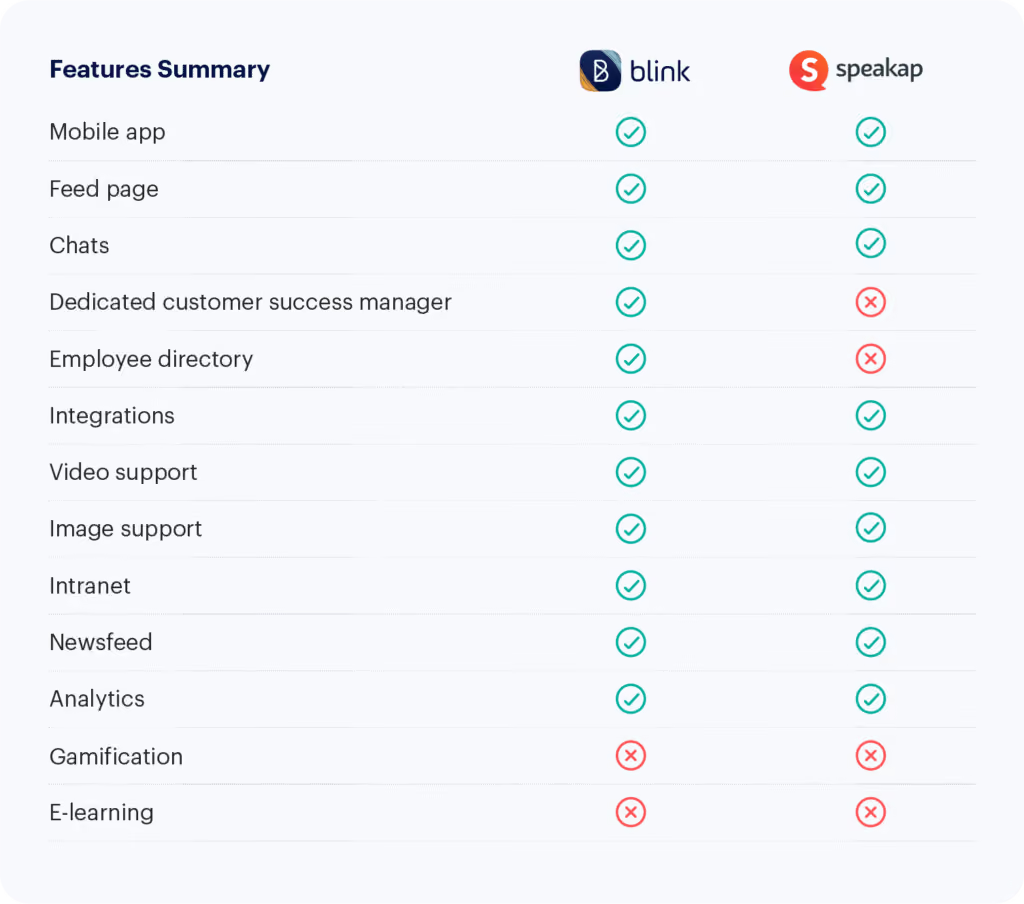
Speakap vs Blink: How they’re similar
Blink and Speakap have a few similarities:
Modern UI
Speakap nails its app by providing a straightforward user experience that is comparable to consumer-oriented apps your employees are already familiar with. With its timeline and one-on-one chats, it will fit right into your employees’ day.
The same can be said for Blink. The user interface is intuitive and modern, making it enjoyable to use for any employee. Users report that the platform “works equally well for desk and frontline workers.”
Timeline
Blink offers a versatile feed to share news, updates, and employee-generated content. You can send important notifications, share inspiring pictures and stories, and collect acknowledgements through actionable posts.
In Speakap, it’s straightforward to share news articles, publications, documents, and images. However, some features are slightly more limited. Some user reviews say “docs can't be opened directly within the app” and that there is a “Limited availability to insert images into posts.”
Custom branding
Blink’s theming options make it simple to add your own colors, images, logo, and even a fully white-labelled app with your company’s branding.
Speakap also offers excellent features to create a branded employee communications platform. You can create a branded app, add a custom logo, and play with menu themes.
Speakap vs. Blink: How they’re different
Analytics
Blink is a robust frontline communications platform that offers a lot of analytic capabilities and customizations to reach and engage every worker.
You can track your employees’ engagement with the content through data on every post’s reach, impressions, and interactions.
For uploaded documents, you can see the total number of views for each file and the change in views over time. You get an overall picture of your organization's engagement through a total user and active adoption count as well
Speakap has metrics that provide insight, including usage, adoption rate, read receipts, and user polls.
However, some users will find the analytics weak compared to other platforms. Besides tracking the employees who engage with your posts, data like reach and impressions are missing.
Omni-directional communication
Blink leans on user-generated content for their feed, making it ideal for organizations that want to open up lines of communication and encourage engagement.
In contrast, Speakap prioritizes a top-down style of communication. This could be a disadvantage for organizations looking for maximum engagement and collaboration between all levels of employees.
The communication style is less targeted to individual groups and teams, and some reviewers report that they “can’t target multiple recipients per post.”
Integrations
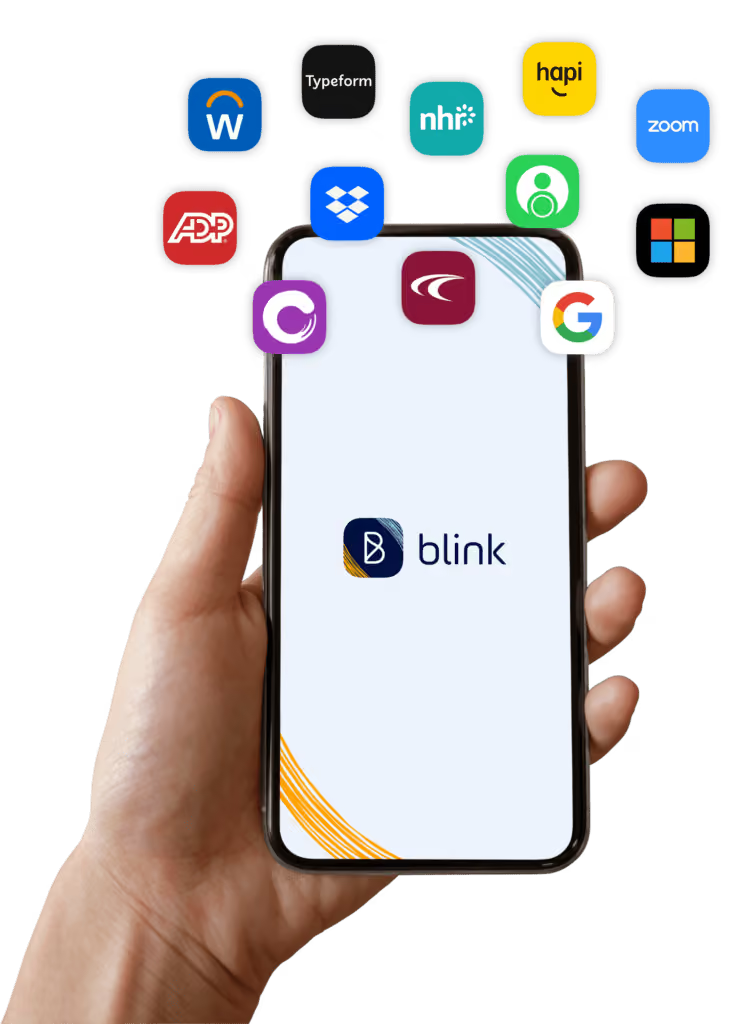
Along with a feed for daily updates, a hub for document sharing, pages for long-form content, and a multi-directional chat, Blink can be tailored to the needs of each organization.
You can customize the look of your app through personalized branding and many integrations. You can also add any essential software through Blink’s API.
Using Blink’s micro-app feature, you can add just about any functionality to your centralized app. Complete end-to-end customization can take some work through micro-apps and necessary integrations.
In Speakap, you do have a good range of integrations for HR and e-learning. But you only get read-only interfaces, links, and iframes rather than something more substantial.
Speakap is unlikely to be an overall internal communications solution as it lacks a native way to customize the functionalities within the app.
Besides linking integrations, users can’t add additional functions like payroll tracking into the app itself. Users say a con for their experience with Speakap is that there is “no ability for custom features.” and you “can't connect different apps easily.”
Customer service
Blink’s newness is a major plus for user experience and feature adoption, but this means some essential features are still being rolled out, and bugs do occur.
However, the customer service and development teams are quick to resolve any issues. Blink offers each client a dedicated support contact that oversees the transition and helps to optimize the platform for each business.
Blink also takes customer input and feedback heavily into consideration when developing new features.
Speakap’s users also frequently say they appreciate the company’s customer support, which also assigns a dedicated customer success manager to each account. Nonetheless, users report that “There are some features that would need better customer support.”
Speakap vs Blink: pricing
Blink offers four levels of paid service based on company size, while Speakap offers three pricing tiers based on features and customer service.
Blink levels:
Essential: $3.40 per person, per month
Business: Price on application
Enterprise: Price on application
Enterprise Plus: Price on application
Speakap levels:
Basic: Price on application
Premium: Price on application
Additional features, customer support
Premium+: Price on application
Additional features, priority technical support
Speakap vs. Blink: final thoughts
Both Blink and Speakap are good employee communication tools for organizations with a number of frontline workers. If your goal is to encourage across-the-board engagement with a total communications solution, go with Blink.
If you’re looking for a more targeted top-down communication app that fits into your organization’s existing platforms, go with Speakap.
If you’re not sure, try Blink’s powerful frontline employee communications solution for free.
Are you stuck between Speakap and Blink for your organization's employee communication solution?
Keep reading to find out the major similarities and differences and see which one is right for you.
Speakap vs. Blink — quick facts
Speakap and Blink are both mobile-focused employee communication apps designed for organizations with many frontline workers.
The main difference is the number of features — and cost.
Speakap could be the perfect lightweight top-down communication software for you if you’re just looking for a way to keep employees up to date and enable chat features.
However, if you want more extensive interactions, a centralized hub, and in-depth customization that replaces all other employee intranets, Blink’s features are more than worth the price.
Speakap vs Blink: How they’re similar
Blink and Speakap have a few similarities:
Modern UI
Speakap nails its app by providing a straightforward user experience that is comparable to consumer-oriented apps your employees are already familiar with. With its timeline and one-on-one chats, it will fit right into your employees’ day.
The same can be said for Blink. The user interface is intuitive and modern, making it enjoyable to use for any employee. Users report that the platform “works equally well for desk and frontline workers.”
Timeline
Blink offers a versatile feed to share news, updates, and employee-generated content. You can send important notifications, share inspiring pictures and stories, and collect acknowledgements through actionable posts.
In Speakap, it’s straightforward to share news articles, publications, documents, and images. However, some features are slightly more limited. Some user reviews say “docs can't be opened directly within the app” and that there is a “Limited availability to insert images into posts.”
Custom branding
Blink’s theming options make it simple to add your own colors, images, logo, and even a fully white-labelled app with your company’s branding.
Speakap also offers excellent features to create a branded employee communications platform. You can create a branded app, add a custom logo, and play with menu themes.
Speakap vs. Blink: How they’re different
Analytics
Blink is a robust frontline communications platform that offers a lot of analytic capabilities and customizations to reach and engage every worker.
You can track your employees’ engagement with the content through data on every post’s reach, impressions, and interactions.
For uploaded documents, you can see the total number of views for each file and the change in views over time. You get an overall picture of your organization's engagement through a total user and active adoption count as well
Speakap has metrics that provide insight, including usage, adoption rate, read receipts, and user polls.
However, some users will find the analytics weak compared to other platforms. Besides tracking the employees who engage with your posts, data like reach and impressions are missing.
Omni-directional communication
Blink leans on user-generated content for their feed, making it ideal for organizations that want to open up lines of communication and encourage engagement.
In contrast, Speakap prioritizes a top-down style of communication. This could be a disadvantage for organizations looking for maximum engagement and collaboration between all levels of employees.
The communication style is less targeted to individual groups and teams, and some reviewers report that they “can’t target multiple recipients per post.”
Integrations
Along with a feed for daily updates, a hub for document sharing, pages for long-form content, and a multi-directional chat, Blink can be tailored to the needs of each organization.
You can customize the look of your app through personalized branding and many integrations. You can also add any essential software through Blink’s API.
Using Blink’s micro-app feature, you can add just about any functionality to your centralized app. Complete end-to-end customization can take some work through micro-apps and necessary integrations.
In Speakap, you do have a good range of integrations for HR and e-learning. But you only get read-only interfaces, links, and iframes rather than something more substantial.
Speakap is unlikely to be an overall internal communications solution as it lacks a native way to customize the functionalities within the app.
Besides linking integrations, users can’t add additional functions like payroll tracking into the app itself. Users say a con for their experience with Speakap is that there is “no ability for custom features.” and you “can't connect different apps easily.”
Customer service
Blink’s newness is a major plus for user experience and feature adoption, but this means some essential features are still being rolled out, and bugs do occur.
However, the customer service and development teams are quick to resolve any issues. Blink offers each client a dedicated support contact that oversees the transition and helps to optimize the platform for each business.
Blink also takes customer input and feedback heavily into consideration when developing new features.
Speakap’s users also frequently say they appreciate the company’s customer support, which also assigns a dedicated customer success manager to each account. Nonetheless, users report that “There are some features that would need better customer support.”
Speakap vs Blink: pricing
Blink offers four levels of paid service based on company size, while Speakap offers three pricing tiers based on features and customer service.
Blink levels:
Essential: $3.40 per person, per month
Business: Price on application
Enterprise: Price on application
Enterprise Plus: Price on application
Speakap levels:
Basic: Price on application
Premium: Price on application
Additional features, customer support
Premium+: Price on application
Additional features, priority technical support
Speakap vs. Blink: final thoughts
Both Blink and Speakap are good employee communication tools for organizations with a number of frontline workers. If your goal is to encourage across-the-board engagement with a total communications solution, go with Blink.
If you’re looking for a more targeted top-down communication app that fits into your organization’s existing platforms, go with Speakap.
If you’re not sure, try Blink’s powerful frontline employee communications solution for free.
What we'll cover
Start your free trial today
See how Blink helps frontline teams stay connected, informed, and engaged.
Good internal communication is the glue that holds organizations together. It keeps everyone informed, aligned, and connected — helping employees understand company priorities and feel part of a shared purpose.
In 2026, internal communication involves more than noticeboards and scattered email threads. Organizations with hybrid or frontline teams need modern internal communication platforms like Blink to connect employees, simplify updates, and enable easy collaboration.
A successful internal communication strategy includes all communication types: top-down, bottom-up, and peer-to-peer. These channels work together to connect employees and ensure information flows throughout your organization.
For larger or dispersed teams, achieving this can feel like a tall order. But with the right internal communication software, even global workforces can stay connected and engaged.
Luckily, many new tools and platforms can help your company improve communication.
Types of internal communication tools and platforms
Before diving into specific providers, it helps to understand the main types of internal communication software shaping the modern workplace in 2026.
The most effective organizations use a combination of these tools — or a single employee experience platform like Blink, which combines many of these functions into a single mobile-first solution.
Instant messaging tools
Internal communication isn’t just top-down. Co-worker collaboration tools keep conversations flowing across teams and locations by enabling quick information sharing, file exchange, and informal social connections.
{{mobile-chat="/image"}}
Advantages:
A communication tool that allows employees to chat and share information (along with emojis and GIFs)
Most instant messaging tools are available on both desktop and mobile
Messaging tools can be used for communication between co-workers, but also for information-sharing between leadership and employees
Best tools: Blink, Slack, Jive, Workvivo
Emails and newsletters
Digital newsletters have always been great for sharing essential company updates. Modern tools enhance this channel with templates, analytics, and branded content delivery.
Best tools: ContactMonkey, Axero, Poppulo, Staffbase
Audio and video conferencing tools
Rewind a decade and video conferencing probably wouldn’t be one of the top staff communication tools on your list. Today, however, in a world of remote and hybrid teams, video conferencing tools are a workplace essential. They allow employees to talk face-to-face, even when they’re not based in the same office.Now a workplace essential, these tools make remote and hybrid meetings seamless — from one-to-one calls to company-wide events.
Best tools: Zoom, Google Meet, Microsoft Teams
Employee recognition center
Recognition platforms reward effort and build engagement by blending social recognition with tangible rewards to boost morale and employee retention.
Best tools: Blink, Bonusly, Unily
{{mobile-kudos="/image"}}
Employee engagement and surveys
Engage your employees and you experience countless benefits, including improved productivity, customer loyalty, and profitability. But if you really want to improve employee engagement, you need to measure it.
Employee surveys and feedback forms are an essential part of any internal communication toolkit. They support bottom-up communication and give you valuable insight into how employees really feel about working for your firm.
{{mobile-survey="/image"}}
Best tools: Blink, SurveyMonkey, Bonusly, Qualtrics
Company news feed
A private, social-style feed alerts employees to company updates and important cultural moments.
Best tools: Blink, Workvivo, Staffbase, Happeo
{{mobile-main="/image"}}
Project management
Project management platforms keep work visible, accountable, and collaborative.
Best tools: Asana, monday.com
Intranet
Evolving beyond traditional intranets, these tools now enable engagement, two-way communication, and document collaboration.
Mobile-first employee communication apps centralize updates, messaging, and engagement features — ideal for hybrid and frontline teams.
Best tools: Blink, Workvivo
Employee experience platform
These top-tier employee experience platforms offer a user-friendly way to access messaging, news, surveys, recognition programs, and HR functions.
These platforms go beyond communication — supporting onboarding, engagement, and culture-building.
Best tools: Blink, Workvivo, Staffbase
The takeaway:
Modern internal communication relies on an integrated ecosystem or a unified platform like Blink, which simplifies your tech stack and enhances workforce connection.
Blink serves as a mobile-first communication app, a modern intranet, a recognition tool, and a complete employee experience platform.That agility makes it ideal for companies looking to streamline their technology and boost employee engagement.
20 best internal communication tools
Ready to find the right comms solution for your organization? Take a look at our round-up of the best internal communication tools for 2025.
Blink is a modern internal communication tool and employee experience platform that brings together messaging, news, surveys, recognition, and analytics into a single mobile-first solution. It’s designed for organizations that want to improve communication, engagement, and access to information across both desk-based and frontline teams.
{{mobile-hub="/image"}}
As a mobile-first internal communication platform, Blink’s unified interface lets teams share updates, message peers, and access essential workplace applications in real time, without a corporate email address — no matter their location.
Unlike single-purpose messaging apps, Blink functions as an all-in-one internal communication software, combining collaboration and employee engagement tools in one place.
Features like pulse surveys, recognition, and content personalization enable two-way communication and make company-wide updates more meaningful.
Blink also includes social-style communication features — such as Stories, Communities, and a personalized news feed — that make information sharing intuitive and engaging. Built-in analytics help leaders understand message reach, engagement trends, and content effectiveness.
Pros
Unified internal communication toolset: Blink combines chat, news, surveys, recognition, and analytics.
Mobile-first accessibility: It works on smartphones and desktops, and doesn`t require a company email.
Seamless integrations: Connects with Microsoft 365, Google Workspace, HRIS, and scheduling tools.
Data-driven insights: The analytics dashboards measure communication performance and engagement.
Cons
The search functionality could benefit from more advanced filtering and refinement options.
Pricing
Pricing is available on request
Use Cases
Strengthening culture and alignment through data-informed communication strategies
Connecting hybrid and frontline teams with one internal communication platform
Centralizing all company messages, tools, and resources in a single hub
Improving engagement through interactive multimedia content
2. Asana
Asana is a well-known project management tool and, if you use it, you’re in good company. Around 85% of Fortune 100 companies say they use Asana.
With this workplace communication platform, you can create, prioritize, and allocate tasks. You can view tasks in timeline, board, and list formats — and track your progress toward milestones.
The visual format makes it easy to see which tasks your team needs to complete first. And the process of identifying and remedying project bottlenecks becomes much easier too.
Pros
A free version that supports 10 members and comes with unlimited storage, tasks, and messages
A clean, intuitive interface and a comprehensive selection of project and task management tools
Comes with a mobile app so employees can keep of track of projects on the go
Good integration with third-party tools
Cons
A high volume of email notifications can be frustrating for users
One of the more expensive project management solutions available
The mobile experience pales in comparison to the desktop experience
Collaboration tools aren’t as extensive and effective as those of other project management tools on the market
Pricing
Monthly pricing for Asana starts at a basic free plan. A business plan costs $24.99 per user per month when billed annually.
Use cases
Giving remote teams the tools they need to manage projects effectively
Cross-team collaboration
Status updates and reporting — leaders can view dashboards and reports to stay informed of project progress.
3. Jive
Jive is a community-building communication tool that you can use for top-down, bottom-up, and peer-to-peer connection. Team members can share photos, videos, documents, status updates, and blog posts. They can also decide whether their post gets seen by one team member, a specific group, or the whole organization.
Another great feature of Jive is its People Directory. Here, employees can search for co-workers they want to connect with, based on their skills, endorsements, and favorite activities.
Pros
Jive is an all-purpose business communication tool
Supports personalized news updates
Provides a single inbox so employees can manage all company communications and conversations in one place
Cons
Jive has a complicated interface and a cluttered layout that can be difficult for users to understand and navigate
Limited integrations with the other workplace tools you use
Some users say the Jive mobile app is slow and clunky with lackluster features
Pricing
Pricing is available on request.
Use cases
Creating a centralized hub for updates and document sharing
Personalizing company updates to make them more relevant and engaging
Giving employees the tools they need to interact with leadership, managers, and coworkers
4. Zoom
Zoom is often listed as one of the most reliable video conferencing platforms. It offers excellent audio and visual quality, even when internet connection is patchy, and it’s really easy to use.
You can record meetings, direct meeting participants to breakout rooms, and make use of a meeting annotation function. Zoom offers a range of other useful features too, including an online whiteboard and virtual working spaces (known as Zoom Huddles).
Pros
User-friendly interface
Can run small one-to-one meetings, large conferences, and anything in between
Advanced features include breakout rooms and webinar hosting
Cons
Zoom can be expensive for larger teams, with add-ons needed for meetings of more than 500 participants
Pricing
A Pro plan, for up to 99 users, costs $15.99 per user per month. A Business Plan, for up to 250 users and with a greater range of features, costs $21.99 per user per month.
Use cases
Running live meetings and webinars
Supporting video and audio communication for hybrid and remote teams
5. Bonusly
Bonusly gives you all the tools you need to run a successful recognition program. Via an intuitive platform, employees can tag peers and congratulate them on their accomplishments. Congratulated employees earn points, which they can then use to claim their preferred reward — a gift card, cash, or a charitable donation.
Reporting tools give leaders insight into team dynamics and patterns of recognition. It helps you to discover top performers and identify people who haven’t had any recognition in a while.
Pros
A user-friendly interface and next to no learning curve
The option to tailor recognition programs to fit your culture and values
Out-of-the-box integrations with other workplace tools including Workday, Asana, and Slack
Cons
Limited analytics — so it can be hard for companies to understand employee engagement and recognition patterns
Pricing
Monthly pricing options for Bonusly starts at $2 per user.
Use cases
Strengthening company culture and employee morale with regular recognition, even when employees are working remotely
Creating a culture of peer-to-peer recognition — employees can award points and praise to their co-workers
6. Axero
Axero is an internal comms platform designed to unify teams, increase productivity, and improve workplace culture. It features mass email tools, an activity stream, a blogging platform, and instant messaging.
Using Axero, you can create a central hub for files, communications, and company updates. Collaboration features also come in handy, with space for team discussions and the option to co-edit documents.
Pros
Axero’s customer service is responsive and helpful
Good customization and integration options
A comprehensive employee directory that makes it easy for staff to find and connect with co-workers
Cons
A steep learning curve — users say that Axero can be overwhelming for beginners
Some users say that Axero functionality lags behind that of other intranet competitors
Limited features on the mobile version
Pricing
Pricing is available on request.
Use cases
Creating a single hub for news, updates, and resources
Supporting collaboration across your company, with file sharing and team discussions
Building a personalized employee experience, with custom dashboards tailored to the roles and departments of employees
7. ContactMonkey
ContactMonkey is one of the best newsletter platforms available. Unlike some of its competitors, ContactMonkey integrates with both Outlook and Gmail so you can send emails from and receive replies to your usual inbox.
The platform provides an easy-to-use, drag-and-drop email builder. Multiple team members can collaborate on the same email. And analytics tools help you judge which newsletter content is best engaging your workforce, so you can create more of the same.
Pros
Employee survey tools so you can email your surveys to the workforce with ease
Integration with Outlook and Gmail
SMS integration that allows you to reach employees with urgent updates
Real-time tracking and analytics — so you get insight into email open rates and click-throughs
Cons
You can only use ContactMonkey for internal emails, not external marketing emails
Only supports communication over email, which may not be particularly engaging or appropriate for all organizations
Unlikely to fulfill all your internal communication needs
Pricing
Prices start from $600 per month for 500 employees. Prices for more extensive plans are available on request.
Use cases
Engaging email and newsletter communication for employees
Launching employee surveys to help you acquire useful feedback
8. Slack
Slack is an instant messaging tool that supports asynchronous communication. Slack works well for desk-based employees who have access to other platforms, like Google Drive. Slack doesn’t work as well for on-the-go, field-based employees, who don’t have such easy access to separate cloud storage.
People within your organization can launch chat threads, including as many or as few team members as they like. They can create threads for different projects, departments, and topics. Teams also get access to little extras, like file sharing, message search, and a task reminder function.
Pros
User-friendly interface
Integration with a wide range of other workplace software
Customizable notifications
Cons
Doesn’t work well for teams who are on the go — Slack is most suited to desk-based teams
Can be hard to find what you’re looking for across multiple chats and channels
Pricing
Slack offers a limited free plan. Paid plans start from $8.75 per user per month.
Use cases
Ensuring real-time communication between dispersed team members
Providing a variety of internal communication channels — including direct messages, group chats, and channels
SurveyMonkey has made it to our employee survey top spot for its ease of use. This employee communications platform has lots of survey templates to choose from and, if speed is your priority, lots of features that help you get employee feedback fast.
You can choose from hundreds of expert-written questions or write your own. And with the help of custom templates, you can find or create surveys for any situation, whether you want to conduct 360 reviews, find out your Net Promoter score, or seek feedback on your employee engagement efforts.
Pros
Ease of use — SurveyMonkey has a clean, uncluttered interface that employees will enjoy using
Using the Genius Assistant and the “build it for me” feature, you can create surveys quickly
Excellent analytics that help you make sense of employee responses
Cons
Limited free features
Limited customization options, so you may struggle to create complex or specialized surveys
Pricing
Prices start from $30 per user per month.
Use cases
Boosting employee satisfaction and engagement with the help of employee feedback
Making it easy for your teams to launch and respond to employee surveys
10. Microsoft SharePoint
Microsoft SharePoint is a file-sharing software that integrates seamlessly with the other Microsoft tools you may already use. You can create branded document libraries called sites, customizing them for document collaboration or top-down comms.
Teams get to share news, documents, and data. They can also edit documents collaboratively — setting notifications so they know when a co-worker makes changes.
Pros
Easy integration with other Microsoft products
Allows you to segment employees by division, giving each division its own calendar and visual timeline
Customization options so you can build forms, workflows, and custom applications for your teams
Cons
Not particularly user-friendly, especially on mobile
Cost of implementation is high and adoption rates tend to be low
Pricing
A basic SharePoint plan costs $5 per user per month.
Use cases
Project collaboration — teams can co-edit documents and manage workflows
An easy way for desk-based teams to access company documents and resources
Using internal announcements and newsletters to communicate with all employees
11. Monday.com
Monday.com is a project management tool that supports comms and employee engagement. You can use this internal communications software to create and assign tasks, track project progress, and create performance-tracking templates for employees.
Team members receive notifications when action is required. And an easy-to-use visual interface makes it easy to see where each project is up to at a glance.
Pros
A comprehensive set of project management tools
Customizable project templates to get you started
A weekly overview so you can see tasks and project milestones you need to tackle over the next few days
Cons
The backend of this business communication software is complicated and involves a steep learning curve
Limited comms tools so Monday.com isn’t useful as a standalone business communication platform
Pricing
Prices start from $8 per user per month.
Use cases
Improving project management and work collaboration
Task and workflow automation to streamline repetitive processes
12. Workvivo
Workvivo is an intranet software company owned by Zoom. You can use this internal communication tool to improve comms, employee engagement, and recognition, too. You can also make use of multiple communication channels and employee feedback tools.
Standout features include live broadcasting tools, so you can launch live streams and podcasts. You can also create microsites, where teams and special interest groups can create their own, tailored communities.
Pros
Strong translation abilities for multilingual organizations
An engaging, social-media-style interface that will feel familiar to employees
Rich communication tools including a news feed and instant messaging (available through integrations with tools like Slack, MS Teams, and Zoom meetings)
Cons
Chat functionality on the mobile app falls behind the desktop experience
Advanced features — including chat, Workvivo TV, and advanced analytics — are add-ons that come at an additional cost
Admins say they want better customization options and improved third-party integrations
Staffbase is an internal communication platform designed to connect and engage employees. It brings company news, messaging, and resources into one place, making it easier for you to reach your workforce — whether they’re remote, hybrid, deskless, or office-based.
With Staffbase, you can communicate over the company intranet and send emails and SMS, all from one centralized dashboard. You can also create tailored content paths so employees receive the right information at the right time.
Pros
A great user experience across desktop and mobile versions
Brings a range of communication and workplace functions into one location, supporting top-down, bottom-up, and peer-to-peer conversations
Built-in reporting so you can see how employees are using the platform and interacting with your content
You can customize the platform so it matches the look and feel of your branding
Cons
Some add-ons and integrations come at an additional cost
There are few out-of-the-box features on the employee app
Search functionality and integrations aren’t as good as they could be
Pricing
Pricing is available on request.
Use cases
Launching employee surveys with in-built tools
Creating a single source of truth within your organization thanks to communication channels that all workers can access
Making comms more personal, with the option to segment your audience and deliver relevant content to different employee groups
14. Poppulo
Poppulo is an email and mobile communications software. It also provides digital signage functionality and digital tools for desk and meeting room management.
You can target messages based on location, role, or interests to cut through the noise. You can also access tools for planning and promoting internal events, like town halls and team meetings.
Pros
Omni-channel communications, across email, SMS, intranet, and digital signage
Drag and drop email design tools plus advanced personalization
Strong analytics — Poppulo gives comms teams clear visibility into message performance
Cons
Poppulo is more complex than some of the other tools on this list, so there can be quite a learning curve
While it brings multiple communication channels together, Poppulo isn’t comprehensive enough to work as a standalone company communication system
Pricing
Pricing is available on request.
Use cases
Enterprise email communication and analytics
Improving the quality of email messaging with employee segmentation tools
Managing office workspace among hybrid teams
15. Qualtrics
Qualtrics is an employee survey and feedback tool. You can use it to capture employee data via surveys and passive listening — and discover how your business is doing across metrics like intent to stay, engagement, inclusion, and wellbeing.
Surveys are easy to customize, with advanced question types and logic, while analytics and reporting tools help you turn insights into actionable strategies.
Pros
Flexible survey design options
Powerful analytics and reporting capabilities
AI tools that guide you to take action based on your employee feedback findings
Cons
Using advanced features effectively may require training
Qualtrics can be overly expensive for smaller businesses
Pricing
Pricing is available on request.
Use cases
Improving employee satisfaction and engagement with the help of regular surveys
Creating a culture of 360 feedback to improve the effectiveness of management and leadership
16. Happeo
Happeo is a Google-based intranet that provides a centralized location for all internal communications. It provides a hub for company news, documents, and collaboration tools.
Key features include a social intranet, an employee directory, and an intuitive search function. You can also use AI tools to find and fix gaps in your knowledge base.
Pros
Easy integration with Google Workspace tools
Excellent search functions so it’s easy to find the people, posts, and integrated third-party apps you’re looking for
The option to create hubs and communities based on departments, roles, and shared interests
Cons
Limited integrations beyond the Google suite
A web-first platform, best suited to desk-based teams
Pricing
Pricing is available on request.
Use cases
Creating a centralized hub for updates and document sharing
Unily is an employee experience and internal communications tool. It provides features that support its “four cornerstones” of digital employee experience: Alignment, Engagement, Enablement, and Simplicity.
Key features include email, employee feedback, and recognition tools. You can design, sequence, and automate employee journeys so staff receive relevant information at the right time. You can also use gamification features to improve intranet engagement.
Pros
An excellent desktop version, with an engaging and intuitive user experience
Fine-grained controls for admins
A good range of notifications
Cons
Mixed opinions on Unily’s customer service and ability to support its partners
Translating Unily’s comprehensive desktop features to mobile is a challenge for admins
Pricing
Pricing is available on request.
Use cases
Creating channels for company-wide communications
Boosting employee engagement with dynamic content and gamification
A comprehensive intranet platform, Simpplr supports internal communication and employee engagement. It provides a user-friendly, social-media-style interface and provides AI-driven content recommendations.
Standout features include employee listening tools, surveys, and a recognition program. There are also lots of communication channels you can use across email, SMS, a mobile app, and desktop software.
Pros
An intuitive, uncluttered interface
Strong analytics that make it easy to track engagement metrics and content performance
Great search functions
Cons
Difficult login process, with multiple links provided
Some users say the struggle to integrate Simpplr with their preferred third-party apps
Advanced features can be expensive
Pricing
Pricing is available on request.
Use cases
Making employee feedback and listening a key part of company culture
Creating a centralized hub for communications, resources, and community
Bringing large organizations and distributed teams together
Google Meet is a video conferencing and virtual meeting tool. It’s integrated into Google Workspace, so it connects easily to Gmail, Calendar, and any other Google tools your team happens to use.
It’s incredibly easy to use via an internet browser so users don’t even have to download the software. This makes it one of the most accessible virtual meeting tools currently available.
Pros
Easy to set up and use
The ability to hold meetings with up to 1,000 participants
Chat, emoji, and screen share functions available during meetings
Cons
You need additional tools to fulfil all internal communication needs
Fewer advanced features compared to Zoom and Microsoft Teams
Pricing
Prices start from $6 per user per month.
Use cases
Virtual team meetings, webinars, and company-wide announcements
One-on-one video meetings
Virtual training and employee onboarding
20. Microsoft Teams
Microsoft Teams combines instant messaging, video conferencing, and file-sharing tools. As you’d expect, it offers the best possible integration with other Microsoft Office tech. You can use a selection of tools to create an all-round internal communication solution.
You can use Teams to run video meetings and team chats when your employees are working remotely or across different locations.
Pros
Strong integration with other Microsoft products
Secure communication and file sharing
Cons
Interface isn’t particularly engaging and there are few social-media-style features
Teams is designed for desktop use so mobile users don’t get the same user experience
Pricing
Prices start from $4 per user per month.
Use cases
Creating digital channels for internal communication and project management
Launching video and audio calls and sharing company-wide updates
Bringing remote and hybrid teams together, even when they’re working in different locations
Choosing an internal communication tool for your frontline organization (2026)
The right choice depends on your organization’s structure, workforce, and goals — particularly if you operate with hybrid or frontline teams.
For frontline organizations, the most significant communication challenge is dispersion. To resolve this, every employee should receive critical updates and feel part of the same company culture, even if they rarely visit headquarters.
To build a sense of belonging, choose a mobile-first internal communication platform that’s user-friendly and equally accessible for all.
To identify the best fit, ask yourself these four questions when evaluating internal communication software:
#1. Is your organization office-based, or do you have deskless workers to consider?
Some internal communication tools suit desk-based teams, such as intranets designed for desktop access. However, these are often unsuitable for reaching frontline workers who rely on smartphones.
To prevent information gaps, look for mobile-first internal communication solutions that offer the same functionality across devices. A dedicated mobile app ensures equal access and engagement across every team member — no matter where they work.
#2. Do your employees have regular opportunities to connect during the workday?
Connection drives performance, and employees who feel they belong are much more engaged and productive.
The problem for frontline teams is that they often lack organic “water cooler” moments. Using internal communication tools that enable social-style interaction — such as chat, feeds, and communities — fosters real-time collaboration between field and office teams.
#3. How much time can your employees spend on internal comms each day?
As frontline employees are busy serving customers, maintaining operations, or working off-site, they need a simple and reliable communication platform.
When evaluating tools, prioritize their ease of use, onboarding speeds, and precise message delivery.
Also check adoption rates and engagement levels as they’re powerful indicators of how smoothly a tool integrates into your daily workflow.
#4. How many internal communication goals do you want to cover?
Some platforms specialize in single functions, such as surveys, document sharing, or project management. Others, like all-in-one employee communication platforms, combine these capabilities.
To streamline your tech stack while enhancing connection and engagement, choose an internal communication tool that supports multiple channels — chat, news, surveys, recognition, and analytics — within one system.
The importance of internal communications in an organization
Every organization — frontline or otherwise — needs an effective internal communication strategy thatunites employees behind the company culture and values, improves collaboration, and enhances retention.
Strong internal communication also supports:
Company connection: When employees feel aligned with organizational goals, engagement and satisfaction rise
Change management: Transparent communication ensures buy-in during transitions
Problem-solving: Clear, direct messaging limits misinformation and strengthens trust
Productivity: Employees perform best when information is easy to find and act upon
Many internal communication tools support these goals — from instant messaging and surveys to intranets and recognition platforms. For frontline teams, the right solution must be mobile-first and easy to access on the go.
The right internal communication software can transform a disconnected team into a cohesive, informed community.
Blink shows how this works by helping companies like Go North West connect all their employees through a single digital hub.
Blink. And transform company communication with an all-in-one internal communication platform built for every worker.
Get comms right and you improve collaboration, employee engagement, and the employee experience. But get comms wrong and employees are likely to switch off from the company intranet — making it much harder for you to land critical messages.
A surprising number of organizations miss the mark. While 77% of leaders think the comms they share give employees the context they need to do their jobs well, only 46% of employees agree.
To ensure your comms are as good as they need to be, check that you’ve not fallen into one of these bad internal communication habits.
And if you have, don’t worry! There are strategies to break those bad habits so you can improve employee communications and engagement at your organization.
{{future-of-internal-comms-2025="/callouts"}}
7 bad internal comms habits and how to break them
Bad habit #1: Posting inconsistently
When it comes to internal communications, the only thing worse than not posting at all is posting once… and never again.
Internal comms inconsistency can confuse expectations, misdirect attention, and ultimately result in you losing your most important audience — your employees. People may stop checking on the intranet because they’re used to seeing nothing but tumbleweed. So when you do have an important message to share, there’s no one there to see it.
Break the habit: Figure out the cadence that best fits the needs of your organization. Then, make sure there’s new content on the company intranet on a regular basis.
Don’t overlook the power of a daily or weekly update: A whopping 85% of employees said they’re most motivated when management offers regular updates on company news.
{{mobile-post-planner="/image"}}
For many, creating a content calendar and writing posts in bulk will help maintain consistency. Sound like you? Try using a scheduling tool. Some modern internal communications platforms may even have this scheduling functionality built in. This way, you can then create and schedule posts in advance, choosing to publish them at a time when your teams are most likely to need and read them.
Bad habit #2: Saying too much
We’ve seen plenty of internal communications messages that try to say too much all at once. They cover one topic in overwhelming depth — or cover a multitude of topics in one post.
If this sounds familiar, it’s a habit you need to break. When you cram too much information into your messages, you risk confusing employees. You bury your central message and encourage your workforce to skim or ignore future comms.
Break the habit: Before you start writing any message, get clear on the most important point you want to convey. Lead with this key message, putting it at the top of your post and adding supporting details underneath.
If you need to share lots of information, try splitting your content into smaller, more digestible chunks. You can then create a post around each part of the news or announcement, publishing a logical series of posts that are less likely to overwhelm employees.
Bad habit #3: Limiting yourself to text only
Your employees are used to seeing a wealth of interactive, visual content in the technology they use in their personal lives. Social media platforms like Instagram and TikTok know exactly what keeps users scrolling and wanting more: short-form, highly visual, and personalized content.
If you lead with text-based messages at work, you’re unlikely to catch their eye — or contribute to a positive intranet experience.
Break the habit: Hook your audience from the get go by making your internal comms channels feel like a social media experience. Incorporate visuals like short-form videos, polls, photos, and graphics.
This dynamic and engaging content is more likely to grab the attention of your audience and keep them returning to your platform.
{{mobile-stories="/image"}}
Bad habit #4: Using the wrong channels or platforms
It should be easy for employees to find the information they’re looking for on your intranet. But if you don’t have a strategy for what goes where, they’re going to struggle to find what they need, when they need it.
A poorly governed channel strategy can damage not just the employee experience, but key operational metrics like productivity: Employees spend nearly 20% of their work week looking for internal information or tracking down colleagues who can help with specific tasks.
Break the habit: As the saying goes, “location, location, location!” Consider the format of your employee communications and which channel or platform suits each format best.
For example, it makes sense for an evergreen resource — like a policy or FAQ document — to live on your company intranet, in a resource hub. A short-form update, relevant only in the moment, is better suited to your news feed. And a message hyper-relevant to a specific group of employees can find the right home in the appropriate digital community.
{{mobile-community="/image"}}
Bad habit #5: Taking a one-comms-fits-all approach
Send all employees all the messages and you’ll overload them with information — some of it completely irrelevant to them and their role. Employees who grow used to receiving non-personalized internal communications are more likely to skim or ignore critical information.
Break the habit: Ensure that every message is relevant to the employee who receives it.
Pick communication tools that allow you to segment your audience, ideally by team, role, tenure, and location. Then select the relevant audience for each post and resource.
You can also use different communication channels — like a closed team chat or an employee community — to ensure specific information cuts through.
Bad habit #6: Sourcing ideas only from the C-suite
Your business leaders are a great resource for content ideas. But they’re busy people. So if you rely solely on the C-suite, you may find it hard to generate enough content. Plus, by sourcing only one side of the corporate story, making it difficult to tell a well-rounded story that can resonate with any employee.
Break the habit: Get content ideas from your business leaders, by all means. But also involve employees across all levels in the content creation process.
You can do this with the help of an internal communications platform that facilitates two-way communication. Employees can comment on posts, amplifying their impact. You can also identify employee ambassadors and ask them to create employee-generated content.
This approach makes content creation easier for your comms team and — because you’re giving your workforce a voice — improves employee engagement, too.
Bad habit #7: Not getting feedback regularly
Let’s say you’ve successfully done it — you quit all the bad comms habits on this list up until now. Well done! But that doesn’t necessarily mean messages are getting through to your employees.
Without regular employee feedback, you can’t know for sure how employees feel about your internal communications. And that means it’s still a challenge to ensure any changes to your employees communications strategy are meaningful improvements.
Break the habit: Regularly launch employee surveys and polls to gauge how employees feel about your internal communications. Ask them about every detail: cadence, content, channels, opportunities for two-way interaction.
Also, use intranet analytics to identify your best-performing content. When you see what’s working well in terms of effectiveness and employee engagement, you can build more of that into your content schedule.
Not only will your employee comms thrive, your employees will, too: Workers who feel their voice is heard are 4.6 times more likely to feel empowered to perform their best work.
{{mobile-live-stream-poll="/image"}}
Break bad communication habits and supercharge your comms
These bad communication habits stop messages from getting through. They also lead employees to lose interest in your communication channels, making it even harder for your comms team to be successful moving forward.
But like any bad habit, the ones on this list can be broken, and with the right adjustments, you can prevent bad habits from forming again. Make just a few simple tweaks — like democratizing content creation, posting more consistently, and seeking employee feedback — and you can get company comms back on the right track.
You’ll also build a more informed, connected, and collaborative organization — which is good for business and good for the employee experience, too.
From fairy tales to blockbuster movies to conversations with family and friends, we’re surrounded by stories — and have been since we were tiny babies. Stories are how we learn and make sense of the world.
Stories also have a powerful impact on the brain. Neuroscience shows that stories awaken our senses, help us remember information, and create a sense of human connection.
Using storytelling for business is, therefore, a really effective way to engage employees with your messaging. It’s also a great way to convey information quickly and effectively to time-poor frontline workers.
We know not everyone is a creative writer. But we also believe that with the right approach, you can make business storytelling an integral part of your organization.
So in this article, we’ll walk you through some of our best tips for using company storytelling for your internal communications. Let’s start by looking at some common storytelling structures.
Some popular storytelling structures
Storytelling has existed since the development of language itself. As Yuva Noah Harari explains in his book Sapiens:
“It is the distinctive ability to believe in stories that separate sapiens from other creatures. You could never convince a monkey to give you a banana by promising him limitless bananas after death in monkey heaven.”
Storytelling is one of the foundational pillars of society. It’s shaped our understanding of right and wrong for generations. From 30,000-year-old cave drawings in France to Aesop’s fables to the urban legends teenagers share today, all cultures in history have told stories.
And despite there being stories about every topic and every character imaginable, stories tend to fall into a surprisingly small number of categories. Knowing these categories can help when you’re creating your own corporate stories.
The seven basic plots
Some people argue that you can put every single story ever created into one of these seven categories.
Rags to riches. A character finds power, money, or love, loses it, and then wins it back. Example: Cinderella.
The quest. The main character has to reach a location or fulfill an objective, conquering obstacles along the way. Example: The Lord of the Rings.
Rebirth. A character changes their ways and becomes a better person. Example: A Christmas Carol.
Overcoming the monster. A hero has to overcome an evil force. Example: Any James Bond movie.
Comedy. A story designed to make people laugh by subverting expectations and mixing the familiar with the absurd. Example: Bridget Jones’ Diary.
Tragedy. The main character makes a big mistake or demonstrates a character flaw which leads to their undoing. Example: Bonnie and Clyde.
Voyage and return. A character goes to a strange land, overcomes the challenges there, and returns home with newfound experience or knowledge. Example: Gulliver’s Travels.
The hero’s journey
The hero’s journey is another popular story structure. A hero is living happily in their comfort zone when something unexpected happens and they’re forced into an adventure.
Here are some examples:
Harry Potter lives with the Dursleys. Hagrid comes to take him to Hogwarts.
Frodo Baggins lives with Bilbo in Hobbiton. Bilbo sets off on a journey leaving the ring to Frodo.
Barbie lives in Barbieland. But when she starts behaving strangely, Weird Barbie sends her to the real world.
This same basic template can be found across countless books, movies, and TV shows — and it tends to follow the same 12 steps.
A hero is called to an adventure. They experience tests, allies, and enemies. They reach a low point before finding a solution and returning back to their original lives as a hero.
How these popular story structures can support business storytelling
We’re not suggesting that you go and write a whole novel or screenplay about your organization. But there are a few things we can learn from these storytelling structures.
First, storytelling is not just a talent people are born with or without. There are structures you can follow and techniques you can learn. It’s perfectly possible for your internal communications team to tell compelling corporate stories.
Second, structures like the hero’s journey lend themselves beautifully to storytelling in corporate communications. Challenges intrigue your audience and get them to empathize with the hero. But the hero always achieves their goal. So success is another important and inspiring part of the story.
By incorporating key story elements — compelling characters, emotional ups and downs, and a popular story structure — into your internal communications, you can create messages that engage your employees. You make your messages more memorable and create a sense of connection between employees and your organizational values.
How to supercharge engagement with internal communication storytelling
There are lots of ways to boost employee engagement with your internal communications.
You can give employees a voice with communication tools that support bottom-up communication. You can celebrate achievements and recognize hard work.
Simply giving employees the right information improves their motivation and morale. Employees who receive enough information to do their jobs well are 2.8 times more likely to feel engaged in their work.
Business storytelling is another strategy to add to your list. And however you choose to use storytelling for business, here are some tips that will help you make your stories more engaging for employees.
1. Make it easy
Many organizations use outdated internal communication software that makes it hard to share stories. Some are still using email newsletters or paper memos as their only channels of internal communication. So storytellers find it hard to get their stories seen.
You can make it easy for everyone to tell corporate stories by assessing your internal communication tech and — if it isn’t streamlined and user-friendly — consider other internal communication software providers.
2. Share corporate stories as they happen
The more relevant a story, the more impact it tends to have. Workers like to see authentic stories that are happening in real-time, not stories about an event or accomplishment that happened weeks ago.
Share corporate stories as they happen and employees are more inclined to respond to them in the moment. They’ll then amplify the story by sharing or commenting on it.
3. Mix it up
When storytelling for internal communications, you can get creative. You can use stories to convey all sorts of information. Here are a few ideas.
Share a customer success story. Share a case study explaining a customer pain point, describing how a frontline team member supported the customer, and the outcome your customer achieved. Use quotes from the customer and a video or photos, so employees can put a face to the name.
Share the story of your organization. Tell the story of how your company came to be. This type of story works really well during the onboarding process. Be authentic. Share the challenges founders faced, how they overcame them, and what their plans are for the future.
Paint a picture. The characters in your stories don’t have to be real. You can use imagined characters to paint a picture for employees. For example, when explaining how a new process will benefit customers, create a customer character — let’s call her Sarah — and describe the process from her point of view.
Celebrate an employee milestone. Rather than simply recognizing an employee for their hard work, describe the journey they’ve taken within the company. Start with their nervous first days and lead on to their current successes.
There are countless ways to weave stories into your internal communications. So don’t be afraid to mix it up and try new things.
4. Bring stories to town hall meetings
Whether you conduct town hall meetings in person — or involve remote and frontline workers by live streaming — starting with a story is a great way to build rapport.
When leaders tell stories — any stories — they come across as more human. This makes it easier for employees to trust the organization’s leadership and makes them more likely to contribute to the meeting with their own questions and comments.
According to Ally Bunin, Global Head of Internal Communications Stories at Russell Reynolds Associates:
“Starting with a story is the best way to open a town hall. We encourage our team to share a personal story, even if it's not related to the topic of the town hall meeting. A story makes them more relatable, and it's so important to be a human first.”
5. Be authentic
Stories are compelling because — sometimes — things go wrong for the hero. So don’t gloss over the failures or challenges involved in your stories, even those that come from senior leaders.
Stories told with honesty and authenticity are much more engaging for employees. Therefore, leaders should aim to tell their own stories, rather than relying on polished scripts.
Even if the business is struggling right now and you’re sharing bad news, you’ll make a better impact with a sincere story than with an airbrushed version of events.
The more open you are in your storytelling for internal communications, the more inclined your workers are to believe in what you say. And they’ll not shy away from lending their support.
6. Avoid information overload
When marketing to customers, a company takes steps to ensure that its messages are relevant to each segment of the audience. You should try to do the same for employees.
Corporate stories only resonate with employees when they’re relevant to them and their roles. So —as part of your internal communications strategy — be sure to segment your audience and personalize messages for each sector of your workforce.
This helps to avoid information overload. And because employees come to expect relevant internal communication messages, they’re less likely to switch off from your communication channels.
7. Use the power of repetition
While you want to avoid information overload, you need to make your most important stories stand out and sink in.
Stories tied to your mission, brand, values, and identity should stick in the hearts and minds of employees. To achieve this, you need to repeat those stories often.
Take inspiration from Howard Schultz, the former CEO of Starbucks. Schultz often recited an anecdote about his travels to Milan. It was in Italy that he discovered brewed espresso for the first time and became convinced that coffee shops could be big business in the US.
Schultz shared this story at many different times, events, and locations. He did this to inspire workers, to show his human side, and to emphasize that the Starbucks brand is about more than just selling coffee. It’s about delivering an experience.
Search for Howard Schultz and his name is now synonymous with this story. Repetition has helped him to create a company legend that has engaged and motivated Starbucks employees for years.
Internal communication storytelling for your organization
Company storytelling is a powerful way to improve your internal communications.
Company stories are engaging. They prompt emotion in employees, which makes them feel more bonded to your organization. And while the corporate world tends towards numbers and charts, there’s scientific proof that stories live longer in the memory than even the most impressive stats.
These storytelling benefits can help you achieve your internal communication goals. You can encourage more employees to use your intranet or employee app. You can get more employees to read and engage with your content. You can ensure that important messages are being read and remembered.
In today’s modern workplace — with the help of internal communication tech tools, like Blink — it’s easier than ever to use storytelling for business. You don’t have to rely on edited corporate announcements that receive little engagement.
Instead, you can create and curate stories from across the organization. You can tell stories using engaging multimedia content, like video or live stream. Employees can comment on news feed stories — and create their own content, too.
What’s more, because Blink is a mobile-first employee app, you can put business stories at the fingertips of every employee, whether they work in the office or on the frontline of your organization.
A record 50.5 million people living in America quit their jobs in 2022 — and a further 40% of US employees considered leaving their jobs. Organizations need to step things up a notch if they want to start engaging both their desk-based and frontline staff.
The good news is there are many employee engagement strategies, tactics, and ideas you can implement to turn around the situation. The 12 strategies we discuss in this guide will help you create an engaging workplace experience and drive employee engagement for both desk-based and frontline employees.
Frontline Employee Engagement in 2024
Blink created this guide after working with hundreds of frontline organizations. Now, these insights can help other leaders prepare for a year that promises both challenge and opportunity.
Download to learn more: The top eight frontline engagement trends to watch out for and the six key strategies for success
A quick recap: what is employee engagement?
Employee engagement is the ongoing process of ensuring your workforce feels:
Emotionally connected to their job, coworkers, and organization as a whole
Satisfied with their job role and function
Aligned with your company’s values
Able to give 100% during work hours
Industry statistics cite employee engagement as a key factor in employee satisfaction, retention, and even company profitability. Employee engagement should be a number one priority for businesses globally — and yet, as of 2023, only 23% of employees globally are engaged.
You can use a number of methods to measure employee engagement levels in your business. Think surveys, metrics, and other engagement KPIs that will help determine how motivated, satisfied, and fulfilled your employees are in their work.
Remember, employee engagement is often the byproduct of a great employee experience. If you provide a fulfilling, enjoyable, and inspiring workplace experience, you enable and encourage engagement.
With this in mind, you need to tailor and adapt your employee engagement strategies to meet the needs of different types of employees, including frontline workers. This will make their overall experience positive and rewarding.
The foundations of effective employee engagement strategies
Engaged employees can be your greatest business asset. They are more focused and committed than disengaged workers, encourage their coworkers, and positively impact your bottom line.
But improving employee engagement is not about what you do. It’s about what you are as an organization, the culture you cultivate, and the values that you live by.
So before we jump into the employee engagement strategies, it’s important to look at the key values of employee engagement that form the foundation for those strategies. Those core values are:
Respect
Respect is an essential consideration for all your high-level decisions about managing employees. For your workers to be engaged at work, they should be able to trust that they are being treated with fairness and respect.
So how do you convey this in your processes and policies? You pay competitive wages, allow enough breaks, listen to their ideas, and formally recognize excellent performance and value-abiding behaviors.
Transparency
If your employees aren’t aware of anything about your organization that’s beyond their scope of work or immediate team, you can’t blame them for feeling like an outsider. Sooner or later, they’ll feel isolated and disengaged.
Being in the loop doesn’t just help them do their jobs in a better way, but also makes them feel like they belong. So it’s essential to communicate openly and regularly with all your employees.
The more transparent your communication, the higher level of trust you’ll build with your workers. And the more comfortable they’ll feel sharing their thoughts and concerns, which brings us to the next pillar of employee engagement.
Two-way communication
Most organizations follow a top-down approach to employee communication in which frontline employees hardly ever have a say. But these workers often have the best insights because they work directly with customers day in and day out.
So one of the best values to nurture and cultivate for high employee engagement is two-way communication. Give your workers ample opportunities to raise their voice and share what they think. Then act on this feedback to take your employee engagement to the next level.
12 actionable employee engagement strategies
Here are 12 employee engagement strategies & tactics you can implement today:
1. Foster co-worker relationships
When employees have friendly relationships with immediate team members and other people in the organization, they are more likely to enjoy the day-to-day.
Workplace relationships don’t just help with networking, they also provide the guidance and motivation a worker needs to succeed in their role. And creating opportunities to build and nurture these connections is one of the best employee engagement strategies.
Co-workers don’t always cross paths throughout the working day — especially in frontline organizations. It might be up to you to encourage better intra-department connections through organized events. You could create a program to encourage workers to collaborate, socialize, or train each other on the parts of the job that they know best.
Workers from different departments can connect, share notes, and exchange best practices. This way, they can also try out a recently learned skill or explore different options they might want to pursue in the future.
In fact, there are many cases in which employees consider leaving their organization to pursue a different career path. This program will help you facilitate the lateral moving of an employee to a different department, so they aren’t forced to look elsewhere. This way you hit two goals with one stone: high employee engagement and better employee retention.
2. Have a thorough onboarding process
Onboarding is essential for setting the right tone and expectations when a new employee joins your team.
As the statistics in the video above highlight, around 20% of new hires leave in the first seven weeks of employment, but organizations with a strong onboarding process have improved retention rates by 82%.
A strong onboarding experience is achieved by:
Making sure your onboarding process covers not only organizational policies, but also the company’s core values, mission, and vision
Giving your new employees mobile accessto relevant materials and resources to learn from, and encouraging all employees to provide their feedback
Acknowledging the importance of connection during onboarding. Introduce new hires to their team members, leadership, and coworkers. For a dispersed workforce, this can be done by ensuring your employees have the right digital tools and channels to connect from wherever they are
A sense of belonging from day one is integral in order to improve employee engagement — particularly for the frontline, where80% of workers feel they have few connection opportunities at work.
See how Go North West is using Blink to make new team members feel part of the organization right from day one.
3. Rethink physical spaces
Frontline employees power the global workforce. With no central break room or day-to-day opportunities for office chat, dispersed workers can become increasingly disconnected from the rest of the organization.
While team building and other social events may be organized with the best of intentions, they often miss the mark for frontline workers, putting more pressure on employees instead of providing a channel for enthusiastic engagement.
If you’re a frontline leader, you need to rethink your social spaces and channels to meet the engagement expectations of all your employees. This might mean creating dedicated digital channels, Feeds, or groups for frontline workers who would otherwise never have a chance to interact.
Deliberately creating space for accessible social interaction can help build relationships, increase engagement, and create an environment of inclusion and positivity throughout your organization.
Career growth has a positive impact on knowledge workers’ organizational engagement
Career goal progress and professional ability development promote job engagement
Career growth has a positive effect on affective commitment, which in turn influences employee engagement.
If you can make workers feel that they can advance their careers without leaving your company, you’ll see a big boost in employee engagement. Workers at every level of your company should be able to view a clear-cut career path ahead and the map to follow that path.
So when formulating employee engagement strategies for your company, see how you can help workers get in complete control of their careers. The more assured they are about achieving their future goals, the more engaged you’ll find them to be.
How to accomplish this? Take your workers’ input on where they see themselves in the future. Here’s a career development plan template that might come in useful, as you do.
When you empower employees to take charge of their goal setting in alignment with team objectives, they’ll be more invested in working hard to hit those goals. And they won’t need tight schedules to do the same, leading to an improvement in overall satisfaction.
5. Provide training and learning opportunities
Helping workers learn new skills and investing in their professional development is crucial to their engagement.
In fact, 35% of millennial employees (who also make up around 35% of the US workforce) said they were attracted to employers who offer excellent training and development programs for this reason and saw it as the top benefit they wanted from an employer.
There are many measures you can take to facilitate employee education:
Conduct online workshops that support employees’ learning goals
Provide reimbursements for courses workers enroll in
When you invest in employees’ learning and development, you are sending a message that your company is committed to them for the long term. And this demonstration of commitment makes them far more likely to give their 100% on the job.
6. Clear and consistent communication
Dispersed staff need a tool that allows them to interact with each other as if they were in the same room. This is key for breaking down barriers, unifying teams, and working productively, no matter where your team is located.
At Blink, communication is part of our culture and we are strong believers in its power. This is something that you must emphasize too if you wish to engage your employees. When you build a culture of trust and open communication, you help create an environment of transparency, respect, and collaboration.
You also need to make sure your team members are able to communicate with each other. Every team member should be aware of the communication channels that the organization uses and how to use them.
As leaders, don’t forget your own role in communication, either. Simply providing employees the channels to communicate and actually engaging employees through these channels are two different things.
To ensure a clear and consistent communication strategy, consider:
Frequent News Feed updates to keep team members in the loop
Regularly scheduled 1-1s and ongoing two-way feedback loops
Targeted posts in group chats and forums for sharing ideas and gaining insights
When someone asks where they work, your workers can feel absolute pleasure, cold apathy, or even disdain or embarrassment answering that question. It all depends on your company’s reputation inside and outside the premises.
Money is undoubtedly a strong motivator, but employees also want to feel proud of where they work. The strength of your organization’s brand and what it stands for is directly related to your workers’ level of engagement.
That makes internal branding one of the most crucial employee engagement strategies. It means you need to ensure that your workers understand, support, and feel connected to your mission, vision, and values. The more convinced they are of what your brand stands for, the more likely they are to emulate behaviors that speak to the same values.
The supermarket chain Trader Joe’s is a great example. It has designed a fun and quirky environment for both workers and customers, with the workers conveying its brand values through different aspects of their job. The way they name products, design signage, décorate the store, and interact with customers — everything aligns with the Trader Joe’s brand.
The checkout process is just as warm, friendly, and casual. Workers display enthusiasm and a genuine desire to help with their feedback and expertise on the products.
This goes on to show that when done correctly, internal branding can create a virtuous cycle. It will attract workers who love your brand, who will further communicate their passion to your customers and partners, thereby enhancing the brand and attracting more top talent.
8. Encourage diversity and inclusion
D&I initiatives are crucial to the overall employee experience, making them a great place to focus your efforts for improving engagement levels. Research by ADP states:
“Studies have shown that employees who are satisfied with their organization’s commitment to diversity and inclusion (D&I) are twice as engaged as dissatisfied employees. Changeboard adds that diverse and inclusive organizations work 12% harder, are 19% more likely to stay longer with the organization, and collaborate 57% more effectively with peers.”
What does this look like in action? Bentley University highlights some key actions that can help you better promote diversity in the workplace, including to:
Address implicit bias: Make sure everyone in the company, starting with your C-suite and leadership teams, is aware of their unconscious bias and take proactive steps to address it
Acknowledge intersectionality: D&I initiatives must not ignore or sidestep the fact that all individuals have nuanced social identities and backgrounds that can confer or deny privilege in accordance with cultural norms
Invest in Employee Resource Groups (ERGs): Investing in ERGs, or affinity groups that provide social support for employees with shared backgrounds, interests, and/or experiences is one of the most effective ways to ensure diversity initiatives remain top-of-mind
Offer mentorship programs: Mentorships encourage both personal and professional growth, and provide a pipeline for leadership development. For groups with fewer role models in senior positions, mentorship can be crucial to cultivating diverse leadership
Communicate with transparency: Be open and transparent about the goals of your D&I initiatives. Communicate progress towards achieving measurable objectives, ensure everyone is informed about key developments in the initiative, and most importantly, be open to feedback from all employees on how you can improve it
In addition to these diversity strategies, every segment and every department of your organization must also feelincluded to foster true D&I and, in turn, boost engagement.
In fact, studies show that belonging is one of the most powerful predictors of D&I efficacy in the workforce. Organizations with high levels of belonging also have higher employee net promoter scores (eNPS), which are correlated with higher engagement levels.
Frontline workers can experience the very opposite. Warehouse workers, for example, are typically secluded from other employees — and that goes double if they work the night shift as well. If a frontline worker continues to feel left out, then their engagement is likely to suffer. It’s crucial that you take the necessary steps to ensure that everyone has a sense of belonging and inclusion, starting with your frontline employees.
9. Survey, listen, and act
12 best employee engagement strategies & tactics that work 2
Your employees all have improvements they’d make to their roles, whether it’s a better work-life balance, tools that they can actually use in their roles, or more contact with management. You need to collect these insights — and act on them — to keep your employees engaged long-term.
An employee engagement survey can help you gain this valuable feedback from workers. An employee survey gives you insights into employees’ opinions, attitudes, and experiences — and you can use this data to identify areas for action.
You can also use surveys to recognize areas of improvement and understand what makes employees proud of their work.
Make sure you follow through on survey results with actions that address the employee feedback provided. Additionally, keep your workers in the loop with regular updates on progress and changes made as a result of their input. This will help build trust between your team and management, and demonstrate your commitment to employee engagement.
10. Recognize and reward
Rewards and recognition are essential for employee engagement. In fact, one 2022 Harvard Business Review study found that when anemployee says their manager is great at recognizing them, then that employee is 40+% more engaged than those with managers who were not.
Recognition is an effective way to keep employees motivated. It also reinforces the behaviors you want more of in your organization.
For example, if you want to encourage team collaboration, reward teams that work together on a project or present a unified front during client meetings. If you need increased productivity, recognize employees who go above and beyond to get the job done.
Remember, rewards don’t have to be expensive or elaborate. Digital recognition tools or Kudos are both an effective and cost-effective way to show appreciation for your team’s hard work.
11. Provide incentives and perks
While closely related to your rewards and recognition schemes, incentives and perks work slightly differently. Typically, incentives are used to elicit a particular action from your employees. For instance, you might offer bonus pay for completing a project before the deadline or reaching certain on-the-job targets.
Unlike as-and-when recognition and rewards that react to a job well done, with ongoing incentives, workers will often know what they will get for completing the challenge ahead of time, and exactly what is required in order to receive that incentive.
Perks are more general benefits that make working in your organization more desirable. Some basic examples could include flexible work hours, subsidized gym memberships, and free snacks or coffee. You really need to get more creative than this, however, if you want to provide perks that your employees really want.
For example, factors such as compensation, growth through promotion, paid training, and high-value traditional benefits have the largest impact on frontline employee preferences when choosing a new role. However, employers do not value the same factors, according to the same research by McKinsey. The study states:
“When it comes to growth-oriented attributes, employers tend to emphasize a higher job title (among the bottom five attributes for frontline employees) over job growth and learning opportunities (both top-five attributes), which may help explain why frontline employees cite a lack of employer-provided development opportunities as a primary barrier to their advancement.”
To align your company perks with the needs of your frontline workers, you should consider providing opportunities for a yearly raise or promotion, advanced learning and employee development opportunities, and ongoing upskilling.
McKinsey: What frontline employees want—and what employers think they want
12. Implement employee engagement tech with analytics tools
Analytics are essential for a successful employee engagement strategy. With the right engagement analytics tools, you can gain insights into how employees are engaging with company messages, what topics they’re most interested in, and how to best tailor future activities to their needs.
For example, use feedback or survey tools on mobile devices to collect real-time data from employees. This data can then be analyzed to reveal the most critical areas of focus for your engagement strategy.
You can also use dedicated analytics features to tailor specific messages or activities that best meet the needs of individual employees. This helps you create a more personalized, effective experience for workers and drive more meaningful engagement within your organization.
Using technology to monitor employee engagement is also one of the best ways to ensure that initiatives are tied directly to overall business objectives. Analytics help you understand if there are any engagement gaps that you need to fill.
Are there certain teams that consistently fail to engage with your content, for example? Tracking open rates, comments, will help you identify any disengaged teams or employees, so that you can work to address and improve their experience.
How to create an employee engagement strategy
Set goals
You need goals that are specific and measurable when creating a successful employee engagement strategy. This provides the foundation for your efforts, ensures everyone is on the same page, and helps you assess progress along the way.
Identify your issues
Once you have established your goals, determine what obstacles stand between you and achieving those objectives. Communication issues, lack of motivation, or a disconnected team can all put your progress at risk. Knowing what might stand in your way will help you tailor activities to your organization’s needs and develop solutions that are relevant and effective.
Build your plan
Next, you need to create a plan of action for achieving your engagement goals. You should include activities such as tailored employee surveys, tech and communication refreshes, and analytics implementation in this plan.
Analyze and adjust
Finally, track the progress of your employee engagement efforts with analytics tools and review how well they worked. Adjust activities based on the findings, and move forward with more tailored initiatives.
Why your employee engagement strategy might fail
Not listening to feedback
If you don’t listen to what your employees are telling you, then your engagement activities will be misguided and ineffective. You need to respond quickly and effectively to feedback in order to ensure that your initiatives meet their needs.
Not having the right tools
Communication and engagement tools are essential in today’s workplace, and even more so if you want an engaged workforce. Without the right tools, you won’t be able to track progress or employee engagement scores accurately — let alone ensure that everyone is on the same page.
Plus, if your tools aren’t fit for mobile, you will be missing out on the chance to engage with your key employees when they are on the move.
Not having leadership buy-in
Employee engagement strategies rely on strong leadership support. Without it, your initiatives can easily be overlooked or deprioritized as other programs take precedence. Make sure that your leadership is involved and invested in the process to ensure success.
But who are your most engaged allies?
How would greater employee engagement help them meet their targets?
How do you bring the opportunity to life for your wider leadership team?
What are the risks they’ll ask you about, so that you can prepare in advance?
Employee engagement strategies only work when teams are communicating effectively. Invest time into making sure that communication channels are clear and regularly updated with relevant content so that everyone can stay in the loop.
Final thoughts
No one wants employee disengagement. It’s costly and damaging to morale. Plus, disengaged workers make errors at a 60% higher rate.
But still, many companies turn a blind eye to the issue. They wait to take concrete action and implement employee engagement strategies until things get out of hand.
The good news is that improving employee engagement is both possible and measurable. You need the right steps, the right engagement tools, and serious execution. So take a good look at your present culture and see which of these strategies will be a good start for you.
Remember, your company is a community. And communities prosper only when every member and segment feels valued, trusted, and respected.
Blink is an internal communications tool that can help take your employee engagement to new heights.
Internal communications is the practice of keeping all employees, at every level of an organization, connected and in the loop. The primary goal of an internal communications strategy is to ensure that all members of an organization are well-informed and able to collaborate effectively.
Clear and streamlined communications are an essential factor in the success of any company, whether it has ten employees or one thousand. Over 40% of workers say that their trust in their leadership and team has been compromised due to poor communication.
From frontline workers to admins behind a desk, when each individual has a clear understanding of business goals, values, and guidelines, it makes for a much more connected workflow.
Read on to understand everything you need to know about internal communications, the types of internal communication, and the benefits that come from implementing a solid internal communications strategy.
Understanding internal communications
Internal communications can take a variety of forms – email, intranet, chat apps, newsletters, in-person meetings, bulletin boards, or an app specifically designed to streamline internal communications.
An effective internal communications strategy helps every employee feel connected to the larger company vision, and therefore aware of how their individual roles contribute to the overall success of the organization. A JobsinME poll found that a massive 85% of workers feel more connected to their jobs when there is effective communication in the workplace.
A solid internal communications strategy goes a long way in fostering that engagement – employees feel involved in the company mission and understand the role they play.
Regular communication also helps build trust between employees and leadership, strengthening that sense of belonging. Plus, those open channels of communication allow employees to share their ideas, concerns, and feedback, making them feel valued and empowered.
In frontline organizations, an effective internal communications strategy is even more critical. Deskless employees can be harder to reach through email or memos, as they’re not constantly checking email or messages (or may not even have access to these tools). But these frontline workers are even more in need of clear communications, to mitigate misunderstandings, enhance safety and compliance, and share urgent updates.
An internal communications app, like Blink, is ideal for organizations with frontline workers, connecting everybody and placing everything they need in one place.
This type of internal communication flows from higher levels of management to lower levels. It starts with the C-suite, who makes all the calls, then disseminates their instructions, policies, and decisions to the organization’s employees through managers and leaders.
Within an internal communications strategy, top-down communications are a structured approach that ensures important directives and guidelines are communicated uniformly. Top-down comms not only maintain consistency but also help in disseminating organizational objectives effectively throughout the workforce.
Formal top-down employee communication methods include company-wide emails, official announcements, regular town hall meetings, or memos from upper management.
For example, in a hospital's internal communications strategy, this could look like an all-staff email sharing new patient care protocols. In a manufacturing plant, a bulletin board could display dates for upcoming safety training sessions. Or in retail, a company-wide text message can share information about a new product that management wants workers to upsell.
Pros
It is an efficient way to communicate broad messages.
Messages are controlled and aligned with organizational goals, reducing misunderstandings.
Conveys a sense of professionalism in conveying critical information.
Cons
It doesn’t consider how employees can share feedback.
The passive reception of information may lead to disengagement.
Information flow can be slow, causing delays in decision-making and implementation.
It’s impersonalized, which can give employees a sense of being undervalued.
2. Formal bottom-up communication
This is the process where employees at lower levels of the hierarchy communicate their feedback, suggestions, concerns, and ideas to higher levels of management or leadership.
This type of communication involves conveying information from the "bottom" of the organizational structure upward, allowing employees to have a voice, contribute their insights, and influence decision-making processes.
Three-quarters of employees are more engaged and feel more effective when they feel their voice is heard, Workforce Institute found.
When included as a part of an internal communications strategy, formal bottom-up employee communication not only empowers workers but also fosters a culture of inclusion and innovation within an organization. It's a valuable channel for capturing on-the-ground insights, which can often be missed by higher management. Less than half of employees feel as though they have an easy way to share feedback on key communications; a solid bottom-up communication strategy is one way to mitigate this.
In a frontline organization, there are many ways to implement formal bottom-up communications. Employee surveys are a popular way to gather feedback from an entire team at once, and Blink’s in-app survey tool allows HR teams to get real-time data straight from the mouths of employees.
For example, in a healthcare setting, nurses and medical staff might use formal bottom-up communication to suggest improvements in patient care protocols or to report safety concerns.
Other formats for bottom-up communications include anonymous feedback forms and regular one-on-one meetings between employees and their managers.
By actively encouraging and acting upon this type of feedback, organizations can harness the collective intelligence of their workforce and adapt to the evolving needs of the industry.
Pros
Employees feel heard and valued, leading to higher employee engagement.
A range of diverse perspectives can be gathered, leading to more well-rounded and innovative solutions.
Frontline employees can identify challenges that might not be apparent to higher-level management.
When employees are involved in change processes, they are more likely to support and adapt to new initiatives.
Cons
Gathering, reviewing, and responding to a large volume of employee feedback can be time-consuming.
It can be resource-intensive, requiring specific software.
Not all employee suggestions may align with organizational goals or be feasible to implement.
Formal bottom-up communication may result in inconsistent messaging across teams.
3. Formal horizontal communication
This is the sharing of communications between individuals or departments at the same hierarchical level within the organization, for example, cross-functional meetings or interdepartmental emails.
Unlike the vertical communication we discussed above, which involves information flowing up or down within an organization, formal horizontal communication is between colleagues who hold similar positions within the organization.
Leadership consultancy Fierce, Inc. found that 86% of employees feel that a lack of proper collaboration and miscommunication between teams lead to workplace failures.
Formal horizontal communication helps facilitate the smooth functioning of departments, coordination, collaboration, and information sharing. For instance, in a retail setting, it's crucial for the sales team to communicate effectively with inventory management to ensure products are stocked efficiently.
In frontline organizations, formal horizontal employee communication connects the various cogs that make up the company and keeps it functioning. Within the structured internal communications strategy, it can take many forms, including project reports, regular email updates between departments, and the establishment of specific cross-functional teams.
When done right, formal horizontal communication enables seamless collaboration and makes the company culture one of teamwork and shared goals
The key here is constant communication. Using an internal app with a chat function - whether it’s private messaging or a group chat - will promote regular collaboration. Blink’s chat feature enables seamless conversation, to encourage employees to work together and share ideas.
Pros
Promotes knowledge sharing between peers with different expertise.
Allows teams to align their efforts and activities with each other, avoiding overlap or conflict.
Improves communication within the organization, leading to better company culture.
Allows colleagues to provide feedback on each other's work, which they’re often more receptive to than feedback from above.
Cons
A reliance on formal channels may discourage spontaneous creative interactions between colleagues.
Communication may become siloed within specific departments.
Can sometimes be time-consuming, especially when multiple people need to be involved.
May not adapt well to rapidly changing circumstances or unexpected needs.
4. Informal communication
Unlike other aspects of an organization’s internal communications strategy, informal communication isn’t facilitated or regulated by the organization’s internal communication channels. It happens spontaneously between colleagues – water cooler chat, if you will.
This style of communication often occurs in casual settings or through personal relationships and can take place at various levels of the organization, including between employees and managers, and even across different departments.
Informal comms include face-to-face conversations, social media interactions, instant messaging, and phone calls. It serves as a complement to formal communication channels and plays a significant role in building relationships and shaping the company culture.
We can look at Bank of America as a case study. Breaks for customer service employees used to be staggered so as not to have a shortage of staff fielding customer complaints. However, an internal audit found that productivity increased when workers took breaks together and socialized over lunch.
Oftentimes, frontline employees are working in silos and isolated from their coworkers. In frontline organizations, informal communications go beyond just sharing practical insights, it also gives these frontline workers a sense of camaraderie and belonging. In high-stress environments like hospitals or retail, where teams need to work seamlessly to serve customers and patients, these informal connections are invaluable.
Furthermore, workers can share valuable information that they learn on the job, which might not necessarily warrant discussion in formal channels. For example, tips for handling certain customers, which patient rooms have better heating, or even finding help to cover a shift.
The informal nature of these interactions fosters a culture of approachability, ultimately contributing to a more resilient and united frontline workforce.
The main Feed in Blink is designed specifically to foster this informal communication that keeps an organization running. It brings the whole company together in one place, without the formality of a memo or email chain. The Feed looks and feels like the social media apps we’re already accustomed to, making it easy for everyone to use.
Pros
Quick and easy, especially in fast-paced environments.
Helps to build personal relationships and a sense of camaraderie among employees.
Allows frontline workers a way to connect and engage with their coworkers, especially those who don’t have these opportunities come naturally.
Practical knowledge, tips, and best practices are shared more easily through informal conversations.
Cons
Frontline workers are limited in their opportunities for spontaneous chat, requiring the need for a centralized informal communications platform.
It can lead to the spread of inaccurate information or rumors if not properly managed.
Individuals who are not part of specific conversations or social circles may be inadvertently excluded.
Important issues might not receive the attention they deserve when discussed informally.
Why is internal communications important for your business?
For a truly effective internal communications strategy, a workforce should be three things: connected, engaged, and aligned.
A connected workforce
The right internal communications strategy bridges the gap between remote, frontline, and office employees. Without a wide-reaching net, internal communications can become stilted or even ineffective.
Frontline employees are consistently at a disadvantage due to the fact they most times do not have a company email or a desktop, like the organization’s office workers.
More than 80% of the global workforce is deskless. Whether your company is in healthcare, manufacturing, or transportation, these frontline workers need to feel just as involved and valued as the ones behind a desk.
For these organizations, effective internal communications reduce turnover, increase profits, enhance employee experience, and boost productivity. Read more about deskless worker team communication here.
An engaged workforce
Transparent communication empowers employees and boosts morale.
When employees are informed about the company's vision and the reasons behind certain actions, they feel a sense of ownership and inclusion. Transparency fosters trust, as employees perceive that their contributions and concerns are valued, leading to increased engagement and overall satisfaction.
Two-way internal communication is essential for employee engagement – as we covered above, top-down communication can lead to passive reception of information, which is a killer for engagement.
An effective internal communications strategy gives employees the ability to voice concerns and provide feedback or suggestions to management. This gives them a direct hand in decision-making, directly increasing their engagement with their work.
An aligned workforce
Aligning teams and goals across the entire organization, from the CEO to frontline workers, is crucial for success.
This involves ensuring everyone is across the broad business goals and objectives and understands how their individual work is crucial for reaching these goals. A study conducted by IBM found that 72% of employees don’t understand their organization’s core strategy, due to poor communication.
Don’t let that 72% be your employees. An aligned workforce ensures that the messages being communicated resonate with everyone, and are understood in the intended manner.
Effective internal communications leads to better collaboration, within teams and across departments.
Strategies to implement successful internal communications
Only 7% of workers agree that internal communication within their workplace is accurate, timely, and open.
Building a cohesive internal communications strategy is the key to uniting and motivating your workforce. We’ll touch on some strategies to help you create a successful internal communication plan, or you can read our in-depth step-by-step guide to writing an internal communications strategy.
Utilize technology for internal communication
These days, there are endless tools and software available to help organizations stay on top of internal communications. We’re no longer in the age where we have to rely on printed memos and morning meetings.
Blink, and other digital communication tools which promote collaboration and information sharing, can totally revolutionize an organization. They provide efficient, real-time means to disseminate information, engage employees, and foster collaboration.
Not only can these platforms allow employees to ask questions, provide feedback, and participate in discussions, but they also act as a centralized place for policies, procedures, and guides that employees can access.
A recent Emergence study found that more than half of deskless workers are dissatisfied with the software solutions provided by employers.
Particularly for decentralized teams and organizations with frontline workers, technology-driven internal communication plays a pivotal role in keeping employees informed, connected, and aligned with organizational goals.
Understand how to best reach your employees
Obviously, organizations are made up of different types of employees, and traditional top-down internal communication strategies generally don’t take this into account. In order to make sure your message is relevant to your audience, you need to tailor your message based on who you are communicating with.
For example, a message intended for frontline staff may focus on practical details and how it impacts their daily tasks, while a message for senior management might emphasize strategic implications and long-term business goals.
Consider the different workers that need to be reached with your internal communications strategy, and segment your audiences based on:
Job role
Seniority level
Communication needs
Whether they are desk-based or frontline workers
Then, you can analyze previous engagement data to see what type or format of content works best for each audience – eg. Email, live chat, video, etc., and the best times to communicate for the most engagement.
Utilizing technology can be very helpful here. Blink offers real-time powerful analytics to help you understand what content performs best, when, and with whom.
By customizing the messaging approach, and using data to optimize what the content is and when you are sending it, internal communication becomes more effective, increasing employee engagement and alignment with goals.
Establish regular feedback
Without regular feedback, internal communications are simply one-sided, which does nothing for employee engagement and satisfaction.
Every successful internal communications strategy should have built-in practices to regularly collect feedback from employees at every level of the organization. This can be done through surveys, suggestion boxes, town halls, anonymous feedback, or weekly leadership check-ins.
Employee feedback allows an internal communications strategy to be actually shaped by the people it’ll affect, not just the high-up decision-makers behind desks. Highlighting areas where improvement is needed – before it escalates into a problem – is crucial, not just for the employee experience but also for the success of the business as a whole.
Case study: Our collaboration with Salutem
During the COVID pandemic, the health industry faced endless challenges. Employees and organizations were dramatically affected by high levels of stress, low staff morale, and a huge hit to communications.
Salutem, a healthcare company that provides services such as care homes and healthcare staffing, needed a solution to overcome the challenges presented by the pandemic. To do so, Salutem used Blink to revamp their internal communications strategy.
With Blink’s easy-to-use super-app, Salutem was able to launch monthly surveys, collect feedback and plan face-to-face group meetings to encourage two-way conversations between managers and staff.
Salutem launched S.E.L.F (Salutem Employee Listening Forum) initiatives to connect staff and promote a culture of free communication within the organization. Each division had a rep – nominated by managers through the Blink Feed – who were responsible for moderating Blink Channels and following up with their respective teams.
Colleagues were encouraged to share thoughts and open up conversations around concerns or opportunities for growth, which started conversations and reconnected employees across all teams.
The improvements that came from the new internal communications strategy were nearly immediate. The organization saw a:
300% increase in survey responses
92% adoption rate of Blink
Tenfold increase in staff who were easy to communicate with
The integral role of internal comms in organizational success
There aren’t many constants in this world, particularly in the ever-changing landscape of a frontline organization. But one does remain: the vital role of an internal communications strategy. From formal top-down messages that steer the company's vision to informal water cooler chats that breed friendships, effective internal communication is crucial for the success of any organization.
By implementing a solid internal communications strategy, organizations can create a workplace where ideas flow freely, where feedback is valued, and where employees are informed, engaged, and motivated. It's a workplace where everyone, from frontline staff to top executives, feels heard, appreciated, and connected.
Internal communications shouldn’t just be a strategy, however. It needs to be a core tenet of your organization’s culture. Introducing an effective tool – like Blink – to encourage effective internal communication is key. By fostering open dialogue, valuing feedback, and leveraging technology, organizations can create an environment where everyone feels heard, informed, and engaged.
It's not about reinventing the wheel, but about adopting effective internal communications strategies that keep your workforce connected and motivated.
Customer experience has a big impact on customer satisfaction and loyalty, along with long-term business success. But it’s getting harder to keep customers happy.
Gallup research reveals that employees are becoming more demanding and they’re expecting higher levels of service, particularly as the cost of products and services is rising.
To keep pace with changing expectations, 86% of customer service leaders told Gartner that customer experience is a top priority for 2024. Organizations are investing time and money in finding new ways to boost customer satisfaction.
Here, we look at the true impact of happy customers on a business. We also explore eight strategies you can use to create a customer experience your customers are sure to shout about.
The importance of happy customers
Happy customers are a sign that your product and service are meeting expectations. Happy customers are also good for business. Here are the benefits you can expect when you keep your customers satisfied.
Customer loyalty
According to Forrester research, “customer-obsessed” companies enjoy 51% better customer retention than less customer-focused organizations.
When you provide excellent customer experiences, you get more satisfied customers. These people are more likely to shop or do business with you again — because they already know and trust your brand.
Brand advocacy
Happy customers are more likely to become brand advocates. They’re inclined to share their positive experience of your brand in person and online.
This matters to your business because 92% of people trust word-of-mouth marketing more than advertising — and because 50% say they trust online reviews as much as recommendations from friends and family.
Brand advocates encourage others to trust your brand and shop with you, so you can spend less on marketing campaigns.
Improved revenue
By creating brand advocates, your brand builds a positive reputation that drives sales. And by encouraging repeat custom, you save on customer acquisition costs — it’s much easier and cheaper to convert an existing customer than it is to convert a new one.
This explains why, according to McKinsey, customer experience leaders achieve 2x greater revenue growth than those who lag behind.
How to keep customers happy and loyal
Now we’ve covered the benefits of prioritizing customer satisfaction, let’s look at how to create happy customers for your business. To improve the customer experience, tick off the following tasks:
Invest in employee experience
Ensure customer-facing employees have the resources they need
The more happy and engaged your employees are at work, the better experience they produce for customers. Achieve high levels of employee engagement and the quality of your products, service, and customer interactions improves.
Gallup puts a figure on it. Its research shows that companies with high levels of engagement achieve a 10% increase in customer loyalty and a 23% increase in profitability. Employee engagement also leads to better productivity, performance, and employee retention, all of which benefit customers.
To improve the employee experience, employee engagement software is a game-changer. The right software helps you foster a strong company culture, where every employee has the support and resources they need to succeed.
It gives you tools for employee surveys and recognition. Employees can use your engagement software to communicate with their managers and peers, which fosters a sense of belonging. You can also use these tools to analyze employee engagement, identifying issues and areas for improvement.
By investing in the employee experience, with tech tools that connect customer-facing employees to company culture, you build a workforce that cares deeply about customers.
2. Ensure customer-facing employees have the resources they need
You create more happy customers when employees can access the right resources at the right time. With easy access to customer and product information, employees can:
Give quick and accurate responses
Tailor interactions to create a more personalized experience
Take the initiative to solve problems and enhance the customer experience
Create a consistent and predictable customer experience
Make resources available via an employee app and frontline employees have everything they need at their fingertips. You can also incorporate internal communication tools, so employees can learn best practices and gain customer insights from co-workers.
When employees have the right resources, they feel competent and confident supporting customers. They’re also more likely to experience positive customer interactions, which improves the employee experience and (as we saw in the point above) further fuels customer satisfaction.
3. Treat each customer as an individual
81% of customers prefer companies that offer a personalized experience. But 61% say most companies treat them like a number.
To treat your customers like individuals, start with the basics. Learn and use customer names. Encourage your customer service representatives to listen and to have real, empathetic conversations with customers, rather than just repeating phrases by rote.
Also, ensure your systems and processes flex to each new customer interaction. Give customer-facing employees autonomy so they can adapt their approach to the customer in front of them.
For example, employees at the Ritz-Carlton hotel chain famously have a $2000 budget per day to improve guest experiences without managerial approval.
4. Provide a variety of touchpoints
Convenience means different things to different customers. So they should be able to reach out to you in the way that best suits them.
Looking at the demographics and communication preferences of your target market, determine which touchpoints are most in demand.
You may like to provide customer support over the phone, email, or live chat. Social media support is proving popular with Gen Z and Millennial customers, with 17% of all consumers getting customer service over direct messages on social channels.
Just ensure the experience is seamless. Your customer service agents should be able to see where a particular customer is up to, no matter which combination of communication channels they’ve chosen to use. This prevents customers from having to repeat the same story each time they speak to someone new.
5. Do customer research
McKinsey recently shared the story of a mobile telecom operator that was having a hard time hanging on to its customers, many of whom were being enticed by cut-price offers from competitors.
After trying and failing to stem the tide by tying customers into contracts and offering great deals to new customers, the CEO listened in on customer service calls. He identified countless customer pain points.
By tackling these pain points, the company reduced its customer churn rate by 75% and doubled its revenue over the next three years. As the CEO said, “It’s amazing the things you can do when you shut up and listen to your customers.”
You can’t keep your customers happy if you don’t understand what they want. To find out what your customers really think of your products and services, you need to seek and analyze customer feedback.
You can gather this feedback using customer surveys. You can also surface customer views with the help of existing customer call transcripts, social media posts, and company reviews.
Also, tap into the knowledge of your frontline workforce. They deal with your customers day in and day out — so they’re well-positioned to shine a light on customer needs, frustrations, and expectations.
Using this research and insight, identify the most common customer pain points. Then develop a plan for resolving them to boost customer loyalty and create more happy customers.
6. Leverage automation
77% of customer service teams are already using AI. It’s helping to make customer support quicker and more effective.
Customers can use a self-service knowledge base to find answers to their questions. Chatbots can answer routine queries, passing customers onto an agent when requests are more complicated.
With the help of automation tools, your customer service team has more time to provide stellar service to the customers who need it most.
But getting the balance right is important. Consumers still value human interaction. Live phone conversations are still one of the preferred methods of contacting companies for help and support, even among younger age groups.
So leverage automation — but maintain a variety of communication channels to ensure every customer gets the experience they expect.
You could track metrics like your net promoter score (NPS) and your customer satisfaction score (CSAT). You can keep tabs on how your customer service team is doing with resolution rate, first contact resolution rate, and customer effort score (CES) metrics.
By tracking customer satisfaction at all stages of the customer journey — and by analyzing customer behavior across your website and other interactions — you get to know which areas of your business have the biggest impact on customer happiness.
You also identify areas where there’s room for improvement and can then allocate resources based on your findings.
Follow the right customer KPIs and you can identify gaps in the customer experience — and close them — before they begin to erode customer happiness.
8. Create customer experience goals
Once you have a clear handle on how happy your customers are, you can set customer experience goals based on customer satisfaction metrics.
Choose goals you can measure — such as driving 10% more revenue from existing customers or lowering your average customer service response time to five minutes. Measurable, time-specific goals are easier to track and work towards because you have a clear definition of success.
Finally, everyone on your team should know what you want to achieve and why. Using internal communication tools to share your goals gets all employees on the same page. This is particularly useful for those who facilitate the customer experience.
In summary: 8 strategies to create happy customers and boost loyalty
Prioritizing the customer experience helps you keep customers satisfied. It also boosts brand advocacy and revenue.
Providing fast and convenient customer service, via a range of channels, is essential. You should also treat your customers as individuals and seek their feedback regularly.
While AI is a feature of customer service in many organizations, it’s important to harness its benefits while ensuring customers can always access an empathetic, human customer support agent.
These strategies are all crucial if you want to keep your customers happy. But they’re unlikely to be successful if you don’t also invest in the employee experience.
Workers who enjoy a positive employee experience provide a better standard of customer support. They’re more likely to go above and beyond to give customers the kind of service they remember positively.
To better engage your customer-facing employees, mobile-first employee engagement tools — such as an employee app — are key. They’re a place where you can share useful resources, where co-workers can connect with each other, and where you can build a strong company culture.
Using these tools, you improve the employee experience and employee engagement — which means you’ll find it much easier to satisfy customer expectations and win customer loyalty.
To learn more about communication tools that empower your workforce, including your customer-facing team members, explore Blink today.