Actimo vs. Blink – which is better? It's a question many buyers are asking. And of course, the answer depends on who's asking!
Blink and Actimo are both cloud-based internal communication platforms with a strong customer base and some overlap in features. Yet their primary focus varies.
Actimo vs. Blink – quick facts
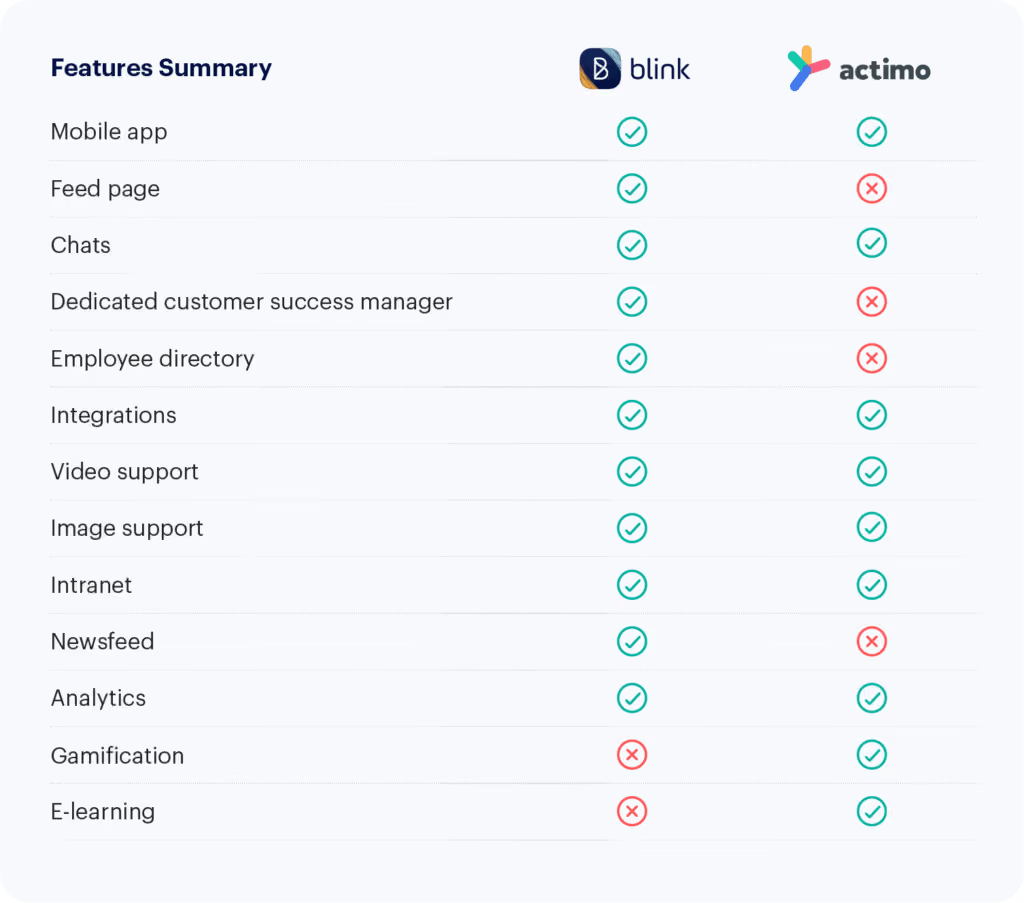
Actimo is ideal for teams who want a platform that enables e-learning but aren’t as concerned about real-time interaction.
In contrast, Blink is a truly inclusive real-time communications platform for frontline workers, though it doesn’t have an integrated LMS system.
Your organization’s technical resources may also determine which one is best for you. Blink is easier to use out-of-the-box, while Actimo requires a more thorough setup.
Both apps place a heavy focus on mobile usability, but Actimo doesn’t offer a newsfeed and is best used as a static intranet.
And while Actimo's designed for medium-sized organizations, Blink works best for extra-large enterprises with 25,000+ staff.
In this post, we'll break down the key differences and similarities between Blink and Actimo.
Let's dive into it.
Actimo vs. Blink How they're similar
Mobile-first content
On Blink and Actimo, all content is mobile-first. In other words, everything is optimized to be viewed on a small phone screen, not a desktop. This means both could be a solid option for organizations with mobile or frontline workers.
Customizability
Blink is customizable through third-party integrations and offers a wide variety of functionality through its micro-app function. While the starter platform is incredibly easy to set up, full end-to-end customization can take some work through micro-apps and necessary integrations.
Similarly, Actimo can be extensively configured with a fully customizable onboarding flow and plenty of in-app engagement data. Capterra users commented that it's 'easy to make presentations or apps for almost any purpose.'
Multi-lingual offering
Both platforms cater to multiple different languages. Blink even offers on-demand translation of content into the users language of choice.
Some users complained that Actimo switches text from English to Danish.
Actimo vs. Blink: How they're different
Integrations
Blink's integration capability is one of its strongest selling points. Through its dedicated app marketplace, users can shop for new integrations and mix and match to build their own 'super app'. Integrations are configured using Single Sign-On, so users can access different tools without leaving Blink.
By contrast, Actimo probably won't be the solution that replaces every one of your current internal communications tools. There are limited integrations with third-party business tools beyond HR systems.
Employee engagement
Taking a cue from the most popular social apps, Blink offers a live feed with company updates and user-generated text, images, and video. As a result, engagement with the app is remarkably high, with an average of 14 app opens per user per day.
On Actimo, it can be a lot of work to get set up and maintain engagement. Since the content isn’t primarily user-generated, admins will need to regularly create and schedule content to encourage use. That also means communications are more top-down than other platforms.
e-Learning
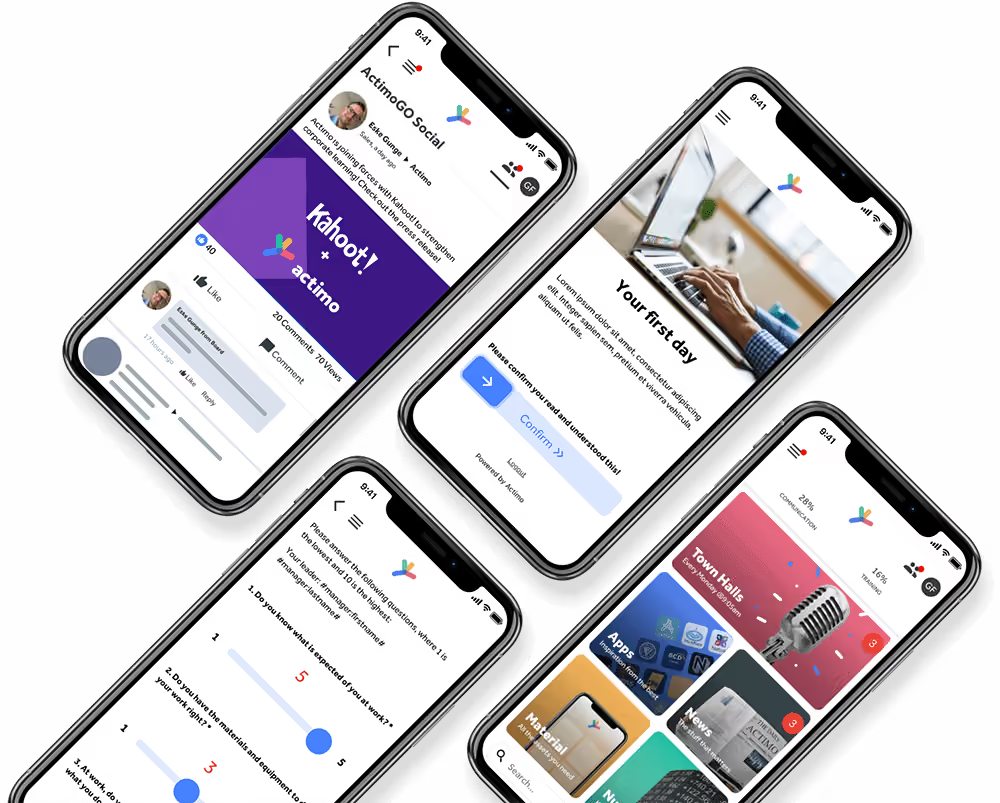
Actimo is a fantastic application to facilitate training and learning. Users liked that 'training is fully self-paced and fits anywhere in employee schedules.'
Within the platform, micro-learning is detailed yet simple to use. There are also engaging learning paths with gamified achievements that users can access at their own pace. Data on the compliance with, and completion of, necessary training, is another plus.
On Blink, there is no native onboarding and training function. However, a function can be added with the micro-apps feature, or by adding an integration.
Peer-to-peer communication
Blink offers a searchable in-app database of employees, so it’s easy for users to find a coworker they want to connect with. When they find that co-worker, there are many different ways to communicate: 121 or group chat, through real-time feed posts and comments, or by creating Hub content.
For those looking for a platform with a People Directory, Actimo may also not be a good choice. Beyond group members, there is no way to see a complete list of employees at your organization.
UX/UI
Blink developers design the app to mimic consumer apps like Uber and Facebook as closely as possible, so the user experience is familiar and fresh. Reviewers praised the platform's 'responsive, team-customizable features.'
While Actimo users appreciate they have 'full control of the layout', they were disappointed that the UI is 'clunky andoutdated'.
Frontline focus
While users commented that the app works 'just as well for desktop as it does on mobile', Blink is unique in its laser focus on the frontline experience. And despite offering a highly usable mobile experience, there is also a surprising amount of depth to the content and features.
While Actimo is optimized for the frontline experience, it doesn't focus on tailored features for specific industries (in Blink's case, transport and healthcare).
Targetting content
Blink's architecture is based on 'teams', which means all content is targetted is personalised to users depending on the groups they're in. Users can schedule campaigns months in advance, and 'pin' posts to ensure they're read, or tag them as 'mandatory reads'.
Actimo users complained the app is 'missing a way to micro-manage groups and send-outs', and requested 'more functionality for campaign planning.'
Actimo vs. Blink: systems and pricing
Unlike Actimo, Blink offers all of its features and capabilities through a single system with optional paid add-ons, which includes a dedicated Customer Success Manager. An all-in-one solution like Blink is attractive to many buyers since it provides seamless functionality and is priced as a single unit.
Blink also offers a number of pre-built integrations with popular business apps to allow for further customization.
The core product is priced in four according to scale:
Essential
Business
Enterprise
Enterprise Plus
Organizations can also take advantage of a 40% discount if they pay annually.
Overall, Blink is an affordable product, with users commenting on its 'excellent value for money'. While Actimo pricing is not available online, reviewers commented on the cost per user being 'hard to justify' for smaller organizations.
Actimo vs Blink: final thoughts
While Actimo is a strong choice for organizations focused on training and onboarding, it lacks the features to make it a true digital workplace.
Actimo vs. Blink – which is better? It's a question many buyers are asking. And of course, the answer depends on who's asking!
Blink and Actimo are both cloud-based internal communication platforms with a strong customer base and some overlap in features. Yet their primary focus varies.
Actimo vs. Blink – quick facts
Actimo is ideal for teams who want a platform that enables e-learning but aren’t as concerned about real-time interaction.
In contrast, Blink is a truly inclusive real-time communications platform for frontline workers, though it doesn’t have an integrated LMS system.
Your organization’s technical resources may also determine which one is best for you. Blink is easier to use out-of-the-box, while Actimo requires a more thorough setup.
Both apps place a heavy focus on mobile usability, but Actimo doesn’t offer a newsfeed and is best used as a static intranet.
And while Actimo's designed for medium-sized organizations, Blink works best for extra-large enterprises with 25,000+ staff.
In this post, we'll break down the key differences and similarities between Blink and Actimo.
Let's dive into it.
Actimo vs. Blink How they're similar
Mobile-first content
On Blink and Actimo, all content is mobile-first. In other words, everything is optimized to be viewed on a small phone screen, not a desktop. This means both could be a solid option for organizations with mobile or frontline workers.
Customizability
Blink is customizable through third-party integrations and offers a wide variety of functionality through its micro-app function. While the starter platform is incredibly easy to set up, full end-to-end customization can take some work through micro-apps and necessary integrations.
Similarly, Actimo can be extensively configured with a fully customizable onboarding flow and plenty of in-app engagement data. Capterra users commented that it's 'easy to make presentations or apps for almost any purpose.'
Multi-lingual offering
Both platforms cater to multiple different languages. Blink even offers on-demand translation of content into the users language of choice.
Some users complained that Actimo switches text from English to Danish.
Actimo vs. Blink: How they're different
Integrations
Blink's integration capability is one of its strongest selling points. Through its dedicated app marketplace, users can shop for new integrations and mix and match to build their own 'super app'. Integrations are configured using Single Sign-On, so users can access different tools without leaving Blink.
By contrast, Actimo probably won't be the solution that replaces every one of your current internal communications tools. There are limited integrations with third-party business tools beyond HR systems.
Employee engagement
Taking a cue from the most popular social apps, Blink offers a live feed with company updates and user-generated text, images, and video. As a result, engagement with the app is remarkably high, with an average of 14 app opens per user per day.
On Actimo, it can be a lot of work to get set up and maintain engagement. Since the content isn’t primarily user-generated, admins will need to regularly create and schedule content to encourage use. That also means communications are more top-down than other platforms.
e-Learning
Actimo is a fantastic application to facilitate training and learning. Users liked that 'training is fully self-paced and fits anywhere in employee schedules.'
Within the platform, micro-learning is detailed yet simple to use. There are also engaging learning paths with gamified achievements that users can access at their own pace. Data on the compliance with, and completion of, necessary training, is another plus.
On Blink, there is no native onboarding and training function. However, a function can be added with the micro-apps feature, or by adding an integration.
Peer-to-peer communication
Blink offers a searchable in-app database of employees, so it’s easy for users to find a coworker they want to connect with. When they find that co-worker, there are many different ways to communicate: 121 or group chat, through real-time feed posts and comments, or by creating Hub content.
For those looking for a platform with a People Directory, Actimo may also not be a good choice. Beyond group members, there is no way to see a complete list of employees at your organization.
UX/UI
Blink developers design the app to mimic consumer apps like Uber and Facebook as closely as possible, so the user experience is familiar and fresh. Reviewers praised the platform's 'responsive, team-customizable features.'
While Actimo users appreciate they have 'full control of the layout', they were disappointed that the UI is 'clunky andoutdated'.
Frontline focus
While users commented that the app works 'just as well for desktop as it does on mobile', Blink is unique in its laser focus on the frontline experience. And despite offering a highly usable mobile experience, there is also a surprising amount of depth to the content and features.
While Actimo is optimized for the frontline experience, it doesn't focus on tailored features for specific industries (in Blink's case, transport and healthcare).
Targetting content
Blink's architecture is based on 'teams', which means all content is targetted is personalised to users depending on the groups they're in. Users can schedule campaigns months in advance, and 'pin' posts to ensure they're read, or tag them as 'mandatory reads'.
Actimo users complained the app is 'missing a way to micro-manage groups and send-outs', and requested 'more functionality for campaign planning.'
Actimo vs. Blink: systems and pricing
Unlike Actimo, Blink offers all of its features and capabilities through a single system with optional paid add-ons, which includes a dedicated Customer Success Manager. An all-in-one solution like Blink is attractive to many buyers since it provides seamless functionality and is priced as a single unit.
Blink also offers a number of pre-built integrations with popular business apps to allow for further customization.
The core product is priced in four according to scale:
Essential
Business
Enterprise
Enterprise Plus
Organizations can also take advantage of a 40% discount if they pay annually.
Overall, Blink is an affordable product, with users commenting on its 'excellent value for money'. While Actimo pricing is not available online, reviewers commented on the cost per user being 'hard to justify' for smaller organizations.
Actimo vs Blink: final thoughts
While Actimo is a strong choice for organizations focused on training and onboarding, it lacks the features to make it a true digital workplace.
Internal communications is the practice of keeping all employees, at every level of an organization, connected and in the loop. The primary goal of an internal communications strategy is to ensure that all members of an organization are well-informed and able to collaborate effectively.
Clear and streamlined communications are an essential factor in the success of any company, whether it has ten employees or one thousand. Over 40% of workers say that their trust in their leadership and team has been compromised due to poor communication.
From frontline workers to admins behind a desk, when each individual has a clear understanding of business goals, values, and guidelines, it makes for a much more connected workflow.
Read on to understand everything you need to know about internal communications, the types of internal communication, and the benefits that come from implementing a solid internal communications strategy.
Understanding internal communications
Internal communications can take a variety of forms – email, intranet, chat apps, newsletters, in-person meetings, bulletin boards, or an app specifically designed to streamline internal communications.
An effective internal communications strategy helps every employee feel connected to the larger company vision, and therefore aware of how their individual roles contribute to the overall success of the organization. A JobsinME poll found that a massive 85% of workers feel more connected to their jobs when there is effective communication in the workplace.
A solid internal communications strategy goes a long way in fostering that engagement – employees feel involved in the company mission and understand the role they play.
Regular communication also helps build trust between employees and leadership, strengthening that sense of belonging. Plus, those open channels of communication allow employees to share their ideas, concerns, and feedback, making them feel valued and empowered.
In frontline organizations, an effective internal communications strategy is even more critical. Deskless employees can be harder to reach through email or memos, as they’re not constantly checking email or messages (or may not even have access to these tools). But these frontline workers are even more in need of clear communications, to mitigate misunderstandings, enhance safety and compliance, and share urgent updates.
An internal communications app, like Blink, is ideal for organizations with frontline workers, connecting everybody and placing everything they need in one place.
This type of internal communication flows from higher levels of management to lower levels. It starts with the C-suite, who makes all the calls, then disseminates their instructions, policies, and decisions to the organization’s employees through managers and leaders.
Within an internal communications strategy, top-down communications are a structured approach that ensures important directives and guidelines are communicated uniformly. Top-down comms not only maintain consistency but also help in disseminating organizational objectives effectively throughout the workforce.
Formal top-down employee communication methods include company-wide emails, official announcements, regular town hall meetings, or memos from upper management.
For example, in a hospital's internal communications strategy, this could look like an all-staff email sharing new patient care protocols. In a manufacturing plant, a bulletin board could display dates for upcoming safety training sessions. Or in retail, a company-wide text message can share information about a new product that management wants workers to upsell.
Pros
It is an efficient way to communicate broad messages.
Messages are controlled and aligned with organizational goals, reducing misunderstandings.
Conveys a sense of professionalism in conveying critical information.
Cons
It doesn’t consider how employees can share feedback.
The passive reception of information may lead to disengagement.
Information flow can be slow, causing delays in decision-making and implementation.
It’s impersonalized, which can give employees a sense of being undervalued.
2. Formal bottom-up communication
This is the process where employees at lower levels of the hierarchy communicate their feedback, suggestions, concerns, and ideas to higher levels of management or leadership.
This type of communication involves conveying information from the "bottom" of the organizational structure upward, allowing employees to have a voice, contribute their insights, and influence decision-making processes.
Three-quarters of employees are more engaged and feel more effective when they feel their voice is heard, Workforce Institute found.
When included as a part of an internal communications strategy, formal bottom-up employee communication not only empowers workers but also fosters a culture of inclusion and innovation within an organization. It's a valuable channel for capturing on-the-ground insights, which can often be missed by higher management. Less than half of employees feel as though they have an easy way to share feedback on key communications; a solid bottom-up communication strategy is one way to mitigate this.
In a frontline organization, there are many ways to implement formal bottom-up communications. Employee surveys are a popular way to gather feedback from an entire team at once, and Blink’s in-app survey tool allows HR teams to get real-time data straight from the mouths of employees.
For example, in a healthcare setting, nurses and medical staff might use formal bottom-up communication to suggest improvements in patient care protocols or to report safety concerns.
Other formats for bottom-up communications include anonymous feedback forms and regular one-on-one meetings between employees and their managers.
By actively encouraging and acting upon this type of feedback, organizations can harness the collective intelligence of their workforce and adapt to the evolving needs of the industry.
Pros
Employees feel heard and valued, leading to higher employee engagement.
A range of diverse perspectives can be gathered, leading to more well-rounded and innovative solutions.
Frontline employees can identify challenges that might not be apparent to higher-level management.
When employees are involved in change processes, they are more likely to support and adapt to new initiatives.
Cons
Gathering, reviewing, and responding to a large volume of employee feedback can be time-consuming.
It can be resource-intensive, requiring specific software.
Not all employee suggestions may align with organizational goals or be feasible to implement.
Formal bottom-up communication may result in inconsistent messaging across teams.
3. Formal horizontal communication
This is the sharing of communications between individuals or departments at the same hierarchical level within the organization, for example, cross-functional meetings or interdepartmental emails.
Unlike the vertical communication we discussed above, which involves information flowing up or down within an organization, formal horizontal communication is between colleagues who hold similar positions within the organization.
Leadership consultancy Fierce, Inc. found that 86% of employees feel that a lack of proper collaboration and miscommunication between teams lead to workplace failures.
Formal horizontal communication helps facilitate the smooth functioning of departments, coordination, collaboration, and information sharing. For instance, in a retail setting, it's crucial for the sales team to communicate effectively with inventory management to ensure products are stocked efficiently.
In frontline organizations, formal horizontal employee communication connects the various cogs that make up the company and keeps it functioning. Within the structured internal communications strategy, it can take many forms, including project reports, regular email updates between departments, and the establishment of specific cross-functional teams.
When done right, formal horizontal communication enables seamless collaboration and makes the company culture one of teamwork and shared goals
The key here is constant communication. Using an internal app with a chat function - whether it’s private messaging or a group chat - will promote regular collaboration. Blink’s chat feature enables seamless conversation, to encourage employees to work together and share ideas.
Pros
Promotes knowledge sharing between peers with different expertise.
Allows teams to align their efforts and activities with each other, avoiding overlap or conflict.
Improves communication within the organization, leading to better company culture.
Allows colleagues to provide feedback on each other's work, which they’re often more receptive to than feedback from above.
Cons
A reliance on formal channels may discourage spontaneous creative interactions between colleagues.
Communication may become siloed within specific departments.
Can sometimes be time-consuming, especially when multiple people need to be involved.
May not adapt well to rapidly changing circumstances or unexpected needs.
4. Informal communication
Unlike other aspects of an organization’s internal communications strategy, informal communication isn’t facilitated or regulated by the organization’s internal communication channels. It happens spontaneously between colleagues – water cooler chat, if you will.
This style of communication often occurs in casual settings or through personal relationships and can take place at various levels of the organization, including between employees and managers, and even across different departments.
Informal comms include face-to-face conversations, social media interactions, instant messaging, and phone calls. It serves as a complement to formal communication channels and plays a significant role in building relationships and shaping the company culture.
We can look at Bank of America as a case study. Breaks for customer service employees used to be staggered so as not to have a shortage of staff fielding customer complaints. However, an internal audit found that productivity increased when workers took breaks together and socialized over lunch.
Oftentimes, frontline employees are working in silos and isolated from their coworkers. In frontline organizations, informal communications go beyond just sharing practical insights, it also gives these frontline workers a sense of camaraderie and belonging. In high-stress environments like hospitals or retail, where teams need to work seamlessly to serve customers and patients, these informal connections are invaluable.
Furthermore, workers can share valuable information that they learn on the job, which might not necessarily warrant discussion in formal channels. For example, tips for handling certain customers, which patient rooms have better heating, or even finding help to cover a shift.
The informal nature of these interactions fosters a culture of approachability, ultimately contributing to a more resilient and united frontline workforce.
The main Feed in Blink is designed specifically to foster this informal communication that keeps an organization running. It brings the whole company together in one place, without the formality of a memo or email chain. The Feed looks and feels like the social media apps we’re already accustomed to, making it easy for everyone to use.
Pros
Quick and easy, especially in fast-paced environments.
Helps to build personal relationships and a sense of camaraderie among employees.
Allows frontline workers a way to connect and engage with their coworkers, especially those who don’t have these opportunities come naturally.
Practical knowledge, tips, and best practices are shared more easily through informal conversations.
Cons
Frontline workers are limited in their opportunities for spontaneous chat, requiring the need for a centralized informal communications platform.
It can lead to the spread of inaccurate information or rumors if not properly managed.
Individuals who are not part of specific conversations or social circles may be inadvertently excluded.
Important issues might not receive the attention they deserve when discussed informally.
Why is internal communications important for your business?
For a truly effective internal communications strategy, a workforce should be three things: connected, engaged, and aligned.
A connected workforce
The right internal communications strategy bridges the gap between remote, frontline, and office employees. Without a wide-reaching net, internal communications can become stilted or even ineffective.
Frontline employees are consistently at a disadvantage due to the fact they most times do not have a company email or a desktop, like the organization’s office workers.
More than 80% of the global workforce is deskless. Whether your company is in healthcare, manufacturing, or transportation, these frontline workers need to feel just as involved and valued as the ones behind a desk.
For these organizations, effective internal communications reduce turnover, increase profits, enhance employee experience, and boost productivity. Read more about deskless worker team communication here.
An engaged workforce
Transparent communication empowers employees and boosts morale.
When employees are informed about the company's vision and the reasons behind certain actions, they feel a sense of ownership and inclusion. Transparency fosters trust, as employees perceive that their contributions and concerns are valued, leading to increased engagement and overall satisfaction.
Two-way internal communication is essential for employee engagement – as we covered above, top-down communication can lead to passive reception of information, which is a killer for engagement.
An effective internal communications strategy gives employees the ability to voice concerns and provide feedback or suggestions to management. This gives them a direct hand in decision-making, directly increasing their engagement with their work.
An aligned workforce
Aligning teams and goals across the entire organization, from the CEO to frontline workers, is crucial for success.
This involves ensuring everyone is across the broad business goals and objectives and understands how their individual work is crucial for reaching these goals. A study conducted by IBM found that 72% of employees don’t understand their organization’s core strategy, due to poor communication.
Don’t let that 72% be your employees. An aligned workforce ensures that the messages being communicated resonate with everyone, and are understood in the intended manner.
Effective internal communications leads to better collaboration, within teams and across departments.
Strategies to implement successful internal communications
Only 7% of workers agree that internal communication within their workplace is accurate, timely, and open.
Building a cohesive internal communications strategy is the key to uniting and motivating your workforce. We’ll touch on some strategies to help you create a successful internal communication plan, or you can read our in-depth step-by-step guide to writing an internal communications strategy.
Utilize technology for internal communication
These days, there are endless tools and software available to help organizations stay on top of internal communications. We’re no longer in the age where we have to rely on printed memos and morning meetings.
Blink, and other digital communication tools which promote collaboration and information sharing, can totally revolutionize an organization. They provide efficient, real-time means to disseminate information, engage employees, and foster collaboration.
Not only can these platforms allow employees to ask questions, provide feedback, and participate in discussions, but they also act as a centralized place for policies, procedures, and guides that employees can access.
A recent Emergence study found that more than half of deskless workers are dissatisfied with the software solutions provided by employers.
Particularly for decentralized teams and organizations with frontline workers, technology-driven internal communication plays a pivotal role in keeping employees informed, connected, and aligned with organizational goals.
Understand how to best reach your employees
Obviously, organizations are made up of different types of employees, and traditional top-down internal communication strategies generally don’t take this into account. In order to make sure your message is relevant to your audience, you need to tailor your message based on who you are communicating with.
For example, a message intended for frontline staff may focus on practical details and how it impacts their daily tasks, while a message for senior management might emphasize strategic implications and long-term business goals.
Consider the different workers that need to be reached with your internal communications strategy, and segment your audiences based on:
Job role
Seniority level
Communication needs
Whether they are desk-based or frontline workers
Then, you can analyze previous engagement data to see what type or format of content works best for each audience – eg. Email, live chat, video, etc., and the best times to communicate for the most engagement.
Utilizing technology can be very helpful here. Blink offers real-time powerful analytics to help you understand what content performs best, when, and with whom.
By customizing the messaging approach, and using data to optimize what the content is and when you are sending it, internal communication becomes more effective, increasing employee engagement and alignment with goals.
Establish regular feedback
Without regular feedback, internal communications are simply one-sided, which does nothing for employee engagement and satisfaction.
Every successful internal communications strategy should have built-in practices to regularly collect feedback from employees at every level of the organization. This can be done through surveys, suggestion boxes, town halls, anonymous feedback, or weekly leadership check-ins.
Employee feedback allows an internal communications strategy to be actually shaped by the people it’ll affect, not just the high-up decision-makers behind desks. Highlighting areas where improvement is needed – before it escalates into a problem – is crucial, not just for the employee experience but also for the success of the business as a whole.
Case study: Our collaboration with Salutem
During the COVID pandemic, the health industry faced endless challenges. Employees and organizations were dramatically affected by high levels of stress, low staff morale, and a huge hit to communications.
Salutem, a healthcare company that provides services such as care homes and healthcare staffing, needed a solution to overcome the challenges presented by the pandemic. To do so, Salutem used Blink to revamp their internal communications strategy.
With Blink’s easy-to-use super-app, Salutem was able to launch monthly surveys, collect feedback and plan face-to-face group meetings to encourage two-way conversations between managers and staff.
Salutem launched S.E.L.F (Salutem Employee Listening Forum) initiatives to connect staff and promote a culture of free communication within the organization. Each division had a rep – nominated by managers through the Blink Feed – who were responsible for moderating Blink Channels and following up with their respective teams.
Colleagues were encouraged to share thoughts and open up conversations around concerns or opportunities for growth, which started conversations and reconnected employees across all teams.
The improvements that came from the new internal communications strategy were nearly immediate. The organization saw a:
300% increase in survey responses
92% adoption rate of Blink
Tenfold increase in staff who were easy to communicate with
The integral role of internal comms in organizational success
There aren’t many constants in this world, particularly in the ever-changing landscape of a frontline organization. But one does remain: the vital role of an internal communications strategy. From formal top-down messages that steer the company's vision to informal water cooler chats that breed friendships, effective internal communication is crucial for the success of any organization.
By implementing a solid internal communications strategy, organizations can create a workplace where ideas flow freely, where feedback is valued, and where employees are informed, engaged, and motivated. It's a workplace where everyone, from frontline staff to top executives, feels heard, appreciated, and connected.
Internal communications shouldn’t just be a strategy, however. It needs to be a core tenet of your organization’s culture. Introducing an effective tool – like Blink – to encourage effective internal communication is key. By fostering open dialogue, valuing feedback, and leveraging technology, organizations can create an environment where everyone feels heard, informed, and engaged.
It's not about reinventing the wheel, but about adopting effective internal communications strategies that keep your workforce connected and motivated.
At Blink, we believe every worker — not just the ones glued to a desk — deserves to feel connected, in the loop and part of something bigger.
Until now, Blink has been the go-to for massive organizations keeping their frontline teams buzzing.
But today, we’re flipping the script. For the first time, everyone can try Blink free right from our homepage.
That’s right: no red tape, no long sales calls, no IT headaches. Just instant access to the same platform trusted by retail and hospitality giants, healthcare heroes and transport legends around the world.
Why this matters
If you run a small or midsized business, you know the struggle:
Important updates vanish into the black hole of your email inbox
WhatsApp groups spin out of control, with current employees frustrated with the lack of work-life balance and ex-employees still lurking in the wings
Your “intranet” is basically a dusty folder no one dares to open
Meanwhile, your people — especially those on the frontline — are ready for a better way to communicate. They live on mobile, expect apps that feel as easy as Instagram, and they hate feeling disconnected.
That’s exactly why we built Blink. And you don’t need enterprise money to experience it.
What you’ll unlock in your free trial
Sign up today and you can start building your employee communications hub — via an intuitive set-up experience — in minutes:
A social-style news feed that people actually read and post to
Secure chat and groups that replace rogue WhatsApp chains
Fully branded and personalized so your intranet reflects your brand at every touchpoint
Everything in one place with a one-stop shop for policies, shifts, training, and more
Recognition and surveys to keep morale sky-high
All of it designed for quick adoption and lasting engagement. And the best part? Your team already knows how to use it.
A big moment for small businesses
Here’s the truth: The future of work isn’t just for enterprises. When every team, no matter the size, gets world-class communication and collaboration tools, big things happen. Morale grows. Operations run smoother. And the culture you’re building has a digital home that matches the energy of your people.
But this is just the start. What comes next is even more exciting: unlocking the potential of your people.
Our Blink for Everyone team is driven by one simple mission: to make it easier for people to find, try, and love Blink. So I want to also take this opportunity to thank all of our founding Blink for Everyone customers, some of whom are celebrated on our Customer Wall of Love.
There’s nothing to hold you back. The same tech trusted by global enterprises is now in your hands — free to try, starting today.
MJ Moore has been paving the way at Blink for over three years, bringing her Workday consulting background to build our entire Implementation function from the ground up. Now, as VP of Implementation in our London office, she’s led lightning-fast launches and established a team that customers can’t stop raving about.
We chatted with MJ about what drew her to Blink in the first place, the culture she thrives in, and why she’s more energized than ever to keep driving innovative solutions for frontline workers around the globe.
What is your position at Blink?
I’m the VP of Implementation.
How long have you been at Blink?
Just over three years. I celebrated my three-year anniversary in February.
What initially attracted you to join Blink?
I think I simply loved the technology. I came from a Workday background, doing Workday consulting, and was looking for that early-stage buzz again — something I felt Blink had in spades. The technology was at an exciting point in the market, and I wanted to be part of a company that had tons of potential for growth.
What's a project you are proud of from your time at Blink?
That’s a tough question because there are so many highlights! One of the biggest is building the Implementation team from scratch. When I first joined, there wasn’t an official Implementation function at all. Now, we’ve got a robust team of people working together with clear processes, methodologies, templates — everything we need. They’re incredibly self-sufficient, and our customers love them, which is such an awesome feeling.
Another standout moment was launching Blink to 6,000 users in Mexico in under eight days. We were a lot smaller at the time, so I ended up running almost the entire project on my own. The client was facing serious union issues and worried about potential factory closures, so they needed Blink ASAP to keep everyone informed and hopefully avoid a strike. It was crazy stressful, but we pulled it off, and in the end, they were able to communicate everything in time. They actually avoided the strike altogether, which was a huge relief for them — and for us, knowing we helped make that possible.
How would you describe the company culture at Blink in three words?
Energetic, challenging, and supportive: There’s a lot of energy in the team; we set high expectations for ourselves; and everyone is there to help each other succeed.
What's one thing you're excited about for the future of Blink?
Honestly, it’s thrilling to think about how much opportunity lies ahead. We’re in an industry where Blink could become essential to so many different sectors — frontline workers, office-based teams, you name it. We’ve barely scratched the surface of what we can do, and each new market or customer segment opens up possibilities we haven’t even explored yet. That level of untapped growth is exactly what makes Blink so exciting to be part of. It’s the kind of momentum that drives you to keep innovating, knowing there’s still so much room to make a real impact.
Can you tell us about a recent initiative or program launched at Blink that you found particularly exciting?
I really love the “Adopt a Customer” program because it encourages everyone in the company — even those who don’t usually interact with customers — to take a deeper interest in who we serve. Our biggest goal is driving customer happiness, and this initiative pushes each person to learn about one specific customer’s journey, challenges, and needs. When you have to present your findings at an All Hands meeting, you naturally dive into researching their background, business goals, and how they use Blink. That extra effort is not only fun, but it also fosters empathy and understanding. It’s awesome to see colleagues who haven’t had much customer exposure suddenly become champions for “their” customer, sharing insights that might otherwise go overlooked.
Why do you work for Blink?
I’m here because Blink’s mission speaks to me on a really personal level. There’s something powerful about the tools we provide — especially for frontline workers who haven’t had anything like Blink before. It has the potential to fundamentally change how they do their jobs, and that’s exciting to be a part of.
I’ve also been given a lot of responsibility and freedom to make an impact, which is something I really value. In previous roles, I sometimes felt disconnected from the end users, but here, I get to see real reactions to our tech — people lighting up because it makes their work lives easier. That’s a genuine thrill and it reminds me why I do what I do every day.
You launched the system. You hosted the training. But employees just aren’t using your new tech. If this sounds familiar, you’re not alone.
Across industries, companies are investing heavily in new digital tools — internal communication software, employee apps, intranets, and core HR systems like Workday. But while the technology is powerful, access and adoption often fall short — especially for frontline and deskless workers.
Before you blame the tech (or call IT in a panic), take a step back. The issue often isn’t the system itself. It’s what came before: employee confusion, a lack of buzz, a lack of buy-in.
If you’re struggling with software adoption, start by getting to know the real issues behind a lackluster launch.
The adoption gap is a communication problem
Tools don’t tend to fail because the tech is inherently bad. So what gives? Why has adoption of your new tech tool stalled?
The truth is, ineffective internal communication is one of the usual suspects. If the right messaging hasn’t reached all employees at the right time, your adoption rates suffer.
Your communication tools are ignored. Or worse, actively resisted.
This is a problem. Because poor tech tool adoption harms the employee experience and employee engagement. Workers get a disjointed experience and it’s hard to keep everyone on the same page.
When only half the workforce is using a tool, it also kills your ROI. You end up bringing new internal communications tools into the mix to fill gaps. And the digital workplace gets noisy (and expensive!).
{{mobile-hub="/image"}}
The 3 biggest reasons employees ignore tools
Let’s break it down. When employees fail to engage with a new tech tool, it’s usually down to one or more of the following reasons.
#1. They didn’t know it existed
An obvious one. But also a surprisingly common issue. If your comms strategies aren’t up to scratch, it’s easy for messages (even repeated ones) to slip through the net.
Maybe your tech tool memo got lost in an inbox that was fit to bursting. Maybe managers failed to cascade the information in the way you’d intended. Perhaps frontline employees missed the paper memo on their dash through the depot.
Comms can fail to reach the desired recipient in all sorts of ways, particularly if you have lots of hard-to-reach frontline employees. The result? Employees simply don’t know that your new software exists.
#2. They didn’t see how it helped them
Let’s suppose the message did get through. Employees were aware that a new tech tool was on the horizon. But your team failed to communicate software benefits to employees.
Will it save them time? Make their jobs easier? Give them greater control over their shift schedule?
When employees don’t get answers to these questions, they fail to understand how your new tech matters to them and their work lives. And when they’re already juggling task management, they’re unlikely to make time to download and learn something new.
#3. They didn’t know how to use it
The final thorn in the side of a new tech tool launch? Employees not understanding how to use your new tech — or how to fit it into their daily workflow.
Tools that feel like extra admin, or that require clunky logins and complex steps, are unlikely to win favor with your workforce.
And, even with the best possible UX for every segment of your workforce, you still need to signpost training and support. Another task for your internal comms team.
For tools like Workday, which are often built for desktop workflows, employees need support to engage with features like payslips, benefits, or scheduling from their phones. A mobile-native interface like Blink’s helps bridge that UX gap — and makes core functionality feel intuitive, not intimidating.
{{mobile-workday="/image"}}
How internal comms can get employees on board
Internal comms play a huge role in tech tool adoption. If employees are ignoring your new software, here’s what your comms team can do.
Craft a story around the tool
Don’t just announce the what. Explain the why. Move beyond the benefits the software offers your organization. Put yourself in an employee’s shoes and think about the difference it makes to them.
A new LMS isn’t just a training platform. It’s a way for employees to boost their skills and take another step along their chosen career path.
A new mobile scheduling app isn’t a way for the company to ensure maximum shift coverage. It’s a way for employees to reclaim control over their week.
Build a narrative around the tool that answers employees’ most pressing question: What’s in it for me?
That may mean crafting different stories for different segments of your workforce. By incorporating employee segmentation into your strategy, you can highlight what new tech brings to your drivers or retail employees compared to the benefits it brings to your office-based staff.
It may also mean harnessing the power of an internal creator culture, getting employees who are using and loving your new solution to voice their thoughts as part of authentic, employee-generated content.
Use multiple channels to reinforce the message
Any communicator will tell you. Repetition matters. So does variety.
So push the message across every communication channel your employees use. That might include:
Manager shout-outs
SMS reminders
Push notifications from your employee mobile app
Instant messaging for quick check-ins
Video content showing employees using the tool
Pulse surveys to check in on feedback
Reinforcing email content
Video conferencing to troubleshoot issues
Using multiple internal communication platforms and channels increases the likelihood that all employees will see your content, even hard-to-reach frontline employees and those who do remote work.
It takes more effort — and maybe a comms schedule or two! But when you build buzz and understanding through a concerted campaign of communication, the payoff is better reach, stronger recall, and higher rates of software adoption.
Empower managers to model and cascade usage
Managers are the missing link in too many software rollouts. If they don’t understand the tool — or worse, aren’t using it themselves — employees won’t either.
So, give managers early access. Train them on how the tool works and why it matters. Give them talking points and answers to the FAQs they’re most likely to hear from employees.
You need managers who can participate in knowledge sharing — who can confidently say: “Hey — this thing works. Here’s how it helped me. Let me help you get started.”
So when sharing launch news, sympathize with employees. This is an upheaval. New tech always comes with a learning curve. And until employees are up to speed, it’s a pain they can do without.
You should also communicate transparently and clearly, so employees trust and understand what you’re saying.
When you approach your software launch as you would any other type of change communication, you’re more likely to get employees on board.
{{mobile-main="/image"}}
IT + internal communications = smoother rollouts
Too often, tech rollouts are the responsibility of the IT team.
IT chooses the tool, implements the tool, launches the tool. IT runs the project management overall. And internal comms? They’re asked to throw together a post about it the day before it goes live.
But this sets a new software launch up to fail. Because when the internal comms team and IT teams work together, ensuring a smooth and successful software rollout gets a whole lot easier.
Here’s how you can encourage team collaboration and do things differently.
Bring comms in early — not just at launch
As soon as IT begins the search for a new tech tool, comms should be in the room.
The comms team can facilitate internal communication between IT and the software’s end users — your employees. They can clarify what employees want and need from a new tool, so you’re more likely to find software that fits the bill and get workforce buy-in.
Further down the line, comms is also vital in the process of developing launch messaging — and shaping rollout strategy. When your comms team fully understands the tool and what it brings to the table, they’re much better placed to craft a messaging strategy.
Meetings with the IT are an opportunity to learn:
What do employees need to know, feel, and do to adopt this tool?
What comms assets can we build in before the launch date?
What support will we provide for employees to help them get started?
Plan messaging the same way you plan tech implementation
IT teams build timelines, test cases, and go-live checklists. Your employee communications plan should be just as robust. You need to factor in:
Pre-launch buzz. Teasers, sneak peeks, and launch countdowns.
Launch day comms. Announcements, how-to guides, success stories, and FAQs.
Post-launch support. Nudges, reminders, employee feedback loops, and adoption incentives.
Be consistent with your comms and you’ll keep your new tech tool in the company conversation. That means more people signing up to use it.
Celebrate small wins and usage milestones
Adoption isn’t a one-day event. It’s a process. And people are encouraged to give your new tech a go when they see their peers using it.
So use employee data to help you prioritize employee recognition. Spotlight early adopters. Call out team members that hit usage goals. Share stores from employees who’ve benefited from the tool.
These micro-moments build momentum. They remind everyone that this change is here to stay and that the tech is already helping employees just like them.
{{mobile-kudos="/image"}}
Adoption isn’t just about tools — it’s about strategic communication
Tech rollouts aren’t a launch moment — they’re a behavior change. And behavior change starts with communication.
You need to get strategic, working to build buzz and trust —and planning a comprehensive calendar of comms before, during, and after launch day.
Ideally, you put these principles into practice way before rollout. But if you’re dealing with a stalled launch, you can still skyrocket those adoption figures.
Act quickly (because momentum is hard to get back once it’s lost). And work to reach all employees, telling them what your tool does, how it benefits them, and how they can start using it.
Especially if you’re rolling out a traditionally office-worker platform like Workday, make sure the experience works for every employee — not just those at a desk. Blink gives your workforce one-tap access to all tools, wrapped in a communication layer that builds buzz, drives behavior change, and keeps your investment delivering long after go-live.
Get your software back into the company conversation, get a few more employees on board, and watch adoption — and your company culture overall — thrive.
MangoApps is a well-known name in the internal communication and collaboration space, offering an all-in-one platform for employee intranets, communication, and task management. But for many organizations—especially those with deskless or distributed teams—it’s not always the best fit. Whether you're looking for a more intuitive interface, stronger mobile capabilities, or better support for real-time communication, you're not alone in your search.
In this guide, we break down the top 12 MangoApps alternatives to consider in 2025, based on usability, features, employee engagement, and scalability.
What to look for in a MangoApps alternative
Before diving into the list, here are the key factors to consider when evaluating alternatives:
Mobile-first experience: If your workforce includes frontline or non-desk employees, you’ll need a platform that works seamlessly on mobile devices.
Ease of use: Platforms with clean interfaces and intuitive navigation drive higher adoption across all levels of the organization.
Real-time communication: Look for tools that enable instant updates, alerts, and chat, not just static content.
Integration flexibility: Your platform should connect easily with tools like Microsoft 365, Google Workspace, Workday, and HRIS systems.
Employee engagement tools: Polls, surveys, recognition features, and content targeting help drive connection and culture.
Scalability and support: Whether you’re a company of 500 or 50,000, ensure the platform can scale with you—and that help is readily available.
Here are the best alternatives to MangoApps in 2025
#1. Blink – The all-in-one employee experience app
Best for: Enterprise organizations that want to streamline communication, drive engagement, and boost productivity.
Blink stands out as the most powerful MangoApps alternative — especially for organizations looking for a modern, mobile-first platform that actually gets used. Unlike traditional intranet tools that sit in the background, Blink puts everything your employees need into one intuitive app: communications, schedules, forms, HR systems, and more. With real-time chat, content targeting, newsfeeds, surveys, and recognition features, Blink doesn’t just inform employees — it activates them.
The platform is designed for engagement, boasting adoption rates of over 80% across industries like retail, healthcare, logistics, and manufacturing. It also integrates effortlessly with tools like Microsoft 365, Workday, UKG, and ADP, making it a true hub for the digital employee experience. Plus, Blink’s admin tools give Internal Comms, HR, and IT full control over what content is delivered to whom — so you’re always reaching the right people with the right message.
For companies tired of legacy platforms that don’t connect with modern workforces, Blink is a clear upgrade.
{{watch-video="/callouts"}}
#2. Staffbase
Best for: Large enterprises that want to build branded employee apps.
Staffbase specializes in custom-branded employee communication apps, with a strong focus on top-down messaging and internal news delivery. It’s a good fit for enterprises with a strong emphasis on company-wide updates, although some users find its collaboration features limited compared to more integrated platforms.
#3. Unily
Best for: Enterprises seeking a polished intranet with strong SharePoint integration.
Unily delivers a sleek and customizable intranet experience, particularly suited to companies already using Microsoft tools. It shines in content publishing and brand personalization, but may require a significant implementation timeline and budget.
#4. Simpplr
Best for: Companies looking for an intranet focused on content discovery and employee engagement.
Simpplr offers a modern, AI-powered intranet designed to help employees find the information and people they need quickly. Its strengths lie in personalization, integrations, and employee feedback tools, though smaller teams might find it more than they need.
#5. Haiilo
Best for: Social-first communication and employee advocacy.
Haiilo blends internal communication with social sharing, making it a great option for organizations that want to empower employees to become brand ambassadors. It supports news distribution, surveys, and analytics, but collaboration tools are more limited.
#6. LumApps
Best for: Organizations embedded in the Google Workspace ecosystem.
LumApps integrates deeply with Google tools and offers features like personalized news feeds, social communities, and knowledge management. It’s well-suited for content-heavy communication but may not be ideal for frontline teams.
#7. Jive
Best for: Enterprises looking for a community-driven intranet.
Jive is a mature platform known for its collaboration and knowledge-sharing capabilities. It supports employee communities and forums but may feel outdated compared to newer, more agile platforms.
#8. Igloo Software
Best for: Mid-size businesses seeking a flexible digital workplace solution.
Igloo offers pre-built templates, collaboration tools, and strong document management. It’s a solid choice for knowledge workers but lacks the modern mobile experience many organizations now require.
#9. Workvivo
Best for: Organizations prioritizing culture, recognition, and employee social engagement.
Workvivo turns your intranet into a social space where employees feel more connected to their company. Its strength lies in fostering real-time interaction and transparency. Many teams choose it to reinforce culture and encourage engagement beyond standard top-down messaging. It’s engaging and user-friendly, though companies may need to pair it with additional tools for workflows, operations, or integrations.
#10. Happeo
Best for: Google Workspace-centric companies wanting a fast, social intranet.
Happeo blends social features with knowledge sharing and is known for its fast deployment and Google integration. It’s ideal for remote or hybrid teams who need an intranet without the complexity.
#11. Speakap
Best for: Deskless workforce communication, especially in retail and hospitality.
Speakap is built for frontline teams and focuses on secure, real-time updates. It’s easy to use and offers role-based content delivery, though it lacks the depth of features found in all-in-one platforms like Blink.
#12. Interact Software
Best for: Enterprises wanting a structured, content-rich intranet.
Interact offers strong content management, personalization, and search capabilities. It’s geared toward knowledge sharing and compliance-driven industries but may not offer as fluid a mobile experience.
Final thoughts on choosing a MangoApps alternative
If you're searching for a MangoApps alternative that delivers better engagement, faster communication, and a user experience your employees will love, Blink should be at the top of your list. While other platforms have their strengths, Blink combines everything you need — mobile access, real-time updates, integrations, and workforce-wide engagement — into a single platform that scales with your business.
Ren has been making her mark at Blink for over a year, helping to power our Revenue Operations function with a sharp analytical eye and a strong command of tools like SQL and Python. Based in our London office, she’s been a driving force behind smarter systems, cleaner data, and smoother cross-team collaboration.
We caught up with Ren to hear more about what drew her to Blink, the projects she’s proud of, and how being part of a fast-moving, mission-driven team keeps her inspired every day.
Which Blink office do you work out of?
I'm based in the London office.
What is your position at Blink?
I work as a Revenue Operations Analyst.
How long have you been at Blink?
I’ve been at Blink for just over a year now!
What initially attracted you to join Blink?
Honestly, it was the product that really stood out to me. I really connected with Blink’s mission of helping frontline employees stay connected. I had previously spent some time working in education as a teacher, so I saw first-hand how valuable something like Blink could be. I remember thinking, “If I had this as a teacher, I would’ve loved it.” That real-world application really sold it for me.
What confirmed I’d made the right choice was during the interview process. I got to meet my future team and was thrown straight into a collaborative SQL task. That experience representedthe collaborative nature of the environment at Blink and it immediately felt like a team I wanted to be part of.
What's a project you are proud of from your time at Blink?
Rather than one specific project, I’d say I’m proud of how much I’ve grown my technical skills. I’ve had the chance to work on projects that pushed me to master tools like SQL and Python. It’s been amazing to not only learn those languages but to use them daily and feel confident doing so.
One of the biggest challenges early on was finding the time and headspace to fully focus on that kind of technical development. But as a team, we tackled that by introducing dedicated Hackathon days, which gave us uninterrupted time to solve complex problems and upskill together.
The impact of this has been really rewarding. A lot of the work I’ve done in Rev Ops has helped bring critical data into the hands of our go-to-market teams, enabling them to better connect with customers and prospects. Most recently, I’ve been using SQL and Python to help build out parts of our very own internal “Blink ChatGPT” tool!
How would you describe the company culture at Blink in three words?
I would describe the Blink culture as fun, motivating, and challenging.
Fun because the social side of Blink is genuinely brilliant. We’ve had some amazing team events — from the Crystal Maze experience to crazy boules, an F1 simulator, and even a speedboat ride along the Thames. These moments really help bring people together and build strong bonds across teams.
Motivating because you’re constantly surrounded by incredibly smart, driven people who are all deeply invested in the success of the company. Being around colleagues who genuinely care pushes you to bring your best every day.
Challenging because the pace is fast, and the problems we’re solving are complex. Those challenges have also been the most rewarding and have accelerated my growth more than I expected.
What's one thing you're excited about for the future of Blink?
I’m really excited to keep seeing us sign big, well-known customers. Every time we bring a large name on board, it’s a huge morale boost across the company. It really shows how strong our product is. A standout for me was when we signed McDonald’s — such an iconic brand choosing us felt like a major moment. I’d like to see us continue to expand into the retail market. Another big fashion brand would be really exciting. It’s a sector where our impact could be huge, and there is a lot of potential there.
Can you tell us about a recent initiative or program launched at Blink that you found particularly exciting?
The first thing that comes to mind is all of the work that has gone into the upcoming summer party. I think it’s going to be an amazing event — not just for us internally, but for our customers too. It’s a brilliant opportunity to bring everyone together, share best practices, and show off what makes Blink such a great platform. Events like this really spotlight our culture and our community.
Since joining Blink, I’ve also had the chance to be part of three customer launches. It’s been incredibly rewarding to meet users in person and see the real impact our platform has on their day-to-day work. This definitely motivates me in the work that I do at Blink.
Why do you work for Blink?
I work for Blink because, as I’ve said before, I believe in the product. I think it’s an incredibly impactful software that helps a huge number of people. Another thing I appreciate is the variety in my role — it keeps the work dynamic and engaging. I get to work across lots of different teams at Blink, from operations to technical projects. That mix keeps things exciting. Plus, the atmosphere here is genuinely great. If I had to pick a favorite team to collaborate with, I’d say the sales team. They’re always full of energy, very motivated and really fun to work with. I’m grateful that I get the opportunity to collaborate with them.