Interact vs Blink: Employee Platform Comparison (2026)
Interact vs Blink compared on intranet features, mobile access, chat, and frontline employee engagement. See which platform is the better choice.
Jess DeVore
Published:
September 6, 2023
Last updated:
September 17, 2023
What we'll cover
On the hunt for the perfect comms solution for your organization?
Whether you’re looking for a tech to engage a frontline workforce or a modern intranet that puts your organization’s knowledge at your fingertips, we’re comparing techs that can take your internal communication to the next level.
Today we look at Interact vs. Blink to see which is right for you.
Interact vs. Blink — quick facts
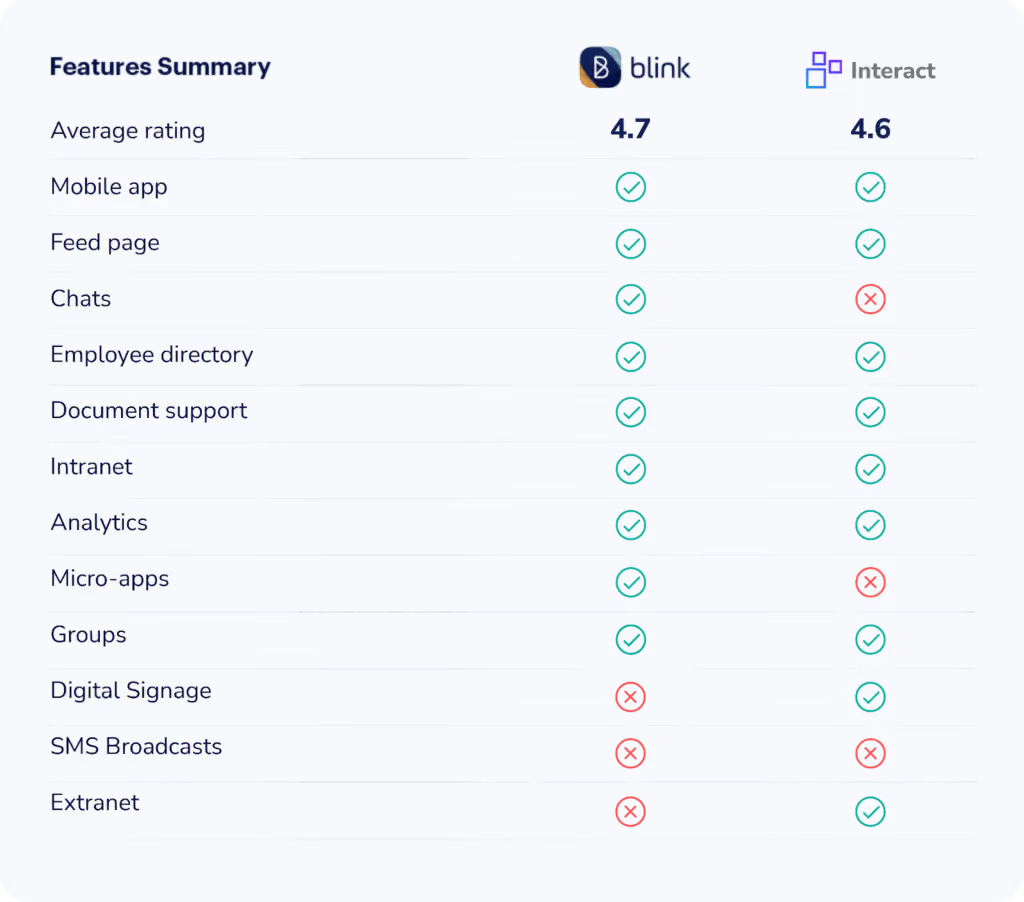
Blink and Interact are modern internal communication solutions suited for enterprise and small organizations. Their intuitive user experience and mobile applications lend themselves to a frontline workforce.
However, Interact is mainly an intranet replacement with various social employee engagement features. It is an older solution, and some feel that its features are a little old-fashioned. That includes an inclination towards top-down communications and static intranet pages.
In contrast, Blink packages an intranet with chat, micro-apps, and interactive content management to create an open, engaging digital experience. The priority is on encouraging all employees to participate in discussions and voice their contributions.
How they’re similar
Mobile-focused
Blink is designed with the mobile frontline worker in mind. That means you can reach everything you’d expect to have access to as a desk worker straight from your phone. The features and design flow seamlessly, no matter the screen size, to unite your organization with one application.
Similarly, Interact also caters to companies with a significant number of frontline workers. The intranet software is fully responsive and works on both iOS and Android.
Targeted posts
Both internal employee communication tools recognize that the most effective messages are tailored.
Interact uses “personas” you can define based on qualities you set. More than just dividing workers by role, you can segment your messages based on the training they’ve already received, location, and more.
Blink also allows you to target posts based on certain teams and work functions. The live feed of employee posts, company communications, and important real-time notifications are 100% customizable for each individual.
People directory
Both Blink and Interact make it easy to discover and contact any other member in your organization, breaking down communication barriers.
Blink’s People Directory consists of each team member's photographs, role, time zone, and location.
Interact’s directory adds a bit more content to this directory with customizable bios, interests, and expertise.
How they’re different
Many features set each communication management software apart. Let’s take a look:
SMS
Interact adds multichannel broadcasts that include the option to send a text to employees. One reviewer notes how “beneficial a feature like this would be during a pandemic.”
Although Blink can push notifications to each user’s phone, there is no out-of-the-box feature that allows SMS texting.
Chat
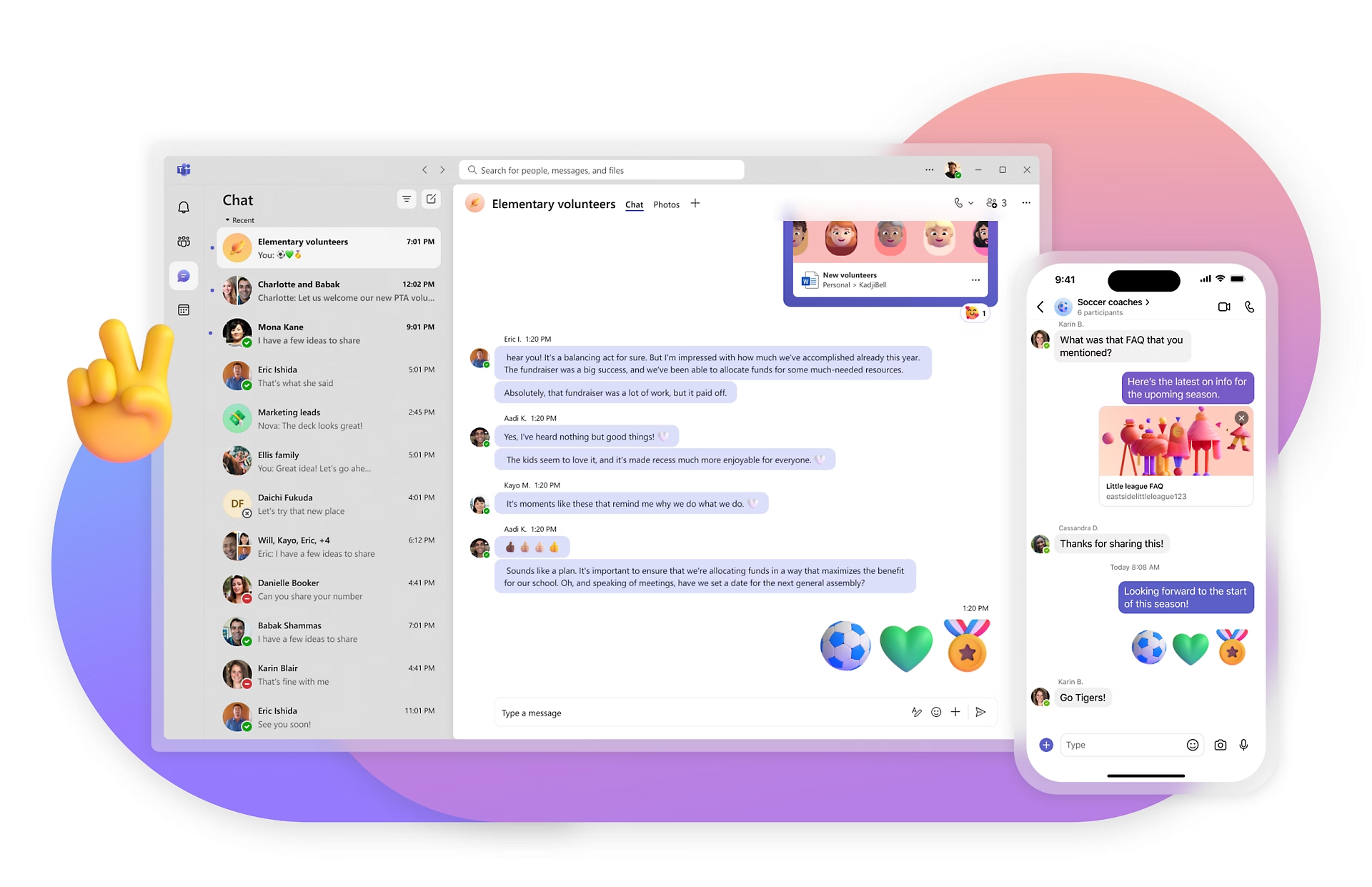
When comparing Interact vs. Blink, one large difference is Blink’s native chat function. Users can start secure group or one-on-one chats. Document-sharing and emoji capabilities also mean your employees have the tools to get their message across, no matter the subject.
In contrast, Interact only has a tagging function to start conversations and, more often than not, will need to integrate with third-party chat platforms.
Digital signage
The Interact software includes built-in digital signage capabilities. That gives your team the ability to display updates, company news, and other useful information in break rooms, conference rooms — anywhere with a screen.
Blink does not offer a feature to create and display digital signage natively in the app but can be configured with integration to serve this purpose.
Micro-apps
Blink offers deep integration with thousands of apps, acting as your one-stop solution to digital workplace technology. Blink also lets you build out integrations for any app you need through customizable micro-apps.
When comparing the customization of Interact vs. Blink, you are slightly more limited with the latter. Although it also offers several integrations, the Interact intranet does not offer a way for users to add ample features themselves.
Extranet
Interact offers additional extranet services that provide a communication platform for business partners. External parties can access FAQs, product pages, blogs, answer surveys, and more through a simple login page.
Blink’s product offering is more narrowly focused on internal communications, so if your team is not looking for an extranet solution, a platform with features solely designed for internal teams may serve you better.
Feed page
Blink’s feed page provides an engaging, personalized experience that enables a sense of connectedness and omnidirectional communication.
When comparing Interact vs. Blink’s newsfeed, Interact’s is more focused on activity updates. For example, when a document is updated or a user joins a new group.
Although users can like and comment, the social aspect is not as prominent. The platform’s forum allows more back-and-forth conversations but does not encourage frequent participation.
Ease of use
Blink takes most of the burden of onboarding and IT off your hands, making it an ideal solution for enterprise companies and lean teams alike. The features are intuitive, requiring little to no training, and once you’re onboarded, Blink handles all the behind-the-scenes IT to keep your hands free.
On the other hand, learning to use Interact’s intranet does take a bit more time. User reviews say, “Its functionality is difficult to administer and labor-intensive. It is also not very intuitive.”
One feature that is consistently said to be difficult to use is its forms. “Forms are a great feature to have, but we've found them cumbersome to create and maintain.”
Interact vs. Blink — pricing
Blink offers four levels of paid service based on company size, while Interact’s pricing structure is a bit more opaque. They offer individualized pricing based on your organization’s exact requirements, so you’ll have to request a quote to see how much it may be for you.
Here’s a look at Blink’s pricing:
Essential: $3.40 per person, per month
Business: Price on application
Enterprise: Price on application
Enterprise Plus: Price on application
Interact vs. Blink — final thoughts
If you’re looking for a comprehensive, modern intranet with social features, want to maintain a more traditional communication structure, and have the resources to spend a little more time learning how to use the product in the backend, Interact may be the right choice for you.
However, if you want an intranet with engaging, intuitive features that refresh your internal communications with open dialogue, and you want to be able to fully customize your solution’s features, Blink may be your go-to.
Determine if Blink is the right solution for you by booking a demo. Try it free for 14 days.
On the hunt for the perfect comms solution for your organization?
Whether you’re looking for a tech to engage a frontline workforce or a modern intranet that puts your organization’s knowledge at your fingertips, we’re comparing techs that can take your internal communication to the next level.
Today we look at Interact vs. Blink to see which is right for you.
Interact vs. Blink — quick facts
Blink and Interact are modern internal communication solutions suited for enterprise and small organizations. Their intuitive user experience and mobile applications lend themselves to a frontline workforce.
However, Interact is mainly an intranet replacement with various social employee engagement features. It is an older solution, and some feel that its features are a little old-fashioned. That includes an inclination towards top-down communications and static intranet pages.
In contrast, Blink packages an intranet with chat, micro-apps, and interactive content management to create an open, engaging digital experience. The priority is on encouraging all employees to participate in discussions and voice their contributions.
How they’re similar
Mobile-focused
Blink is designed with the mobile frontline worker in mind. That means you can reach everything you’d expect to have access to as a desk worker straight from your phone. The features and design flow seamlessly, no matter the screen size, to unite your organization with one application.
Similarly, Interact also caters to companies with a significant number of frontline workers. The intranet software is fully responsive and works on both iOS and Android.
Targeted posts
Both internal employee communication tools recognize that the most effective messages are tailored.
Interact uses “personas” you can define based on qualities you set. More than just dividing workers by role, you can segment your messages based on the training they’ve already received, location, and more.
Blink also allows you to target posts based on certain teams and work functions. The live feed of employee posts, company communications, and important real-time notifications are 100% customizable for each individual.
People directory
Both Blink and Interact make it easy to discover and contact any other member in your organization, breaking down communication barriers.
Blink’s People Directory consists of each team member's photographs, role, time zone, and location.
Interact’s directory adds a bit more content to this directory with customizable bios, interests, and expertise.
How they’re different
Many features set each communication management software apart. Let’s take a look:
SMS
Interact adds multichannel broadcasts that include the option to send a text to employees. One reviewer notes how “beneficial a feature like this would be during a pandemic.”
Although Blink can push notifications to each user’s phone, there is no out-of-the-box feature that allows SMS texting.
Chat
When comparing Interact vs. Blink, one large difference is Blink’s native chat function. Users can start secure group or one-on-one chats. Document-sharing and emoji capabilities also mean your employees have the tools to get their message across, no matter the subject.
In contrast, Interact only has a tagging function to start conversations and, more often than not, will need to integrate with third-party chat platforms.
Digital signage
The Interact software includes built-in digital signage capabilities. That gives your team the ability to display updates, company news, and other useful information in break rooms, conference rooms — anywhere with a screen.
Blink does not offer a feature to create and display digital signage natively in the app but can be configured with integration to serve this purpose.
Micro-apps
Blink offers deep integration with thousands of apps, acting as your one-stop solution to digital workplace technology. Blink also lets you build out integrations for any app you need through customizable micro-apps.
When comparing the customization of Interact vs. Blink, you are slightly more limited with the latter. Although it also offers several integrations, the Interact intranet does not offer a way for users to add ample features themselves.
Extranet
Interact offers additional extranet services that provide a communication platform for business partners. External parties can access FAQs, product pages, blogs, answer surveys, and more through a simple login page.
Blink’s product offering is more narrowly focused on internal communications, so if your team is not looking for an extranet solution, a platform with features solely designed for internal teams may serve you better.
Feed page
Blink’s feed page provides an engaging, personalized experience that enables a sense of connectedness and omnidirectional communication.
When comparing Interact vs. Blink’s newsfeed, Interact’s is more focused on activity updates. For example, when a document is updated or a user joins a new group.
Although users can like and comment, the social aspect is not as prominent. The platform’s forum allows more back-and-forth conversations but does not encourage frequent participation.
Ease of use
Blink takes most of the burden of onboarding and IT off your hands, making it an ideal solution for enterprise companies and lean teams alike. The features are intuitive, requiring little to no training, and once you’re onboarded, Blink handles all the behind-the-scenes IT to keep your hands free.
On the other hand, learning to use Interact’s intranet does take a bit more time. User reviews say, “Its functionality is difficult to administer and labor-intensive. It is also not very intuitive.”
One feature that is consistently said to be difficult to use is its forms. “Forms are a great feature to have, but we've found them cumbersome to create and maintain.”
Interact vs. Blink — pricing
Blink offers four levels of paid service based on company size, while Interact’s pricing structure is a bit more opaque. They offer individualized pricing based on your organization’s exact requirements, so you’ll have to request a quote to see how much it may be for you.
Here’s a look at Blink’s pricing:
Essential: $3.40 per person, per month
Business: Price on application
Enterprise: Price on application
Enterprise Plus: Price on application
Interact vs. Blink — final thoughts
If you’re looking for a comprehensive, modern intranet with social features, want to maintain a more traditional communication structure, and have the resources to spend a little more time learning how to use the product in the backend, Interact may be the right choice for you.
However, if you want an intranet with engaging, intuitive features that refresh your internal communications with open dialogue, and you want to be able to fully customize your solution’s features, Blink may be your go-to.
Determine if Blink is the right solution for you by booking a demo. Try it free for 14 days.
Amelia has spent the last two years bringing energy, creativity, and a spark of marketing magic to Blink’s Boston office. As a Senior Marketing Associate, she’s helped shape our presence at events across the US, from high-profile conferences to intimate dinners — and even found time to turn our beloved mascot, Blinkie, into plush toys and Legos.
We sat down with Amelia to talk about what brought her to Blink, the milestones she’s proud of, and what makes the culture in Boston so special.
1. What is your role at Blink?
I am the Senior Marketing Associate at Blink and am based out of the Boston office. I have been here a little over two years.
2. What initially attracted you to join Blink?
I’ve always been drawn to the fast-paced, creative energy of tech startups, and when my former colleague Courtney Hayes joined Blink, she couldn’t stop talking about the mission, the buzz around the product, and how great the team was. That instantly piqued my interest.
At the time, I was still early in my career and looking for a place where I could grow — and Blink offered that in a really exciting way. It felt like a no-brainer. Once I learned more about the technology and how it was solving real problems for frontline teams, I knew I wanted to be part of it.
3. What's a project you are proud of during your time at Blink?
Because I run our events in the US, no two days ever look the same. Every event — whether it’s a major conference, a global webinar, or an intimate dinner — comes with its own unique set of challenges and rewards, so it’s hard to pick just one project. But I’m incredibly proud of how we’ve grown our event presence over the last couple of years. People now expect to see Blink at major industry shows, and they expect us to bring a level of excitement and creativity — and we’ve been delivering on that. From how we look to the quality of conversations we’re having, it’s been a huge leap forward.
On another note, I also somehow became a toy manufacturer on the side! Over the past year, I’ve worked with third-party partners to bring our mascot Blinkie to life as both plush toys and Legos. It’s been a long but fun process, from design to production, and now that they’re in our hands, it’s incredibly rewarding. They’re playful and memorable, and they bring so much joy to our customers, prospects, and the whole Blink team.
4. How would you describe the company culture at Blink in three words?
Supportive, upbeat, and collaborative.
The Boston office has such a special vibe. Everyone genuinely supports one another, no matter their title or role. We help each other grow, hold one another to high standards, and always find ways to bring energy and fun into the day. That kind of culture makes it easy to stay motivated and feel confident in the work you’re doing.
5. What's one thing you're excited about for the future of Blink?
Definitely our global growth. It’s exciting to see new customers coming on board — whether they’re small teams or massive enterprises. Even in just the few years we’ve been in the US market, we’ve seen incredible momentum. Every new logo is a reminder that there’s a real need for what we’re building.
I’m especially excited to see where we go in industries like EMS and retail. We’ve already made an impact, and I think there’s still so much opportunity. Some of the brands we’ve signed recently weren’t even on my radar when I first joined — and now they’re some of our biggest wins. It makes the next few years feel full of possibility.
6. Can you tell us about a recent initiative or program launched at Blink that you found particularly exciting?
I’m really excited about the new voice and video feature we launched. I’m someone who sends voice notes all the time and prefers face-to-face conversations, so this update felt like it was made for people like me. It’s not just convenient, it adds a whole new dimension to how people communicate on Blink. Sometimes a message just doesn’t capture tone or emotion the right way, and this makes interactions feel more human and real. I think it’s going to be a game-changer for our customers.
7. Why do you work for Blink?
The product, the mission, and the people. Blink is solving a real need connecting frontline workers who have been left out of digital transformation. That in itself is meaningful work. But what makes it special is the people behind it. Everyone here is passionate about the mission and genuinely wants to make a difference.
There was actually a moment early on in my first year, during an all-hands meeting. Sean gave a really inspiring update about our progress, and I remember looking around the Boston office and seeing how proud people were. That was when it really hit me that I was part of something important.
At Blink, we’re continuously evolving our employee experience platform to meet the dynamic needs of organizations and their diverse teams. Our Spring 2025 product release showcases the newest features that will soon be coming to the Blink platform.
Staying true to our commitment to exceptional employee experiences — whether in the field or at the desk — we’re thrilled to introduce our latest innovations. These new features are designed to reshape how employees connect with their organizations and with each other.
From reimagining our Hub experience and to powering event management, these updates are built to create a more curated and connected digital workplace.
{{whats-new-in-blink-spring-2025="/callouts"}}
#1. A new digital era of event management
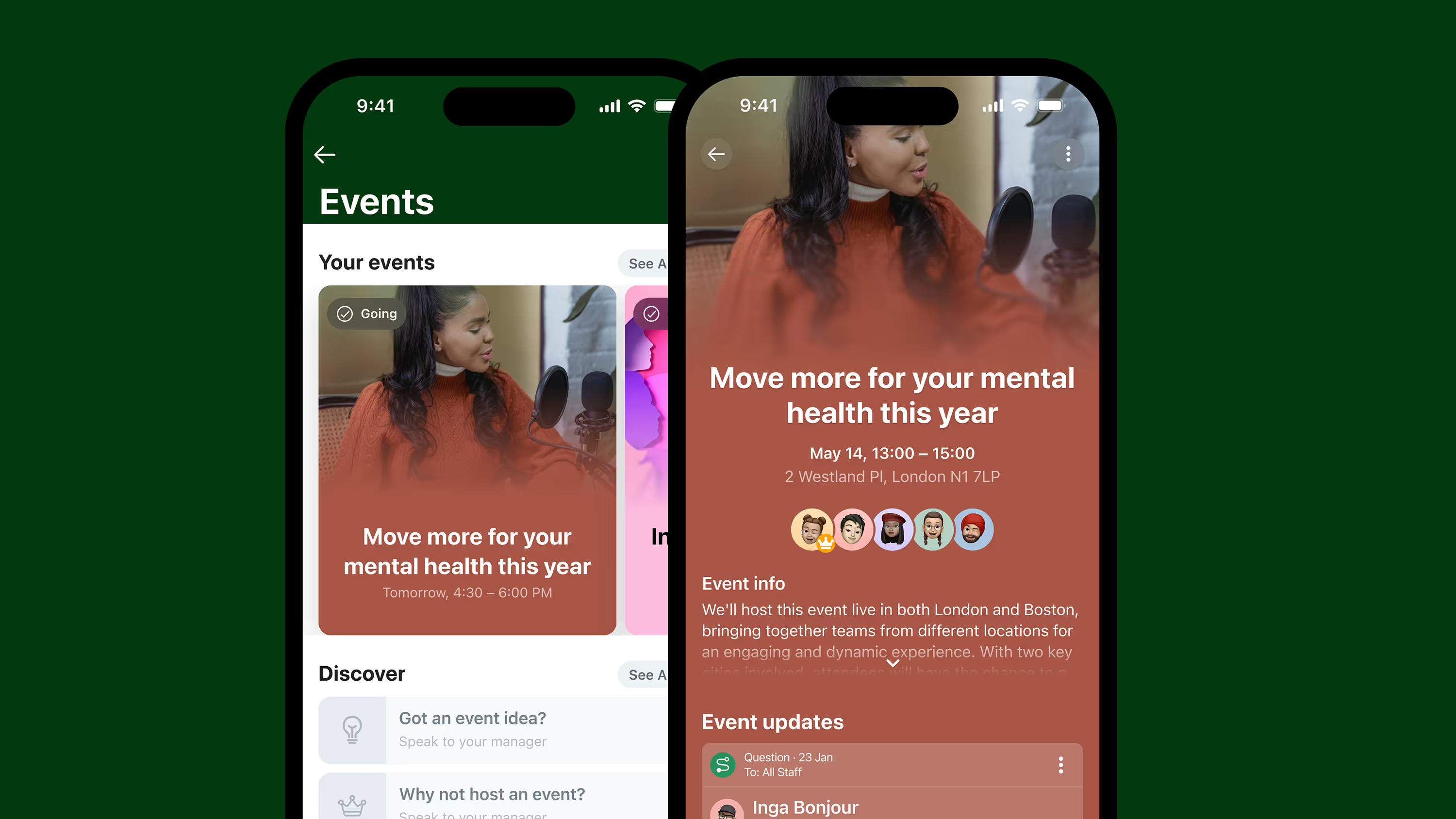
We’re excited to introduce a smarter way to plan, promote, and manage company events — so you can keep employees informed and excited, whether they’re in the office or on the go.
With a dedicated events homepage, format-inclusive setup (in-person, virtual, and hybrid), and calendar integration, hosting employee events for your organization has never been easier.
What’s new:
Effortless setup: Create an event in just three steps using the web-based event wizard.
Target the right audience: Choose which users and groups can discover and engage with your event.
Planned promotions: Schedule event reminders and promotions using the post planner.
Smart RSVPs: See who’s attending, undecided, or declining — and send reminders with a shareable link.
Easy editing: Hosts can update details and manage attendees with flexible permissions.
Alias support: Choose to host events under an alias for a consistent brand experience.
{{mobile-events="/image"}}
#2. Smarter folder sharing in the Hub
We’re upgrading folder permissions in the Hub to give you more flexibility — without the workaround. It’s a small but mighty update that will make managing shared content simpler and smarter.
What’s new:
Custom permissions for child folders: Set unique access rules without duplicating parent folders.
Cleaner structure: Organize content your way, with better control over who sees what.
#3. A new page change log to track updates
We’re adding a change log to pages in the Hub, making it easier than ever to track edits, stay aligned, and maintain trust in your shared content.
Whether you’re managing shift protocols or company-wide announcements, the new page change log will help you keep your information up to date — and your teams on the same page.
What’s new:
Full edit history: See who made what change and when, with clear timestamps and author details.
Built-in transparency: Empower teams to confidently collaborate, knowing there’s a reliable audit trail.
Content you can trust: Perfect for policy updates, team documentation, and any page that will be regularly changed or updated.
{{mobile-hub="/image"}}
#4. A richer page editing experience
We’re upgrading the editing experience in our app to help you create more beautiful, engaging pages — perfect for everything from team wikis to onboarding docs. And we’re excited to roll out even more formatting options and editing tools soon.
Whether you’re building a company knowledge base or crafting the perfect announcement, pages will now be easier to customize (and better-looking) than ever.
What’s new:
Content organization: Add and format tables effortlessly
Visual components: Embed images and videos directly into your pages
Ultimate ease of use: Enjoy a smoother, more intuitive drag-and-drop experience
#5. A more curated Communities experience
We’re expanding the power of Communities with new controls that help you shape more intentional spaces — so the right people see (and join) the right Communities, every time.
From social groups to ERGs, these updates will give you the flexibility to support meaningful, relevant communities across your organization — while keeping the experience simple, engaging, and fun.
What’s new:
Flexible visibility: Control who can discover or access each Community without making it strictly private.
{{mobile-community="/image"}}
#6. A refreshed mobile navigation to find what you need faster
We’re streamlining mobile navigation to help users get where they’re going — quicker and with less tapping. This simple change will make a big difference in how employees move through Blink on the go.
What’s new:
Cleaner layout: Now featuring four primary buttons — Feed, Chats, Groups, and Hub — plus a “More” menu for everything else. (For example, the new event management feature will live under the “More” menu!)
Smarter structure: Groups are front and center, giving employees faster access to the people and spaces they care about most.
Hannah’s hard work and dedication to quality don’t go unnoticed, and she is a key contributor to making the department successful. She is an amazing self-starter, reliable, and always team-oriented.
In her role, she is responsible for everything relating to customer quality response at the facility, which helps us increase customer satisfaction and efficiency and adhere to regulations that are critical to the manufacturing process. Her role includes but is not limited to: Customer complaint investigations (TICS), Return Material Authorizations (RMAs), NCMR generation and completion via software (C-Pro), participation in CAPA processes for addressing internal and external requests, supplier (SCARS), supervising returned material, tracking, inventory adjustments and corrections, analysis, and reporting.
She also supervises the calibration of laboratory equipment and weigh scales, and conducts preventive maintenance of testing instruments, important for preventing defects and maintaining consistency.
Throughout all of this, she manages to deliver clear, concise communication across all levels of the organization.
What does she want to do next?
She’ll be supported to do whatever she wants to do!
How you complete that sentence could speak volumes about your leadership skills.
Good leadership in the workplace is crucial for the long-term success of your business and superb employee experience.
In fact, there's a 1674% chance of an employee having a strong perception about your leadership when you connect them to their purpose, accomplishments, or each other.
Great leaders inspire and motivate their team members. But it's easier said than done.
Being a good leader can be challenging. It takes a lot of practice and focus. But like any other skill, you can learn to be an effective leader.
If you don't know how to be a good leader, you're in luck. We'll explore 10 qualities of a good leader to give you tips to become a strong leader at work.
What makes a good leader in the workplace?
A good leader engages in open communication, motivates their team members, leads by example, listens to feedback, and is open to new ideas in an ever-changing workplace.
Anyone can sit in a corner office and boss people around, but there's more to effective leadership than that.
Learning the traits of a good leader will help you significantly impact your company's success.
With that in mind, here are 10 attributes of a good leader and how to use them effectively to your advantage.
1. Good leaders engage in open communication.
Employees want to be heard — whether it's an issue that needs resolving or ideas they believe would improve the business or better serve clients.
When you don’t communicate well with your team, they may feel discouraged, resulting in poor morale and lower production. Project.co shared that 35% of businesses have lost an employee due to poor communication.
The best leaders customize their communication styles to suit each situation and team members' preferences — which means they take the time to learn which communication mode each team member prefers.
Do your employees prefer email or phone conversations? Or maybe face-to-face?
You can also use a straightforward mobile app like Blink to turn your employees into a close-knit group by enabling communications between them.
Effective communication decreases misunderstandings and employee errors, builds trust among team members, and improves morale. Pumble backs that up, stating that effective communication can increase a team's productivity by 25%.
As long as it's done respectfully, you should maintain a work environment that promotes honest communication.
Promoting a judgment-free environment sinceyour employees are likely to give their opinions more often when they don’t fear discrimination.
Giving undivided attention to your team members when they’re speaking.
Asking your employees for suggestions to increase their engagement. You'll aim to implement employee engagement strategies that work.
Asking (not demanding) your employees to do stuff for you.
2. Great leaders encourage professional and personal development.
One of the most critical leadership qualities you can have is nurturing your staff by giving them personal development opportunities.
That can include anything from leadership training or teaching them a new skill to encouraging them to pursue a passion that inspires them in and out of the workplace.
In 2021, Lorman shared that 70% of employees are likely to leave their current job to work for an organization that invests in employee growth and development.
Employees value learning opportunities, so it's no surprise that companies with successful training programs typically see a significant increase in employee retention.
Picture a company culture where every team member receives training according to their interests. In such a case, every employee will feel you care about their goals, dreams, and overall well-being.
When that happens, your employees will go above and beyond to help you achieve your goals and vision.
Here are four strategies you can use to encourage professional and personal development in the workplace:
Encourage mentoring and coaching between managers and employees.
Identify and develop soft skills such as time management, active listening, and delegation.
Implement cross-departmental training programs to increase the efficiency of your entire company.
3. Successful leaders lead their employees by example.
One of the characteristics of a good leader is their ability to ‘walk the talk.’
Here’s an instance of a true leader leading by example:
Jane is a manager at a local bank with a team of seven employees (you can pretend that’s Jane and her team in the above picture). She shows up to work a few minutes early to plan her schedule.
When her team starts to arrive, she greets them warmly and inquires about their families.
She then calls her team members into a morning meeting. And instead of leading with her plan, she gives each person a chance to voice their ideas. She appreciates their input and asks them to create proposals to bring their ideas to life.
When it’s time to start working, Jane attends to clients like the rest of the team.
As a result, Jane gets high levels of employee engagement since she demonstrates that she’s invested in her team's initiatives and business.
Leading by example means guiding your employees through actions instead of words. The saying ‘do as I say, not as I do’ has no place in today’s world.
Nowadays, employees want to see your actions match what you say. That means showing them what’s required instead of just telling them.
Here are four ways to lead by example:
Be a role model to your employees by walking the talk.
Give clear instructions to your staff.
Avail yourself to answer questions your employees might have.
Make employees feel part of the team by letting them know why you're giving them specific instructions.
Use respectful words like ‘please’ when giving instructions to your team members.
4. Strong leaders give constructive feedback to employees about their performance.
Employee feedback is an incredibly effective tool. Offered well, it can grow your employees, strengthen bonds between staff and managers, and improve trust levels.
“We all need people who will give us feedback. That’s how we improve.” — Bill Gates
Direct, honest feedback is the best way to steer your team in the right direction.
Don’t wait for monthly or quarterly assessments to give your employees feedback. Give them right after an event has occurred. It will have the most significant impact on their performance.
Here are four tips to help you give employees effective feedback that gets the results you need:
Give individual feedback privately.
Avoid sandwiching corrective feedback between two positive feedbacks. It will create confusion, undermine the feedback, and decrease trust levels.
Focus on your employees' behaviors (what they do) rather than their personality traits (what they’re like).
5. Secure leaders ask for feedback from employees about their leadership style.
The saying goes: there’s always room for improvement. That’s especially true when you're a good leader.
Who can point out these growth opportunities better than your employees?
After all, they work with you every day, so they know your strengths and weaknesses.
“Feedback is the Breakfast of Champions.” — Ken Blanchard
However, getting honest feedback isn’t always easy.
Employees may feel awkward revealing their true thoughts. They may not want to offend anyone's feelings or face future consequences for harsh criticism. That may cause them to give you fluffy feedback or avoid the request.
Use these tips to ask your employees for feedback and increase the likelihood that they give honest, actionable feedback:
Ask your employees specific questions instead of vague questions such as, “What do you think?”
Tell your staff not to hold back on their feedback and make them feel they’re doing you a favor by being honest.
Give them time to think about your questions and develop helpful answers.
Ask employees about what you can do better in the future rather than what you did wrong in the past.
6. Transformational leaders are open to change and new ideas.
Change is hard — even if the change is for the better. Successful leaders are aware of this and don't pretend otherwise.
They also understand that embracing change with the right mindset is critical to creating an environment where change is integral to their company's DNA.
A great leader never wants to be the smartest person in the room. They surround themselves with a team of experts with more ideas and experience without feeling threatened.
And when these experts are led well, they can be a powerful force in driving strategy, making changes, and enhancing the company's bottom line. They’ll perform at a high level with little oversight and push you to grow continually.
“It doesn’t make sense to hire smart people and tell them what to do; we hire smart people so they can tell us what to do.” — Steve Jobs
Whether you're leading a team of two or five thousand, below are four ways to embrace new ideas and get your employees on the ‘change-wagon’ faster:
Surround yourself with a committed team of experts.
Understand why you need the change and clearly express the desired outcome.
Include your employees in decision-making from the get-go to strengthen their commitment to change.
Make sure your beliefs and behaviors support the change. Be resilient, persistent, and willing to step outside your comfort zone.
7. Effective leaders set clear employee goals and delegate work.
A good leader makes sure their employees are doing what they’ve assigned them to do to achieve the company's mission and goals.
The instructions you give should be measurable and quantifiable. Use existing data to develop a baseline for employees to do their best work.
Moreover, 2021 research by Bi Worldwide showed that 31% of employees said their manager set attainable goals for them, but they weren’t challenging. So be sure to have goal-setting discussions with your employees to set goals that will challenge them to grow.
An effective leader also knows what tasks to delegate. They know they can’t accomplish everything alone, so they assign tasks to team members they’re confident will complete them.
As a result, they empower and boost their employees’ morale. And in the process, they free up their time to focus on what will yield the highest returns and grow the business.
Here are three tips to help you delegate tasks to your team members:
Look for opportunities to delegate tasks based on your teams' strengths and weaknesses.
Walk your employees through the project you're delegating and clarify when you need it done.
Give continuous feedback and be specific on what they did well and what they need to improve on.
A good leader has the right motivation and passion. They’re not driven by money or prestige but genuinely want to inspire others to do their best.
Passionate leaders increase productivity and make sure workers are committed to the company's values, mission, and vision.
“A great leader's courage to fulfill his vision comes from passion, not position.” — John C. Maxwell
Most successful leaders have a passion (not a job) and know how to rally others around that passion.
In short, passionate leaders lead with heart.
Here are seven qualities that set passionate leaders apart from the crowd:
They're open-minded and respect differing opinions.
They have a positive attitude and superb problem-solving skills.
They’re great communicators and listen with the intent of genuinely understanding rather than advancing their agenda.
They're future-focused and capable of engaging others to achieve their goals.
They look at the big picture and embrace challenges.
They're risk-takers and put in the hard work to execute ideas.
They're self-aware, surround themselves with like-minded people, and sustain collaborative relationships.
Your ability to inspire, motivate, and create a magnetic vision needs commitment and perseverance. But it’s worth the effort, whether your goal is productivity, employee retention, or project management.
9. Successful leaders have a positive attitude even when things go south.
Most people tend to associate good leadership with smooth sailing.
After all, what can go wrong if you build and nurture a great team and generate excellent ideas?
…. a lot.
But whether it's a minor misunderstanding or a significant error, how you handle a negative situation reveals a lot about your emotional intelligence and leadership abilities.
“Great leadership usually starts with a willing heart, a positive attitude, and a desire to make a difference.” — Mac Anderson
When things go south, your words and actions as a leader are critical. Here’s what you can do during those times:
Take time to evaluate the situation and know what the problem is.
Face the problem with positivity and look for solutions.
Be flexible and adaptable and make adjustments along the way.
Remain persistent and determined to solve the issues.
10. Good leaders are always learning.
All successful leaders have one trait in common — a hunger for learning. They enroll in relevant online courses, read great books, use the best tools, and constantly improve.
Great leaders have an innate sense of curiosity that often drives them to learn more, which helps them perform better for their businesses and provide personal fulfillment.
“Leadership is not an expertise. Leadership is a constant education.” — Simon Sinek
Learning helps great leaders challenge their assumptions and bring clear understanding to the table.
In contrast, failure to keep learning means you won't adapt to the ever-changing work environment. And depending on your industry's competition, this can be a significant issue that spells the death of your company.
Here are three ways to keep learning and become a better leader:
Embrace an open mind to see things from different perspectives.
Read relevant books, industry publications, and blogs.
Take advantage of consultants, personal networks, industry events, and other organizations and learn from them.
How to be a good leader at work: your checklist
Openly communicate: Make sure your team always know what's going on and what is expected of them.
Develop your team: Push each team member in their personal development. Make sure you each team member has a clear and robust personal development plan.
Lead by example: Easier said than done, but be the example your team can learn from. Show them the type of employee you want them to be.
Give constructive feedback: Don't be afraid to give constructive feedback. 1-1's are normally the place for this.
Ask for feedback: You won't always get things right, and not everyone will agree with you. Ask for feedback from your team on your management style and how you can improve.
Be open to change and new ideas: If a team member has an idea or a new way of doing things, be open to it. Don't stick to the way things are just because "that's how it's always been".
Set goals & delegate: You can't do everything on your own, give your team responsibility and delegate tasks appropriately. This can help with point 2 as well.
Show your passion: If you love your job, show it. This passion can be infectious and help motivate your team.
Keep positive: Things won't always go to plan, but you can weather the storm. Keep positive and let your team know you have their back with whatever road bumps you hit.
Don't stop learning: Your development also doesn't stop. If you want to lead by example you need to make sure you are up to date with the latest techniques and strategies for your role.
Wrapping up: What makes a good leader in the workplace?
Most people aren’t born with the ability to get things done and inspire others every day. And that’s okay — you don’t have to be born with that ability to succeed.
Although it takes time to be a good leader, you can learn strong leadership skills. But like any other skill, it takes a lot of practice and focus.
Just keep in mind it also requires you to grow and engage your team. Blink’s Employee Engagement App can help you keep employees engaged and connected. Try it out today.
It’s packed with company milestones, product launches, quarterly updates, and maybe even "Employee Appreciation Week”. But for a significant proportion of your workforce, it’s largely irrelevant.
Because what it doesn’t capture is the other calendar. The calendar of frontline operational reality — of shift changes, policy updates, roster gaps, and the months where teams are working flat out just to cope with demand.
Effective frontline communication planning means overlaying this unofficial calendar on top of the official one. Let’s explore how.
What the "official" internal comms calendar misses
Before you can build a better comms calendar and improve frontline employee communication, you need to understand how the standard employee communication strategy falls down for frontline workers.
In many organizations, there’s a gap between the content comms teams plan and what frontline workers actually need to hear. Here’s why.
It reflects business priorities not frontline concerns
The typical internal comms calendar is organized around what the business wants to say — launches, milestones, strategic updates.
This can be useful for frontline employees. But they also need other information: what’s changed, what to focus on, how to do the job well today.
It doesn’t treat operational updates as comms
Operational updates are often shared through manager cascades or notice boards rather than through official comms channels. That makes it easy for messages to be delayed, diluted, or missed altogether.
These updates rarely make it onto the content calendar because nobody thinks of them as “comms”. But for frontline workers, these are the comms that matter most.
It assumes stability in an unstable sector
Frontline environments are subject to change. Last-minute rota gaps, unexpected site disruptions, safety updates — these aren’t planned weeks in advance.
Internal communications that are entirely pre-scheduled leave organizations without the space for unplanned moments. But these are the times that most require a comprehensive comms response.
It ignores emotional cadence
Different times of year bring different levels of frontline fatigue, stress, and morale. A piece of content that lands well in October may land very differently in the first week of January.
The standard comms calendar rarely accounts for this — which means messages are written and scheduled without enough consideration for the emotional and operational context in which they land.
Want to incorporate frontline comms into the official comms calendar? Here are the kinds of comms your frontline teams need throughout the year.
January
Staff shortages are still playing out. Annual leave has depleted teams. New policies roll in with the New Year. And motivation is at its lowest point of the annual cycle, with employees experiencing back-to-work blues and post-Christmas financial pressures.
The official comms calendar arrives with vision statements and annual goals. But on the floor, people are simply wondering whether they can get through the week without any surprises.
What frontline workers need: Stability, not inspiration. Clear guidance on any policy changes. Reassurance that leadership understands what the frontline is feeling. Well-being signposting. Manager check-ins.
February
February, with its grey weather and flat energy, is a month when comms teams tend to go quiet because there’s nothing obvious to communicate. But this is a really crucial time for comms to step in and lighten the mood.
What frontline workers need: Consistency. Recognition. Peer-to-peer connection. You can prompt employees to interact with news feed content, celebrate colleagues, and start conversations with people beyond their immediate shift.
March & April
The new financial year usually means new targets, policy updates, and process changes.
This is when a significant volume of important information needs to reach the frontline — and there’s a risk that change communications get missed or filtered imperfectly through manager cascades.
What frontline workers need: Repetition. If you haven’t said it five times, it hasn’t landed. Effective change communication for frontline workers means repeating the same information in multiple formats, across multiple touchpoints, with clear channels for questions and clarification.
Summer
A time of holidays and heat. Shift swaps spike, coverage gets unpredictable, and project and production targets shift. New or temporary staff are onboarded quickly.
In this environment, comms that were drafted three weeks ago may bear little resemblance to what’s actually happening on the floor.
What frontline workers need: Speed and self-serve. Updates that reach workers at the right time. Updated policies and procedures available via a searchable knowledge hub. Team messaging tools for new hire questions.
September
Back-to-school season reshapes team availability. Parents may struggle to juggle work around strict pick-up and drop-off times. Students are leaving or joining. Teams are reconfiguring at the same time that new routines are being established.
What frontline workers need: Coordination. Shift schedule comms. Reconnection with teammates after summer breaks through the people directory and communities.
October & November
Thanksgiving, Black Friday, and the festive season are all on the horizon. That means increased consumer spending and increased pressure on frontline workers across sectors.
During this time, hiring ramps up, training is a priority, and expectations of worker output increase.
What frontline workers need: Personalization and prioritization. When everything competes for attention, nothing gets through. This is the time for careful segmentation — making sure frontline staff only receive updates relevant to their role — and for comms that connect individual effort to the bigger picture.
December
A time when many frontline organizations are working at maximum operational intensity. Workers are tired, with limited mental bandwidth. But they need to maintain momentum until the festive break. During this time, stress levels are high, mistakes are more likely, and attention is a scarce resource.
What frontline workers need: Brevity and clarity. This is not the month for lengthy updates or complex policy docs. Every piece of content should be short, sweet, and to the point. Push employee recognition at this time, too — it works wonders for morale.
The types of communication frontline workers are most likely to respond to
The frontline content you choose to share will vary depending on the month. But there are some frontline communication best practices you should try to weave into your comms calendar all year round.
Personal and timely beats corporate and scheduled
A message that arrives just at the right moment carries more weight than a perfectly crafted scheduled update. Frontline comms planning should build in space for reactive, real-time communication alongside pre-scheduled content.
Peer-to-peer comms matter as much as top-down
Frontline workers return to internal comms channels when they provide space for co-worker connection. So enable and amplify peer communities, recognition, and knowledge-sharing to create a sense of engagement and belonging that top-down messaging alone can’t achieve.
Recognition in the moment beats the end-of-quarter shoutout
By the time a quarterly recognition email arrives, workers have long forgotten the specific moment you’re referencing. Recognition that’s immediate, specific, and visible to the team has significantly more impact on morale and engagement than delayed, generic praise.
Interactive comms beat passive messaging
Content that employees can respond to, react to, and participate in generates more engagement than broadcast updates. Polls, questions, short-form video, and news feed content that invites a response are more engaging and more memorable.
Multimedia beats a page of text
Frontline employees work busy shifts. They don’t have a ton of time during the workday to check in with company comms.
For this reason, the best messages are short, succinct, and put the most important information first. They also use images and video to convey a lot of information in a short space of time.
Comms planning for frontline workers: How to build the internal comms calendar they actually need
Understanding the unofficial calendar is the starting point. Building it into your internal comms strategy requires a few practical shifts.
Overlay operational moments onto your comms plan
Map seasonal peaks, policy change cycles, onboarding waves, and predictable points of stress alongside your standard content calendar.
For each moment, ask: what do frontline workers need to know, feel, or be able to do at this point in time? Then, craft communications based on your answers.
Give managers the tools to communicate without becoming a bottleneck
Managers are the last mile of internal comms — but they can’t carry the full weight of operational communication without support.
Pre-written talking points, timely manager-only briefings, and clear escalation channels help managers communicate effectively without creating delays or distortions.
Segment your audience
A warehouse operative, a new seasonal hire, and a shift supervisor have very different information needs. A frontline communication strategy that treats the whole workforce as a single audience will underserve all of them.
Segmentation — by role, location, tenure, and shift pattern — means every employee receives communication that’s hyper-relevant to their current situation.
Frontline communication planning made easy with Blink
Building an internal comms calendar that works for frontline workers requires careful planning. But executing that plan can feel hard without the right comms infrastructure.
A desktop intranet that shift workers never log into. A bulletin board crowded with paper notices. A manager cascade that creates confusion and bottlenecks. None of these channels provides effective support for a new and improved, frontline-focused comms schedule.
Blink is a unified mobile-first platform designed around the realities of frontline work. It provides:
A personalized news feed so you can deliver targeted content to the right employees at the right time
Push notifications for urgent operational updates
A searchable knowledge hub for self-service information
Recognition and survey tools that make employees feel valued and heard
Analytics that show comms teams what’s landing — by team, location, and time of year
Blink gives you the tools to plan, deliver, and continuously improve frontline communication — all in one place. So you can turn your comms calendar into something frontline workers actually see, use, and rely on.
If you're comparing Beekeeper and Blink right now, the most important fact is the one most comparison articles still miss. Beekeeper was acquired by LumApps in July 2025, in a deal valuing the combined company at more than $1 billion. The integration roadmap runs 12 to 24 months. That changes how buyers should weigh this decision.
This guide gives you a current, objective comparison. What each platform actually does, what the LumApps merger means for new Beekeeper buyers, where the two products differ, and how to choose.
The short answer
Pick Blink if you want a mobile-first frontline platform with an independent product roadmap, transparent per-user pricing, and a single app that combines comms, a searchable knowledge hub, and chat. Blink starts at $3.75 per user per month.
Pick Beekeeper (now part of LumApps) if you need built-in shift scheduling and inline translation as core day-one features, you want to replace your existing scheduling tool rather than integrate with it, and you're comfortable buying into a platform mid-integration with a larger desk-worker intranet (LumApps).
Both are real options. The right choice depends on your workforce mix and how much integration risk you can absorb.
What changed: the LumApps acquisition explained
In April 2025, LumApps and Beekeeper announced a definitive agreement to merge. The deal closed in July 2025. Here's what's publicly confirmed:
The combined company is valued at over $1 billion, backed by private equity group Bridgepoint, which already held a majority stake in LumApps from 2024. (Bridgepoint announcement)
The merged business serves around 7 million users across 2,000+ clients, with roughly $150 million in recurring revenue and 600+ employees. (LumApps press release)
The combined product is being positioned as an "AI Employee Hub" for both desk-based and frontline workers. (Forrester analysis)
A fully integrated platform is expected over 12 to 18 months, with a 24-month integration roadmap covering infrastructure, user provisioning, and mobile apps. (Reworked coverage)
LumApps has confirmed there are no short-term sunset plans for either platform during the integration. (LumApps + Beekeeper hub)
This isn't a small bolt-on. LumApps is primarily a desk-worker intranet on Google Workspace and Microsoft 365. Beekeeper is a mobile-first frontline app. Merging them into a single hub is a multi-year engineering and product effort. New Beekeeper buyers should understand they're buying into the start of that journey, not the end of it.
What buyers should ask before signing with Beekeeper today
These are fair questions to ask any Beekeeper sales contact in 2026:
Which Beekeeper modules are on the combined-platform roadmap, and which will be retired or rebuilt on LumApps infrastructure?
If our contract spans the 24-month integration, what's our migration path if functionality moves to a different SKU or pricing tier?
How does pricing change once we're on the combined LumApps + Beekeeper platform?
Which engineering and product leaders from Beekeeper are committed through the integration?
There are no wrong answers here. There are only answers you should hear before you sign.
Comparison point
Blink.
Beekeeper (LumApps Group)
Ownership
Independent, frontline-focused
Acquired by LumApps in July 2025, backed by Bridgepoint
Product roadmap
Single product, frontline-first
Mid-integration with LumApps intranet, 12 to 24 months
Starting price
$3.75/user/month (Core, annual)
Not published, third parties cite $5 to $15/user/month
Free trial
Free trial across all tiers
14-day premium trial, free plan up to 30 users
Best for
Mobile-first frontline teams, mixed office and frontline workforces
Shift-based operations wanting native scheduling and inline translation in one app
Knowledge hub
Unified, searchable Hub in-app
Streams and channels, less unified search
Shift scheduling
Integrates with your existing scheduler
Native built-in scheduling
Chat: delete and forward
Yes
No (per user reviews)
Inline translation
Multi-language publishing on Pro
150+ languages, inline
Integrations
Direct native (Microsoft 365, Salesforce, IdPs)
Mix of native and Zapier-based
Digital signage
Not offered
Yes, break room displays
AI assistant
Included on Pro
Roadmap item under "AI Employee Hub" combined product
Where Beekeeper is genuinely strong
To be fair to Beekeeper, it has real product depth in a few areas:
Shift scheduling is native, not an add-on. Built-in scheduling, swaps, and time-off requests. For operators who want comms and scheduling in the same app, that's a meaningful day-one feature.
Inline translation across 150+ languages. Useful for multilingual frontline workforces where messages need to land in the worker's language without an extra step.
Mature workflow automation. Onboarding flows, chatbots, and operational checklists are well-developed and documented.
If those three features are non-negotiable for your rollout, Beekeeper covers them out of the box.
Where Blink is genuinely strong
Blink is built mobile-first for frontline teams and competes head-to-head in the same buying conversations. Where it pulls ahead:
Unified Hub. Blink combines a feed, chat, and a searchable knowledge hub in one app. Documents, policies, and SOPs are all findable in the same place a worker reads comms.
Mobile-first content experience. Built for workers who don't have a desk or a corporate email address. Rich post formatting, embeds, and emoji support in the feed.
Transparent per-user pricing. $3.75/user/month on the Core annual plan, $5.00/user/month on Pro, with a free trial across all tiers. No quote-only walls for SMB buyers. (Blink. pricing)
Independent product roadmap. Blink is not mid-integration with a larger desk intranet. The roadmap is fully focused on frontline use cases.
Direct integrations. Native connections to Microsoft 365, Salesforce, and other workforce systems, rather than relying on third-party connectors for security-sensitive flows.
Pricing: what you actually pay
Blink publishes pricing on its website. As of May 2026:
Core: $3.75/user/month (annual) or $5.60/user/month (monthly). Includes feed, chat, Hub, custom branding.
Pro: $5.00/user/month (annual) or $7.00/user/month (monthly). Adds events, live streaming, multi-language publishing, AI assistant, and priority support.
Enterprise: custom, with advanced admin, API access, surveys, dedicated CSM, and SLAs.
Beekeeper does not publish pricing. Third-party trackers report a per-user, per-month range of roughly $5 to $15 depending on modules, plus implementation fees that range from around $1,000 for small deployments up to $50,000+ for larger ones. A free plan for up to 30 users and a 14-day premium trial are available. Sources: Capterra pricing tracker, TrustRadius pricing, GetApp listing.
The practical difference: Blink.'s pricing is predictable per seat. Beekeeper's depends on which modules and add-ons you enable and is harder to forecast before a sales conversation.
Feature comparison
Feed and content. Blink's feed sits next to a unified Hub where documents, policies, and SOPs are searchable in the same app workers read messages in. Beekeeper organizes content into multiple streams, and user reviews on G2 frequently note that documents are harder to find compared to chat or feed posts. For frontline workers searching one-handed on a shift, that difference compounds every day.
Chat. Blink supports message deletion, forwarding, and saving in group chats. Beekeeper users on G2 and Capterra have flagged the inability to delete old chats as a long-running frustration. Small detail, daily impact.
Scheduling. Beekeeper replaces your scheduler. Blink. partners with it. If you already run Deputy, When I Work, Quinyx, or a workforce management system, Blink. integrates without forcing a rip-and-replace. That keeps your shift logic, payroll exports, and labor rules where they already work, and puts comms next to them in one app workers actually open.
Integrations and IT load. Blink ships direct native integrations with Microsoft 365, Salesforce, and the major identity providers (Okta, Azure AD, Google). Beekeeper relies on a mix of native and Zapier-based connectors for many of the same flows. For IT and security teams, that's fewer middleware points to audit and fewer third-party data hops to review.
AI: shipping vs roadmap. Blink's AI assistant is live on the Pro tier today, helping admins draft posts, translate, and surface content for workers. Beekeeper's AI features are now tied to the combined "AI Employee Hub" with LumApps, which is on a 12 to 18 month build. If AI is part of your decision, the practical question is whether you want it in your hands now or in the roadmap.
Mobile experience. Both apps work on a phone. The difference is what loads when a worker opens it. Blink. leads with a personalized feed and a searchable Hub. Beekeeper leads with streams and operational workflows. For mixed workforces and engagement-led rollouts, Blink.'s home screen does more on first open.
Mobile experience and frontline adoption
Both products are mobile-first. The honest read on adoption signals:
Blink publishes adoption rates above 90% across customer case studies, with a UI built specifically for workers who only ever use the app on a phone. (Blink. customers)
Beekeeper publishes similar high-adoption numbers and has a longer track record in very large hotel and manufacturing deployments.
The differentiator isn't whether either app works on a phone. Both do. It's what the worker sees when they open it. Blink.'s home screen leads with a personalized feed and Hub. Beekeeper's leads with streams and operational workflows.
Migration considerations: moving from Beekeeper to Blink
If you're a current Beekeeper customer evaluating alternatives because of the LumApps merger, the practical migration questions:
Content export. Both platforms support data export. Confirm the format with each vendor.
User provisioning. Blink integrates with the major IdPs (Okta, Azure AD, Google). Most Beekeeper customers can re-provision in days, not weeks.
Integrations. Audit which third-party connectors you depend on today. Blink. ships direct integrations with the most common systems, which reduces ongoing Zapier or middleware costs.
Timeline. A typical Blink SMB rollout takes 2 to 6 weeks end-to-end. Larger or multilingual rollouts run 6 to 12 weeks.
The team at Blink handles migration planning and content import directly. If you want a structured assessment, request one here.
Final word
Beekeeper is a capable product with real strengths, especially around shift scheduling and inline translation.The LumApps acquisition doesn't make it a bad choice. It does make it a different choice than it was 18 months ago. New buyers should know they're signing into a multi-year integration and ask the right questions about roadmap and pricing.
Blink is built mobile-first for frontline teams, with a unified Hub, transparent pricing, and an independent roadmap focused entirely on this audience. If those things matter to you, start a free trial and put it side-by-side with Beekeeper on your real use cases.