What’s new in Blink: Voice and video calling, live streaming, and more
Discover the latest and greatest features coming to the Blink platform — from in-app calling and live streaming, to advanced employee intelligence and dark mode, and more.
The Winter 2025 product release highlights Blink's latest innovations — some already live and others rolling out over the next quarter. Missed our Autumn 2024 release? Check it out here!
At Blink, our employee experience platform is always evolving to keep pace with the ever-changing needs of organizations and their teams.
In line with our dedication to creating exceptional employee experiences — whether on the frontline or in the front office — we’re excited to introduce our latest product features, built to transform how employees connect with their organizations and each other.
From enabling easy communication with in-app calling and live streaming, to powering better outcomes through enhanced data intelligence, these powerful new features are designed to support a connected, engaged, and uplifted workplace.
#1. Voice and video calling: Power real-time, in-app collaboration
We’re excited to announce the addition of native 1:1 video and voice calling within Blink, making it even easier for employees to connect, collaborate, and deliver real-time results for your business.
This new feature will include:
Streamlined communication: Enables seamless 1:1 video and voice calls directly from individual chats or colleague profiles on mobile.
Built for international teams: Ideal for organizations with global workforces who need quick and reliable access to colleagues.
Future-proof design: Will launch on mobile, with plans to extend to desktop and explore group calling capabilities.
Flexible add-on: Available as an optional feature priced based on users, ensuring scalability for any organization.
{{mobile-voice-video="/image"}}
#2. Live streaming: Go live with all employees at once
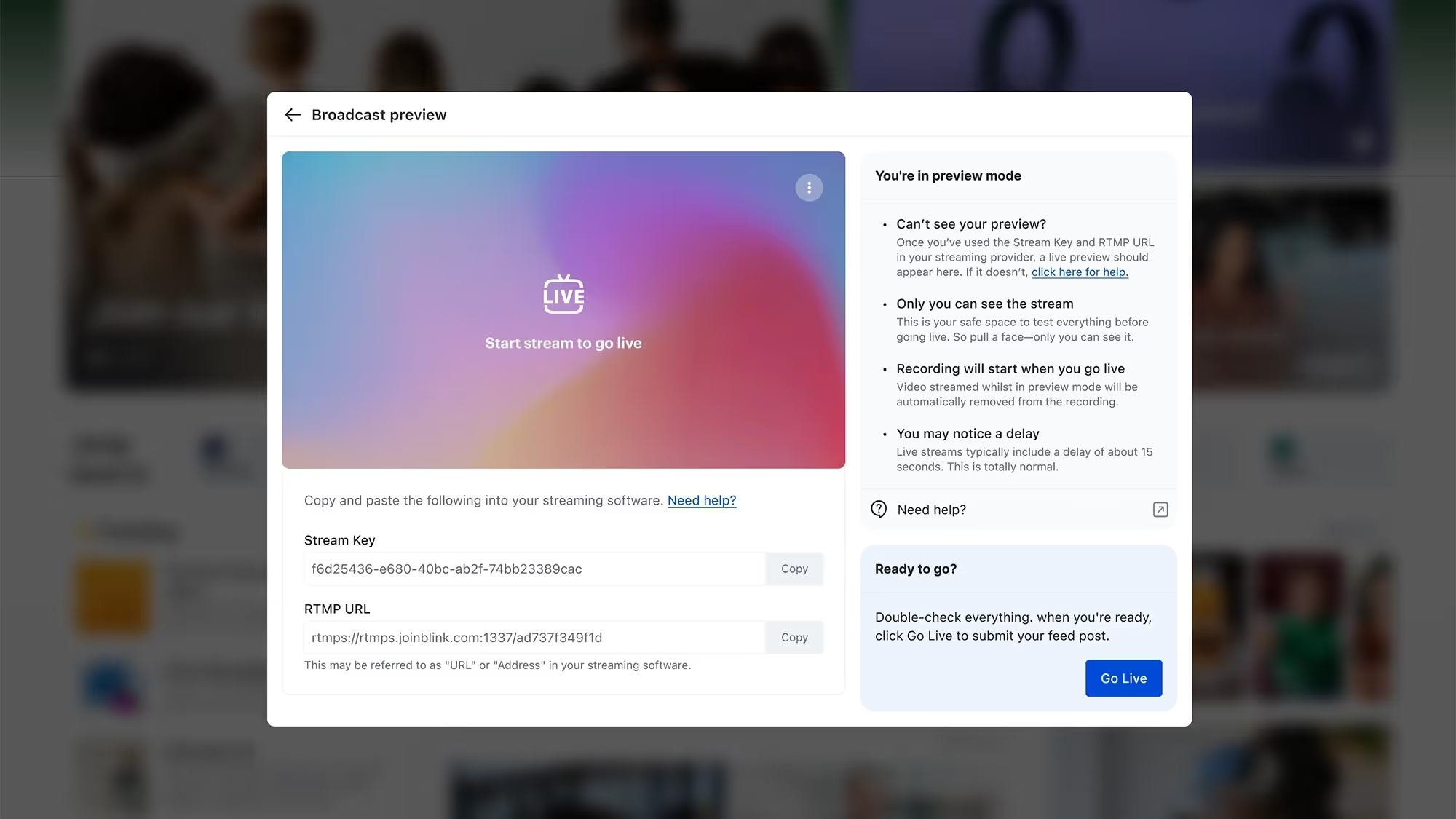
Bring your live events to life on Blink! Our new live streaming feature lets you promote and host events directly in the Feed, fostering real-time engagement and interaction.
Here’s what you can do:
Stream seamlessly via Vimeo or YouTube, with full support for Vimeo interactions on Blink.
Share streams from other platforms using Real Time Messaging Protocol (RTMP) for an additional cost.
Engage your audience as they comment and interact during your event.
Discover what drives your organization with Advanced Employee Intelligence — an upgraded analytics suite that goes beyond the basics to tackle turnover, engagement, and productivity. These actionable insights, available as a paid add-on feature, will empower you to address challenges proactively and foster a thriving workplace.
Transform your data into a powerful driver of organizational success with four core pillars of insights:
Activation: Ensure every employee is connected and engaged with activation metrics by team and role, plus gamified nudges to boost adoption.
Communication: Maximize the impact of your messages with heat maps and deep-dive analysis into communication effectiveness by category, media, and more.
Engagement: Track and improve satisfaction with tools like engagement leaderboards and influencer metrics that spotlight key communicators.
Productivity: Streamline workflows by analyzing app usage, tool access, and shift management to reduce friction and optimize efficiency.
#4. Journeys 2.0: Engage employees before day one
Make a lasting first impression with Blink’s new Journeys for preboarding! This enhancement to our Journeys feature allows managers to kick off onboarding before an employee’s first day, creating a standout employee experience right from the offer stage.
Here’s what’s new:
Include line managers in the journey for a seamless, supportive experience.
Use enhanced start-date triggers to send tailored communications ahead of the first day.
Deliver a bespoke preboarding journey that sets the stage for success.
#5. Image-first feed: Curate the content experience
We’ve made the Feed even better with a new posting experience designed for high-quality, highly curated content that stands out and visually engages users.
Here’s what’s new:
Choose your layout: Opt for the classic look or an enhanced layout that puts your images front and center.
Audience-first review: See how your post will appear to your audience before you post.
Simple to use: The curation and review steps are seamlessly built into the posting process.
#6. Self-service SSO: Simplify access to third-party systems
Our new self-service SSO feature streamlines user access to key third-party systems directly through Blink, reducing the need for multiple logins and improving overall security. This feature makes it easier than ever to connect Blink with the tools your teams rely on.
Key takeaways include:
Enhanced user experience: Simplify workflows by allowing users to access essential systems without remembering multiple passwords, driving better uptake and ease of use.
Flexible configuration: Administrators can set up and manage SAML 2.0 Single Sign-On directly from the Blink Admin dashboard, enabling seamless integration with your Service Provider.
#7. Polls as Stories: Boost engagement with a visual integration
Take your Polls to the next level by sharing them through Stories, including our new image-first Polls feature, to maximize visibility and participation. This integration helps make employee feedback and interaction more accessible and engaging than ever.
Here’s what you can do now:
Increase engagement: Promote Polls in Stories to capture attention and encourage more responses from your teams.
Visual appeal: Leverage image-first Polls to create a dynamic and engaging experience, driving curiosity and interaction.
{{mobile-story-polls="/image"}}
#8. Chat and channel moderation: Maintain a professional communication environment
Administrators now have greater control over chats and channels with new moderation capabilities, including the ability to hide certain types of content when necessary. These tools empower admins to foster a safe, engaging, and well-managed communication space for everyone.
With this feature, you’ll gain:
Improved oversight: Maintain a positive and professional environment by managing and moderating conversations directly within chats and channels.
Content management: Use the “hide” feature to remove inappropriate or irrelevant content, ensuring discussions stay on track.
#9. Dark mode: A new way to experience Blink
Enjoy a more comfortable and visually striking interface with our new dark mode feature, now available via a simple toggle in your settings. This update adds a touch of personalization and comfort to your everyday platform experience.
With dark mode:
Improved comfort: Reduce eye strain during late-night use or in low-light environments with a sleek, dark interface.
Personalized experience: Give users the flexibility to choose between Light and Dark modes based on their preferences.
{{mobile-dark-mode-post="/image"}}
Coming soon
Get excited for updates to the Hub experience, moderation enhancements, and in-app events management!
Bring your consumer-grade employee experience to life
As we kick off a new year of workplace evolution, our mission remains unchanged: to deliver tools that strengthen connections, boost productivity, and ensure every employee enjoys a seamless and exceptional experience — no matter their role or location.
These latest product enhancements reflect our commitment to helping organizations supercharge their employee experience as we step into 2025.

The Winter 2025 product release highlights Blink's latest innovations — some already live and others rolling out over the next quarter. Missed our Autumn 2024 release? Check it out here!
At Blink, our employee experience platform is always evolving to keep pace with the ever-changing needs of organizations and their teams.
In line with our dedication to creating exceptional employee experiences — whether on the frontline or in the front office — we’re excited to introduce our latest product features, built to transform how employees connect with their organizations and each other.
From enabling easy communication with in-app calling and live streaming, to powering better outcomes through enhanced data intelligence, these powerful new features are designed to support a connected, engaged, and uplifted workplace.
#1. Voice and video calling: Power real-time, in-app collaboration
We’re excited to announce the addition of native 1:1 video and voice calling within Blink, making it even easier for employees to connect, collaborate, and deliver real-time results for your business.
This new feature will include:
Streamlined communication: Enables seamless 1:1 video and voice calls directly from individual chats or colleague profiles on mobile.
Built for international teams: Ideal for organizations with global workforces who need quick and reliable access to colleagues.
Future-proof design: Will launch on mobile, with plans to extend to desktop and explore group calling capabilities.
Flexible add-on: Available as an optional feature priced based on users, ensuring scalability for any organization.
{{mobile-voice-video="/image"}}
#2. Live streaming: Go live with all employees at once
Bring your live events to life on Blink! Our new live streaming feature lets you promote and host events directly in the Feed, fostering real-time engagement and interaction.
Here’s what you can do:
Stream seamlessly via Vimeo or YouTube, with full support for Vimeo interactions on Blink.
Share streams from other platforms using Real Time Messaging Protocol (RTMP) for an additional cost.
Engage your audience as they comment and interact during your event.
Discover what drives your organization with Advanced Employee Intelligence — an upgraded analytics suite that goes beyond the basics to tackle turnover, engagement, and productivity. These actionable insights, available as a paid add-on feature, will empower you to address challenges proactively and foster a thriving workplace.
Transform your data into a powerful driver of organizational success with four core pillars of insights:
Activation: Ensure every employee is connected and engaged with activation metrics by team and role, plus gamified nudges to boost adoption.
Communication: Maximize the impact of your messages with heat maps and deep-dive analysis into communication effectiveness by category, media, and more.
Engagement: Track and improve satisfaction with tools like engagement leaderboards and influencer metrics that spotlight key communicators.
Productivity: Streamline workflows by analyzing app usage, tool access, and shift management to reduce friction and optimize efficiency.
#4. Journeys 2.0: Engage employees before day one
Make a lasting first impression with Blink’s new Journeys for preboarding! This enhancement to our Journeys feature allows managers to kick off onboarding before an employee’s first day, creating a standout employee experience right from the offer stage.
Here’s what’s new:
Include line managers in the journey for a seamless, supportive experience.
Use enhanced start-date triggers to send tailored communications ahead of the first day.
Deliver a bespoke preboarding journey that sets the stage for success.
#5. Image-first feed: Curate the content experience
We’ve made the Feed even better with a new posting experience designed for high-quality, highly curated content that stands out and visually engages users.
Here’s what’s new:
Choose your layout: Opt for the classic look or an enhanced layout that puts your images front and center.
Audience-first review: See how your post will appear to your audience before you post.
Simple to use: The curation and review steps are seamlessly built into the posting process.
#6. Self-service SSO: Simplify access to third-party systems
Our new self-service SSO feature streamlines user access to key third-party systems directly through Blink, reducing the need for multiple logins and improving overall security. This feature makes it easier than ever to connect Blink with the tools your teams rely on.
Key takeaways include:
Enhanced user experience: Simplify workflows by allowing users to access essential systems without remembering multiple passwords, driving better uptake and ease of use.
Flexible configuration: Administrators can set up and manage SAML 2.0 Single Sign-On directly from the Blink Admin dashboard, enabling seamless integration with your Service Provider.
#7. Polls as Stories: Boost engagement with a visual integration
Take your Polls to the next level by sharing them through Stories, including our new image-first Polls feature, to maximize visibility and participation. This integration helps make employee feedback and interaction more accessible and engaging than ever.
Here’s what you can do now:
Increase engagement: Promote Polls in Stories to capture attention and encourage more responses from your teams.
Visual appeal: Leverage image-first Polls to create a dynamic and engaging experience, driving curiosity and interaction.
{{mobile-story-polls="/image"}}
#8. Chat and channel moderation: Maintain a professional communication environment
Administrators now have greater control over chats and channels with new moderation capabilities, including the ability to hide certain types of content when necessary. These tools empower admins to foster a safe, engaging, and well-managed communication space for everyone.
With this feature, you’ll gain:
Improved oversight: Maintain a positive and professional environment by managing and moderating conversations directly within chats and channels.
Content management: Use the “hide” feature to remove inappropriate or irrelevant content, ensuring discussions stay on track.
#9. Dark mode: A new way to experience Blink
Enjoy a more comfortable and visually striking interface with our new dark mode feature, now available via a simple toggle in your settings. This update adds a touch of personalization and comfort to your everyday platform experience.
With dark mode:
Improved comfort: Reduce eye strain during late-night use or in low-light environments with a sleek, dark interface.
Personalized experience: Give users the flexibility to choose between Light and Dark modes based on their preferences.
{{mobile-dark-mode-post="/image"}}
Coming soon
Get excited for updates to the Hub experience, moderation enhancements, and in-app events management!
Bring your consumer-grade employee experience to life
As we kick off a new year of workplace evolution, our mission remains unchanged: to deliver tools that strengthen connections, boost productivity, and ensure every employee enjoys a seamless and exceptional experience — no matter their role or location.
These latest product enhancements reflect our commitment to helping organizations supercharge their employee experience as we step into 2025.

Say hello to Jackson Mannix — Boston-based Commercial Account Executive, former SDR trail-blazer, and resident champion of all things frontline.
Since joining Blink in late 2022, Jackson has helped shape our SDR program from the ground up, pushed the Southeast market into high gear, and kept the competitive-but-collaborative spirit of our culture alive and buzzing.
This week, he sat down with us to talk startup chaos (the good kind!), scaling a sales engine, and why empowering frontline workers still gets him out of bed every morning. Let’s dive in!
Which Blink office do you work out of?
I work out of our Boston office.
What is your position at Blink?
I’m a Commercial Account Executive covering the U.S. Southeast. I joined Blink in fall 2022 as an SDR.
How long have you been at Blink?
Just over two and a half years.
What initially attracted you to join Blink?
Back then I wasn’t sure which kind of company I wanted to join. I’d spent about six months bartending and serving at a local Boston bar, figuring out my next step. I knew I wanted to get into software sales — I just didn’t know where or how. More importantly, I wanted to work with people who were invested in my growth and who valued the traits I bring to the table.
While job-hunting, I tapped my network and discovered Blink. At that point, Blink didn’t have a Boston presence, but the passion I saw for Blink was contagious. The idea of helping frontline workers, not just businesses, struck a chord. Yes, we deliver huge value to organizations and improve their bottom line — but we also make life less stressful for hourly employees who are raising families and juggling enough already.
Having lived that hourly-wage reality myself, I immediately saw the impact Blink could have. We’re creating real, global change by improving work for people who often get overlooked. That combination of purpose, growth, and the chance to help build something from the ground up drew me in.
What's a project you are proud of from your time at Blink?
The evolution of our SDR program, hands down. I spent more than two years as an SDR, so it was a true career commitment. The first 4-6 months were pure learning, then — right as I hit my stride — Amanda (our Global Sales Development Director) arrived. Working closely with her and the senior SDRs, we overhauled training, processes, and feedback loops.
Seeing that transformation — from the scrappy early days to today’s structured program — has been incredible. We have a new cohort of SDRs coming in now, and they’ll benefit from a playbook built on both our successes — and our mistakes. Every miscue was a lesson that made the program stronger. I’m proud that leadership trusted me to shape the day-to-day work, give candid feedback, and help steer where the team is going.
How would you describe the company culture at Blink in three words?
Competitive, collaborative and chaotic.
Blink is competitive in the best way: We all push each other — within and across teams — to set a high bar, but never with the hope that someone else falls short. I want to beat my number, but I still want the person next to me to smash theirs, too.
That healthy drive dovetails with a spirit of collaboration that’s almost startling. From day one, people leap in to share decks, brainstorm talk tracks, or hop on a call when something goes sideways. That help hasn’t slowed for me two-and-a-half years later.
“Chaotic” sounds negative, but it’s a positive here. Priorities shift fast, new projects hit your desk with immediate urgency, and if you thrive in that kind of pressure-makes-diamonds environment — learning from the inevitable missteps and bouncing back stronger — Blink is your playground.
What's one thing you’re excited about for the future of Blink?
Landing big global logos will always be a thrill, but what really excites me now is cracking new verticals where we’ve barely scratched the surface.
Billions of frontline workers still lack a modern comms tool, and some operate in highly specific or newly burgeoning industries. Every so often a niche customer pops up — maybe a specialty manufacturer or seasonal service — who shows us Blink can solve problems we didn’t know existed in that space. One unexpected win like that can inspire product tweaks and reshape how we go to market.
The “green grass” feels endless, and the idea that next quarter’s most interesting deal might come from a sector we’ve never targeted keeps the future wide open.
Can you tell us about a recent initiative or program launched at Blink that you found particularly exciting?
I’m loving the new podcast studio. We upgraded from a basic setup to a full broadcast-quality room, and the content now coming out — clean visuals, tight edits, professional sound — has lifted our thought leadership game. Podcasts may feel crowded, but they work because people already consume information that way. Watching customers plan their own internal podcasts after seeing what we’ve built is proof we’re practicing what we preach. It’s cool to see us invest in a channel, nail the execution, and then hand clients a real-world example they can replicate for their own teams.
Why do you work for Blink?
I believe in our mission and in the people delivering it. Over the past two-and-a-half years, Blink has celebrated my wins loudly and stood by me during the lows.
When a deal closes, teammates are first to cheer; when I hit a rough patch, my teammates and leadership step in without hesitation. Amanda, for instance, showed incredible compassion when I was dealing with serious personal challenges, and the business made sure I felt heard and valued, not just judged by a number.
That genuine, reciprocal support is powerful. It’s why I log in every morning ready to push harder, and why I see a long runway for myself here.
Frontline employee engagement is no easy task. Your frontline employees work varying shift patterns and spend limited time at head office. They don’t tend to get much downtime during their working hours. And they aren’t always kept in the loop when it comes to company comms.
These obstacles get in the way when you’re trying to connect frontline workers to company culture — and each other. And it’s why standard team-building activities usually fall short.
To make a success of your employee engagement strategy, you have to tailor activities to your deskless workforce. Otherwise, you risk disengagement, plus the productivity and retention issues that go with it.
That’s why we’ve created this list of 18 employee engagement activities. These ideas are suited to busy frontline workers and their schedules. They’re designed to boost engagement and offer meaningful benefits to your employees.
This can lead to lower levels of productivity. It can also cause increased staff turnover rates, which already tend to be pretty high in frontline organizations.
Employee engagement activities, like the ones we’ve included below, help frontline employees feel more connected to their company, role, and co-workers.
And, according to Gallup, improving your employee engagement rates can lead to a range of business benefits. Besides increased productivity and employee retention, these benefits include:
A reduction in safety incidents
A decrease in absenteeism
An increase in customer loyalty
An increase in profitability
Employee engagement is good for employees — and it’s good for business. So let’s take a look at the activities that will help make it happen.
18 employee engagement activities (that work for a frontline workforce)
To engage your frontline workforce, you can incorporate any of the following employee engagement activities into your work days:
1. Engage with employees from day one
2. Celebrate employee milestones and contributions
3. Incentivize goals
4. Create a mentorship program
5. Offer perks that boost employee wellbeing
6. Give regular feedback
7. Encourage group chat
8. Provide shift swap tools
9. Plan a money management month
10. Launch a poll
11. Create online communities
12. Offer professional development opportunities
13. Launch a competition
14. Use video tools
15. Organize a volunteering day
16. Hand the mic to your leaders
17. Run Lunch and Learn sessions
18. Measure employee engagement
Team engagement ideas for frontline workers are different than for other workers. With their variable schedules, you can’t arrange lunch dates or after-work get-togethers.
Here are a few employee engagement initiatives your frontline workers can benefit from.
You can start with employee engagement activities like:
Introducing new co-workers (digitally if it’s not possible to introduce everyone in person)
Supporting new hires to login and familiarize themselves with your engagement tech tools
Sharing a library of online resources that explain the company, their role, and company culture
Assigning them a buddy or mentor
New hires need regular guidance, especially from managers. So don’t assume your workers are done onboarding after a few days or weeks. Instead, design a process that lasts for at least 90 days.
2. Celebrate employee milestones and contributions
Employee recognition improves engagement. Everyone likes to feel appreciated and valued by their employer.
So make recognition a regular feature on your company intranet or newsletter. Celebrate birthdays, volunteer work, and project milestones. Recognize the hard work and successes of employees.
You can also encourage peer-to-peer recognition. 75% of employees say that giving recognition makes them want to stay at their current organization longer.
Get co-workers to nominate each other for awards, then hold an award ceremony. Or simply get them to appreciate each other by sending a message on the company news feed.
3. Incentivize goals
Gamify the work environment by offering rewards in return for meeting goals. When employees perform well and meet targets, give them a gift you know they’ll like. Company rewards can include gift cards, discounts, cash prizes, an extra day of paid vacation, or the option to give a charitable donation.
But don’t dive right in. Before you announce your reward program, it’s a good idea to survey employees. Ask them which rewards they’d prefer so you can be sure that workers will be motivated by the prizes on offer.
4. Create a mentorship program
Do you want your employees to engage with each other, learn valuable skills, and help each other at the same time? Try rolling out a mentorship program.
Assign frontline workers a mentor within your organization. You can pair people from different departments and different levels of the company.
Then, set a regular schedule of mentor meet-ups. Mentors and mentees might like to conduct meetings online to better suit their work schedules.
Also, offer guidance on how constructive meetings should be run. The aim is for mentees to set workplace goals and come up with a plan for achieving them.
5. Offer perks that boost employee wellbeing
A healthy worker is a productive worker. So encourage fun runs, offer free healthy snacks, and provide discount gym memberships.
Also, try to provide flexible scheduling when possible to give employees a better work-life balance. You’ll reduce employee stress and their risk of burnout.
To ensure frontline employees can access wellbeing activities, you can use a wellbeing app. Via this type of tool, you can provide employee engagement activities. Things like mindfulness and meditation sessions, nutrition planning, and health tracking, all via an employee’s mobile device.
6. Give regular feedback
Gallup research shows that 80% of employees who say they’ve received meaningful feedback in the past week are fully engaged in their work.
So schedule activities where employees receive regular feedback from managers. Make it constructive and useful for employees, so it’s not an appointment they dread.
Also, take a few hours each week to run an online open-door session. This is a time when employees can meet with managers digitally to ask questions and express any concerns.
7. Use the company news feed
A user-friendly employee app with a company news feed acts as a virtual water cooler. It’s a place where frontline workers, who may spend little time with co-workers, get to build stronger workplace relationships.
The comms team can support engagement by using the news feed to share a mix of essential and informal posts. They can announce news, celebrate birthdays, and share tips — encouraging workers to comment, like, and post.
Also, consider these engagement-boosting ideas:
A weekly challenge — a photo contest, a trivia quiz, or a step-count competition
Employee spotlight — highlight a different employee each week, describing their achievements, personal stories, and contributions
A survey — whether the topic is something fun or something more serious, surveys are a great way to engage your workforce
Health and wellness tips — share tips and articles related to physical and mental health, all suited to the demands of frontline roles
8. Provide shift swap tools
Frontline employees want greater levels of flexibility. It’s not always easy for frontline organizations to provide this when there are fixed shifts to fill.
But with shift swap tools, you make it easy for workers to achieve a little more work-life balance. They can swap shifts with co-workers without HR or managers having to get involved.
You can provide other self-serve tools, too. For example, via the Blink interface, employees can access their pay stubs, request time off, and view their shift schedules.
Automating HR tasks like this gives more control to your frontline workers and lightens the load for your HR team.
9. Plan a money management month
Money worries can affect an employee’s wellbeing and their engagement with work. And employee engagement activities are most effective when they provide real value for your workers.
So plan a money management month to help employees make informed financial decisions. Use quizzes and polls to engage employees in the conversation. Challenge employees to a low or no spend day. Provide money advice over 1:1 chats or via your company resource center.
This is exactly what they’ve done at supermarket chain, Tesco, where they recognized the strain that the cost of living crisis has put on employees. In response, they introduced a range of new initiatives:
Skills training activities so employees develop store-wide skills and can pick up extra shifts
A Pay Advance scheme that allows workers to access earned pay ahead of payday
Personalized videos explaining to every worker how much their pension will be worth
10. Launch a poll
Polls give employees a chance to share their ideas and opinions. It’s a way to make their voices heard.
You can launch polls online, with the help of a tool like Blink Surveys. This allows you to quickly and easily find out what frontline employees are thinking about your chosen topic.
You might like to ask questions related to internal communications, company change, employee engagement, or simply the layout of the break room. Using this insight, you can make changes that make a real difference to your employees.
Just be sure to keep them updated with poll findings and your plan of action so they know that you’re really listening to what they have to say.
11. Create online communities
It’s easier to build connections with co-workers when you have something in common with one another. Online communities — based around shared interests — make it easy for frontline workers to find like-minded work friends.
So create space on your intranet for these types of communities. Perhaps you have a group that loves to run in their spare time. A gaggle of gamers. Or a bunch of bookworms. An online community helps bring these co-workers together.
12. Offer professional development opportunities
Training is a great way to improve workplace engagement. 71% of frontline workers have a strong desire for more learning opportunities at work. But a third of workers say that employers don’t invest enough in their growth.
Try to make training more accessible to your frontline workforce. Remember that it doesn’t have to take place in a classroom. You can put training resources into the palm of frontline workers’ hands with the help of the right technology.
You can offer micro-learning modules that workers can complete on mobile devices during a break. And provide fun online courses, with competitive and gamified features.
Also, remember that a lot of worker engagement can be tracked back to your managers. So ensure that managers get the employee engagement training they need, too.
13. Launch a competition
Pit teams of employees against each other with a fun company-wide competition. For an engagement boost, link your competition to company goals and values.
For example, if you’re championing employee wellbeing, set workers a steps or fitness challenge.
If you’re focused on employee development, encourage workers to complete training modules by setting them a training challenge.
To highlight your commitment to a chosen charity, set a fundraising contest.
Alternatively, improve engagement on the company app with a quick photo caption competition.
Pick challenges that can be completed remotely, without teams having to meet up in person. Also, plan rewards for the winners and give regular updates via your comms channels to keep competitors engaged.
14. Use video tools
When you can’t meet face to face, video is the next best thing. You can film leadership updates, company events, and new product demos to give employees more insight into the organization and their roles.
Videos are a great option for town hall meetings. Post the video on your employee news feed and employees who can’t attend in person can watch the video back later.
Similarly, get new hires to film a video to introduce themselves and post it to the news feed. Their co-workers can comment on the post to say hello and help their new co-worker feel more at home.
15. Organize a volunteering day
Offering employees opportunities to volunteer is good for their wellbeing and engagement levels. You can make this activity more appealing to frontline workers by giving them paid time off to volunteer and by giving them flexibility over the days they choose.
Salesforce leads the way on this. They give employees seven business days every year to volunteer for one of the non-profit organizations that Salesforce formally supports — or one of their own choosing.
Jamie Olsen, senior director of Citizen Philanthropy at Salesforce says:
“These are the types of programs that people want and that are attracting them to companies right now. They better the community. They improve people’s happiness.”
You can ensure everyone is on the same page by conducting a virtual Q&A session with one of your leadership team.
This type of event gives employees direct access to leadership. It bridges the gap between the frontline and head office. It also helps employees make their voices heard, which makes them feel valued and motivated.
The prospect of a Q&A can be a little daunting for leaders. But remember, a moderator can facilitate the session, reading out pre-submitted questions and managing live questions.
Also bear in mind that there are huge benefits to be gained. These include frontline insights, improved communication, and a stronger workplace culture.
17. Run lunch and learn sessions
When employees have all the information they need to do their jobs well, they feel more engaged. So give employees access to an online library of resources, transferring any old paper documents to a digital format.
With this library, you can then run virtual Lunch and Learn sessions. This is where a group of employees watches or reads a selected resource. Afterwards, they discuss their reflections either over video call or via group messaging.
18. Measure employee engagement
The last on our list of employee engagement activities is one for your people team, not your frontline employees. And it’s a really important part of any employee engagement strategy.
Find out how you’re doing by tracking employee engagement KPIs. Track your employee net promoter score (eNPS), engagement with your intranet platform, or employee survey results.
You can then set goals and — by drilling down into the data provided by your platform analytics — find actionable areas for improvement.
Final thoughts: employee engagement activities and ideas
To make a success of frontline employee engagement, you need to:
Provide employee engagement activities that offer real benefits for frontline employees
Make these activities accessible to the frontline with the help of flexible, digital solutions
You then create a culture that employees can play an active part in, no matter their schedule or location. You also motivate frontline workers to engage with company culture out of choice, making time for it in their busy days.
Incorporating the activities above into your frontline workplace is much easier when you have the right technology. And an employee engagement app comes in very useful. It’s a way to put all content and communication into the palm of every employee.
By creating online spaces where employees can gather, chat, share knowledge, and connect with company culture, you extend employee engagement to your hardest-to-reach employees — those on the frontline.
At Blink, we’re constantly evolving our employee experience platform to meet the dynamic needs of organizations and their employees.
As part of our commitment to empowering great employee experiences from the frontline to the front office, we’re excited to announce our latest suite of product features designed to improve the way employees engage with their organization and with each other.
From fostering deeper social connections and real-time interactions, to improving platform security and content protection, discover 6 new features designed to help you create an engaging, reliable, and thriving workplace.
#1. Stories: Share snapshots of your company culture
In today’s fast-paced world, the need for real-time connection and engagement has never been more important — and that includes at work. That’s why we’re excited to bring Stories, a first-of-its-kind feature, to Blink. With Stories, teams can easily share moments, celebrate wins, and keep the workplace experience fun and dynamic.
Much like Stories on the social media platforms we know and love, employees and team leaders can share temporary posts that live at the top of the Feed, keeping internal content relevant and up to date.
{{mobile-stories="/image"}}
Why you’ll love it:
Instant sharing: Whether it’s celebrating team achievements, giving updates on project milestones, or sharing everyday moments, Stories offer a personal touch that helps foster a connected culture.
Boost engagement: With the ability to share everyday moments and add a personal touch using image-editing tools, Stories make it easier for employees to connect and engage beyond formal communications.
Keep content fresh: With a 72-hour shelf life, Stories are a great way to share timely messages and encourage frequent, social snapshots of your day.
With Stories, organizations can bring a fresh yet familiar approach to their internal communications strategy, engaging employees not just in critical communications but throughout their everyday work lives.
#2. Communities: Modernize your employee resource groups
As part of the reimagined Connect section, which brings Groups, Teams, and Contacts into one cohesive view, we’re excited to introduce Communities. This new feature allows employees to connect and collaborate over shared interests and hobbies.
With Communities, which are open for anyone to explore and join, employees have an intuitive and interactive digital space to foster deeper connections that go beyond day-to-day work tasks.
{{mobile-community="/image"}}
Key benefits:
Personalized experience: Employees can join Communities based on their interests, passions, or hobbies, creating a more inclusive and engaging workplace.
A dedicated space: Each Community comes with its own unique Feed, Channels, and Resources, creating a dynamic virtual hub for content and communication.
Cross-company connection: Communities provide an opportunity to engage with colleagues across the organization, helping to bridge the gap between teams, departments, and geographies.
From Parents at Work and Home Chefs, to Dog Lovers and LGBTQ+ Crew, Communities open up new opportunities for social connection, workplace collaboration, and community-building.
#3. Moderation: Enhance control over your digital spaces
In order to ensure organizations can create and maintain a positive digital environment, we’ve enhanced our platform moderation tools. Administrators can now better manage and control content in Blink through new reporting and moderation functionalities.
New capabilities:
Report a comment: Users can now report individual comments, in addition to posts, making moderation more precise.
Report reasons: Users can provide specific reasons for reporting content, enabling admins to make more informed decisions and take quick action.
Streamlined admin workflow: Moderation tasks are now part of the admin task list, ensuring that no report goes unnoticed.
These improvements give admins more transparency and control, allowing them to better maintain a respectful and focused communication environment.
#4. Mobile version control: Improve security for frontline teams
We’ve added mobile version control as an additional security measure to help organizations protect sensitive content on Blink’s platform. With this new feature, admins now have the option to require that devices meet a minimum OS version requirement, across iOS and Android, to access specific content and resources.
Why it matters:
Improved data security: By controlling OS versions, companies can add an additional layer of security to any sensitive resources housed in the Content Hub.
Tailored policies: Admins can customize their security settings to include OS version requirements, helping to meet BYOD (bring your own device) policies and ensuring compliance.
Prompted updates: As part of this feature, Blink will alert employees in-app whose devices don’t meet the minimum OS requirements and prompt them to update their device. Blink will let me know I need to update my device’s operating system.
This update is crucial for companies prioritizing security, especially those with frontline, hybrid, or remote workers who often use their personal devices.
#5. Custom profile fields: Tailor your employee inputs
In addition to our 15 out-of-the-box user profile fields like “Name” and “Location,” we’re excited to roll out customizable profile fields.
Admins can now set up custom profile fields to gather the data they need and expand Blink’s usability, paving the way for admins to design a truly tailored Blink experience for their organizations and employees alike.
A closer look:
Customization: Admins can now create custom fields to collect and manage unique user data, offering more tailored experiences for employees.
Scalability: Whether you’re managing teams in retail, healthcare, or any other industry, custom fields make it easy to track data points that matter most to your organization.
Extensibility: This is just the first step! Soon, custom fields will be integrated across more Blink features, making it easier to manage employee information in a way that works for you.
With these customized fields, you can gain deeper insights, streamline processes, and capture workforce data that aligns with your organization’s unique operational needs.
#6. ServiceNow notification integration: Stay on top of IT updates
Lastly, but certainly not least, we’ve expanded our integration capabilities. Our seamless notification integration with ServiceNow enables employees to receive real-time updates on their IT tickets directly within Blink.
How it works:
Real-time notifications: Whenever an IT ticket is updated or resolved in ServiceNow, employees receive instant notifications via the Feed.
Improved efficiency: This integration reduces the need for employees to switch between platforms, keeping everything in one place and ensuring they stay informed about their requests.
Enhanced integrations like these ensure that Blink can continue to be the central hub for all of your employee communications and task management needs.
Bring your consumer-grade employee experience to life.
As workplaces continue to evolve, our goal remains the same: to provide the tools that foster connection, enhance productivity, and create a seamless and exceptional experience for every employee — no matter what they do and where they work.
These product enhancements are our next step in empowering organizations to meet — and exceed — the expectations of a modern and digitally savvy workforce.
Phil has been with Malcolm group since 2017, working on the logistics side of the business. It’s been challenging to get our Drivers on board with Blink, but Phil has been a true champion of the app from the start. Sharing pictures on the road, offering guidance to fellow drivers, and now he is a trained Mental Health First Aider for Haydock, he uses the platform to communicate and support with his peers who might be struggling.
How has Blink helped in his role?
We have drivers on roads all over the UK and Blink allows Phil to reach them when he otherwise couldn't. It also means drivers can easily reach office colleagues and others across the business.
What does he want to do next?
Phil loves driving so I’m sure he’ll keep trucking on!
2022: the year BYOD policy finally became mainstream?
Towards the end of the 2010s, BYOD was considered on its way out. The balance between good data security and infringing on employees’ private lives was difficult to manage, and buy-in rates were low.
Now, however, employers are adopting BYOD in their droves.
Why?
If you’re thinking ‘COVID. Definitely COVID’, you’re about 90% of the way there.
Equally, it’s not the only factor that has contributed:
The speed, resilience and availability of 5G make remote working significantly easier from a wider range of devices.
Increasing usage of smart IoT to increase productivity, including smart speakers and enhanced wearables. With 1.3 billion projected subscriptions to IoT-related technologies in 2023, this is very much an emerging use case for BYOD.
With the increase in remote working since COVID and consumer tech evolving rapidly, now is the time to think about tightening up your BYOD policy, or creating one from scratch if you don’t have one already. Here’s what you need to know, with a bring your own device policy template included at the end of the article.
“BYOD is the concept of employees using their personally owned device(s) for work purposes.
With BYOD, an organization has ownership of the corporate data and resources that may be accessed or stored on a device, but the device itself is the property of the user.”
Following on from this, a ‘bring your own device’ policy is the set of rules and regulations both employee and employer need to follow to make this work. Ultimately, it’s about maintaining a balance between your employees’ privacy and your IT security needs as an employer.
You might be partially BYOD without even realizing it! For most businesses, the big use case is smartphones. If you’ve ever asked employees to use their smartphones for any work-related purpose, that’s a BYOD policy. This could include:
Running work social media accounts
Installing employee apps, workplace instant messenger or any other internal comms tool
Taking work-related calls
Using it to track mileage, manage driving routes
Expense filing (via uploading photos of receipts, for example)
In fact, you’re very much in the minority if your employees don’t use their personal phones for any business activity – 87% of companies depend on their employee’s ability to access mobile business apps from their personal smartphones.
What are the benefits of BYOD?
BYOD policies can:
Save your business money on recurring hardware spend (bear in mind that most laptops will need to be replaced every few years, and that you’ll need to keep buying more as your business grows its headcount!)
Help establish remote working as a viable option. New employees have everything they need to start immediately and aren’t held back by not having the right equipment.
When managed well, BYOD is flexible, affordable, and accessible. Employees save time by working with the devices they like best, and you can implement a mobile-first approach without a huge expenditure on company smartphones.
What are the challenges and risks of BYOD?
The biggest issue BYOD workplaces face is data and device security. Whilst you can set up fair usage policies and train your employees in good security practices, you can’t completely dictate how they use their personal devices.
Let’s say you have a BYOD policy and you’d like your employees to install a mobile intranet app on their personal smartphones. After initial installation, you have no direct control over:
How often each employee installs updates
Where they take their smartphone
Who uses the smartphone
What else they install on their smartphone and how they use it
All of these are major security risks when it comes to corporate data. Whilst personal devices are increasingly a target for hackers, even the most mundane everyday accident can pose a threat.
Did your employee leave their phone unlocked on the bus?
Could children or other family members access work info by accident?
Instances like these can pose a huge risk. You’re also relying on employees to have access to devices that will support the software you want them to use. This might be a fair assumption for some workplace demographics (salaried, management level employees) but shouldn’t be taken as a given.
That’s why, if you’re serious about BYOD, you’ll need to give some serious thought to:
Making your policy comply with a wide range of device types
Providing adequate IT support for personal devices
Creating a policy that is seen as fair by employees, and doesn’t infringe on their personal lives
Creating a bring your own device policy
Want to benefit from the flexibility and cost savings BYOD offers, without turning your workplace into your IT security team’s worst nightmare? A solid BYOD policy is the answer. Follow these steps for a safe and secure workplace.
Preparing for and creating a BYOD policy: 5 steps to success
Decide which apps employees should be able to access from personal devices
In terms of risk, there’s a difference between your employee’s personal calendar tool, a project management solution and your business’s accounting app. Consider which level of security you’re comfortable granting access to in a less-regulated environment – you might want to keep systems with particularly sensitive info away from BYOD policies.
Decide which personal devices your employees can use for a BYOD policy
Weigh up risk vs reward here. If you already have a policy for using company laptops and have an entire cupboard of them to distribute, you might be better off sticking with them. Be sure to consider the implications of smart speakers and IoT devices too.
You might also want to impose an age limit on devices your employees use. Older devices that don’t support the latest software and operating system versions are a huge risk as weak points become well documented by hackers.
Set up reasonable security controls
Again, this is a balancing act. Your employees are likely to be more than happy with some security protocols on their device – this helps protect their personal information too! Equally, they might become understandably bitter about completing a 15-factor authentication process every time they check their WhatsApp.
You could start with a requirement to password protect their device, with biometrics if available, and add two-factor authentication for each business app they need to login to. A screen that locks after a set period of inactivity is also useful.
Check your SSL certificates
An SSL certificate is a snippet of code on your web server that makes online communications more secure. If employees need to view confidential information such as financial accounts or sensitive personal info like payroll and benefits, an SSL certificate helps ensure they can do that safely.
Mostly, this is a job for your IT team – but it’s good to be aware of it whilst drawing up the rest of your policy.
Outline BYOD expectations for employees and provide training
Your employees know how to use their own devices – but don’t take it as a given that they’re completely up to speed on the latest IT security know-how.
That’s why regular IT security training is vital. Cyber threats are constantly evolving, and what was good practice 18 months ago might be out of date today. Make it part of your onboarding process, and ensure that you have e-learning top-ups every year for maximum impact.
BYOD Do’s and Don’ts
Looking for a quick guide to BYOD security? Share these do’s and don’ts with your employees as a handy reference!
DO
- Keep your passwords secure and change them regularly
- Use biometric features for device security if possible
- Report any lost or stolen devices to IT within 24 hours
- Complete our refresher training regularly so you’re aware of the latest threats
DON’T
- Share your device passwords with anyone
- Screenshot or copy company data to other locations on your device
- Access systems that you don’t need to
- Access sensitive data in crowded areas without a screen protector
- Leave your device unattended for any length of time
BYOD policy examples
A basic, top-level BYOD template looks something like this:
Introduction
Lay out what the policy is for and why it’s needed
Acceptable use
Explain what employees can and can’t do with a device used for BYOD
Supported devices
List what devices your IT team can support for BYOD access to business systems
Security
Outline the security expectations for employees’ BYOD.
Risks/disclaimers
Explain the risks of BYOD policy, what to do if a device is compromised, and how the business deals with security breaches.
Want to see this BYOD template in action? Check out a real-world example here.
BYOD policy: final thoughts
Plenty of businesses use BYOD solutions successfully, 24/7. With the right foundations, bring your own device can be a safe, accessible and flexible way of managing remote, hybrid and mobile workforces in particular.
A solid BYOD policy is vital to unlocking these benefits. Too vague, and you risk security issues developing that you have no direct control over. Too overbearing, and your employees will start to resent it, disengage, and find workarounds.
Set clear expectations, provide regular security training and be open to discussion with employees for the best results. Offering to pay a percentage of the value of the device each employee uses for work isn’t necessary, but it’s a nice touch that says “We appreciate what you’re doing for us”. And, in the long run, that will pay off significantly.
While staying in a hotel in Belgium, I ate half a cookie with my breakfast and left for a couple of hours to explore the city on foot. It was a large cookie, so I left it in my room thinking that I’d finish it when I get back.
But when I returned, it was gone. I called the front desk and they said housekeeping threw it away because they thought serving me a fresh one would be better. I contacted the kitchen, and found that they were already informed to deliver the cookie as soon as I called.
Do you see the quality of service and convenience I experienced because the front desk, housekeeping, and kitchen staff worked together and kept each other in the loop? And do you think I’d want to stay in that hotel again? Absolutely!
That’s the potential of good teamwork and collaboration. Working as a team, your employees can merge their unique talents and give your company a real competitive advantage. On top of that, cultivating teamwork skills helps you create a happy working environment for yourself and your workers.
In this article, we’ll take a closer look at what it means to work as a team, the importance of teamwork skills, and the top skills your team should have for effective collaboration.
What are teamwork skills?
Teamwork skills are the traits and abilities that allow you and your employees to work well with one another on a project or task.
If you’ve played a sport in school or joined a club at work, you may already be familiar with what it means to work as a team.
Most educational institutions try to incorporate these skills in students early on, since they lay the groundwork for all your future endeavors, whether professional or personal.
So “teamwork skills” is more like a blanket term encompassing qualities such as proper communication, active listening, and conflict management.
Why work as a team?
Teamwork isn’t just a fancy term to put on your website and posters in the office. It’s an integral part of your culture and business operations. Plus, it has a direct impact on your revenue.
As per a survey by EIU, when workers are not working as a team, the impact on overall revenue is serious. Over 33% of sales lost as a result were valued between $100,000 and $999,999.
No matter your industry or job role, the ability to work alongside others is crucial for you and your workers to contribute positively to the company.
Communication and collaboration among a team are the attributes that unite a group of diverse individuals towards common business objectives. And they make it more likely for organizations to achieve them.
Teamwork skills you need to work as a team
Your ability to work as a team depends on how well you instill and demonstrate the teamwork skills mentioned below. But if a skill doesn’t come naturally to you, worry not. All of these can be improved with the right teamwork development strategies.
Communication
Clear, steady, and efficient communication is critical to consistent teamwork. When team members inform, educate, and inspire one another, amazing things happen; barriers are broken down, knowledge is shared, and productivity skyrockets. Team management tools can be used to maximize productivity while building a strong and trustworthy remote team.
Actions that demonstrate this skill include: checking in with team members, asking clarifying questions, articulating your ideas, and sharing information in a timely manner.
Project management
Contrary to what you may think, project management skills are not just crucial for managers and coordinators, but they also benefit other team members.
Knowing the basics of project management, team members can understand and align better with the plans and processes set forth by the leader. Plus, project management best practices help employees feel more assured about the timeline and completion of the projects.
Actions that demonstrate this skill include: setting realistic goals, assigning roles and responsibilities, managing project budget, defining tasks, and prioritizing them based on their urgency and importance.
Delegation
Every team member has different strengths and capacity to accommodate the tasks associated with a project. They need to know exactly what their job is, and have a reasonable amount of work on their plate.
So to function effectively, teams need leaders who know how to delegate. You should have the ability to clearly assign tasks to the people who can handle them. Plus, you’ll need to set deadlines that are challenging yet achievable.
Actions that demonstrate this skill include: creating guidelines, setting expectations, showing what a successful outcome looks like with example, and scheduling.
Conflict resolution
Conflict is part and parcel of any collaborative project. Sooner or later, it’s bound to happen in your team, whether in the form of a small disagreement or a large debate.
But how you handle such a situation speaks volumes about your aptitude to work as a team. Strong team players keep their cool and look at any conflict as an opportunity for clarification, learning, and growth.
Actions that demonstrate this skill include: being open to ideas different than yours, being fair and respectful, listening with the intent to understand, and backing up your ideas with examples and unbiased data.
Active listening
Listening seems like a simple and passive activity, but it isn’t always as easy for some people as speaking and expressing their own ideas.
Real, active listening is much more than just sitting back and letting others talk. It takes effort and focus. It involves giving your 100% attention to the speaker and listening not just for the words, but also the intent and emotions behind them.
Most people don’t really listen. Even when they do, they listen to prepare an instant response in their mind. But good listeners listen to understand first. And then they ask clarifying questions to validate what they understood. This whole process takes the trust and satisfaction of the whole team to another level.
Actions that demonstrate this skill include: Giving undivided attention to the person speaking, considering non-verbal cues, making eye contact, and not making unfounded assumptions.
Rapport building
Rapport is the informal connection you have with your team members that makes it easy and comfortable to carry out the formal responsibilities.
Being able to bond and engage in enthusiastic conversations is important for you and your team to realize their full potential. It leads to better communication, planning, and an overall more pleasant working environment.
Actions that demonstrate this skill include: showing an interest in your team beyond what they do at work, finding common interests, empathizing with their needs and frustrations, and offering help and support.
Public speaking
How can we talk about working as a team and not talk about public speaking and presentation skills? You’ll frequently need to address your whole team to explain a process or persuade them to adopt a new approach.
It’s often scary for people to present because they expect everything to be smooth and perfect. And they want to look like a fancy orator. But a good presentation is more like a normal, friendly conversation focused on clearly communicating your points. As long as you do that much, your job is done.
Actions that demonstrate this skill include: working with MS Powerpoint or other presentation software, designing visual slides, understanding your audience, and telling stories that hook.
Steps to improve how you work as a team
Teamwork skills are mostly soft skills. So improving them is a little more complicated than hard skills, since hard skills usually have a straightforward rulebook. Still, there are steps you can take to boost your teamwork skills significantly.
Learn from strong team players
Whether inside or outside your immediate team, you will always find people who work really well as part of teams. And you can learn a lot by observing them and their ability to collaborate.
See the behaviors and words of people who excel at teamwork and take notes about things that stand out to you. Whenever you see an example of great collaboration, jot it down and try to incorporate the lessons in your own words and actions.
Set specific goals
To truly grow yourself as a team player, you must identify specific areas for improvement and set concrete objectives. Plus, it’ll really help if you put time constraints on your goals.
For example, saying something like, “I’ll start communicating and showing an interest in my team members’.” is not a specific goal. A better alternative is, “I’ll ask each team member if they need any help at least once every week.”
Practice teamwork
Honing your ability to work as a team takes patience and consistent practice. Once you set goals, try to find every opportunity you can to practice the skills you want to improve.
For example, you can start volunteering to your team with small tasks, or be the first one to raise your hand when there’s a chance to work with someone new.
The more you work with a diverse set of professionals, the better you’ll get at collaboration.
Get regular feedback
We often tend to miss the little things that we need to improve the most, while berating ourselves on stuff that no one would notice. When speaking in front of a group, for example, you may be worried that you look nervous. But mostly it’s just in your mind.
The point is, it can be hard to determine what you need to improve on your own. So the best way to get around your blind spots is to ask coworkers for feedback.
Get your mentor, supervisor, or a trusted peer within your team to evaluate your ability to work as a team member. By sharing their honest and unbiased opinion of your strengths and weaknesses, they can help you work on things that really matter. So you’ll know where to channel your time and energy.
Wrapping up: improve the skills you need to work as a team
Great teamwork does not happen by chance. Working as a team requires a lot of work from managers as well as team members.
You need open communication, clear delegation, team building, and other important skills and best practices we’ve shared above. All of them will give you a good starting point to get accustomed to the basics.
Plus, improving your teamwork skills is a journey that never ends. There will always be new things to help your team learn and get inspired. So keep researching and learning from the best businesses out there.
With adequate time and practice, you will eventually build a collaborative workplace that’ll keep you ahead of the curve for years to come. And while you’re at it, also consider using a tool that streamlines ongoing communication and collaboration at your company, such as Blink. Book a free Blink demo today.