6 ways to create an intranet your frontline workforce will love
Discover modern intranet solutions that strengthen employee engagement and company culture.
Jess DeVore
Published:
August 26, 2024
Last updated:
January 8, 2025
What we'll cover
The employee intranet is a critical piece of the employee engagement puzzle. It keeps your workforce on the same page, supports the easy sharing of information and resources, and serves as a valuable tool to support internal communications, HR, and IT functions.
But historically, employee intranets have been developed with a desk-based workforce in mind, creating a gap in the workforce tech experience for frontline employees — the vast majority of the global workforce.
It’s a gap that these deskless employees are keenly aware of: Just 10% of frontline workers say they have enough access to the tools, tech, and opportunities they need to connect and advance in their workplace.
This lack of access is often a result of two simple reasons: Most intranets are 1) designed for a desktop computer experience and 2) accessible only through a corporate email address — two things that many frontline workers don’t have or use on a regular basis.
To overcome these issues, organizations sometimes try communicating with their frontline workers using memos on a noticeboard, SMS messages, or shadow IT. Yet this just furthers the disconnect, with desk-based workers getting a rich digital workplace experience — and frontline workers still missing out on all the benefits an employee intranet brings.
With frontline satisfaction and retention in need of urgent attention, a modern intranet, suited to all sectors of your workforce, can transform the frontline employee experience.
Let’s look at six ways that organizations can customize their intranet to make it more frontline-friendly. By incorporating these ideas into your own intranet, you can give your frontline employees — alongside your office staff — the communications, connection, and resources they need to thrive in the workplace.
6 ways to customize your intranet for the frontline
#1. Make all tools and resources accessible in one hub
Frontline employees work busy shifts with limited downtime. If they have to switch between lots of different apps, remembering multiple sets of login details, they’re unlikely to regularly use your workplace tools.
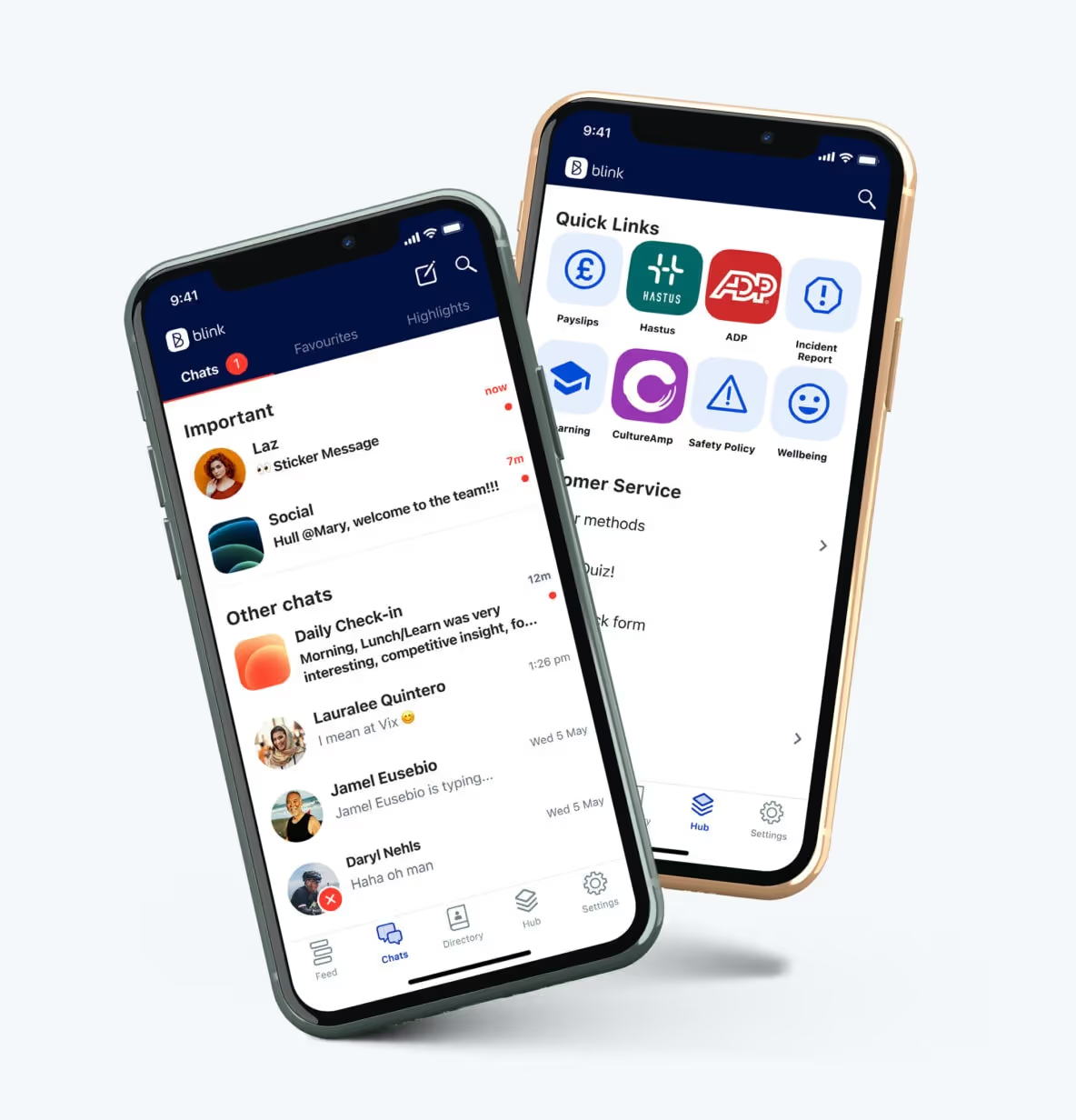
By putting everything your workforce might need in a centralized employee app, your frontline workers can benefit from quick and easy access to key tools and resources.
An employee app, accessible via smartphone or desktop computer, can act as a content hub where all policies, documents, and forms are stored. It’s where employees can catch up with company news, connect with coworkers, and fill out the latest employee surveys.
{{mobile-hub="/image"}}
With the help of single sign-on technology, a company app can also act as the gateway to all other workplace software, improving adoption of tools across the business. Employees need to sign on just once to access anything from training programs and shift-swapping software to time-off policies and employee benefits.
#2. Create different channels to satisfy all employee connection needs
While it may not take place around the famous water cooler, office-based workers get lots of opportunity during the work day for informal chit chat. But frontline employees — who often work disparately, away from HQ and on their own — tend to miss out on coworker connection. This can create a disjointed employee experience and get in the way of knowledge sharing, team building, and collaboration.
So when it comes to the company intranet, don’t just create channels for important company updates. Create channels suited to informal conversation and two-way communication, too.
{{mobile-connect="/image"}}
Here, employees can get to know one another and chat about their choice of topics. They can enter groups, building relationships with co-workers in the same location, in the same role, or with the same hobbies. By providing a variety of communication channels on your employee intranet, you satisfy the various connection needs of your workforce.
#3. Use mandatory reads to highlight important communications
Some frontline employees work in environments where safety and compliance are critical. Others interface with customers and need the most up-to-date information on inventory and processes. But these workers don’t always call into HQ before their shift starts, and they sometimes operate with less direct supervision than their office-based peers.
So how can you ensure critical updates get through to your deskless workforce?
By marking the latest policies, safety alerts, and best practices as mandatory reads on your intranet, they’re more likely to cut through the noise.
Mandatory reads appear prominently on the intranet dashboard or the company news feed. They only disappear when an employee reads and acknowledges them. And by using backend analytics that track engagement and reading rates, your internal communications team can ensure that all workers, regardless of their locations, have received and read new need-to-know information.
#4. Surface personalized content based on teams and titles
If you primarily use your intranet for your desk-based workforce, it likely contains a lot of information that is irrelevant to your frontline teams. Serve this information to your frontline employees and they’ll become disengaged with your intranet, making it harder for you to communicate key messages.
Use intranet tools that allow you to personalize the user experience — and don’t simply make a distinction between your office and frontline staff.
Segment your employees based on their title, team, location, and tenure. Then customize their dashboard so it features the most relevant content. For frontline employees, you might like to include key contacts, “suggested for you” content, and news related to the frontline.
Similarly, when employees access the company news feed, they should see content relating to them and their roles. You can achieve this by selecting the audience for each post — whether that’s the whole company, your office staff, your frontline workers, or a particular team.
#5. Make it easy for managers to recognize great workers
A third of frontline workers say that a primary reason for leaving their position is feeling undervalued by their employer. Yet despite the role of workplace appreciation in engagement and retention, less than half of workers said they had received recognition from their organization, leaders, or peers in the previous month.
Frontline managers are well-placed to offer praise but — like the people they lead — these managers are busy, feeling like there are barely enough hours in the day. To build recognition into the frontline employee experience, make it easy for managers to tackle through an employee intranet with built-in rewards and recognition features.
By providing ready-to-go templates, managers can easily but meaningfully personalize and post messages of recognition to a company news feed or a group chat. With just a few clicks, managers can show appreciation for hard work, highlight successes, or celebrate an employee birthday.
{{mobile-kudos="/image"}}
Highlight employees on public channels within your intranet and recognition will take on a life of its own. Coworkers and other managers can like the post and comment with their own words of praise, amplifying the post’s impact.
The fewer steps involved in employee recognition, and the more visible you make it, the more likely it is to become an integral part of company culture.
#6. Analyze intranet data to identify gaps and opportunities
A modern intranet is more than just an information hub — it’s a way to capture, measure, and analyze employee engagement rates. It also allows you to segment data by division, location, and more criteria to unearth more granular employee-level insights.
By examining intranet engagement data for your frontline workforce, you can build a clearer picture of which strategies are working — and which could be improved. Also, consider using employee surveys to ask your frontline about their intranet experience. You may discover points of friction and reasons why employees aren’t using your intranet.
With these data-backed insights, you can make targeted and informed decisions about how to customize your intranet to maximize frontline employee engagement.
A frontline-friendly culture can be built on the intranet
While standard intranets don’t always work for a frontline workforce, there are ways to customize your employee intranet so it meets the needs of everyone.
Personalize your intranet experience so its content and chats are more relevant to frontline employees. Give your dispersed workers recognition and coworker connection opportunities. Above all, make your intranet easy to access and use via a mobile app.
By doing so, you’ll make your intranet more engaging — and provide a reliable source of information and connection for all employees.

The employee intranet is a critical piece of the employee engagement puzzle. It keeps your workforce on the same page, supports the easy sharing of information and resources, and serves as a valuable tool to support internal communications, HR, and IT functions.
But historically, employee intranets have been developed with a desk-based workforce in mind, creating a gap in the workforce tech experience for frontline employees — the vast majority of the global workforce.
It’s a gap that these deskless employees are keenly aware of: Just 10% of frontline workers say they have enough access to the tools, tech, and opportunities they need to connect and advance in their workplace.
This lack of access is often a result of two simple reasons: Most intranets are 1) designed for a desktop computer experience and 2) accessible only through a corporate email address — two things that many frontline workers don’t have or use on a regular basis.
To overcome these issues, organizations sometimes try communicating with their frontline workers using memos on a noticeboard, SMS messages, or shadow IT. Yet this just furthers the disconnect, with desk-based workers getting a rich digital workplace experience — and frontline workers still missing out on all the benefits an employee intranet brings.
With frontline satisfaction and retention in need of urgent attention, a modern intranet, suited to all sectors of your workforce, can transform the frontline employee experience.
Let’s look at six ways that organizations can customize their intranet to make it more frontline-friendly. By incorporating these ideas into your own intranet, you can give your frontline employees — alongside your office staff — the communications, connection, and resources they need to thrive in the workplace.
6 ways to customize your intranet for the frontline
#1. Make all tools and resources accessible in one hub
Frontline employees work busy shifts with limited downtime. If they have to switch between lots of different apps, remembering multiple sets of login details, they’re unlikely to regularly use your workplace tools.
By putting everything your workforce might need in a centralized employee app, your frontline workers can benefit from quick and easy access to key tools and resources.
An employee app, accessible via smartphone or desktop computer, can act as a content hub where all policies, documents, and forms are stored. It’s where employees can catch up with company news, connect with coworkers, and fill out the latest employee surveys.
{{mobile-hub="/image"}}
With the help of single sign-on technology, a company app can also act as the gateway to all other workplace software, improving adoption of tools across the business. Employees need to sign on just once to access anything from training programs and shift-swapping software to time-off policies and employee benefits.
#2. Create different channels to satisfy all employee connection needs
While it may not take place around the famous water cooler, office-based workers get lots of opportunity during the work day for informal chit chat. But frontline employees — who often work disparately, away from HQ and on their own — tend to miss out on coworker connection. This can create a disjointed employee experience and get in the way of knowledge sharing, team building, and collaboration.
So when it comes to the company intranet, don’t just create channels for important company updates. Create channels suited to informal conversation and two-way communication, too.
{{mobile-connect="/image"}}
Here, employees can get to know one another and chat about their choice of topics. They can enter groups, building relationships with co-workers in the same location, in the same role, or with the same hobbies. By providing a variety of communication channels on your employee intranet, you satisfy the various connection needs of your workforce.
#3. Use mandatory reads to highlight important communications
Some frontline employees work in environments where safety and compliance are critical. Others interface with customers and need the most up-to-date information on inventory and processes. But these workers don’t always call into HQ before their shift starts, and they sometimes operate with less direct supervision than their office-based peers.
So how can you ensure critical updates get through to your deskless workforce?
By marking the latest policies, safety alerts, and best practices as mandatory reads on your intranet, they’re more likely to cut through the noise.
Mandatory reads appear prominently on the intranet dashboard or the company news feed. They only disappear when an employee reads and acknowledges them. And by using backend analytics that track engagement and reading rates, your internal communications team can ensure that all workers, regardless of their locations, have received and read new need-to-know information.
#4. Surface personalized content based on teams and titles
If you primarily use your intranet for your desk-based workforce, it likely contains a lot of information that is irrelevant to your frontline teams. Serve this information to your frontline employees and they’ll become disengaged with your intranet, making it harder for you to communicate key messages.
Use intranet tools that allow you to personalize the user experience — and don’t simply make a distinction between your office and frontline staff.
Segment your employees based on their title, team, location, and tenure. Then customize their dashboard so it features the most relevant content. For frontline employees, you might like to include key contacts, “suggested for you” content, and news related to the frontline.
Similarly, when employees access the company news feed, they should see content relating to them and their roles. You can achieve this by selecting the audience for each post — whether that’s the whole company, your office staff, your frontline workers, or a particular team.
#5. Make it easy for managers to recognize great workers
A third of frontline workers say that a primary reason for leaving their position is feeling undervalued by their employer. Yet despite the role of workplace appreciation in engagement and retention, less than half of workers said they had received recognition from their organization, leaders, or peers in the previous month.
Frontline managers are well-placed to offer praise but — like the people they lead — these managers are busy, feeling like there are barely enough hours in the day. To build recognition into the frontline employee experience, make it easy for managers to tackle through an employee intranet with built-in rewards and recognition features.
By providing ready-to-go templates, managers can easily but meaningfully personalize and post messages of recognition to a company news feed or a group chat. With just a few clicks, managers can show appreciation for hard work, highlight successes, or celebrate an employee birthday.
{{mobile-kudos="/image"}}
Highlight employees on public channels within your intranet and recognition will take on a life of its own. Coworkers and other managers can like the post and comment with their own words of praise, amplifying the post’s impact.
The fewer steps involved in employee recognition, and the more visible you make it, the more likely it is to become an integral part of company culture.
#6. Analyze intranet data to identify gaps and opportunities
A modern intranet is more than just an information hub — it’s a way to capture, measure, and analyze employee engagement rates. It also allows you to segment data by division, location, and more criteria to unearth more granular employee-level insights.
By examining intranet engagement data for your frontline workforce, you can build a clearer picture of which strategies are working — and which could be improved. Also, consider using employee surveys to ask your frontline about their intranet experience. You may discover points of friction and reasons why employees aren’t using your intranet.
With these data-backed insights, you can make targeted and informed decisions about how to customize your intranet to maximize frontline employee engagement.
A frontline-friendly culture can be built on the intranet
While standard intranets don’t always work for a frontline workforce, there are ways to customize your employee intranet so it meets the needs of everyone.
Personalize your intranet experience so its content and chats are more relevant to frontline employees. Give your dispersed workers recognition and coworker connection opportunities. Above all, make your intranet easy to access and use via a mobile app.
By doing so, you’ll make your intranet more engaging — and provide a reliable source of information and connection for all employees.
What we'll cover
Start your free trial today
See how Blink helps frontline teams stay connected, informed, and engaged.
The intranet we think of when we hear the word “intranet” has a bad reputation. For too long, intranets have been static, disorganized, and irrelevant. Clunky design, poor navigation, and buried links have long frustrated employees, turning these platforms into digital wastelands that are more of a hindrance than a help.
But modern intranets are changing the game. Today’s employee experience platforms are dynamic, user-friendly hubs that streamline internal comms, fuel collaboration, and boost engagement. They stand out in three key ways:
Mobile first: Always accessible from a smartphone, no matter where or how your employees work (with an equally great desktop experience)
Insta-grade: As seamlessly intuitive and visually engaging as the social apps (like Instagramnand TikTok) that we use every day in our personal lives
Real-time insights: Built-in analytics, like engagement and sentiment, that empower leaders to optimize employee adoption and productivity
Ready to leave outdated intranets behind? Let’s explore seven steps to designing an intranet experience your employees will love.
How do you modernize your employee intranet?
Follow these seven steps to upgrade your company intranet as quickly and smoothly as possible.
Step 1: Take stock of what’s working (and what’s not)
The first step to improving your employee intranet is auditing the system you’re currently working with. Identify elements that you’d like to keep, as well as those that make sense to get rid of.
Intranet areas to audit include:
Content quality: Assess your intranet content based on its quality, usefulness, and the level of engagement it receives from employees. This helps you determine which content should be kept or deleted. It may also give insight into the content formats you want to prioritize on your refreshed platform.
Usability: To assess the usability of your employee intranet, you can create and trial a series of scenarios. Base these scenarios around tasks your employees typically try to complete on the intranet — like creating a user account on a business tool, enrolling in annual benefits, or referring someone for a job opening. You can also look at help desk requests and search logs to find out what employees are struggling with.
Mobile access: Don’t forget to audit your intranet across all devices. Ask yourself how user-friendly the mobile version of your intranet is. Assess how easy it is to log in via mobile and whether you can access the same features and functionality across both mobile and desktop.
{{mobile-main="/image"}}
Step 2: Find out what your team really needs
An audit gives insight into how your current intranet is working. Next, it’s time to dig deeper.
Seek feedback from employees across the whole of your organization. Include employees from different departments and levels of the company for a holistic view — and be sure to include frontline workers, who are often left behind when it comes to workplace tech.
Using employee surveys and focus groups, ask employees which elements of the current intranet they find useful. Find out where they experience friction. Also, get their opinion on the new intranet features and functionalities they’d like to see.
With a clear idea of user needs, you can build a comprehensive picture of what your modern employee intranet should look like. You can also establish the goals you want your intranet to achieve.
For example, you may want a news feed function to improve internal communication. Or a recognition feature to boost employee engagement. Maybe you want to find new ways to involve your frontline employees in company comms. Or need easy integration with the workplace software you already use.
{{future-of-internal-comms-2025="/callouts"}}
Whatever your platform needs and goals, get them down on paper before attempting the following step.
{{mobile-survey="/image"}}
Step 3: Choose mobile-first technology that works for everyone
Look at your list of intranet must-haves. It may be that your current platform can be updated or adapted to meet those needs.
Bear in mind that — at a minimum — a modern intranet platform is mobile-friendly and scalable. It integrates with existing systems, providing a seamless digital employee experience. To meet all of these needs, it also tends to be a cloud-based system, with collaboration tools and advanced search functionality.
A modern employee intranet should also provide all the tools you need for effective employee communications. It supports employee engagement and the digital employee experience — and it will make the work of your communications and HR teams much easier.
If your current platform isn’t measuring up, it’s time to look for alternative intranet software. Start by browsing the top intranet software providers. Look at software reviews. Create an intranet shortlist and sign up for platform demonstrations.
Step 4: Put the user experience (UX) front and center
Having chosen the intranet technology best suited to your organization, it’s time to ensure it provides the best possible user experience.
Good intranet UX is critical for employee adoption, engagement, and productivity. Best practices in UX design include:
Easy-to-find content: Users should be able to complete common tasks and find resources in just a few clicks. To aid this process, categorize and present resources logically and with clear, descriptive labels.
A user-friendly search bar: The intranet search bar should be instantly visible — and when an employee uses the search bar, it should lead to relevant resources.
Customization options: Employees are more likely to engage with your intranet if it feels relevant to them and their roles. So put employees into segmented groups to ensure they get a tailored intranet experience.
Finally, keep in mind that your intranet should be visually appealing and intuitive to use, no matter which device an employee accesses it from.
Step 5: Create an Instagram-grade experience for every employee
Personalized experiences make your intranet more engaging for employees. So when updating your intranet, aim to give users control over their dashboard layout. Use role-based permissions to prevent employees from becoming overwhelmed by content they don’t need.
Also, segment employees based on their role, team, tenure, and where they work. That way, they only receive relevant employee communications. On Blink, platform admins can even create customized employee journeys so the right content is automatically served to employees at the right time.
We also provide a personalized company news feed. Using the “jump back in” feature, employees can head straight for content that is likely to be of interest, based on the content they engage with most.
{{mobile-stories="/image"}}
Step 6: Roll it out gradually — and with ample training
Even with the best UX, employees will need a little time to get used to a new intranet platform. So to ensure a successful launch — and high levels of adoption and usage — it serves to take this step slowly.
You might want to launch a pilot program, where you make your new intranet available to a select group of employees. These workers can test your platform and provide feedback.
Based on this feedback, you can identify and rectify issues before rolling out the platform to the rest of your workforce. Pilot-phase employees can also act as intranet ambassadors, encouraging their coworkers to give the platform a try.
Another approach is the phased rollout. You start by launching a pared-down version of the employee intranet platform. Employees learn how to use fundamental features first. You can then follow up by releasing new features — providing additional training as you go.
This prevents your IT team from being swamped with support and training requests. It also ensures a positive intranet experience from day one, which improves your chances of high user adoption and employee engagement.
Step 7: Keep improving with real-time insights
To ensure your modernized employee intranet is meeting the goals you’ve set, you need to measure its performance. Identify key performance indicators, including:
Adoption rates
Engagement levels
Number of active users
Message response rates
Also, collect user feedback. Find out what employees think of the new platform. Ask them if there are any points of friction and what improvements they’d like to see.
You can then use your data to make ongoing and targeted improvements. That may mean refining the platform, reorganizing content, providing additional training, or better marketing the benefits of your modernized intranet solution.
Modernize your intranet for today — and prepare for tomorrow
A modern employee intranet has the potential to transform your organization.
As the digital landscape evolves, so will the needs of your employees, and with the right platform, your intranet can adapt to meet those changes seamlessly. But having the right partner is just as crucial. A true partner will work alongside you — from planning and launch to long-term growth — ensuring your intranet not only fits your organization’s needs today but evolves with it for the future.
With the right platform, your intranet can be more than just a repository — it can become a powerful tool for engagement, productivity, and connection.
Future-proof your organization by creating an intranet that connects, empowers and inspires your entire workforce now and for the years ahead.
More than 80% of the global workforce is deskless. That's more than 2.7 billion people working outside of a traditional office setting, making it more important than ever to have effective communication tools in place.
This guide is designed to help business leaders keep their deskless employees connected and communicating, no matter where they are. We'll cover a variety of topics, from why communication is so important (and often challenging!) for deskless workers, to how to choose and evaluate digital communication tools to engage your deskless workforce with ease.
Why communication is important for deskless workers
With such a strong majority of the global workforce that is deskless, purposeful corporate communication solutions are crucial. This means ensuring all employees feel connected, in-the-loop and heard - even as a deskless team. As such, there are a number of reasons effective employee communication is important for frontline workers and their wider teams.
1. Reduces turnover
With the Great Resignation still in full swing, all business leaders need to be focusing on employee retention. This becomes even more prominent for the deskless workforce, with52% of frontline workers claiming they would leave their job over tech tools in 2022.
Additionally, according to a survey of 8,000+ global frontline workers and C-suite executives, 45% of frontline workers were planning on leaving the frontline altogether this year.
With most corporate communications tools not designed for them and frontline engagement projects lacking in substance, deskless workers are showing high turnover rates and low job satisfaction, creating an unstable workforce for your business.
Effective communication can improve job satisfaction by creating a sense of community and increasing transparency from leadership. This also helps to reduce misunderstandings and conflicts among employees, leading to better employee retention rates.
2. Increases profits
Better communication means better engagement. Indeed tells us that improved communication works to connect and keep open lines of communication between employees and other members of the organization, which ultimately works to create better engagement between employees. But did you know that this can have a further positive impact on your company profitability?
Engaged employees, who feel heard, valued and involved in communications, are more productive, and this increased productivity can often result in a more profitable business.
As we highlighted in our recentEmployee Engagement Statistics Guide, highly engaged organizations achieve a 23% difference in profitability, alongside a 43% difference in turnover. By driving home your employee engagement with impactful, intuitive communication, you’re investing in the success of your deskless workforce, and the long-term success and overall profitability of your business.
3. Drives employee experience & empowerment
Deskless workers often have limited access to traditional channels of communication, such as email or company intranet. Providing alternative means of communication, such as mobile apps designed for the frontline, can help improve the employee experience by giving them a voice and empowering them in their work environment.
This also allows for agile, on-the-go, two-way communication that deskless employees need in their fast-paced work environments, which is where communications for deskless workers often fall short.
Better employee experience can also boost your bottom line. HBR research shows that a shift in employee experience would result in a 45% increase in profits per person-hour, adding significantly to both individual, team and overall company success.
4. Increases productivity & organization
Effective organizational communication can increase productivity by reducing miscommunications and streamlining processes. It also allows for better frontline organization, as employees have access to important information and updates in real time.
This helps deskless workers stay on top of their tasks and responsibilities, leading to more productive employees and a more organized frontline.
Without efficient two-way communication solutions, it can be difficult for business leaders to understand, or even acknowledge, the issues their frontline workers are facing. For example, did you know that70% of frontline workers have either suffered from burnout or felt at risk of burning out?
With great team communication, your leaders can hear and respond directly to workers needs, implementing them into their organizational practices.
Whether that means giving employees an intuitive two-way communication solution such as a mobile employee app, an accessible scheduling tool to prevent miscommunications or an easier way to organize shift swaps, effective communication can improve the productivity and organization of your workforce.
5. Boosts trust, engagement & morale
A lack of communication can lead to a disengaged and distrusting workforce, as employees feel isolated and disconnected from the larger company culture.
Research shows that nearly all (99%) of C-suite executives believe their frontline workers trust them, while only a quarter (26%) of workers entirely trust their organization to communicate company updates and news transparently.
Clearly, as part of the C-Suite it's important to understand how purposeful internal communications help to build a sense of community among deskless workers. By increasing transparency from leadership, you can drive employee engagement long-term. In turn, this can improve overall job satisfaction, minimize churn and build trust with your workers.
6. Improves worker safety
Proper communication can also improve safety in the workplace. Problems with communication leading to major accidents/incidents are well known, according to HSE.
Proper frontline communication includes informing deskless employees of important safety updates, as well as providing a platform for reporting concerns or hazards. In turn, this can lead to a better quality of work and decrease the likelihood of accidents or injuries on the job.
The Blink frontline engagement app offers a central Hub for storing core company policies, procedures and training documents, ensuring all teams have access to important information and updates in real time. It also includes Secure Chats, giving frontline employees the ability to report concerns or hazards directly to management for swift resolution.
The challenges of communicating with deskless workers
While the benefits are great, it can be a huge challenge to communicate with deskless workers in the modern work environment. Some key challenges of communicating with deskless workers include:
Budget: When you're under-budgeted and under pressure, finding the right communication channels and tools for your deskless workers can be a complex and costly process for business leaders that don't know where to invest.
Old software or no access to tech: Deskless workers may not have access to the same technology or software that office-based employees do, leading to communication disconnects, especially when using tech not designed for them.
Implementing new software: Introducing new communication software can also be a challenge, requiring dedicated training and support to ensure adoption and success for your deskless teams.
Easy access to the right information: Deskless workers often require easy access to essential information, such as company updates, product knowledge or HR policies. Without proper communication channels in place, there can be a breakdown in sharing important information with these teams.
Disconnected, disengaged & distributed: With teams spread across various locations, it can be difficult for deskless workers to feel connected and engaged with the company and their coworkers. Effective communication helps bridge this disconnect.
No sense of community or belonging: Deskless workers may not have the same office community or team spirit as traditional office-based employees, making it crucial for businesses to find ways to build a sense of belonging and connection within their remote or distributed teams.
So – how can leaders overcome these challenges and drive stronger communication between their employees? Let’s take a look.
How to improve communication with deskless workers
Build a digital culture
The pressure’s on for leaders in the frontline sector to digitize their communication efforts with deskless employees. As such, many companies are now developing digitalization strategies that enhance employee experience and drive performance.
One key to business success in a post-Covid world is to embrace a digital culture.
For digital culture to be successful, it must be driven from the ground up.
Clearly, it's important for business leaders to embrace a digital culture, with communication tools and processes that accommodate deskless workers. This means investing in the right technology solutions, as well as training and support for adoption of more complex tools.
For leaders of a deskless organization, digital communication can reduce the complexity of managing a dispersed team, as well as improve transparency and accessibility for employees in remote locations, making everyone's lives easier.
Digital transformation and digital adoption are now key concepts for the deskless workforce, and a focus on digital culture can ensure deskless workers feel connected and included in company processes. With your workers able to access important information and comms from the palm of their hand, you'll have no shortage of engaged, on-the-ball and informed employees.
And remember, this digital transformation must be built from the ground up, with impactful input from deskless workers themselves on their communication needs and challenges.
Listen to and act on feedback
As important as it is to have the right communication tools in place, it's also essential for business leaders to implement processes that gather and listen to feedback from their deskless teams. Ask for input on what channels and tools they prefer, as well as how communication processes can be improved, and implement it in your communication strategy.
Direct communication with features such as surveys, polls or secure chats can make it easier for deskless workers to provide their input. And listening to and implementing this feedback can lead to more successful communication strategies with your deskless teams.
When workers know that their feedback is being listened to, and acted upon, they will be more receptive to future engagement strategies and communications.
With the right processes in place, deskless workers can feel just as heard, connected, included as their office-based colleagues, leading to a more natural, intuitive communication flow within the entire organization.
Provide easy access to key information
By providing an easy-to-access, intuitively designed central Hub for information and communication, deskless workers have easy access to the essential information they need for their roles. This includes company updates, product knowledge, HR policies and more - all in one place, accessible on any device.
A central Hub can also promote a sense of community by allowing deskless workers to connect with their colleagues and share ideas or important information.
This not only saves valuable time for you and your employees, but can also boost your productivity and improve communication initiatives in the long run.
Focus on building a sense of belonging and connection
Though they may not have the same office community as traditional office-based employees, there are still ways to build a sense of belonging and connection for deskless workers.
This includes regularly scheduled check-ins with managers or team members, virtual (and meaningful) team building activities, and offering opportunities for professional development.
These efforts can help deskless workers feel included, valued, and connected with their colleagues and the company as a whole, which can improve employee engagement in a way that feels natural and earned.
Keep two-way communication channels open
As we touched on, it’s important for deskless workers to not only receive information, but also have the opportunity to share their ideas and feedback.
Communication should not be a one way street from the top down. Employees should be engaging in two-way conversations with both each other and management in order to keep communication open and transparent.
This can be done through regular check-ins or meetings, as well as utilizing communication tools that allow for a two-way flow of information - such as Secure Chats or collaboration platforms.
Encourage real employee recognition
Recognition and appreciation are important for all employees, but can be even more impactful for deskless workers who may not have the same opportunities for team praise or company events.
Implementing a recognition program, with features such as virtual badges or “shout-outs”, can help deskless workers feel seen and valued. And don’t underestimate the power of a personalized thank you note or Feed shoutout from leadership - deskless employees can feel just as appreciated through these small gestures.
The role of technology in deskless communication & employee engagement
The right employee technology is vital for your team communication. And as the deskless workforce continues to grow, so does the need for communication technology and tools specifically designed for them.
Reports show that 75% of deskless workers spend most of their work time using some form of technology, yet 60% reported being unsatisfied with the tech they use.
This is where better employee communication and engagement apps come in. By investing in technology that truly supports and engages your deskless team, you’re able to better connect with them, reaping all of the benefits of great communication we explored above.
But what is the exact role of technology in team comms and employee engagement? Here are a few key roles great technology solutions can play:
Easy communication & real-time responses
The right tech should connect your deskless employees with ease, ensuring they have the same access to communication as their desk-based colleagues. With mobile and desktop apps, they can easily communicate no matter where they are or what device they’re using, making one key role of employee tech easy and intuitive communication.
Successful communication also relies on timely responses, and the right employee communication app should support this with real-time messaging and notifications. This helps to keep your deskless team in-the-loop, ensuring they have access to important information as it happens.
Easy access to important information
Employee engagement technology reduces complexity and overhead for your teams by simplifying password management with single sign on to your tools. By centralizing important information, documents and updates on one platform, employees can easily access what they need without having to navigate multiple systems or chase down colleagues, resulting in a better overall employee experience.
Easy implementation & adoption
A key role of the right technology in team communication and engagement is simple implementation and adoption. Look for a solution that’s easy to set up and navigate, with support available when you need it. This helps make the transition smoother, leading to faster adoption and better results from your tech investment.
It can also be useful to choose a technology that feels familiar to employees in order to drive adoption of your chosen tool. By providing a user-friendly, familiar experience, such as a mobile app, deskless workers are more likely to engage and adopt the technology in their day-to-day work.
One core role of employee communication tech is to help your business leaders focus on driving real change and value, rather than being bogged down by day-to-day IT management. Look for a solution that is scalable and customizable, allowing you to easily adapt your communication strategy as your business grows and changes.
By developing business value away from business-as-usual (BAU) IT and into an employee communication and engagement platform fit for your frontline, you’re investing in your deskless workforce, and ultimately, your organization.
How to measure the impact of communication technology on your workforce
C-suite leaders are starting to catch on to the potential benefits employee communications technologies, tools and apps can have on their workforce. In fact, leadership trends show increased HR support of supervisors and managers with innovative processes and technology. But how can those leaders measure the success of these digital initiatives?
As part of the C-Suite, the CIO will want to see ROI on any investment made in employee communication technology. In fact, data from CIO found that 81 percent of IT leaders agree that CIOs are under extreme pressure to defend their technology investments and prove ROI.
This can be done through surveys, pulse check-ins, or feedback from leaders and managers on team performance. Additionally, you should consider investing in a technology that provides real-time employee engagement analytics, like ourFrontline Intelligence feature, to get live insights into how your deskless teams are utilizing the tool.
This key data can help inform and improve your internal communication strategy, ultimately leading to better, and more tangible, ROI.
It’s also important to consider other measures of success, such as improved team profitability, communication and collaboration, boosted employee engagement and satisfaction rates, increased productivity, and higher retention rates for deskless employees. These all contribute to the overall impact of employee communication technology on your workforce.
Final thoughts
At Blink, ouremployee communication and engagement software offers a mobile-first, intuitive solution for your deskless workforce. We support real-time communication, easy access to important information, and simple implementation and adoption – all key roles of technology in team communication and employee engagement.
Our employee app is made for the frontline, to support the needs of your deskless team and drive business value in the process.
Interested in learning more? Request a demo today to see how Blink can drive value for your deskless organization.
“I kind of feel that 60 is the new 40,” says Ciarán McKinney, 61-year old manager at Age & Opportunity. Workplace communication skills are shifting as the workforce is slowly shifting as baby boomers continue working past the traditional retirement age.
The trend is mirrored on the other end, too. The teen employment rate in 2021 is the highest it has been in the last 10 years. These new workers are the first generation Z members to enter the workforce, and many are starting as frontline workers.
What does this mean for you?
Generational differences in the workplace affect many industries, but frontline workers are usually the most diverse. Over 33% of frontline workers are over 50, and the low barrier to entry means many frontline workers are among the youngest workers.
Your workforce demographic is more diverse than ever. You have employees belonging to multiple generations with different internal communication styles working together. To get the most out of them, you need to manage them effectively.
Managing a multigenerational workforce takes practice and understanding. You need to understand generational differences in the workplace and approach each generation in a way that suits them.
Generation breakdown – understanding the differences
If you’ve read the classic To Kill a Mockingbird, you might remember Atticus Finch's advice:
“You never really understand a person until you consider things from his point of view... Until you climb inside of his skin and walk around in it.”
Taking Atticus’s advice to heart, you should remember that while you can define a generation by a few key events and common traits, you must view the person as an individual first.
To find common ground with different generations, let’s understand the environment they grew up in.
Baby boomers
Commonly called baby boomers, the generation born between 1946-1964 represents close to 40 million members of the American workforce.
For most of their work-life, they either communicated face-to-face or used emails and phone calls. They might be known as the tech-averse generation, but 52% of baby boomers own a tablet.
Generation X
Generation X includes those born between 1965-1980. It is the second-largest generation in the American workforce (53 million active workers).
They were also the first generation that saw both parents in the workforce as normal. This might have made many Gen Xers independent and self-reliant.
Millennials
Millennials, sometimes referred to as Generation Y, were born between 1981-1996. With 56 million millennials in the American workforce, they are the largest generation at work today. This is true in the UK as well, where roughly 50% of the workforce consists of millennials.
Millennials grew up surrounded by technology. The internet and mobile phones became common during their childhood.
The best way to communicate with them is usually by texting. On average, millennials spend 48 minutes a day texting, higher than any other group surveyed.
But try to avoid phone calls as 75% of millennials find them time-consuming.
Generation Z
The newest addition to the workforce, Gen Z, was born between 1997-2012. They represent a small but growing group.
Gen Z is best known for its passionate beliefs around diversity, climate change, and a desire to change the world.
Here’s what Casey Winch, CEO of Tallo, has to say about that:
“If you’re in the business of recruiting Gen Z, you need a diversity and inclusion strategy, and you need it now.”
Gen Zers came into a world with widespread access to technology. You can call them digital natives. They are likely to possess excellent tech skills and communicate using text messages, instant messaging, and social media.
Effective communication in a multi-generational workforce
Working with a multigenerational workforce doesn’t have to mean struggling to balance everyone’s needs. You can use the range of experiences from different age groups as an advantage.
Some companies have done this effectively.
Pair different generations together intentionally
You can get higher productivity by mixing older and younger generations as teams. It increases the productivity of both older and younger employees.
Riva Precision Jewelry went for this when it faced a skilled labor shortage. It hired young workers who lacked skills and paired them with experienced employees.
This addressed their labor shortage and made both groups happy. Older workers were compensated for their time teaching, and the newer employees gained experience in the industry.
Offer flexibility to older employees
One way companies have stayed engaged with older workers is by offering them a flexible schedule. This can even include working at multiple locations.
Companies like Home Depot and CVS have started implementing snowbird programs that allow older workers to transfer to a warmer store during the winter months. These workers tend to defer retirement since they can fit work into their schedules easily.
“A good number of our pharmacy customers are going to be mature customers, and as part of our focus on diversity, we want a workforce that reflects our customer base,” according to David Casey, CVS’s vice president for workforce strategies.
Find a way to provide coaching to younger workers
The nursing field has struggled with an ageing workforce and retaining new workers. Baptist Health Lexington was no exception.
Managers at the hospital struggled to find time to meet with staff about career concerns, but millennials longed for career mentorship. They hired an on-call career counsellor and saw an 11% decrease in turnover.
The return on investment (ROI) and worker satisfaction encouraged Baptist Health Lexington to keep the change.
Workplace communication skills for every generation
We’ve seen how some frontline companies are crafting policies for a multigenerational workforce, but finding solutions for your workers might take time. There are some general ideas you should keep in mind when managing generational differences in the workplace for your frontline staff.
Keep things conversational, not corporate
Keep the team communication distributed over communication channels by complexity and importance.
If you’re praising someone, do it over the phone. Guiding someone, opt for face to face.
This is especially important as companies adapt to more text-based communication for frontline workers. You can easily approach a coworker in the break room, but a casual conversation on the company's texting app takes practice.
In general, you want a reason to message someone. If you see a coworker you need to speak with commented on a company post, try to initiate a conversation.
Understand that people might take more time to respond to your feedback than you are used to. Some generations are more sensitive about respecting their free time and may wait to reply until they are at work again.
Prioritize flexibility
Jacquelynn Wolff, a Boston resident, received an offer for her dream job. But it was in New York. She didn’t want to leave, so she discussed it with her employer who agreed on remote work.
“It lowered my stress levels instantly. I’m able to work better for my team, too, because I don’t have to worry about adjusting to a new city or a long commute.”
She isn’t alone. Workers worldwide are asking for a flexible work environment.
About half of the global workforce would consider quitting a job if workplace flexibility ends after the pandemic.
But work flexibility might mean different things for different generations. There is no one-size-fits-all solution. Work-life balance varies from person to person.
Ask your employees. Survey them and find what they prefer.
Include everyone and adapt your feedback style
Frontline employees tend to work away from the office. You can’t give feedback to them using a thumbs up or facepalm (not that you should do that with office employees either).
So what’s the best way to congratulate them on a job well done or correct their errors?
That varies with each generation.
"Older generations tend to be more linear and traditional, while younger generations are looser and more spontaneous around time and place," says consulting CEO Tammy Erickson.
Younger generations grew up with likes and shares of social media. They like frequent attention. Sixty-six percent of Gen Z preferred feedback every few weeks.
You can send a shout-out tweet to a millennial and Gen Zer. They may love it. Baby boomers and Gen Xers might not share this response.
Older generations tend to prefer face-to-face meetings. Suggest improvements in one-to-one meetings and congratulate them in front of their colleagues for maximum effect.
Ask your employees how they prefer to learn about their performance. Not every millennial has a Twitter account, and not all baby boomers enjoy phone calls.
6 tips to improve your workplace communication skills to engage every generation
With that in mind, let’s end with a few tips that will enhance multi-generational communication for everyone.
Ask! Survey for group feedback and keep track of what each individual prefers. You may find your workers follow a similar pattern to their generation, or they may surprise you.
Use a multidimensional approach to communications and try to reuse content to suit as many people as possible.
For example, if most of your workforce prefers in-person meetings but others learn better on their own time, record videos of in-person announcements to reshare later.
Pass the tools of internal communications to your employees. Employee-generated content is compelling. You can add personality, create meaningful connections, and put a face to the dry policy updates.
Have a central repository like Blink that can mix rich content like videos and images with conversations and calls. Keeping everything in one, mobile-friendly place makes it easier to reach others and communicate the way that works best for everyone.
Keep channels open for constant feedback about what could be improved. Don’t assume a few changes at the end of the year will be ok going forward. Remind employees to approach you about possible improvements when they can, and make sure you’re available.
Make it human. Let your employees see you at home, record videos on your way in, accept things that are a little messy for the sake of authenticity. Likewise, don’t expect perfection from your employees.
Final thoughts: workplace communication skills for every generation in the workplace
With so many generations at work, you will see generational differences in the workplace. It’s essential to understand and acknowledge them.
Let your frontline employees define themselves. A millennial can excel at soft skills, and a baby boomer can adapt to newer technologies. Effective communication grows from an environment that is open and adaptable.
Offer flexibility and show your workers that you are invested in their continuing careers. Adopt communication tools that cater to all generations and make it easier for everyone to be heard.
Focus on what’s similar instead of different to keep moving forward as a successful frontline team.
9 ways to boost employee engagement in manufacturing organizations
The manufacturing industry has an engagement problem. Just 25% of manufacturing employees are engaged at work, making it one of the least engaged occupations in the US.
Employee engagement is the extent to which workers feel satisfied with their jobs and are aligned with organizational values. It also influences how able and willing they are to give 100% to their work.
So the stat above is worrying. But it also presents an untapped opportunity for forward-thinking firms.
When you improve employee engagement, you create a stronger connection between employee and organization. This leads to better retention, productivity, and business results.
Take a look at our ideas for manufacturing employee engagement to swim against the tide, attract additional employees and motivate the ones you already have.
The importance of employee engagement in manufacturing
It is without question that employee engagement is important to every organization in every industry.
Engagement has a direct impact on talent acquisition and retention. Staff are less likely to take time off sick and productivity sees a 14% uptick. Happier, more satisfied staff produce better, more cost-effective results for your company.
But in manufacturing, employee engagement can help you to overcome a range of industry-specific challenges. There’s a link between manufacturing employee engagement and all of the following:
Quality management – engaged employees care more about company goals – they’re more likely to spot and report quality issues
Safety and risk management – engaged employees pay more attention to the critical comms sent out, which can often include safety and risk management documents. Engaged employees also hold themselves accountable for their impact on the team and work environment, which will lead them to paying more attention to health and safety.
Customer experience – there’s a link between employee experience (EX) and customer experience CX) – engaged employees manufacture better products and provide a better service
Business results – when quality, safety, and CX improve, you improve overall business results – costs go down, sales go up
Key factors influencing employee engagement in manufacturing
If you want to improve the manufacturing employee experience at your organization, you need a strategy. This plan sets out how every part of your company – not just your HR team – is going to work together to improve engagement.
Your strategy should also consider the key factors that affect employee engagement in the manufacturing workplace.
Communication
Internal communication within a manufacturing organization can be tricky.
To start, the majority of manufacturing frontline employees don’t have business emails. This creates an initial barrier to cross —of how to even communicate with these workers.
Then you have teams in the office and on the factory floor, plus a variety of login, language, and time constraints. To give updates on safety protocols and equipment issues, and to share company culture, you need communication channels that deliver the right information to every employee.
The physical work environment
Your workplace should be a safe and comfortable environment for employees. Equipment and protocols have to support the physical wellbeing of workers. And staff need easy-access communication channels so they can report hazards and safety concerns.
Training and development
Training and development are key in a fast-changing sector like manufacturing. So employees can deliver products to the expected standard. And so you can retain more of your workers by giving them new challenges and a clear career path.
Manufacturing employees are often responsible for repetitive tasks. And it can be hard for them to see how their work fits into the bigger picture. Workplace leaders bring meaning to employee work by recognizing their efforts and sharing company goals and values.
9 ways to improve employee engagement in manufacturing
Looking to improve employee engagement at your manufacturing firm? The following ideas will help you enhance the employee experience and reap business rewards.
1. Invest in technology
AI, automation, robotics – manufacturing tech is coming on leaps and bounds. But technology doesn’t just improve manufacturing processes. You can use it to boost employee engagement, too.
An employee app like Blink supports easy communication across your organization. As a mobile-first solution, available via smartphone, you can put mandatory reads, new safety protocols, and essential company updates at the fingertips of every employee.
You also bring together the tech tools your teams already use. With next-level integration capabilities, Blink puts information and resources in one easy-access location. You provide a friction-free, user-friendly interface that your employees enjoy using.
Technology streamlines work – and keeps employees in the loop. Just be sure to choose tools suited to both frontline and desk-based workers, and accessible for those with a company email or without. In doing so, you create an equitable working environment and raise the engagement bar for everyone.
You can put the rumor mill out of action and adopt a more open communication style by letting information move freely between all members of your organization:
Leaders keep employees in the loop, sharing key updates and supporting workers to understand the bigger picture.
Managers have an open-door policy and regularly connect with their employees, offering feedback, updates, and – crucially – listening to what they have to say, too.
Workers are encouraged to contribute – they collaborate with each other and feel comfortable raising issues and ideas with decision-makers
So how do you make this kind of communication a reality within your manufacturing organization?
Firstly, you need the right communication channels. These should be suited to your way of working and link every member of the workforce. In a large, modern workplace, a noticeboard crammed with paper memos simply won’t cut it.
Secondly, leaders need to leave egos at the door. Open communication means sometimes hearing things you don’t want to hear. Remember that negative feedback is often more valuable than good as it highlights areas for improvement. And encourage managers to lead by example.
Lastly, bear in mind that open communication can be taught. So train employees in information sharing, active listening, empathy, and teamwork. Teach them which communication channels are the most appropriate – and how often they should be using them.
3. Translation capabilities
Most manufacturing organizations have a diverse, multinational workforce. And many frontline employees don’t speak English as a first language. So if you’re not already translating company comms, this is a really easy way to boost employee engagement across the board.
Resources, information, and internal communication should be available in the languages your workforce speaks. That way everyone receives the same message and enjoys equal access to information. This also eliminates the bottleneck that managers create, having to be the translator themselves and spending their hours on managing the communication channels that their employees don’t have access to.
For example,The Blink app supports over 100 languages. Contributors can translate posts and resources at the click of a button, making all of your content accessible to everyone on your team, regardless of the language they prefer to use.
With effective, accurate translation, you get everyone on the same page – and include everyone in your company culture.
4. Recognition programs
Recognition makes employees feel valued. When you appreciate and reward employees who go above and beyond, you motivate them and inspire other employees to follow suit.
So when an employee hits a professional or personal milestone, when someone highlights a safety issue before it becomes a hazard, or when a team consistently meets their targets, give them the public recognition they deserve. And encourage co-workers to praise one another, too.
You can give recognition in company meetings, on the blog, or in the newsletter. Or ensure you reach every member of staff with recognition updates by using a digital solution like Blink.
With Blink’s recognition feature, you can post instant, personalized messages to highlight staff achievements. You add a recognition post to the company news feed and start building recognition into your company culture in just a few clicks.
Praise goes a long way. But you may also like to consider perks and prizes. Gift vouchers, an extra paid day’s leave, or a catered team lunch can all incentivize your teams. For manufacturing firm, JFE Shoji Power, sweepstake competition prizes helped them to fill overtime shifts.
But before you put a reward program into place, survey your staff. Find out what they really want in terms of recognition and reward. That way your recognition program stands to make the most impact.
5. Opportunities for advancement
It’s not just your office-based team who are keen to advance in their careers. 70% of frontline employees have applied for advancement opportunities. But this group doesn’t always get the resources or support they need to move up the career ladder.
When you’re looking to improve employee engagement in a manufacturing organization, allowing all employees to learn and advance within their roles is crucial. It gives employees something to work towards and feel excited about. And it makes them much more invested in doing a good job.
There are lots of things you can do to support career growth.
Map out clear career goals with employees, offering training and mentor support to help them achieve them
Give workers more responsibility during the standard work day, encouraging them to take ownership and make decisions where appropriate
Cross-train and rotate jobs to bring variety to an employee’s workplace experience
Ensure everyone is aware of training and career opportunities within your organization, highlighting typical career pathways and the perks of promotion
6. Regular, two-way feedback
As we mentioned earlier, open communication is an important part of employee engagement. You can facilitate this type of interaction by providing regular opportunities for two-way feedback.
Regular 1-to-1s between employees and managers help to maintain open lines of communication. These meetings are an opportunity to align goals, resolve conflicts, and identify areas for development.
Crucially, employees get the chance to raise queries and issues, too. They can provide insight into the manufacturing employee experience and any challenges they’re currently facing.
Just remember, this type of interaction needs to take place regularly, not just once or twice a year. To build trusting, open relationships, you need to build this type of communication into every single week.
That means managers spending time on the factory floor, seeing for themselves what excites, challenges, and frustrates workers. It means creating impromptu feedback opportunities. And it means using digital solutions to make feedback and communication easy, even when managers and workers aren’t based in the same location.
7. Create a safe environment
The manufacturing industry in the US has some of the highest rates of occupational injury and illness. But you don’t get high rates of manufacturing employee engagement unless staff feel safe at work.
When employees feel safe:
They can focus on their work
They feel a greater sense of morale
They feel valued and supported
They trust in workplace leadership
Prioritize workplace safety and you also create a virtuous circle. Safe environments lead to better employee engagement. And engaged employees help to improve workplace safety going forward. There are 70% fewer safety incidents in the most engaged workplace environments than there are in the least.
Leaders and managers should regularly reassess the safety performance of equipment and protective wear. Careful plant design can help to mitigate safety risks, while clear risk assessment and safety protocols help workers identify and rectify issues before they lead to a safety incident.
But workplace safety isn’t just about having the right equipment and protocols. It’s about fostering a company culture with safety at its core.
To do this, you need psychological safety in addition to physical safety. This is where people feel safe voicing their opinions because they’re not worried about being judged, blamed, or punished.
Give employees a sense of psychological safety – and the right communication tools – and they’ll be more likely to report safety issues. Digital tools, rather than pen and paper methods, help safety information to travel both ways, reaching decision-makers and factory floor workers quickly.
8. Invest in training and onboarding
Manufacturing processes are prone to change. Employees need to keep their knowledge of tech and equipment, as well as their skills, up-to-date. This helps to create a safe environment for everyone working on the manufacturing team. And it boosts employee engagement, too.
71% of manufacturing employees say that training and development is important to them in their work life
35% say they aren’t getting the quality of training and development they expect
28% said they would leave their employer soon because of poor training and skills development
Onboarding is not to be overlooked either. When new hires start working for a company, there’s lots to learn. Safety protocols. How to use equipment. Company values. Who they can turn to for feedback and support.
Some organizations, lacking manpower, don’t put enough time and effort into onboarding. But this is where you lay the foundations of employee experience. And it can make or break an employee’s engagement with your firm.
You can maximize onboarding benefits without spreading their staff too thin, with the help of a digital onboarding process.
Employees access guides, rules, and resources via the company portal. They can refer back to resources as and when they need them. It’s also easy for your teams to update resources with the most up-to-date information.
Managers and co-workers can then supplement this online learning with face-to-face input ensuring a positive experience for new employees.
9. Implement employee surveys
You can never really be sure how your staff are feeling unless you ask. So before you implement an employee engagement strategy for your manufacturing organization, it makes sense to conduct surveys.
As well as listening to employee concerns during manager 1-to-1s, surveys allow employees to give feedback on specific aspects of their role and on what they feel could be better within the organization.
Follow up with a regular schedule of surveys and you build a complete picture of the employee experience:
Annual surveys give you insight into employee engagement progress
Quick and easy pulse surveys give you an up-to-the-minute snapshot of employee sentiment
Lifecycle surveys help you understand the challenges facing employees at each stage in their journey
To get feedback from as many employees as possible, you need to communicate openly. Tell employees about the insights your surveys have uncovered. And share your plan for acting upon their feedback as well as any results.
By engaging employees in every stage of the feedback process, they’re much more likely to respond next time you send out a survey request.
You’ve read the tips. Now get some real-life inspiration! Aggregate Industries has already put these employee engagement tips into action. Find out how this manufacturing firm improved digital engagement across their frontline with Blink. Watch the webinar now.
In conclusion
In manufacturing, employee engagement can be transformational. When you improve the employee experience, you improve product quality, workplace safety, and customer service. You also find it easier to attract and retain staff in a tough labor market.
In an engaged workplace, information flows between all members of your workforce. Work is more meaningful thanks to clear company values and a sense of the bigger picture. Employees are empowered to do their best work, every day.
Getting to this point may feel like a challenge, particularly if you haven’t given much thought to employee engagement up to this point. But it’s a lot easier to make engagement improvements when you harness the power of technology.
With the help of a mobile-first employee app, you connect every employee, from your HQ office to the factory floor, regardless of their access to a company email or not. You can conduct surveys, give recognition, and provide easy-access training resources. You can translate information into a variety of languages.
Get an employee app on your team and you’ll find it easy to reach and engage every member of staff, whatever their preferred language and whatever their role.
The company intranet shouldn’t be a place where your documents go to gather digital dust. Done right, an intranet acts as the beating heart of your organization.
That’s because there are so many ways you can use an intranet. Internal communication, project management, personnel services, collaboration – a modern intranet can be the hub for a diverse range of workplace activities.
Too often, however, the company intranet is neglected. Without regular improvement, it becomes irrelevant and unappealing to your employees. Usage drops and you end up paying for something that no one really engages with.
So how do you keep your intranet up to date and in use? If you feel your company intranet has lost its shine, take a look at the list of intranet improvement ideas below. They’ll help you to maximize your intranet – boosting employee engagement, connection, and productivity in the process.
What is a company intranet?
The intranet has changed a lot over the years. So we thought it wise to start with a definition.
A company intranet is a local network, exclusively for you and your employees. Unlike the company website, it’s a place where you can share documents and data privately – without worrying about clients, competitors, or the general public seeing them.
A basic company intranet usually includes:
Internal communication tools
An employee directory
Document sharing
Access to personnel services
That’s how we’d describe a traditional company intranet. But there’s a lot of variation between different intranet software. As we’ll see in a moment, older intranets are a world away from the modern versions many companies use today.
Why is it important to improve your company intranet?
An intranet can boost employee engagement and streamline operations. But if your organization is still using an older style of intranet, you may run into the following problems:
Functionality is limited
Employees don’t like using your intranet
Some employees (for example, your frontline workers) can’t access your intranet
There’s no getting away from it. Older intranets have limitations- they were designed for a version of the workplace that no longer exists. They’re great for sharing information among a desk-based team but traditional intranets aren’t particularly user-friendly or accessible.
In contrast, modern intranet software solutions are built with the needs of today’s digital workplace in mind. They allow easy internal communication and collaboration, even when employees are away from the office. And they provide a hub for workplace essentials, like benefits and payroll.
But remember – whichever type of intranet you’re currently using within your organization, there’s always room for improvement. Technology and employee expectations are constantly changing and your intranet needs to keep pace.
Updates enhance the intranet experience for employees, which means they’re more likely to use the platform. They also bring a greater range of functions under the same intranet umbrella, helping teams to be more productive.
A fully optimized intranet (or a similar tool – like an employee app), puts essential tools at the fingertips of your workforce. Employees are more effective and engaged. And you get the most out of your software investment.
14 ideas to improve your company intranet
An older intranet is sometimes little more than a glorified shared folder. Even modern intranets can quickly fall behind ever-evolving tech trends and employee needs.
By improving your intranet, you create something altogether more useful and exciting. Adopt modern intranet features and you’ll bring your company intranet up-to-date while encouraging employee uptake too.
In this section, we’re going to look at lots of ideas for improving your company intranet.
1. Improve communication channels
2. Personalized user portals
3. Content creation
4. Social networking features
5. Integration of AI and automation
6. Mobile accessibility
7. Rewards and recognition
8. Feedback and surveys
9. Integration with other tools
10. Analytics and reporting
11. Onboarding and training resources
12. Security and data privacy
13. User training and support
14. Commitment to continuous improvement
1. Improve communication channels
Think of the communication tools you use outside the workplace – the apps you use to chat with friends and family.
These apps are appealing and engaging. They facilitate fast and easy communication via instant messaging. They allow you to chat privately or in groups. And they come with an intuitive, user-friendly interface.
Recreate the same experience within your company intranet and you boost both team connection and employee engagement.
So where should you start? The first step to improving intranet communication channels is ensuring everyone has a voice. Conversations should be two-way, not one-way. That means using communication channels that allow information to travel in all directions – peer-to-peer, top-down, and bottom-up.
Once you’ve established these types of communication channels, encourage your teams to use them. Allow employees to create spaces where co-workers can chat and collaborate. Welcome feedback and frontline intel from your workers and use channels to share important news.
When communication channels crisscross your organization in this way, everyone hears and is heard. And important information is a lot less likely to be missed.
2. Personalized user portals
Marketing emails. Grocery store rewards. Netflix recommendations. The best digital experiences are tailored to each individual consumer.
Personalization makes experiences more engaging – and, when we spend our days bombarded with information, it cuts through the noise to ensure that key messages resonate.
We can apply this approach to the company intranet. When an employee logs in and sees a dashboard personalized to their role, their team, and their past intranet interactions, everything becomes much more engaging. An employee gets relevant content front and center.
Whether your intranet provides personalization automatically – or if employees can rearrange the user portal themselves – tailored experiences are another great way to improve your intranet.
3. Content creation
At a minimum, employees should be filling out their employee profile. But you can encourage them to go further. Make your intranet more relevant and engaging by involving all team members in content creation.
Employees can share team news, tutorials, and guides. To ensure cohesion, you can create a content template to support employees with the process, outlining the structure they should follow and the tags they can add.
Of course, employees can also contribute their posts, comments, and reactions on a social-media-style news feed.
4. Social networking features
72.3% of the US population uses social networking sites. So it’s safe to say that most of your employees enjoy hanging out on at least one of the popular social media platforms.
Add a social-media-style news feed to your intranet solution and you make things feel a little less corporate and a little more social. Employees can see and share posts, images, and videos. They can also comment and react to posts published by their co-workers.
A news feed keeps employees in the know. It’s a place to share important workplace updates and events. But not any old news feed will do. If you want high adoption rates, you need a news feed with a user-friendly interface. When a platform is intuitive, employees find it easier to weave it into their work day.
Blink Feed – a feature of the Blink super-app – replicates the experience of popular social network news feeds by prioritizing connection and usability. It offers a range of really useful add-ons, too – like critical messages that sit at the top of the news feed until employees read and acknowledge them.
5. Integration of AI and automation
Love it or loathe it, AI is making work quicker and easier. So incorporating it into your company intranet makes perfect sense.
With the help of AI, you can:
Automate repetitive intranet tasks, like expense report processing and employee onboarding
Give time-strapped content creators inspiration for their posts
Personalize employee portals based on the features they use most often
Send push notifications, drawing employee back to the intranet when new content is posted
Add an AI chatbot to your intranet and you can do even more. This virtual assistant can handle routine inquiries. It can help employees find answers to FAQs, locate relevant resources, or troubleshoot intranet issues.
When AI and automation do some of the heavy lifting, employees complete tasks quickly and easily, and you lighten the load for your personnel and IT teams, too.
6. Mobile accessibility
Back in the day, old intranets worked off a server in the office. You could only log in if you were based on a desktop computer in the same building.
We’ve come a long way. Now, in a world where employees work remotely – and where they’re used to slick digital experiences – most intranets can be accessed via an internet connection. But does this go far enough?
If employees access your intranet solely from a computer or laptop screen, then maybe. But if you’re a frontline organization, probably not. You need a solution with mobile-first design that ensures the same great intranet experience across all devices.
That’s because frontline workers don’t always have access to a desktop or laptop computer. They often don’t even have access to a work email address. And if your intranet offers a sub-standard (or non-existent) mobile experience, these workers can end up cut off from co-workers, comms, and company culture.
A mobile-first intranet ensures every member of your organization – including those working remotely or on the frontline – gets the same information and sense of connection. Your intranet reaches employees wherever they spend their workdays.
7. Rewards and recognition
According to Gallup and Workhuman research, employees who get recognition for their hard work are up to 20 times more engaged than those who don’t.
Praise an employee and you boost their motivation. Give public recognition and that impact grows. You create a positive company culture. And the wider team – seeing that effort is rewarded – are more likely to up their game, too.
If you’re not using your intranet to recognize and reward the employee behaviors you want to see, this is another key area for improvement. You need tools – like Blink’s recognition feature – that help you weave small but meaningful recognition into your every day.
Show employees just how much you value them with instant, personalized messages. And go public, celebrating employee successes with the whole team so everyone benefits.
Aggregate Industries, a manufacturer and supplier in the UK, put this rewards action with their Net Zero campaign that is at a core of their organization.
In an effort to drive awareness about the team’s sustainability efforts, “carbon atoms” were placed throughout the Blink platform for employees to find while engaging with content. Once discovered, each atom held a question related to their Net Zero strategy, and when an employee answered the question correctly, they were entered into a contest for a prize. This ultimately drove incredible engagement with the platform while learning about a key strategy of theirs, and then the employees were rewarded when they engaged.
To learn more about how Aggregate Industries utilizes Blink for their Internal Communications strategy, check out our webinar here.
8. Feedback and surveys
The best intranets have built-in feedback and survey functions that make it easy to discover employee needs, concerns, and expectations.
You promote open, two-way communication with regular requests for feedback. You then have all of the communication tools you need to share findings and a plan of action with employees.
With these tools at your disposal, you can seek feedback on any aspect of the employee experience, including the intranet itself. Perhaps a crucial feature is clunky and difficult to use. Or extra functionality would make a popular tool even more useful.
Launch surveys via Blink’s mobile super-app and it’s super easy for employees to respond – even when using a smartphone. You can discover what employees think of your intranet, and then make data-driven software improvements.
9. Onboarding and training resources
When you use your intranet for onboarding, there are lots of benefits:
You create a standardized process
New hires have a resource they can refer back to
You save manager time because the intranet does some of the training for them
It’s easy to gather feedback and data on the onboarding process
If you aren’t already using your intranet to train new hires, start by putting mandatory training resources, FAQs, and video tutorials onto your portal. Also, encourage new starters to use your employee directory, finding relevant co-workers to connect with.
Introduce new employees to your intranet from the very beginning and you showcase its role within your organization. Employees get to see its features and benefits, and are more likely to use it going forward.
10. Integration with other tools
Company intranets are most useful when they’re a one-stop-shop – a hub for all the technologies, tools, and resources you use within your organization.
Putting everything in one place speeds up and streamlines workflow. Employees don’t waste time logging in and out of different platforms. And they don’t have to familiarize themselves with multiple interfaces. Instead, they access everything they need via your intranet portal.
If you’re currently using a patchwork of different tools, you can improve things by finding out which integrations your intranet software supports.
Alternatively, you can connect tools via a feature like the Blink hub. Here, you can put HR systems, internal communications, project management, employee benefits, and more, in the same accessible place.
11. Analytics and reporting
If your current intranet doesn’t have analytics and reporting features this is another area crying out for improvement. With analytics, you get to see:
See how communication flows around your company so you can identify both positive and negative relationships. Filter employee engagement data by team or date range. Find the most popular news feed posts to learn which content grabs employee attention.
Analytics and reporting functions make intranet data easy to understand and act upon. You can then use your findings to make your intranet even more effective.
12. Security and data privacy
There’s a cyber-attack every 39 seconds. Any digital workplace needs to consider the cyber security risks they face and regularly reassess the safety measures they have in place.
The best intranets provide rock-solid security that keep systems and data safe. So if your intranet security hasn’t been updated in a while, this could be another key area for improvement.
Access control measures prevent unauthorized users from accessing specific intranet sections or features. Encryption and password protection keep sensitive documents from prying eyes. Multi-factor authentication (MFA) is an extra-secure way to verify a user’s identity as they log in to the system.
Employee training is also essential. Everyone needs to understand secure password practices – and how to recognize and respond to security threats. When your teams understand best security practices you can rest easy, knowing that your intranet isn’t putting your business at risk.
13. User training and support
Employee security training is important. So too is intranet training. Too many intranets are underutilized simply because employees aren’t familiar with the range of features they offer.
Of course, the best intranets are intuitive and easy to use. But if you find that your adoption rates aren’t as healthy as you’d like them to be, hone in on training.
Create guides that explain intranet features and how to use them. Consider setting up a dedicated support channel for intranet-related issues and inquiries. Appoint intranet champions – members of staff who get full training on intranet systems and can then share their knowledge with co-workers.
Training and support help employees to understand and see the value in your intranet, while you maximize the impact of intranet features.
14. Continuous improvement
It’s never a case of implementing an intranet solution and then letting it run its own course. To get the best out of an intranet, treat it like a constant work in progress.
The tech tools we use in our personal lives are regularly updated. And your intranet solution needs to move with the times too. To stay relevant and engaging, it has to adapt to changing trends, tech advances, and the needs of your employees.
With surveys, feedback requests, and analytics, you keep your finger on the pulse. You can figure out what’s missing from your intranet and which features need work. You also get the buzz of seeing which changes make the most impact.
Do companies still use intranets?
We’ve just spent a lot of time talking about the improvements you can make to the company intranet. But let’s circle back to an important question – do companies still even use them?
When it comes to the traditional company intranet, not so much. Business leaders have realized that a digital workplace and digitally-savvy employees need something more. They need an intranet that’s agile, user-friendly, and engaging. And traditional intranets don’t tend to tick these boxes.
That’s why many organizations have turned to modern intranet solutions courtesy of today’s top intranet software providers. They use an intranet that employees can access via an internet connection, one that combines lots of useful workplace tools, like project management and personnel services.
But for some organizations, these updated intranets are still falling short. So instead of an intranet solution, they’re choosing to use a mobile-first employee app.
Difference between intranets and employee apps
The intranet has its drawbacks. It doesn’t necessarily work across all devices. Nor does it provide the exceptional user experience that employees now expect. Employee apps – offering many of the same features as a company intranet – remedy these issues.
Everyone in your organization can use the employee app. They don’t have to be sitting at a computer. And they don’t even need their own company email address. This makes employee apps particularly well-suited to frontline organizations.
Imagine a frontline worker – a bus driver who spends the day driving. She spends very little time with co-workers or at company HQ. In the past, when the company used an intranet that she couldn’t access, she relied on the depo notice board for company updates.
But now, thanks to the company’s employee app, she receives internal communication and makes co-worker connections via her smartphone. On her commute or during a break, she can open the app and get up to speed.
Unlike an intranet, an employee app boosts engagement, collaboration, and productivity for all employees. They typically have high rates of user adoption so no one gets left behind.
Preview Blink and learn about the features we offer for frontline teams.
The intranet of the future?
When you make improvements to your intranet, you help it to reach its full potential. You pack it with the features and functionality that make life easy for your employees.
Workers enjoy a user-friendly intranet experience that streamlines their workflow and helps them to connect with co-workers. You get boosted employee engagement and productivity.
Whether you choose to improve your intranet or switch to a mobile-first employee app, it’s all about using this incredibly powerful tool in a way that best meets the needs of your business.
Instant messaging and two-way communication features facilitate conversation across your organization. Integration with AI and other workplace tools makes teams more efficient. Personalized, social-media-style portals ensure employee engagement. Mobile-first solutions bridge the gap between frontline teams and HQ.
Prioritize improvements that match your business goals and you can have an internal communication solution fit for the workforce of today – and tomorrow.
Find out if Blink’s employee app is a good fit for your organization. Book a demo to see our platform in action.
When it comes to intranets vs. employee experience platforms, what’s the real difference?
It’s getting harder and harder to tell. Here’s why.
There’s been a revolution in the type of tech tools we use in the modern workplace. For a long time now, we’ve been moving away from static communication tools — like the traditional employee intranet — toward dynamic, engagement-centric platforms.
Intranet software is still the backbone of internal communication and collaboration in many organizations. But employee experience platforms (EXPs) play an ever-expanding role in the workplace ecosystem.
These user-friendly platforms are changing our expectations of what the employee intranet should be. They’re bringing together various digital workspace tools — for communication, collaboration, learning, wellbeing, and performance management.
Ultimately, they’re providing HR teams with an easy way to perform employee experience management — and much more besides. They’re having a big impact on company culture, employee engagement, and employee retention.
So is the intranet still relevant in a world of integrated EXPs? Let’s look at how the lines between these two types of workplace tech have blurred — and what this means for your organization.
The showdown: Intranets vs. employee experience platforms
Intranets 101: The old guard of workplace tech
An intranet is a private network that facilitates the sharing of information across an organization. It’s a hub for workplace resources, news, and tools.
Traditionally, the employee intranet has supported limited interactivity. It’s a tool for top-down employee communications — where leaders speak and employees listen.
Intranet platforms are often designed for office-based employees. Workers without a desktop computer or a company email address may struggle to access the tools and resources housed on the intranet.
EXPs explained: The future of employee engagement
An employee experience platform is a dynamic ecosystem. It integrates employee communication, engagement, and collaboration tools.
EXPs place a firm focus on employees and their experience in the workplace. They provide tools for recognition and co-worker connection. They support two-way internal communication, with essential features like employee surveys — and a news feed where employees can share user-generated, relevant content.
EXPs are often available via desktop and smartphone apps. So they allow HR and comms leaders to promote company culture and share vital information across the whole organization. Everyone — including your company’s frontline workers — can access EXP resources.
Blurred lines: When intranets meet EXPs
With the advent of EXPs, modern intranet software tends to go beyond the static experience of old. Intranet providers are incorporating more and more EXP features into their offering.
So why is this change taking place? Why are the lines between the employee intranet and employee experience platforms blurring? We put this shift down to three key factors.
#1. Tech trends that are changing the game
Technology has moved on drastically since the days of the traditional employee intranet. And modern intranet solutions are taking inspiration from EXPs.
Some now come with real-time communication tools that support fast and effective teamwork. Some have user-friendly interfaces that mimic the experience employees get on their favorite social media apps.
AI integration is another popular trend. It’s helping communications teams to create compelling messages. It’s also helping comms and HR teams make sense of the employee landscape, by turning complex employee data into actionable insights.
#2. Employees are demanding better tech
Using tech tools in their personal lives, employees enjoy seamless experience. They get personalized recommendations. They can access tools from their smartphones. It’s quick and convenient for users to find the information and tools they need.
As a result, their expectations of workplace tech have become more exacting.
Old and clunky workplace tech creates a poor digital employee experience (DEX). It creates friction and frustration in the work day. This impacts employee productivity, satisfaction, and retention.
With this in mind, intranet software is evolving to meet the needs of today’s employees. Increasingly, you’ll find solutions that offer mobile-first, real-time, and personalized experiences.
#3. Building a business case for better tools
1 in 3 workers says workplace technologies are not being used effectively — and employers are wasting money on unused licenses. Employees would prefer fewer but more effective tools to help them do their jobs.
Unified platforms reduce tool fatigue. The right platform also improves ROI because you pay for a single software solution, designed to help you meet a range of business objectives.
According to Gartner research, top business priorities for 2025 include:
Change management
Strategic workplace planning
Building a strong organizational culture
Leader and manager development
A comprehensive platform can help with all the above. You can use it to drive productivity, efficiency, employee engagement, wellbeing, and retention.
{{mobile-main="/image"}}
Intranets vs. EXPs: What still sets them apart?
Intranet software providers are adopting many EXP features in a bid to improve their offering. But there remain some key differences between most intranets and employee experience platforms. These are:
Content vs. experience: Intranet software prioritizes static content. It’s focused on providing employees with the resources they need to do their jobs. EXPs focus on experience and engagement, powered by interactive social features. They have a positive impact on the employee experience and company culture.
One-way vs. two-way communication: Intranet solutions allow leaders to share information with employees. EXPs facilitate a dialogue. They give employees the tools they need to speak up and leave feedback — and for leaders to respond, showing they value the input of their workforce.
User experience: Traditional intranet platforms are often legacy systems that have been updated, bit by bit, to meet modern workforce needs. EXPs, however, have been built with today’s workforce (and their expectations) in mind. They are consumer-grade, intuitive solutions that employees enjoy using.
These differences pose a problem. In platforms where these differences are more pronounced, you’ll struggle to meet diverse organizational needs with just one tool.
You may be able to share and store company resources but struggle to promote two-way interaction. You may be able to launch beautiful employee surveys while sharing company feedback remains a challenge. Document sharing may be easy, but knowledge sharing or facilitating collaboration with project management tools may be nearly impossible.
As we’ve already seen, using more than one platform causes frustration for employees and increases your software costs. So there’s a strong case for finding workplace tech that ticks all the boxes.
Why integrated platforms are the future
We may be a bit biased — but we believe that unified platforms are the future. Powered by seamless integration, they provide employees with the corporate communication, tools, and resources they need to thrive in their roles.
For example, an integrated platform can provide key features such as:
An integrated social feed where employees can get relevant, engaging, and up-to-the-minute company news
Task management features that bring all tasks together in one easy-to-understand dashboard
Personalized employee journeys, with the platform delivering resources to workers as and when they need them
An exceptional digital experience across all devices, so you can roll the platform out to your entire workforce
Robust analytics, that help you gauge what content is getting good engagement — and where there’s room for improvement
Of course, when bringing all of your workplace tools into one super platform, there are considerations you need to bear in mind.
You need to balance rich features with simplicity to avoid overwhelming users. You also need to personalize the platform experience to each employee to prevent information overload. Platform usage will drop if employees find your solution too complicated or irrelevant.
A good intranet software provider will help you overcome these challenges and maximize the benefits of a unified platform. Key benefits include:
Streamlined workflows. Employees don’t waste time switching between different workplace software. From Google Workspace and ServiceNow, to Workday and ADP, and everything in between, any tool they need is easily and quickly at their fingertips. This means better efficiency and productivity across your workforce.
Improved engagement. An integrated platform takes the best bits of the intranet and places them all in one intuitive interface. It then builds in other engagement features — like recognition, learning, and instant messaging with coworkers — to create a thoroughly engaging platform and digital workplace.
Data-driven insights. With everything in one place, it’s easier to make sense of platform data. Your team can track employee experience and engagement metrics, viewing them alongside key business data relating to retention and productivity. With enhanced reporting tools, you can get a better sense of organizational performance and have the insight you need to make targeted improvements.
Why choose? Get the best of both worlds
The distinctions between an intranet and an EXP are getting harder to spot. The lines between the two platforms are increasingly blurred and these software solutions often provide many of the same features.
So, when deciding on the right tech for your organization, it’s best to take a holistic view. It’s about creating the right ecosystem for your workforce that offers a single source of truth for internal comms and links to the tools and features you need to ensure productivity, engagement, and employee satisfaction.
You may choose to use an EXP to fill the employee engagement gaps left by your intranet software solution. You can also find EXPs that fulfill both roles — that of an employee intranet and an employee experience platform.
Either way, the right EXP will integrate with the other workplace software you use — including HRIS, learning and development, and wellbeing tools — to give employees everything they need in a single application.