Get ready for this week’s Life at Blink spotlight! We’re thrilled to introduce a pivotal member of our Boston team — George Monk! As an Account Executive, George has been with Blink for nearly four years, making a significant impact from both sides of the Atlantic. Starting out in our London office, George was Blink’s first US SDR, pioneering our efforts to connect with U.S. businesses. Dive in to learn more about George, his journey, and what makes Blink such a unique place to work!
What initially attracted you to join Blink?
When I first joined Blink, I wasn’t sure what to expect. The idea of joining a startup initially made me hesitant because I was concerned about potential lack of structure and training programs. But eventually, I told myself, "Why not give it a shot and embrace the challenge?"
Blink was actually my first job right out of university, where I studied chemistry. It’s funny because, during my time at university, I had no idea what my career path would look like. I knew I was interested in joining the private sector, but my vision for the future was still blurry. It wasn’t until I joined Blink that I found a direction that truly resonated with me, and I'm glad I took that leap of faith.
What's a project you are proud of from your time at Blink?
I'm particularly proud of what we've achieved in the EMS sector, working with paramedics, EMTs, and medical technicians. It’s an area where Blink has really made an impact, especially with the younger workforce, who are typically between 18 and 25 and are very receptive to using our platform. When I first joined, our presence in the EMS industry was minimal — we were just starting to break into the market. But now, we're leading the charge. We've partnered with over 20 agencies, and Blink is becoming a household name in the industry. It’s been incredibly rewarding to watch that growth and know that we've made a real difference in helping these critical workers stay connected and informed.
How would you describe the company culture at Blink in three words?
If I had to describe Blink's company culture in three words, I’d say it's high-achieving, fun, and inclusive. We’re all about pushing ourselves to deliver the best results, but we also know how to enjoy the process along the way. There’s a strong sense of camaraderie, and despite how driven everyone is, it’s still an incredibly supportive and inclusive environment.
What's one thing you're excited about for the future of Blink?
I'm really excited about Blink's future, especially as we focus on expanding our presence in the US. Bringing more household names and big brands onboard is something that really energizes me. We're making a significant impact, and I can't wait to see how we continue to grow in the American market. It’s thrilling to think about how far we’ve come and how much potential there still is to grow.
Can you tell us about a recent initiative or program launched at Blink that you found particularly exciting?
A recent initiative that I find really exciting is the opportunity we have to help thousands of customers who’ve been left behind by the closure of Meta's Workplace. Being able to migrate them over to Blink is a huge opportunity not just for those businesses but for us as well. Meta announced they’d be closing in May, so it’s been a major focus for us since then. With the official discontinuation happening in August next year, I imagine we’ll continue helping with these migrations for months to come. It’s incredibly rewarding to know we’re stepping in to provide a solution when these companies need it most.
Why do you work for Blink?
I have the luxury of coming to work every day and genuinely enjoying it. I love the people I work with, and I love the diversity of our customers. Getting to work with companies from so many different industries keeps things exciting and fulfilling.
What we'll cover
Start your free trial today
See how Blink helps frontline teams stay connected, informed, and engaged.
Tom has been with Realise Training, a leading provider in the apprenticeship, adult learning and vocational training market, since October 2018. Realise supports people to fulfill their potential and help businesses upskill their workforce, and this year around 16,000 learners benefit from apprenticeship and adult education programs through Realise. Most of their training is done onsite, so their tutors are often traveling and working remotely.
Tom is part of the operational support team. There is not a job he doesn’t do — and if there is, he still gives it a go to try and help someone else out. What makes him awesome? EVERYTHING! He literally keeps the business moving from events to transport to decorating, his talents are endless. He even took up modeling some new Realise-branded clothing at one point… We need more Toms in this world!
How has Blink helped in his role?
Blink really aids in communication, from those quick instant messages when you need some last-minute train tickets to Tom being able to notify the business of operational notifications.
What does he want to do next?
I think building our own driving school sounds like something he would like to participate in! All those vehicle insurance documents and building regulations… he'd love it!
Attitude – how an employee feels about the company, their co-workers, their managers, and their role. And behavior – the effort that an employee is willing to invest in their work.
These two attributes have a huge impact on your business.
When an employee has a positive attitude and is willing (on most days) to give their all, they’re more energized and productive. They’re keen to learn and find solutions for workplace problems.
Engaged employees are also more loyal to your organization. Teams with high engagement have turnover rates 18% to 43% lower than those with low engagement. They have lower rates of absenteeism, too.
It’s easy to see how employee engagement can help to build a more effective and efficient organization. You reduce costs linked to recruitment, sick leave, and low productivity. And you get the very best from your workforce.
Understanding the importance of employee engagement is the first step. However, finding ways to improve employee engagement within your organization, is another - And that’s what we’ll be focusing on here.
We’re going to explore a range of employee engagement ideas that you can put into practice at your business to increase engagement. But first, let’s take a look at how employee engagement applies to frontline organizations.
Employee engagement in frontline organizations
Employee engagement is so often focused on those working remote or behind a desk, rather than your frontline employees. Common activities or ideas to increase employee engagement actually actively exclude frontline workers, as well. Think in-office lunches, social happy hours, or team building activities during the standard workday.
But the truth is frontline employees want to feel engaged in the same way a desk-based team does. They benefit from a sense of belonging and connection. And your business benefits too.
Engaged employees working on the frontline provide a better service for customers or patients. Like their office-based co-workers, they take less time off sick and are less likely to look for another job.
All frontline organizations should be looking to improve employee engagement - and it’s easier than you might think. Below are our top ways to improve employee engagement across your entire organization - applicable to not only desk-based teams, but frontline organizations as well.
12 ideas to improve employee engagement quickly
Employee engagement goes way beyond team building activities and the standard annual employee review. The most engaged organizations weave employee engagement activities into the fabric of their workplace.
Our tips to improve employee engagement:
Embrace technology
Promote two-way communication
Recognize and reward
Offer growth opportunities
Foster work-life balance
Gather feedback from employees
Set clear expectations
Give regular feedback
Promote team collaboration
Celebrate milestones
Lead by example
Measure and act on feedback
1. Embrace technology
Today’s tech is intrinsically engaging, to the extent that people spend an average of 4.8 hours a day on mobile apps. That’s a third of their waking hours.
People leaders can take advantage of this fact by embracing mobile tools to increase employee engagement. Of course, embracing a clunky old intranet is going to do more harm than good. It won’t offer the user experience that employees now expect from their tech. But with cutting-edge software and apps, leaders make the cornerstones of engagement – communication, collaboration, and recognition – more appealing and accessible to employees.
For frontline organizations, this can revolutionize the way you work.
Employees no longer need a desktop or company email to access internal comms. With an employee engagement app like Blink, they can simply use the smartphone in their pocket, meaning everyone stays connected.
Teams can access chat functions, recognition features, and company tools and resources – all from the same interface.
Leaders can make the most of employee engagement surveys and analytics features. They can use data to understand employee engagement like never before, finding more effective ways to improve it.
When you put the very best tech tools at the heart of your employee engagement strategy, you connect your frontline to co-workers and management. You also make measuring and improving engagement a whole lot easier.
2. Promote two-way communication
Good communication is the key to employee engagement. It’s a way to share information and company values and to include every member of your organization in company culture. But 80% of professionals rate their organization’s communication as poor or average.
If your company comms aren’t hitting the mark, it may be because communication only moves top-down. Your leadership team speaks and everyone else listens.
You’re much more likely to motivate employees when you create channels for two-way communication. (Like they did at Domino’s). When you give them a voice, encourage them to speak up, and listen to what they have to say, employees are much more engaged.
In fact, employees who say their voice is heard at work are 4.6x more likely to give their all.
Creating two-way communication is harder in large, hybrid, and frontline organizations. How do you connect co-workers, managers, and leadership when they don’t physically cross paths? And what do you do when frontline employees don’t have a company email account?
Again, it comes down to having the right tech tools. You need communication channels that are easy to access – from the office, at home, on the shop floor, and on the road. So everyone stays connected and updated wherever they’re working.
3. Recognize and reward
When employees feel that hard work goes unnoticed, there’s less incentive for them to bring their A-game. So if you’re looking to improve your employee engagement strategy, recognition and rewards are another key focus area.
Some organizations go all out with a points and rewards system. Employees earn points for good work and can then spend points to get gift cards, company merchandise, or even make a charitable donation.
But there are lots of other ways to show your appreciation for employees. An employee of the month program or a simple thank you goes a long way. And – as we’ll see in a moment – rewarding high performers with training and career progression opportunities may prove more meaningful than small monetary prizes.
However you approach recognition and reward, the key is finding a strategy that works for all employees.
Perhaps a frontline employee stays late to get a job done. Or receives positive feedback from a customer. These employees should enjoy the same level of manager and peer-to-peer recognition as their office-based co-workers.
With Blink’s recognition tool, it’s easy to create a culture of appreciation. Anyone can send personalized messages of appreciation, sharing posts with individuals, teams, or the whole organization.
4. Offer growth opportunities
Employees who have a clear career path are more likely to stay working with your company. They’re also more engaged and productive in their work.
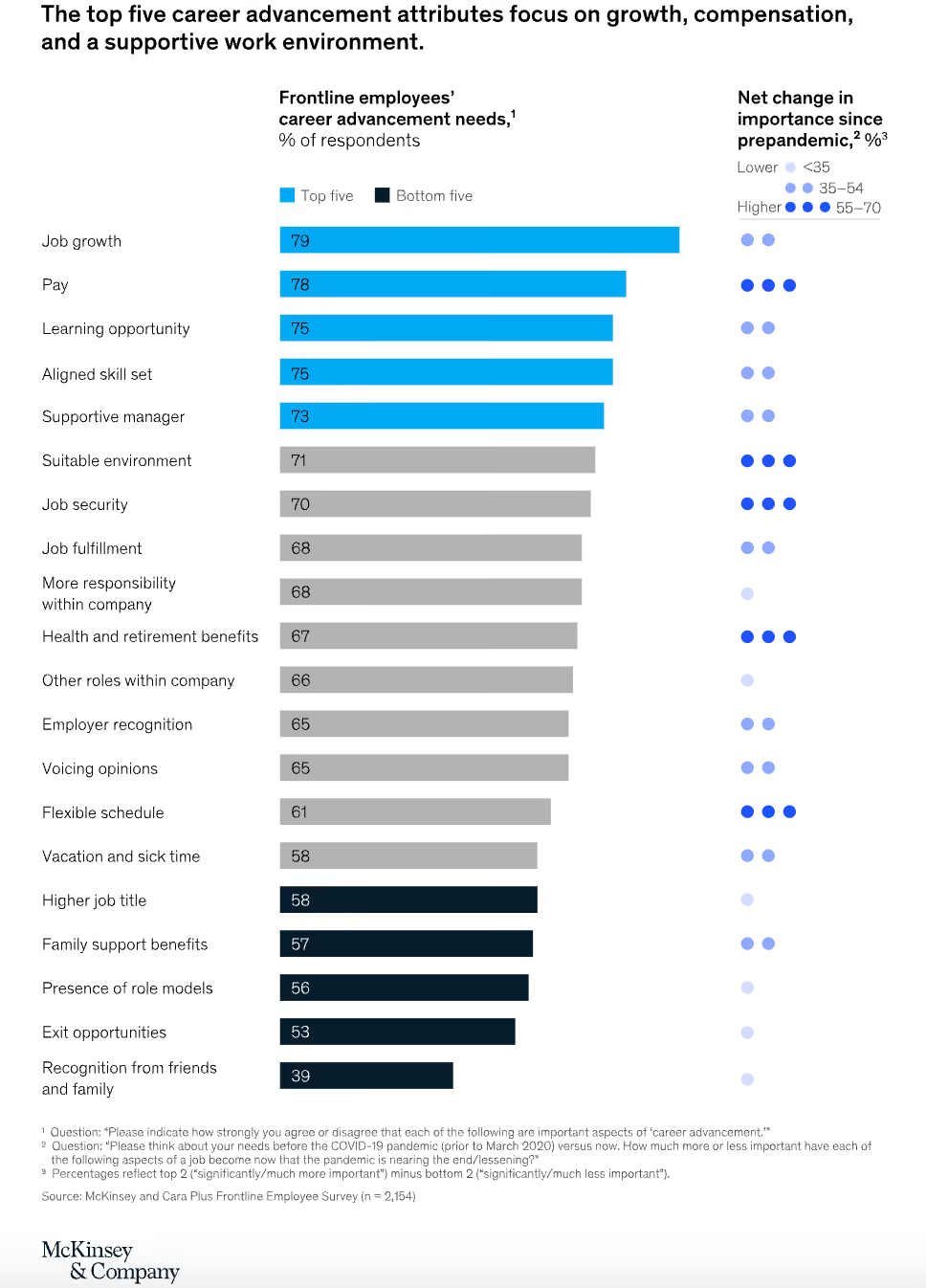
But too often, the focus is on the professional development of management and office-based employees. According to McKinsey research, many employers underestimate the value that frontline workers place on learning and career advancement opportunities.
Of the 2,100 frontline employees McKinsey surveyed, 70% said they had applied for a promotion or a job with more responsibility. But only 25% of those who applied were successful. And 65% said they were unsure how to achieve advancement.
Source: McKinsey
As well as highlighting the lack of growth for frontline employees, McKinsey made several recommendations:
Share professional development, mentorship, and promotion opportunities with every team member
Give managers the training they need to help employees establish career growth goals – and support them to achieve them.
Where a promotion isn’t possible, consider a lateral move or the assignment of new challenges within an employee’s current role to satisfy their hunger for growth
Ultimately, when employees are given the support they need to thrive in their careers, it’s a win-win. An organization retains employees and improves performance. Employees get to enjoy the challenge and satisfaction of expanding their talents.
5. Foster work-life balance
Achieving work-life balance as a frontline worker isn’t always easy. Shifts tend to be long and unpredictable. And when employees are supporting customers or patients, it can be hard to even take scheduled breaks.
This has long been accepted as “the way things are”. But with a third of workers saying that work-life balance is a top priority when looking for jobs, frontline organizations looking to increase employee engagement have a real opportunity – to outshine other employers and better support their staff.
You could offer predictable shifts and – where that isn’t possible – communicate shifts in advance. Consider flexible working and fair overtime policies. Encourage employees to get enough downtime by addressing an always-on culture.
Another key consideration? We know that 70% of frontline employees have suffered from burnout or felt at risk of burnout. This is something that the Starbucks team has taken on board.
Starbucks employees get access to a mental health care platform and free therapy sessions. They also get 10 days of backup care for the children or adults they care for, helping them balance the competing responsibilities of work and caregiving with less stress.
By helping employees to plan and enjoy their time away from work, organizations can count on improved productivity and engagement each time workers arrive for a shift.
6. Gather feedback from employees
Frontline employees are your eyes and ears on the ground. They can provide valuable perspective on what is and isn’t working operationally and how you can improve the customer experience.
But if your organization – like many frontline firms – is suffering from a frontline connection gap, you struggle to access that insight. More often than not, frontline employees don’t have the access they need to provide this valuable feedback.
This means you miss out on all kinds of frontline employee feedback – including their thoughts on employee engagement. You find it much harder to identify and address engagement issues before they affect morale and retention.
The first step to fixing this issue is developing feedback channels for all employees. Tech tools can help. An app like Blink allows you to send a feedback request to a frontline worker’s smartphone, meaning they’re much more likely to see it and respond.
Remember that different employees prefer different feedback methods so open up a variety of options.
Make pulse surveys, annual employee engagement surveys, and manager one-on-ones part of your feedback request schedule. And give employees the option to leave feedback anonymously so they feel comfortable being completely honest.
With up-to-date employee feedback, you can make your employee engagement strategy more relevant and effective. You get to the heart of how employees feel – and discover the areas where change is most needed.
7. Set clear expectations
Uncertainty and employee engagement don’t mix. Role ambiguity creates stress and it’s one of the leading causes of employee burnout.
Employees need to understand exactly what’s expected of them. They need to know what work to do, how to do it, and who to do it with. Even when a frontline role involves a lot of autonomy, employees need guidance on their remit to feel confident and motivated.
Managers are responsible for setting clear expectations. And it all comes down to good communication.
Frontline managers should clearly define the role and its responsibilities for new hires. They need to set key performance indicators (KPIs) so employees know what success looks like. And they need to give clear instructions when assigning new tasks.
Employees also need to know how their role fits into the bigger picture. How do their tasks relate to overarching company values and goals?
By giving employees clarity you improve employee engagement. But you also promote accountability and show employees that their work is valuable.
8. Give regular feedback
Picture an employee – let’s call him Jim – who hasn’t had any manager feedback in a while.
Jim keeps running into the same customer service problem. But he doesn’t feel comfortable approaching his manager about it. And he’s not due a one-to-one for months.
So Jim keeps at it, doubting that he’s doing a good enough job but unsure what to do about it. Without regular manager input Jim feels less confident in his abilities. His job satisfaction inevitably takes a hit.
Now let’s picture a different scene.
Jim’s manager – let’s call her Jane – understands how important feedback is to employee engagement. She sets up regular, informal one-to-ones, where both she and Jim can raise any issues.
Jim gets to hear that he’s doing a great job. And gets useful, actionable advice on what he could do better. He gets recognition where it’s due and a regular reminder of role expectations.
Feedback needs to move in both directions. And it’s as relevant to your longest-serving staff as it is to new hires. Feedback boosts the confidence of employees and increases their job satisfaction, which means better employee engagement.
Employees also stand to benefit most when feedback is constructive. This means managers focus on facts, not opinions. They talk about the actions of an employee, not their personality traits.
They also approach feedback as a two-way conversation, where employees get a chance to share their thoughts within an open and supportive environment.
9. Promote team collaboration
Two heads are always better than one. And employees who work well together are happier, more productive, and less stressed. Team collaboration can help to prevent loneliness, too.
Glassdoor research shows that 60% of employees with less than five years of work experience feel lonely all or most of the time. But 89% of all workers say that a sense of belonging within their company is essential for workplace happiness.
Bringing teams together, including frontline employees who tend to work alone, is therefore crucial to employee engagement. And it starts with company culture.
You need a psychologically safe environment where everyone feels comfortable contributing their thoughts and ideas. Like a calendar of team building activities. Special consideration for new hires and team members who work in isolation. And praise for team successes as well as individual wins.
The right communication and collaboration tools are another important part of the puzzle. Project management software helps people to collaborate when they’re not working in the same location. And chat tools allow workers to share problems, ideas, and solutions with ease.
Elara Caring is one of the largest care providers in the US, with around 32,000 carers working on their frontline. The company found it hard to connect its carers and was experiencing a collaboration problem.
By making Blink their communication hub, they improved team collaboration dramatically. Now 95% of employees say they feel more connected to the organization and their co-workers.
10. Celebrate milestones
Mavis Mills, an ASDA supermarket employee, recently celebrated her 80th birthday. And the whole team celebrated with her. They decorated her checkout with banners and balloons and gave her gifts, flowers, and a cake.
Celebrations like these bring teams together. They boost employee engagement for the person being celebrated and inspire other employees, too.
You can celebrate birthdays, work anniversaries, passing probation, or the successful conclusion of a company project. Anything that fits with your company values and culture.
Of course, it’s easier to plan a celebration for on-site teams. You can organize a gathering in the office or – as ASDA did – around the checkout where Mavis was working.
But that doesn’t mean hybrid and dispersed frontline teams have to forgo celebrations. You can still improve employee engagement by celebrating milestones via internal communication tools.
For example, with the Blink Feed, you can share meaningful milestones with a team or the whole organization – and encourage employees to join in the celebration. You can celebrate little and often to show appreciation for employees on a regular, informal basis.
11. Lead by example
The leaders of today do things differently. Good leaders understand that transparency, fairness, and emotional intelligence help to improve employee engagement.
Unlike workplace leaders of the past, they know that when everyone, at all levels of a company, sticks to the same rules and values people feel more invested in a company’s success.
As a leader, this means practicing what you preach.
You should demonstrate the same commitment to two-way communication, collaboration, and recognition that you want to see in employees. You should model work-life balance so workers find it easier to follow suit.
By living and breathing company values and culture, you inspire trust and respect in your workforce. And when you join them in using the same communication and employee engagement tools, you make it much more likely that people will follow your lead.
12. Measure and act on feedback
Gathering feedback is an essential part of any employee engagement strategy. But simply getting employees to leave feedback isn’t enough. You have to measure and act upon employee feedback, too.
Research shows that people who say their employer takes meaningful action based on their feedback are 37% less likely to look for another job. And they’re also much more likely to take part in future surveys.
So mine employee feedback for data. Then create employee engagement KPIs so you can measure progress. You can base targets around metrics like:
Absenteeism rate
Employee retention rate
Employee net promoter score (eNPS)
It then all comes down to good internal communication. Share your feedback findings and engagement progress with employees. It shows that you take their views seriously and are committed to making improvements.
Employee engagement: the next step
In thriving organizations, the drive to improve employee engagement is more than just an HR team initiative. It’s something that the whole organization embraces as part of its ethos.
Communication, feedback, and recognition become part of everyone’s every day. And the organization benefits from better staff retention, productivity, and satisfaction.
Your organization may not be at this point yet. But wherever you are in your employee engagement journey, the 12 ideas listed above will help you move forward. Weave these activities into your employee engagement strategy and you’ll encourage the employee attitudes and behaviors you want to see.
When it comes to frontline organizations, the right tech tools are a priority because they make employee engagement so much easier. They provide the vital line of connection between every member of your workforce, from new hires to stalwart staff, and frontline workers to your office-based team.
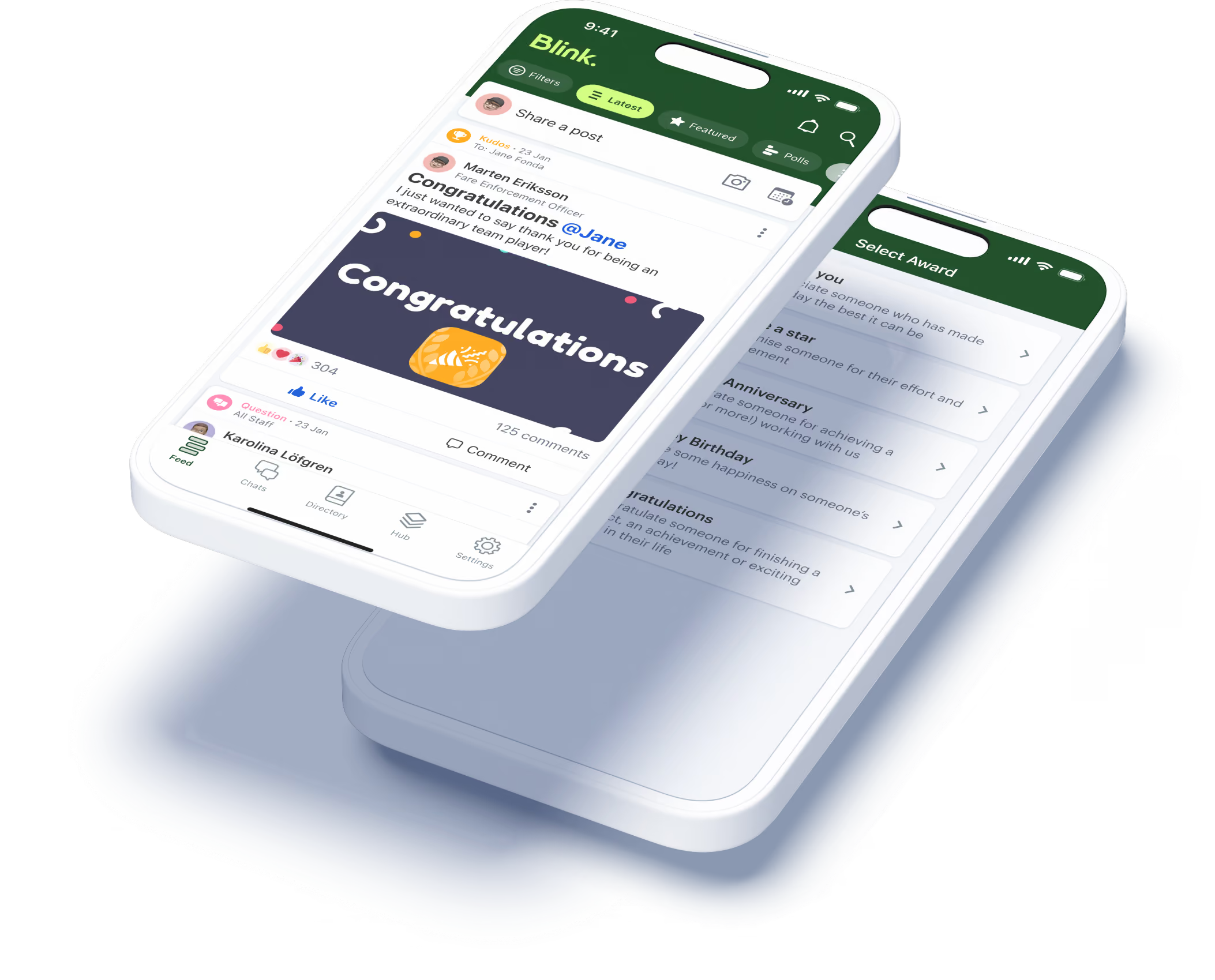
Blink’s mobile-first super-app helps every frontline employee to feel valued and heard. And with a news feed, secure chat, recognition features, surveys, analytics, and more, you have everything you need to transform internal communication and employee engagement for the better.
Hi I am Fabien, I moved to London in 2012 from my home country France. I studied Business Management and prior to joining Blink in June 2021, I spent 8 years at Estée Lauder Companies as a Business Analyst.
In 2020, I took on a Software Engineering Bootcamp at General Assembly to start a new career as a Developer. 🚀
At Blink, I am a Full Stack Developer within the Solutions Engineering Team. Day to day, my job is to help our customers getting extra value out of Blink. ⭐️
Some of the projects I work on include building integrations with third party systems our customers use or creating digital forms within the app to replace existing paper processes our customers might have. ✅
I love working at Blink because we enable frontline workers from key sectors, such as healthcare or transport, to feel better connected to their organisation and we help them streamline some of the tasks they have to do on a day to day basis so they can focus on making the world a better a place.
If you want to make a difference, if you like to be challenged, if you are eager to learn and want to be part of an awesome team, Blink is the right place for you! 💙
Shake Shack started in a hot dog cart in Madison Square Park over 25 years ago. Today we're a global brand with more than 700 restaurants, 14,000 team members, and an ambitious growth goal.
We're opening more than 60 new restaurants this year alone. Every new shack means new people, new teams, and new ways for our message to get lost along the way. Growth at that pace makes clear, consistent communication more important than ever.
For us, that meant finding a better way to reach, recognize, and engage our teams as we continue to scale.
Keeping every team connected
As Shake Shack has grown, so has the need to keep our teams informed and connected. A message may start with our support center or leadership, then move through above-shack leaders, shack leaders, managers, and frontline teams.
At our size, communication has to be timely, relevant, and easy to access for the people closest to our guests. We needed an approach built for the way our teams work today and flexible enough to support where we're headed next.
What our people were telling us
Before I moved into communications, I spent five years in our People Resources team, running our annual engagement survey. Those results gave us important insight into how team members felt about their leaders, workplace, and our culture, and reinforced how much the team experience shapes engagement.
Two things came up again and again as drivers of engagement: recognition and voice. People want their work to be seen. And they want to know that when they share an idea or a concern, someone with the power to act is actually listening.
An annual survey couldn't give us either of those things consistently, at scale, across 500-plus locations. We needed a way to make recognition and voice part of the everyday experience, not a once-a-year check-in.
What we needed from a tool
When we went looking for a platform, three things mattered most.
It had to fit into one place. Our team members already use different systems throughout the day, and we wanted to make access simpler, not add another step. A single point of entry mattered.
It had to be built for the floor, not the desk. I sit at a computer most of the day. The majority of our team members are on their feet, serving guests, with a phone in their pocket and not much time to sit and dig through an intranet. Mobile-first wasn't a nice-to-have. It was essential.
It had to inform, connect, and engage. We wanted a platform that could share the big picture, make it relevant to each team member, and connect the four walls of one Shack to the broader Shake Shack story. It also needed to feel natural for a workforce that is used to engaging through mobile, social, and real-time experiences.
That combination is what led us to Blink.
What changed
The integration piece has made the biggest difference day to day. We connected Blink to Workday through single sign-on, so a team member can go from the Blink Hub straight to viewing their payslip or a compliance module in seconds, no extra password required. Password reset requests have dropped since launch.
We also made communication more relevant. We wanted a platform that helps people see what matters to them, when it matters. An hourly team member and a corporate employee may need different information, and that targeting helps keep the experience useful and engaging.
And we made it ours. In a Shake Shack environment, Blink looks like Shake Shack: our colors, our photography, our voice.
How we got people to actually use it
A platform is only as good as its adoption. We built it with our operators, not just for them, testing and iterating before we launched company-wide. Then we found our champions early. Earlier this year, we brought almost 250 operators and leaders together for a two-day summit, and we used Blink as the event app, pushing schedules, session reminders, and photo sharing through the platform before it ever launched to the wider team.
By the time we launched a few weeks later, those leaders were already active, and the content was already there. Within the first two weeks, more than 70% of our workforce had registered. That number keeps climbing.
Where we're headed
We now have a more direct way to reach our frontline teams. As we grow and scale our business, that matters more every day.
We're also excited about where the platform itself is going. Last week, I built and launched a pulse survey in about five minutes and started seeing responses in real time, something our old, once-a-year survey tool could never do. As Shake Shack scales to 1,500 shacks, we need our tools to scale and evolve with us. Seeing that kind of innovation already happening gives me real confidence that Blink will keep meeting us where we are, and where we're headed next.
Hannah’s hard work and dedication to quality don’t go unnoticed, and she is a key contributor to making the department successful. She is an amazing self-starter, reliable, and always team-oriented.
In her role, she is responsible for everything relating to customer quality response at the facility, which helps us increase customer satisfaction and efficiency and adhere to regulations that are critical to the manufacturing process. Her role includes but is not limited to: Customer complaint investigations (TICS), Return Material Authorizations (RMAs), NCMR generation and completion via software (C-Pro), participation in CAPA processes for addressing internal and external requests, supplier (SCARS), supervising returned material, tracking, inventory adjustments and corrections, analysis, and reporting.
She also supervises the calibration of laboratory equipment and weigh scales, and conducts preventive maintenance of testing instruments, important for preventing defects and maintaining consistency.
Throughout all of this, she manages to deliver clear, concise communication across all levels of the organization.
What does she want to do next?
She’ll be supported to do whatever she wants to do!
Employee messaging is broken — but it’s not because people “don’t engage.”
It’s because most workplace messages are slow, noisy, and buried in channels employees never asked for. Email is where urgent notifications go to disappear. Unofficial tools like WhatsApp create risk and chaos. And legacy intranets were never built for real-time conversation — especially for frontline teams.
Meanwhile, employees are used to fast, visual, social communication everywhere else in their lives. If your internal messaging doesn’t meet that bar, it’s not being ignored — it’s being outcompeted.
The good news? Employee messaging isn’t doomed. But it does need new rules.
Let’s break them down.
{{mobile-chat="/image"}}
The new rules of employee messaging
Rule #1: Messaging should mirror how people already communicate
Away from work, employees are chatting over WhatsApp and TikTok. They’re sending short, visual, highly engaging messages in real-time. This is their norm.
Voice notes, GIFs, emojis, attachments, and the option to hop on a video call straight from the chat thread keep conversations flowing naturally — just like they do on personal apps.
Rule #2: Keep it safe, centralized, and compliant
Struggling to follow rule #1 because you don’t have modern comms tools?
Unofficial employee communication channels, like WhatsApp, are a tempting alternative. This is especially true if you have frontline employees who cannot access desktop-based communication channels.
But shadow IT like this poses a risk to your business. Beyond the sheen of convenience, there are issues with data privacy and device security. Your comms team has zero oversight and no analytics, so it’s hard to use employee messaging to build company culture.
In contrast, a dedicated messaging tool like Blink is secure. It offers end-to-end encryption, admin controls, and content moderation tools.
Centralized identity management comes as standard. So you can automatically end platform access when someone leaves your company — and get new hires onboarded with ease.
{{childrens-of-alabama="/callouts"}}
Rule #3: Everyone sees only what they need
It’s hard to surface relevant details in a flood of information. So if you want employee messaging to cut through, people should be able to find the messages that matter to them, in an instant.
For this, you need targeted channels that reduce noise and prevent notification fatigue. That means role, location, and interest-based groups. It also means giving employees control with searchable chat, pinned messages, and notification settings.
With Blink, you get all the above, plus the added benefit of employee journeys. This feature lets you deliver personalized content pathways, ensuring the right content reaches the right person at the right time. It’s perfect for onboarding, training, and other key touchpoints within the employee life cycle.
Rule #4: Make your feed worth scrolling
Messaging tools + company news feed = the magic combo. Employees can chat with their team over communication tools, then head over to the news feed for company-wide connection and insight.
So, how do you make your news feed successful? Remember: To stand out in a crowded digital landscape, your feed has to compete with employees’ personal mobile apps.
Think photos, short-form video stories, and infographics. Messages that ditch the corporate tone. Employee recognition, celebrations, behind-the-scenes peeks, and quick-fire polls.
A scroll-worthy feed does more than entertain. It amplifies big company messages, strengthens culture, and keeps employees engaged, productive, and feeling part of something bigger.
{{mobile-main="/image"}}
Rule #5: Measure everything
You know you’re sticking to the new rules of employee messaging when the stats back you up.
So track what lands, what gets ignored, and which teams are engaged. Use these data to tweak content formats, timing, and style (and educate other content creators within the company), so messages land better every time.
With BlinkIQ, you can track read rates, workforce engagement trends, and even employee sentiment to get a full picture of your internal comms performance. You get the insight you need to make meaningful changes to comms and the wider employee experience.
How do you build an employee messaging playbook?
If you’re keen to give your workplace communication strategy a glow-up, you’ll get the best results by following this playbook.
Establish your purpose and principles
First, get the fundamentals straight.
Why is employee messaging important to your organization? Perhaps it supports speedy communication, connection, alignment, or frontline access to comms.
What are your guiding principles? Is it clear, informal, transparent, and useful?
And how does messaging fit within the broader comms ecosystem? What types of employee communication belong on your team chat app, and which are better suited to your news feed or content hub?
Decide on your tools
These days, traditional intranet platforms, email, and shadow IT aren’t up to the task of effective employee messaging. You need a tool that mimics the experience of text and social apps, while offering next-level security features.
If you don’t currently have this kind of tech on your team, it’s time to gather cross-functional consensus on what your messaging tool should look like. Draw up a shortlist of tools that meet your requirements. Demo these tools and decide on the best fit.
Organize your channels
To keep things shipshape in your messaging tool, you need to decide the following:
Naming conventions for channels or groups (so they’re easy to search)
When to create a new channel
Who is permitted to create a new channel
You may then want to create (at a minimum) channels for specific departments, locations, and teams.
Create chat guidelines and governance
Create guidelines on the kind of content that people can share over company messaging channels. Establish emoji, GIF, and reaction etiquette.
Also, decide who’s responsible for governance — your IC team, HR, managers, or designated channel moderators? In the unlikely case that someone posts something inappropriate, moderators can then flag and remove the content.
{{mobile-hub="/image"}}
Create training materials
Teach employees how to get the most out of chat functions by offering step-by-step instructions for new employees and top tips for existing ones.
Let them know how to manage their notifications, how to share their location, how to set their status, and how to favorite a message.
Go further by training managers in good messaging practices. Offer advice on how to keep the digital conversation flowing, how to use AI assistance, and how to ensure their comms are accessible, engaging, and inclusive of all employees.
Decide on your success metrics
What does good look like when it comes to your employee messaging channels? Decide what metrics you want to track, and benchmark performance to see what impact any improvements make.
You might like to track:
Read rates
Message reactions
Employee sentiment
Operational efficiency
Compliance rate
Then, segment data by team or chat channel to find out where additional IC support may be needed.
{{less-is-more="/callouts"}}
Upgrade employee messaging with Blink
Playing by the new rules of employee messaging doesn’t just improve workplace communication. It powers knowledge sharing, team building, and productivity across your organization.
To achieve this, you need a modern messaging tool that meets the expectations of employees and the needs of your organization.
Blink is a secure, mobile-first messaging platform. It delivers consumer-grade chat and a personalized news feed, perfect for information sharing and co-worker connection.
But Blink doesn’t stop there. It offers a content hub, analytics, and deep integrations with other software you use. It is a complete solution for internal communications, employee experience, and employee engagement.



.jpeg)
%2520(2).jpeg)