10 Best Haiilo Alternatives & Competitors for 2026
Compare 10 Haiilo alternatives for employee communication and engagement. See features, pricing, Gartner ratings, and frontline readiness.
Jess DeVore
Published:
August 25, 2025
Last updated:
August 25, 2025
What we'll cover
If you’re exploring alternatives to Haiilo, you’re likely looking for an internal communications or employee engagement platform that can scale with your business, drive adoption, and deliver measurable impact. While Haiilo offers useful features for connecting employees, it isn’t always the best fit for every organization—especially if you need deeper integrations, frontline support, or more advanced analytics.
To help you find the right solution, we’ve rounded up the top 10 Haiilo alternatives worth considering in 2025. Whether you’re in HR, IT, or internal communications, these platforms can help you improve employee experience and organizational performance.
What to look for in a Haiilo alternative
When evaluating Haiilo competitors, it helps to understand where Haiilo may fall short for certain organizations. Here are the factors to prioritize:
True mobile-first experience – Haiilo works well as an intranet, but adoption among frontline and non-desk workers can be limited. Look for tools proven to engage every employee.
System integrations – Many organizations want a platform that connects seamlessly with HRIS, payroll, and scheduling tools. Alternatives like Blink offer deeper plug-and-play integrations.
Speed to value – Some Haiilo deployments require significant IT involvement. If fast rollout matters, choose a solution with lower implementation overhead.
Measurable analytics – Haiilo provides engagement insights, but competitors often offer more advanced analytics that tie communication directly to business outcomes.
Scalability across regions – Global organizations may need multilingual support, compliance features, and governance tools beyond what Haiilo provides.
Cost vs. functionality – Evaluate whether you’re paying for features you don’t need. Some alternatives offer more affordable plans without enterprise complexity.
Blink is the #1 Haiilo alternative because it combines communication, engagement, and productivity tools into one easy-to-use platform. Unlike Haiilo, Blink integrates seamlessly with your existing HR, payroll, and scheduling systems, so employees don’t need to juggle multiple apps. With a mobile-first design, offline mode, and push notifications, Blink ensures critical updates always reach your people — no matter where they are.
Organizations choose Blink for its high adoption rates, even among frontline teams who are traditionally hard to reach. Leaders benefit from advanced analytics that show exactly how messages land across the workforce, while employees enjoy a personalized feed, secure chat, surveys, and recognition tools. With a 4.8/5 Gartner rating, Blink consistently outranks competitors on usability and ROI.
If you’re looking for a Haiilo alternative that goes beyond communication and delivers true employee experience, Blink is the clear choice.
#2. Staffbase
Gartner Rating: 4.6/5 G2 Rating: 4.5/5 Pricing: Custom pricing; typically starts around $5–$10 per user/month.
Staffbase is a strong alternative to Haiilo for companies that want a branded, polished employee app. Unlike Haiilo, which is rooted in intranet design, Staffbase puts more emphasis on top-down corporate communications and employer branding. It’s especially popular in industries where leadership visibility and a clean, consumer-grade design matter most.
The tradeoff is that implementation often requires significant IT or consulting support, and the cost can rise quickly for larger deployments. If you’re prioritizing a branded communication hub over a flexible intranet, Staffbase may be a better fit than Haiilo.
#3. Firstup
Gartner Rating: 4.4/5 G2 Rating: 4.3/5 Pricing: Custom enterprise pricing, often above $10 per user/month.
Firstup is an employee engagement platform that focuses heavily on automation and targeted messaging. It’s designed for enterprise organizations that need to orchestrate communication across large, complex workforces. Features include AI-powered content distribution, analytics, and campaign planning tools.
That said, Firstup can feel heavy for smaller teams and is often considered an expensive option compared to Blink or Haiilo. It also relies on external SSO providers for integrations, which can add extra costs. Still, it’s a powerful choice for organizations with the budget and IT resources to fully leverage it.
#4. Workvivo
Gartner Rating: 4.6/5 G2 Rating: 4.7/5 Pricing: Custom pricing, generally $7–$12 per user/month.
Workvivo, now part of Zoom, takes a very different approach than Haiilo by positioning itself as a community engagement platform rather than an intranet. Its design feels more like a workplace social network, with shoutouts, recognition tools, and community feeds that encourage peer-to-peer interaction.
Compared to Haiilo, which is often used as a structured intranet for documents and news, Workvivo excels at building culture and connection across distributed teams. Organizations looking to create a more interactive, social employee experience will find Workvivo a compelling option.
#5. Simpplr
Gartner Rating: 4.5/5 G2 Rating: 4.6/5 Pricing: Typically starts at $8–$12 per user/month.
Simpplr differentiates itself from Haiilo through its AI-powered intranet features.While Haiilo delivers a solid communications hub, Simpplr adds a layer of intelligence to help employees search, find, and personalize content faster. Its dashboards and policy hubs make it easy to navigate complex company information.
That said, its price point is on the higher end, and the focus leans more toward knowledge management than real-time employee engagement. If your challenge with Haiilo is that it feels too static or hard to navigate, Simpplr offers a more intelligent experience.
#6. Unily
Gartner Rating: 4.4/5 G2 Rating: 4.3/5 Pricing: Enterprise-focused, often starting at $10+ per user/month.
Unily is an enterprise-grade intranet often chosen by global organizations with complex governance needs. Compared to Haiilo, which tends to serve mid-market European companies, Unily shines in areas like multilingual support, compliance frameworks, and deep Microsoft 365 integrations.
It’s highly customizable but also resource-heavy, which can lead to longer rollouts and higher costs. If your Haiilo deployment feels too limited for a global enterprise environment, Unily offers more scale and enterprise governance capabilities.
#7. LumApps
Gartner Rating: 4.5/5 G2 Rating: 4.4/5 Pricing: Starts around $12 per user/month, enterprise pricing model.
LumApps stands out as a Haiilo alternative for Google Workspace and Microsoft 365 ecosystems. While Haiilo functions as a standalone intranet, LumApps embeds directly into employees’ daily workflows with integrations for Gmail, Drive, Teams, and SharePoint.
It also offers stronger multilingual support and global publishing features, making it a fit for multinational organizations. The tradeoff is a more complex setup and administration compared to Haiilo. If your organization is heavily invested in Google or Microsoft, LumApps provides a more integrated alternative.
#8. MangoApps
Gartner Rating: 4.4/5 G2 Rating: 4.6/5 Pricing: Starts at $5 per user/month.
MangoApps positions itself as an affordable all-in-one alternative to Haiilo. While Haiilo is primarily a communications platform, MangoApps combines intranet, messaging, project collaboration, and learning management into one tool. This makes it appealing for mid-sized organizations that want more utility at a lower cost.
The downside is that the interface feels less modern than newer entrants, and some users report adoption challenges. But if you’re evaluating Haiilo and find it pricey for the features offered, MangoApps provides a budget-friendly, multi-feature substitute.
#9. Jostle
Gartner Rating: 4.2/5 G2 Rating: 4.4/5 Pricing: Starts around $4 per user/month.
Jostle is a lightweight alternative to Haiilo, aimed at smaller organizations that don’t need a full enterprise intranet. It offers core features like org charts, news posts, and directories, but without the complexity of Haiilo’s content management layers.
Where Jostle stands out is its simplicity and ease of rollout — teams can be up and running quickly without heavy IT support. It’s a good choice if Haiilo feels like “too much platform” for your organization’s size or budget.
#10. Beekeeper
Gartner Rating: 4.5/5 G2 Rating: 4.6/5 Pricing: Starts at $4.50 per user/month.
Beekeeper is designed specifically for frontline workers, which makes it a sharp contrast to Haiilo’s intranet-first approach. With secure messaging, task coordination, and shift updates, it solves a different problem: getting critical information to employees without desks or corporate email.
While it doesn’t have the intranet depth of Haiilo, Beekeeper excels at fast, real-time communication on the frontline. Organizations with large retail, hospitality, or manufacturing workforces often see stronger adoption here than with Haiilo.
Final thoughts
Haiilo has earned its place as a recognizable intranet and communications platform, but many organizations discover its limitations when it comes to frontline adoption, integrations, and actionable analytics. While it works well as a central hub for content and news, it often stops short of delivering the end-to-end employee experience modern companies expect.
That’s where Blink stands out. Unlike Haiilo, Blink isn’t just an intranet—it’s a mobile-first employee experience platform that brings together communication, engagement, and productivity in one app. From frontline workers without email access to knowledge workers in global headquarters, Blink ensures every employee is connected, engaged, and productive.
With a 4.8/5 Gartner rating and adoption proven across industries like retail, healthcare, transport, and hospitality, Blink is trusted by organizations worldwide to deliver measurable impact. If you’re exploring alternatives to Haiilo, Blink is the clear #1 choice to unlock potential across your entire workforce.
If you’re exploring alternatives to Haiilo, you’re likely looking for an internal communications or employee engagement platform that can scale with your business, drive adoption, and deliver measurable impact. While Haiilo offers useful features for connecting employees, it isn’t always the best fit for every organization—especially if you need deeper integrations, frontline support, or more advanced analytics.
To help you find the right solution, we’ve rounded up the top 10 Haiilo alternatives worth considering in 2025. Whether you’re in HR, IT, or internal communications, these platforms can help you improve employee experience and organizational performance.
What to look for in a Haiilo alternative
When evaluating Haiilo competitors, it helps to understand where Haiilo may fall short for certain organizations. Here are the factors to prioritize:
True mobile-first experience – Haiilo works well as an intranet, but adoption among frontline and non-desk workers can be limited. Look for tools proven to engage every employee.
System integrations – Many organizations want a platform that connects seamlessly with HRIS, payroll, and scheduling tools. Alternatives like Blink offer deeper plug-and-play integrations.
Speed to value – Some Haiilo deployments require significant IT involvement. If fast rollout matters, choose a solution with lower implementation overhead.
Measurable analytics – Haiilo provides engagement insights, but competitors often offer more advanced analytics that tie communication directly to business outcomes.
Scalability across regions – Global organizations may need multilingual support, compliance features, and governance tools beyond what Haiilo provides.
Cost vs. functionality – Evaluate whether you’re paying for features you don’t need. Some alternatives offer more affordable plans without enterprise complexity.
Blink is the #1 Haiilo alternative because it combines communication, engagement, and productivity tools into one easy-to-use platform. Unlike Haiilo, Blink integrates seamlessly with your existing HR, payroll, and scheduling systems, so employees don’t need to juggle multiple apps. With a mobile-first design, offline mode, and push notifications, Blink ensures critical updates always reach your people — no matter where they are.
Organizations choose Blink for its high adoption rates, even among frontline teams who are traditionally hard to reach. Leaders benefit from advanced analytics that show exactly how messages land across the workforce, while employees enjoy a personalized feed, secure chat, surveys, and recognition tools. With a 4.8/5 Gartner rating, Blink consistently outranks competitors on usability and ROI.
If you’re looking for a Haiilo alternative that goes beyond communication and delivers true employee experience, Blink is the clear choice.
#2. Staffbase
Gartner Rating: 4.6/5 G2 Rating: 4.5/5 Pricing: Custom pricing; typically starts around $5–$10 per user/month.
Staffbase is a strong alternative to Haiilo for companies that want a branded, polished employee app. Unlike Haiilo, which is rooted in intranet design, Staffbase puts more emphasis on top-down corporate communications and employer branding. It’s especially popular in industries where leadership visibility and a clean, consumer-grade design matter most.
The tradeoff is that implementation often requires significant IT or consulting support, and the cost can rise quickly for larger deployments. If you’re prioritizing a branded communication hub over a flexible intranet, Staffbase may be a better fit than Haiilo.
#3. Firstup
Gartner Rating: 4.4/5 G2 Rating: 4.3/5 Pricing: Custom enterprise pricing, often above $10 per user/month.
Firstup is an employee engagement platform that focuses heavily on automation and targeted messaging. It’s designed for enterprise organizations that need to orchestrate communication across large, complex workforces. Features include AI-powered content distribution, analytics, and campaign planning tools.
That said, Firstup can feel heavy for smaller teams and is often considered an expensive option compared to Blink or Haiilo. It also relies on external SSO providers for integrations, which can add extra costs. Still, it’s a powerful choice for organizations with the budget and IT resources to fully leverage it.
#4. Workvivo
Gartner Rating: 4.6/5 G2 Rating: 4.7/5 Pricing: Custom pricing, generally $7–$12 per user/month.
Workvivo, now part of Zoom, takes a very different approach than Haiilo by positioning itself as a community engagement platform rather than an intranet. Its design feels more like a workplace social network, with shoutouts, recognition tools, and community feeds that encourage peer-to-peer interaction.
Compared to Haiilo, which is often used as a structured intranet for documents and news, Workvivo excels at building culture and connection across distributed teams. Organizations looking to create a more interactive, social employee experience will find Workvivo a compelling option.
#5. Simpplr
Gartner Rating: 4.5/5 G2 Rating: 4.6/5 Pricing: Typically starts at $8–$12 per user/month.
Simpplr differentiates itself from Haiilo through its AI-powered intranet features.While Haiilo delivers a solid communications hub, Simpplr adds a layer of intelligence to help employees search, find, and personalize content faster. Its dashboards and policy hubs make it easy to navigate complex company information.
That said, its price point is on the higher end, and the focus leans more toward knowledge management than real-time employee engagement. If your challenge with Haiilo is that it feels too static or hard to navigate, Simpplr offers a more intelligent experience.
#6. Unily
Gartner Rating: 4.4/5 G2 Rating: 4.3/5 Pricing: Enterprise-focused, often starting at $10+ per user/month.
Unily is an enterprise-grade intranet often chosen by global organizations with complex governance needs. Compared to Haiilo, which tends to serve mid-market European companies, Unily shines in areas like multilingual support, compliance frameworks, and deep Microsoft 365 integrations.
It’s highly customizable but also resource-heavy, which can lead to longer rollouts and higher costs. If your Haiilo deployment feels too limited for a global enterprise environment, Unily offers more scale and enterprise governance capabilities.
#7. LumApps
Gartner Rating: 4.5/5 G2 Rating: 4.4/5 Pricing: Starts around $12 per user/month, enterprise pricing model.
LumApps stands out as a Haiilo alternative for Google Workspace and Microsoft 365 ecosystems. While Haiilo functions as a standalone intranet, LumApps embeds directly into employees’ daily workflows with integrations for Gmail, Drive, Teams, and SharePoint.
It also offers stronger multilingual support and global publishing features, making it a fit for multinational organizations. The tradeoff is a more complex setup and administration compared to Haiilo. If your organization is heavily invested in Google or Microsoft, LumApps provides a more integrated alternative.
#8. MangoApps
Gartner Rating: 4.4/5 G2 Rating: 4.6/5 Pricing: Starts at $5 per user/month.
MangoApps positions itself as an affordable all-in-one alternative to Haiilo. While Haiilo is primarily a communications platform, MangoApps combines intranet, messaging, project collaboration, and learning management into one tool. This makes it appealing for mid-sized organizations that want more utility at a lower cost.
The downside is that the interface feels less modern than newer entrants, and some users report adoption challenges. But if you’re evaluating Haiilo and find it pricey for the features offered, MangoApps provides a budget-friendly, multi-feature substitute.
#9. Jostle
Gartner Rating: 4.2/5 G2 Rating: 4.4/5 Pricing: Starts around $4 per user/month.
Jostle is a lightweight alternative to Haiilo, aimed at smaller organizations that don’t need a full enterprise intranet. It offers core features like org charts, news posts, and directories, but without the complexity of Haiilo’s content management layers.
Where Jostle stands out is its simplicity and ease of rollout — teams can be up and running quickly without heavy IT support. It’s a good choice if Haiilo feels like “too much platform” for your organization’s size or budget.
#10. Beekeeper
Gartner Rating: 4.5/5 G2 Rating: 4.6/5 Pricing: Starts at $4.50 per user/month.
Beekeeper is designed specifically for frontline workers, which makes it a sharp contrast to Haiilo’s intranet-first approach. With secure messaging, task coordination, and shift updates, it solves a different problem: getting critical information to employees without desks or corporate email.
While it doesn’t have the intranet depth of Haiilo, Beekeeper excels at fast, real-time communication on the frontline. Organizations with large retail, hospitality, or manufacturing workforces often see stronger adoption here than with Haiilo.
Final thoughts
Haiilo has earned its place as a recognizable intranet and communications platform, but many organizations discover its limitations when it comes to frontline adoption, integrations, and actionable analytics. While it works well as a central hub for content and news, it often stops short of delivering the end-to-end employee experience modern companies expect.
That’s where Blink stands out. Unlike Haiilo, Blink isn’t just an intranet—it’s a mobile-first employee experience platform that brings together communication, engagement, and productivity in one app. From frontline workers without email access to knowledge workers in global headquarters, Blink ensures every employee is connected, engaged, and productive.
With a 4.8/5 Gartner rating and adoption proven across industries like retail, healthcare, transport, and hospitality, Blink is trusted by organizations worldwide to deliver measurable impact. If you’re exploring alternatives to Haiilo, Blink is the clear #1 choice to unlock potential across your entire workforce.
What we'll cover
Start your free trial today
See how Blink helps frontline teams stay connected, informed, and engaged.
The Winter 2025 product release highlights Blink's latest innovations — some already live and others rolling out over the next quarter. Missed our Autumn 2024 release? Check it out here!
At Blink, our employee experience platform is always evolving to keep pace with the ever-changing needs of organizations and their teams.
In line with our dedication to creating exceptional employee experiences — whether on the frontline or in the front office — we’re excited to introduce our latest product features, built to transform how employees connect with their organizations and each other.
From enabling easy communication with in-app calling and live streaming, to powering better outcomes through enhanced data intelligence, these powerful new features are designed to support a connected, engaged, and uplifted workplace.
#1. Voice and video calling: Power real-time, in-app collaboration
We’re excited to announce the addition of native 1:1 video and voice calling within Blink, making it even easier for employees to connect, collaborate, and deliver real-time results for your business.
This new feature will include:
Streamlined communication: Enables seamless 1:1 video and voice calls directly from individual chats or colleague profiles on mobile.
Built for international teams: Ideal for organizations with global workforces who need quick and reliable access to colleagues.
Future-proof design: Will launch on mobile, with plans to extend to desktop and explore group calling capabilities.
Flexible add-on: Available as an optional feature priced based on users, ensuring scalability for any organization.
{{mobile-voice-video="/image"}}
#2. Live streaming: Go live with all employees at once
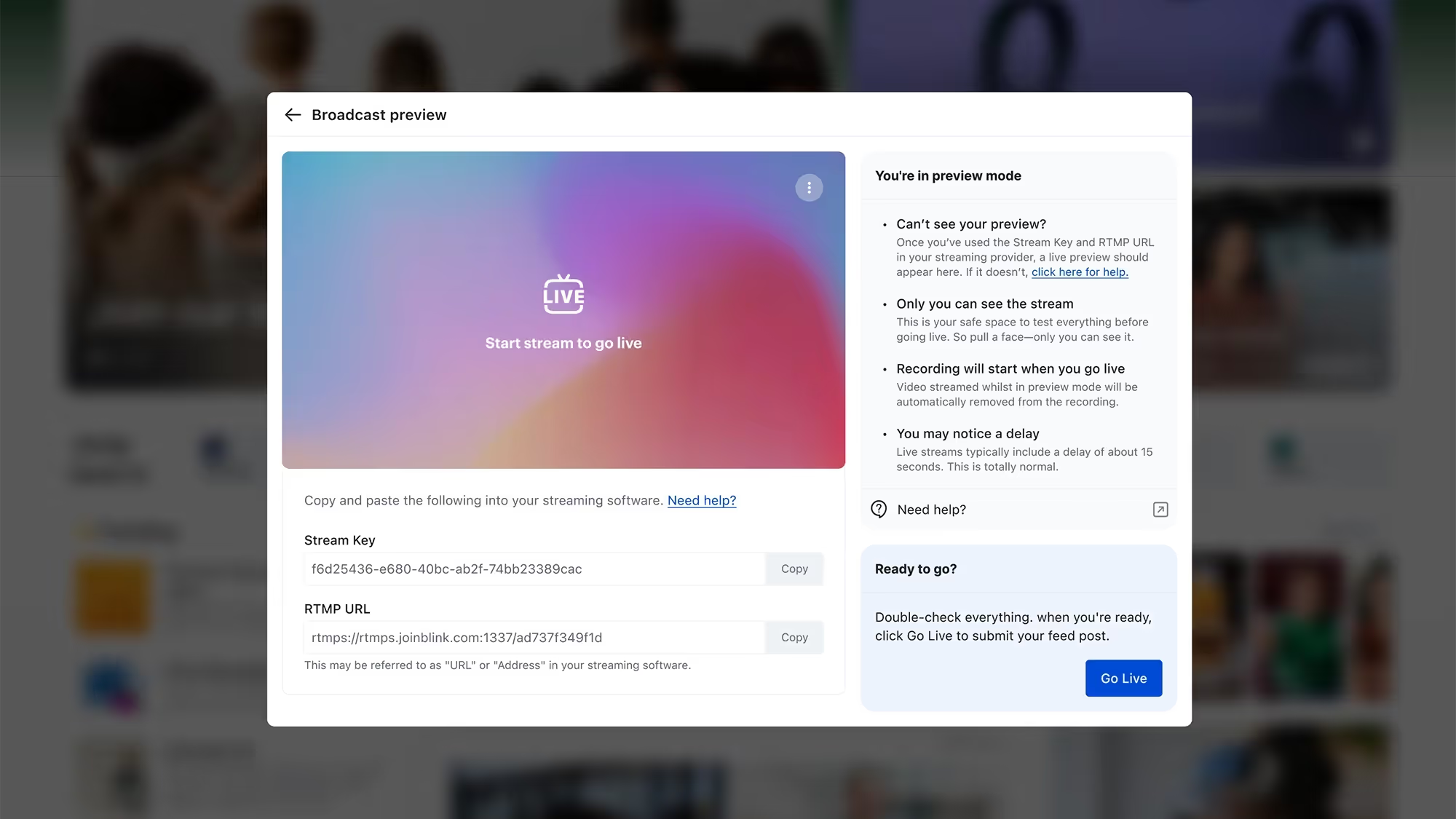
Bring your live events to life on Blink! Our new live streaming feature lets you promote and host events directly in the Feed, fostering real-time engagement and interaction.
Here’s what you can do:
Stream seamlessly via Vimeo or YouTube, with full support for Vimeo interactions on Blink.
Share streams from other platforms using Real Time Messaging Protocol (RTMP) for an additional cost.
Engage your audience as they comment and interact during your event.
Discover what drives your organization with Advanced Employee Intelligence — an upgraded analytics suite that goes beyond the basics to tackle turnover, engagement, and productivity. These actionable insights, available as a paid add-on feature, will empower you to address challenges proactively and foster a thriving workplace.
Transform your data into a powerful driver of organizational success with four core pillars of insights:
Activation: Ensure every employee is connected and engaged with activation metrics by team and role, plus gamified nudges to boost adoption.
Communication: Maximize the impact of your messages with heat maps and deep-dive analysis into communication effectiveness by category, media, and more.
Engagement: Track and improve satisfaction with tools like engagement leaderboards and influencer metrics that spotlight key communicators.
Productivity: Streamline workflows by analyzing app usage, tool access, and shift management to reduce friction and optimize efficiency.
#4. Journeys 2.0: Engage employees before day one
Make a lasting first impression with Blink’s new Journeys for preboarding! This enhancement to our Journeys feature allows managers to kick off onboarding before an employee’s first day, creating a standout employee experience right from the offer stage.
Here’s what’s new:
Include line managers in the journey for a seamless, supportive experience.
Use enhanced start-date triggers to send tailored communications ahead of the first day.
Deliver a bespoke preboarding journey that sets the stage for success.
#5. Image-first feed: Curate the content experience
We’ve made the Feed even better with a new posting experience designed for high-quality, highly curated content that stands out and visually engages users.
Here’s what’s new:
Choose your layout: Opt for the classic look or an enhanced layout that puts your images front and center.
Audience-first review: See how your post will appear to your audience before you post.
Simple to use: The curation and review steps are seamlessly built into the posting process.
#6. Self-service SSO: Simplify access to third-party systems
Our new self-service SSO feature streamlines user access to key third-party systems directly through Blink, reducing the need for multiple logins and improving overall security. This feature makes it easier than ever to connect Blink with the tools your teams rely on.
Key takeaways include:
Enhanced user experience: Simplify workflows by allowing users to access essential systems without remembering multiple passwords, driving better uptake and ease of use.
Flexible configuration: Administrators can set up and manage SAML 2.0 Single Sign-On directly from the Blink Admin dashboard, enabling seamless integration with your Service Provider.
#7. Polls as Stories: Boost engagement with a visual integration
Take your Polls to the next level by sharing them through Stories, including our new image-first Polls feature, to maximize visibility and participation. This integration helps make employee feedback and interaction more accessible and engaging than ever.
Here’s what you can do now:
Increase engagement: Promote Polls in Stories to capture attention and encourage more responses from your teams.
Visual appeal: Leverage image-first Polls to create a dynamic and engaging experience, driving curiosity and interaction.
{{mobile-story-polls="/image"}}
#8. Chat and channel moderation: Maintain a professional communication environment
Administrators now have greater control over chats and channels with new moderation capabilities, including the ability to hide certain types of content when necessary. These tools empower admins to foster a safe, engaging, and well-managed communication space for everyone.
With this feature, you’ll gain:
Improved oversight: Maintain a positive and professional environment by managing and moderating conversations directly within chats and channels.
Content management: Use the “hide” feature to remove inappropriate or irrelevant content, ensuring discussions stay on track.
#9. Dark mode: A new way to experience Blink
Enjoy a more comfortable and visually striking interface with our new dark mode feature, now available via a simple toggle in your settings. This update adds a touch of personalization and comfort to your everyday platform experience.
With dark mode:
Improved comfort: Reduce eye strain during late-night use or in low-light environments with a sleek, dark interface.
Personalized experience: Give users the flexibility to choose between Light and Dark modes based on their preferences.
{{mobile-dark-mode-post="/image"}}
Coming soon
Get excited for updates to the Hub experience, moderation enhancements, and in-app events management!
Bring your consumer-grade employee experience to life
As we kick off a new year of workplace evolution, our mission remains unchanged: to deliver tools that strengthen connections, boost productivity, and ensure every employee enjoys a seamless and exceptional experience — no matter their role or location.
These latest product enhancements reflect our commitment to helping organizations supercharge their employee experience as we step into 2025.
Movement is your bread and butter. The movement of goods. The movement of passengers. But when it comes to the movement of information, transit and logistics organizations have it tough.
Reaching employees who aren’t tethered to a desk isn’t always easy. These employees don’t tend to have a company email address. And they don’t have easy access to desk-based tech and tools. This means they can’t access the traditional intranets that many organizations still use.
If you’re anything like thousands of transit and logistics companies up and down the country, you may be experiencing an employee communication gap. And this causes no end of organizational headaches.
Frontline managers bear the brunt. They already juggle competing demands. But they also spend a big chunk of their workday relaying messages between the C-suite, HR, and frontline workers.
Remember, every minute a frontline manager spends sending out comms or fielding inquiries is another minute diverted from delivering speed and quality.
Frontline workers suffer, too. When internal communication is patchy, they feel less connected to their organization. And less satisfied with their jobs.
You can put an end to these headaches with effective workplace communication. It’s a bridge that connects HQ with your transit depot, warehouse floor, and drivers. A solution that eases a frontline manager’s workload and helps you better reach transit and logistics employees.
In this article, we explore all the ways you can develop effective workplace communication in your transit or logistics organization. So buckle up and let’s take a closer look.
Importance of reaching your transit & logistics employees
When the people within your organization struggle to communicate effectively, it isn’t simply an inconvenience. Poor employee communication can cause serious problems for your company. Problems like inefficiency, employee disengagement, and staff churn.
Luckily, the converse is also true. Prioritize communication and find ways to reach your transit and logistics employees and there are valuable business benefits to be gained.
You improve manager efficiency
Currently, managers spend a lot of time using ineffective methods to reach employees.
They stick paper memos on the depot noticeboard. They make phone calls. And they take on the role of messenger, carrying information between HR, leadership, and frontline employees.
When you make employee communication more effective, managers get valuable time back. They can get messages out quickly and effectively. So they have more time to focus on other tasks.
You empower your frontline
Good employee communication empowers your frontline. You help them thrive in their roles and feel connected to the larger mission. You put the tools and resources they need at their fingertips.
For example, employees find it easy to get the latest company updates. They can also access information on their shift schedule and pay stubs. And get support from managers when they need it.
You boost staff happiness and retention
Focus on communication and you make your workplace friendlier and more connected. Managers and leadership can communicate with employees. But employees can also communicate with one another. And they have a direct line to decision-makers
This connection supports engagement, which supports employee loyalty. When an organization has good internal communication, staff are less likely to leave.
We know that it’s difficult to hire frontline staff right now, in both transit and logistics organizations. Labor shortages are impacting a company’s ability to operate and turn a healthy profit.
Engaging your employees better — with the help of effective internal communication — makes it more likely that they’ll stay working for your organization.
8 strategies to improve how you reach your transit & logistics employees
We know how important good employee communication is to a frontline organization. So let’s take a look at all the ways you can achieve it.
Use an employee app
Some of your transit and logistics employees sit at a desk. But many of them spend their days on the road or on the warehouse floor, away from the office.
These frontline team members don’t necessarily have an employee email address. And they very rarely have access to a work computer. This makes them hard to reach — particularly if you’re using traditional, desktop-based communication tech.
A mobile-first employee communication tool, like a frontline app, bridges the gap between head office and frontline workers.
A few standout features?
An employee app doesn’t require an employee email address or a desk-top device. Employees can access all company comms securely via their smartphones.
An employee app is easy to use. Its interface is like that of popular social media apps. So employees find it intuitive to use and adoption tends to be high.
An employee app is a one-stop-shop. Employees get everything from pay stubs to shift schedules, co-worker messages to mandatory updates. All in the palm of their hand.
An employee app is effective. Updates and tools are available for employees to access at a time and place that suits them. So fewer messages are missed.
Implement regular meetings
Whole-team meetings help you to create an open dialogue. Employees get up-to-speed on the latest company news. Managers can answer employee questions. Everyone feels more connected to co-workers and the wider organization.
You can also use meetings to find solutions to problems. When you have a full range of perspectives and priorities in a room, it’s easier to make decisions that work for everyone.
Regular meetings are an important tool in internal communications. But they’re not always easy to arrange for transit and logistics teams. When everyone is working different shift patterns – across many locations – implementing whole-team meetings is a challenge.
There are a couple of ways around this.
You can rotate the time and location of meetings so employees on a fixed shift pattern aren’t always missing out. You can also keep meetings short and sweet to maximize the number of people who can attend.
And don’t forget to harness the power of tech. Virtual meetings are just as valuable as in-person meetings. As long as everyone is able and encouraged to give real-time input.
Provide training opportunities
Continuous training gives employees the skills, knowledge, and confidence they need to excel. It helps employees to make better decisions and provide better service. It also helps your organization to comply with safety regulations.
But frontline employees often miss out on training opportunities.
According to McKinsey research, 20% of frontline employees says that their employer offers no resources to adequately prepare them for advancement opportunities. And 65% say they are unsure or unaware of how to achieve career advancement.
Employees feel more engaged — and therefore more receptive to company comms — when they feel valued, enabled, and supported.
As well as offering role-based training equitably to both frontline and desk-based teams, you can use training to support your comms goals in the following ways:
Teach new hires about company culture and communication norms
Offer training on the communication tools you use
Incorporate training on company goals and how an employee’s role supports them
Training makes employees better at their jobs. But it can also help them to feel more connected to their work and the wider organization.
Establish feedback loops
A one-way conversation, where we can’t get a word in edgewise, is no fun. We’re happy to listen – but we want our voices to be heard, too.
It’s no different for company communications. The most connected and engaged organizations welcome two-way conversations between employees and leadership.
Of course, top-down communication has its place. Leaders need to share company updates and essential information with employees. But ideas, queries, and opinions need to flow in the other direction too.
You can encourage more bottom-up communication from your transit or logistics employees by creating feedback channels. Try to run:
Pulse surveys: to get a snapshot of how employees are feeling
Annual surveys: to gain in-depth insight into the employee experience and benchmark your performance
If you don’t have survey tech that frontline employees can use, suggestion boxes are an alternative. You could also run a regular schedule of 1-2-1 meetings so employees can speak up about any issues they’re facing.
Just remember that facilitating regular, anonymous feedback is only the first step in the process. To ensure employees get involved with your feedback program, you need to establish a feedback loop.
This means telling employees what their feedback has revealed — and any changes you plan to make. You can then give them further updates on the actions you’re taking and the results they’re producing.
Promote transparency
Trust is the foundation of positive internal communication. Employees are more likely to engage with your comms when they trust in what you’re saying. And they’re more likely to be transparent in their own communication when they have your example to follow.
So how do you make your employees more trusting? It all starts with transparency in the way you share information.
Transparent communication helps employees to understand leadership logic. When they understand the reasoning behind decisions and changes, they’re more likely to get behind them. And when you’re honest about challenges and problems, they may also be able to offer helpful solutions.
Ultimately, when employees can count on open, valuable communication like this, they’re less likely to avoid noticeboard memos and the company emails that land in their inbox.
Transparent employee communication is easier when you have the right communication channels — like town hall meetings, a frontline app, and regular 1-2-1s. Training can also help managers and employees to embrace a company culture where sharing information is the norm.
Recognize your employees
Recognition is a form of employee communication that fosters connection between employee and employer. It helps to create a positive work environment with high morale and engagement.
If you feel you could do more to recognize employees, start by thinking about your company culture. What are the behaviors you want to see in your organization?
Then align recognition with these behaviors, celebrating and rewarding employees when they demonstrate them.
Here are a few ideas for ways you can weave recognition into your day-to-day:
Celebrating work and personal milestones
Peer-to-peer recognition (where co-workers get to highlight the successes of their peers)
Employee of the Month awards
Public recognition via employee communication channels
By offering regular, timely recognition you motivate employees to do a great job. And by recognizing employees publicly, you inspire their co-workers to follow suit.
But it’s not just about performance and productivity. Recognition feeds your internal communication efforts, too.
That’s because engaged employees are more likely to read and respond to company messages. And because recognition helps to strengthen workplace relationships. Show that you value one another and open, trusting, effective communication becomes a whole lot easier.
Support collaboration
Collaboration supports internal communication — and vice versa. That’s because collaboration translates into all the following:
Effective knowledge sharing: when employees have the right communication channels, they can share insights and learning with other team members
An aligned organization: when your teams work together, you align employees around company goals and objectives
Improved problem-solving and decision-making: two heads are better than one, so when employees regularly share ideas and perspectives you end up with better solutions and decisions
Strong relationships: employees who work together develop stronger relationships and find it even easier to communicate and collaborate in the future
You can encourage collaboration by celebrating collaboration when you see it. You also need easy-to-use communication channels that break down silos. This means frontline teams can work together, even when they’re physically apart.
Imagine a bus driver comes across a patch of black ice on their route. With a clearly defined, mobile-first communication channel, they can quickly and easily alert other drivers to the hazard.
With good collaboration, everyone’s work gets safer, easier, and more satisfying. And employees have the support they need to be better at their jobs.
Offer clear internal communication channels
Think about how your organization communicates with employees in the here and now. You and your teams might be using some (or all) of the following:
An intranet
Noticeboards
Phone calls
Emails
Word of mouth
A suggestion box
Personal messaging apps
Town hall meetings
1-2-1 meetings
These communication channels don’t meet the needs of every employee within a transport or logistics organization.
Drivers and warehouse workers don’t always have access to a company email address or the company intranet. It’s pretty much impossible to schedule a town hall meeting that everyone can attend.
Some of these methods of communication are also unreliable and inefficient. Memos on a noticeboard are quickly out-of-date. Individually calling employees about their shifts takes up a lot of manager time. And messaging via personal apps isn’t always secure.
A modern intranet or employee app is a more effective alternative. When you put a clear communication channel in place — and train employees in how to use it — you cut the noise.
You also reap the following benefits:
You create one source of reliable information so employees learn to trust company comms
Managers spend less time on comms because they can quickly and easily reach all employees on the same communication channel
Frontline and office-based employees get equal access to internal communication – no one is left out of the loop
Employees get targeted comms, relevant to their roles, so they’re much less likely to ignore the messages you send
Blink is an employee app built for frontline organizations. It helps transit and logistics companies to achieve better communication, connection, and efficiency. It also acts as the digital front door for your organization.
Communication
With a built-in newsfeed, messaging function, and content hub, you can achieve effective company communication. You can share your mission and acknowledge top performers. Managers can post mandatory reads, conduct 1-2-1s, and direct communications to specific regions, sites, and departments. All while avoiding information overload.
Connection
You help to combat driver loneliness with employee chat, employee surveys, and an engaging, personalized news feed. You bring connection to solitary roles and help employees to feel seen, heard, and appreciated.
Efficiency
With Blink, you connect frontline staff to management and resolve issues faster. Staff are empowered to file accident reports and outage updates. Managers replace time-consuming paper-based processes with digital ones. Leaders also get valuable data and reporting features that allow them to visualize communication flow and further improve their comms strategy.
A digital front door
Via Blink’s user-friendly dashboard, employees can access all the apps and tools they use. Shipment details, shift schedules, digital order forms, health and safety notices, training materials, pay stubs. With the Blink frontline app, you put everything at the fingertips of every employee.
Blink case study: Stagecoach bus company
UK bus company, Stagecoach, has already put Blink’s frontline app into action. They needed a way to connect their 21,000 bus drivers and improve staff engagement.
Thanks to Blink they have:
Reduced staff turnover by 26%
Increased employee satisfaction by 46%
And with 89% of drivers opening the employee app an average of six times per day, they’ve managed to reach the majority of their frontline workforce each and every day.
MJ Moore has been paving the way at Blink for over three years, bringing her Workday consulting background to build our entire Implementation function from the ground up. Now, as VP of Implementation in our London office, she’s led lightning-fast launches and established a team that customers can’t stop raving about.
We chatted with MJ about what drew her to Blink in the first place, the culture she thrives in, and why she’s more energized than ever to keep driving innovative solutions for frontline workers around the globe.
What is your position at Blink?
I’m the VP of Implementation.
How long have you been at Blink?
Just over three years. I celebrated my three-year anniversary in February.
What initially attracted you to join Blink?
I think I simply loved the technology. I came from a Workday background, doing Workday consulting, and was looking for that early-stage buzz again — something I felt Blink had in spades. The technology was at an exciting point in the market, and I wanted to be part of a company that had tons of potential for growth.
What's a project you are proud of from your time at Blink?
That’s a tough question because there are so many highlights! One of the biggest is building the Implementation team from scratch. When I first joined, there wasn’t an official Implementation function at all. Now, we’ve got a robust team of people working together with clear processes, methodologies, templates — everything we need. They’re incredibly self-sufficient, and our customers love them, which is such an awesome feeling.
Another standout moment was launching Blink to 6,000 users in Mexico in under eight days. We were a lot smaller at the time, so I ended up running almost the entire project on my own. The client was facing serious union issues and worried about potential factory closures, so they needed Blink ASAP to keep everyone informed and hopefully avoid a strike. It was crazy stressful, but we pulled it off, and in the end, they were able to communicate everything in time. They actually avoided the strike altogether, which was a huge relief for them — and for us, knowing we helped make that possible.
How would you describe the company culture at Blink in three words?
Energetic, challenging, and supportive: There’s a lot of energy in the team; we set high expectations for ourselves; and everyone is there to help each other succeed.
What's one thing you're excited about for the future of Blink?
Honestly, it’s thrilling to think about how much opportunity lies ahead. We’re in an industry where Blink could become essential to so many different sectors — frontline workers, office-based teams, you name it. We’ve barely scratched the surface of what we can do, and each new market or customer segment opens up possibilities we haven’t even explored yet. That level of untapped growth is exactly what makes Blink so exciting to be part of. It’s the kind of momentum that drives you to keep innovating, knowing there’s still so much room to make a real impact.
Can you tell us about a recent initiative or program launched at Blink that you found particularly exciting?
I really love the “Adopt a Customer” program because it encourages everyone in the company — even those who don’t usually interact with customers — to take a deeper interest in who we serve. Our biggest goal is driving customer happiness, and this initiative pushes each person to learn about one specific customer’s journey, challenges, and needs. When you have to present your findings at an All Hands meeting, you naturally dive into researching their background, business goals, and how they use Blink. That extra effort is not only fun, but it also fosters empathy and understanding. It’s awesome to see colleagues who haven’t had much customer exposure suddenly become champions for “their” customer, sharing insights that might otherwise go overlooked.
Why do you work for Blink?
I’m here because Blink’s mission speaks to me on a really personal level. There’s something powerful about the tools we provide — especially for frontline workers who haven’t had anything like Blink before. It has the potential to fundamentally change how they do their jobs, and that’s exciting to be a part of.
I’ve also been given a lot of responsibility and freedom to make an impact, which is something I really value. In previous roles, I sometimes felt disconnected from the end users, but here, I get to see real reactions to our tech — people lighting up because it makes their work lives easier. That’s a genuine thrill and it reminds me why I do what I do every day.
Some comms strategies stream seamlessly, while others are stuck buffering with no end in sight
Let’s face it: We live in a world where content rules. We’re constantly streaming, scrolling, watching, and sharing. And just like our favorite shows and platforms, every internal communication strategy has its own vibe — some sleek and polished, others functional but messy, and some… a little too obsessed with rainbows and brand tone.
You wouldn’t launch a new show without a trailer — so why send an update without context, curation, or a hook?
Think about it — your comms platform has viewers (aka employees), admins (your comms team), and its own programming lineup (all those emails, updates, videos, surveys, and shoutouts).
So, here’s the big question:
If your internal comms strategy were a streaming platform… which one would it be?
This is part personality quiz, part gentle diagnosis, and all good fun. And who knows — it might just help you spot a few things to fix, finetune, or completely rethink.
Netflix: The overcommunicator
Tagline: Volume overload. No one knows what to watch.
You’re the king of content volume. Like Netflix, you’re publishing constantly — newsletters, CEO updates, campaign launches, benefits reminders. There’s always something new when employees log in, but just like binge-watchers lost in an endless homepage scroll, your audience is overwhelmed. It’s communication without curation — and everyone’s tuning out.
Pros: Rich, varied content. People know where to find it.
Cons: Information fatigue. Nothing feels urgent, so everything gets ignored.
It’s time to curate like an editor. Use weekly digests, “Top 5 things to know,” or audience targeting to surface the right content to the right people — and give your employees some breathing room.
{{mobile-main="/image"}}
HBO Max: The prestige broadcaster
Tagline: Prestige content — but only for the few.
Your internal comms are prestige TV. Like HBO Max, your content is polished, strategic, and often award-worthy — think slick leadership videos and brand-perfect announcements. But it’s top-down and infrequent, designed more for executives than everyday teams. The result? High production value, low connection on the ground.
Pros: Executive trust, strong brand storytelling.
Cons: Limited accessibility. The “everyday” content is missing.
As your next step, pair your prestige comms with grassroots content. Empower local teams to share stories. Make space for informal, in-the-moment updates alongside strategic comms.
Amazon Prime Video: Functional but frustrating
Tagline: Function over feel.
Your intranet is basically Amazon Prime Video. Everything’s technically there — tools, policies, updates — but good luck navigating it. The interface is cluttered, search is a mess, and the content isn’t exactly curated. Like users lost in Prime’s endless menus, your employees might log in, sigh, and log right back out.
Pros: One source of truth.
Cons: Low discoverability. Employees check out before they find what they need.
The name of the game? Simplify. Highlight most-used tools, audit stale pages, and clean up the homepage. Make your digital workplace feel more like a front door, not a storage closet.
{{mobile-hub="/image"}}
Peacock or Paramount+: The niche network
Tagline: Great content. Tiny audience.
Your comms have cult-classic energy. Like Peacock or Paramount+, you’ve got a few loyal fans and some hidden gems — but overall, your platform just isn’t top-of-mind. Maybe it’s an underused email list or a team SharePoint that rarely gets checked. Great content, but a limited reach means employees are missing the message.
Pros: Focused, relevant updates.
Cons: Low visibility. People say, “Wait — that was announced?”
Time to go multi-channel! Promote your channels like you would a new show launch. Use mobile notifications, digital signage, and team huddles to raise awareness. Great content deserves more viewers.
Disney+: Family-friendly and heavily branded
Tagline: All smiles, no spice.
You’ve mastered the brand voice. Like Disney+, everything in your comms world is polished, upbeat, and totally on-message. It’s a clean, curated experience with beautiful visuals and strong storytelling — perfect for onboarding and mission moments. But after a while, employees might start wondering: Where’s the real talk?
Pros: Strong visual identity and consistent voice.
Cons: Lack of vulnerability. Feels too “corporate.”
To take your strategy to the next level, try mixing in unfiltered stories from employees. Showcase real feedback, day-in-the-life clips, or candid shoutouts. People trust people — not just polish.
{{mobile-stories="/image"}}
Hulu or NOW: Slightly messy — but people still use it
Tagline: Organized chaos.
You’re Hulu in the US or NOW in the UK — a little bit of everything, with a side of chaos. Your comms live across multiple tools, old and new: Slack threads, SharePoint pages, WhatsApp chats. It’s inconsistent and messy, but it works — because your people have figured out where to look. (Even if they wish it were easier.)
Pros: Content variety, team-specific relevance, enough routine to maintain engagement.
Cons: Fragmented user experience. No single source of truth.
It’s time to unify and streamline. Build a comms hub that feels intentional — not accidental. Keep the local flavor, but tie it all together with a central mobile-first platform.
Apple TV+: All style, not enough substance (yet!)
Tagline: Gorgeous ghost town.
Your comms platform is Apple TV+ — sleek, modern, beautifully branded. It looks amazing and sets a high bar for design. But once you get past the homepage? There’s not much happening. Content is minimal, engagement is low, and employees forget to check in. Pretty isn’t enough — it needs purpose.
Pros: Strong design, great adoption potential.
Cons: Low repeat engagement. Employees say “it looks nice” — but don’t use it.
Try to focus on day-to-day value. Share timely updates, celebrate wins, and surface useful info like shift changes or HR tools. Pair aesthetic with utility.
{{mobile-kudos="/image"}}
YouTube: The employee-led engine
Tagline: Employee-generated magic (with a dash of mayhem).
You’re YouTube — and you’ve handed the mic to your people. Your internal comms are powered by shift videos, peer shoutouts, team stories, and crew takeovers. It’s authentic, bottom-up, and wildly engaging. Sure, it gets a bit chaotic without guardrails — but that realness? That’s what employees keep coming back for.
Pros: High engagement, peer-to-peer connection.
Cons: Needs light moderation and content alignment.
Our recommendation? Set the stage for success. Spotlight standout creators, guide content themes, and introduce a few soft guardrails to keep things safe and focused.
What’s your ideal mix?
The truth is, no internal communication strategy is just one platform. We’re all working with a blend — a little Netflix here, a little HBO there, maybe even a dash of YouTube energy for good measure.
But thinking about your comms this way? It helps. It surfaces what’s working — and what might need a reboot. So ask yourself:
Is your content too polished when it should be more conversational?
Do you only reach a select few — but leave the rest of your workforce buffering?
Are you focusing on sharing it all when what your people really want is clarity?
Build your “comms bundle” — the perfect mix of trust, relevance, usability, and creativity. And just like your ideal Friday night lineup, it should be easy to find, engaging to watch, and worth coming back to.
Explore top platforms that deliver more than a SharePoint skin
Akumina positions itself as a digital workplace experience layer built on SharePoint—but for many organizations, it creates more complexity than it solves.
It’s highly customizable, yes—but that often comes with long implementation timelines, heavy IT lift, and limited employee engagement. If you're looking for a solution that’s easier to roll out, more intuitive to use, and built for actual adoption, you're not alone.
In this article, we break down the 12 best Akumina alternatives—modern intranet and employee experience platforms that go beyond SharePoint overlays to deliver real value for today’s hybrid, remote, and mobile workforces.
#1. Blink
Best all-in-one intranet and employee app
Blink is a modern employee platform that combines internal communications, essential tools, and content into one intuitive experience. Unlike Akumina, Blink doesn’t sit on top of SharePoint—it replaces it, offering native mobile and desktop apps that employees actually want to use.
Why Blink over Akumina:
Lightning-fast deployment (no dev work required)
Personalized, social-style feed
Messaging, surveys, forms, and files all in one place
Works beautifully on mobile and web
{{watch-video="/callouts"}}
#2. Interact
Best for structured intranets with strong comms features
Interact is a mature intranet platform that offers a blend of content governance and communication tools. It provides more flexibility and a better out-of-the-box experience than Akumina, especially for internal comms teams.
Key strengths:
Smart content targeting
Built-in comms features (surveys, likes, comments)
Page templates and drag-and-drop tools
#3. Simpplr
Best for AI-powered content personalization
Simpplr is a polished, AI-driven intranet focused on employee engagement. It’s known for lifecycle communication (e.g. onboarding, transitions), and offers more automation than Akumina without the same technical setup burden.
Why it stands out:
AI-powered content surfacing
Smart search and recommendations
Built-in templates for lifecycle moments
#4. Staffbase
Best for internal comms at enterprise scale
Staffbase shines when it comes to centralized, top-down communication. With a branded employee app and multi-channel messaging, it’s a better option than Akumina for organizations prioritizing reach and visibility.
Top features:
Newsletter builder
Campaign management
Native mobile app with notifications
#5. LumApps
Best for global enterprise deployments
LumApps offers a broad, customizable employee experience platform with deeper integrations and personalization than Akumina—without being tied to SharePoint. It supports global rollouts and multi-language content delivery.
Why it’s better:
Google & Microsoft integrations
AI personalization
Multilingual and regional content support
#6. Happeo
Best for Google Workspace users
If your organization uses Google Workspace, Happeo is a lightweight, user-friendly intranet that connects seamlessly with your tools. It’s far easier to deploy and use than Akumina, especially for remote teams.
Highlights:
Tight Google integrations
Social intranet features
Customizable layouts
#7. ThoughtFarmer
Best for easy-to-manage intranets
ThoughtFarmer focuses on simplicity and people-first design. Unlike Akumina’s complex configurations, it offers a quick setup and low learning curve—perfect for organizations without large IT departments.
Notable features:
People directory and profiles
Easy content editing
Micro-sites for teams and departments
#8. Igloo
Best for governance and compliance-heavy teams
Igloo is a solid Akumina alternative if your focus is structured content, document control, and knowledge management. It’s more rigid than Blink or Happeo, but ideal for finance, legal, and healthcare.
Strengths:
Document versioning
Access controls
Policy and procedure hubs
#9. Jive
Best for community collaboration
Jive is ideal for organizations that value social collaboration and peer-to-peer interaction. While Akumina layers content, Jive fosters real-time engagement and employee communities.
Features:
Social groups and forums
Peer recognition
Advanced analytics
#10. Haiilo (formerly Smarp)
Best for employee advocacy and engagement
Haiilo is a newer entry but a compelling Akumina alternative if you’re focused on culture, employee voice, and comms amplification. It goes beyond intranet basics into the territory of employee engagement and advocacy.
Why consider Haiilo:
Omnichannel comms
Employee-generated content
Engagement analytics
#11. Noodle
Best for small companies wanting a turnkey intranet
Noodle is a lesser-known but solid option for SMBs. It’s easy to set up and includes standard intranet features without the need for SharePoint or heavy integrations.
Pros:
Budget-friendly
Core intranet tools (news, docs, chat)
On-prem or cloud options
#12. Unily
Best for enterprise intranets with rich features
Unily is a well-known intranet solution with a robust feature set, polished UI, and strong Microsoft integrations. It’s a better alternative to Akumina if you want a full-featured, polished intranet with deep customization—without starting from scratch.
Why it’s a solid pick:
Beautiful UX
Strong multilingual and multi-brand support
Flexible integrations with Microsoft 365 and beyond
Final thoughts: Choosing the right Akumina alternative
Akumina can work well for highly customized intranet needs—but that flexibility often comes at the cost of complexity, budget, and adoption.
Whether you want something faster, simpler, or more engaging, the 12 alternatives above offer modern options that fit different use cases and team types.
Want a platform that people will actually use?
Blink replaces legacy intranet headaches with an all-in-one, beautifully simple platform for communication, tools, and culture.
Employee retention is the art of holding onto your staff once you’ve hired them.
And, in 202w, it’s more important than ever.
Why?
Because companies are finally waking up to the competitive advantages of being a "people" company. A "churn and burn" approach to hiring results in poor customer service.
This is an issue, because customers are placing increasing value on good service. With smartphones, it’s easier than ever to find a competitor company to buy from. Or in the case of consumer goods, to avoid the shop altogether and order online.
Before we start.
You can hold onto employees (more or less) by treating them well. Listening to their concerns, and providing them with a few incentives to stay put.
If you’re an HR professional or a CEO, you don’t need us to tell you that. What you might find useful is an in-depth guide to employee retention in the modern workforce.
How to maximize your employee engagement efforts. And make sure there were no stones left unturned in creating the most comprehensive guide... we asked some industry-leading experts to contribute. We’ll cover:
Detail on the importance of employee retention today.
How to build effective employee retention strategies.
The exit interview, and how to turn it into your secret employee retention weapon.
Let’s begin...
Why is employee retention important?
Employee retention means "treating your employees right"; it’s an end in itself, not just the means.
From an ethical standpoint, no company should mistreat their employees. Meeting your colleagues’ basic needs and providing them with a safe and stimulating workplace? It's the right thing to do for its own sake.
But it’s more than that.
Attracting talent to your company—and keeping it once you’ve found it—has so many advantages. According to Herzberg's famous Two-Factory Theory, employee retention and employee motivation are interdependent. You can find out more about this in the Vantage Circle HR blog. A strong employee retention strategy will:
Reduce operating costs.
Improve customer service levels.
Allow you to out-compete your competitors for the best people.
The cost of high employee turnover
Hiring and firing is expensive.
Eye-wateringly expensive, to be precise. Think six to nine months salary as a conservative estimate.
Then you need to consider the impact of not having someone there to do that person’s work. That could slow down a massive project. Cause higher overtime costs as existing staff pick up their work. Or just lead to a reduction in staff morale as they struggle with increased workloads.
Companies tend to get the importance of this for salaried positions and execs. but there’s often a bit of a blind spot when it comes to their non-desk workforce and the real cost of losing an employee.
Sure, replacing a senior-level manager is more expensive than replacing a bus driver. But what happens if your bus drivers’ morale becomes so low that two or three quit per month?
It all adds up.
"Losing talented staff can also have emotional consequences on those who stay. Effectively reducing productivity by decreasing morality and motivation," says Rochelle van Rensburg of the Ezzely Blog.
"Maintaining essential talent is therefore mission-critical to organizational effectiveness for all these reasons. Staff retention puts companies ahead of their competitors, by reducing recruiting and re-skilling costs. But more importantly, by keeping the top performers, which results in all of their specialized knowledge and expertise remaining in-house."
Your mobile workforce interacts most with customers. They are the public face of your company. So, their happiness will reflect in the level of service they give your customers.
Happier, more engaged employees deliver better customer service. They also build up a bank of operational knowledge over time. This helps them respond to queries quicker and more effectively than a steady stream of new hires ever could.
The importance of employee retention in 2020
An active employee retention strategy is more important than ever. There are two key reasons for this:
Firstly, it's never been easier for customers to look elsewhere if they feel that your levels of service don’t match their expectations. We live in an age where any information you want is available via a few taps of a smartphone screen.
Dissatisfied with a hotel stay? Booking.com can recommend thousands of others.
Bad experience in a taxi? A quick Google gets you all the phone numbers of other local firms.
Poor customer experience at a theme park? TripAdvisor lists other attractions.
You get the idea.
Despite this, customers still want to be loyal. Millennials want to stick around if your brand fits in with their personal values. Don’t throw away this loyal market.
Secondly, it's never been easier to browse jobs via online jobs boards. If your workforce isn’t happy they will move. Don’t assume that they will sit in their job miserable because there aren’t any other options.
Reasons why employees leave and reasons why managers leave aren't always the same.
Your competitors may be waking up to the benefits of being a "people company." They'll more than happily snap up the staff you can't keep.
The best employee retention strategies
A strong employee retention rate is crucial to remain competitive. How you go about doing this is worth examining in some depth.
Remember - you are an employee too! As you create your employee retention strategies, keep asking yourself, "would I be happy with this?" or, "does this seem reasonable to me?"
Here are a few points you’ll need to cover when creating an employee engagement plan. Remember, the employee experience starts before the first day at the interviewing stage. To set each new starter up for success, getting the onboarding right is crucial. Want to learn more? Check out the Definitive Guide to Onboarding.
Let's quickly touch on the foundation of any working relationship: trust. As Kayla Lopez from the recruitment firm Viqtory.com reminds us. "If your employees trust you and the organization they tend to embrace the workplace; this begins before the employee is even hired. Transparency is something that we need to willingly support to gain trust. A workforce that trusts you will be engaged, a workforce that is engaged will retain. Trust is the foundation of all strong partnerships."
Now for the details...
Pay well
We’ll start with the basics.
If your pay rates don’t match with your competitors’, you’re going to have a bad time keeping hold of your high achievers.
Take a quick look at what your competitors pay for equal positions. Try and build a league table of what similar companies to you pay, and where you rank. Glassdoor is a good starting point.
Aiming for the absolute top is ideal if you can afford it, but you don’t have to offer the best salary offer out there. There are plenty of other ways to encourage your staff to stay put (more on that below), as long as you can land in the middle of the table. For someone working in a frontline job, it is difficult to give your best at work knowing you could get $5.00 per hour more for the same job elsewhere. (Even if there’s free pizza every Friday).
It’s also worth noting that even a generous wage packet won’t persuade your employees to stay if you’re otherwise a nightmare to work for. Consider this step the cornerstone of all your employee engagement efforts. Not enough by itself, but essential in building something lasting and meaningful.
Give competitive benefits
You might not be able to take it to Silicon Valley levels. (Free three-course meals for breakfast, lunch and dinner, unlimited holidays, and puppy creches).
You can offer a benefits package or a performance bonus scheme tailored to the size of your business, your budget, and your business objectives. The key is to prioritize benefits that would have a tangible difference to the lives of your employees. Add the fancy stuff on if you have money to spare.
Think about:
Childcare vouchers: we’re all aware of the struggle to find affordable childcare. Help your workforce with their work-life balance (and keep it diverse—most of the people who end up quitting jobs for childcare reasons tend to be women) by offering vouchers to help with the cost.
Health coverfor employees and dependents: an absolute must if you're US-based, although even if you live in a country which has some form of universal health care, giving employees the opportunity to go private is very appealing.
Flexible working: if the type of work you do accommodates it, flexible working is like gold dust to your staff. A "work your hours however you want" policy helps people manage childcare commitments, fit in dentist appointments, and reduce the stress of trying to juggle work and life commitments.
Lunch program: Most of the lunch break is spent buying, prepping or reheating food. Offering a tasty and healthy in-house solution, such as the online canteen Smunch, allows your employees to capitalize on their break time and share a meal together. Ultimately, this will improve your company culture and cross-departmental communication as well.
Once you’ve got the basics sorted, some nice-to-have options include:
Above average PTO allowances
Free gym memberships and cycle to work programs
Personal development funds
Develop a feedback culture to empower employees
Your employees know their workplace better than anyone else. Make the most of it.
If your employees feel involved in shaping their workplace and consulted on major decisions then they will be reluctant to leave it.
The key to this is to carry regular, easy-to-complete employee engagement surveys so you know exactly what the mood on the ground is and how to improve it.
Employees will hold an enormous amount of goodwill towards a workplace that listens to their concerns and acts on them. Equally, they will reserve a special sort of resentment for those that send out survey after survey, only to ignore the results.
It’s essential to have a solid plan in place for your employee engagement surveys, or they will backfire spectacularly.
Key pointers
Small, regular surveys are better than long, annual ones. Only giving your employees one chance per year to raise issues will result in bottled up frustrations spewing out come survey time. Not only does this result in surveys that skew unhelpfully negative, but it also means that your HR team will face an uphill struggle
Another point about designing surveys that you can respond to effectively: keep it targeted. Focus each of your quick-answer surveys on a specific area—facilities onsite, for example, or about relationships with line managers.
Use short answer questions: "yes/no" or "on a scale of 1-5" formats make it easier for people to respond immediately. Long-form feedback can be helpful, but having lots of long-answer text boxes on your survey will put people off completing it. A good compromise is to have an optional "any specific comments" box at the end of the survey.
When you’ve processed the surveys, share the results and shout about what you’re doing to act on feedback. Employees will appreciate the transparency, and it’s important to signpost what you’re doing to address the concerns they raise—or they won’t bother to participate in future surveys.
Try and create a "feedback culture" in your company by encouraging people to come forward with suggestions for improvements any time they want. Surveys highlight pain points as they are reactive; an anonymous suggestions box (either digital or real-life), on the other hand, will bring out the more innovative side of your workforce.
These suggestions might be small—a new way of organizing the break room fridge, or the introduction of free coffee Mondays—but the opportunity to improve the workplace in this way will work wonders for your wider staff’s sense of allegiance to it.
Make your workplace a fun place to work
If your coworkers are your friends, spending time at work doesn’t seem so taxing.
This is where the fun stuff comes in—the away days, lunchtime yoga, the free breakfast bar, the Christmas party...
If you have a mobile workforce, don’t forget to include them, too! They might not be in the office that often, so having regular get-togethers or breakfast clubs when shifts change is a great way to build a sense of belonging.
Obviously, base these activities on what your own workforce would like, but some ideas include:
Regular lunchtime sports clubs (running, yoga, five-a-side, badminton are good starting points)
Away days and team-building weekends.
Semi-regular opportunities for free food. Depending on the size of your team, you could offer lunch on the company each Friday, pizza parties when teams hit their targets or just because
Big events like Christmas parties and family fun days. If you run awareness weeks for things like diversity, mental health and stress, why not run some exciting events for these too?
Recognition of key milestones. If there are particularly busy periods throughout the year (like the Christmas rush for anyone working in retail or hospitality), put on an event to recognize the hard work your employees put in. This could be a full-on party, or simply just giving your staff the nod to take off after lunch on a quiet day.
This step does, however, come with a big flashing warning sign that says: don’t bother doing any of these without doing the steps listed above first.
Because these are fun and exciting, and sound super trendy when you put them on your Careers page, people often use them in place of paying a decent wage, or offering flexible working hours, or acting on employee feedback.
The exit interview - your employee retention secret weapon
One of the best ways of figuring out what’s going wrong with your employee retention efforts is asking your colleagues when they leave.
Seems counter-intuitive, and rather frustrating, doesn’t it?
And in some ways, it is. No amount of collecting and aggregating exit interview data, tweaking your employee engagement plan and making changes in your company to reduce employee turnover will change the fact that, for that particular employee, your efforts weren’t enough. For HR people and line managers, that stings sometimes.
Still, if you can take your losses on the chin, this is a real opportunity to do better for your colleagues, and identify and fix any major issues that push people to leave.
There are three main reasons why exit interviews are so effective at flagging up things that need to change:
The employee is leaving so won't hold back
Regardless of how many times you reassure your colleagues that your pulse surveys are anonymous and that helpful suggestions are encouraged, they will still be a little suspicious.
The worry that surveys aren’t really anonymous, or that speaking out about a key workplace bugbear will get them labelled as a troublemaker, will be a constant thorn in the side of your employee retention efforts.
(As a side note, if this attitude is pervasive then it might be time to take a look at your workplace culture. A little reticence is natural. An all-encompassing dread of speaking up might indicate something a little more sinister).
The exit interview is a different kettle of fish. They’re leaving. There are no raises or opportunities for promotion in the pipeline. This is their opportunity to "tell it like it really is."
Listen, even if you think they’re being unfair and bitter.
Problems brought up during exit interviews tend to have weighed heavily on an employee’s decision to leave. In other words, they’re big issues you need to address urgently.
Get the whole picture
Multiple exit interviews help build up a better picture of life on the ground.
Of course, there’s always the chance that one particular employee just, for whatever reason, didn’t have a good time.
That’s where keeping data from previous exit interviews comes in.
For example, if an employee complains about their line manager being unbearable, it might just be a clash of personalities. Equally it could be because that line manager is difficult to work for and too demanding. It’s difficult to say without further info.
So. Run some analytics.
How many other employees from that line manager’s team have left over the past year?
Did they say anything in their exit interviews?
Have they been flagged to HR for anything previously?
If so, you might want to investigate further.
This is why it’s important to conduct an exit interview for every single person that leaves the business. If you restrict it to management positions, people based in HQ, or full-time workers, you’re missing key sets of data that could be useful in improving your employee retention strategy.
Find out what went wrong
An exit interview, conducted well, helps you identify wrong turns in your employee journey map.
You’ll probably have some sort of employee journey map already.
You might call it something different. We’re referring to the plan you make that starts at the hire phase and ends with the offboarding phase when the employee leaves. This normally includes guidelines for each stage they go through with your company. For example:
Hiring:
Offer letter and contract sent
Start date agreed two weeks in advance
Onboarding:
First day: tour of premises, fire safety, welcome coffee or lunch
First six weeks: all e-learning to be completed
You get the idea. Here's a basic template you could expand on:
The exit interview provides an excellent opportunity to ask your employees about various stages in this plan, to see whether they’ve been carried out to your expectations.
Ask specifically, and don’t be afraid to go right back to the start of their employment. Whether they felt welcomed in their first weeks, for example. If they were given clear and regular feedback on their performance, and compare that to your notes on how your employee journey should pan out.
It could be that, despite your meticulous efforts in planning it, your employee journey map isn’t being adhered to by managers in the wider organisation. This could be why your employees are leaving - this map provides guidelines on how to make sure people feel safe, supported and included at work. If people don’t follow it you’re going to have problems.
Your employee journey map is important. If it isn’t being followed, you need to correct that as soon as you can. Exit interviews are the best way to do this.
How to conduct an employee retention interview
Be flexible around your employees needs
If a lot of your workforce are remote or mobile, don’t insist on a face-to-face interview at HQ.
There are several free video calling apps available, so why not make use of them? An employee is more likely to feel comfortable talking to you if you’ve made accommodations for their situation.
If they’re more comfortable talking to you, they’re more likely to be honest with you, and that’s exactly what you want.
Don’t make it overly formal
Go for a relaxed vibe. Making things too formal will only stifle conversation.
If you’re conducting a face-to-face interview, it’s a nice touch to provide some sort of refreshments; hot drinks and a pastry, maybe. The employee will appreciate the gesture, and it will encourage a more conversational feel, which is exactly what will get them to open up.
Identify the specifics to touch on
You will know, from previous exit interviews if there are any particular pain points in your employee experience.
Ask about them. You’ll then be able to establish:
Whether these are still issues
What progress you’ve made on them, and how effective your efforts to tackle them have been.
...But allow them to express their opinion too
If the structure of the interview is entirely created by you, you could miss something important.
By allowing employees space to expand on their own concerns, you give yourself the opportunity to pick up on potential issues that aren’t on your radar. Sure, a lot of this could be specific to that particular individual, but you should investigate nonetheless—otherwise you’ll never know whether it’s the iceberg tip of something bigger.
Remember: your relationship with the employee isn't over
People leave for all sorts of reasons—not all of them negative.
You might want to leave the door open for talented employees, in case they want to return at some point. Also consider that talented former employees can be great source of referrals.
These can be your company’s cheerleaders, even after they’ve left. A good exit interview can make this relationship. A poor one can ruin it.
Of course, there’s also the possibility that the employee leaving has been less than stellar. In this case you should see the exit interview as a chance to smooth things over, and divert potentially negative Glassdoor reviews or social media mentions.
Final thoughts
To summarize:
An employee retention strategy is important because it makes your employees happier. Happier, more engaged employees perform better in general, and deliver better customer service.
The cost of employee turnover is measured in increased operational costs and decreased institutional knowledge.
Bearing this in mind, the question you should be asking yourself isn’t "can we afford to expand our employee retention efforts?"
It’s "can we afford not to?"
An engaged, happy workforce with a low churn rate isn’t just a nice thing to have.
It’s not just something you can boast about on your Careers page.
It’s a competitive advantage—and people are only just waking up to this fact. Because now more than ever, people value good customer service. If you can provide that, you’ll have a serious head start on your competitors.
Blink is an internal communications tool that’s does everything your intranet does, but better. Try it out today! Request a free demo to get started.