Blink scores highest for user experience and mobile in 2025 ClearBox report
Blink has once again been named one of the top intranet platforms by ClearBox Consulting in the latest update of the 2025 Intranet and Employee Experience Platforms report.
Jess DeVore
Published:
January 30, 2025
Last updated:
May 7, 2025
Blink honored with ClearBox Choice award
On May 7, Blink was named one of six ClearBox Choice award recipients — a recognition reserved for platforms that truly stand out in a strong, competitive market. ClearBox’s 2025 Intranet and Employee Experience Platforms report evaluated 20 solutions and honored Blink for its deep commitment to frontline workers and clear mobile-first design.
ClearBox’s recognition speaks volumes:
“Blink impresses us with their dedication to frontline workers. The vendor not only offers a mobile experience that clearly understands this audience’s needs, but they deliver boots-on-the-ground service that’s rare in this industry.”
Blink’s continued recognition highlights our commitment to frontline-first design and ease of use, setting us apart in a crowded field.
Blink receives top marks again from ClearBox
For the third year in a row, Blink has earned a top spot in ClearBox’s annual review of the intranet market. This prestigious report evaluates the leading modern intranet and employee experience solutions, recognizing standout platforms that excel in key areas.
Here’s what ClearBox had to say about Blink:
“Blink is a frontline-focused, mobile-first product that understands its target audience perfectly. The interface is reminiscent of social media tools (in a good way), so it’s instantly familiar and quick to adopt.”
Let’s dive into the report’s findings and see how Blink performed.
About ClearBox
ClearBox Consulting is an independent intranet consultancy that provides unbiased advice to help organizations find the right intranet solution. With a client roster that includes companies like Unilever, PlayStation, GlaxoSmithKline, and Bayer, ClearBox is a trusted name in the industry.
Each year, ClearBox evaluates 20 leading intranet vendors, assessing them across eight key criteria and providing detailed insights and recommendations.
About Blink
Every year, ClearBox compares 20 leading intranet vendors and their products, scoring them on eight criteria. It then releases a report to detail its findings. As part of the report, ClearBox highlights standout intranet vendors, giving them a ClearBox Choice Award. In 2024, Blink was among the award-winners for the second year running.
What does the report assess?
ClearBox evaluates every product against eight criteria. Criteria include user experience and visual appeal, community and engagement, publishing and communications management, and mobile and frontline support.
The organization also seeks customer opinions on the product and customer support from the vendor. It looks at information on pricing and each vendor’s development roadmap too.
Blink continues to lead the way in two crucial areas:
Mobile and frontline support
Like with the 2024 report, Blink was the only software provider to score maximum points for this criterion.
Blink is designed from the ground up with frontline workers in mind. ClearBox praises Blink’s approach, stating:
“The focus Blink places on the deskless audience is among the best we’ve seen in this report and makes a compelling choice for organizations with a frontline-heavy workforce.”
Unlike other platforms that require additional purchases for full mobile functionality, Blink provides an all-in-one mobile-first solution. Employees can easily access everything they need via a smartphone — without requiring a company email or desktop login. This ensures that frontline workers remain connected, engaged, and informed, no matter where they are.
{{mobile-main="/image"}}
User experience and visual appeal
Blink once again earns top marks for its user-friendly interface and social media-inspired design. ClearBox highlights:
“Blink is a mobile-first solution that offers an easy-to-use interface on all device types. There is a good range of practical tools that complement the excellent social and communication features too.”
Blink’s platform is designed to be as intuitive as the consumer apps employees already use. The simple, visually appealing layout ensures quick adoption and ongoing engagement. Features like an interactive company news feed, multimedia content sharing, and Stories create a seamless and engaging user experience.
{{mobile-stories="/image"}}
Blink’s Total Cost of Ownership (TCO) rating
In this year’s report, ClearBox introduced an indicative “Total Cost of Ownership” (TCO) score, evaluating not just licensing costs but also set-up effort and ongoing administrative needs.
Blink stands out in two key quadrants:
Turnkey: A good value, easy-to-manage platform with minimal administrative burden.
Optimized: A comprehensive solution with robust out-of-the-box capabilities, requiring little ongoing maintenance.
This recognition confirms that Blink is both a powerful and cost-effective choice for organizations looking to improve employee experience without adding unnecessary complexity.
{{mobile-hub="/image"}}
Some more highlights from the ClearBox report
Here’s what else ClearBox had to say about Blink:
“Blink offers organizations alternatives to shadow technology like WhatsApp, while also offering an effective desktop experience that helps bring employees together.”
“The user experience across all device types is excellent and works particularly well for the community, social and communication focus of the platform.”
“It offers a good companion to desktop platforms too, meaning desk workers and frontline workers can be served by products that best suit their needs without clashing.”
And here’s what customers interviewed by ClearBox said about their experience with Blink:
“[Blink] really connects the workforce and helps you bring creative content to your frontline.”
“Blink has provided a reliable and dynamic communications platform with a diverse range of useful functionality backed up with outstanding customer support.”
“[Blink] are experts in what they do.”
“Our Blink partners have been fantastic and very supportive.”
{{mobile-community="/image"}}
Why choose Blink?
Organizations across all industries or scopes — especially those with frontline employees — continue to turn to Blink as their employee experience platform of choice. Blink balances simplicity with robust functionality, ensuring that both frontline and desk-based employees can stay connected and engaged.
ClearBox sums it up best:
“Organizations of any size that have frontline workers or want to address community needs will find something to like about Blink.”
What we'll cover
Start your free trial today
See how Blink helps frontline teams stay connected, informed, and engaged.
When’s the last time you had a work-related question, opened your phone to Google it, and ended up down a rabbit hole of Tasty slow cooker recipe videos on Instagram?
If the answer is, “Not that long ago,” don’t worry. You’re not alone.
Many people consider social networks a productivity killer. Swiping through an endless stream of dog videos can make it hard to get work done.
Social media apps get a bad rap at work, but that’s because they’re so good at keeping people engaged and interacting.
What if you could harness the power of social media and use it to help your employees engage more at work?
You can use a social intranet to make your internal communications as engaging as a playlist of cats riding Roombas (well, almost).
With a social intranet, your employee network becomes more than a dumping ground for company documents — it’s a place where people can collaborate, learn, and feel connected to one another.
A social intranet is a private collaboration platform where workers can access content in one place. It offers social features like commenting and messaging so employees can interact and work together. And unlike traditional intranet solutions, social intranet software uses interactive elements to increase employee engagement and collaboration in the digital workspace.
Since intranets are networks only company employees can access, they serve as internal communications and knowledge management tools.
Why employee apps are the new intranet
Are intranets a thing of the past? In this eBook, learn how to engage with the deskless workforce effectively to build strong, happy frontline organizations.
Traditional intranet setups have more restrictions when it comes to posting and interaction. For most employees, it’s like having “read-only” access to company resources.
Yes, social intranets are still relevant — here's how to use one 1
On the other hand, social intranets give workers permission to create and engage with content. You can use social intranets to share company resources and encourage employees to connect with each other and the content.
Let’s take a look at some of the top benefits of choosing a social intranet over a traditional one.
Deloitte found that improving employee engagement can increase retention by up to 87%. The study also suggests that using social tools internally increases employee satisfaction by 20%.
Socializing intranet with features like instant messaging keeps your employees connected so they’re more likely to feel like they’re part of a team.
Better collaboration
Gone are the days when you had a question at work and you had to walk five desks over to get your answer. With remote working in a digital workspace, your employees may be spread over several states and countries. That can make collaboration a challenge.
Social intranets provide tools that make it easier for your employees to connect and work together by offering features such as status updates and commenting. Activity streams, which are similar to social media news feeds, keep everyone in the loop, and private instant messages (which work like, e.g. Instagram DMs) eliminate the need for lengthy email chains.
Increased productivity
If workplace interruptions get out of hand, they’re a killer on your team’s productivity.
Imagine your marketing department trying to work on a website update, but they keep getting calls from sales reps who can’t find the right assets. Or maybe your website developer is hard at work on that new layout, but they’ve got to field emails from marketing about text updates.
With a traditionally restricted intranet, your employees have to rely on constant calls and meetings to share information.
A social intranet with private messaging and commenting features lets your employees engage with updates on their own time, so they can focus on their priorities without interruption.
Enhanced security
Employees who can’t contribute to their intranet need to find other places to share documents and files. Unfortunately, file-sharing platforms like Google Suite or Dropbox aren’t as secure as your private network.
With a social intranet, you have an added layer of security on your internal knowledge and documents.
What your social intranet platform should include
As you review different social intranet platforms, look for features that help employees connect and collaborate.
Yes, social intranets are still relevant — here's how to use one 2
Here are some standard social intranet features to look for:
Commenting, tagging, and messaging for easy social interaction
Company news feeds and notifications for sharing updates
Information hub with powerful search capabilities for ease of access
Communities and forums for collaboration and knowledge-sharing
Polls and surveys for collecting feedback
Employee directory so people can get to know each other’s faces even if they haven’t met
Social intranet best practices
According to Prescient Digital Media, only 13% of employees use the company intranet every day. Most companies need to work harder to make their intranet useful for employees.
Here’s how you can set up your intranet to make sure your employees love checking in.
Make contribution easy
You can’t force employee engagement from the top down. Everyone in your organization has something to contribute, so make sure they can.
Businesses aren’t run out of a single headquarters anymore. Remote workers and frontline employees who interact with customers don’t always have access to a laptop or computer.
If you want a social intranet that everyone will use, it must be accessible to your entire workforce. Choose a platform optimized for mobile apps so your deskless workers still get the same online employee experience.
Look for a provider with analytics
How do you know if your social intranet is making a difference? Well, you won’t – unless you track its analytics.
Yes, social intranets are still relevant — here's how to use one 3
Marketers use engagement analytics to measure the success of every campaign. You should take the same approach to internal communications.
By tracking your workforce analytics, you can figure out what type of content works for your team and create more of it. Without them, you risk investing a lot of time for a small reward.
Final thoughts: what is a social intranet, and how does it benefit you?
Staying connected in the digital workplace is vital. But that doesn’t mean it’s easy. Businesses need tools that adapt to ‘new normals’ and still keep employees connected.
The best social intranet is also a modern intranet.
It helps you create an internal comms resource your employees will actually want to use. No matter where your people are, they can log on and feel connected to the company and supported in their work.
On the hunt for the perfect comms solution for your organization?
Whether you’re looking for a tech to engage a frontline workforce or a modern intranet that puts your organization’s knowledge at your fingertips, we’re comparing techs that can take your internal communication to the next level.
Today we look at Interact vs. Blink to see which is right for you.
Interact vs. Blink — quick facts
Blink and Interact are modern internal communication solutions suited for enterprise and small organizations. Their intuitive user experience and mobile applications lend themselves to a frontline workforce.
However, Interact is mainly an intranet replacement with various social employee engagement features. It is an older solution, and some feel that its features are a little old-fashioned. That includes an inclination towards top-down communications and static intranet pages.
In contrast, Blink packages an intranet with chat, micro-apps, and interactive content management to create an open, engaging digital experience. The priority is on encouraging all employees to participate in discussions and voice their contributions.
How they’re similar
Mobile-focused
Blink is designed with the mobile frontline worker in mind. That means you can reach everything you’d expect to have access to as a desk worker straight from your phone. The features and design flow seamlessly, no matter the screen size, to unite your organization with one application.
Similarly, Interact also caters to companies with a significant number of frontline workers. The intranet software is fully responsive and works on both iOS and Android.
Targeted posts
Both internal employee communication tools recognize that the most effective messages are tailored.
Interact uses “personas” you can define based on qualities you set. More than just dividing workers by role, you can segment your messages based on the training they’ve already received, location, and more.
Blink also allows you to target posts based on certain teams and work functions. The live feed of employee posts, company communications, and important real-time notifications are 100% customizable for each individual.
People directory
Both Blink and Interact make it easy to discover and contact any other member in your organization, breaking down communication barriers.
Blink’s People Directory consists of each team member's photographs, role, time zone, and location.
Interact’s directory adds a bit more content to this directory with customizable bios, interests, and expertise.
How they’re different
Many features set each communication management software apart. Let’s take a look:
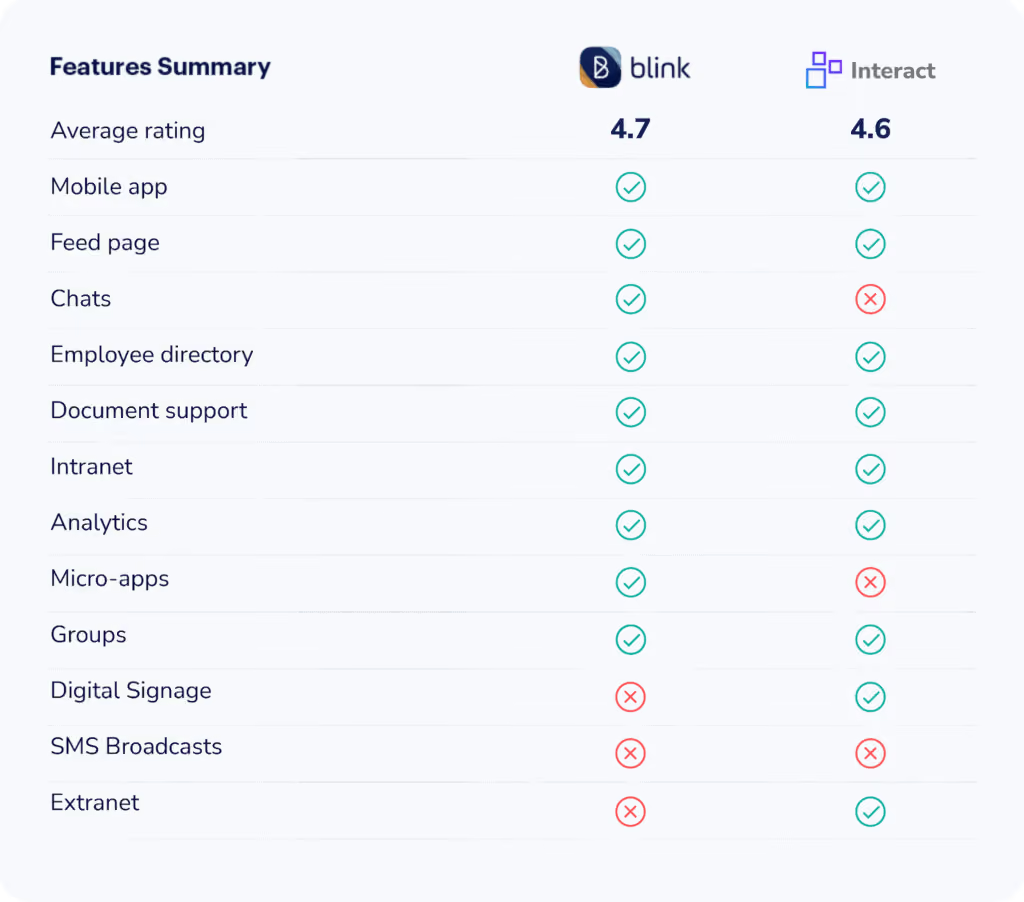
SMS
Interact adds multichannel broadcasts that include the option to send a text to employees. One reviewer notes how “beneficial a feature like this would be during a pandemic.”
Although Blink can push notifications to each user’s phone, there is no out-of-the-box feature that allows SMS texting.
Chat
When comparing Interact vs. Blink, one large difference is Blink’s native chat function. Users can start secure group or one-on-one chats. Document-sharing and emoji capabilities also mean your employees have the tools to get their message across, no matter the subject.
In contrast, Interact only has a tagging function to start conversations and, more often than not, will need to integrate with third-party chat platforms.
Digital signage
The Interact software includes built-in digital signage capabilities. That gives your team the ability to display updates, company news, and other useful information in break rooms, conference rooms — anywhere with a screen.
Blink does not offer a feature to create and display digital signage natively in the app but can be configured with integration to serve this purpose.
Micro-apps
Blink offers deep integration with thousands of apps, acting as your one-stop solution to digital workplace technology. Blink also lets you build out integrations for any app you need through customizable micro-apps.
When comparing the customization of Interact vs. Blink, you are slightly more limited with the latter. Although it also offers several integrations, the Interact intranet does not offer a way for users to add ample features themselves.
Extranet
Interact offers additional extranet services that provide a communication platform for business partners. External parties can access FAQs, product pages, blogs, answer surveys, and more through a simple login page.
Blink’s product offering is more narrowly focused on internal communications, so if your team is not looking for an extranet solution, a platform with features solely designed for internal teams may serve you better.
Feed page
Blink’s feed page provides an engaging, personalized experience that enables a sense of connectedness and omnidirectional communication.
When comparing Interact vs. Blink’s newsfeed, Interact’s is more focused on activity updates. For example, when a document is updated or a user joins a new group.
Although users can like and comment, the social aspect is not as prominent. The platform’s forum allows more back-and-forth conversations but does not encourage frequent participation.
Ease of use
Blink takes most of the burden of onboarding and IT off your hands, making it an ideal solution for enterprise companies and lean teams alike. The features are intuitive, requiring little to no training, and once you’re onboarded, Blink handles all the behind-the-scenes IT to keep your hands free.
On the other hand, learning to use Interact’s intranet does take a bit more time. User reviews say, “Its functionality is difficult to administer and labor-intensive. It is also not very intuitive.”
One feature that is consistently said to be difficult to use is its forms. “Forms are a great feature to have, but we've found them cumbersome to create and maintain.”
Interact vs. Blink — pricing
Blink offers four levels of paid service based on company size, while Interact’s pricing structure is a bit more opaque. They offer individualized pricing based on your organization’s exact requirements, so you’ll have to request a quote to see how much it may be for you.
Here’s a look at Blink’s pricing:
Essential: $3.40 per person, per month
Business: Price on application
Enterprise: Price on application
Enterprise Plus: Price on application
Interact vs. Blink — final thoughts
If you’re looking for a comprehensive, modern intranet with social features, want to maintain a more traditional communication structure, and have the resources to spend a little more time learning how to use the product in the backend, Interact may be the right choice for you.
However, if you want an intranet with engaging, intuitive features that refresh your internal communications with open dialogue, and you want to be able to fully customize your solution’s features, Blink may be your go-to.
Determine if Blink is the right solution for you by booking a demo. Try it free for 14 days.
Healthcare. Manufacturing. Hospitality. Whatever your industry, frontline workers are the lifeblood of your company.
Frontline workers know what’s wrong before you do.
They know what delights customers—and what drives them mad. Why customers are buying less, cancelling contracts, moving to competitors.
The problem? Most companies aren’t listening.
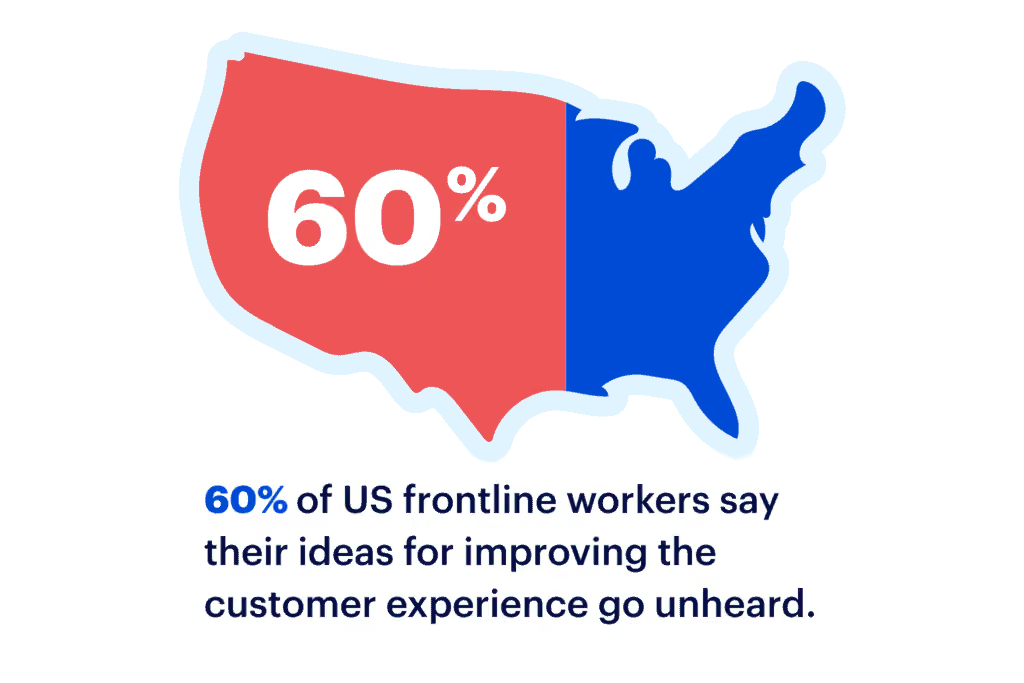
Research shows 60% of frontline workers feel their suggestions go unheard. That can be discouraging and lead to disengaged employees.
That’s why, to get your frontline staff to feel appreciated, you must find ways to improve employee experience. By doing so, you’ll see a drop in absenteeism, safety incidents, and an increase in work quality.
It’ll also translate to a better experience for your customers. After all, your frontline staff interacts with your clients every day. If they feel better, they provide better service.
The benefits are great, but remember—it all starts with making your employees feel heard.
For that reason, it’s crucial to include your frontline workforce in internal communications. Not by sending ad-hoc corporate comms in their direction. But by creating an internal comms strategy that’s as relevant to frontline workers as it is to desk workers.
With thoughtful, relevant communications at every stage of the frontline employee lifecycle.
The employee lifecycle refers to the employees’ experience at your company throughout their tenure. It starts from the instant they first learn about your company and ends when they exit.
An understanding of the employee lifecycle can guide you on how to personalize employee experience to match workers’ unique priorities.
80% of professionals rate employee experience as important or very important, but 59% feel they are not ready to address the associated challenges. That explains why many organizations have a one-size-fits-all approach to creating a workplace experience.
However, different employees have different needs based on where they are in the employee cycle. Making that distinction is one of the ways HR can improve employee experience.
Moreover, the duration of the employee lifecycle also depends on whether the majority of your staff is desk-based or frontline. Frontline workers tend to leave at a dramatically higher rate than their desk-based counterparts.
In fact, most verticals see an average of 50% turnover per year, leading to several disadvantages:
Increase in likelihood of data breaches
No provision for giving digital identity to frontline workers
Additional schemes and incentivization to retain frontline workers
Constant hiring, onboarding, and offboarding
Decline in loyalty towards the organization
No wonder the employee lifecycle of frontline workers is so damaging and frustrating. It’s unfortunate considering how this turnover can be reduced without making a big hole in your budget.
Just put yourself in your worker’s shoes—What should the company start doing to improve your employee experience?
Frontline workers aren’t just motivated by money. They are also driven by meaningful work, inspiring work culture, and internal recognition. By implementing an effective internal communication technology and employee experience software, you can have many of them stay longer with the company.
An intro to employee lifecycle management software
Including frontline workers in your internal comms doesn’t just help you garner customer insights; it adds to your bottom line. In fact, a recent Forbes study showed firms that involve 75% of their frontline employees in internal comms achieved more than 20% growth over a year.
As frontline workers also tend to be remote workers—on the field, at the bus depot, at a hospital—the easiest way to bring them into communications is via employee lifecycle management software that reaches them wherever they are.
In other words: if you can’t bring them into a physical office, bring them into a digital one. Building a better employee experience starts with bringing your frontline staff into the conversation.
This digital platform used to be a desktop-based intranet, but that technology has gone out of date in recent years, especially for frontline workers.
In fact, our recent research shows that 2 in 10 healthcare employees don’t even know how to use their company intranet. It’s just too sluggish for today’s workplaces.
While desk-based workers have improved their workflows with technologies such as Slack and Microsoft Teams, frontline workers are stuck with noticeboards and letters.
That’s where modern intranet software fills the gap. It’s built for mobile, but also compatible with desktop devices. Providing a single hub for knowledge sharing and communication makes way for a better employee experience at every step of improving the employee lifecycle.
What are the employee lifecycle stages?
1. Outreach
The first stage of the employee lifecycle is when potential employees come across your brand and the job vacancy.
But today’s workers are more selective than ever before. The average number of applicants per job opening has declined from 52 in 2016 to 36 in 2017 and 29 in 2018.
Potential workers don’t express interest just because you have an open position. And they won’t blindly trust the positive references provided by your company.
Instead, they’ll rely on the PR you have “earned.” They’ll read online reviews, reach out to your current staff members, and check your social media mentions. Improve employee experience, and you’re more likely to read positive posts or tweets.
That’s why your employer branding is crucial at this stage. Your employer brand is how potential and current employees view your company. It’s the image that comes to their minds when they think about your reputation as an employer.
And it can be strengthened with the right communication tools.
Think about what you would suggest to improve your experience as an employee, and ask your frontline staff for their input.
A modern intranet solution such as Blink can help you ensure that your existing workers are well-versed with all your policies, core values, brand statement, employee benefits, and recent accomplishments.
ALT: Blink centralizes document sharing to improve employee experience.
This information will shape the messages your employees spread elsewhere on the web through employer reviews, informational interviews, and social media updates. And it’ll help you build a reputation that attracts a talented workforce.
2. Recruitment
The demand for frontline workers is higher than ever due to the pandemic and great resignation. However, the talent pool has been retiring or retraining for less demanding positions.
The result is a massive shortage of frontline workers. No wonder 82% of companies struggle to recruit the right people.
If you want to attract the best talent, demonstrate you know how to enhance employee experience for your workers. You need a concrete strategy that brands your organization as an exceptional place to work. And at the core of this strategy is a modern intranet platform.
Encrypted and fully secure private messaging between members of your hiring team (or any of your workers) should be a priority. Blink offers this and robust form-building functionality that enables your HR division to create application materials tailored to each vacancy.
3. Onboarding
Most employees make up their minds about staying or leaving an organization within the first three months of joining.
And given the fast turnover in recent times, it’s important to start on the right foot and look for ways to improve employee experience. One such method is improving the onboarding process. Implementing a structured employee onboarding process is essential to making a good impression on your top talent and shaping them into productive, engaged team members, which will ultimately have a positive impact on employee performance and retention.
Onboarding processes often consist of many meetings and conferences, along with tons of files and folders that need to be reviewed, filled, and submitted to different departments.
Depending on the size of your recruitment drive, you may also need to create hundreds of new datasets for each hire, increasing the risk of inaccuracies.
An intranet can help you centralize, structure, speed up, and even automate parts of the process.
With Blink, for example, you can automate the entire user creation process, eliminate a great deal of overhead, and keep the user profiles always up-to-date.
Not just that, setting up a designated onboarding site with Blink can help you centralize essential training materials and resources. You can also encourage new employees to connect with each other and ask questions using the chat function.
Another onboarding issue that arises with frontline workers is that many don’t have a corporate email address, let alone a digital identity. That’s why Blink lets you set up accounts for frontline workers without assigning them email addresses or phone numbers.
The beauty of such a system is that frontline workers can easily access Blink and the data associated with third-party software integrations such as Microsoft 365.
The result? Your company makes a great impression and your workers start identifying themselves with your culture right from the beginning.
4. Training and development
Learning is another crucial part of the employee lifecycle. However, a common issue for frontline organizations is the difference in the learning styles of workers.
Let’s take the age factor for example. While older employees may prefer conventional training tools such as seminars, meetings, and paper-based reading material, younger generations are more inclined towards social engagements, texting, and online reading.
Blink has the tools you need to bridge this gap, all accessible from a single place. For the young crowd, it offers social and gamified training features like badges, kudos, and leaderboards.
Meanwhile, baby boomers get access to traditional educational formats including video webinars, explainer videos or articles, and printable manuals.
5. Performance
This stage of the lifecycle usually requires some ideas to update your employee experience strategy with some new ideas.
After all, a common issue with frontline workers is the lack of well-defined career progression. Many stay in the same role and pay bracket throughout the employee lifecycle, and not necessarily because they want to.
Workers can feel they have no big, long-term goal to strive for. That affects motivation and engagement while increasing employee turnover.
Blink can support you here too, by letting you plan concrete roadmaps to aid career growth and promotion milestones.
Your workers can get a direct line of communication with mentors whose careers they wish to emulate, along with learning materials and best practices to build new skills.
Employee recognition is the key to engagement, yet 63% of employees don’t feel recognized for their achievements. With Blink, you can monitor workers’ progress and reward top performers.
Little gestures such as giving a big ‘thank you’ at an online event, or tagging and thanking people in the newsfeed or your organization or department can go a long way. It would also encourage other employees to follow suit.
6. Offboarding
As much as intranet software can increase employee engagement and slow down your turnover, some employees will still leave. And it’s important for your organization to get a pulse of the exit process.
According to one study, companies that act on employee feedback have twice the engagement score of those that don’t.
You basically want to know three key things:
Why are they leaving? Timely feedback can help nip key issues in the bud.
Did they successfully complete all their exit formalities?
Do they still have access to any sensitive information?
So Your intranet solution should be ready to handle all these aspects.
Blink, for instance, automates de-provisioning, eliminating the risk of ex-employees still having access to company data.
It also helps you organize exit interviews, offboarding checklists, and pulse surveys so you can learn from each employee’s feedback to improve employee experience.
Final thoughts: Improve employee experience with an optimized intranet
To succeed in the new work era, frontline workers need experiences tailored to their needs at each stage of the employee lifecycle. Whether it’s their first week on the job or last, they need personalized resources, training, and access to key people in the organization.
Learning how to improve employee experience at each of these stages will help reduce turnover, increase engagement, and lead to happier workers. Understand how employee experience and engagement work together. Don't forget to into account the relationship between employee engagement and employee experience.
Employee lifecycle management can help you deliver a stellar experience to both frontline and desk-based employees. And by adopting a next-gen intranet software like Blink, you’ll increase employee engagement and streamline your worker’s experience.
Optimizing an intranet for marketing departments might not be on your mind, but your marketers can benefit from stronger connections with the rest of your corporation.
“Until recently, we communicated through email. This was to share patient information and… not much else. There was little in the way of engaging employees, celebrating achievements, or keeping in touch,”
The health organization shares personal anecdotes and success stories and communicates with different branches and departments easily.
Best of all, with a smart intranet, your marketing team members can use these interactions and stories as marketing collateral.
The intranet for marketing means taking advantage of features other departments will be excited about — like your company social networking feed — and using them to ease your marketers’ workload.
Must-have features for your marketing intranet
Intranets have been associated with HR or IT for a long time. But these departments aren’t the only ones who benefit from a way to connect to the rest of your organization.
With the right features, your marketing department can both source materials and share upcoming campaigns with ease.
You need to be able to share different media content on your intranet. And you want to be able to share the latest marketing strategies with frontline staff and receive pictures, videos, and feedback from them. It should be simple for everyone to publish their own content too.
An intranet with different permission settings will help make sure only certain teams or people have approval to see specific documents or market research. That makes it easier to share information confidently in the digital workplace.
The best intranet platforms for marketers should integrate with other apps like Slack or Microsoft 365, so your team can continue to use the tools they feel comfortable with.
Surveys will help marketing gain feedback from different departments without hassle. They can then check the built-in analytics to see how engaged employees are with the content they’re posting.
5 ways to use your intranet for marketing
Now you know what features to look for in a marketing intranet, it’s time to go over how you can use those tools productively.
1. Share marketing initiatives
Sometimes employees don’t know about new deals or offers unless they get notifications from management. An intranet keeps everyone on the same page.
2. Create a sharable photo album
Make an album where staff can upload pictures or video clips that marketing can use. Having one place where a photo of a staff celebration can be quickly uploaded to the company intranet reduces the strain on all of your workers.
When it’s easier for people to share their content, they’re more likely to.
3. Collect social media content
Not only pictures but quotes, examples of good work by frontline workers, and even share job vacancies at specific locations. Social media is becoming less curated, and more authentic content is resonating with users.
Sharing digital marketing materials with actual workers instead of models can help you achieve that genuine feel.
4. Promote your company blog
Share posts that staff are likely to be interested in and learn from. 89% of marketers use blogs in their content strategies, but do your workers know about it? Don't just send them to your homepage — share case studies, white papers, and press releases they might care about.
5. Share marketing materials that others need
Have a folder or feed for current sales strategy and brand assets, so if an employee needs to reference them, they’ll always have easy access to the promotions.
Get your marketing team on board
A social intranet is only as good as the contributions from its users.
You need to get your marketing department engaged with a new platform, or they won’t see the benefits from the workspace.
Multiple experts at the Content Marketing Institute expect video content to grow in 2022, but your department might not have the resources to create all of this content themselves.
By leaning into your company’s intranet software, your team can source photos, videos, success stories, milestones, and other materials from frontline workers and other departments as they create them.
Marketing will be able to access this information quickly — and in most cases, directly. 23% of marketers surveyed by HubSpot said just finding the ideas for new content was their biggest challenge for 2022.
If your marketing team is able to improve internal communications with other branches, they can access new information and learn what’s trending in stores now.
They can also use employee-generated content as a springboard or incorporate it directly into new marketing efforts.
The best way to have marketing get on board with an intranet is to have them try it out for free and see how they like it.
Final thoughts: marketing intranet — using an intranet to transform marketing
An intranet for marketing can streamline the entire department and lessen their workload.
Having your entire company help generate content yields a more authentic message that improves employee engagement and means less time spent hunting for a good photo or story.
Communicating and defining the roles helps keep everyone on the same page.
But make sure the intranet solution you choose has the features your organization needs for each department.
Your employees need to be able to access the intranet easily, and a mobile solution will help more workers connect and engage.
Help cut down on the work your marketing department is facing with a fast, company-wide intranet like Blink today.
Today, most of your company’s vital documents live digitally. From benefits plan statements to the potluck sign-up — paper is a thing of the past.
When you tally everything an employee accesses online, it’s easy to see how content can be a lot to manage. That’s why companies need a way to aggregate, manage, and share all of their internal information.
They often use a combination of platforms to get the job done, but this can be confusing and inefficient.
For that reason, more companies are moving towards a single unified intranet CMS software that can act as a single resource for content management.
An intranet content management system boosts communication, improves productivity, and allows workplaces to function remotely. Plus, research shows that companies with strong internal social networks are 7% more productive.
If you’re in the market for the best CMS for intranet, take a look at our recommendations below.
The best CMS intranet for 2023 roundup:
1. Blink
Blink is an employee intranet with many features, making it a great choice for companies looking for an all-in-one solution for their internal communication needs.
The content management hub is a sleek, mobile-first design, and the software is easy to set up and onboard without extensive IT or training teams.
Features:
CMS Hub for documents
Content feed
Business chat
People directory
Micro-app functionalities
Best intranet CMS software for: All-in-one frontline communication.
Price: Plans start at $3.40/user/month.
2. SharePoint
SharePoint is Microsoft’s intranet offering, making it a great choice for teams who already heavily rely on Office Suite tools.
SharePoint leverages internal websites to host content pages and team resources. It’s a powerful content management tool that works well for large companies looking for a robust CMS but could be overly complex for smaller organizations.
Features:
Document library
Information rights management
Project management server and timelines
Team-based content websites
Cloud or on-site data storage
Company news page
Best intranet CMS software for: Enterprise content management.
Price: Plans start at $5/user/month.
3. Glasscubes
Glasscubes provides a cloud-based platform for employees to collaborate and share files. Users can send messages to others or attach files to messages for further collaboration.
The lightweight system is engaging and easy to use, perfect for companies looking for a straightforward, high-value CMS intranet that improves engagement.
Features:
Secure online file storage
No limitation in file type or size
Internal chat
Activity feed
Task management and scheduling
Best intranet CMS software for: Team collaboration.
Price: Plans start at $35/month.
4. Simpplr
Simpplr is a CMS employee intranet that prioritizes usability and social engagement.
Packed with features like an AI-driven social feed, events calendar, and a newsletter, Simpplr is the choice for companies looking for feature-rich software that improves culture, communication, and engagement.
Features:
Employee intranet
Employee blogs
Employee profiles
AI smart feed
Newsletters
Events calendar
Social websites for teams
User analytics
Best intranet CMS software for: Engaging social teams.
Price: Available upon request.
5. OnSemble
Building off a 15-year history in intranet, OnSemble offers a well-rounded intranet platform designed for customer-centred organizations.
The content management tool, employee forums, and leadership blogs engage workers and provide them with the resources to do their best work. Drag-and-drop page builders mean OnSemble can be relatively easy to customize for small to midsize organizations.
Features:
Employee directory
Content management
Document search
Forums
Cloud or on-site data storage
Best intranet CMS software for: Customer-oriented organizations.
Price: Plans start at $6/user/month.
Final thoughts: The 5 best intranet CMS software in 2023
A content management system is an essential feature of your company’s intranet. With so much of today’s work taking place remotely or on mobile, having everything accessible boosts your employee’s engagement, supports a positive company culture, and increases productivity.
There are many great intranet platforms out there, and what you choose will come down to your company’s size and needs.
If you’re looking for a simple solution that packs tons of engaging features into one affordable platform, give Blink a try. The mobile-first platform and modern design will work well for any team.
Blink wins ClearBox Choice award for the second year running
Blink has been named one of the top intranet platforms by ClearBox in the latest update of the 2024 Intranet and Employee Experience Platforms report. Every year, the intranet consultancy takes an in-depth look at the intranet market, comparing available solutions and awarding the best intranet providers.
Here’s a snippet of what ClearBox had to say about Blink:
“The focus Blink places on the deskless audience is among the best we’ve seen in this report and makes a compelling choice for organizations with a frontline-heavy workforce.” — ClearBox Consulting
Let’s take a closer look at the ClearBox report and its review of Blink.
About ClearBox
ClearBox Consulting is an independent intranet consultancy that helps organizations find intranet solutions that meet their needs. It’s a vendor-neutral company that prides itself on giving honest, impartial advice. Previous clients include big names like Unilever, PlayStation, GlaxoSmithKline, and Bayer.
About the report
Every year, ClearBox compares 20 leading intranet vendors and their products, scoring them on eight criteria. It then releases a report to detail its findings. As part of the report, ClearBox highlights standout intranet vendors, giving them a ClearBox Choice Award. In 2024, Blink was among the award-winners for the second year running.
What does the report assess?
ClearBox evaluates every product against eight criteria. Criteria include user experience and visual appeal, community and engagement, publishing and communications management, and mobile and frontline support.
The organization also seeks customer opinions on the product and customer support from the vendor. It looks at information on pricing and each vendor’s development roadmap too.
Blink’s mobile-first intranet: The ClearBox review
ClearBox describes Blink as “a frontline-focused, mobile-first product that understands its target audience perfectly.”
The report praises Blink’s community and engagement features, its approach to integrations, and its ability to support two-way employee communications. ClearBox gives Blink particularly high scores in the following areas:
Mobile and frontline support
User experience and visual appeal
Community and engagement
Here, we look at each of these criteria in more detail.
{{mobile-main="/image"}}
Mobile and frontline support
Blink was the only software provider in the ClearBox report to score maximum points for this criterion. Staffbase comes close. But achieving the same mobile and frontline support as Blink comes at an additional fee for Staffbase customers.
Blink was built with the frontline workforce front of mind. We wanted to create a tool that leveled the playing field, giving deskless workers equal access to internal communications and company resources.
Employees can log onto our mobile-first platform via smartphone — they don’t need a desktop computer or a company email address. Via a user-friendly interface, they can then access everything they need to thrive in their roles. This boosts employee engagement and the frontline employee experience.
User experience and visual appeal
For user experience and visual appeal, Blink gets a near perfect score — and ties with Omnia and Staffbase for its out-of-the-box offering.
ClearBox highlights Blink’s highly effective mobile user experience and straightforward navigation. The report also references Blink’s excellent branding and design options, along with the social-media-style experience it provides for users.
We know that social media provides an excellent user experience. So, with Blink, you get a comprehensive company news feed that you can fill with interactive, multimedia content. Organizations can also share real-time updates and employee-generated content across Blink Stories.
Community and engagement
ClearBox highlights Blink’s focus on community and people. It also praises the wide range of engaging features Blink includes as standard. These include employee surveys, a range of communication channels, and employee recognition tools.
The ClearBox report also talks about Blink Journeys. Admins can create tailored content pathways for employees, triggering the right content at the right time in the employee lifecycle. This ensures relevant and engaging content that is personalized to every user.
Employees can also join Communities — spaces where workers can unite around shared interests — to find like-minded co-workers and develop a deeper sense of belonging.
Some more highlights from the ClearBox report
Here’s what else ClearBox had to say about Blink:
“Blink was designed with the frontline in mind and the focus on a mobile-first experience is clear throughout. Blink is an excellent app product and one of the best we’ve reviewed in this report.”
“[Blink is] easy to use and quick to navigate, making communications, reference materials, and tools easy to find.
“Blink offers organizations alternatives to shadow technology like WhatsApp, while also providing easy access to business tools without the need for employees to download multiple apps.”
And here’s what customers interviewed by ClearBox said about their experience with Blink:
“Blink has drastically improved the way we communicate with our team members. In a recent survey, [employees] already feel more listened to and this is all down to Blink.”
“[Blink] is amazing. They partner with us to complete projects or work through any desired improvements as they are able. Great partner to work with!”
Why choose Blink?
Blink is the leading mobile-first employee experience platform. It gives admins all the tools they need to share critical messages and build a strong company culture. It allows frontline and desk-based workers to join the conversation, build workplace relationships, and find the information they need to do their jobs well.


.png)
.avif)
.avif)