Fall G2 results: Blink excels in employee communications
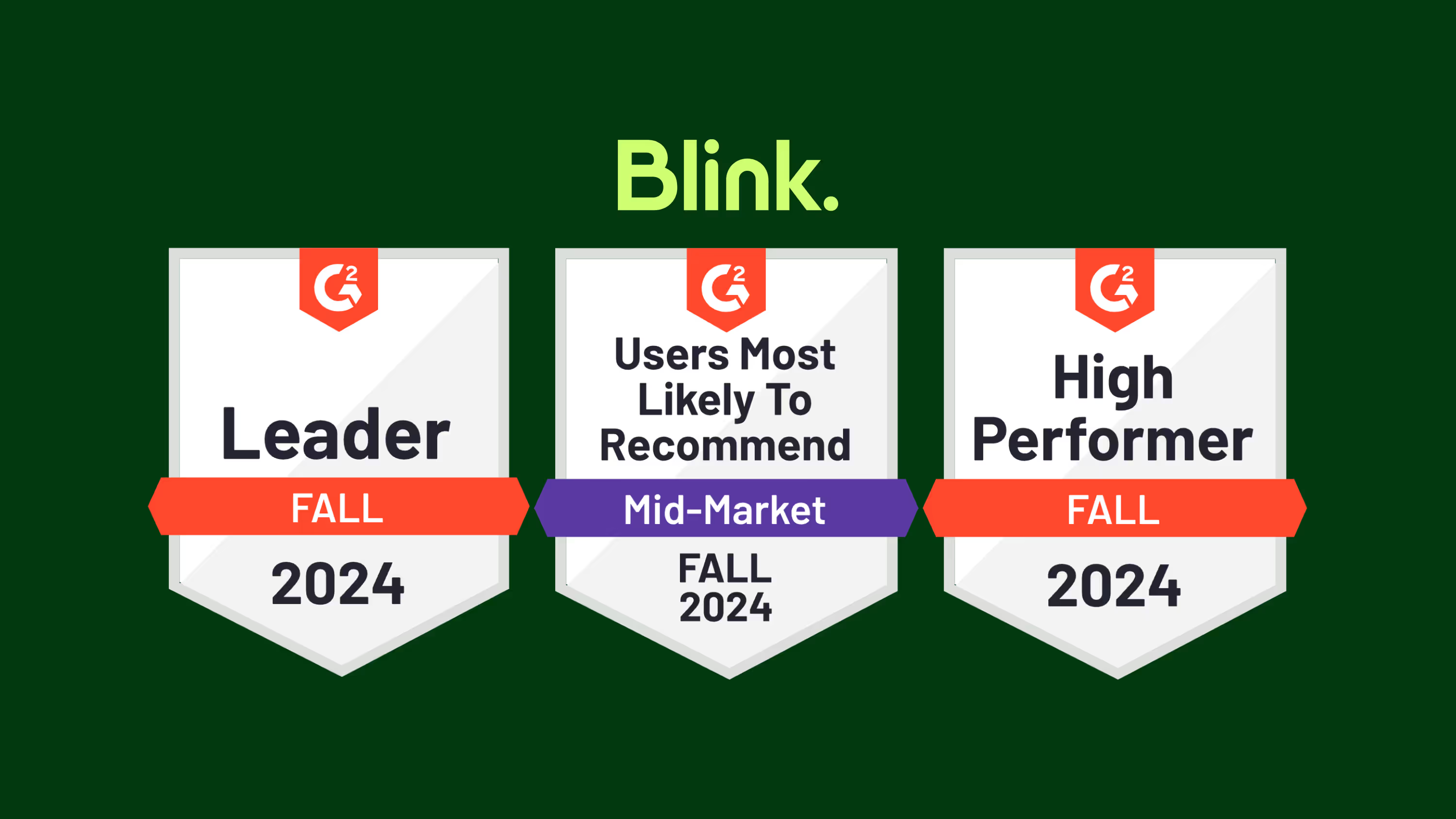
G2’s 2024 fall reports are now live — and Blink has made some major moves in employee communications categories.
Jess DeVore
Published:
October 9, 2024
Last updated:
October 10, 2024
What we'll cover
G2’s 2024 fall reports are now live — and Blink has made some major moves in employee communications categories.
We’re excited to have improved on our strong G2 ratings from spring 2024, where we were recognized in the employee communications, employee intranet, frontline worker communications, and employee engagement software categories.
Let’s take a closer look at G2’s fall results and explore what they mean for Blink — and our customers.
An introduction to G2 rankings and reports
G2 is the world’s most trusted software marketplace. It provides software reviews and comparisons and — every quarter — it releases its G2 reports.
These reports are based on the reviews of real software customers. They highlight the very best software options available and help users find products capable of solving their business problems.
To create its ranking and reports, G2 assesses software providers based on the following indices:
Results Index. To create its Results Index report, G2 looks at whether a software platform meets user requirements. It also looks at estimated ROI, product adoption rate, and how likely users are to recommend the product to a friend.
Usability Index. The Usability Index is all about how easy it is to use a particular software. G2 looks at ease of use, ease of admin, and the percentage of users who adopt the product.
Relationship Index. For its Relationship Index, G2 ranks software companies on the quality of their support. Users are asked whether a software provider is easy to work with — and whether they’d recommend this software product to a friend.
Implementation Index. To create these rankings, G2 looks at user opinions related to ease of setup and the length of time it took to go live.
Grid Report. The Grid Report is G2’s analysis of the competitive landscape for a particular software category. Each available product is plotted on the grid according to its market presence and user satisfaction.
Enterprise Grid Report. G2 segments its reviews based on the size of the company its reviewers work for. In its Enterprise Grid Report, G2 only includes reviews from enterprise companies — those with 1,001 or more employees.
Regional Grid Report. G2 also highlights the top 50 companies from each global region. A company’s region is determined by where it was founded, where its executive team resides, and where the majority of its workforce is located.
Blink’s G2 rankings for fall 2024
So how did Blink perform in the fall G2 results? We jumped up a number of spots in key employee communications categories:
Blink moved up two spots in the Relationship Index for Employee Communications and is now ranked #2 out of all employee communications software for customer service.
Blink also moved up two spots in G2’s Grid Report for Employee Communications, again ranking #2 out of all employee communications software.
Blink moved up four spots — coming in #2 — in the Enterprise Grid Report for Employee Communications.
But that’s not all! Here’s how Blink performed in employee communications, frontline worker communications, and enterprise social networking categories.
Employee communications
G2 ranked Blink as one of the top three software providers in all of the following categories:
Usability Index for Employee Communications
Relationship Index for Employee Communications
Results Index for Employee Communications
Grid Report for Employee Communications
According to G2, Blink is user-friendly, provides good customer support, and produces business results. Blink is also an industry leader in the internal communications space, with high levels of software satisfaction and performance.
In addition, showing that it performs well for large organizations, Blink was listed as one of the top three software providers for the following enterprise company categories:
Enterprise Results Index for Employee Communications
Enterprise Implementation Index for Employee Communications
Enterprise Grid Report for Employee Communications
As well as being well-reviewed by users, products included in the Employee Communications category must be able to:
Create internal content campaigns
Personalize distribution of communication
Segment company into designated groups
Allow employees to subscribe to topics or content of interest
Analyze performance of content shared within the application
With a news feed, content hub, instant messaging, survey, recognition, and digital form features, Blink gives companies everything they need to improve internal communications. Our app fosters a culture of two-way communication, so organizations can keep staff informed and engaged.
Frontline worker communications
Blink also ranked highly when it comes to frontline worker communications. It’s featured as one of the top three software providers in the following categories:
Usability Index for Frontline Worker Communication Platforms
Relationship Index for Frontline Worker Communication Platforms
Results Index for Frontline Worker Communication Platforms
Enterprise Results Index for Frontline Worker Communication Platforms
Products included in the Frontline Worker Communications category must be able to:
Provide real-time messaging capabilities, allowing frontline workers to communicate quickly and efficiently with their co-workers and supervisors
Provide the ability to broadcast announcements and updates, such as policy changes or emergency alerts, to specific individuals, groups, or the entire workforce
Enable the sharing of documents, manuals, standard operating procedures (SOPs), and other resources
Provide survey and feedback tools to gather insights from employees
Have a specific and designated use case for frontline and deskless workers
Unlike other platforms in the space, Blink was designed with the frontline workforce in mind. It’s a mobile-first employee communications app with the same great features and user experience across desktop and mobile device versions.
Employees can access Blink from their smartphones. They don’t need a company email address to log in. And with single sign-on technology, they have easy access to the internal communications, company resources, and coworker connections they need to thrive in their roles.
Enterprise social networking (ESN)
This quarter, Blink received recognition in the Enterprise Social Networking category and received a new badge:
Enterprise Europe Regional Grid Report for Enterprise Social Networking (ESN)
To qualify for inclusion in this category, a software product must:
Allow users to create and maintain profiles that include information such as contact info, skills, expertise, and interests
Have an activity feed or timeline that displays real-time updates, posts, and interactions from users or groups
Allow users to engage with content via likes and comments
Enable users to upload, share, and collaborate on a variety of files or document types
Allow users to send direct messages in one-on-one or group conversations
Organize groups or communities based on employees’ interests, projects, or departments
Blink provides informal, interactive communication channels that support bottom-up and peer-to-peer communication. Employees can share updates and photos directly with their co-workers, building connections across the organization even if they work remotely or on a company’s frontlines.
“Our frontline absolutely love being able to post out things themselves, and they feel part of the community of colleagues. We had a slight manager / frontline divide before Blink — but now it’s helped everyone feel involved and equal. We also love the Hub as it allows people to be self-sufficient! The customer support is absolutely excellent!”
Blink review
Reviewer: Matt M
Company size: Mid-market: 51-1,000 employees
Rating: 5 stars
“Blink has been a game changer for our organization. The timeliness of employee communication has increased dramatically, allowing us to exchange crucial information with our team in real time. As an Emergency Medical Services provider, all branches of our organization need to be in constant communication. Since implementing BLINK, we have benefitted from a dramatic culture change.”
Blink: Boosting employee engagement across a mobile workforce
Reviewer: Laura P
Company size: Mid-market: 51-1,000 employees
Rating: 5 stars
“We love that Blink tackles our past challenges of inconsistent messaging and low engagement, especially with our remote and frontline workforce. Its functionality across desktop and mobile apps allows staff to easily access company messages, connect with colleagues, and utilize systems on-the-go. This fosters a two-way communication flow between managers, teams, and the entire business, boosting teamwork and knowledge sharing. Employees actively use the system to post, engage with each other, and build a more collaborative work environment — that’s what makes it a game-changer for engagement.”
Blink: The all-in-one employee communications platform
G2 consistently ranks Blink as one of the best employee communications and frontline worker communications platforms on the market. So if you want to improve internal communications or employee engagement at your organization, Blink could be just the software solution you need.
G2’s 2024 fall reports are now live — and Blink has made some major moves in employee communications categories.
We’re excited to have improved on our strong G2 ratings from spring 2024, where we were recognized in the employee communications, employee intranet, frontline worker communications, and employee engagement software categories.
Let’s take a closer look at G2’s fall results and explore what they mean for Blink — and our customers.
An introduction to G2 rankings and reports
G2 is the world’s most trusted software marketplace. It provides software reviews and comparisons and — every quarter — it releases its G2 reports.
These reports are based on the reviews of real software customers. They highlight the very best software options available and help users find products capable of solving their business problems.
To create its ranking and reports, G2 assesses software providers based on the following indices:
Results Index. To create its Results Index report, G2 looks at whether a software platform meets user requirements. It also looks at estimated ROI, product adoption rate, and how likely users are to recommend the product to a friend.
Usability Index. The Usability Index is all about how easy it is to use a particular software. G2 looks at ease of use, ease of admin, and the percentage of users who adopt the product.
Relationship Index. For its Relationship Index, G2 ranks software companies on the quality of their support. Users are asked whether a software provider is easy to work with — and whether they’d recommend this software product to a friend.
Implementation Index. To create these rankings, G2 looks at user opinions related to ease of setup and the length of time it took to go live.
Grid Report. The Grid Report is G2’s analysis of the competitive landscape for a particular software category. Each available product is plotted on the grid according to its market presence and user satisfaction.
Enterprise Grid Report. G2 segments its reviews based on the size of the company its reviewers work for. In its Enterprise Grid Report, G2 only includes reviews from enterprise companies — those with 1,001 or more employees.
Regional Grid Report. G2 also highlights the top 50 companies from each global region. A company’s region is determined by where it was founded, where its executive team resides, and where the majority of its workforce is located.
Blink’s G2 rankings for fall 2024
So how did Blink perform in the fall G2 results? We jumped up a number of spots in key employee communications categories:
Blink moved up two spots in the Relationship Index for Employee Communications and is now ranked #2 out of all employee communications software for customer service.
Blink also moved up two spots in G2’s Grid Report for Employee Communications, again ranking #2 out of all employee communications software.
Blink moved up four spots — coming in #2 — in the Enterprise Grid Report for Employee Communications.
But that’s not all! Here’s how Blink performed in employee communications, frontline worker communications, and enterprise social networking categories.
Employee communications
G2 ranked Blink as one of the top three software providers in all of the following categories:
Usability Index for Employee Communications
Relationship Index for Employee Communications
Results Index for Employee Communications
Grid Report for Employee Communications
According to G2, Blink is user-friendly, provides good customer support, and produces business results. Blink is also an industry leader in the internal communications space, with high levels of software satisfaction and performance.
In addition, showing that it performs well for large organizations, Blink was listed as one of the top three software providers for the following enterprise company categories:
Enterprise Results Index for Employee Communications
Enterprise Implementation Index for Employee Communications
Enterprise Grid Report for Employee Communications
As well as being well-reviewed by users, products included in the Employee Communications category must be able to:
Create internal content campaigns
Personalize distribution of communication
Segment company into designated groups
Allow employees to subscribe to topics or content of interest
Analyze performance of content shared within the application
With a news feed, content hub, instant messaging, survey, recognition, and digital form features, Blink gives companies everything they need to improve internal communications. Our app fosters a culture of two-way communication, so organizations can keep staff informed and engaged.
Frontline worker communications
Blink also ranked highly when it comes to frontline worker communications. It’s featured as one of the top three software providers in the following categories:
Usability Index for Frontline Worker Communication Platforms
Relationship Index for Frontline Worker Communication Platforms
Results Index for Frontline Worker Communication Platforms
Enterprise Results Index for Frontline Worker Communication Platforms
Products included in the Frontline Worker Communications category must be able to:
Provide real-time messaging capabilities, allowing frontline workers to communicate quickly and efficiently with their co-workers and supervisors
Provide the ability to broadcast announcements and updates, such as policy changes or emergency alerts, to specific individuals, groups, or the entire workforce
Enable the sharing of documents, manuals, standard operating procedures (SOPs), and other resources
Provide survey and feedback tools to gather insights from employees
Have a specific and designated use case for frontline and deskless workers
Unlike other platforms in the space, Blink was designed with the frontline workforce in mind. It’s a mobile-first employee communications app with the same great features and user experience across desktop and mobile device versions.
Employees can access Blink from their smartphones. They don’t need a company email address to log in. And with single sign-on technology, they have easy access to the internal communications, company resources, and coworker connections they need to thrive in their roles.
Enterprise social networking (ESN)
This quarter, Blink received recognition in the Enterprise Social Networking category and received a new badge:
Enterprise Europe Regional Grid Report for Enterprise Social Networking (ESN)
To qualify for inclusion in this category, a software product must:
Allow users to create and maintain profiles that include information such as contact info, skills, expertise, and interests
Have an activity feed or timeline that displays real-time updates, posts, and interactions from users or groups
Allow users to engage with content via likes and comments
Enable users to upload, share, and collaborate on a variety of files or document types
Allow users to send direct messages in one-on-one or group conversations
Organize groups or communities based on employees’ interests, projects, or departments
Blink provides informal, interactive communication channels that support bottom-up and peer-to-peer communication. Employees can share updates and photos directly with their co-workers, building connections across the organization even if they work remotely or on a company’s frontlines.
“Our frontline absolutely love being able to post out things themselves, and they feel part of the community of colleagues. We had a slight manager / frontline divide before Blink — but now it’s helped everyone feel involved and equal. We also love the Hub as it allows people to be self-sufficient! The customer support is absolutely excellent!”
Blink review
Reviewer: Matt M
Company size: Mid-market: 51-1,000 employees
Rating: 5 stars
“Blink has been a game changer for our organization. The timeliness of employee communication has increased dramatically, allowing us to exchange crucial information with our team in real time. As an Emergency Medical Services provider, all branches of our organization need to be in constant communication. Since implementing BLINK, we have benefitted from a dramatic culture change.”
Blink: Boosting employee engagement across a mobile workforce
Reviewer: Laura P
Company size: Mid-market: 51-1,000 employees
Rating: 5 stars
“We love that Blink tackles our past challenges of inconsistent messaging and low engagement, especially with our remote and frontline workforce. Its functionality across desktop and mobile apps allows staff to easily access company messages, connect with colleagues, and utilize systems on-the-go. This fosters a two-way communication flow between managers, teams, and the entire business, boosting teamwork and knowledge sharing. Employees actively use the system to post, engage with each other, and build a more collaborative work environment — that’s what makes it a game-changer for engagement.”
Blink: The all-in-one employee communications platform
G2 consistently ranks Blink as one of the best employee communications and frontline worker communications platforms on the market. So if you want to improve internal communications or employee engagement at your organization, Blink could be just the software solution you need.
Team building activities get a bad rap. While the intention behind such exercises is to break the ice, they are often seen as embarrassing and awkward.
Leaders are so enthusiastic when conducting these games that they don’t even notice workers looking for the nearest exit.
That’s not to say you shouldn’t conduct team-building exercises. Building collaboration skills in your team is essential, and team-building games can really help you achieve that.
The problem usually lies with the team-building activities managers pick. A quick search for team-building ideas will show you that the web is filled with hundreds of them. But many are unfeasible, difficult, or uncomfortable for workers. They look good on paper but you can’t really implement them in an actual workplace.
So in this post, we are going to solve this problem. Instead of giving you a huge directory of endless activities, we’ve handpicked a few team-building activities that are easy, effective, and enjoyable.
Types of team building activities
Some team-building ideas are more suited for your company than others. Your choices will depend on several factors, such as team size and function.
But you also need to consider where you’re going to conduct the team-building exercises and how the location impacts the mindset of your team members. Based on the location of the team-building games, they can be split into three main categories.
Indoor team building activities
Indoor games take place in the office or another work location. And you’ll likely conduct them during regular work hours. For this reason, indoor activities have a serious, formal overall vibe. If your whole team works from a single location, then choosing indoor team-building exercises is your best bet.
Outdoor team building activities
At a team retreat, you need team-building games that can be played outdoors. Plus, the overall mood is more relaxed and casual than indoor exercises. So the team-building activities you pick should be more fun and energetic.
Virtual/online team building activities
More and more people are working remotely, and many teams are spread out in different locations these days. If that applies to your team too, you need remote team-building activities that can be conducted via web conferencing.
The good news is we’ve covered all the three types in the list below. In fact, some of our team-building ideas belong to multiple categories. For example, you’ll also find exercises that can be run indoors as well as online.
For each team-building activity, we’ve also mentioned its best-suited environments. So without further ado, let’s jump in.
Quick and easy team building activities
Campfire stories
Suitable environments: indoor, online, outdoor
Number of team members: 5-25
Objective: Foster informal communication by encouraging team members to share and identify common experiences
This is one of the evergreen team-building activities. It improves team bonding via inspired storytelling. Team members gather in a circle, as people do in a fireside chat when camping. They share workplace experiences, get to know each other better, and refresh memories.
What makes it great: Storytelling is a time-tested way to pass information informally and shape communities. So a storytelling session with work-related stories can get your team members to loosen up, learn some useful lessons, and feel closer to one another. You can also confine the stories to train people around a certain theme.
How it works: Come up with a list of words that can trigger your employees’ memories and remind them of a previous experience. For example, these could be “demo day,” "on-site trip," "side project,” and so on.
Find a way to display all the words to your team members. If you are conducting the activity indoors, for example, you can use a whiteboard.
Have team members take turns to pick a trigger word and share an experience related to it. Once a trigger word has been taken by a participant, move it to a separate area so it can’t be repeated.
You can also ask workers to share more trigger words that come to mind after they have heard a story. So you won’t run out of ideas for stories.
Blind draw
Suitable environments: indoor, outdoor
Number of team members: 10-25
Objective: Improve delegation skills, communication, and teamwork among participants
This team-building exercise involves drawing an object with just spoken instructions. You can use this team-building exercise as a fun, light activity between two intense sessions.
What makes it great: It looks simple on the surface. But to win this team-building game, team members will have to get many things right. For example, they’ll have to pick the right person to draw, and to give instructions. Plus, they’ll need to communicate well. So the activity teaches them both delegation and collaboration.
How it works: Gather some everyday objects, signs, or shapes. You can print them on sheets of paper, or search for photos on a free stock photography website.
Divide employees into teams of five people. Have each team choose the “artist” who will draw the shape. Assign a different object to each team and give them a time limit of 3-5 minutes.
Each team will then guide the artist on drawing the object. But they can’t say the name of the object. While the artist is drawing, he couldn’t know what the object is, nor can his team know what he is drawing until he’s done. The team with the drawing most similar to their object wins.
You know who
Suitable environments: indoor, online
Number of participants: 10-50
Objective: Introduce team members to one another and establish connections
In this team-building game, employees will map the connections between one another on a whiteboard. Teams can choose their “avatars”, and then draw arrows to map how they are connected to other workers. It’s a great way to break the ice when team members don’t know each other well.
What makes it great: This team-building activity lets you build a small, social-media-style network, but without the technology. It will not just help as a standalone activity, but also allow team members to keep mingling throughout the whole day or event.
How it works: Provide participants with index cards, markers, and tape. Each worker will then write their name, add their job title, and draw an "avatar" on their index card, like how there’s a profile photo on a social network.
Then gather all the index cards and stick them on a whiteboard, with plenty of space between every two cards. Participants will then draw arrows from their card to others who they already know in some capacity.
Plus, they’ll also mention how they know the person. For example, maybe they went to the same university or were part of the same team in the past.
Cross-functional jigsaw
Suitable environments: indoor
Number of team members: 10-20
Objective: Build cross-functional collaboration, communication, and problem-solving skills
This team-building activity divides a group of employees into two teams, both of which are asked to solve a jigsaw puzzle in the time limit specified.
But there’s a twist. Some of the pieces required by each team belong to the other team. So both the teams need to work together.
What makes it great: This is a great exercise in improvisation, problem-solving, and collaboration. When the teams start putting the pieces together, they don’t know about the catch. They are surprised by the realization that their success depends on working with the other team, and this lesson remains with them for a long time.
How it works: Simple! Take two puzzles. Replace some pieces in one puzzle with those of the other. Make two teams and give them the puzzles to solve. Ask them to keep communicating with each other while they’re on the task. But don’t tell them that you have interchanged some pieces. Let them figure it out on their own. Also, declare another rule that teams can exchange only one puzzle piece at a time.
Survival priorities
Suitable environments: indoor, outdoor
Number of team members: 5-30
Objective: Inspire participants to solve problems together, demonstrate leadership, and practice negotiation.
Imagine your plane has crashed on an island in the middle of nowhere, and it’s burning. There are only a few minutes to salvage some items from the wreckage. What will you take and what will you leave? That’s what this team-building exercise is about.
What makes it great: This team-building game is great for giving your team a taste of a high-stress situation, and honing their ability to work together under pressure. Their success will depend on negotiating calmly, picking a leader, and planning the whole thing carefully.
How it works: Set up a space with several survival items such as various foods, water, knives, weapons, flares, tarp, matches, and so on. You don't even need to have the actual items. You can use their pictures too.
The quantity of each item should be limited so teams will be forced to trade and collaborate. Divide employees into two or more teams. And they have 30 minutes to rank what they need the most and get survival items from the space.
Coffee standup
Suitable environments: indoor, online
Number of team members: 2-8
Objective: Build rapport and improve team communication
Countless professionals across the globe start their work with daily standup meetings and coffee. So there’s no reason you can’t combine the two. This team-building activity involves daily standups that can be conducted indoors or online. Participants talk about what’s on their to-do list for the day while enjoying a nice, hot beverage.
What makes it great: This team-building exercise is best-suited for remote teams in which workers don’t get to see their team members on a daily basis. Having a light chat while doing something casual can help build camaraderie, improve communication, and know what everyone’s doing.
How it works: Ask workers to grab a cup of coffee from the cafeteria, a coffee shop, or make one at home. Then all the employees in the team join a stand-up chat for 10-15 minutes. Each team member talks about what they intend to do, and if there’s anything they need help with.
Shark tank mania
Suitable environments: indoor, online
Number of team members: Up to 30, split into teams of five
Objective: Encourage innovation, collaboration, and skills to sell your ideas
This activity is inspired by the popular TV series — Shark Tank. In this team-building game, participants create a product pitch for investors. The product and the investors both don’t need to be real. Your team will just create a mock version of the show.
What makes it great: Getting your team members to participate in their own version of Shark Tank goes a long way to instill entrepreneurship, innovation, and the ability to think big. Since there can be multiple cofounders and others behind a startup, this activity also promotes teamwork.
How it works: Divide employees into teams of 3-5 people, and ask each team to prepare their pitch for an imaginary product. The pitch could include product name, brand tagline, marketing plan, financial projections, and so on.
Choose some people to be the investors with an imaginary pool of money. You can also give them fake backgrounds. Every team will then present their pitch to these “Sharks.” The team that gets the most funding wins.
Over to you: team building activities to engage your workforce
Running an organization is not easy. It’s hard to get hundreds of workers on the same page, let alone get them to take collective action towards business goals.
Hard, but not impossible. With the right collaboration strategies and team-building activities, you can build an atmosphere of camaraderie and open communication at work. Plus, these exercises also teach your team valuable soft skills such as leadership, negotiation, and problem-solving.
They might take some time and effort to execute in the beginning, but the results will convince you to keep going. So start putting them into practice and reap the benefits of improved culture and collaboration at your workplace.
Also, the right technology can turbocharge your efforts to build a culture of open communication and collaboration. This is where Blink can help. Consider booking a free Blink demo today.
If you’re anything like the majority of companies, there’s definitely room for improvement.
And that matters. Because employee engagement impacts everything from productivity to employee retention to overall business performance.
These employee engagement statistics can help you find a path forward. They reveal what’s working and what isn’t, and can hopefully provide some inspired ideas for your engagement strategy.
Where have these stats come from?
We’ve collated the latest employee engagement statistics from across the world with findings from our own, UK-based, frontline-focused research to give you a comprehensive insight into workplace engagement in 2026.
Our research surveyed 1000 respondents over the age of 18 from the United Kingdom. At the time of the survey, respondents held frontline roles in both public and private health and social care.
General employee engagement statistics
An engaged employee is someone who’s committed to their employer and invested in their role. They feel connected to their organization, experience job satisfaction, and tend to feel motivated while at work.
So how many workers actually feel this way? Let’s start with some statistics that reveal the current state of employee engagement in companies across the world.
1. According to Gallup’s 2025 State of the Global Workplace report, just 21% of employees are engaged at work. That’s down from 23% in 2023.
2. In the US, the picture is slightly better. Here, 31% of workers are engaged and 52% describe themselves as thriving.
3. In 2024, manager engagement fell from 30% to 27%. That’s a big issue because managers account for 70% of the variance in team employee engagement.
4. The recent drop in employee engagement cost the world economy $438 billion in lost productivity.
{{mobile-main="/image"}}
Impact of employee engagement statistics
When employee engagement isn’t what it could be, it has a big impact on a business.
5. According to Gallup research, when compared to companies with low engagement, highly engaged companies experience the following:
81% drop in absenteeism
64% reduction in safety incidents
41% reduction in quality defects
18% increase in productivity
23% improvement in profitability
6. Employee engagement impacts customer experience, too. Companies with a top-rated employee experience are more than twice as likely as other organizations to achieve a top-rated customer experience.
7. Engaged employees are more loyal to your organization. By improving employee engagement, high-turnover organizations can reduce turnover by 18% and low-turnover organizations can reduce it by 43%.
Statistics on employee engagement and retention
While we’re on the topic of talent retention, let’s dig a little deeper. What drives employees to leave your organization? And how many are currently eyeing the job boards?
The following employee engagement statistics give insight into what steps you can take to reduce employee turnover.
8. We know that 50% of workers are watching for or actively seeking a new job right now.
9. Turnover isn’t the only issue facing employers. 1 in 5 UK workers is “quiet quitting.” They’re doing the bare minimum while not actively looking for another job.
10. Work-life balance is an important consideration when deciding where to work. 46% of employees list this as the main reason for staying in their current role. This compares to 23% who list competitive pay and benefits as the primary reason for staying.
11. Learning and career advancement are closely linked to employee engagement. 31% of employees have quit a role due to a lack of career progression. And 42% of employees say they’d quit if no L&D opportunities were offered.
12. It’s clear that people want to feel part of a welcoming and inclusive company culture. 55% of employees say they’d quit their job if they felt they didn’t belong.
13. Employee recognition is another powerful driver of employee engagement and retention. Well-recognized employees are 45% less likely to leave their roles within two years.
{{mobile-kudos="/image"}}
Internal communication and employee engagement statistics
14. 93% of internal communicators say they are held either jointly or solely responsible for employee engagement in their organization.
15. 70% of people who intend to stay with their employer for the long term rate communication as “excellent”. This drops to just 24% of people who rate communication as “good”.
16. According to Gallup research, only 47% of employees strongly agree that they know what is expected of them at work and only 32% feel strongly connected to their organization’s mission or purpose.
17. 26% of UK employees are “deeply disconnected”. They rarely hear from their CEO or senior leaders and have overwhelmingly negative views of leadership communication.
18. Just 13% of employees give their organization top marks for internal communication. And in our research, almost one-fifth of workers said they didn’t receive relevant communications from their employer.
19. Teams aren’t always aligned with company goals. Only 15% of staff fully grasp the rationale behind their organization’s strategy.
Frontline employee engagement statistics
Frontline employee engagement can feel particularly tricky. These workers are on the go, working across different locations and different shift patterns. They don’t always have easy access to workplace tech tools — so it’s easy for them to feel disconnected from HQ, company culture, and co-workers.
What do we know about frontline employee engagement in 2026? Here are a few stats.
20. Frontline turnover is often high. But focusing on retention and engagement can save lots of money. Losing a single frontline retail employee costs a retailer nearly $10,000 on average.
21. Only 10% of frontline workers say they have high access to the tools, tech, and opportunities they need to connect and advance in their workplace, and the frontline workforce only gets 1% of companies’ technology budget.
22. Some frontline workers feel unfairly treated and undervalued. 2 in 5 frontline employees say they are viewed as inferior by employees in the office and 39% say their work is not valued as highly as office work.
23. Part of the engagement issue for frontline workers could be internal communication tech. Just 52% of internal communicators say they have the right tools to reach all employees, regardless of location or work type.
24. A fifth (21%) of UK frontline employees are “quiet quitting.” Drivers of disengagement among quiet quitters include a lack of employee recognition, workplace conditions, stress, and ineffective communication.
25. Improving frontline recognition stands to make a big impact. Only 43% of deskless workers feel seen and appreciated at work compared with 61% of desk-based employees.
26. Another driver of engagement for frontline employees is L&D and career progression opportunities. 68% of frontline employees say they’re interested in learning new skills and 73% say they don’t mind learning new skills outside of work hours.
{{mobile-hub="/image"}}
Workplace technology and employee engagement stats
The tech tools employees are expected to use inevitably impact employee experience and employee engagement. So what’s the current state of workplace tech?
27. Our research shows that one-fifth of workers don’t, or no longer, use their intranet, with two-thirds of those employees unsure about how to log on.
28. Tool overload is becoming a serious problem. One study estimates that the average worker spends 9% of their year — almost 200 hours — switching between workplace apps.
29. Over half of workers (56%) say tool fatigue —produced by toggling, alerts, and redundant platforms — negatively affects their work each week.
30. How you acquire tools is also important. Employees who say they have a lot of influence over which technologies are adopted in their workplace are more than twice as likely to report high job satisfaction as those who have no influence.
31. There’s a tech tool confidence gap between desk-based and deskless workers. 74% of office workers say they feel confident using the latest technology. But only 65% of non-office workers agree.
32. Training is needed, particularly around AI. Nearly half of employees want more investment in AI skills development from their employers.
33. Organizations are using a wide range of tools to improve internal comms and employee engagement. 72% of organizations use an intranet, 75% use enterprise chat tools, and 16% use social and engagement platforms to reach, engage, and align employees.
34. Just 17% of organizations use an employee communication app, but of those that do, the vast majority rate it as an effective tool.
35. According to our research, over one-third (34%) of employees say they don’t have easy access to workplace systems on their smartphones.
Employee listening and employee voice statistics
When employees feel heard in the workplace, they’re more engaged. And when organizations understand how employees are feeling, they can spot issues early, intervening before employee engagement takes a hit.
Take a look at these statistics on employee feedback and listening strategies.
37. 6 in 10 employees say their organization welcomes open and honest feedback on them as an employer.
38. Only 15% of managers see acting on feedback as a top responsibility. But around 1 in 4 employees say this is what they want most from their managers.
39. Over half of UK employees think their leaders really understand the challenges they face. But this figure drops to fewer than 4 in 10 among non-managerial staff.
40. When assessing how employees feel about work, 76% of organizations use an employee engagement survey. But just 69% of those organizations say that surveys are valuable and effective.
41. It could be that little and often is the way forward. Of the 48% of communicators who use pulse surveys as a listening channel, 60% said they were valuable in providing usable feedback that enabled decisions.
{{mobile-survey="/image"}}
Remote and hybrid employee engagement statistics
Onto another big section of the workforce — remote and hybrid employees. What do the latest statistics say about their employee experience and levels of employee engagement?
42. According to the Korn Ferry Workforce 2025 survey, of the 59% of global employees who are working full-time in the office, only 19% actually want to be there.
43. Hybrid working is good for emotional well-being. A large proportion of hybrid workers report feeling less drained (79%), less stressed (78%), and less anxious (72%) as a result of spending part of the week working from home.
44. Hybrid working has a positive impact on employee retention. According to one study, resignations fell by 33% among workers who shifted from working full-time in the office to a hybrid schedule.
45. It’s not all good news. 28% of hybrid workers say they feel less connected to organizational culture and 21% say it harms their working relationship with co-workers. Employers need to find ways to bring employees together, even when they’re working from home.
46. Fully remote employees are more likely to look for a new job than hybrid employees. It seems that employees need to feel a connection to the company and co-workers if they’re to stay working for your organization.

47. Gallup has uncovered what it calls “the remote work paradox.” While remote workers enjoy higher levels of engagement (31%) compared to hybrid (23%) and on-site workers (19%), they’re less likely to say they’re thriving in their lives overall. Why? Gallup suggests that remote work is more emotionally and mentally taxing than other forms of work.
Statistics on employee engagement, community, and connection
Another driver of employee engagement? Feelings of connection to company culture and co-workers. So are employers doing enough? Let’s take a look.
48. In 2026, 72% of employees say they have a strong relationship with their manager (up 8 percentage points from 2025), and 63% feel more connected to them than to the company as a whole.
50. 83% of employees want their workplace to provide a sense of community. More than a third are willing to trade higher pay for stronger friendships or social enrichment at work.
51. A strong sense of connection and belonging in the workplace has clear benefits for employers, too. More than 8 in 10 employees say a sense of community improves their work performance.
52. Loneliness is a significant driver of disengagement and turnover. 4 in 10 employees have considered leaving or have actually left their employer because of workplace loneliness.
53. 75% of employees say that celebrating the work of their peers makes them want to stay at their current organization longer.
{{mobile-community="/image"}}
Employee well-being statistics
Boosting employee happiness and well-being is another proven way to increase engagement. These stats give us insight into what is most likely to move the needle.
55. 40% of the world’s workforce experiences a lot of daily stress, 21% experience a lot of anger, and 23% experience a lot of sadness.
56. Our research reveals that a quarter of workers don’t believe that their employer cares about their mental well-being.
57. 92% of workers expect their organizations to show care in the workplace, and 83% feel companies have a responsibility for the health and wellbeing of their people.
58. Household budgets are tight right now. 40% of employees have taken on a second job to help with the rising cost of living.
59. 60% of employees say their companies’ benefits do not currently meet their needs, and only 37% feel their organization understands what they need in their personal lives and for their families.
60. Employees who enjoy their work are 49% less likely to say they would consider taking a new job than employees who don’t enjoy their work.
More findings from our Frontline Health Survey
When conducting our Frontline Health Survey, we asked a couple of open-ended questions. These questions gave us real insight into how employees felt about their workplace and employee experience, and we’ve included some of their responses below.
What’s one thing in your day-to-day working life that you wish you could change?
Some responses included:
To have senior leaders listen to my concerns.
To feel I can voice concerns in a professional and confidential way.
To be listened to, respected, and appreciated.
To receive better communication, interaction, and support.
If you could say one thing to senior management anonymously, what would it be?
Some responses included:
Please answer my emails and questions. I am trying to do my best at work and would appreciate feeling listened to.
Listen to us. Listen to your staff.
Communication, please!
I don't know, I feel like I don't have much contact with them.
Employees clearly care about giving feedback and seeing their opinions being taken on board. They want two-way communication with leadership, regular recognition, and better workplace support.
{{mobile-chat="/image"}}
So what do these employee engagement stats mean for business leaders?
The message written in these employee engagement statistics is clear: engagement is central to business success and organizations need to do more.
Across industries, employees are saying the same thing. They want to feel informed. They want to feel heard. They want to feel connected to co-workers and company culture. And they want the tools and support they need to do their jobs well.
When those foundations are missing, disengagement follows — along with lower productivity, higher turnover, and weaker organizational performance.
Here are a few key takeaways.
1. Communication is the foundation of engagement
Internal communication and employee engagement are closely linked. When employees have access to the right comms channels, they feel more connected to leaders, managers, company culture, and each other.
It’s also easy for employees to stay informed and aligned. They get clear updates on where your company is heading, so everyone feels connected to the bigger picture.
2. Employee voice is a powerful driver of engagement
Employees want to be heard. They want to share feedback, raise concerns, and contribute ideas. But too often, communication flows in only one direction.
For every employee to have a voice — including frontline, remote, and hybrid workers — they need easy access to pulse surveys, feedback tools, and open communication channels. Only then can leaders get to know how employees feel and act on that insight quickly.
3. Frontline employees need better tools — and better access
Frontline workers make up the majority of the global workforce, yet many still lack access to the digital tools they need to succeed. When employees feel disconnected from information, co-workers, and leadership, engagement suffers.
Mobile-first employee experience platforms can help to close this gap. They give frontline workers direct access to communication, training, recognition, and support — right from their smartphones.
4. Tool overload is hurting productivity and morale
Employees are losing hundreds of hours each year switching between disconnected tools. This “toggle tax” slows work down, drains energy, and creates frustration.
Organizations are responding by consolidating systems into unified platforms that bring communication, resources, and workflows together. When everything lives in one place, employees spend less time searching — and more time doing meaningful work.
5. Engagement is the key to retention, performance, and growth
Engaged employees stay longer. They perform better. They create better customer experiences. And they help organizations grow faster.
Disengagement, on the other hand, is expensive — costing businesses billions in lost productivity and turnover.
The organizations that lead the way in 2026 and beyond will be those that treat engagement as a priority, investing in the tools, communication, and culture needed to support it.
[Product image - Stories]
What next? How to improve employee engagement in 2026
These employee engagement statistics provide lots of food for thought. There’s a ton of useful information that you can use to inform your employee engagement strategy.
The key pillars? To improve employee engagement at your organization, you need:
Effective, interactive internal communication that reaches every employee, wherever they work
A strong workplace culture and a sense of community that connects people to something bigger
Regular employee recognition that makes employees feel seen and valued
A focus on employee listening and well-being, with feedback leading to visible action
Experiences tailored to frontline, remote, and hybrid workers — not just desk-based teams
Simple, streamlined tools that make work easier, not harder
Get these foundations right and engagement follows. So do retention, productivity, and business performance.
But trying to deliver all this through disconnected tools and outdated systems is an uphill battle. So the one change that stands to make the biggest difference?
Implementing a unified, user-friendly platform that supports all of the above. That’s where Blink comes in.
Blink brings communication, recognition, surveys, resources, and community into one mobile-first platform designed for the realities of today’s workforce. It connects your people to information, support, and each other in just a couple of taps.
Available across both smartphone and desktop devices, and with robust integrations and analytics, Blink has everything you need to improve employee experience, boost employee engagement, and measure your progress, too.
Here's the question I come back to constantly: how do you get 16-to-19-year-olds on the shop floor to care about a message from the CEO?
It's not a rhetorical question. It's one my team has been working on for the last 18 months, and we've made a real impact.
Five generations, one workforce
JD Sports isn't a small operation. We have 90,000 colleagues across 20+ countries with25 brands under the JD Group banner. And five generations working side by side, with 70% of our workforce being under the age of 30.
That last number is the one that keeps me up at night (in a good way). The majority of our people are on shop floors, not in front of laptops. They're not opening an intranet. They're not watching the hour-long town hall recording.
There's never a day where we don't walk into the office and think: what can we do for the stores today, and how are we going to get this message to land? Everyone has a different love language. There is no one-size-fits-all anymore, there just can't be.
The red flag: one-way, overly corporate communication
As a FTSE 100 company, we have real obligations. Results to share, legal updates to communicate, leadership directives to cascade. None of that goes away.
But the way we were delivering it? It wasn't landing.
Long messages. Lengthy calls. Content that felt designed for a boardroom, not a stockroom.
The fix wasn't to dumb things down. It was to meet people where they actually are.
JD Now: going where our people are
We launched JD Now - our internal comms platform - in the UK 15 months ago. The brief was simple: mobile-first, bite-sized and human.
Instead of polished corporate videos, we started producing 30–45 second clips on iPhones. Quick editing, often with a same-day turnaround. A CEO update became five key points, delivered straight to camera, in under a minute.
For some of our shop floor colleagues, it might be the first time they've ever seen anything from our CEO. Because it's on their phone and it's done in a style of content they’re already used to seeing from their other favorite apps.
But the bigger unlock wasn't the content my team was making. It was the content our colleagues started creating themselves.
When you give people a platform, they run with it
Employee-generated content has taken over JD Now — and honestly, we didn't plan it that way.
One store team created a popular movie franchise-themed video to promote an Air Max release. A group in London started recording a podcast about career progression, using an Amazon mic and an iPhone. These all became smash hits with great engagement of likes and comments from their peers and leaders. We didn't ask them to do any of this. They just did it, because they'd found a space that felt theirs.
That podcast host? We spotted him, brought him up to Manchester to host a major youth event, and then took him to a King's Trust event where he met Prince William. Because he posted on our internal comms platform.
Making leaders human
One of the most consistent things we heard in surveys was simple: there’s a big opportunity to know and understand the people who are leading us better.
We tackled this head-on with JD Now — starting with our senior leaders in retail. Many of them are known as the important people who come in, provide feedback and expect excellence (we always make sure we’re the best, of course).. However, during our launch week, and the weeks leading up to it, we empowered these leaders to use JD Now as a platform to connect with their people - not just talk about sales, but use it as a way to connect and engage in a way they might not have been able to before. They’ve leaned into it…now commenting on various posts and showcasing their personalities a bit more.
The response from colleagues? Oh, they’re normal people!
I know it sounds corny. But we were blown away by how many colleagues said: yeah, actually, employee communications can be engaging. One comment, a post, a like on a photo from a store and the ability to have more visibility did so much more for the perception and connection to that team than a dozen town hall appearances.
The numbers back it up
When we first launched JD Now, we saw an incredible 74% adoption across our initial 20,000 colleagues, and it has grown from there. Right away, we knew that our teams had a genuine desire to experience a new way of communicating.
This was validated with a 3% increase in our overall Communication score in our first global survey following the launch of JD Now. We absolutely credit that to changing how we communicate and how we get retail leaders genuinely involved.
But the metric I care about most isn't a survey score. It's when a store manager says to me, unprompted: "We should put that on JD Now."
We didn't prompt them. They came to us. That's what matters.
What I'd tell every comms team
The future of communications isn't rooted in communication. It's about culture.
What makes your organization you?
What are your values, and how do they connect with your colleagues?
Everything else falls into place when you feel really good about what you have to offer — and when your people feel it too.
Gen Z is taking over the workforce whether we're ready or not. I'm a millennial, so I'm somewhere in the middle, but I see it every day, and understand the importance of connecting to people in a way that resonates with them, and knowing one-way isn’t the best way.
The organizations that'll win aren't the ones with the slickest content strategy. They're the ones that make young people feel like they actually belong there.
That's what we're building at JD. And we're only just getting started!
As the nights grow longer and the shadows creep in, we can’t help but share some of the most terrifying tales from the world of internal communications.
These are the kinds of stories that send shivers down the spines of communications leaders everywhere — from abandoned intranets to the files that won’t die, each one serves as a chilling reminder of what happens when things go awry in the workplace.
But don’t worry, we’re not here to scare you for long. With the right strategies and technologies, you can avoid each nightmare scenario and ensure your employees are kept safe from the monsters of comms gone wrong.
So grab a mug of hot apple cider, curl up under a blanket, and read on, internal communicators… if you dare.
#1. The abandoned intranet
It’s a cautionary tale we hear all too often.
The company’s intranet, once a thriving hub of communication and collaboration, is now a digital ghost town. There was once a time when employees would check in daily for company news, office events, and team updates. Now, it’s a desolate, dusty corner of the office’s virtual space, where outdated files collect cobwebs and employee profiles haven’t been updated since 2016.
No one posts anymore. No one checks it. Rumor has it that some employees haven’t even logged in for years.
As workers find more convenient ways to communicate on the fly, the old intranet withers away, trapped in the past. No matter how hard HR tries to breathe life into it, the abandoned intranet remains a relic of a bygone era — an eerie reminder that if communication tools don’t meet modern employee expectations, they’re doomed to fade into oblivion.
#2. The phantom shift swap
The shift swap app was supposed to make everything easier. But for one bus driver, it felt like a terrifying prank.
She submitted a request to swap shifts, expecting a quick confirmation. But when the shift was approved, strange things began to happen. Her name appeared on two shifts at once. Overlapping schedules. Double bookings. No matter how many times she tried to fix it, she was stuck in an endless loop of conflicting shifts. Her manager said she tried to adjust the schedule, but the terrors persisted. Colleagues wondered if she’d been cursed to work two shifts at the same time, forever trapped behind the wheel.
As the errors mounted, it became clear that this was no ordinary scheduling issue. It was a haunting glitch with no escape in sight.
The only way to help her escape this scheduling nightmare was a shift management tool with real-time integration into the comms platform — no room for terrible errors.
{{mobile-shifts="/image"}}
#3. The curse of the social scrolls
You’ve heard of the risks of “all work and no play” — but what about the other way around?
There was once a company who launched a social media-inspired internal platform to modernize the employee experience. It had it all — likes, shares, comments, and the ability to follow colleagues’ posts. Employees were thrilled, treating company updates like their favorite social media feeds.
But then, things took a terrifying turn.
It all started when a routine update on workplace safety spiraled into a viral nightmare. A sarcastic comment sparked a meme storm, and soon, the original message was buried beneath a graveyard of reactions.
Notifications haunted inboxes. Critical information got lost in the noise. Announcements became a race for likes and important deadlines were ghosted as employees spent time conjuring clever comments or trying to win thread wars.
The only way to save the team from this cursed scrolling nightmare was to strike the balance between employee engagement and efficiency — where important messages were prioritized and light-hearted engagement didn’t overshadow critical work updates.
{{mobile-mandatory-reads="/image"}}
#4. The cursed CEO email
Legend has it that whenever the CEO sends a company-wide email, chaos ensues.
The email arrives without warning. Employees feel a chill run down their spines as they open it. Suddenly, meetings are scheduled, projects are assigned, and urgent tasks appear out of nowhere. Everyone has that sinking feeling — you’ve just been “voluntold” for something new.
But the worst part? The email sits in your inbox, lingering, waiting for the poor soul who dares to click “Reply All.” And when they do, chaos breaks loose — a flood of unnecessary responses, confusion, and frantic attempts to undo the damage.
It’s a curse that haunts the office every time, and no one seems to learn the lesson. Some say that targeted messaging and group filters are on their way, ready to rid the company of frightening follow-ups… but then another all-employee email arrives and all hope of progress is lost.
5. The forgotten frontline worker
The newest member of the shipping team was excited to join the company — but something was off.
As the weeks passed, he couldn’t shake a deep feeling of total isolation. He never received the onboarding checklist that he was told to complete. He sent messages to his colleagues, but no one responded. The company’s communication channels were a maze he couldn’t navigate. He tried joining the team’s video call, but every attempt resulted in error messages.
The more he tried to reach out, the more he realized — he was completely alone in the company’s communication void. It was as if no one knew he existed.
As he worked the quiet aisles of the fulfillment center, he began to wonder if he was doomed to wander the similarly empty virtual hallways of the company, disconnected and invisible.
A simple mobile-first comms platform, intuitively designed to onboard frontline and remote workers smoothly, could have saved him from this forgotten fate.
{{mobile-recognition-post="/image"}}
#6. The jump scare alert
Every time the company intranet sends a new notification, employees flinch.
It’s never good news. The dreaded ping of a new notification means another last-minute all-hands meeting, a new policy change, or another round of mandatory compliance training. No one is safe from the frenzy of pings, dings, and buzzes, each one causing a ripple of jump scares throughout the employee base.
The never-ending notifications aren’t just constant, they almost feel cruelly timed — catching workers off guard during lunch breaks, late-night shifts, or right when they’re about to clock out.
Each alert leaves employees with a sinking feeling. What fresh horror awaits?
The employees often look into the distance and share stories of friends whose employers use message segmentation and smart notifications to personalize alerts and reduce irrelevant pings. “If only we were so lucky,” they whisper into the abyss.
#7. The files that won’t die
It started with an innocent attempt to delete an outdated HR file.
But no matter how hard the HR team tried, the file kept coming back, plagued by ghostly glitches. They uploaded a newer version, yet “Benefits2024” turned into “Benefits2024_v2,” then “Benefits2024_FINAL,” then “Benefits2024_FINALFINAL.” It didn’t matter how many versions she created — the old files returned to haunt the intranet, filling up space and confusing employees. Soon, the page was cluttered with so many versions, no one knew which file was the real one anymore.
It was a digital graveyard of files, and there seemed to be no way to stop the nightmare.
These haunted files could only be put to rest in a dynamic content hub where other systems and tools integrated with ease — leaving the intranet free from undead debris. {{mobile-hub-safety="/image"}}
#8. The dreaded “let’s split up” slip-up
In an effort to cover more ground and engage employees where they are, the internal comms team made a fateful mistake: they split up into different task forces.
They had specific groups for HR updates, operations, and company culture. Instead of coming together to create a unified message, each team worked in silos, unaware of what the others were doing. Emails flooded employees’ inboxes — some with safety updates, others with event invites, and still more with policy reminders.
Before long, messages contradicted each other. Employees grew confused, overwhelmed by the sheer volume of communications. They didn’t know whose emails to prioritize, which deadlines were real, or where to turn for accurate information.
The split had fragmented not just the comms strategy, but the workforce itself.
If only the team had used a modern all-in-one comms platform, where unified company-wide and targeted messages could be sent with ease, they could have avoided this chilling fate altogether.
#9. The faceless leader
There’s a chill in the air whenever a company-wide message arrives from… The Leader.
No one knows who they are. No one’s seen their face or heard their voice. All they know is that every few weeks, a cold, impersonal email appears in their inboxes, filled with company updates, policy changes, and new directives. The messages are distant, robotic, and completely one-sided. Employees can’t reply. They can’t ask questions. They can’t even tell if The Leader knows what’s really going on at the frontline.
The faceless leader simply delivers information, never seeking feedback, never engaging in conversation. It feels like a ghostly figure hovering over the organization, whispering commands from the shadows.
The team grows frustrated, morale dips, and engagement begins to vanish into thin air.
With a comms platform that encourages two-way dialogue, maybe The Leader could finally step out of the shadows, engage with employees directly, and build trust. Until then, employees are left haunted by the eerie silence on the other end of the message.
Don’t let internal comms frights keep you up at night.
While these spooky stories may send a chill down your spine, they don’t have to haunt your workplace.
With the right internal communication tools — from mobile-first apps that keep everyone in the loop no matter where they work, to message segmentation that prevents information overload — you can save your employees from these hair-raising horrors.
This Halloween, don’t let outdated technology, disjointed messaging, or phantom notifications haunt your team. After all, internal comms should unite — not cause fright.
Blink. And deliver all treats — no tricks — with your internal comms this Halloween season.
Digital tools are transforming the way organizations build and sustain employee engagement. Platforms like Blink, Workvivo, Staffbase, and Reward Gateway are helping teams stay connected, improve communication, and bring company culture to life — wherever employees work.
But with so many employee engagement tools on the market, choosing the right one can be tricky. The wrong platform can waste time, hurt adoption, and even reduce engagement.
Getting it right matters. Companies with highly engaged teams are more productive and see up to 23% higher profitability. The best employee engagement software goes beyond simple communication — it connects people, recognizes great work, and supports a shared sense of purpose.
Every organization is different. The tools that work for a remote or office-based workforce may not suit a frontline team. That’s why it’s important to align your engagement goals with the right platform.
You’ll find software built for:
Frontline employees — mobile-first apps like Blink that keep workers connected on the go
Remote teams — tools such as Asana and Slack that combine communication and project management
Office-based teams — platforms like Culture Amp and OfficeVibe that measure engagement and feedback
And others that specialize in areas such as:
Communication and collaboration
Feedback and performance
Wellbeing and productivity
Rewards and recognition
Choosing the right solution depends on your people and your priorities — because engagement software only works when it works for everyone.
For frontline organizations, this is especially true. Most engagement platforms are still built with desk-based employees in mind. Only 1 in 10 frontline workers says they have access to the tools and technology they need to connect and advance at work — even though they make up 82% of the global workforce.
Without easy access to company updates, communication, and recognition, frontline employees can quickly feel disconnected and undervalued.
That’s why your employee engagement solution needs to work for all employees — wherever and however they work.
In the next section, we’ll look at the best employee engagement software for 2026 — from all-in-one employee apps like Blink to specialized tools for communication, wellbeing, and recognition.
Let’s take a closer look.
Best employee engagement app for frontline organizations
Frontline employees are the backbone of many industries — from transportation and retail to healthcare and hospitality. But engaging this workforce comes with unique challenges. Many frontline employees don’t have regular access to company systems, email, or desktop devices, making it harder for them to stay informed and connected.
That’s why mobile-first employee engagement software has become essential. The best platforms for frontline teams combine communication, recognition, and real-time updates in one easy-to-use app.
These tools close the gap between head office and the field, helping every employee — regardless of location — feel included in company culture.
Below are some of the best employee engagement tools for frontline workers in 2026, starting with Blink, a leading all-in-one platform designed specifically for deskless and distributed teams.
Best employee engagement software for frontline workers
Blink
When it comes to engaging a dispersed, frontline workforce, few tools match what Blink delivers.
Blink is a mobile-first employee engagement platform built to help organizations connect with every worker — whether they’re in the field, on the factory floor, or on the move. Used by teams across industries such as transport, healthcare, logistics, and construction, Blink turns everyday communication into connection.
Employees can easily chat with colleagues, access company updates, view schedules, and complete essential tasks all in one place. The result: better communication, stronger engagement, and a more unified culture.
Managers benefit, too. Blink’s analytics dashboard helps leaders track engagement and performance trends, identify communication gaps, and celebrate wins through built-in recognition tools.
Key features include:
All-in-one communication: Peer-to-peer chat, team groups, and company-wide updates keep everyone aligned.
Employee recognition: Built-in recognition features highlight great work and reinforce culture.
Engagement surveys: Pulse surveys provide quick, actionable insights into morale and satisfaction.
Analytics and insights: Track usage, engagement, and content performance to inform strategy.
Seamless integrations: Connect scheduling, HR, and project management tools for a single digital workspace.
Mobile-first design: Works on any smartphone — no corporate email required.
With Blink, your entire workforce can access the same tools and information, creating a seamless digital experience that keeps everyone connected, informed, and motivated.
Request a demo today to see how Blink can transform engagement across your frontline teams.
Best employee engagement software for desk-based remote workers
If you're looking for employee engagement software platforms suited to desk-based remote workers, here are some excellent options.
Google Chat
Source: Google Chat Capterra Reviews
Google Chat is a communication platform that includes features like video and voice calls, and group chat. It's a great option for workplace communication and it's free to use.
As you’d expect, this tool integrates with the rest of the Google suite, including Google Calendar, Drive, Groups, and Gmail. But it lacks some of the advanced features you tend to get with paid tools.
Reviews from Capterra note that Google Chat is easy to use. It also provides good collaboration tools. However, the interface can be frustrating, message delivery can be an issue, and notifications can be challenging to navigate.
Pricing: Monthly pricing for Google Chat for business starts at $6 per user.
Discord
Discord is a chat app designed for gamers. But it’s recently been used for workplace communication, too. It includes features like voice and video chat, so you can easily connect and communicate with colleagues.
You can use Discord for free, making it a basic but cost-effective tool for internal communications, especially in a remote working environment.
Pricing: Many of Discord’s features are free to use. For businesses that want to invest in extra perks, Discord’s premium tier, “Nitro,” is available for $99 per year.
Asana
Asana is a popular project management tool that can also be used for employee engagement. With Asana, you can easily create and assign tasks, track task progress, and set team priorities. You can also use Asana to create custom projects for easy employee collaboration.
Source: Asana Capterra reviews
Asana makes a great option for remote teams, in part because it offers a mobile app for easy access to tasks and progress data. This helps to ensure that employees are working cohesively and effectively wherever they’re based.
Reviews from Capterra note that while Asana offers a clean, intuitive, and integrated interface, notifications are often missed, automatic opt-in to email notifications can be annoying, and the different projects and access features can be confusing.
Pricing: Monthly pricing for Asana starts at a basic free plan. A business plan costs $24.99 per user per month when billed annually.
ClickUp
ClickUp is a cloud-based collaboration and project management tool and it’s a good option for those looking to improve remote employee engagement.
Key features include task assignments and statuses, alerts, and a task toolbar. But while ClickUp does well in terms of task management, it doesn’t offer a full range of employee engagement tools.
This platform lacks features relating to real-time communication, employee recognition, and social interaction. So you’re likely to need additional software.
Pricing: ClickUp offers a free version. Monthly pricing for a Business plan costs $12 per user per month.
WorkTango
WorkTango is an employee experience platform with a number of solutions for employee engagement. It provides tools like employee surveys, real-time analytics, rewards, and recognition.
You can also see how your engagement scores rank against other WorkTango customers to get a better sense of how you’re doing.
On Capterra, users say that anonymous feedback and anonymous employee chat allow for truly honest conversations. Clients also praise recognition features. However, some users would like better reporting tools and easier platform navigation.
Leapsome is a good employee engagement tool for goal setting and employee development.
It’s designed to support organizations to create high-performing teams. You can use Leapsome to track and collaborate on goals, run 360-degree reviews, and create personalized learning pathways.
With lots of tools for remote teams, Leapsome helps maintain employee progress even when employees aren’t in the office. The software also offers video conferencing tools, which make it easy to collaborate on agendas and align action plans.
Pricing: Pricing starts at $8 per user per month, with the option to add on the extra features you need.
Slack
Source: Slack Capterra Reviews
Slack is a great productivity tool for remote office workers. It helps you to organize teams and their work, with the help of channels, huddles, and a workflow builder.
However, it's worth noting that Slack doesn't provide much in the way of scheduling, performance tracking, or survey features. If these tools are essential to your organization, you’ll need to use Slack plus another employee engagement platform.
Reviews from Capterra note that Slack’s user interface is easy to use. They like channel and plugin features. They also appreciate having all work conversations in one place.
However, reviews also note that it can be a confusing platform to use, with lots of channels across different teams. Adoption can also be difficult if people are not familiar with the software.
Pricing: For multiple employees, monthly pricing for Slack starts at $6.67 per user.
Best employee engagement software for desk-based office workers
Now, let’s take a look at the tech tools best suited to office worker engagement.
OfficeVibe
Source: OfficeVibe Capterra Reviews
OfficeVibe is a “people-first” employee experience platform, with a number of employee engagement features designed for the office.
It helps employers to assess and improve employee engagement levels with robust measurement tools. It also provides an app so you can track progress on the go if needed.
Reviews from Capterra note that OfficeVibe is an innovative tool that helps organizations better understand employee happiness. The company also provides strong customer service.
However, managers complain that survey questions can’t be customized and that insights don’t go deep enough. They also say that the Slack integration doesn’t work too well and that setup can be confusing.
Pricing: Monthly pricing for OfficeVibe ranges from a free version to a $5 per user Pro Plan.
SurveyMonkey
By using employee satisfaction survey tools like SurveyMonkey, you can collect regular feedback from employees on their engagement levels. This real-time feedback can help you to identify problem areas and take steps to improve employee engagement in your organization.
As well as survey templates, SurveyMonkey offers reporting and analytics features that help you spot data trends and insights. It also uses AI to reveal employee sentiment.
Pricing: For over three users, monthly pricing for SurveyMonkey starts at $31.83 per user.
Doodle
Employee polls are a quick and easy way to collect anonymous feedback from employees on a range of topics. You can use employee poll tools from Doodle to gather feedback on everything from engagement levels to job satisfaction.
But Doodle does more than polls. It also provides meeting, video conferencing, and scheduling tools. You can even poll meeting attendees to find a time that works for everyone and improve attendance.
Pricing: Monthly pricing for Doodle Professional starts at $6.95 per user.
Monday.com
Monday.com is a project management tool that can also be used for employee engagement.
With Monday.com, you can create and assign tasks, track progress, and more. You can also use it to create performance tracking templates for employees. This can help you to identify areas where employees need improvement and take steps to address them.
On Capterra, Monday.com users say that the platform’s project management tools are excellent. But others complain that the backend of the platform is complicated and involves a steep learning curve.
Pricing: For more than two employees, monthly pricing for Monday.com starts at $8 per user per month.
Culture Amp
Culture Amp’s employee engagement platform provides over 40 science-backed survey templates. You can use these surveys to find out how employees feel about engagement, belonging, inclusion, and more.
The platform also uses AI-powered insights to summarize employee engagement findings, supporting your business to make data-backed decisions.
Reviews from Capterra say that Culture Amp has a user-friendly user interface. They also praise the platform’s ready-to-go survey templates.
But users don’t like having to rely on the Culture Amp support team to update some parts of the platform. They also say that — while survey features are strong — features like the objective and key results (OKR) module aren’t as well-developed.
The following tools specialize in one area of employee engagement. As such, they make a great add-on to your chosen staff engagement tool.
At Blink, our App Marketplace integrates all the tools you need to manage your employee engagement in one place. If we don't already integrate with your app, just ask!
Kudos
Kudos is an add-on app that allows employees to give and receive recognition in real time. With Kudos, you can create a culture of recognition where employees feel appreciated for their hard work.
Pricing: Monthly pricing for Kudos starts at $3.25 per user.
Friday
Friday is an app that makes it easy to give employees recognition for a job well done. With Friday, you can give employees badges, points, and rewards to show your appreciation.
Pricing: Friday has a free version. Monthly pricing goes up to $100+ for company plans.
Bonusly
Bonusly is another dedicated employee recognition tool. Bonusly supports peer recognition, allowing employees to give each other bonuses in the form of points that can be redeemed for rewards. By using Bonusly, you can create a culture of appreciation and recognition throughout your workforce.
Pricing: Monthly pricing options for Bonusly starts at $2.70 per user.
Limeade Wellbeing
Employee wellbeing programs, like those on offer from Limeade, go hand in hand with employee engagement programs. Because when employees feel healthier, happier, and less stressed, they have the headspace they need to engage with their work.
Limeade provides customized employee wellness programs. These programs encourage participation and deliver essential wellbeing resources via one handy tool.
With this tool, you can also listen and respond to your workforce in real time through anonymous surveys, polls, and quizzes. All that’s really missing from this system is strong employee communication tools.
WeThrive is an employee engagement tool designed to support the mental health of desk-based workers. With this platform, you can create surveys to assess employee wellbeing and then take action to improve it.
WeThrive analytics allow you to segment survey results by team, tenure, location, department, and manager. This makes it easy to identify the root causes of poor wellbeing and identify areas for improvement.
Reward Gateway is an employee engagement solution that offers employee discounts, employee rewards and recognition, and tools for employee communications.
This combined platform is a great tool for office-based employers looking to boost employee recognition, with features such as discounts and rewards accessible in one place.
Reviews from Capterra note that Reward Gateway is flexible and easy to use. But it can be glitchy, with reporting features sometimes not running properly and some features failing to run as smoothly as others.
Pricing: Monthly pricing for Reward Gateway starts at $10.19 per user.
Weekdone
For structured goal setting, Weekdone is an excellent choice. It’s a top-rated OKR platform that allows you to track weekly plans and progress, provide feedback, and get everyone pulling in the same direction.
OKR software can also be used to ensure that remote employees have clear objectives, with performance reviews and goal tracking.
Pricing: For more than three employees, monthly pricing for Weekdone is $8 per user.
Awardco
Awardco is another bonus tool that makes recognizing and rewarding people easier and more effective.
With Awardco, employers can set up reward and recognition programs that their employees can access from any device. You can tailor incentives to your teams, ensuring the prizes on offer act as real motivation.
This tool is a good option for office-based companies of all sizes looking to increase employee satisfaction and engage with their workforce to boost productivity.
Pricing: Pricing for Awardco ranges from $2,500 to $4,000 per year.
QuizBreaker
QuizBreaker is a virtual team-building tool. It works well for both office-based and dispersed teams, bringing a bit of gamification to the work day.
Key features of QuizBreaker include:
a scheduled icebreaker quiz that helps employees get to know each other better
escape games and 1,000+ trivia quizzes for fun team-building events
employee profiles that reveal work style, unique strengths, and fun facts
pulse surveys to help you get regular feedback from employees
QuizBreaker isn’t an all-in-one employee engagement tool. But this platform helps teams to bond and brings a little fun to your workplace culture.
Capterra score: Not found in Capterra database. Pricing: Monthly pricing for QuizBreaker starts at $3 per user.
Motivosity
Motivosity is employee recognition software that makes it easy for managers to give recognition and rewards.
Motivosity’s “Thanks Matters” card is an innovative way of rewarding employees. Like Bonusly, you assign points for great performance. These points directly translate into cash, which employees can access via a special Visa debit card.
They can choose from hundreds of reward options. You can even add your own gifts such as branded swag or lunch with the CEO. Employees can also choose to forgo cash rewards in order to make charitable donations.
Key employee engagement software features to prioritize in 2026
When choosing the right employee engagement software for your organization, focus on the features that will help you overcome your biggest engagement challenges. The right combination of tools can improve communication, morale, and productivity across every level of your workforce.
Channels and chats
Communication is the foundation of engagement. Real-time chat features — including group channels, private messages, and announcements — ensure employees stay in the loop and can collaborate quickly, wherever they work.
Surveys, polls, and content analytics
Platforms with built-in surveys, polls, and analytics help you measure engagement levels, gather employee sentiment, and identify emerging issues before they become major problems. This data ensures every employee has a voice and helps leaders take action with confidence.
Employee recognition
Recognition tools — such as kudos, badges, or points systems — make it easy to celebrate achievements and highlight great work. This simple feature goes a long way toward strengthening motivation, morale, and a sense of belonging.
Analytics and dashboards
For organizations managing distributed or frontline teams, analytics functions are essential. They allow you to measure engagement, retention, and satisfaction while uncovering insights into how employees interact with leadership and one another. These insights drive continuous improvement in your employee experience strategy.
A main feed or hub
A centralized hub — or main company feed — brings all updates, videos, documents, and announcements together in one place. This consolidation creates a single source of truth, keeping employees informed and aligned with your company’s goals.
At Blink, our frontline employee app brings all of these features together. With tools for chat, recognition, surveys, analytics, and communication, Blink helps you overcome common engagement challenges and connect every employee — from the frontline to the office.
The business benefits of digital employee engagement tools
Digital engagement tools require an upfront investment — both financially and in time. But the return on that investment is substantial. The right software encourages participation, builds connection, and creates a culture employees want to be part of.
Below are the five key business benefits of using digital employee engagement software.
#1. Reduce employee turnover and save on recruitment costs
Engaged employees are more likely to stay with your organization, reducing the cost of recruitment and training. According to SHRM, hiring a new employee can cost three to four times the position’s salary, making engagement one of the most effective retention strategies available.
Digital tools strengthen this connection by amplifying company culture and ensuring all employees can participate fully — leading to a happier, more loyal workforce.
#2. Strengthen company culture through digital engagement platforms
In today’s competitive labor market, salary alone isn’t enough to retain top talent. Engaged employees are motivated by purpose, belonging, and appreciation.
Digital engagement tools help reinforce these pillars by improving communication, supporting growth, and enabling public recognition. The right platform makes culture tangible — connecting leadership, values, and everyday work.
#3. Improve internal communication with employee engagement software
Two-way communication is critical for engagement. Modern tools help you deliver the right message to the right people — whether through audience segmentation, targeted updates, or role-based notifications.
These platforms also make it easier to track the effectiveness of communication. With built-in analytics, you can see how employees interact with content and refine your messaging to increase engagement and clarity across the organization.

#4. Use analytics to understand and improve employee engagement
Feedback is the backbone of a strong employee engagement strategy. Without it, leaders can’t identify what’s working or where improvements are needed.
Employee engagement software with advanced reporting provides actionable insights. You can see how satisfied employees are, how frequently they engage with company updates, and where there are communication or experience gaps.
With Blink, for example, you can access detailed data on engagement, satisfaction, and retention — helping you identify frontline challenges early and respond faster.
#5. Boost productivity with connected employee engagement platforms
Disconnected tools slow teams down. Employees lose valuable time switching between apps, searching for information, and handling repetitive admin tasks.
A unified engagement platform streamlines these processes. By digitizing workflows, automating basic tasks, and connecting every workplace app in one place, you free up employees to focus on meaningful, high-impact work.
Blink’s connected platform helps teams stay organized and productive — from digitized HR processes to mobile-friendly task management — improving both individual and organizational performance.
For this week’s Life at Blink, we’re excited to shine the spotlight on Joe Whitney! As a Senior Sales Development Representative, Joe has been an integral part of the team for the past year. Starting out as an SDR, Joe’s dedication and growth have made a real impact at Blink. Join us as we explore Joe’s journey, his role in shaping our sales efforts, and what he believes makes Blink a special place to work.
How long have you been at Blink?
I’m coming up on two years — in about five days, it'll be my Blinkiversary. There is a lot going on so it’s gone by really quickly.. Looking back, it feels like these two years have flown by. So many other things outside of Blink seem to have moved a bit slower. But life moves fast, and the older you get, the quicker it seems to go.
What initially attracted you to join Blink?
I have kind of a funny story — well, not exactly funny, but it's the story of how I got to Blink.
For the eleven years before I joined Blink, I was a professional hockey player. I played four years at Boston College, and after college, I signed with the New Jersey Devils to play professional hockey. It was an amazing 11- year journey.
It took me to a lot of different places — I lived in San Antonio, Texas; Tucson, Arizona; Hartford, Connecticut; Hershey, Pennsylvania; New Jersey; and then over to Sweden and Germany. My family and I lived there for two years each. It was a great experience, and I learned a lot of valuable life lessons from seeing different cultures and parts of the world. I think it made me more well-rounded, and I’ve been able to bring some of those experiences into my work at Blink and in sales.
It was funny because when we started having kids, my wife and I never imagined we’d be taking two kids to live in Germany or Sweden for two years. But I wanted to continue my career, so we made the move. We packed all our bags and flew to Sweden. I played in a city called Linköping, and as soon as we landed, it felt like our new home, and the people were incredibly kind. It was a great culture to live in and be a part of, and I thoroughly enjoyed it.
When my contract expired, we moved to Germany to a small city calledIserlohn, about two hours from Amsterdam. The lifestyle there was very different from Sweden. It was more like North America. The town was small and quiet, but it was a great experience. I learned a lot about German culture and the people. And of course, they love their beer, which was a lot of fun!
When that career ended, it was a bit of a “holy smokes, what do I do next?” moment.
At first, I wasn’t sure if I could do it, since I didn’t have any prior experience. But after reassurance from mentors, friends, and family, encouraging me that many of the same skills in athletics can be applied to sales as well was when I decided to dive in. It was important for me to start as an SDR and work my way up.
What's a project you are proud of from your time at Blink?
The thing I’m probably most proud of at Blink is how, despite being a smaller company with a lot of changes and pivots, especially within the SDR team, we’ve been able to build something meaningful.
When I joined in October 2022, our new CRO, Jim McInerny, had just been hired, and we were preparing to go to market in the US. One of the main reasons I came to Blink was to have an impact on the culture and a smaller team. What I'm most proud of is helping to build the culture within the sales development program.
I'm really proud of the fact that after two years, we’re starting to gain traction, building out the program, and seeing the progress we are making as a company. It’s been a journey, but it’s exciting to see how far we have come.
How would you describe the company culture at Blink in three words?
Innovative, creative, tight-knit team.
There are so many different ways to describe it, which makes it tough to choose just three words. I think the culture is very open and transparent, and we have a lot of great people working together towards one mission. That’s what makes it so fun to be part of the team.
Coming from an athletic background, I'm all about teamwork, and it feels great to be in a company where the mindset is very team-oriented. There aren’t any selfish people in our organization, and that makes it incredibly enjoyable to work with everyone.
What's one thing you're excited about for the future of Blink?
I feel like we’re at a point now where we truly control our own destiny. The sky’s the limit for us, and I believe that everyone on the team is fully bought into the company’s mission. The opportunities we have and the market we're tackling are so big and global that we have the potential to change the lives of so many people in different parts of the world. This could have a huge impact on how people approach their work and how they feel about going to work.
I'm really excited about the opportunities ahead of us as a company to transform the way people work and make this as big as possible.
Can you tell us about a recent initiative or program launched at Blink that you found particularly exciting?
Yeah, I think, obviously in sales, day to day, you’re calling people, trying to explain our approach to the employee experience, and inspiring them to see things differently. But I wouldn’t call that a specific project; it’s more like an ongoing journey in sales.
What really inspired me was some of the work we did with some of our biggest customers, particularly on the product side. They’ve done some really cool things within a work app that feels more like a social app we use in our everyday lives. The product features and the vision our product team has for making this next generation of apps so modern is really exciting to see.
Why do you work for Blink?
In general, when I first started, I wasn’t really sure what to expect. There are a million different jobs out there, and a lot of people work on cool things. But I’ve really found a sense of pride in our company’s mission and the vision of where we want to go.
There are so many essential workers around the world who, like us, are trying to take care of their families, make a living, and provide the best opportunities for their loved ones. Many of the people we serve are blue-collar workers who take immense pride in what they do. We often talk about how they’ve been underinvested in and don’t have the same resources as other types of workers.
Serving this part of the workforce is something I’m really proud of. I have a lot of friends and family members who are blue-collar workers on the frontlines, and it took me a little while to realize there was such a gap in support for them. Being at Blink and seeing it firsthand through our customers was eye-opening and helped me fully embrace our mission of serving essential frontline employees. Ultimately, these workers make the world go round.
Providing a better digital employee experience for these essential works and making it much easier to access all the tools they need to do their jobs productively is incredible. It feels like a lifelong mission.