What is an employee app?
It's 6:45 a.m. and a store manager finds out about a new return policy because a colleague forwarded a screenshot of a group text. Nobody sent her the actual memo, because the memo went to an email address she doesn't have. An employee app is a mobile app that gives every worker, desk-based or not, one place to get company news, talk to colleagues, and find documents. It also handles tasks like shift swaps or time-off requests, all from a personal phone rather than a desktop login. For many frontline and deskless workers, it's the only digital tool connecting them to the organization at all.
Most comms stacks were built for the half of the workforce that has a laptop and a login. The other half, retail associates, warehouse crews, care workers, delivery drivers, gets a notice board, a group text, or nothing. An employee app, sometimes called a workforce app or staff app, is the tool built specifically to close that gap, not add another channel to the pile. Platforms like Blink exist for exactly this reason.
The short definition
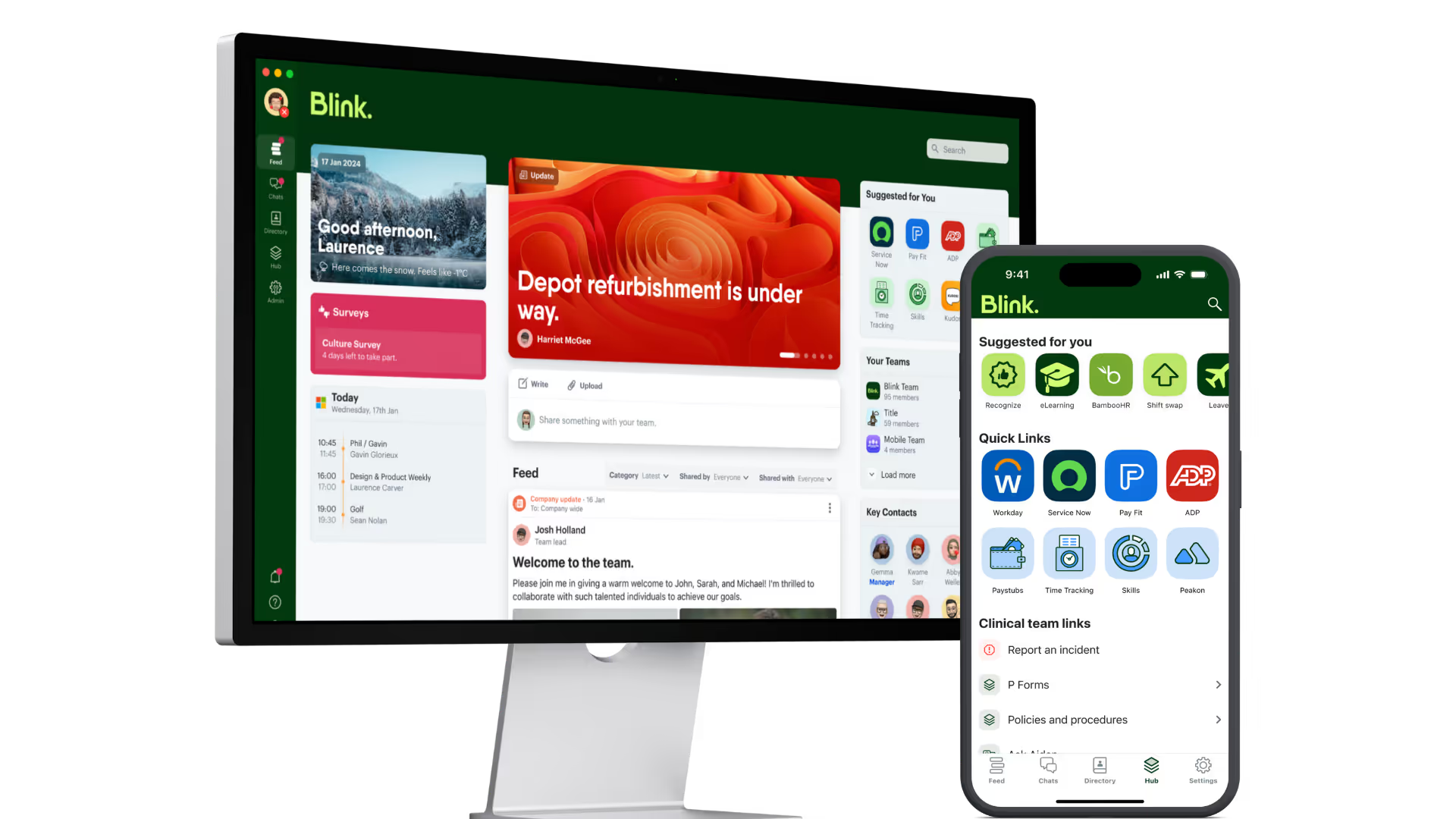
An employee app is a single mobile application that replaces the patchwork of email, printed notices, group chats, and separate HR systems most organizations rely on to reach frontline and distributed staff. It typically combines a company news feed, messaging, a document library, a staff directory, and self-service tools like shift swaps, forms, and recognition, all accessible from a phone. The defining feature isn't any one tool inside it, it's that workers without a company email or an assigned desk can log in too, and get the same access as everyone else.
What does an employee app actually include?
A real employee app bundles nine tools that otherwise live in separate systems, so a worker opens one app instead of hunting across five. The core components show up across almost every serious platform in this category:
- A feed. Company news, site-specific updates, and leadership posts, targeted so a store team sees store news and a depot team sees depot news, not a flat broadcast everyone skims and ignores.
- Chat. One-to-one and group messaging that stays inside a company-owned, auditable channel instead of a personal WhatsApp group that nobody can moderate or retrieve after someone leaves.
- A knowledge hub. Policies, SOPs, and training material stored in one searchable place instead of a shared drive nobody on the floor can access.
- A staff directory. So a new hire at a 40-site retailer can actually find out who their regional manager is.
- Digital forms. Replacing paper for things like incident reports, time-off requests, and onboarding paperwork.
- Task management. Assigning and tracking shift-level work, audits, or checklists across sites.
- Recognition. Peer-to-peer and manager shoutouts that are visible company-wide, not just a comment on a manager's personal social account.
- Surveys. Quick pulse checks or longer engagement surveys that reach people who don't check a work inbox.
- Integrations. Single sign-on, so staff log in once instead of juggling five separate passwords for HR, payroll, or scheduling systems.
Not every vendor ships all nine. The ones that cover most of this list are built for frontline reach specifically, like Blink, Workvivo, or Staffbase. The ones that cover two or three are usually scheduling tools, like Connecteam, that added messaging later.
Employee app vs. intranet vs. team chat vs. HR self-service: what's the difference?
Reach and device are the real dividing lines. An employee app is built mobile-first for people without a company login, while the other three assume one. Here's how they actually differ in practice.
{{blink-table:table-1}}
Head office and salaried teams adopt Slack or a corporate intranet just fine. Hourly, frontline, or seasonal staff get left out, not because those tools are bad, but because they were never built for someone without a desk or a company email. An employee app is the category built to close exactly that gap, which is why other systems increasingly connect into it rather than compete with it for attention. Our guide to what an intranet is covers that comparison in more depth, and if you're already comparing options, our roundup of the best employee apps for small businesses looks at how that plays out by vendor.
Who actually needs an employee app?
Three kinds of organization get the clearest case for an employee app over another desktop tool: frontline-heavy, multi-site, and email-less.
Frontline-heavy organizations. Retail, hospitality, healthcare, manufacturing, and transport businesses run on people who are on their feet most of the day, not at a keyboard. If the comms strategy assumes everyone checks email, most of the workforce is structurally excluded.
Multi-site businesses. A single head office can write one good policy update. Getting it to 40 stores, 12 depots, or 200 care locations consistently, with proof that it was actually read, is a different problem entirely. An employee app with targeting and read receipts solves the distribution half of that problem directly.
Companies without universal company email. This is the sharpest dividing line: if a meaningful share of staff, retail associates, drivers, care workers, warehouse crews, don't have a work email address, most mainstream software simply doesn't reach them. An employee app is designed around that reality rather than treating it as an edge case.
Setup and cost are usually the first worry for an ops manager weighing this up. The cost comparison should weigh the subscription against what's currently lost to manual follow-up, not against doing nothing.
Why does this matter for frontline workers specifically?
A worker without a company email can't receive a Slack invite, can't log into a SharePoint intranet, and often can't even get an HR self-service password reset, because the whole system assumes a corporate identity that was never issued. JD Sports reached 87% adoption within 10 days of launch. For a deskless worker, having one app that reliably carries pay information, shift changes, and safety updates is often the difference between being part of the organization and finding out about decisions secondhand.
Benefits of using an employee app
The clearest benefit of an employee app is reach, not just convenience. Reach matters because engagement starts from a low base. According to Gallup's 2023 State of the Global Workplace report, only 23% of employees worldwide are engaged at work. Separately, deskless and frontline employees tend to get the least direct communication from leadership in the first place, which compounds that engagement gap further. Closing it starts with the basic mechanics of information actually reaching people.
Beyond comms, an employee app replaces slower manual processes. Digital forms cut down on paper-based requests and repeated calls to HR. Task tracking gives multi-site operations leaders visibility into shift-level work they'd otherwise only get by phoning around.
Examples by industry
Retail. Multi-store chains use employee apps to push product and promotion updates to the floor before a shift starts, track read receipts for compliance training, and give seasonal hires same-day access without a company email.
Hospitality. Hotel and restaurant groups replace printed shift boards and manager phone trees with an employee app, letting corporate push brand-wide updates while local managers keep day-to-day posts specific to their property.
Transport. Operators with drivers who are never at a desk, and often share devices, use employee apps for safety alerts, digital incident reporting, and recognition. Stagecoach, a Blink customer, has seen up to a 26% reduction in frontline turnover.
Healthcare. Care providers with largely mobile, shift-based staff use employee apps to push policy updates with acknowledgment tracking, store training material centrally, and give staff a single login into connected HR systems instead of several separate ones.
Manufacturing. Plant floor teams without company devices or email use employee apps to replace phone-line shift reporting and paper time-off requests with a digital workflow that works from a personal phone.
If communication is the specific gap your organization is trying to close, our guide on employee communication apps ranks the main options, and our piece on retail employee communication goes deeper on how this plays out on the sales floor.
Blink's employee app is built around exactly this problem: one mobile app for news, chat, documents, and tasks, designed from day one to work without a company email or an issued device. You can see the full feature set on Blink's full product overview.
See what an employee app looks like in practice
If you're evaluating what an employee app would need to cover for your own team, the fastest way to find out is to try one with real staff. Start a 14-day free trial or book a demo to see how it works with your own frontline.