What’s new in Blink: Voice and video calling, live streaming, and more
Discover the latest and greatest features coming to the Blink platform — from in-app calling and live streaming, to advanced employee intelligence and dark mode, and more.
Jess DeVore
Published:
January 7, 2025
Last updated:
January 7, 2025
What we'll cover
The Winter 2025 product release highlights Blink's latest innovations — some already live and others rolling out over the next quarter. Missed our Autumn 2024 release? Check it out here!
At Blink, our employee experience platform is always evolving to keep pace with the ever-changing needs of organizations and their teams.
In line with our dedication to creating exceptional employee experiences — whether on the frontline or in the front office — we’re excited to introduce our latest product features, built to transform how employees connect with their organizations and each other.
From enabling easy communication with in-app calling and live streaming, to powering better outcomes through enhanced data intelligence, these powerful new features are designed to support a connected, engaged, and uplifted workplace.
#1. Voice and video calling: Power real-time, in-app collaboration
We’re excited to announce the addition of native 1:1 video and voice calling within Blink, making it even easier for employees to connect, collaborate, and deliver real-time results for your business.
This new feature will include:
Streamlined communication: Enables seamless 1:1 video and voice calls directly from individual chats or colleague profiles on mobile.
Built for international teams: Ideal for organizations with global workforces who need quick and reliable access to colleagues.
Future-proof design: Will launch on mobile, with plans to extend to desktop and explore group calling capabilities.
Flexible add-on: Available as an optional feature priced based on users, ensuring scalability for any organization.
{{mobile-voice-video="/image"}}
#2. Live streaming: Go live with all employees at once
Bring your live events to life on Blink! Our new live streaming feature lets you promote and host events directly in the Feed, fostering real-time engagement and interaction.
Here’s what you can do:
Stream seamlessly via Vimeo or YouTube, with full support for Vimeo interactions on Blink.
Share streams from other platforms using Real Time Messaging Protocol (RTMP) for an additional cost.
Engage your audience as they comment and interact during your event.
Discover what drives your organization with Advanced Employee Intelligence — an upgraded analytics suite that goes beyond the basics to tackle turnover, engagement, and productivity. These actionable insights, available as a paid add-on feature, will empower you to address challenges proactively and foster a thriving workplace.
Transform your data into a powerful driver of organizational success with four core pillars of insights:
Activation: Ensure every employee is connected and engaged with activation metrics by team and role, plus gamified nudges to boost adoption.
Communication: Maximize the impact of your messages with heat maps and deep-dive analysis into communication effectiveness by category, media, and more.
Engagement: Track and improve satisfaction with tools like engagement leaderboards and influencer metrics that spotlight key communicators.
Productivity: Streamline workflows by analyzing app usage, tool access, and shift management to reduce friction and optimize efficiency.
#4. Journeys 2.0: Engage employees before day one
Make a lasting first impression with Blink’s new Journeys for preboarding! This enhancement to our Journeys feature allows managers to kick off onboarding before an employee’s first day, creating a standout employee experience right from the offer stage.
Here’s what’s new:
Include line managers in the journey for a seamless, supportive experience.
Use enhanced start-date triggers to send tailored communications ahead of the first day.
Deliver a bespoke preboarding journey that sets the stage for success.
#5. Image-first feed: Curate the content experience
We’ve made the Feed even better with a new posting experience designed for high-quality, highly curated content that stands out and visually engages users.
Here’s what’s new:
Choose your layout: Opt for the classic look or an enhanced layout that puts your images front and center.
Audience-first review: See how your post will appear to your audience before you post.
Simple to use: The curation and review steps are seamlessly built into the posting process.
#6. Self-service SSO: Simplify access to third-party systems
Our new self-service SSO feature streamlines user access to key third-party systems directly through Blink, reducing the need for multiple logins and improving overall security. This feature makes it easier than ever to connect Blink with the tools your teams rely on.
Key takeaways include:
Enhanced user experience: Simplify workflows by allowing users to access essential systems without remembering multiple passwords, driving better uptake and ease of use.
Flexible configuration: Administrators can set up and manage SAML 2.0 Single Sign-On directly from the Blink Admin dashboard, enabling seamless integration with your Service Provider.
#7. Polls as Stories: Boost engagement with a visual integration
Take your Polls to the next level by sharing them through Stories, including our new image-first Polls feature, to maximize visibility and participation. This integration helps make employee feedback and interaction more accessible and engaging than ever.
Here’s what you can do now:
Increase engagement: Promote Polls in Stories to capture attention and encourage more responses from your teams.
Visual appeal: Leverage image-first Polls to create a dynamic and engaging experience, driving curiosity and interaction.
{{mobile-story-polls="/image"}}
#8. Chat and channel moderation: Maintain a professional communication environment
Administrators now have greater control over chats and channels with new moderation capabilities, including the ability to hide certain types of content when necessary. These tools empower admins to foster a safe, engaging, and well-managed communication space for everyone.
With this feature, you’ll gain:
Improved oversight: Maintain a positive and professional environment by managing and moderating conversations directly within chats and channels.
Content management: Use the “hide” feature to remove inappropriate or irrelevant content, ensuring discussions stay on track.
#9. Dark mode: A new way to experience Blink
Enjoy a more comfortable and visually striking interface with our new dark mode feature, now available via a simple toggle in your settings. This update adds a touch of personalization and comfort to your everyday platform experience.
With dark mode:
Improved comfort: Reduce eye strain during late-night use or in low-light environments with a sleek, dark interface.
Personalized experience: Give users the flexibility to choose between Light and Dark modes based on their preferences.
{{mobile-dark-mode-post="/image"}}
Coming soon
Get excited for updates to the Hub experience, moderation enhancements, and in-app events management!
Bring your consumer-grade employee experience to life
As we kick off a new year of workplace evolution, our mission remains unchanged: to deliver tools that strengthen connections, boost productivity, and ensure every employee enjoys a seamless and exceptional experience — no matter their role or location.
These latest product enhancements reflect our commitment to helping organizations supercharge their employee experience as we step into 2025.
The Winter 2025 product release highlights Blink's latest innovations — some already live and others rolling out over the next quarter. Missed our Autumn 2024 release? Check it out here!
At Blink, our employee experience platform is always evolving to keep pace with the ever-changing needs of organizations and their teams.
In line with our dedication to creating exceptional employee experiences — whether on the frontline or in the front office — we’re excited to introduce our latest product features, built to transform how employees connect with their organizations and each other.
From enabling easy communication with in-app calling and live streaming, to powering better outcomes through enhanced data intelligence, these powerful new features are designed to support a connected, engaged, and uplifted workplace.
#1. Voice and video calling: Power real-time, in-app collaboration
We’re excited to announce the addition of native 1:1 video and voice calling within Blink, making it even easier for employees to connect, collaborate, and deliver real-time results for your business.
This new feature will include:
Streamlined communication: Enables seamless 1:1 video and voice calls directly from individual chats or colleague profiles on mobile.
Built for international teams: Ideal for organizations with global workforces who need quick and reliable access to colleagues.
Future-proof design: Will launch on mobile, with plans to extend to desktop and explore group calling capabilities.
Flexible add-on: Available as an optional feature priced based on users, ensuring scalability for any organization.
{{mobile-voice-video="/image"}}
#2. Live streaming: Go live with all employees at once
Bring your live events to life on Blink! Our new live streaming feature lets you promote and host events directly in the Feed, fostering real-time engagement and interaction.
Here’s what you can do:
Stream seamlessly via Vimeo or YouTube, with full support for Vimeo interactions on Blink.
Share streams from other platforms using Real Time Messaging Protocol (RTMP) for an additional cost.
Engage your audience as they comment and interact during your event.
Discover what drives your organization with Advanced Employee Intelligence — an upgraded analytics suite that goes beyond the basics to tackle turnover, engagement, and productivity. These actionable insights, available as a paid add-on feature, will empower you to address challenges proactively and foster a thriving workplace.
Transform your data into a powerful driver of organizational success with four core pillars of insights:
Activation: Ensure every employee is connected and engaged with activation metrics by team and role, plus gamified nudges to boost adoption.
Communication: Maximize the impact of your messages with heat maps and deep-dive analysis into communication effectiveness by category, media, and more.
Engagement: Track and improve satisfaction with tools like engagement leaderboards and influencer metrics that spotlight key communicators.
Productivity: Streamline workflows by analyzing app usage, tool access, and shift management to reduce friction and optimize efficiency.
#4. Journeys 2.0: Engage employees before day one
Make a lasting first impression with Blink’s new Journeys for preboarding! This enhancement to our Journeys feature allows managers to kick off onboarding before an employee’s first day, creating a standout employee experience right from the offer stage.
Here’s what’s new:
Include line managers in the journey for a seamless, supportive experience.
Use enhanced start-date triggers to send tailored communications ahead of the first day.
Deliver a bespoke preboarding journey that sets the stage for success.
#5. Image-first feed: Curate the content experience
We’ve made the Feed even better with a new posting experience designed for high-quality, highly curated content that stands out and visually engages users.
Here’s what’s new:
Choose your layout: Opt for the classic look or an enhanced layout that puts your images front and center.
Audience-first review: See how your post will appear to your audience before you post.
Simple to use: The curation and review steps are seamlessly built into the posting process.
#6. Self-service SSO: Simplify access to third-party systems
Our new self-service SSO feature streamlines user access to key third-party systems directly through Blink, reducing the need for multiple logins and improving overall security. This feature makes it easier than ever to connect Blink with the tools your teams rely on.
Key takeaways include:
Enhanced user experience: Simplify workflows by allowing users to access essential systems without remembering multiple passwords, driving better uptake and ease of use.
Flexible configuration: Administrators can set up and manage SAML 2.0 Single Sign-On directly from the Blink Admin dashboard, enabling seamless integration with your Service Provider.
#7. Polls as Stories: Boost engagement with a visual integration
Take your Polls to the next level by sharing them through Stories, including our new image-first Polls feature, to maximize visibility and participation. This integration helps make employee feedback and interaction more accessible and engaging than ever.
Here’s what you can do now:
Increase engagement: Promote Polls in Stories to capture attention and encourage more responses from your teams.
Visual appeal: Leverage image-first Polls to create a dynamic and engaging experience, driving curiosity and interaction.
{{mobile-story-polls="/image"}}
#8. Chat and channel moderation: Maintain a professional communication environment
Administrators now have greater control over chats and channels with new moderation capabilities, including the ability to hide certain types of content when necessary. These tools empower admins to foster a safe, engaging, and well-managed communication space for everyone.
With this feature, you’ll gain:
Improved oversight: Maintain a positive and professional environment by managing and moderating conversations directly within chats and channels.
Content management: Use the “hide” feature to remove inappropriate or irrelevant content, ensuring discussions stay on track.
#9. Dark mode: A new way to experience Blink
Enjoy a more comfortable and visually striking interface with our new dark mode feature, now available via a simple toggle in your settings. This update adds a touch of personalization and comfort to your everyday platform experience.
With dark mode:
Improved comfort: Reduce eye strain during late-night use or in low-light environments with a sleek, dark interface.
Personalized experience: Give users the flexibility to choose between Light and Dark modes based on their preferences.
{{mobile-dark-mode-post="/image"}}
Coming soon
Get excited for updates to the Hub experience, moderation enhancements, and in-app events management!
Bring your consumer-grade employee experience to life
As we kick off a new year of workplace evolution, our mission remains unchanged: to deliver tools that strengthen connections, boost productivity, and ensure every employee enjoys a seamless and exceptional experience — no matter their role or location.
These latest product enhancements reflect our commitment to helping organizations supercharge their employee experience as we step into 2025.
What we'll cover
Start your free trial today
See how Blink helps frontline teams stay connected, informed, and engaged.
Hey! I'm Theo Booth, I am originally from the UK but I have spent the majority of my life trying to travel as much as possible and I have lived in 5 countries.
Before becoming a software engineer I was in the shipping industry, initially as a broker before becoming a trader.
I did a Software Engineering bootcamp during lockdown before joining the Solutions Engineering team at Blink as a Full Stack Developer in September of last year.
The responsibilities of the role are twofold: Firstly, to scope out and build custom integrations that can service our clients needs; and secondly, to work with customers to find solutions to/tailor bespoke apps for the pain points in their current ways of working.
The culture at Blink is second to none and the diverse team is a mix of weird and wonderful people all driving towards the same goal. It’s a lovely place to work!
Keith has been with Metroline since 1997 and is currently based at the Willesden Junction Garage in London. Starting first as a bus driver, he transitioned to the role of Driving Instructor in 2001 and is now a skilled PCV Driving Examiner.
Keith is passionate about delivering a high-class, professional service whether training others or conducting tests on behalf of the DVSA. New drivers appreciate his empathy, experience, and great sense of humor. Keith is also incredibly supportive of new members in the department, including the very person who nominated him: Andrew Price.
While he loves the transport industry, his other great love in life is Ipswich Town FC Football Club. When he’s not training new drivers, he’s at Portman Road Stadium cheering on the Tractor Boys in the Premier League.
What does he want to do next?
Continue to improve the standards at which we conduct training to produce the best in class drivers and improve their experience along the way.
Nominated by: Andrew Price, Senior Driver Trainer and Delegate Driving Examiner
The average person will work 35 hours per week. That adds up to 84,365 hours over their lifetime. Yet just over one-third of employees (34%) are engaged, and 16% are actively disengaged in their work and workplace.
If you’re reading this, the chances are you want to make sure your employees don’t feel like they are wasting a large portion of their life at work. We’ll do our best to help you do just that.
In this handy guide, we’ll break down the key steps you need to take when creating an employee engagement strategy.
From understanding why your organization truly needs an employee engagement strategy, to the actionable steps you can take to create your own strategy, we’ll cover everything you need to know right here.
Why you need an employee engagement strategy
Creating an employee engagement strategy can seem daunting, but it’s important for any business. Having a strategic approach to your employees’ happiness and engagement will help you retain top talent, keep them motivated and productive, and ultimately grow your business.
Effective employee engagement strategies will outline exactly how you are going to improve employee engagement within your organization, allowing all team members to stay on the same page when it comes to their roles and responsibilities.
In short: by creating an employee engagement strategy, you can strategically work to improve your employee engagement. And with improved levels of engagement, come a number of organizational benefits, including:
Higher Productivity: Employee engagement is closely linked with productivity. Engaged employees are more motivated to do their best work and achieve their goals. In fact, research has shown that engaged employees are up to 202% more productive than disengaged employees.
Reduced Staff Turnover: Low employee retention is costly and disruptive for any business, and one of the most decisive factors for employee retention is employee engagement. Engaged employees are less likely to leave their job, which reduces the need for costly and disruptive staff turnover.
Improved Morale: A happy workforce is a productive workforce. When employees feel engaged and valued, they are more likely to be happy at work and less likely to experience stress or burnout. As such, a staff engagement strategy can motivate employees and improve morale, job satisfaction and overall company culture.
Greater Loyalty: An engaged employee is more likely to be loyal to their company, in fact 90% of workers said they are more likely to stay at a company that takes and acts on feedback: AKA one that engages them. They are less likely to look for jobs elsewhere and are more likely to recommend their company to others. Therefore, the right employee engagement strategies can drive your staff retention rates and encourage employees to stay with your company for longer.
Employee engagement strategies & business types
What your employee engagement strategy needs to consist of will change depending on your business type. For example, a software company will need to focus on ways to motivate and engage product designers and developers in order to compete for top talent in a competitive Silicon Valley environment. A healthcare organization, on the other hand, will need to come up with innovative ways to engage their nursing and medical staff to combat physician burnout and the growing nursing shortage.
What's important is that you provide your workforce with strategies that are designed for them specifically. Ultimately, your strategy will depend on the type of employees you have, the unique challenges facing those teams in your market, their day-to-day tasks, and how your organization operates as a whole.
Employee engagement for the frontline
Creating an employee engagement strategy can be especially important for frontline organizations. With 80% of the global workforce working on the frontline, it’s important to have strategies in place that will help keep these workers engaged, productive and motivated.
Additionally, employees in frontline positions often have more direct contact with customers and are more likely to represent the company to the public. As such, it is important for these employees to be engaged and motivated, so they can provide positive customer service experiences.
Remember: whatever strategies you use, it’s important to tailor them specifically to your industry, business type and workforce.
How to create your employee engagement strategy
In order to have engaged employees, you need a plan in place, outcomes in mind, a clear outline of responsibilities and a culture that takes participation seriously. You also need a toolset available that is able to execute your plan, close distances, track results and simplify operations.
To make this a little easier to understand, we've broken the process down into 7 simple steps.
1. Define - Your purpose, values & mission
Defining your own purpose, company core values, and mission statement is a crucial step in creating your employee engagement strategy. In fact, when teams know your goals and expectations of them, they are 2.8 times more likely to be engaged in their roles, according to research from Quantum Workplace.
By clearly articulating what you stand for as an organization, you can align your staff with these values and give them a reason to be invested in the success of your business in the long-term.
To ensure that all employees are on the same page here, you should provide an easy-to-access Hub containing all company policy and procedure documents, along with a thorough onboarding process for new hires.
2. Listen - Conversations and research
Direct, two-way conversations and further research into your employees’ needs and wants will help you to create a more personalized engagement strategy, making this a core step in the strategic process. One way to do this is through pulse surveys.
Pulse Surveys are short, regular surveys that ask employees about their engagement levels and how they feel about their work. This can help you to identify any areas where your employees may be struggling, and can help to ensure that your employee engagement strategy is constantly evolving.
Whether it’s through surveys, focus groups, one-on-one interviews or anonymous staff feedback tools, gathering data and hearing directly from your employees can give you valuable insights into what they need from an engagement strategy, and help you identify your organisation's key engagement drivers, in order for staff to stay engaged at work.
3. Review - Analyze and plan
Once you have gathered data from your employees, it’s time to analyze this information and determine what action needs to be taken. You may find that certain areas of your workplace are in need of improvement, or perhaps a company-wide change is necessary to boost employee engagement.
Whatever the results of your employee research, it’s crucial to identify specific targets and actions that will make your plan a success. What’s working, what's not? Are there specific issues that need to be addressed? What are your engagement goals as a business leader?
Key goals for your employee engagement strategy could include:
Lower staff absenteeism
Better employee retention rates and lower turnover
Improved productivity
Enhanced employee motivation and happiness
Increased customer satisfaction
More positive organizational culture.
By reviewing and analyzing the data you have gathered, you can gain a clear understanding of how to better engage employees in order to achieve these goals. This will help you to build a more effective employee engagement strategy that your employees want to respond positively to.
4. Commit - Actions speak louder than words
Strategy is important, but actions always speak louder than words. Employee engagement strategies that work, only work if you plan to back them up with core actions, processes and real change.
Below, we have outlined some key ways to commit to your employee engagement strategy. By truly committing to all of these actions, you can bring your employee engagement strategy to life and start seeing real results.
Tools & technology
Digital tools are essential for any organization looking to boost engagement. By providing your employees with the right tools, you can make it easier for them to connect with each other and with your company. This can help to improve communication and collaboration within your team, leading to higher job satisfaction, and a more engaged workforce.
There are a variety of different digital tools that you can use to engage your employees, including great employee engagement apps, online chat software and team collaboration tools.
It’s also important to consider using technology with frontline-specific features in deskless organizations. With52% of frontline workers claiming they would leave their job over tech tools, better digital commitments are clearly needed here. By providing your employees with tools fit-for-purpose on the frontline, you can ensure that your employees feel supported and engaged no matter where they are in the organization.
Assuming that you have already begun the process of gathering data and analyzing it, you should now begin to take actions across the board in order to improve employee engagement. One way to do this is through better recruitment practices.
People who match your ideals and company culture, who will add value, and who are onboarding engagement are more likely to be engaged employees. Therefore, it is important to take care in the recruitment process, and to ensure that you are hiring people who will be a good fit for your company. You can use interviews, personality tests and job simulations to get to know a candidate better, and to see how they would fit into your team.
It is also important to provide a thorough onboarding process for new hires in order to establish a culture of engagement from day one. This can help them to feel welcome and comfortable in their new role, and can help them to learn about your company policies and procedures.
Communication
Regular communication is key to keeping employees engaged. Employees need to feel like they are part of the bigger picture, and that their voice is heard. By establishing a regular communication schedule – whether it be through Secure Chats, email, newsletters, team meetings or other methods – you can ensure that your employees are kept in the loop.
It’s also important to have a clear internal communications strategy in place. This should outline who is responsible for communicating with whom, and what methods will be used. This will help to ensure that everyone is on the same page, and that important messages don’t get missed.
It’s important to tailor communications to the needs of your employees. For example, if most of your employees are frontline workers who don’t have access to a computer, you may need to adjust your communications methods so that they can be accessed on mobile devices – think mobile employee engagement apps. You may also need to consider using different methods for different departments or locations within your company.
Surveys
Although surveys are important when drafting your strategy, it’s also important to gather feedback from your employees on a more regular basis if you want to walk the walk of employee engagement. By conducting regular Employee Surveys, you can get a sense of how your employees are feeling at any given time – and if things need to change.
An employee engagement survey can help you to gather valuable data and feedback from your employees, which you can use to improve your strategy. You may want to consider including questions about work-life balance, employee engagement initiatives, training and development, and other areas.
Frequent surveys are a great way to get ongoing feedback from your employees and to see how they feel about various aspects of their job or the company as a whole. You can also use surveys to measure the success of your employee engagement strategies, obtaining valuable insight into what is working and what needs to be changed or improved.
Managers
“Leadership has an important role to play when it comes to employee engagement, and this is especially important given nearly half (45%) of workers say leadership is “minimally” or “not at all” committed to improving company culture. In fact, 78% of employees confirmed that any change to culture needs to be driven by the CEO.” — Jeff Cates, CEO of Achievers.
For business leaders, mid-level management is often the first step towards employee engagement. By ensuring managers are supported from the top level, given the budget, training, tools and support they need, you can set them up for success as well as help to create a culture of engagement across your entire organization.
Effective managers have many important roles when it comes to employee engagement. They are responsible for setting expectations, holding people accountable, and providing feedback. They are also responsible for coaching and mentoring their team members, as well as helping to resolve any issues or conflicts that may arise.
5. Measure - Analyze and report
To measure the impact and see if their employee engagement activities and strategy is working, businesses should use employee engagement analytics via the right tools, at the right time.
It’s important to use analytics at different points throughout your engagement strategy, as this will help you to gain valuable insight and data that can be used to adjust what is working and improve the areas that need improvement. For example, you may want to analyze employee satisfaction levels before implementing a new training program, or track engagement levels over time to see if your initiatives are working.
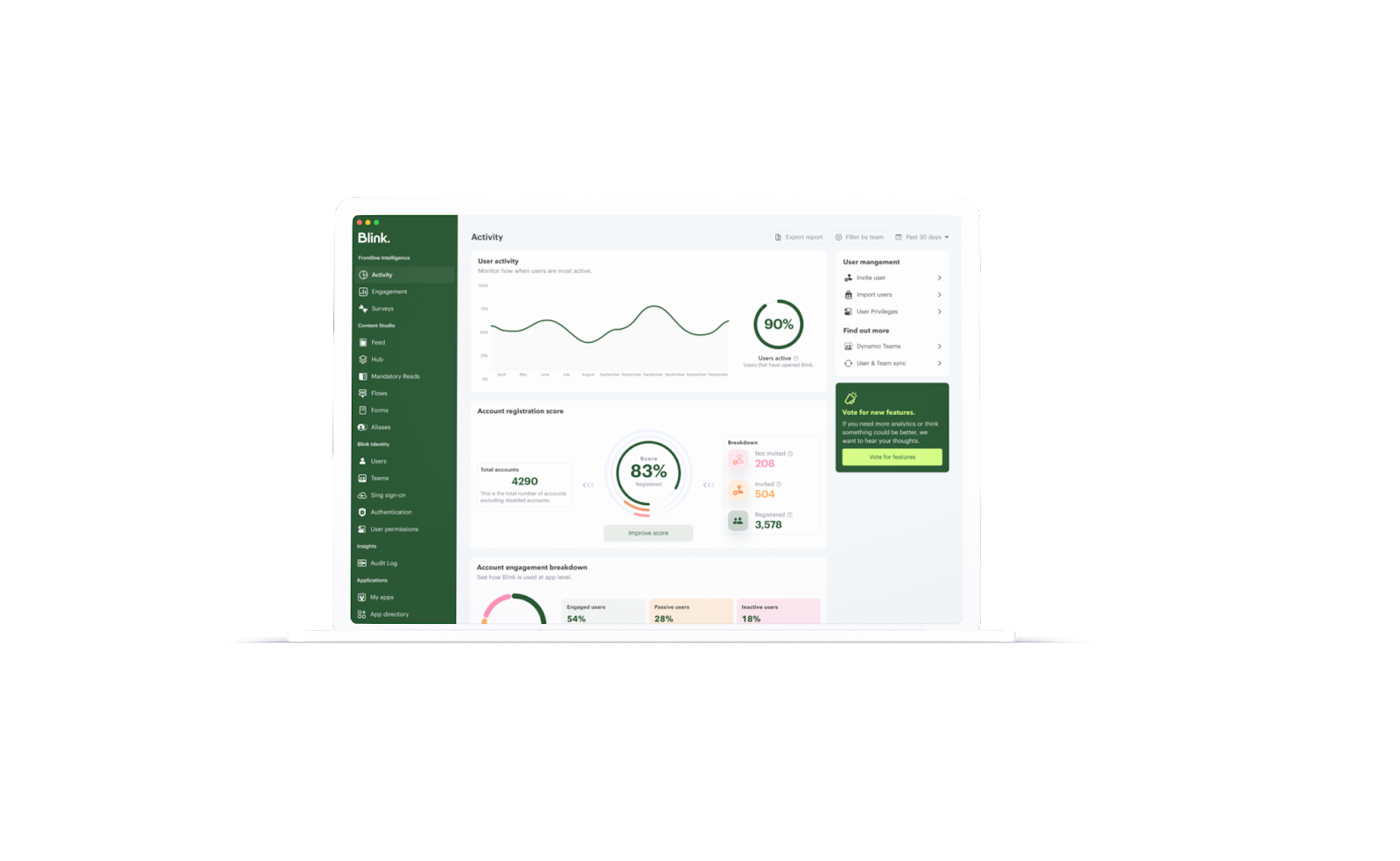
There are many different types of analytics tools that you can use to analyze and report this data, for example Blink'sFrontline Intelligencetool. Our powerful analytics offer insight into the people and relationships that make your organization tick.
By analyzing data from people, places, and things on a regular basis, you can gain real-time intelligence into your employee engagement strategy that you can use to better support and understand your workforce.
6. Reward - recognition & progression
When used effectively, recognition can be an extremely powerful tool for improving employee engagement. Employees need to feel appreciated for their efforts, and recognition is one of the best ways to show your most engaged employees that you appreciate them.
However, simply giving employees a pat on the back isn’t enough – recognition needs to be meaningful, memorable and measurable. By taking the time to recognize employees in a meaningful way, you can show them that you truly value their contributions, and make them want to engage and contribute more.
There are many different ways to recognize employees, and it’s important to find what works best for your organization. Some popular methods of recognition include offering Kudos or Employee Recognition, awards ceremonies, Feed shout-outs, gift cards or vouchers, and thank-you notes.
It's also crucial that you back up recognition with opportunities for growth and career development. This may include promotions, opportunities to learn new skills, a stronger compensation and benefits package, or simply more responsibility. By providing employees with opportunities for growth and progression within the organization, you are helping them feel valued and motivated to continue performing well.
7. Repeat - Regular check-ins and adjustments
To truly maximize the impact of your employee engagement strategy, it’s important to take a regular and systematic approach. This means that you should regularly check in on key metrics, analyze the data you gather, and make any necessary adjustments based on what you find.
Stay on top of your engagement. Track key metrics such as employee satisfaction and engagement levels, and conduct regular check-ins to analyze the data you gather. This will help you make any necessary adjustments to your strategy in a timely and effective manner, ensuring that your employees are engaged and motivated at all times.
Final Thoughts
At Blink, we provide the all-in-one solution to employee engagement. Designed for the frontline, our easy-to-access, intuitive employee engagement app delivers real-time data and communications, actionable insights and intelligent recommendations.
Inspiring engagement in your employees has never been easier. With our powerful analytics tools and customizable recognition programs, you can gain valuable insight into your workforce and take the steps needed to boost engagement levels across the board.
Whether you’re looking for a way to track employee performance, improve communication and feedback, or simply create a more positive work environment, Blink has everything you need.
Jessica is a customer assistant in a retail store. She started the job six months ago, enjoys supporting customers, and has been consistently meeting her monthly targets.
But Jessica doesn’t get acknowledgment from her manager or other staff members. Not just that. The store recently hired another person in the exact same role as Jessica and — according to the grapevine — at a higher salary than her.
Jessica’s co-worker, Marco, has been working at the store for a couple of years. He knows the job like the back of his hand and is feeling bored and underutilized. But, as far as he knows, the organization doesn’t have progression or training pathways suited to him. So he’s started looking for a job elsewhere.
Jessica and Marco came into the organization with high levels of morale — and they’ve been putting in the work. But they aren’t getting what they need from their employer. So their morale dips. Customer service and productivity suffer. Employee turnover ticks upward.
This makes it harder for the organization to achieve its goals. And it’s why every company should be working to build and sustain employee morale.
Here, we look at how to boost employee morale and motivation in 2025.
What is employee morale and why is it important?
Employee morale is how employees feel about their jobs and work environment. It’s linked to employee engagement, job satisfaction, and staff retention.
What does low team morale look like?
In a workplace with low morale, employees do the bare minimum to ensure their paycheck while keeping one eye firmly on the job boards.
And unfortunately for employers, low morale is contagious. If one demoralized employee fails to pull their weight — or badmouths leadership — they hurt the morale of co-workers, making it increasingly difficult for an employer to reset the tone.
What does high team morale look like?
In contrast, in a workplace with high morale, employees are loyal, happy, and engaged in their work. They’re productive and more likely to go above and beyond their prescribed duties. These workers also tend to pitch in during times of crisis.
Employees with high morale are happy with the employee experience at their organization — and they help to set the mood. They create a wave of positivity that inspires improved morale and performance among their peers.
What’s the situation in 2025?
When we look at the current state of employee morale, the news isn’t great.
According to recent Glassdoor research, almost 2 in 3 employees feel stuck in their current roles. They might not be heading for the door just yet, but these “quiet quitters” are feeling dissatisfied and unmotivated — and they’re having a negative impact on the morale of co-workers.
It seems there’s never been a better time to boost staff morale in the workplace. Let’s find out some strategies you can use at your organization.
How to boost employee morale in 2025
Whether morale has been slowly declining or has taken a hit due to workplace changes, here are some employee morale boosters to use in your organization.
Master change management
In today’s workplace, change can feel like the only constant. But that doesn’t mean employees are used to it. If change isn’t managed and communicated sensitively, it can damage workplace culture and employee morale.
For example, imagine you’ve just announced a hiring freeze. Existing workers may assume that a downsizing initiative is on the way and start worrying that their jobs are at risk. Workforce morale suffers.
You can avoid this dip in morale by clearly communicating with employees. It could be that the hiring freeze is helping to ensure the safety of existing roles. Or that budgets are being diverted to training and development.
When implementing change, consider what employees need to know, demonstrate empathy, and follow change communication best practices to give employees the information and assurances they need.
Challenge your team
When a job is too easy, employees become bored. But a job that is too difficult causes problems, too. Employees can become discouraged.
To build staff morale, you need to strike a balance. Give employees the tools, training, and support they need to fulfill their roles. And challenge them with new tasks that push at their limits, so they develop new skills and grow their confidence.
Recognize hard work
Imagine you put a ton of effort into a project. Or you go out of your way to give a co-worker the support they need. Or you ace a presentation you’d been feeling really nervous about.
{{mobile-kudos="/image"}}
You probably (deservedly) feel really proud of yourself. But what if your actions don’t prompt any praise from leaders, managers, or peers? You may end up feeling deflated and demoralized.
Employees who don’t feel recognized for their hard work, are two times more likely to say they’ll quit within the next year. But those who receive regular, authentic, and meaningful recognition are more likely to bring their A-game.
Progression is a key driver of employee engagement. You can raise engagement and morale by helping employees to progress in their roles and careers.
When employees get the training they need — through thorough onboarding, ongoing professional development, mentoring, and coaching — they feel more confident and less stressed. They feel valued by the organization and their performance improves.
Lay out career progression opportunities at your organization and there’s even more incentive for employees to do their best. When they can see a future with your company, they become more committed and less likely to look for a job elsewhere.
Create a sense of community
A positive and connected workplace culture is an effective employee morale booster. 83% of employees want their workplace to provide a sense of community, with more than a third willing to trade a bigger pay packet for stronger friendships and social enrichment at work.
When thinking about workplace connection, it’s worth spending a little extra time thinking about remote and frontline employees. These workers can be hard-to-reach and often end up feeling isolated from company culture.
So how do you create a sense of community for workers who don’t spend a lot of time together IRL? An employee app is an increasingly popular solution.
An app acts as a digital water cooler. With an engaging news feed and instant messaging tools, it gives employees access to conversation and company culture via their smartphones. You can also encourage workers to find their tribe, connecting with like-minded colleagues via digital Communities.
{{mobile-community="/image"}}
Give health and wellbeing a boost
Show concern for employee health and wellbeing and you’re more likely to achieve high levels of morale. Workers see that you care about them as people — not just as employees — which makes them feel valued.
Here are a few ideas for how to support employee health and wellbeing:
Create a volunteering program, so it’s easy for employees to give back to the local community
Encourage employees to take a full lunch break and use their full PTO allowance
Offer flexible work options and shift swap tools to support employee work-life balance
Keep fit with exercise challenges and fitness subscriptions
Talk openly about mental health and ensure employees know who to turn to if they need to talk
Initiatives like these help prevent stress and burnout while improving employee motivation and productivity.
Communicate, communicate, communicate
Having and communicating an inspiring vision is crucial for employee morale. In many organizations, workers don’t know the “why” behind business objectives. Nor are they aware of how their own work ties in with those goals.
To keep employees motivated and on the same page, open communication is essential. And with the right internal communication tools, you can share consistent and engaging messages with all employees.
You can keep employees up to date with company updates via a multi-media news feed. You can store essential documents relating to policies and mission in an easy-access content hub. Across all internal communication channels you can amplify company culture and the values that guide it.
{{mobile-main="/image"}}
Improve internal communication and you make everyone aware of company goals and the latest company news. Everyone understands what is expected of them — and they pull in the same direction — increasing employee morale in the process.
Give employees a voice
When employees feel heard, they feel valued and are more likely to do their best work. Gathering employee feedback helps in other ways too.
You can use employee surveys, listening tours, and one-to-one chats to find out what helps and harms the morale of your workforce. Let employees have their say and you’ll find meaningful ways to improve the employee experience.
As part of a well-executed employee voice strategy, you then close the feedback loop. You share your findings and your plan of action with employees. This builds trust in the feedback process and means your workforce is more likely to engage with future surveys and listening events.
Measure employee morale
You can supplement the qualitative data you gain from employee listening with quantitative data gained from analytics tools. Employee morale metrics include:
Absenteeism rates
Employee turnover rates
Productivity
Employee net promoter score (eNPS)
Benchmark and track these KPIs over time and you’ll build a better picture of employee morale. Keep your finger on the pulse and you’ll also be able to spot and address issues in real-time before demoralized employees impact their teammates.
The secret to sustained staff morale?
Building and sustaining employee morale is essential — to attracting and retaining top talent, and to getting the most out of your teams.
When employees feel valued, informed, and connected to the wider company, they’re more likely to feel motivated and engaged.
And when you understand the needs of employees and the state of morale in your organization, you’re better able to make meaningful changes to the employee experience.
With remote or frontline employees in the mix, you may need the help of morale-boosting tech tools. The right software allows you to reach all employees — giving them a voice, connecting them to co-workers and company culture, and recognizing the work they do.
Blink. And watch morale soar with the help of smarter workplace tech.
Once upon a time, a company intranet that worked off a server in your office was enough to keep internal communication on track. But today, company needs have changed. And so have employee expectations.
We’ve entered the era of the digital workplace. Employees use a variety of different devices. Teams work remotely, across multiple locations. And beyond the world of work, everyone is now accustomed to intuitive, convenient, and personalized digital experiences.
Digital change has come quickly. And workplace software — like the intranet — hasn’t always kept pace. Traditional intranets feel old and clunky today. They’re affecting employee experience (EX) - and they could be doing more harm than good.
Thankfully, a new breed of intranet is now emerging. It’s fresher and more relevant to today’s workforce. It’s also built with digital workplace challenges front of mind.
A modern intranet holds the key to two-way communication and collaboration, better employee engagement, and an enhanced digital employee experience (DEX). And it could be a game changer for your organization.
Here, we’re going to take a look at the changing face of the company intranet and examine the features and benefits of a new and improved modern intranet.
Contents
Intranets: then and now
Why you need a modern intranet
Features of a modern intranet
How modern intranets impact the digital employee experience
Choosing the right modern intranet
Conclusion
Intranets: then and now
The company intranet has come a long way since it was first introduced back in the 1990s. Adapting to advances in technology and changing workplace trends, it’s taken on a variety of different forms over the years.
When talking about the modern intranet, it’s useful to compare the most cutting-edge intranet software to what has come before. So let’s step back in time and revisit each stage of intranet evolution.
Early intranets
Closed private networks were the first intranets to hit the office. They used local servers to host static web pages, meaning only computers based within the same geographical location could access them.
These early intranets provided limited interactivity and functionality. They were a place to share company directories, policies, and other documents. But because the setup and maintenance of early intranets required a lot of technical expertise, information was often outdated and badly organized.
Web-based intranets
As the internet went mainstream, web-based intranets made their way onto the market. These intranets were accessible via standard web browsers and had basic search functions, which helped users find what they were looking for. But these new intranets still had their drawbacks.
Internal communication remained one-way, with information traveling from the top of an organization down. Content was often poorly maintained because updates were complex. And there was very little opportunity for companies to provide personalized employee experiences.
{{callout}}
Social intranets
Social intranets were the first intranets to go mobile. Remote servers meant geography mattered less — and everyone within an organization, regardless of their location, could access the same information.
Inspired by social media platforms, social intranets prioritized communication, with features like user profiles and user-generated content. They were also designed to support team collaboration and productivity, with personnel services and project management tools built in.
Modern intranets
Modern intranets take the social intranet concept to the next level. They are a mobile-first solution with a focus on user experience (UX), designed to meet the expectations of today’s digital workforce.
Content creation is democratized in modern intranets. All members of an organization can access information and tools easily. And team leaders get the analytics and data-driven insights they need to improve employee engagement.
Interested in seeing a modern intranet in action? Preview Blink today with a short 2-minute video.
Why your frontline organization needs a modern intranet
So why should your frontline organization ditch its traditional intranet and adopt a modern software solution instead? There are several very good reasons.
Older intranet software can cause friction and frustration. Perhaps your intranet has become a dumping ground for outdated information. Or it simply fails to provide the intuitive, user-friendly, productivity-boosting features we’ve all come to expect.
We know that traditional intranets fail to live up to employee expectations. 67% of workers say that digital experiences in their personal lives are better than the digital experiences they get at work.
Many traditional intranets are built around the needs of desk-based teams, so they do your frontline workers a disservice. Frontline workers miss out on the communication and resources available to their desk-based peers.
A modern intranet, in contrast, helps you meet all of the following challenges head-on.
1. Employee engagement
According to Gallup’s State of the Workplace Report for 2023, just 23% of employees are engaged at work. But organizations should try to do better. That’s because high levels of employee engagement lead to happier employees, improved productivity, and lower rates of attrition.
Employee engagement is always a challenge. But engaging employees in a frontline organization can be particularly tricky. When your workers are deskless, how do you give them the connection, coaching, and support they need to thrive within your organization?
A modern intranet gives you all of the tools you need to engage your employees, regardless of where they work. You can count on a social feed, a content hub, employee recognition tools, surveys, and more.
With analytics too, you can see what is engaging your employees — and what isn’t — so you can improve your efforts going forward.
2. Communication
Open communication within a workplace is vital. It helps you inform, motivate, and engage your employees, while fostering an inclusive and supportive work environment. It involves top-down, bottom-up, and peer-to-peer communication, so everyone has a voice.
For frontline teams, maintaining open channels of communication within teams who don’t work face-to-face requires tailored solutions.
A modern intranet helps you build internal communication links between every member of your workforce — whether they’re based in the office, on the shop floor, or out in the field.
You don’t need to rely on emails or a company noticeboard. Instead, all types of internal communication are supported via your intranet app.
With better communication, you bring your teams together and you may find it easier to grow your company too. A Forbes study found that companies who involve 75% of their frontline in internal comms, achieved more than 20% growth over a year.
3. Digital access
Older intranet software is built around an outdated version of the workplace. It doesn’t prioritize the mobile experience and instead works best for employees who sit at a desk on a computer for the majority of each working day.
Newer intranets understand that the world of work has changed. Digital tools are a workplace essential. And frontline, hybrid, and remote teams should have equal access to the information and interaction that these tools provide.
That’s why the best modern intranets have a mobile-first design. Employees can access them as easily on a small smartphone screen as on a desktop computer. All workers across an organization are engaged and empowered, so no one misses out.
4. Collaboration
Traditional intranets are known for being slow and difficult to use, with low rates of user adoption. In fact, 57% of employees say they see no purpose in their company intranet.
This impacts collaboration. When employees avoid your intranet — because it isn’t intuitive to use or data is hard to find — knowledge sharing suffers and you risk creating organizational silos.
For frontline teams, this exacerbates an existing risk. Frontline workers spend time away from HQ, working different shift patterns, and managing a high workload. These factors already get in the way of team collaboration.
Luckily, this is another frontline challenge that a modern intranet can solve. The intranet allows people across your organization to share ideas and objectives via an easy-to-use interface.
Everyone can contribute, even those who work remotely, making your organization more productive, more innovative, and better able to solve problems.
Features of a modern intranet
We’ve touched on what makes a modern intranet different from the other intranet software available. But now we’re going to delve into the details. Here are features you can expect from the newest intranets and how they stand to benefit your business.
A central hub
A modern intranet acts as the gateway to your business. It’s the go-to location for company communication and knowledge sharing.
With a single, searchable hub, it’s easy for employees to find what they’re looking for, whether that’s essential documents, a directory of co-workers, or a list of the latest company events.
Importantly, information is stored logically and consistently. And the advanced search functionality of a modern intranet — thanks to keyword suggestions and content tagging — means it’s always clear what information is and isn’t available.
User friendly interfaces
Modern intranets are familiar to their users. That’s partly because they can be customized with employer branding. But it’s also because they have an intuitive, user friendly interface that mirrors many of the digital tools employees already feel comfortable using.
Employees don’t need a company email address to sign in. They can get notifications whenever important information is posted. And it’s easy to download intranet apps from the App Store. This means very little training is required.
Personalized experiences
Personalization makes the modern intranet even more engaging for users. Employees can personalize their dashboard and see content tailored to their role and department.
You can also program your intranet so it presents different information depending on where an employee is at in their career and how much time they’ve spent with the company. Someone who started working for you last week will get different intranet content to someone who has been working for you for years.
Communication tools
Managers can share important news and announcements. Teams can share ideas. An employee can wish a coworker a happy birthday. With a variety of communication tools based within the same intranet software, meaningful communication becomes second nature.
Employees don’t have to switch between different platforms for informal co-worker chat, essential C-suite comms, and knowledge sharing resources. They can easily find communications, and contribute to them too, all within the same interface.
It’s also easy for managers to highlight need-to-know information.Push notifications and mandatory reads ensure essential information never goes unread.
Real-time communication
Asynchronous communication is important for teams who work across different time zones or shift patterns. But real-time communication is also crucial for your organization. It allows employees to communicate as if they were in the same physical location — even when they’re not.
This allows for faster decision-making, improved problem-solving, and better collaboration. It also helps employees to feel more connected to one another — because real-time communication mirrors face-to-face communication in a way that an email thread just can’t.
Employee recognition
Employee recognition isn’t always easy when employees work disparately. Managers have to be intentional about praise and recognition because they get few informal opportunities to show their appreciation.
With built-in employee recognition features, a modern intranet makes it easy for you to motivate and incentivize your team.
Managers are prompted to recognize employee anniversaries and milestones. Peers can celebrate coworker wins. And some intranet software even provides recognition leaderboards and real-life rewards as further incentive for hard work.
Collaboration tools
The modern intranet makes collaboration a priority. It provides features that support collaboration for teams who don’t necessarily work in the same office.
From shared calendars to real-time chat, document sharing to task allocation, a modern intranet helps teams work together, even when they’re physically apart.
Mobile compatibility
Workers no longer have to be chained to their desktop computers in order to get the most from the intranet experience. Modern intranets are mobile responsive. They offer the same user experience and the same great features whichever device employees have access to during their workday.
This means frontline, remote, and hybrid workers enjoy the same intranet experience as their desk-based peers. And you create a joined-up organization in which all workers are treated equally.
Integration capabilities
Modern intranet software integrates with the digital tools and data sources you already use within your organization. It creates a seamless experience for employees.
They don’t need to log in to multiple platforms and deal with repetitive or conflicting information. Everything is available via the same intranet hub.
For your management team, integration makes everything more efficient. You don’t need to duplicate work over different tools, which means you improve data accuracy too.
Feedback functions
Good internal communication goes both ways. And with modern intranet feedback functions, it’s easy to find out what your employees are thinking and feeling at any given moment.
Surveys and forms are delivered in a user friendly format so a higher proportion of your employees is likely to respond. And with accurate insight into employee sentiment, you can create better employee experiences, making informed decisions based on what your workforce really wants and needs.
Security
When you opt for a modern intranet, security comes as standard. The best providers work by recognized cybersecurity guidelines.
They provide data encryption and data backup. Regular penetration testing ensures the system always provides a strong defense against cyber-attack. And access controls mean admin teams can choose with members of your organization can see sensitive information.
Analytics to optimize and measure
The best modern intranets offer analytics too, meaning you get real-time data on employee engagement and the employee experience.
You can track a variety of metrics — things like user activity, co-worker interactions, likes, searches, and downloads. And then you can view these results in a visual, easy-to-digest format.
Along with surveys and feedback forms, intranet analytics gives insight into how employees use the software and how it impacts their overall experience of the workplace. This empowers you to make data-driven improvements.
How modern intranets impact the digital employee experience
The digital employee experience (DEX) is how employees feel about the digital tools they use within the workplace. For optimal DEX, you need digital tools that support and streamline every employee workflow, without creating points of friction.
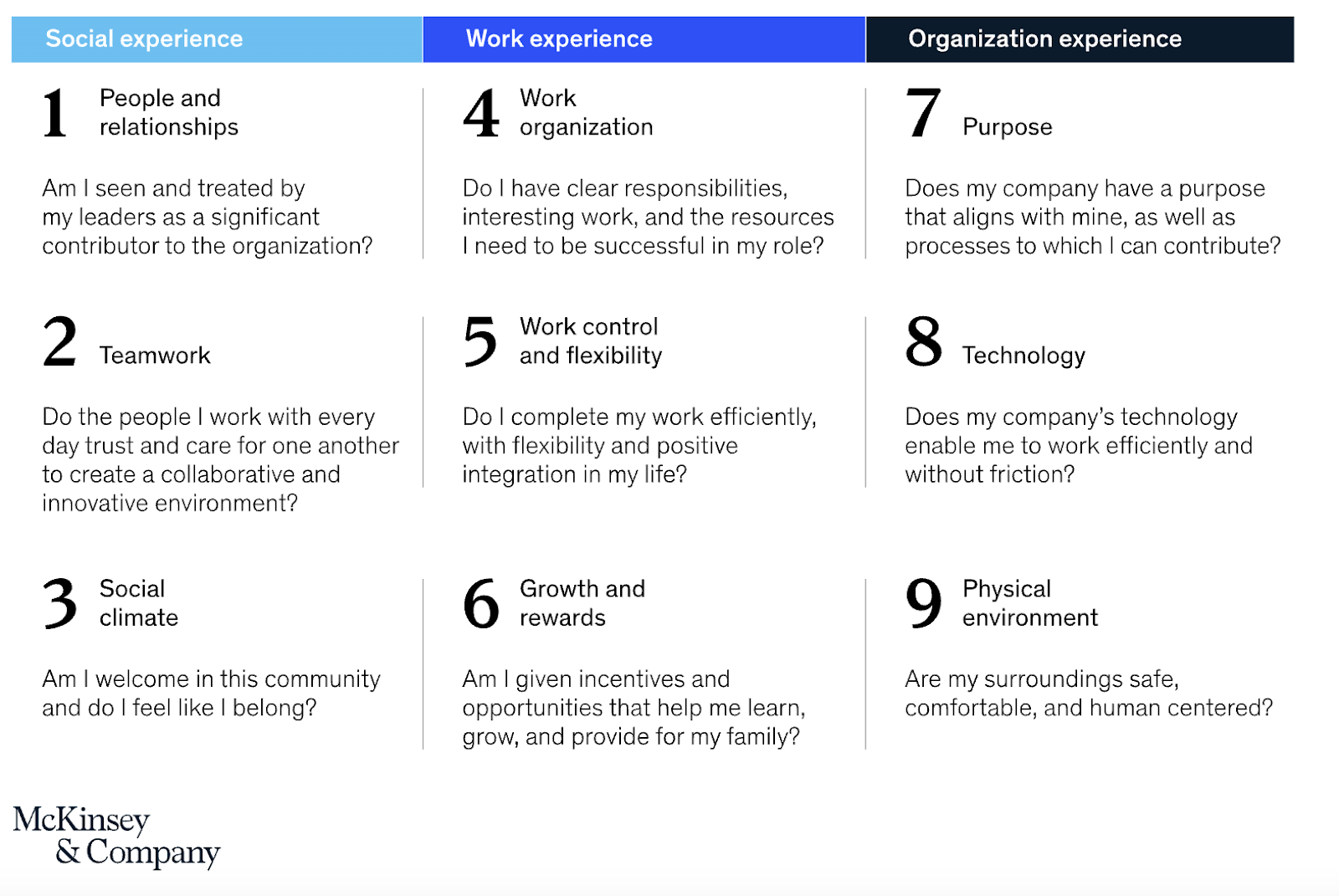
DEX comes under the umbrella of employee experience (EX). But we’d argue that, in a digital workplace, DEX isn’t just part of the EX picture. It’s integral to it. In fact, we can relate DEX to nearly all of the nine EX elements identified by McKinsey.
an employee’s sense of growth, purpose, and motivation
how employees feel about their productivity and efficiency
The company intranet is inevitably a big part of employees’ digital experience. And when you replace a traditional intranet with modern software, designed to meet the expectations and needs of today’s employees, you impact DEX in all of the following ways.
Enhanced communication
These days, we rely on digital communication tools to connect frontline, hybrid, and remote working teams. It’s important to EX that teams get the same level of connection and knowledge sharing, and the same sense of belonging, that they’d get working face-to-face.
Modern intranet software is built with team communication at its core. It understands that, in a digital workplace, informal water cooler chats aren’t always possible.
So it provides teams with communication tools that create a sense of physical togetherness, even when teams work disparately.
With Blink Chat, for example, employees can message each other in real-time. They can chat one-on-one or set up Group Chats for multiple team members. Within chats, employees can send messages, send documents, and even start online voice or video meetings, straight from the app.
But the modern intranet doesn’t just facilitate peer-to-peer communication. It also gives managers the communication tools they need to enhance the employee experience.
This is where the Blink Feed comes in. Via a familiar, social media-style feed, leadership can post company-wide communications. They can guide company culture and broadcast important news, motivating and informing employees in the process.
Employee techquity
Employee techquity is achieved when frontline workers have equal access to the digital tools, resources, and people they need to succeed. Older intranet systems tend to leave frontline and remote workers behind. They fail to address many of the key challenges faced by frontline teams.
This means frontline and remote employees miss out on the opportunities afforded to desk-based staff. They find it harder to advance in their careers, they don’t always have access to the same tools, tech, and training, and they can end up feeling disconnected from company HQ.
A modern, mobile-first intranet helps to create a fairer working environment. All employees get to use exactly the same functions and features, whether they access the platform via a desktop computer or a smartphone device.
A modern intranet is easy to use, so frontline workers can dip into internal comms during a busy work day. It also acknowledges the fact that many frontline workers don’t have a company email address, so provides alternative login methods.
By providing an equal digital experience for all workers within your organization, everyone gets the tools they need to do their job — and everyone enjoys a sense of connection and belonging.
Employees enjoy a better workplace experience when they feel they’re working to the best of their ability.
In a digital workplace, this means having the right information, along with the right collaboration and productivity tools. And this is another area of DEX that a modern intranet can help with.
A modern intranet acts as a content hub for your organization. But unlike old intranet software, this new style of content management system is well-organized and user friendly. It’s easy to find and read policy documents and to collaborate on files with co-workers.
Just take a look at the Blink Hub. It’s a content management system that puts policies, training materials, and manuals in one convenient, easy-to-access location.
A drag-and-drop interface makes it easy to add content. And because the Blink Hub is available via desktop and mobile apps, every member of your organization can access it.
A modern intranet can also provide self-service functions, another big plus for the digital employee experience.
When employees can book shifts, request annual leave, register for a training course, and access pay stubs all from the same platform, work admin becomes much less of a headache.
Employee engagement
Engaged workers feel emotionally connected to their work and co-workers. They feel aligned with company values and empowered to work productively.
A poor digital employee experience gets in the way of engagement. But there are lots of ways that a positive DEX — supported by a modern intranet — can enhance it.
The social features of a cutting-edge intranet — like social feeds, discussion forums, and employee profiles — help employees build meaningful connections with people at all levels of your organization.
Employee recognition and reward functions within the intranet also boost engagement. Employees understand their goals and how these goals relate to the overarching company mission. A culture of recognition and rewards — made easy with intranet tools — then incentivizes them to meet their objectives.
Another way that your intranet can improve employee engagement is with employee personalization.
Workers get to personalize the platform dashboard to make it more relevant and engaging. Admins can adapt content too, tailoring it to the needs of workers at each stage in the employee lifecycle.
Analytics and feedback
Modern intranets make it easy for you to gather information on the digital employee experience. You can launch surveys, send out forms, and dive into the analytics provided by your platform.
This is a huge bonus to your DEX strategy. Because you don’t need to stab in the dark. You have all the data you need to make targeted EX improvements.
View data on employee engagement, satisfaction, and retention. See what content performs best to improve your content management strategy. Understand how your teams interact, identifying co-worker relationships that need a little TLC.
A tool like Blink Analytics allows you to really drill down into the data. You can segment it based on team or location. So you understand exactly how your digital workplace is working for each member of your organization.
Simplicity
Some organizations have approached the challenge of digital transformation by acquiring tech tools for every business function. But this isn’t an effective way of doing things.
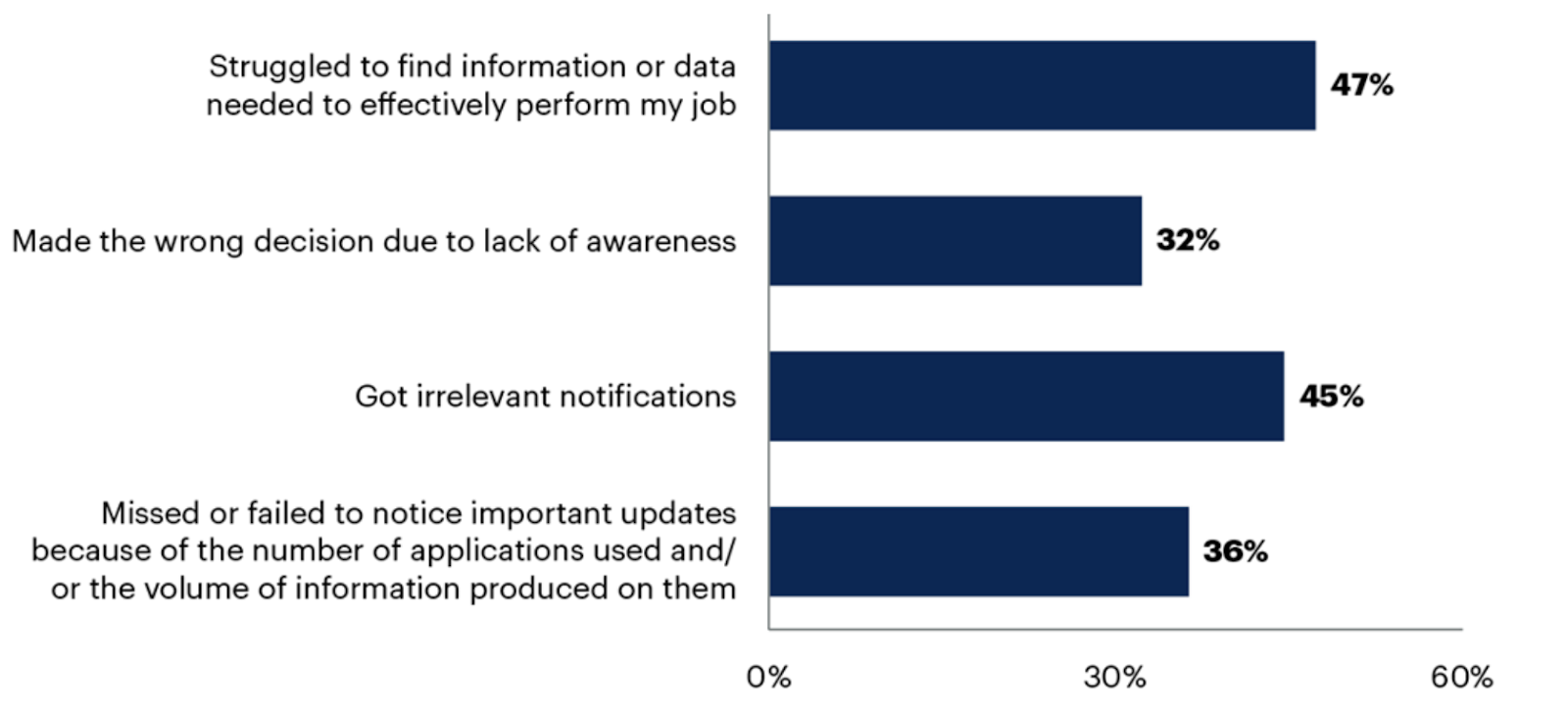
Gartner research shows that application sprawl (when workers are expected to use multiple digital tools) turns up the volume without improving communication.
Simplifying and streamlining the technology you use can therefore have a huge impact on the digital employee experience.
When workers have a single, go-to platform, there’s less friction. Employees aren’t constantly pinged with notifications from multiple apps. They don’t have to familiarize themselves with different interfaces. And it’s easy to find the information and tools they need.
Choosing the right modern intranet
We’ve covered all of the reasons that a modern intranet might benefit your organization. But with numerous intranet options out there, how do you choose the right one for your business?
Let’s take a look at a couple of questions you can ask when looking for intranet software that meets the needs of your organization and employees.
Is the software built to scale?
An intranet is a big investment of time and money. It also quickly becomes a central part of your company operations. So you don’t want to be changing it in a hurry.
When choosing an intranet, look for a solution that can grow with your business. Consider whether an intranet contender will continue to meet your needs if you experience a period of rapid growth and need to take on lots more staff.
Scalable intranets offer bespoke pricing for enterprise clients (per-user pricing can become unaffordable as your team grows). They’re also cloud-based, so you don’t have to rely on on-premise infrastructure when you need to expand capability.
Some other considerations to bear in mind? You need access controls suited to large teams, the option to create communication channels for each team or department, and the right level of security and support for a bigger organization.
Is mobile access a priority?
If you have any workers who don’t spend their workday sitting behind a desk, then a mobile-first intranet is the only logical choice.
On-premise solutions aren’t always accessible via mobile devices. You may even find that remote desk workers, using a laptop or desktop computer, have to jump through VPN hoops to access intranet content.
A mobile-first intranet is designed to work well — and provide the same features — over any device and from any location. So it’s particularly useful for frontline teams who need to access internal info on the go, using their smartphone.
Does the solution provide analytics?
The best intranet solutions give you the analytics and reporting features you need to measure the success of your new platform.
They provide data on employee engagement, content performance, user behavior, employee retention, and employee satisfaction. With real insight, you can identify areas for improvement and make targeted changes.
Only shortlist solutions that offer robust analytics functions. They should be able to provide data on a wide range of metrics, allow you to segment data by a variety of user groups, and provide real-time data. They should also present all data in a visual, easy to understand way.
Does the intranet integrate with your existing technology?
One of the key benefits of a modern intranet is its simplicity. It brings all of the communication and collaboration tools your digital workplace needs into the same platform.
The ideal intranet will meet your business needs in terms of two-way communication, content management, and collaboration. But it should also integrate with any of the tech tools you already use.
You need to know that any payroll, project management, or customer service software can integrate seamlessly with your intranet. And that these tools will continue to work just as well as before.
A new intranet shouldn’t negatively impact the adoption of your current tools. Instead, streamlining your digital tools should actually improve uptake.
Is the intranet user friendly?
An intranet only benefits your company (in all of the ways listed above) if your employees actually use it. So you need a solution that is intuitive and easy to learn, even if your team isn’t super tech-savvy.
Look for an intranet with a user friendly interface. It should feel familiar even if you’ve never used it before. Also, ensure it includes all of the self-service and search functions that make life easy for your teams.
User friendliness is particularly important for frontline teams. Working away from a desk, often with limited time for company comms, your intranet needs to be so easy and engaging that these remote, time-poor workers choose to open the app and check in.
When conducting your software search, it can be helpful to look at adoption and intranet usage stats. If other organizations, with a similar structure to yours, have managed to persuade their workers to use a particular intranet solution, then the platform will probably work well for you too.
Ever since its introduction in the 1990s, the intranet has been an integral part of company operations. But today, organizations are moving away from older intranet versions to embrace a newer, slicker, more effective modern intranet.
A modern intranet supports the creation of a truly digital workplace. It gives frontline, remote, and office-based teams everything they need to work happily and productively. Because it provides a beautiful interface, designed to meet the needs of digital workers, employees actually enjoy using it too.
Choose the right modern intranet and you’ll improve the way your teams communicate and collaborate. You’ll improve DEX and employee engagement, so employee retention gets easier.
You’ll also avoid some of the pitfalls of digital transformation, preventing application sprawl by making all tech tools available via the same user friendly dashboard.
For frontline organizations, the modern intranet really comes into its own. Mobile-first, intuitive design with a real-time communication focus, ensures everyone – whether they work on the frontline or in an office – has access to the tools and information they need.
If you’re ready to benefit your employees and your organization by adopting a cutting-edge intranet solution, take a look at Blink —– a platform designed specifically for frontline teams. Blink does everything a modern intranet does, and more.
Employees get a social feed and a content hub. They can access self-service functions, make their voice heard via company-wide surveys, and receive recognition for a job well done.
As an organization, you can count on analytics and top-notch security. Blink also integrates with many of the most popular workplace apps out there, so it fits seamlessly into your workflow.
Blink has all the tools you need to make your frontline organization more connected, collaborative, and successful. So why not book a demo to see Blink in action?
Intranet (n): dusty, desktop-only internal website your company set up years ago. Hard to navigate. Rarely updated. Mostly ignored.
Sound familiar? Then your business is missing a huge opportunity.
Modern intranets — especially mobile-first ones like Blink — are intuitive, engaging, and built for the frontline and the desk-based workforce.
They’re not just document libraries — they’re a vibrant digital hub, where employees can access information, connect with each other, and feel part of company culture.
So what exactly can an intranet do for your organization? Here are 15 powerful ways to put yours to work in 2025.
What are the applications of an intranet?
There are lots of business-boosting ways to use your intranet. These include:
Sharing company news and updates
Connecting co-workers
Amplifying company culture
Providing access to docs and resources
Easy employee reporting
Shift scheduling
Automating routine tasks
Unifying workplace tools
Viewing pay stubs
Enabling HR self-service
Tracking training and employee performance
Recognizing employee efforts
Inviting employees to company events
Conducting employee surveys
Keeping tabs on business metrics
Ready to take a closer look at each of these intranet uses? Let’s dive right in.
Uses of an intranet for internal communication
A modern intranet provides all the functionality you need to run a successful internal communications strategy. From a news feed to instant messaging to scroll-stopping, social-style posts, here are some great ways to use an intranet for internal comms.
{{mobile-desktop-main="/image"}}
#1. Sharing company news and updates
Forget the company noticeboard. Share updates that actually get seen.
Putting company news on your intranet keeps everyone on the same page. So it’s easier to align on tasks, projects, and overarching business goals.
On a modern intranet, company updates are best suited to the news feed. Here, you can serve up snippets of scrollable content. You can also segment employees by location, role, team, and tenure to ensure that news feed content always feels relevant.
To get your most important messages to cut through, put sticky messages at the top of every employee’s news feed or intranet dashboard. You can even request a read receipt so you can be confident that vital safety announcements and policy updates have been seen.
Want to reach the whole workforce? A mobile-first intranet makes company news available to every employee's smartphone, while push notifications draw their attention to the updates that matter most.
#2. Connecting co-workers with instant messaging
Does your internal comms strategy start and end with email? In 2025, there are smarter, more inclusive ways to connect and engage your workforce.
Email-only communication causes inbox fatigue and poor employee engagement. It provides limited analytics and insights. And it excludes those without a company email address — typically all frontline employees.
{{mobile-chat="/image"}}
Instant messaging via your intranet platform is an excellent alternative. In fact, more than 40% of employees in the US already communicate via instant messaging at work.
The best solutions mirror the messaging experience employees enjoy on tools like WhatsApp. They provide a fast, secure, and intuitive way to conduct real-time conversations with managers and co-workers, over 1-to-1 or group threads.
They also support a streamlined experience, where employees can share links and documents — and even launch a video meeting — right within the app.
A mobile-first intranet makes this functionality available to frontline employees, as well as desk-based staff. It connects co-workers, supporting knowledge-sharing and peer support, even when employees work in different locations.
#3. Amplifying company culture
If you want to reinforce company culture and values across your organization, a modern social intranet is just the right tool.
It comes with interactive, social-media-style features that support the sharing of informal, authentic, and engaging content. Think behind-the-scenes videos, snaps of the latest team lunch, or a post to celebrate a co-worker’s birthday.
Some top social intranet tips? Use your intranet to publish Stories (short-form videos that are great at grabbing attention). Create hashtags to highlight company values. And encourage employees to contribute their own relatable content.
{{mobile-stories="/image"}}
You can also create dedicated Communities based on job function, hobbies, or DEI interests. These virtual spaces foster a sense of belonging and connection, particularly among dispersed and hybrid teams.
#4. Providing access to docs and resources
Document sharing has long been a standard intranet feature. But, with a new-and-improved modern intranet, you can take that functionality to the next level, offering easy access to documents and resources via a user-friendly content hub.
Here, employees can use intuitive search functions to find exactly what they’re looking for. Whether they’re onboarding or just refreshing their knowledge, they can access company policies, read FAQs, and learn about processes.
You can also surface useful content on every dashboard, personalizing the experience so employees see content that’s relevant to them and their roles.
And content management? That’s easy too. Admins can see at a glance which resources need to be updated, so it’s easy to plan revisions into the content schedule.
Uses of an intranet for productivity
The best intranets support employee productivity. They digitize paper processes and automate manual tasks, saving time in every employee work day. Take a look at these intranet uses for inspiration.
#5. Easy employee reporting
Rather than filling in paper forms — or waiting till they see their manager in person — employees can use digital forms on your intranet to streamline the reporting process. They can use your intranet to:
Request replacement IT equipment
Report vehicle or machinery faults
Report a workplace accident
These messages reach relevant teams and managers quickly and securely, no matter where an employee happens to be at the time of filling out the form. So it’s a great way to improve reporting and compliance.
#6. Shift scheduling
If your intranet doesn’t work for frontline employees, your frontline managers are probably feeling pretty overstretched. They’ll be spending a lot of time keeping deskless workers up to speed — and organizing shift schedules.
But set your intranet up for shift scheduling and you save hours of manager time. Employees can log into the intranet via their smartphones to view and swap upcoming shifts, without supervisors having to micromanage the process.
The end result? More filled shifts. A happier, more empowered workforce (who enjoy better work-life balance). And lower stress levels for your frontline managers.
#7. Automating routine tasks
A modern intranet often comes with built-in automation and AI tools that free your people to focus on value-add activities.
Need help drafting a post for the news feed or replying to a tricky comment? Let AI offer inspiration. Want content tailored to every employee? A personalization engine can deliver it, straight to their dashboard.
You can also supercharge search with AI-powered results, recommend resources, and provide instant support with the help of AI chatbots.
Automation is another key feature. You can automate employee journeys. From onboarding nudges to compliance reminders, PTO requests to training alerts — workers receive the right communications at the right time.
#8. Unifying workplace tools
Tired of juggling logins? Sick of toggling between tabs?
When an intranet has deep integrations with the other workplace software you use, it acts as a digital front door for your organization. It’s a user-friendly entry point for everything your people need.
Add in single sign-on technology and employees only have to remember one set of login details to access HRIS, CMS, project management, and payroll software.
This reduces pressure on your IT team — who no longer spend their days dealing with password reset requests. It also creates a joined up digital employee experience, where everything your teams need is just a couple of clicks away.
Uses of an intranet for HR
When your intranet is built just right, HR gets so much easier. With automation, self-serve tools, and seamless alignment with internal comms, you free your HR team from repetitive tasks and allow them to focus their attention on more complex tasks.
#9. Viewing pay stubs
A modern intranet makes it easy for employees to view and download their pay stubs whenever they need them, without submitting a request or chasing payroll.
Whether integrated with your existing timesheet or HR system — or available via built-in intranet functionality — this feature saves time on both sides and gives employees the financial visibility they need.
#10. Enabling HR self-service
A well-designed intranet empowers employees to take care of common HR tasks without sending an email or getting on the phone with your HR team.
They can:
Make time-off requests
Activate benefits and access benefit information
Claim business expenses
Book approved travel and accommodation
By digitizing these processes you make them more convenient. You reduce the need for complex and error-prone paper processes. And you lighten the workload of both employees and HR teams.
Make these features mobile-friendly and they’re then equally accessible to both desk-based and frontline staff, ensuring no one’s left behind.
#11. Tracking training and employee performance
Learning and development is easier to manage when your intranet does some of the heavy lifting.
With the right integrations, employees can access training programs directly from their intranet dashboard. From onboarding materials to ongoing professional development, it’s all in one place.
Key modules can be surfaced automatically, while news feed posts and push notifications can help highlight upcoming training sessions. Compliance training on the horizon? Use priority posts with required acknowledgment to ensure nothing gets missed.
Intranets can also support performance management. Progression plans, KPIs, and development conversations can be logged and tracked in a central location, making it easier for employees to understand expectations and for managers to support growth.
Uses of an intranet for employee engagement
A modern intranet can actively support employee experience — and measure your impact too. Here’s how to use your intranet for employee engagement.
#12. Recognizing employee efforts
Recognition is a powerful motivator. In fact, 82% of employees think recognition plays a significant role in their satisfaction at work.
Chances are, your organization already has some form of employee recognition scheme in place — an awards program or a performance-related bonus.
But — with the help of your intranet — you can weave recognition into the daily interactions of your organization, embedding it in company culture.
You can use your intranet comms channels to celebrate employee birthdays and anniversaries. You can encourage both managers and co-workers to spotlight the hard work of employees.
Link recognition to a rewards program — where employees can exchange recognition points for gift cards, charitable donations, or company merchandise — and you give them even more incentive to bring their A-game.
#13. Inviting employees to company events
Whether it’s a town hall, a team-building session, or a virtual Q&A, intranets make it easy to spread the word and manage attendance for workplace events.
You can:
Target event invitations by location, department, or role
Add RSVP functionality and calendar integration
Remind employees of upcoming events via the intranet news feed
Create dedicated event pages to keep attendees informed
Send push notifications if event details change
By using these intranet functions you simplify the process for both employees and organizers — and avoid events slipping under the radar of their target audience.
#14. Conducting employee surveys
Another modern intranet feature you should be making use of? Employee surveys.
Surveys are one of the simplest but most effective ways to listen to your workforce — and a modern intranet can help you launch them regularly and at scale.
When your intranet has an in-built or integrated survey function, use it to take the pulse of your organization, gathering insights on engagement, satisfaction, or specific initiatives.
And, whether it’s a quarterly deep-dive or a quick-fire poll, make surveys easy to complete from any device — including mobile — so participation stays high.
Once the results are in, you can use intranet analytics and reports to make sense of employee responses in super-fast time. So it’s easy to spot emerging issues and make meaningful changes to the employee experience.
#15. Keeping tabs on business metrics
Intranet analytics reveal a lot about your organization. They tell you how employees are interacting with your intranet — and each other.
Are some tools underused? Which channels are most effective? Where are the drop-off points? Analytics shine a light on it all.
With this data — in tandem with employee feedback — you can improve less popular intranet features, add new functionality, and create an even better user experience.
The best intranets also help you keep tabs on important business metrics like:
User engagement
Employee satisfaction
Employee retention
Productivity
These insights don’t just help you optimize your intranet — they support smarter decision-making across your organization.
By tracking trends over time, you can spot shifts in engagement, identify potential issues early, and measure the impact of new initiatives. You can view data holistically, getting to know the levers that make the most difference to the employee experience and business goals.
What will you do with your intranet in 2025?
The best modern intranets do all the above and more. They’re the digital and social hub of your organization, providing employees with the tools, comms, and connections they need to thrive in the workplace.
But not every intranet makes the cut. Legacy intranets are struggling to keep up with the latest intranet trends.
Typically, they have clunky mobile apps. The user experience lags behind that of consumer-grade tools. And you need additional software to fulfill all the needs of your organization.
Look for modern, mobile-first tools that support every employee — whether they’re behind a desk or on the frontline. Aim for an exceptional user experience and all the functionality listed above.
One platform. All the tools. And an intranet your employees will love.