Communicating Change in the Workplace: 6 Best Practices
Master change communication with 6 best practices covering storytelling, visual comms, feedback channels, and building a change communication plan.
Jess DeVore
Published:
September 17, 2023
Last updated:
December 12, 2023
What we'll cover
A telltale sign of whether an organization will survive and thrive into the future is its adaptability.
That’s because sooner or later, every organization will go through a big change that impacts its employees.
It may be a merger, a growth slump, an acquisition, a leadership replacement, or a company-wide policy update. To make it work – to adapt and thrive – employees need to be aligned with a company’s change efforts. This is especially true for frontline organisations.
Sadly, when it comes to communicating change, many organizational change initiatives fail miserably. A recent study by Gartner shows that only 34% of all change efforts are successful.
We’re not big on fancy jargon. So let’s keep it simple. Change communication is the process of keeping your workers updated on your change initiatives throughout a period of change.
How you go about communicating change can help employees and other stakeholders understand:
What is being changed
Why the change is necessary at this time
What’s the scope of your change efforts
How the change will affect them
What steps are required from their side
Whether you’re adopting new technology, updating a part of a business operation, or shuffling leadership, communicating change helps workers shift from where they are to where they need to be in the future.
Understanding the change communication model
If you want your change initiative to bear fruit, your workers should go through the following phases.
Awareness: informing employees about the coming change. This should be done through clear and relevant messages distributed through internal communication channels.
Understanding: helping employees what, why, and how of the change.
Acceptance: supporting employees in accepting the upcoming change effort and act in accordance with it. This will almost certainly require two-way communication.
Commitment: making sure that communication keeps flowing until the new activities become the norm, to reach full commitment.
Each of these phases is important for a smooth transition. If you rush the process and skip a phase you will encounter resistance. There are no shortcuts.
So the big question is: how can you best meet the needs of workers during each phase? We’re glad you asked. Here are some tips to help you streamline your change initiatives.
Communicating change in the workplace: how to do it right
Use visual communication
Visual communication relies on visual aids to convey information – graphs, maps, charts, infographics…
Images and videos are visual forms of content too. TechSmith’s research shows that using them saves time and leads to faster understanding than text on its own.
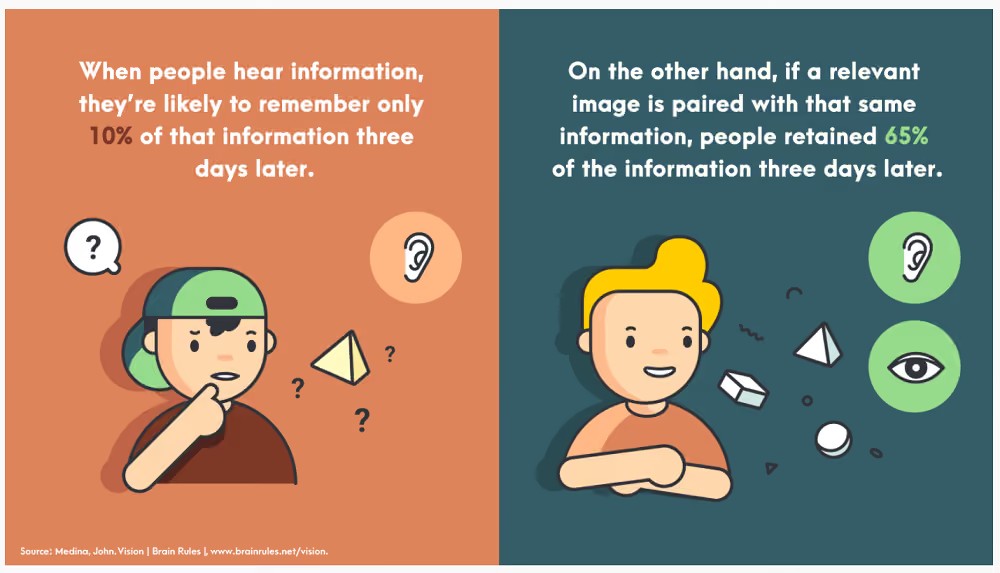
Visuals can help you communicate key data in a way that it’s easily digestible, comprehensible, and memorable.
Chances are your company is already using visualization in many areas. From the emoji that a coworker shares with you to the poster in the hall depicting Covid precautions, you probably come across a variety of visuals every day. So it’s only a matter of extending the same creativity to your change communications.
On top of that, tools like Canva, Piktochart, and Visme that have recently flooded the market allow even non-designers to create stunning visuals in no time.
Once you have created the visual content for communicating change, use a platform like Blink (which has a newsfeed and content hub) ensure smooth distribution and ready accessibility.
Bring in video communication
Videos are among the most engaging communication formats. Viewers retain 95% of a message when the message is conveyed with a video, as compared to just 10% from plain text.
If the thought of creating a video is conjuring images of complex video editing software in your head, worry not.
Just like with graphics, you don’t need to be a video-mixing pro to create engaging clips. What matters is that your videos are genuine and authentic – they don’t need to be slick and polished.
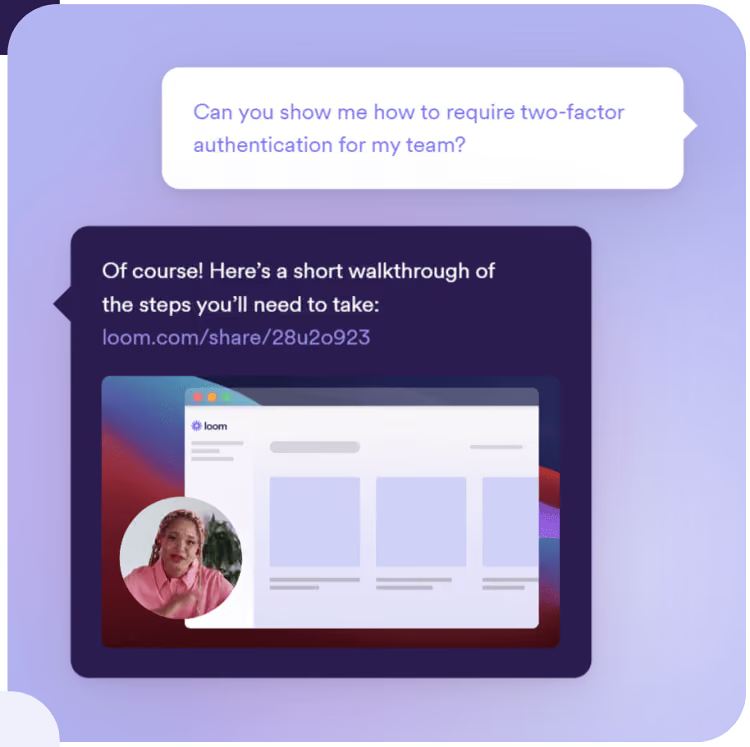
Tools such as Snagit, Piktostory, and Loom make it really easy to record, edit and share videos with employees in your organization.
Communicating change in the workplace: 6 best practices 1
Don’t forget face-to-face channels
It’s no secret that people are increasingly working remotely and relying on digital communication platforms to meet and keep in touch. In many ways, that’s a good thing.
But change, no matter how small, is a sensitive topic. When communicating change, it’s not just about what you’re saying, but also about how you’re saying it – the non-verbal signals you, and your employees, send out contain important information.
Take the example of a global manufacturer who held a meeting of about 200 workers right after a reorganization. There was an unease in the crowd, and when the VP got up to deliver his speech, he spotted this and took it into account: instead of embarking on his presentation, he started by addressing the elephant in the room.
He told the workers that he understood how they were feeling. Uncertain. Sad. Scared. He expressed honest, heartfelt sorrow over the senior management’s distress about letting good people go. He validated what the employees were feeling.
Had this been a virtual meeting, the VP probably wouldn’t have caught the non-verbal signals of workers’ mental and emotional condition.
Communicating change in the workplace: 6 best practices 2
So whenever possible, include in-person communication in your change management communication process. Tune in to what preoccupies your employees so you can respond genuinely. This is especially important if they are frontline workers; make sure they feel seen, heard and taken into account.
Incorporate the principles of storytelling
In the early 1980s, the airline industry went through a tough time. Scandinavian Airlines was hit particularly hard: it was facing a loss of $20 million.
To turn itself around, the business decided to make a big change in its strategy, the core of which was to focus more on business travelers. But changing the mindset of its 20,000 workers was not going to be easy.
So what did they do? The management sent a short handbook to all the employees with a visual story communicating the change. The booklet covered what the company was going through, its future goal, and how workers could help the organization get through its struggles.
Along with other change communication efforts, this approach helped the company increase its earnings by $25 million in the first year, and $80 million overall.
Stories can go a long way in reducing the fear and uncertainty associated with your change initiative, and rally your workers around shared objectives.
Change is stressful. 73% of employees affected by change report experiencing moderate to high stress levels.
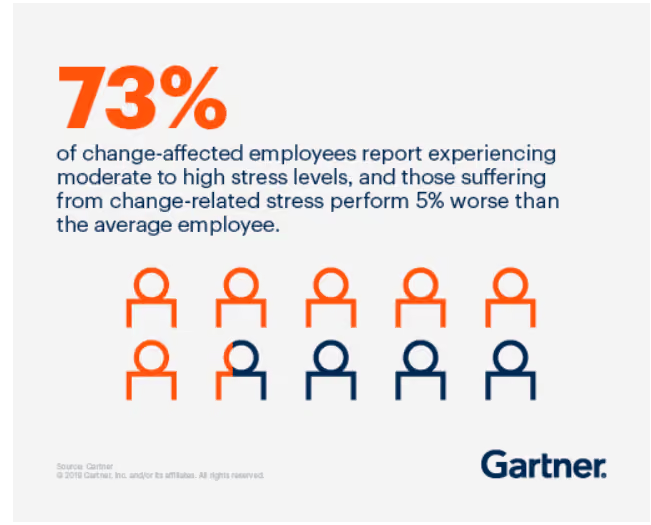
When going through a transition, employees want to feel heard and validated. They should be able to share their concerns, feelings, and experiences, and raise questions.
In-person chats go a long way in giving workers a sense of being included. If that’s not possible, or in larger companies, two-way digital communication channels can make a big difference. Either way, the unspoken message you want to convey is that the management and the employees are in this together.
Create a change communication strategy
Your employees will feel reassured and get on board much faster if they have a clear view of exactly what’s happening when, and if they feel that they have a voice.
The best way to embark on a change process is to start with a change communication strategy that helps workers see what lies ahead. Not knowing generates anxiety; being in the loop alleviates it.
A proper change communication strategy will help you distribute timely, consistent, and relevant information, along with mechanisms for workers to share feedback and raise questions.
Communicating change in the workplace: final thoughts
Communicating change takes time and effort but it is often worth it. When communicated skilfully, a change effort can shift gears and successfully move your company into a desired future state.
Many organizations fail at change management because they treat it as a set-and-forget process. Don’t make that mistake. When communicating change, make sure to hammer home your key messages not just once, but again and again. Keep communicating until the change becomes second nature.
If you make your workers the protagonists in the story of your change, you’ll see a real willingness on their part to adapt and contribute.
If you are looking to implement effective change communication, schedule a demo to learn about how Blink can help you drive successful organizational change with efficient internal communications.

A telltale sign of whether an organization will survive and thrive into the future is its adaptability.
That’s because sooner or later, every organization will go through a big change that impacts its employees.
It may be a merger, a growth slump, an acquisition, a leadership replacement, or a company-wide policy update. To make it work – to adapt and thrive – employees need to be aligned with a company’s change efforts. This is especially true for frontline organisations.
Sadly, when it comes to communicating change, many organizational change initiatives fail miserably. A recent study by Gartner shows that only 34% of all change efforts are successful.
We’re not big on fancy jargon. So let’s keep it simple. Change communication is the process of keeping your workers updated on your change initiatives throughout a period of change.
How you go about communicating change can help employees and other stakeholders understand:
What is being changed
Why the change is necessary at this time
What’s the scope of your change efforts
How the change will affect them
What steps are required from their side
Whether you’re adopting new technology, updating a part of a business operation, or shuffling leadership, communicating change helps workers shift from where they are to where they need to be in the future.
Understanding the change communication model
If you want your change initiative to bear fruit, your workers should go through the following phases.
Awareness: informing employees about the coming change. This should be done through clear and relevant messages distributed through internal communication channels.
Understanding: helping employees what, why, and how of the change.
Acceptance: supporting employees in accepting the upcoming change effort and act in accordance with it. This will almost certainly require two-way communication.
Commitment: making sure that communication keeps flowing until the new activities become the norm, to reach full commitment.
Each of these phases is important for a smooth transition. If you rush the process and skip a phase you will encounter resistance. There are no shortcuts.
So the big question is: how can you best meet the needs of workers during each phase? We’re glad you asked. Here are some tips to help you streamline your change initiatives.
Communicating change in the workplace: how to do it right
Use visual communication
Visual communication relies on visual aids to convey information – graphs, maps, charts, infographics…
Images and videos are visual forms of content too. TechSmith’s research shows that using them saves time and leads to faster understanding than text on its own.
Visuals can help you communicate key data in a way that it’s easily digestible, comprehensible, and memorable.
Chances are your company is already using visualization in many areas. From the emoji that a coworker shares with you to the poster in the hall depicting Covid precautions, you probably come across a variety of visuals every day. So it’s only a matter of extending the same creativity to your change communications.
On top of that, tools like Canva, Piktochart, and Visme that have recently flooded the market allow even non-designers to create stunning visuals in no time.
Once you have created the visual content for communicating change, use a platform like Blink (which has a newsfeed and content hub) ensure smooth distribution and ready accessibility.
Bring in video communication
Videos are among the most engaging communication formats. Viewers retain 95% of a message when the message is conveyed with a video, as compared to just 10% from plain text.
If the thought of creating a video is conjuring images of complex video editing software in your head, worry not.
Just like with graphics, you don’t need to be a video-mixing pro to create engaging clips. What matters is that your videos are genuine and authentic – they don’t need to be slick and polished.
Tools such as Snagit, Piktostory, and Loom make it really easy to record, edit and share videos with employees in your organization.
Communicating change in the workplace: 6 best practices 1
Don’t forget face-to-face channels
It’s no secret that people are increasingly working remotely and relying on digital communication platforms to meet and keep in touch. In many ways, that’s a good thing.
But change, no matter how small, is a sensitive topic. When communicating change, it’s not just about what you’re saying, but also about how you’re saying it – the non-verbal signals you, and your employees, send out contain important information.
Take the example of a global manufacturer who held a meeting of about 200 workers right after a reorganization. There was an unease in the crowd, and when the VP got up to deliver his speech, he spotted this and took it into account: instead of embarking on his presentation, he started by addressing the elephant in the room.
He told the workers that he understood how they were feeling. Uncertain. Sad. Scared. He expressed honest, heartfelt sorrow over the senior management’s distress about letting good people go. He validated what the employees were feeling.
Had this been a virtual meeting, the VP probably wouldn’t have caught the non-verbal signals of workers’ mental and emotional condition.
Communicating change in the workplace: 6 best practices 2
So whenever possible, include in-person communication in your change management communication process. Tune in to what preoccupies your employees so you can respond genuinely. This is especially important if they are frontline workers; make sure they feel seen, heard and taken into account.
Incorporate the principles of storytelling
In the early 1980s, the airline industry went through a tough time. Scandinavian Airlines was hit particularly hard: it was facing a loss of $20 million.
To turn itself around, the business decided to make a big change in its strategy, the core of which was to focus more on business travelers. But changing the mindset of its 20,000 workers was not going to be easy.
So what did they do? The management sent a short handbook to all the employees with a visual story communicating the change. The booklet covered what the company was going through, its future goal, and how workers could help the organization get through its struggles.
Along with other change communication efforts, this approach helped the company increase its earnings by $25 million in the first year, and $80 million overall.
Stories can go a long way in reducing the fear and uncertainty associated with your change initiative, and rally your workers around shared objectives.
Change is stressful. 73% of employees affected by change report experiencing moderate to high stress levels.
When going through a transition, employees want to feel heard and validated. They should be able to share their concerns, feelings, and experiences, and raise questions.
In-person chats go a long way in giving workers a sense of being included. If that’s not possible, or in larger companies, two-way digital communication channels can make a big difference. Either way, the unspoken message you want to convey is that the management and the employees are in this together.
Create a change communication strategy
Your employees will feel reassured and get on board much faster if they have a clear view of exactly what’s happening when, and if they feel that they have a voice.
The best way to embark on a change process is to start with a change communication strategy that helps workers see what lies ahead. Not knowing generates anxiety; being in the loop alleviates it.
A proper change communication strategy will help you distribute timely, consistent, and relevant information, along with mechanisms for workers to share feedback and raise questions.
Communicating change in the workplace: final thoughts
Communicating change takes time and effort but it is often worth it. When communicated skilfully, a change effort can shift gears and successfully move your company into a desired future state.
Many organizations fail at change management because they treat it as a set-and-forget process. Don’t make that mistake. When communicating change, make sure to hammer home your key messages not just once, but again and again. Keep communicating until the change becomes second nature.
If you make your workers the protagonists in the story of your change, you’ll see a real willingness on their part to adapt and contribute.
If you are looking to implement effective change communication, schedule a demo to learn about how Blink can help you drive successful organizational change with efficient internal communications.

What we'll cover
Start your free trial today
See how Blink helps frontline teams stay connected, informed, and engaged.
The best modern intranet platforms for organizations ready to move beyond SharePoint
SharePoint has been a mainstay in the enterprise toolkit for over two decades. It’s a powerful document management system, deeply integrated with Microsoft 365, and often the default choice for storing and sharing internal files.
But here’s the problem: SharePoint was never built to be a communications platform.
While it excels at managing content libraries and handling compliance-heavy workflows, SharePoint often falls short when it comes to engaging employees, delivering real-time updates, and building a connected culture across modern, distributed teams.
In a world where employees expect internal tools to be as intuitive and engaging as the apps they use outside of work, SharePoint can feel clunky, outdated, and hard to navigate—especially on mobile.
That’s why more organizations are seeking SharePoint alternatives that are easier to use, faster to deploy, and actually drive adoption. Whether you’re leading HR, IT, or Internal Comms, this guide will help you find a platform that fits how people work today—not how they worked in 2005.
Below, we break down the top 10 SharePoint alternatives in 2025—from modern employee apps to full-featured intranet platforms—so you can choose the right solution for your team.
#1. Blink
Best for modern organizations that want one app for everything work-related
Blink is a next-generation employee platform that combines intranet, internal communications, and essential tools in one mobile-first app. Unlike SharePoint, Blink is designed with the end user in mind—delivering a personalized, social-style experience that’s as easy to use as your favorite consumer apps.
It works across all employee types—desk-based, remote, frontline, and hybrid—giving everyone a single access point for updates, resources, and action.
Standout features:
Personalized feed with dynamic content
Native mobile and desktop experience
Chat, surveys, micro-apps, and file sharing in one place
Fast rollout with minimal IT dependency
Rich analytics to track engagement and reach
Instagram at work features like Stories
Ideal for: Mid-to-large organizations ready to unify communications, culture, and tools in a single platform. Limitations: Not focused on traditional document-heavy intranet use cases.
{{watch-video="/callouts"}}
#2. Interact
Best for internal comms teams building structured, branded intranets
Interact is a well-established intranet platform known for its structured content management, branded design options, and targeting capabilities. It helps internal comms teams deliver timely, relevant content to the right audiences, while offering tools for feedback and measurement.
Standout features:
Drag-and-drop design tools
User segmentation and targeting
Feedback features (likes, comments, polls)
Integrations with Microsoft 365 and other tools
Ideal for: Communications teams in mid-size organizations. Limitations: Mobile experience isn’t its strongest suit.
#3. Staffbase
Best for enterprise comms with campaign-style messaging
Staffbase is built for centralized internal communication at scale. With a branded employee app and features tailored to top-down messaging, it’s a strong choice for large organizations where internal communications is a dedicated function.
Standout features:
Personalized content feeds
Internal email and newsletter tools
Branded mobile apps
Communication planning and analytics
Ideal for: Enterprises with large, distributed workforces and centralized comms teams. Limitations: More focused on broadcasting than collaboration.
#4. Happeo
Best for Google Workspace-based companies
Happeo is a sleek, modern intranet designed to integrate deeply with Google Workspace. It blends intranet content, social channels, and G Suite tools into a unified interface that’s especially popular with remote and digital-first companies.
Standout features:
Real-time Google Drive integration
Team channels and social intranet feed
Drag-and-drop intranet page builder
Easy onboarding and admin
Ideal for: Teams using Google Workspace who want a polished UX. Limitations: Less relevant for Microsoft-heavy environments.
#5. LumApps
Best for complex enterprise needs and deep integrations
LumApps is an advanced intranet and employee experience platform with a strong focus on personalization, multilingual content, and integration across enterprise systems. It's a go-to for global companies that need a highly structured, configurable solution.
Standout features:
Rich personalization based on user roles
AI-powered recommendations
Microsoft and Google integrations
Multilingual and multi-brand support
Ideal for: Large enterprises with global teams and complex requirements. Limitations: High cost and long implementation time.
#6. Simpplr
Best for AI-driven content delivery and lifecycle comms
Simpplr’s strength lies in making large volumes of content feel personalized and accessible. With built-in AI and lifecycle capabilities, it helps organizations deliver the right information at the right time—especially useful for onboarding, change management, and HR comms.
Standout features:
AI-powered content targeting
Lifecycle campaigns (e.g., onboarding)
User-friendly CMS
Engagement analytics and sentiment tracking
Ideal for: Enterprises that want smarter content delivery. Limitations: More focused on desk-based teams than mobile workers.
#7. Igloo
Best for governance and compliance-focused content management
Igloo offers a more traditional intranet experience with emphasis on document control, structured spaces, and knowledge management. It’s well-suited to organizations with strict compliance, approval workflows, or audit requirements.
Standout features:
Version-controlled document repositories
Approval workflows and access control
Wiki-style knowledge base
Integration with cloud storage systems
Ideal for: Legal, finance, and regulated industries. Limitations: Interface can feel dated; not mobile-first.
#8. Jive (by Aurea)
Best for peer collaboration and internal communities
Jive prioritizes community-driven engagement. It’s a feature-rich platform that encourages social interaction, collaboration, and internal networking, with robust forums and group spaces for employee-led discussions.
Standout features:
Community and interest groups
Discussion threads and forums
Recognition and gamification
Advanced user activity analytics
Ideal for: Knowledge-sharing organizations with a culture of collaboration. Limitations: UI feels less modern; slower updates and innovation.
#9. ThoughtFarmer
Best for small-to-mid teams that want a clean, simple intranet
ThoughtFarmer focuses on usability and simplicity. It offers enough flexibility to meet most intranet needs while staying easy to use for both employees and admins. It’s known for its approachable design and personal touch.
Standout features:
Easy intranet editing tools
Staff directory and org chart
Localized content targeting
Light project and task tools
Ideal for: Mid-sized companies that don’t need enterprise complexity. Limitations: Not ideal for global scale or highly mobile teams.
#10. Basecamp
Best for teams focused on projects, not pages
While not an intranet in the traditional sense, Basecamp is a viable SharePoint alternative for small, project-driven teams. It consolidates file sharing, team comms, tasks, and scheduling into one easy-to-use platform.
Standout features:
Message boards, to-dos, and docs in one place
Calendar and schedule management
File versioning and access control
Notification control and auto-check-ins
Ideal for: Startups and small teams prioritizing execution over content architecture. Limitations: Lacks structured intranet features like targeting, workflows, or internal news.
Final thoughts: Choosing the right SharePoint alternative
The best SharePoint alternative isn’t just about replacing software—it’s about enabling a better employee experience.
Ask yourself:
Does this platform work for all employees—across roles, devices, and locations?
Is it engaging, personalized, and intuitive?
Will people actually use it?
If you want an intranet that employees love—not just tolerate—Blink is a powerful alternative worth exploring.
Employee retention is the art of holding onto your staff once you’ve hired them.
And, in 202w, it’s more important than ever.
Why?
Because companies are finally waking up to the competitive advantages of being a "people" company. A "churn and burn" approach to hiring results in poor customer service.
This is an issue, because customers are placing increasing value on good service. With smartphones, it’s easier than ever to find a competitor company to buy from. Or in the case of consumer goods, to avoid the shop altogether and order online.
Before we start.
You can hold onto employees (more or less) by treating them well. Listening to their concerns, and providing them with a few incentives to stay put.
If you’re an HR professional or a CEO, you don’t need us to tell you that. What you might find useful is an in-depth guide to employee retention in the modern workforce.
How to maximize your employee engagement efforts. And make sure there were no stones left unturned in creating the most comprehensive guide... we asked some industry-leading experts to contribute. We’ll cover:
Detail on the importance of employee retention today.
How to build effective employee retention strategies.
The exit interview, and how to turn it into your secret employee retention weapon.
Let’s begin...
Why is employee retention important?
Employee retention means "treating your employees right"; it’s an end in itself, not just the means.
From an ethical standpoint, no company should mistreat their employees. Meeting your colleagues’ basic needs and providing them with a safe and stimulating workplace? It's the right thing to do for its own sake.
But it’s more than that.
Attracting talent to your company—and keeping it once you’ve found it—has so many advantages. According to Herzberg's famous Two-Factory Theory, employee retention and employee motivation are interdependent. You can find out more about this in the Vantage Circle HR blog. A strong employee retention strategy will:
Reduce operating costs.
Improve customer service levels.
Allow you to out-compete your competitors for the best people.
The cost of high employee turnover
Hiring and firing is expensive.
Eye-wateringly expensive, to be precise. Think six to nine months salary as a conservative estimate.
Then you need to consider the impact of not having someone there to do that person’s work. That could slow down a massive project. Cause higher overtime costs as existing staff pick up their work. Or just lead to a reduction in staff morale as they struggle with increased workloads.
Companies tend to get the importance of this for salaried positions and execs. but there’s often a bit of a blind spot when it comes to their non-desk workforce and the real cost of losing an employee.
Sure, replacing a senior-level manager is more expensive than replacing a bus driver. But what happens if your bus drivers’ morale becomes so low that two or three quit per month?
It all adds up.
"Losing talented staff can also have emotional consequences on those who stay. Effectively reducing productivity by decreasing morality and motivation," says Rochelle van Rensburg of the Ezzely Blog.
"Maintaining essential talent is therefore mission-critical to organizational effectiveness for all these reasons. Staff retention puts companies ahead of their competitors, by reducing recruiting and re-skilling costs. But more importantly, by keeping the top performers, which results in all of their specialized knowledge and expertise remaining in-house."
Your mobile workforce interacts most with customers. They are the public face of your company. So, their happiness will reflect in the level of service they give your customers.
Happier, more engaged employees deliver better customer service. They also build up a bank of operational knowledge over time. This helps them respond to queries quicker and more effectively than a steady stream of new hires ever could.
The importance of employee retention in 2020
An active employee retention strategy is more important than ever. There are two key reasons for this:
Firstly, it's never been easier for customers to look elsewhere if they feel that your levels of service don’t match their expectations. We live in an age where any information you want is available via a few taps of a smartphone screen.
Dissatisfied with a hotel stay? Booking.com can recommend thousands of others.
Bad experience in a taxi? A quick Google gets you all the phone numbers of other local firms.
Poor customer experience at a theme park? TripAdvisor lists other attractions.
You get the idea.
Despite this, customers still want to be loyal. Millennials want to stick around if your brand fits in with their personal values. Don’t throw away this loyal market.
Secondly, it's never been easier to browse jobs via online jobs boards. If your workforce isn’t happy they will move. Don’t assume that they will sit in their job miserable because there aren’t any other options.
Reasons why employees leave and reasons why managers leave aren't always the same.
Your competitors may be waking up to the benefits of being a "people company." They'll more than happily snap up the staff you can't keep.
The best employee retention strategies
A strong employee retention rate is crucial to remain competitive. How you go about doing this is worth examining in some depth.
Remember - you are an employee too! As you create your employee retention strategies, keep asking yourself, "would I be happy with this?" or, "does this seem reasonable to me?"
Here are a few points you’ll need to cover when creating an employee engagement plan. Remember, the employee experience starts before the first day at the interviewing stage. To set each new starter up for success, getting the onboarding right is crucial. Want to learn more? Check out the Definitive Guide to Onboarding.
Let's quickly touch on the foundation of any working relationship: trust. As Kayla Lopez from the recruitment firm Viqtory.com reminds us. "If your employees trust you and the organization they tend to embrace the workplace; this begins before the employee is even hired. Transparency is something that we need to willingly support to gain trust. A workforce that trusts you will be engaged, a workforce that is engaged will retain. Trust is the foundation of all strong partnerships."
Now for the details...
Pay well
We’ll start with the basics.
If your pay rates don’t match with your competitors’, you’re going to have a bad time keeping hold of your high achievers.
Take a quick look at what your competitors pay for equal positions. Try and build a league table of what similar companies to you pay, and where you rank. Glassdoor is a good starting point.
Aiming for the absolute top is ideal if you can afford it, but you don’t have to offer the best salary offer out there. There are plenty of other ways to encourage your staff to stay put (more on that below), as long as you can land in the middle of the table. For someone working in a frontline job, it is difficult to give your best at work knowing you could get $5.00 per hour more for the same job elsewhere. (Even if there’s free pizza every Friday).
It’s also worth noting that even a generous wage packet won’t persuade your employees to stay if you’re otherwise a nightmare to work for. Consider this step the cornerstone of all your employee engagement efforts. Not enough by itself, but essential in building something lasting and meaningful.
Give competitive benefits
You might not be able to take it to Silicon Valley levels. (Free three-course meals for breakfast, lunch and dinner, unlimited holidays, and puppy creches).
You can offer a benefits package or a performance bonus scheme tailored to the size of your business, your budget, and your business objectives. The key is to prioritize benefits that would have a tangible difference to the lives of your employees. Add the fancy stuff on if you have money to spare.
Think about:
Childcare vouchers: we’re all aware of the struggle to find affordable childcare. Help your workforce with their work-life balance (and keep it diverse—most of the people who end up quitting jobs for childcare reasons tend to be women) by offering vouchers to help with the cost.
Health coverfor employees and dependents: an absolute must if you're US-based, although even if you live in a country which has some form of universal health care, giving employees the opportunity to go private is very appealing.
Flexible working: if the type of work you do accommodates it, flexible working is like gold dust to your staff. A "work your hours however you want" policy helps people manage childcare commitments, fit in dentist appointments, and reduce the stress of trying to juggle work and life commitments.
Lunch program: Most of the lunch break is spent buying, prepping or reheating food. Offering a tasty and healthy in-house solution, such as the online canteen Smunch, allows your employees to capitalize on their break time and share a meal together. Ultimately, this will improve your company culture and cross-departmental communication as well.
Once you’ve got the basics sorted, some nice-to-have options include:
Above average PTO allowances
Free gym memberships and cycle to work programs
Personal development funds
Develop a feedback culture to empower employees
Your employees know their workplace better than anyone else. Make the most of it.
If your employees feel involved in shaping their workplace and consulted on major decisions then they will be reluctant to leave it.
The key to this is to carry regular, easy-to-complete employee engagement surveys so you know exactly what the mood on the ground is and how to improve it.
Employees will hold an enormous amount of goodwill towards a workplace that listens to their concerns and acts on them. Equally, they will reserve a special sort of resentment for those that send out survey after survey, only to ignore the results.
It’s essential to have a solid plan in place for your employee engagement surveys, or they will backfire spectacularly.
Key pointers
Small, regular surveys are better than long, annual ones. Only giving your employees one chance per year to raise issues will result in bottled up frustrations spewing out come survey time. Not only does this result in surveys that skew unhelpfully negative, but it also means that your HR team will face an uphill struggle
Another point about designing surveys that you can respond to effectively: keep it targeted. Focus each of your quick-answer surveys on a specific area—facilities onsite, for example, or about relationships with line managers.
Use short answer questions: "yes/no" or "on a scale of 1-5" formats make it easier for people to respond immediately. Long-form feedback can be helpful, but having lots of long-answer text boxes on your survey will put people off completing it. A good compromise is to have an optional "any specific comments" box at the end of the survey.
When you’ve processed the surveys, share the results and shout about what you’re doing to act on feedback. Employees will appreciate the transparency, and it’s important to signpost what you’re doing to address the concerns they raise—or they won’t bother to participate in future surveys.
Try and create a "feedback culture" in your company by encouraging people to come forward with suggestions for improvements any time they want. Surveys highlight pain points as they are reactive; an anonymous suggestions box (either digital or real-life), on the other hand, will bring out the more innovative side of your workforce.
These suggestions might be small—a new way of organizing the break room fridge, or the introduction of free coffee Mondays—but the opportunity to improve the workplace in this way will work wonders for your wider staff’s sense of allegiance to it.
Make your workplace a fun place to work
If your coworkers are your friends, spending time at work doesn’t seem so taxing.
This is where the fun stuff comes in—the away days, lunchtime yoga, the free breakfast bar, the Christmas party...
If you have a mobile workforce, don’t forget to include them, too! They might not be in the office that often, so having regular get-togethers or breakfast clubs when shifts change is a great way to build a sense of belonging.
Obviously, base these activities on what your own workforce would like, but some ideas include:
Regular lunchtime sports clubs (running, yoga, five-a-side, badminton are good starting points)
Away days and team-building weekends.
Semi-regular opportunities for free food. Depending on the size of your team, you could offer lunch on the company each Friday, pizza parties when teams hit their targets or just because
Big events like Christmas parties and family fun days. If you run awareness weeks for things like diversity, mental health and stress, why not run some exciting events for these too?
Recognition of key milestones. If there are particularly busy periods throughout the year (like the Christmas rush for anyone working in retail or hospitality), put on an event to recognize the hard work your employees put in. This could be a full-on party, or simply just giving your staff the nod to take off after lunch on a quiet day.
This step does, however, come with a big flashing warning sign that says: don’t bother doing any of these without doing the steps listed above first.
Because these are fun and exciting, and sound super trendy when you put them on your Careers page, people often use them in place of paying a decent wage, or offering flexible working hours, or acting on employee feedback.
The exit interview - your employee retention secret weapon
One of the best ways of figuring out what’s going wrong with your employee retention efforts is asking your colleagues when they leave.
Seems counter-intuitive, and rather frustrating, doesn’t it?
And in some ways, it is. No amount of collecting and aggregating exit interview data, tweaking your employee engagement plan and making changes in your company to reduce employee turnover will change the fact that, for that particular employee, your efforts weren’t enough. For HR people and line managers, that stings sometimes.
Still, if you can take your losses on the chin, this is a real opportunity to do better for your colleagues, and identify and fix any major issues that push people to leave.
There are three main reasons why exit interviews are so effective at flagging up things that need to change:
The employee is leaving so won't hold back
Regardless of how many times you reassure your colleagues that your pulse surveys are anonymous and that helpful suggestions are encouraged, they will still be a little suspicious.
The worry that surveys aren’t really anonymous, or that speaking out about a key workplace bugbear will get them labelled as a troublemaker, will be a constant thorn in the side of your employee retention efforts.
(As a side note, if this attitude is pervasive then it might be time to take a look at your workplace culture. A little reticence is natural. An all-encompassing dread of speaking up might indicate something a little more sinister).
The exit interview is a different kettle of fish. They’re leaving. There are no raises or opportunities for promotion in the pipeline. This is their opportunity to "tell it like it really is."
Listen, even if you think they’re being unfair and bitter.
Problems brought up during exit interviews tend to have weighed heavily on an employee’s decision to leave. In other words, they’re big issues you need to address urgently.
Get the whole picture
Multiple exit interviews help build up a better picture of life on the ground.
Of course, there’s always the chance that one particular employee just, for whatever reason, didn’t have a good time.
That’s where keeping data from previous exit interviews comes in.
For example, if an employee complains about their line manager being unbearable, it might just be a clash of personalities. Equally it could be because that line manager is difficult to work for and too demanding. It’s difficult to say without further info.
So. Run some analytics.
How many other employees from that line manager’s team have left over the past year?
Did they say anything in their exit interviews?
Have they been flagged to HR for anything previously?
If so, you might want to investigate further.
This is why it’s important to conduct an exit interview for every single person that leaves the business. If you restrict it to management positions, people based in HQ, or full-time workers, you’re missing key sets of data that could be useful in improving your employee retention strategy.
Find out what went wrong
An exit interview, conducted well, helps you identify wrong turns in your employee journey map.
You’ll probably have some sort of employee journey map already.
You might call it something different. We’re referring to the plan you make that starts at the hire phase and ends with the offboarding phase when the employee leaves. This normally includes guidelines for each stage they go through with your company. For example:
Hiring:
Offer letter and contract sent
Start date agreed two weeks in advance
Onboarding:
First day: tour of premises, fire safety, welcome coffee or lunch
First six weeks: all e-learning to be completed
You get the idea. Here's a basic template you could expand on:
The exit interview provides an excellent opportunity to ask your employees about various stages in this plan, to see whether they’ve been carried out to your expectations.
Ask specifically, and don’t be afraid to go right back to the start of their employment. Whether they felt welcomed in their first weeks, for example. If they were given clear and regular feedback on their performance, and compare that to your notes on how your employee journey should pan out.
It could be that, despite your meticulous efforts in planning it, your employee journey map isn’t being adhered to by managers in the wider organisation. This could be why your employees are leaving - this map provides guidelines on how to make sure people feel safe, supported and included at work. If people don’t follow it you’re going to have problems.
Your employee journey map is important. If it isn’t being followed, you need to correct that as soon as you can. Exit interviews are the best way to do this.
How to conduct an employee retention interview
Be flexible around your employees needs
If a lot of your workforce are remote or mobile, don’t insist on a face-to-face interview at HQ.
There are several free video calling apps available, so why not make use of them? An employee is more likely to feel comfortable talking to you if you’ve made accommodations for their situation.
If they’re more comfortable talking to you, they’re more likely to be honest with you, and that’s exactly what you want.
Don’t make it overly formal
Go for a relaxed vibe. Making things too formal will only stifle conversation.
If you’re conducting a face-to-face interview, it’s a nice touch to provide some sort of refreshments; hot drinks and a pastry, maybe. The employee will appreciate the gesture, and it will encourage a more conversational feel, which is exactly what will get them to open up.
Identify the specifics to touch on
You will know, from previous exit interviews if there are any particular pain points in your employee experience.
Ask about them. You’ll then be able to establish:
Whether these are still issues
What progress you’ve made on them, and how effective your efforts to tackle them have been.
...But allow them to express their opinion too
If the structure of the interview is entirely created by you, you could miss something important.
By allowing employees space to expand on their own concerns, you give yourself the opportunity to pick up on potential issues that aren’t on your radar. Sure, a lot of this could be specific to that particular individual, but you should investigate nonetheless—otherwise you’ll never know whether it’s the iceberg tip of something bigger.
Remember: your relationship with the employee isn't over
People leave for all sorts of reasons—not all of them negative.
You might want to leave the door open for talented employees, in case they want to return at some point. Also consider that talented former employees can be great source of referrals.
These can be your company’s cheerleaders, even after they’ve left. A good exit interview can make this relationship. A poor one can ruin it.
Of course, there’s also the possibility that the employee leaving has been less than stellar. In this case you should see the exit interview as a chance to smooth things over, and divert potentially negative Glassdoor reviews or social media mentions.
Final thoughts
To summarize:
An employee retention strategy is important because it makes your employees happier. Happier, more engaged employees perform better in general, and deliver better customer service.
The cost of employee turnover is measured in increased operational costs and decreased institutional knowledge.
Bearing this in mind, the question you should be asking yourself isn’t "can we afford to expand our employee retention efforts?"
It’s "can we afford not to?"
An engaged, happy workforce with a low churn rate isn’t just a nice thing to have.
It’s not just something you can boast about on your Careers page.
It’s a competitive advantage—and people are only just waking up to this fact. Because now more than ever, people value good customer service. If you can provide that, you’ll have a serious head start on your competitors.
Blink is an internal communications tool that’s does everything your intranet does, but better. Try it out today! Request a free demo to get started.
But for the 80% of the global workforce who don’t sit at a desk, it was never designed to work.
Slack is a desktop-centric platform. It’s clunky (and sometimes completely inaccessible) for employees who are on their feet, moving between locations, and rarely sitting down at a desktop computer.
In 2026, this gap is impossible to ignore.
Frontline employees now expect workplace technology to feel as intuitive as the apps they use outside work. Fast, mobile, simple.
And they want to feel as connected to co-workers and company culture as their peers in the office.
So how do you get from here to there?
Follow in the footsteps of the many companies currently seeking Slack alternatives. Specifically, look for mobile-first employee communication tools and frontline messaging platforms.
Slack replacements for mobile-friendly team messaging are designed around the realities of deskless work.
They meet frontline employees where they’re at with the help of intuitive comms tools, available on every employee smartphone. And they make a big difference to comms, culture, and connection in a frontline organization.
In this guide, we’ll explore:
Why Slack falls down for frontline organizations
The internal comms shifts set to shape 2026
Why mobile-first employee comms is now non-negotiable
The features modern frontline messaging platforms must deliver
How Blink supports mobile-friendly team messaging at scale
If your frontline teams currently rely on workarounds, WhatsApp groups, or word-of-mouth to stay informed — this one’s for you.
{{mobile-desktop-main="/image"}}
The limitations of Slack for frontline teams
Slack is one of the most widely recognized internal communication tools in the world. But popularity doesn’t always equal suitability.
Slack was built for desk-based, knowledge worker collaboration. It has lots of great features — like desktop-first team chat, organized communication channels, and app integrations. But it doesn’t make sense for frontline workers.
Frontline workers are employees whose roles require them to work away from a desk or traditional computer. They’re the people working in manufacturing, healthcare, logistics, retail.
These employees often operate in time-sensitive, high-pressure environments. They need communication that is immediate, clear, and impossible to miss. Urgent updates. Relevant content. Highly intuitive messaging tools. And this is where Slack begins to struggle.
Here are some of the key limitations of Slack for frontline use:
Noise and information overload from chat-based streams
Inadequate support for push notifications, role-based broadcasts, and compliance features
Lack of centralized, evergreen knowledge resources suited for easy mobile access
A mismatch between desktop and mobile versions
Slack vs. frontline messaging platforms
Slack
Mobile-first frontline platforms
Mobile-first interface
✔
Desktop-first interface
✔
Fast and reliable mobile performance, even with low or intermittent internet connection
The internal comms shifts driving the 2026 Slack replacement trend
Organizations are choosing to replace Slack because internal communication is changing.
In 2026, three major shifts are reshaping how organizations connect with frontline teams — and exposing the limitations of desktop-based chat platforms like Slack.
Here’s what’s happening.
Shift #1: Multi-channel strategies
Internal comms teams are adopting a multi-channel approach. This is a strategy that combines different communication types — like proactive push channels (emails, SMS) and passive pull channels (intranets, knowledge hubs).
It means sending the right part of the message through the right channel at the right time, adding links between messages where necessary. For example, an urgent update sent via SMS may link to a more detailed policy document on your content hub.
Key actions for frontline organizations:
Implement mobile-first team communication tools
Move permanently beyond paper memos and word-of-mouth comms for frontline workers
Define the purpose of each comms channel to reduce noise
Shift #2: AI automation
In 2026, experts predict that HR and comms leaders will be evaluated on one key thing: how much time their tools give back.
AI is no longer about experimentation. It’s about execution. So there’s increasing demand for AI-powered engagement tools, continuous feedback, and automation in team messaging.
The aim? To drive productivity and smarter workflows. And to free up time for coaching, clarity, and connection.
Key actions for frontline organizations:
Find productivity tools that allow you to automate routine admin
Use AI to make sense of employee feedback, employee sentiment, and platform analytics
Use AI to create and personalize comms platform content
Shift #3: Simplified tech stacks
App overload is real.
The average employee now uses more than 100 digital tools. And frontline workers feel that burden acutely because they’re managing all those logins and tabs on a small smartphone screen.
In 2026, organizations are seeking to simplify their tech stacks. They’re looking for unified platforms that save cost, reduce complexity, reduce cognitive overload, and improve compliance.
By moving from a patchwork of point solutions to an all-in-one mobile-first employee communication platform, see fewer missed messages and improved adoption — particularly among frontline teams.
Key actions for frontline organizations:
Audit tools through a frontline lens
Consolidate around a small number of multi-functional platforms
Integrate a centralized platform with other workplace software
TL;DR: Slack is struggling to keep up with the pace of change in internal comms and the wider workplace — especially in organizations with a frontline workforce. This is why many companies are moving beyond Slack’s limitations to embrace a mobile-first employee communication solution.
The importance of mobile-first employee communication on the frontline
Mobile-first is a philosophy not a feature. A mobile-first employee communication platform is built from the ground up for smartphones. It’s not built for desktop, then adapted later as an afterthought.
For frontline teams, that difference matters. It helps to ensure simple, seamless, touch-friendly experiences for users without easy computer access.
Your retail team can catch up with company news on their lunch break. Carers can swap advice in the time between clients. Your bus drivers get urgent route updates as a smartphone notification.
You get to ditch unreliable and inefficient methods of frontline communication — desktop tools like Slack, manager phone calls, paper memos, and unsecure WhatsApp chats.
You put company comms, culture, and connection, plus essential workplace tools, at the fingertips of every employee. So you can reach, engage, and empower your frontline workers, and the rest of your workforce, too.
{{mobile-chat="/image"}}
The key messaging features frontline platforms must deliver in 2026
If you’re replacing Slack this year — and seeking a better communication solution for your frontline workforce — there are a couple of non-negotiable features you should be looking for.
Some internal communication platforms come with a mobile app. But that doesn’t mean they’re mobile-first. Truly mobile-first employee communication tools are built with smartphone users as a priority. That means intuitive navigation, clear layouts, and simple interactions — a tool that is easy to use on the go, with minimal training and zero frustration.
Employee engagement tools
Modern frontline platforms do more than simply deliver direct messages. They actively foster employee engagement. Features like employee recognition, a culture-boosting news feed, and co-worker chat tools help employees feel connected and valued, even when they don’t sit at a desk.
Two-way, real-time messaging
Two-way communication is another non-negotiable when looking at Slack replacements. Because communication isn’t effective when it’s only top-down. Frontline messaging platforms enable instant conversations so employees can ask questions, provide feedback, and collaborate with teammates in real time.
Content tailored by role
Role-based segmentation allows you to send tailored and secure communications to specific departments, locations, or groups within an organization. It ensures relevance, reduces noise, and helps to drive platform adoption. Look for communication tools that allow you to send targeted messages to your frontline employees. That way, each time they log in, they see content that relates to them.
Searchable, evergreen knowledge spaces
Another key feature of a modern frontline messaging platform is a central hub for documentation, FAQs, and resources. This ensures employees always have access to reliable information — without having to quiz managers or co-workers. And it makes workforce alignment, onboarding, and collaboration much easier.
Analytics and engagement tracking
Insights are critical if you want to understand the impact of your communications. The best platforms track message reach, engagement, and behavior patterns, giving managers the data they need to optimize communication strategies and fix gaps in understanding.
AI-based workflows
AI tools can streamline routine work. Automated reminders, shift notifications, approvals, and content summarization tools save time for managers and staff, letting them focus on higher-value work rather than repetitive tasks.
Integrations and compliance
Frontline communication tools should integrate smoothly with other workplace tools, creating a joined-up system that is easy for deskless workers to navigate — even in the middle of a busy shift. Integrations also help you maintain regulatory compliance. With features like HIPAA readiness for healthcare, secure single sign-on, and audit trails, you can stay efficient and protected while connecting teams across platforms.
{{mobile-integrations-hero="/image"}}
How Blink supports mobile-friendly team messaging for frontline workers
Blink is a mobile-first, social media-inspired employee experience platform, designed around the needs of frontline workers. It streamlines communication, engagement, and operational workflows with the help of:
A multimedia news feed
Real-time messaging tools
Content hub
Employee surveys
Employee recognition
Co-worker communities
Live streams and video calling
Push notifications
AI-powered automation tools
Analytics dashboard
Built-in compliance support
Integrations
Going way beyond the capabilities of Slack (and of a standard team messaging app), Blink gives you the tools you need to transform frontline communication, employee engagement, and company culture.
Organizations like McDonald’s, JD Sports, Dollar Tree, and Domino’s use Blink to connect thousands of frontline employees across stores, warehouses, and healthcare settings. Through Blink, they deliver updates instantly, reduce reliance on WhatsApp or personal text groups, and bring communication, knowledge, and workflows into one mobile-first platform.
Communication platforms are evolving fast — and 2026 marks a turning point.
This is the year mobile-first becomes the baseline for reaching a frontline workforce that’s short on time and always on the move.
It’s the year AI starts doing real work — cutting admin, surfacing insights, and giving managers more time to support their people.
It’s the year organizations get serious about simplifying bloated tech stacks.
Organizations reviewing their frontline messaging tools in 2026 should be thinking beyond chat alone. Because the future belongs to platforms that inform, connect, and motivate your people — all from one streamlined, easy-to-use interface.
Ready to start your search? Look for tools that provide an intuitive mobile experience, a range of comms channels, strong integrations, and clear insights into what’s actually working.
Do that, and you won’t just solve today’s communication challenges — you’ll also be ready for whatever comes next.
Looking for a modern comms tool for your modern workforce? Unlike traditional internal communication methods — like a static intranet or email — an employee communication app is engaging and user-friendly.
It supports the distribution of relevant and personalized content to every employee. And it goes beyond the desktop experience, to give remote and frontline employees access to company comms via a mobile device.
It goes without saying that an employee app can help you improve internal communications. But the impact of the best apps is much wider-reaching. They give you the tools you need to transform employee productivity, engagement, and retention, too.

Here, we’ve put together a list of the best employee communication apps for 2025. We look at the primary features, potential drawbacks, and customer ratings associated with each app to help you find the right platform for your organization.
Best employee communication apps for 2025
These workplace communication apps help you get the right messages to the right employees, without adding unnecessary noise.
Our top employee communication apps for this year are:
Blink: best app for large enterprises with a mix of frontline and desk-based employees
Slack: best app for dispersed desk-based teams in need of real-time collaboration tools
Staffbase: best app for companies with a large, distributed workforce
Beekeeper: best for frontline organizations in highly operational environments
Haiilo: best app for mid to large businesses looking to boost employer branding and advocacy
Workvivo: best app for building community and culture within hybrid and remote teams
Here, we take a detailed look at each app in turn.
1. Blink
{{mobile-desktop-main="/image"}}
Best for: large enterprises with a mix of frontline and desk-based employees
Blink is an all-in-one employee communication app designed for organizations that have both desk-based and frontline employees. Both segments of your workforce get the same high-quality, two-way communication tools via a simple, intuitive platform.
Via the Blink app — available on both smartphone and desktop computers — employees can access a company news feed, real-time messaging, shift schedules, digital forms, employee surveys, and a content hub. Thanks to deep integrations, workers also get one-click access to your other workplace software.
One of Blink’s best features is its user-friendly social-media style interface. Our company communication app enjoys high levels of adoption and usage because there’s virtually no learning curve. Employees can download and start using the app with ease.
Key features/strengths
Social-media style news feed: Employees can stay up-to-date with company news via the news feed, which is populated with engaging posts, photos, videos, and stories. Depending on the settings you choose, employees have the option to like, comment, and create their own posts.
Audience segmentation tools: Wave goodbye to information overload. With Blink, you can segment employees based on their role, team, location, tenure, and interests to ensure they only receive relevant messages.
Knowledge library: A content hub where admins can create or upload documents, policies, FAQs, and resources. Workers can access this hub anytime and from any device with an internet connection.
Instant messaging: Employees can launch secure, one-to-one live chats — or create groups to organize conversations around a specific team, topic, or project.
Mandatory reads: To ensure essential internal communications are read, admins can require employee acknowledgment. They can also use push notifications and in-app reminders to highlight critical messages.
Employee journeys: Admins can automate employee communications, ensuring that workers get the right information at key points in the employee lifecycle.
Communities: Support employees to find like-minded coworkers. The Communities feature supports the creation of coworker groups based on hobbies or interests.
Digital forms: You can use Blink to digitize paper processes, creating and distributing digital forms to gather employee information. Popular options include leave request forms, absence management forms, and near-miss reporting forms.
Platform analytics: With powerful analytics, admins can track internal communication metrics and find areas for improvement. They can see which content is most effective — and identify employees who aren’t engaging with company comms.
Single sign-on: All Blink tools are available via mobile app using single sign-on technology. Deskless workers can access the same employee communication tools as their desk-based peers, without needing a company email address.
Potential downsides
Some users say that the app’s search function could be better. They’d like to see more search management tools and refiners.
Pricing
Pricing is available on request.
Ratings
Capterra: 4.7/5
G2: 4.7/5
2. Slack
Best for: dispersed desk-based teams that need real-time collaboration tools
Slack is one of the most popular workplace communication apps, especially for organizations that have employees working from home. This software is known for its intuitive interface and variety of third-party integrations. Its supported platforms include web, iOS, and Android.
Key features/strengths
Instant messaging: Employees can chat one-to-one via text, audio, or video call. Screen-sharing and file-sharing are supported. A worker can also initiate a conference with up to 15 members.
Channels: Workers can create separate channels for individual projects, topics, or teams. Channels can be private, with only a few team members, or available to everyone in the company.
Knowledge sharing: The files you share on the chat are saved online and are searchable through the platform.
Integrations: Slack connects with common office applications like Google Drive, Zapier, and Trello.
Workflow builder: Workers can automate routine tasks that need inputs and approvals from team members.
Potential downsides
You need an email address to use Slack, making it an impractical solution for frontline workers.
Some users complain that the platform can feel overwhelming and that there are too many notifications.
Users say it’s easy to miss messages because there are so many channels and because search functionality is lacking.
Pricing
Pro: $8.75 per user per month
Business+: $15 per user per month
There is an enterprise plan, with pricing available on request — and a free plan with limited features.
Ratings
Capterra: 4.7/5
G2: 4.5/5
3. Staffbase
Best for: enterprise companies with a big, distributed workforce
Staffbase is a company intranet that provides a mobile app for frontline employees. It gives big organizations all the tools they need to plan, create, send, and measure the impact of internal communications.

Key features/strengths
Content publishing: Staffbase lets admins create, publish, and measure the impact of content. It’s easy to create compelling communications across a range of channels and editors can publish posts under company leaders’ names.
News feed: An interactive social feed, with clear layouts and a user-friendly experience, available on both desktop and mobile app versions of the platform.
Live chat: Employees can initiate or participate in one-to-one and group chats for fast and secure communication.
Employee directory: An employee database makes it easy for employees to find and communicate with coworkers.
Analytics: Admins can get data-driven reporting on employee activity, adoption, and engagement with internal messages.
Integrations: Integration with popular workplace applications such as Google Workspace, Salesforce, and Slack are available.
Potential downsides
Some add-ons and integrations come at an additional cost.
Admins complain that there is limited customization.
There are few out-of-the-box features for frontline workers.
Pricing
Pricing is available on request.
Ratings
Capterra: 4.7/5
G2: 4.6/5
How does Staffbase compare to Blink? View a platform comparison: Staffbase vs. Blink.
4. Beekeeper
Best for: frontline organizations in highly operational environments
Beekeeper is an app for employee communication, designed specifically to connect deskless employees with company HQ. Initially focused on retail employees, Beekeeper has expanded its reach to include other frontline industries.
This platform helps frontline organizations to replace paper processes with digital ones — and it’s a popular choice in fast-paced, operational environments.
Key features/strengths
Real-time communication: Workers can communicate on the go via “streams” and secure chats. You can also use digital surveys to gather frontline feedback.
Content hub: A file library allows quick access to vital documents and resources. Files can be uploaded from a device or imported from Microsoft SharePoint.
Instant translations: For multilingual organizations, Beekeeper provides automatic inline translations to ensure everyone understands your employee messages.
Analytics: Built-in analytics reporting allows admins to view metrics on engagement, popular content, and readership.
Single sign-on: Employees can access the app and other connected apps without an email address, phone number, or password.
Potential downsides
Some users have found the app difficult to use.
With a focus on the mobile and frontline experience, this app isn’t the best option for desk-based employees.
Pricing
Pricing is available on request. There’s a 14-day free trial available.
Best for: mid to large businesses looking to boost employer branding and advocacy
Haiilo is another top employee communications app in 2025. This company was born from a merger between COYO (which specialized in social intranets), Smarp (which was known for its employee advocacy tools), and Jubiwee (which focused on employee surveys).
This app is available on three payment plans. There are also additional modules available if you want to incorporate an employee intranet, surveys, or multichannel communication.
Key features/strengths
Email builder: An email template builder and automatically created delivery lists help you reach desk-based employees with engagement internal newsletters.
Content creation: With the help of AI, co-creation tools, and a content calendar, Haiilo makes content creation easy.
Analytics: Platform analytics help leaders make data-driven decisions. You can also set up alerts for critical developments and get automated reports.
People directory: User profiles and a list of coworkers make it easy to find the teammates you’re looking for.
Live streams, podcasts, and digital signage: Haiilo supports a variety of communication methods, including via TV screens displayed at your office locations.
Employee advocacy: Employees can link their personal social media accounts to the Haiilo platform, then share content directly using the Haiilo interface.
Potential downsides
Some internal communication features are only available as add-ons and come at an additional cost.
There are limited integrations with other workplace tools.
Admins report issues with bulk content control, multi-language features, and app customization.
Pricing
Pricing is available on request.
Ratings
Capterra: 4.3/5
G2: 4.6/5
6. Workvivo
Best for: building community and culture within hybrid and remote teams
Workvivo, owned by Zoom, is a workplace communication tool with a familiar news-feed-style interface so there’s a minimal learning curve. It combines the features of an intranet, internal communication software, and a mobile employee app.
The mobile app makes the platform accessible to remote, office-based, and frontline employees. Supported formats include online, Android, and iOS.
Key features/strengths
Activity feed: Workers from across the company can post updates and keep others informed about the latest workplace news. Posts can also be scheduled for later.
Instant messaging: A chat function is available through integrations with tools like Slack, MS Teams, and Zoom meetings.
Live video streaming: Executives can stream town hall sessions via live video or podcasting for people who cannot attend in person.
People directory: A searchable directory of workers with profile information allows workers to get to know each other better.
Internal articles: Admins can publish and manage articles with rich content such as photos, tables, and video clips.
Potential downsides
Integrations with third-party systems can feel a little light.
Admins say they want better customization options — there is limited out-of-the-box functionality for customization.
The search experience on mobile isn’t as robust as on the desktop app.
Final thoughts: best employee communication apps in 2025
An internal communication app can help you improve employee communications within your organization. It goes beyond paper processes, email, or an outdated intranet to deliver essential comms to every employee smartphone.
As you can see from this list, there are lots of employee communication apps to choose from, each with its own set of features and use cases. You need to consider the size of your organization and the composition of your workforce when deciding between them.
Across most apps, you’ll find a variety of communication channels. The best apps provide access to multimedia news feeds, instant messaging, and surveys. They also give you tools to segment your audience, promote two-way communication, and analyze your comms performance.
But — when choosing an employee communication app for your organization — it pays to think beyond internal comms. To avoid app overload and ensure a streamlined digital employee experience, a platform that helps you achieve multiple workplace goals is ideal.
Blink’s employee app supports internal communication, employee engagement, and employee listening. It provides a home for HR resources and self-serve tools. It also offers deep integration with other workplace software to create a one-stop digital hub for your organization.
Imagine checking the weather forecast once a year and dressing for those conditions all year round.
Sure, you’re spot on for a day or two. But the rest of the year? Without reliable intel, you have to roll with whatever rain, snow, or sunshine comes your way — and scramble to adapt each time a new storm rolls in.
By seeking employee feedback so rarely, you miss out on key insights. Workplace issues evolve and — if you’re unlucky — explode, before they even appear on your radar.
And in all the months between survey seasons, employee voices go unheard and job satisfaction suffers. Staff shift their priorities, come up with fresh ideas, hit new points of friction, and maybe even switch jobs.
If you’re only listening to employees once a year, you’re making decisions in a downpour without an umbrella. Here’s how to flip the script and respond to employee input in real time.
Why annual employee surveys fall short
The annual employee survey comes with a couple of big drawbacks:
It’s too slow. Think about the last big workplace problem you had to deal with. Did it arrive neatly in time for your annual survey? Probably not. By the time your official feedback rolls in, small problems have snowballed and good employees have jumped ship. Annual surveys may be great for spotting long-term trends — but they don’t help you catch and fix problems in the moment.
Survey fatigue is real. Employees are busy. And the annual employee engagement survey tends to be long — you’ve got a lot of questions to ask because you’ve been saving them up for the past 11 months. Faced with competing priorities, employees are liable to skip the survey entirely — which means low completion rates and an even fuzzier picture of employee sentiment.
It feels like a box-ticking exercise. This is another primary reason for low survey completion rates. If your annual survey is overly formal, impersonal, or doesn’t leave space for real, detailed feedback, employees see it for what it is: something the organization has to do, not something it genuinely cares about. If workers don’t believe you’ll act on their answers, they’re a lot less likely to fill out the form.
The data is one-dimensional. Annual surveys are blunt instruments. They tend to value numbers over nuance. They can tell you what’s wrong — but they can’t always tell you why. And without the why, it’s hard to plan a meaningful plan of action. You end up with a spreadsheet full of stats but no clear path toward a better employee experience.
{{mobile-survey="/image"}}
The case for real-time employee listening
In 2025, the world of work is changing — fast. So you can’t conduct an employee engagement survey once a year and call it a done deal. This is where real-time employee listening can help.
Real-time feedback mechanisms — in the form of pulse surveys, quick-fire polls, and team chats — allow you to collect up-to-the-minute employee insights. So you can spot and respond to issues early.
Regularly seeking employee feedback also builds trust. It shows a commitment to hearing employee voices — and to improving the employee experience. This improves survey engagement going forward.
Let’s look at an example.
Employee listening in action at Marlowe Fire & Security Group
Marlowe Fire & Security Group, a leading provider of fire safety and security solutions and a company with a large frontline workforce, knew they had challenges with employee communications, recognition, and company culture.
But traditional surveys weren’t helping them uncover root causes and solutions. Participation was low, insights were vague, and managers didn’t know how to take action.
So Marlowe turned to Blink. Using Blink’s employee surveys, the company was able to customize questions by team and make them accessible on every employee smartphone.
Automated nudges boosted participation and personalized reports went straight to all 150+ line managers — putting actionable insight directly in the hands of those who could act.
Because surveys were easy and effective, Marlowe could run more of them, turning a once-a-year event into an ongoing employee listening campaign. The results speak for themselves: 92.5% survey participation and plenty of new insights uncovered.
Marlowe found that a breakdown in internal communication at line manager level — something their old surveys had never revealed — was a major problem. With this understanding, Marlowe has been able to tackle long-standing issues to create a more connected workplace culture revolving around effective communication.
Making employee feedback a natural and regular part of the employee experience doesn’t have to be complicated. Take a look at these tips to get started.
Use pulse surveys and in-app polls
The annual survey can feel overwhelming for employees. This leads to survey fatigue and low completion rates. You can make it quick and easy for employees to give feedback with the help of pulse surveys and company news feed polls. In just a couple of clicks, employees can share their real-time opinions on everything from a new initiative to leadership communication to the manageability of their current workload.
Create always-on feedback channels
Not all feedback fits neatly into a survey box. That’s why always-on channels like team chats, open forums, or anonymous suggestion boxes are so powerful. They give employees the opportunity to share what’s on their mind in the moment — and provide space for detailed comments. Because they give employees the freedom to talk about anything and everything, open channels like these can uncover issues you didn’t even know existed.
Use one-on-one meetings
Direct, personal conversations — either in person or via private chat — give managers the chance to hear employee feedback first-hand. Staff get the chance to share their latest challenges, frustrations, and ideas. Managers can ask follow-up questions to dig deeper and clarify issues. Handled empathetically, these meetings also build trust and strengthen open communication, making it more likely that staff will come forward with their concerns and suggestions in future.
Keep iterating
When you’re gathering employee feedback regularly, you don’t just get insight into the employee experience. You learn about your feedback process too. You get to see what works and what doesn’t. Perhaps some survey questions yield more honest and revealing answers. Maybe some corporate communication channels are better than others at boosting response rates. Use this data to refine your feedback strategy, finding new ways to encourage and act upon employee input.
{{mobile-live-stream-poll="/image"}}
Turning listening into action (in 3 simple steps)
You’ve collected real-time feedback. Now it’s time to act. To sustain employee survey buy-in and make meaningful changes to the workplace, you need to turn insights into tangible change.
Step #1: Analyze your findings
Don’t just skim the surface of feedback data. Dig into the details. Start by separating your data by a wide range of segments, like team, department, location, role, or tenure — different groups often experience the workplace differently. Look for patterns and recurring themes. Then ask yourself — What is driving this sentiment? — before forming a plan of action.
Step #2: Prioritize quick wins and plan for long-term impact
It’s rare that you can implement changes overnight. But small, visible improvements make a big difference to your workforce. So identify a couple of quick wins to show employees you’re listening — and outline larger projects that will take more time. Early successes encourage more participation and build trust in the feedback process.
Step #3: Close the feedback loop
Tell employees all about it. Openly share what their feedback has revealed. Explain what you plan to do next — the short-term changes and long-term projects, too. Even if you can’t act on every piece of feedback, explain your decisions to build credibility. By closing the feedback loop with thoughtful two-way communication, you show employees that their voices and opinions really matter to your organization.
{{mobile-main="/image"}}
Your people are talking — don’t be the last to hear
Annual surveys have their place. But if they’re your only employee listening or bottom-up communication tool, you’re missing out on huge chunks of the company conversation.
People are sharing feedback constantly — in chats, in meetings, in the break room. If you’re not listening in real time, you risk letting small frustrations grow into big problems, and letting great ideas go unheard.
Employee satisfaction, experience, and retention rates soon start to suffer — and major issues may take you by surprise.
So keep your ear to the ground and your finger on the pulse. Use employee listening digital tools to create regular and informal opportunities for employee feedback.
With Blink, you make those listening tools — from pulse surveys to polls to team chat — available on every employee smartphone and a core part of your employee communication strategies. Feedback is easy, engaging, and continuous. So you get the insight you need to act fast, build a better employee experience, and — ultimately — boost business success.
Andy has such a positive attitude to his work. I can load him up with work as we are a very busy site and he comes back for more. He will always look to help the prisoners with fixes to their cell power as he is aware that's all they have. He assists all trades and gives great advice to the electrical supervisor. We're happy for the chance to recognize his hard work and valuable contribution.
How has Blink helped in his role?
By sharing information which can help ours and other sites- for example cell call plates that cannot be smashed, and lights from another manufacturer. The sharing of this type of information is great for the company.
What does he want to do next?
Andy has conscientiously trained himself on the Test and Inspection course, meaning he will be able to assist the company with extra work on testing.