The three dimensions of a great workplace communication platform
One-dimensional tools add noise. Could a three-dimensional comms tool be the answer?
Jess DeVore
Published:
January 22, 2026
Last updated:
January 22, 2026
What we'll cover
Work shouldn’t feel like a scavenger hunt.
But for most employees — especially frontline teams — that’s exactly what it’s become.
Need a policy? One app. Book time off? Another. Ask a quick question? Different tool. Different login. Different tab.
Three simple tasks. Three systems. And somehow, still no clear answer.
This is what happens when workplace communication platforms are built to do one thing well — and nothing else. Chat lives in one place. Information lives somewhere else. Culture gets bolted on as an afterthought.
The result? More noise. More switching. Less clarity.
The modern workplace doesn’t work in neat little boxes — so your communication platform shouldn’t either. The best ones support how people actually work: by bringing information, action, and connection together.
That’s where multi-dimensional communication comes in.
Here, we look at the three dimensions of effective workplace communication. And how a 360-degree platform creates a calmer, clearer, more connected work day.
From chaos to clarity: Why communication needs three dimensions
Most workplace communication platforms are built around a single idea.
Chat tools focus on conversations. Intranets store information. Engagement tools cover surveys and employee recognition.
But this setup doesn’t reflect how work actually gets done. Real work is messy and interconnected. And when these three strands of communication are kept separate, work is less effective.
With so many tools, there’s more noise and less clarity. Your people waste hours hopping between software. Important information gets lost, ignored, or diluted because it’s not available in the right place at the right time.
Blink takes a different approach. We don’t treat communication as a single stream or function. We recognize that workplace communication is about doing work, finding information, and feeling connected — all at the same time.
We bring the three dimensions of employee communication together, so they can work in sync. We break it down like this:
Head — where information lives
Hands — where work happens
Heart — where culture shows up
Individually, these strands are useful to your business. But together? They’re game-changing. They bring comms, information, and culture to life — without adding complexity and without forcing employees to learn yet another tool.
So what does multi-dimensional communication actually look like? Let’s take a closer look.
{{mobile-workday-feed="/image"}}
The three dimensions of an effective workplace communication platform (and how Blink helps you master all three)
Head: Keep everyone informed
Give employees instant access to the company knowledge, policies, and resources they need to stay aligned and make smarter decisions.
One of the biggest challenges in any organization? Keeping everyone on the same page.
Information is often scattered. Policies are buried in PDFs. Guides live in folders that haven’t been updated since 2019. Content systems are powerful, but underutilized, because access is clunky or confusing.
The result? Employees waste time searching for answers. And when they can’t find them, they either ask around or make assumptions — slowing work down and increasing the risk of mistakes.
How Blink shows up
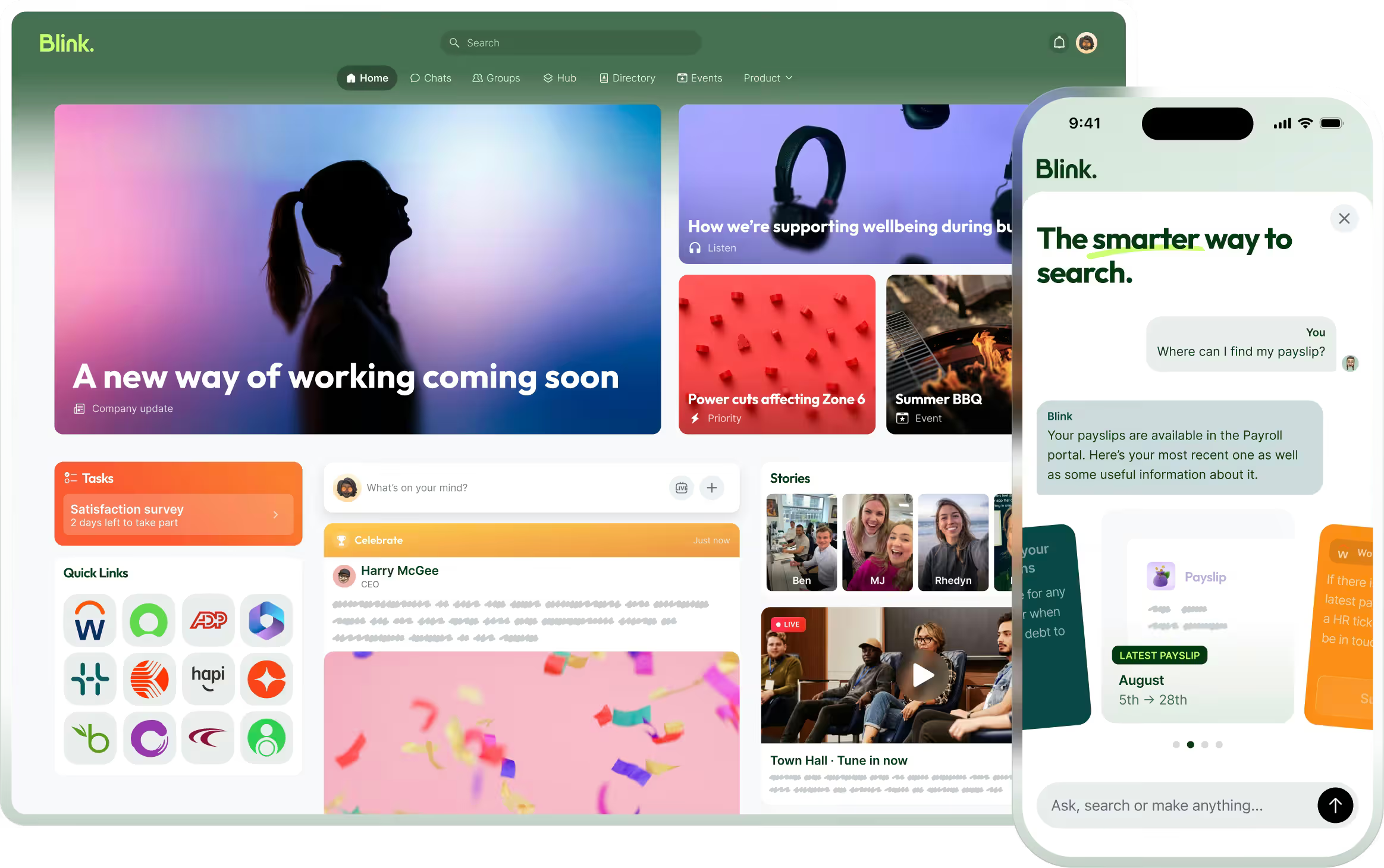
Blink acts as a modern employee intranet. A living wiki — not a dusty document repository. With a searchable content hub and news feed, employees have the latest company information right at their fingertips.
Policies, procedures, and guides live in one searchable source of truth. And for admins, a drag and drop interface makes adding and customizing content simple — no IT degree required.
Digital forms streamline information sharing, too. Whether submitting a safety report or requesting a pay stub, employees can complete tasks quickly and easily.
The impact
When information flows freely, and your intranet platform connects with other communication tools, you get the following benefits:
Fewer information gaps. Employees are always clear on expectations, objectives, and policies.
No duplication. With one centralized location for information, you only create content once.
Better decision-making. Everyone has the info they need to act confidently and efficiently.
Faster onboarding. With automated journeys on the feed and onboarding resources on your content hub, the new hire experience is consistent and streamlined.
Less friction. Powerful search and self-service features let employees find what they’re looking for in seconds — no asking around.
{{mobile-voice-video="/image"}}
Hands: Work smarter, together
Connect people to tools and coworkers so they can execute tasks efficiently.
Information is only the start of the story. To get work done, employees need the right tools and easy ways to collaborate.
But in many organizations, conversations and tasks are scattered across channels — personal messaging apps (like WhatsApp), emails, project tools, and shared drives.
Employees spend more time piecing things together than actually getting work done. Decisions slow down. Projects stall. And for the team in charge of compliance and governance, managing so many siloed channels becomes a real headache.
How Blink shows up
Blink combines all internal communication and teamwork into one safe and organized place.
Employees can send 1-to-1 or group messages, create channels for ongoing conversations, share documents, and launch voice and video calls — all without leaving the app. Crucially, it’s easy to organize, prioritize, and search chat threads. So vital information is always within easy reach.
What’s more, coworker communication doesn’t exist in a vacuum because Blink acts as a digital hub for your organization.
It offers deep integrations with HR, CRM, and project management systems. It gives your employees one-click access to every tool they need and syncs software seamlessly. So moving from talk to task gets a whole lot easier.
The impact
When employees have everything they need to collaborate and complete tasks, the difference is clear:
Easier collaboration. Employees can live chat in real-time, sharing information and solving problems no matter where they work.
Streamlined workflow. Because your systems talk to each other and because you can switch between tools with ease, everyone is more productive and efficient.
Auditable, searchable comms. With everything in one place, it’s easy to locate conversations and continue a project from where you left off.
Better adoption of tools. With one set of login details and easy access from a centralized dashboard, employees use your full range of workplace software, improving adoption and ROI.
{{mobile-kudos="/image"}}
Heart: Shine a light on company culture
Bring company culture to life — recognize achievements, share stories, and create a sense of belonging.
The third dimension of a good employee communication platform is Heart — the human side of work. It’s recognition, connection, and shared experiences.
If your communication tools only focus on information sharing and operations, you’re missing a huge opportunity. Because when achievements are noticed, when employees have an easy way to connect with coworkers, and when culture feels concrete, employee experience improves.
How Blink shows up
Blink shines a light on company culture with a dynamic and engaging social feed that employees just love to scroll.
The news feed features video stories, recognition posts, quick-fire polls, and lots of interactive multimedia content. It’s a place to put the video from your latest team building session. A CEO selfie. A behind-the-scenes look at a new product.
This is where people go to experience those authentic moments that make your organization what it is. And with opportunities for interaction and two-way conversations, everyone gets to take part — even if they work from home or in a frontline role.
Within this ecosystem, employees can also join coworker communities. Here, they can chat with like-minded teammates about passions, hobbies, and shared interests, developing stronger working relationships and a real sense of community.
The impact
An internal communications platform that amplifies company culture delivers real results:
Authentic comms. With access to video conferencing, polls, and multi-media content, you make your culture-building comms more human and engaging.
A stronger sense of belonging. Employees feel connected to their teams and part of something bigger.
Improved retention. A positive company culture fosters loyalty. Blink customers have reduced employee turnover by up to 26%.
Improved engagement. Employees who feel invested in your culture and organization work harder and collaborate more effectively.
Culture without the noise. Personalization and segmentation features ensure content feels relevant and interesting to every employee.
{{mobile-stories="/image"}}
Bringing it all together (this is where the magic happens)
Maybe you have a tool that works well for one element of workplace communication. Or a collection of tools that seem to cover all the bases we’ve covered above.
Either way, for today’s modern workplace, those one-dimensional tools just aren’t enough.
You need a multi-dimensional workplace communication tool. One that brings every element of comms — information, collaboration, and connection — into a centralized, auditable, searchable location.
When you get this right, an employee can see a recognition post in their feed (Heart), click through to the updated policy it references (Head), then jump into a team chat to discuss its implementation (Hands) — all without leaving the app.
Your software works more elegantly and effectively, and work flows more easily. So you get:
Clarity. A place for everything and everything in its place. It’s easy for employees to find the right information when and where they need it.
Streamlined workflows. Bring chat tools, content hub, and a news feed together and you simplify work. Employees stop jumping between tabs, and operational efficiency improves.
Cost efficiency. With just one platform subscription and just one tool to manage, your IT budget goes further.
An enhanced employee experience. Your system reflects how people really work and communicate. Software fits seamlessly into the workday, so digital employee experience improves.
This is what Blink does so well. It’s a platform that unifies every strand of workplace communication. And it does this over a user-friendly, mobile-first app.
So whether you have employees working at home, in the office, or on the frontlines of your organization, everyone has access to the same information, communication channels, and culture-building content.
{{mobile-desktop-main="/image"}}
Blink — and you’ve got a workplace communication platform built for the way people really work
Blink isn’t just another tool. It’s not another feed. And it’s certainly not another platform employees do their best to avoid. It’s a connected experience designed to match employee behavior — not fight it.
By bringing together Hands, Head, and Heart, Blink makes communication simpler, clearer, and more human.
So your employees spend less time searching and switching tools. And more time connecting with colleagues, contributing to company culture, and doing productive, meaningful work.

Frequently asked questions
#1. What are the three dimensions of a great workplace communication platform?
The three dimensions of a great workplace communication platform are:
When these dimensions are integrated, communication becomes clearer, more efficient, and more engaging.
#2. What are the best communication tools for the workplace?
Blink is one of the best communication tools in the digital workplace tech stack. It’s a 360-degree tool that combines messaging tools, a content hub, and employee engagement in one connected user experience. It’s a mobile-first, secure, and intuitive platform, accessible to all employees.
#3. How does a communication platform for teams benefit a business?
A strong team communication platform improves alignment, speeds up decision-making, and strengthens culture. It also reduces tech sprawl and creates real results for engagement and retention.
Employees experience fewer points of friction, so they get more work done, and leadership gains clarity into business operations and workflow.
#4. What communication platform tools are essential in the workplace?
A workplace communication platform needs secure chat, teamwork tools, a central information center, a social feed for updates and praise, and strong links with current systems.
But for most employees — especially frontline teams — that’s exactly what it’s become.
Need a policy? One app. Book time off? Another. Ask a quick question? Different tool. Different login. Different tab.
Three simple tasks. Three systems. And somehow, still no clear answer.
This is what happens when workplace communication platforms are built to do one thing well — and nothing else. Chat lives in one place. Information lives somewhere else. Culture gets bolted on as an afterthought.
The result? More noise. More switching. Less clarity.
The modern workplace doesn’t work in neat little boxes — so your communication platform shouldn’t either. The best ones support how people actually work: by bringing information, action, and connection together.
That’s where multi-dimensional communication comes in.
Here, we look at the three dimensions of effective workplace communication. And how a 360-degree platform creates a calmer, clearer, more connected work day.
From chaos to clarity: Why communication needs three dimensions
Most workplace communication platforms are built around a single idea.
Chat tools focus on conversations. Intranets store information. Engagement tools cover surveys and employee recognition.
But this setup doesn’t reflect how work actually gets done. Real work is messy and interconnected. And when these three strands of communication are kept separate, work is less effective.
With so many tools, there’s more noise and less clarity. Your people waste hours hopping between software. Important information gets lost, ignored, or diluted because it’s not available in the right place at the right time.
Blink takes a different approach. We don’t treat communication as a single stream or function. We recognize that workplace communication is about doing work, finding information, and feeling connected — all at the same time.
We bring the three dimensions of employee communication together, so they can work in sync. We break it down like this:
Head — where information lives
Hands — where work happens
Heart — where culture shows up
Individually, these strands are useful to your business. But together? They’re game-changing. They bring comms, information, and culture to life — without adding complexity and without forcing employees to learn yet another tool.
So what does multi-dimensional communication actually look like? Let’s take a closer look.
{{mobile-workday-feed="/image"}}
The three dimensions of an effective workplace communication platform (and how Blink helps you master all three)
Head: Keep everyone informed
Give employees instant access to the company knowledge, policies, and resources they need to stay aligned and make smarter decisions.
One of the biggest challenges in any organization? Keeping everyone on the same page.
Information is often scattered. Policies are buried in PDFs. Guides live in folders that haven’t been updated since 2019. Content systems are powerful, but underutilized, because access is clunky or confusing.
The result? Employees waste time searching for answers. And when they can’t find them, they either ask around or make assumptions — slowing work down and increasing the risk of mistakes.
How Blink shows up
Blink acts as a modern employee intranet. A living wiki — not a dusty document repository. With a searchable content hub and news feed, employees have the latest company information right at their fingertips.
Policies, procedures, and guides live in one searchable source of truth. And for admins, a drag and drop interface makes adding and customizing content simple — no IT degree required.
Digital forms streamline information sharing, too. Whether submitting a safety report or requesting a pay stub, employees can complete tasks quickly and easily.
The impact
When information flows freely, and your intranet platform connects with other communication tools, you get the following benefits:
Fewer information gaps. Employees are always clear on expectations, objectives, and policies.
No duplication. With one centralized location for information, you only create content once.
Better decision-making. Everyone has the info they need to act confidently and efficiently.
Faster onboarding. With automated journeys on the feed and onboarding resources on your content hub, the new hire experience is consistent and streamlined.
Less friction. Powerful search and self-service features let employees find what they’re looking for in seconds — no asking around.
{{mobile-voice-video="/image"}}
Hands: Work smarter, together
Connect people to tools and coworkers so they can execute tasks efficiently.
Information is only the start of the story. To get work done, employees need the right tools and easy ways to collaborate.
But in many organizations, conversations and tasks are scattered across channels — personal messaging apps (like WhatsApp), emails, project tools, and shared drives.
Employees spend more time piecing things together than actually getting work done. Decisions slow down. Projects stall. And for the team in charge of compliance and governance, managing so many siloed channels becomes a real headache.
How Blink shows up
Blink combines all internal communication and teamwork into one safe and organized place.
Employees can send 1-to-1 or group messages, create channels for ongoing conversations, share documents, and launch voice and video calls — all without leaving the app. Crucially, it’s easy to organize, prioritize, and search chat threads. So vital information is always within easy reach.
What’s more, coworker communication doesn’t exist in a vacuum because Blink acts as a digital hub for your organization.
It offers deep integrations with HR, CRM, and project management systems. It gives your employees one-click access to every tool they need and syncs software seamlessly. So moving from talk to task gets a whole lot easier.
The impact
When employees have everything they need to collaborate and complete tasks, the difference is clear:
Easier collaboration. Employees can live chat in real-time, sharing information and solving problems no matter where they work.
Streamlined workflow. Because your systems talk to each other and because you can switch between tools with ease, everyone is more productive and efficient.
Auditable, searchable comms. With everything in one place, it’s easy to locate conversations and continue a project from where you left off.
Better adoption of tools. With one set of login details and easy access from a centralized dashboard, employees use your full range of workplace software, improving adoption and ROI.
{{mobile-kudos="/image"}}
Heart: Shine a light on company culture
Bring company culture to life — recognize achievements, share stories, and create a sense of belonging.
The third dimension of a good employee communication platform is Heart — the human side of work. It’s recognition, connection, and shared experiences.
If your communication tools only focus on information sharing and operations, you’re missing a huge opportunity. Because when achievements are noticed, when employees have an easy way to connect with coworkers, and when culture feels concrete, employee experience improves.
How Blink shows up
Blink shines a light on company culture with a dynamic and engaging social feed that employees just love to scroll.
The news feed features video stories, recognition posts, quick-fire polls, and lots of interactive multimedia content. It’s a place to put the video from your latest team building session. A CEO selfie. A behind-the-scenes look at a new product.
This is where people go to experience those authentic moments that make your organization what it is. And with opportunities for interaction and two-way conversations, everyone gets to take part — even if they work from home or in a frontline role.
Within this ecosystem, employees can also join coworker communities. Here, they can chat with like-minded teammates about passions, hobbies, and shared interests, developing stronger working relationships and a real sense of community.
The impact
An internal communications platform that amplifies company culture delivers real results:
Authentic comms. With access to video conferencing, polls, and multi-media content, you make your culture-building comms more human and engaging.
A stronger sense of belonging. Employees feel connected to their teams and part of something bigger.
Improved retention. A positive company culture fosters loyalty. Blink customers have reduced employee turnover by up to 26%.
Improved engagement. Employees who feel invested in your culture and organization work harder and collaborate more effectively.
Culture without the noise. Personalization and segmentation features ensure content feels relevant and interesting to every employee.
{{mobile-stories="/image"}}
Bringing it all together (this is where the magic happens)
Maybe you have a tool that works well for one element of workplace communication. Or a collection of tools that seem to cover all the bases we’ve covered above.
Either way, for today’s modern workplace, those one-dimensional tools just aren’t enough.
You need a multi-dimensional workplace communication tool. One that brings every element of comms — information, collaboration, and connection — into a centralized, auditable, searchable location.
When you get this right, an employee can see a recognition post in their feed (Heart), click through to the updated policy it references (Head), then jump into a team chat to discuss its implementation (Hands) — all without leaving the app.
Your software works more elegantly and effectively, and work flows more easily. So you get:
Clarity. A place for everything and everything in its place. It’s easy for employees to find the right information when and where they need it.
Streamlined workflows. Bring chat tools, content hub, and a news feed together and you simplify work. Employees stop jumping between tabs, and operational efficiency improves.
Cost efficiency. With just one platform subscription and just one tool to manage, your IT budget goes further.
An enhanced employee experience. Your system reflects how people really work and communicate. Software fits seamlessly into the workday, so digital employee experience improves.
This is what Blink does so well. It’s a platform that unifies every strand of workplace communication. And it does this over a user-friendly, mobile-first app.
So whether you have employees working at home, in the office, or on the frontlines of your organization, everyone has access to the same information, communication channels, and culture-building content.
{{mobile-desktop-main="/image"}}
Blink — and you’ve got a workplace communication platform built for the way people really work
Blink isn’t just another tool. It’s not another feed. And it’s certainly not another platform employees do their best to avoid. It’s a connected experience designed to match employee behavior — not fight it.
By bringing together Hands, Head, and Heart, Blink makes communication simpler, clearer, and more human.
So your employees spend less time searching and switching tools. And more time connecting with colleagues, contributing to company culture, and doing productive, meaningful work.

Frequently asked questions
#1. What are the three dimensions of a great workplace communication platform?
The three dimensions of a great workplace communication platform are:
When these dimensions are integrated, communication becomes clearer, more efficient, and more engaging.
#2. What are the best communication tools for the workplace?
Blink is one of the best communication tools in the digital workplace tech stack. It’s a 360-degree tool that combines messaging tools, a content hub, and employee engagement in one connected user experience. It’s a mobile-first, secure, and intuitive platform, accessible to all employees.
#3. How does a communication platform for teams benefit a business?
A strong team communication platform improves alignment, speeds up decision-making, and strengthens culture. It also reduces tech sprawl and creates real results for engagement and retention.
Employees experience fewer points of friction, so they get more work done, and leadership gains clarity into business operations and workflow.
#4. What communication platform tools are essential in the workplace?
A workplace communication platform needs secure chat, teamwork tools, a central information center, a social feed for updates and praise, and strong links with current systems.
Digital tools are transforming the way organizations build and sustain employee engagement. Platforms like Blink, Workvivo, Staffbase, and Reward Gateway are helping teams stay connected, improve communication, and bring company culture to life — wherever employees work.
But with so many employee engagement tools on the market, choosing the right one can be tricky. The wrong platform can waste time, hurt adoption, and even reduce engagement.
Getting it right matters. Companies with highly engaged teams are more productive and see up to 23% higher profitability. The best employee engagement software goes beyond simple communication — it connects people, recognizes great work, and supports a shared sense of purpose.
Every organization is different. The tools that work for a remote or office-based workforce may not suit a frontline team. That’s why it’s important to align your engagement goals with the right platform.
You’ll find software built for:
Frontline employees — mobile-first apps like Blink that keep workers connected on the go
Remote teams — tools such as Asana and Slack that combine communication and project management
Office-based teams — platforms like Culture Amp and OfficeVibe that measure engagement and feedback
And others that specialize in areas such as:
Communication and collaboration
Feedback and performance
Wellbeing and productivity
Rewards and recognition
Choosing the right solution depends on your people and your priorities — because engagement software only works when it works for everyone.
For frontline organizations, this is especially true. Most engagement platforms are still built with desk-based employees in mind. Only 1 in 10 frontline workers says they have access to the tools and technology they need to connect and advance at work — even though they make up 82% of the global workforce.
Without easy access to company updates, communication, and recognition, frontline employees can quickly feel disconnected and undervalued.
That’s why your employee engagement solution needs to work for all employees — wherever and however they work.
In the next section, we’ll look at the best employee engagement software for 2026 — from all-in-one employee apps like Blink to specialized tools for communication, wellbeing, and recognition.
Let’s take a closer look.
Best employee engagement app for frontline organizations
Frontline employees are the backbone of many industries — from transportation and retail to healthcare and hospitality. But engaging this workforce comes with unique challenges. Many frontline employees don’t have regular access to company systems, email, or desktop devices, making it harder for them to stay informed and connected.
That’s why mobile-first employee engagement software has become essential. The best platforms for frontline teams combine communication, recognition, and real-time updates in one easy-to-use app.
These tools close the gap between head office and the field, helping every employee — regardless of location — feel included in company culture.
Below are some of the best employee engagement tools for frontline workers in 2026, starting with Blink, a leading all-in-one platform designed specifically for deskless and distributed teams.
Best employee engagement software for frontline workers
Blink
When it comes to engaging a dispersed, frontline workforce, few tools match what Blink delivers.
Blink is a mobile-first employee engagement platform built to help organizations connect with every worker — whether they’re in the field, on the factory floor, or on the move. Used by teams across industries such as transport, healthcare, logistics, and construction, Blink turns everyday communication into connection.
Employees can easily chat with colleagues, access company updates, view schedules, and complete essential tasks all in one place. The result: better communication, stronger engagement, and a more unified culture.
Managers benefit, too. Blink’s analytics dashboard helps leaders track engagement and performance trends, identify communication gaps, and celebrate wins through built-in recognition tools.
Key features include:
All-in-one communication: Peer-to-peer chat, team groups, and company-wide updates keep everyone aligned.
Employee recognition: Built-in recognition features highlight great work and reinforce culture.
Engagement surveys: Pulse surveys provide quick, actionable insights into morale and satisfaction.
Analytics and insights: Track usage, engagement, and content performance to inform strategy.
Seamless integrations: Connect scheduling, HR, and project management tools for a single digital workspace.
Mobile-first design: Works on any smartphone — no corporate email required.
With Blink, your entire workforce can access the same tools and information, creating a seamless digital experience that keeps everyone connected, informed, and motivated.
Request a demo today to see how Blink can transform engagement across your frontline teams.
Best employee engagement software for desk-based remote workers
If you're looking for employee engagement software platforms suited to desk-based remote workers, here are some excellent options.
Google Chat
Source: Google Chat Capterra Reviews
Google Chat is a communication platform that includes features like video and voice calls, and group chat. It's a great option for workplace communication and it's free to use.
As you’d expect, this tool integrates with the rest of the Google suite, including Google Calendar, Drive, Groups, and Gmail. But it lacks some of the advanced features you tend to get with paid tools.
Reviews from Capterra note that Google Chat is easy to use. It also provides good collaboration tools. However, the interface can be frustrating, message delivery can be an issue, and notifications can be challenging to navigate.
Pricing: Monthly pricing for Google Chat for business starts at $6 per user.
Discord
Discord is a chat app designed for gamers. But it’s recently been used for workplace communication, too. It includes features like voice and video chat, so you can easily connect and communicate with colleagues.
You can use Discord for free, making it a basic but cost-effective tool for internal communications, especially in a remote working environment.
Pricing: Many of Discord’s features are free to use. For businesses that want to invest in extra perks, Discord’s premium tier, “Nitro,” is available for $99 per year.
Asana
Asana is a popular project management tool that can also be used for employee engagement. With Asana, you can easily create and assign tasks, track task progress, and set team priorities. You can also use Asana to create custom projects for easy employee collaboration.
Source: Asana Capterra reviews
Asana makes a great option for remote teams, in part because it offers a mobile app for easy access to tasks and progress data. This helps to ensure that employees are working cohesively and effectively wherever they’re based.
Reviews from Capterra note that while Asana offers a clean, intuitive, and integrated interface, notifications are often missed, automatic opt-in to email notifications can be annoying, and the different projects and access features can be confusing.
Pricing: Monthly pricing for Asana starts at a basic free plan. A business plan costs $24.99 per user per month when billed annually.
ClickUp
ClickUp is a cloud-based collaboration and project management tool and it’s a good option for those looking to improve remote employee engagement.
Key features include task assignments and statuses, alerts, and a task toolbar. But while ClickUp does well in terms of task management, it doesn’t offer a full range of employee engagement tools.
This platform lacks features relating to real-time communication, employee recognition, and social interaction. So you’re likely to need additional software.
Pricing: ClickUp offers a free version. Monthly pricing for a Business plan costs $12 per user per month.
WorkTango
WorkTango is an employee experience platform with a number of solutions for employee engagement. It provides tools like employee surveys, real-time analytics, rewards, and recognition.
You can also see how your engagement scores rank against other WorkTango customers to get a better sense of how you’re doing.
On Capterra, users say that anonymous feedback and anonymous employee chat allow for truly honest conversations. Clients also praise recognition features. However, some users would like better reporting tools and easier platform navigation.
Leapsome is a good employee engagement tool for goal setting and employee development.
It’s designed to support organizations to create high-performing teams. You can use Leapsome to track and collaborate on goals, run 360-degree reviews, and create personalized learning pathways.
With lots of tools for remote teams, Leapsome helps maintain employee progress even when employees aren’t in the office. The software also offers video conferencing tools, which make it easy to collaborate on agendas and align action plans.
Pricing: Pricing starts at $8 per user per month, with the option to add on the extra features you need.
Slack
Source: Slack Capterra Reviews
Slack is a great productivity tool for remote office workers. It helps you to organize teams and their work, with the help of channels, huddles, and a workflow builder.
However, it's worth noting that Slack doesn't provide much in the way of scheduling, performance tracking, or survey features. If these tools are essential to your organization, you’ll need to use Slack plus another employee engagement platform.
Reviews from Capterra note that Slack’s user interface is easy to use. They like channel and plugin features. They also appreciate having all work conversations in one place.
However, reviews also note that it can be a confusing platform to use, with lots of channels across different teams. Adoption can also be difficult if people are not familiar with the software.
Pricing: For multiple employees, monthly pricing for Slack starts at $6.67 per user.
Best employee engagement software for desk-based office workers
Now, let’s take a look at the tech tools best suited to office worker engagement.
OfficeVibe
Source: OfficeVibe Capterra Reviews
OfficeVibe is a “people-first” employee experience platform, with a number of employee engagement features designed for the office.
It helps employers to assess and improve employee engagement levels with robust measurement tools. It also provides an app so you can track progress on the go if needed.
Reviews from Capterra note that OfficeVibe is an innovative tool that helps organizations better understand employee happiness. The company also provides strong customer service.
However, managers complain that survey questions can’t be customized and that insights don’t go deep enough. They also say that the Slack integration doesn’t work too well and that setup can be confusing.
Pricing: Monthly pricing for OfficeVibe ranges from a free version to a $5 per user Pro Plan.
SurveyMonkey
By using employee satisfaction survey tools like SurveyMonkey, you can collect regular feedback from employees on their engagement levels. This real-time feedback can help you to identify problem areas and take steps to improve employee engagement in your organization.
As well as survey templates, SurveyMonkey offers reporting and analytics features that help you spot data trends and insights. It also uses AI to reveal employee sentiment.
Pricing: For over three users, monthly pricing for SurveyMonkey starts at $31.83 per user.
Doodle
Employee polls are a quick and easy way to collect anonymous feedback from employees on a range of topics. You can use employee poll tools from Doodle to gather feedback on everything from engagement levels to job satisfaction.
But Doodle does more than polls. It also provides meeting, video conferencing, and scheduling tools. You can even poll meeting attendees to find a time that works for everyone and improve attendance.
Pricing: Monthly pricing for Doodle Professional starts at $6.95 per user.
Monday.com
Monday.com is a project management tool that can also be used for employee engagement.
With Monday.com, you can create and assign tasks, track progress, and more. You can also use it to create performance tracking templates for employees. This can help you to identify areas where employees need improvement and take steps to address them.
On Capterra, Monday.com users say that the platform’s project management tools are excellent. But others complain that the backend of the platform is complicated and involves a steep learning curve.
Pricing: For more than two employees, monthly pricing for Monday.com starts at $8 per user per month.
Culture Amp
Culture Amp’s employee engagement platform provides over 40 science-backed survey templates. You can use these surveys to find out how employees feel about engagement, belonging, inclusion, and more.
The platform also uses AI-powered insights to summarize employee engagement findings, supporting your business to make data-backed decisions.
Reviews from Capterra say that Culture Amp has a user-friendly user interface. They also praise the platform’s ready-to-go survey templates.
But users don’t like having to rely on the Culture Amp support team to update some parts of the platform. They also say that — while survey features are strong — features like the objective and key results (OKR) module aren’t as well-developed.
The following tools specialize in one area of employee engagement. As such, they make a great add-on to your chosen staff engagement tool.
At Blink, our App Marketplace integrates all the tools you need to manage your employee engagement in one place. If we don't already integrate with your app, just ask!
Kudos
Kudos is an add-on app that allows employees to give and receive recognition in real time. With Kudos, you can create a culture of recognition where employees feel appreciated for their hard work.
Pricing: Monthly pricing for Kudos starts at $3.25 per user.
Friday
Friday is an app that makes it easy to give employees recognition for a job well done. With Friday, you can give employees badges, points, and rewards to show your appreciation.
Pricing: Friday has a free version. Monthly pricing goes up to $100+ for company plans.
Bonusly
Bonusly is another dedicated employee recognition tool. Bonusly supports peer recognition, allowing employees to give each other bonuses in the form of points that can be redeemed for rewards. By using Bonusly, you can create a culture of appreciation and recognition throughout your workforce.
Pricing: Monthly pricing options for Bonusly starts at $2.70 per user.
Limeade Wellbeing
Employee wellbeing programs, like those on offer from Limeade, go hand in hand with employee engagement programs. Because when employees feel healthier, happier, and less stressed, they have the headspace they need to engage with their work.
Limeade provides customized employee wellness programs. These programs encourage participation and deliver essential wellbeing resources via one handy tool.
With this tool, you can also listen and respond to your workforce in real time through anonymous surveys, polls, and quizzes. All that’s really missing from this system is strong employee communication tools.
WeThrive is an employee engagement tool designed to support the mental health of desk-based workers. With this platform, you can create surveys to assess employee wellbeing and then take action to improve it.
WeThrive analytics allow you to segment survey results by team, tenure, location, department, and manager. This makes it easy to identify the root causes of poor wellbeing and identify areas for improvement.
Reward Gateway is an employee engagement solution that offers employee discounts, employee rewards and recognition, and tools for employee communications.
This combined platform is a great tool for office-based employers looking to boost employee recognition, with features such as discounts and rewards accessible in one place.
Reviews from Capterra note that Reward Gateway is flexible and easy to use. But it can be glitchy, with reporting features sometimes not running properly and some features failing to run as smoothly as others.
Pricing: Monthly pricing for Reward Gateway starts at $10.19 per user.
Weekdone
For structured goal setting, Weekdone is an excellent choice. It’s a top-rated OKR platform that allows you to track weekly plans and progress, provide feedback, and get everyone pulling in the same direction.
OKR software can also be used to ensure that remote employees have clear objectives, with performance reviews and goal tracking.
Pricing: For more than three employees, monthly pricing for Weekdone is $8 per user.
Awardco
Awardco is another bonus tool that makes recognizing and rewarding people easier and more effective.
With Awardco, employers can set up reward and recognition programs that their employees can access from any device. You can tailor incentives to your teams, ensuring the prizes on offer act as real motivation.
This tool is a good option for office-based companies of all sizes looking to increase employee satisfaction and engage with their workforce to boost productivity.
Pricing: Pricing for Awardco ranges from $2,500 to $4,000 per year.
QuizBreaker
QuizBreaker is a virtual team-building tool. It works well for both office-based and dispersed teams, bringing a bit of gamification to the work day.
Key features of QuizBreaker include:
a scheduled icebreaker quiz that helps employees get to know each other better
escape games and 1,000+ trivia quizzes for fun team-building events
employee profiles that reveal work style, unique strengths, and fun facts
pulse surveys to help you get regular feedback from employees
QuizBreaker isn’t an all-in-one employee engagement tool. But this platform helps teams to bond and brings a little fun to your workplace culture.
Capterra score: Not found in Capterra database. Pricing: Monthly pricing for QuizBreaker starts at $3 per user.
Motivosity
Motivosity is employee recognition software that makes it easy for managers to give recognition and rewards.
Motivosity’s “Thanks Matters” card is an innovative way of rewarding employees. Like Bonusly, you assign points for great performance. These points directly translate into cash, which employees can access via a special Visa debit card.
They can choose from hundreds of reward options. You can even add your own gifts such as branded swag or lunch with the CEO. Employees can also choose to forgo cash rewards in order to make charitable donations.
Key employee engagement software features to prioritize in 2026
When choosing the right employee engagement software for your organization, focus on the features that will help you overcome your biggest engagement challenges. The right combination of tools can improve communication, morale, and productivity across every level of your workforce.
Channels and chats
Communication is the foundation of engagement. Real-time chat features — including group channels, private messages, and announcements — ensure employees stay in the loop and can collaborate quickly, wherever they work.
Surveys, polls, and content analytics
Platforms with built-in surveys, polls, and analytics help you measure engagement levels, gather employee sentiment, and identify emerging issues before they become major problems. This data ensures every employee has a voice and helps leaders take action with confidence.
Employee recognition
Recognition tools — such as kudos, badges, or points systems — make it easy to celebrate achievements and highlight great work. This simple feature goes a long way toward strengthening motivation, morale, and a sense of belonging.
Analytics and dashboards
For organizations managing distributed or frontline teams, analytics functions are essential. They allow you to measure engagement, retention, and satisfaction while uncovering insights into how employees interact with leadership and one another. These insights drive continuous improvement in your employee experience strategy.
A main feed or hub
A centralized hub — or main company feed — brings all updates, videos, documents, and announcements together in one place. This consolidation creates a single source of truth, keeping employees informed and aligned with your company’s goals.
At Blink, our frontline employee app brings all of these features together. With tools for chat, recognition, surveys, analytics, and communication, Blink helps you overcome common engagement challenges and connect every employee — from the frontline to the office.
The business benefits of digital employee engagement tools
Digital engagement tools require an upfront investment — both financially and in time. But the return on that investment is substantial. The right software encourages participation, builds connection, and creates a culture employees want to be part of.
Below are the five key business benefits of using digital employee engagement software.
#1. Reduce employee turnover and save on recruitment costs
Engaged employees are more likely to stay with your organization, reducing the cost of recruitment and training. According to SHRM, hiring a new employee can cost three to four times the position’s salary, making engagement one of the most effective retention strategies available.
Digital tools strengthen this connection by amplifying company culture and ensuring all employees can participate fully — leading to a happier, more loyal workforce.
#2. Strengthen company culture through digital engagement platforms
In today’s competitive labor market, salary alone isn’t enough to retain top talent. Engaged employees are motivated by purpose, belonging, and appreciation.
Digital engagement tools help reinforce these pillars by improving communication, supporting growth, and enabling public recognition. The right platform makes culture tangible — connecting leadership, values, and everyday work.
#3. Improve internal communication with employee engagement software
Two-way communication is critical for engagement. Modern tools help you deliver the right message to the right people — whether through audience segmentation, targeted updates, or role-based notifications.
These platforms also make it easier to track the effectiveness of communication. With built-in analytics, you can see how employees interact with content and refine your messaging to increase engagement and clarity across the organization.
#4. Use analytics to understand and improve employee engagement
Feedback is the backbone of a strong employee engagement strategy. Without it, leaders can’t identify what’s working or where improvements are needed.
Employee engagement software with advanced reporting provides actionable insights. You can see how satisfied employees are, how frequently they engage with company updates, and where there are communication or experience gaps.
With Blink, for example, you can access detailed data on engagement, satisfaction, and retention — helping you identify frontline challenges early and respond faster.
#5. Boost productivity with connected employee engagement platforms
Disconnected tools slow teams down. Employees lose valuable time switching between apps, searching for information, and handling repetitive admin tasks.
A unified engagement platform streamlines these processes. By digitizing workflows, automating basic tasks, and connecting every workplace app in one place, you free up employees to focus on meaningful, high-impact work.
Blink’s connected platform helps teams stay organized and productive — from digitized HR processes to mobile-friendly task management — improving both individual and organizational performance.
A 2022 Gallup report on the work environment found that businesses with engaged employees have 23% higher profits than companies with “miserable workers”. Such businesses also see lower absenteeism and higher customer loyalty.
Unfortunately, Gallup’s 2023 report goes on to tell us that only 23% of employees are actually engaged.
The solution? Effective employee engagement strategies designed to help you create a better company culture, reduce staff turnover, and eventually boost your company’s profits.
But before you can do any of that, you need to know how to measure employee engagement, and what measurement methods really work.
Once you have the tools to measure engagement, you’ll have a solid foundation for improving your engagement levels and reaping the benefits that highly engaged employees bring.
What should you do before measuring employee engagement?
Understand your workforce
Each employee is different with their own unique preferences, needs, and motivations. As such, it's important to get to know your teams well — their needs, challenges, and everything in between — so that you can tailor your employee engagement strategy to work best for them.
Start by getting to know your workforce better: who they are, how they work, and what currently gets in the way of them engaging.
For example, there is often a huge digital inclusion gap between frontline staff and their desk-based coworkers. This gap makes it very hard for frontline workers to engage with their organizations and roles – and even harder for business leaders to get to know them in the first place.
This is where engaging your first-line managers becomes crucial. By enabling first-line managers with the skills and tools to get to know their teams, you have a hotline directly to your frontline – and their engagement preferences.
It’s also important to consider the types of metrics you use for your specific workforce. Desk-based engagement metrics may not accurately reflect the engagement levels of people working in frontline roles. Transit, healthcare, logistics, or manufacturing workers (to name a few) will often have different requirements, channel preferences, and motivations for engagement than other employees.
Therefore, it's essential to understand the specific engagement requirements of your staff, track tailored engagement metrics, and create strategies to address them.
Agree on engagement goals and outcomes
Once you know your workers’ needs, it is important to agree on engagement goals and outcomes with other stakeholders in your organization. This could involve gaining the buy-in of senior management, employee representatives, or other key stakeholders.
Clearly defining your goals and desired outcomes will help ensure that efforts and metrics used to improve engagement are focused and aligned with your overall business strategy. Goal and outcome KPI could include:
Goal: Increase employee retention by 10%
Outcome KPI: Employee retention rate
Goal: Reduce employee turnover by 25%
Outcome KPI: Voluntary resignation rate
Goal: Drive employee satisfaction by 15%
Outcome KPI: Employee satisfaction survey or ENPS scores
By taking these steps before measuring employee engagement, you can ensure that you have a solid understanding of your workforce, metrics that reflect your business objectives, and clear engagement goals to achieve.
There are a number of metrics and methods that can help you gauge a holistic view of employee satisfaction, productivity, and overall engagement in your company, 10 of which we’ll dive into in more detail below.
10 ways to measure employee engagement
Both survey and non-survey methods are available methods to measure employee engagement. Typically, it’s best to use a mix of both to get a holistic overview of employee engagement.
How to measure engagement with survey methods
Surveys help you reach a considerable number of employees at once.
Running employee surveys can be a time-consuming, paper-filled process, but it’s still a great starting point for building the foundation of your employee engagement efforts. And with modern Employee Survey tools now available to streamline the whole process, it needn’t be such a laborious task.
Here are three survey measurement methods you can implement:
1. Annual employee engagement surveys
An annual employee engagement survey measures employees’ experience, motivation, and passion for their job and organization. It reveals how your employees go about their daily jobs and what you can do to improve their engagement on a large, long-term scale.
You can use these surveys to get ideas on areas for improvement and a basis for new recommendations and goals.
Similarly, you can use employee surveys to evaluate your company’s culture and see whether the desired cultural values are practiced among desk-based and deskless employees.
However, employee engagement surveys are only effective if you conduct them correctly.
Here are four best practices for conducting employee surveys:
Use a mix of survey questions: Ask both multiple-choice and open-ended questions. This helps your company collect the most insights into employee engagement without overwhelming respondents.
Leverage mobile apps:Paper surveys don’t cut it. They’re time-consuming since you wait for employees to return the survey papers before you can analyze them, and they’re often disregarded by employees completely or inaccessible by teams that are not in the corporate office, such as frontline teams. Digital surveys take far less time to create and share, and the response is almost instant. So, create surveys that employees can complete from their personal or corporate devices from any location.
Share employee survey results: Share the survey findings with your office and your frontline workers and let them know what actions you’ll take. Managers and leadership need to assure employees that they’re listening and taking into consideration the feedback received.
Identify the best time(s) to survey employees: It might be smart to run your survey during slower periods of work, so that employees have enough time to devote to the survey. Similarly, there’s solid advice to avoid conducting surveys during high-stress periods or bonus season. Such periods skew the survey results and give an unrealistic picture of everyday employee engagement and satisfaction.
2. Pulse engagement surveys
Employee pulse surveys allow you to send more frequent survey requests to your teams. Instead of the annual snapshot of data you gain from once-a-year surveys, pulse surveys let you measure employee engagement levels in real time.
This short survey format allows your teams to provide quick feedback on any aspect of the job or organization, from team dynamics and workflows to company policies and leadership. It’s a great way to learn more about what’s working for your employees on a daily basis and identify what could be improved.
Pulse surveys are much shorter, providing less data than annual surveys but offering real-time insights into employees’ current feelings about the workplace and their job satisfaction.
As such, pulse surveys can be incredibly effective at identifying any sudden decreases or increases in employee morale and engagement, helping you spot them and take action quickly.
You can also tailor pulse surveys to navigate different occasions and identify trends in employee engagement year-round, instead of just once a year. For example, you could send a survey after an important organizational announcement or when there’s been a period of major change.
However you choose to use them, regular pulse surveys are a great way to measure employee engagement and ensure your workforce feels heard.
3. Employee net promoter score (eNPS)
Chances are your organization is already using the net promoter score (NPS) to measure customer satisfaction and loyalty. The same metric can also be used internally to measure employee engagement.
The employee net promoter score (eNPS) provides a solid basis for understanding employee engagement and loyalty in a cost-effective way. By tracking the eNPS scores over time, you can identify trends in employee engagement — which can help you understand how the changes you implement affect staff engagement.
Expert tip: On its own, eNPS is not the most effective way to measure engagement.eNPS it tells you the ‘what’ but not the ‘why’ of an employee engagement score. Only measure employee engagement via eNPS if you can follow it up with more detailed methods, such as employee engagement surveys.
Further methods for measuring employee engagement
4. Implement an employee app with analytics features
Many leaders aren’t aware of the reasons behind the lack of engagement and increasing turnover rates in their business — especially frontline managers. Due to the nature of frontline organizations — varied work environments, conflicting shift patterns, and a historical reliance on paper — it is more difficult to engage with frontline workers and even harder to measure their engagement levels.
As such, employee feedback and surveys don’t always provide the response rates you want, and employees don’t always provide insights you can act on.
To address this, you can implement an employee engagement super-applike Blink to create a digital space that invites a multidirectional, real-time conversation where frontline workers (and their desked counterparts) can speak directly to management — and to each other.
You can also use this technology to measure the outcome of their work environment and assess how your workers engage with your content, interact with other teammates, and participate in company-wide conversations.
For instance, Blink offers Frontline Intelligence — anintegrated analytics tool that measures employee engagement by tracking:
Content metrics: See how your workers interact with posts, files, or pages you share. You can track important metrics such as reach, impressions, likes, comments, and link clicks.
Communication flows: View how many team members communicate with others using the employee app. Visualize the growth in communication and changes in relationships over time to keep a tab on your organization’s employee engagement.
Internal trends: Get an overview of trending posts and topics in the employee feed to understand which content performs best and when.
This allows you to uncover who your promoters of engagement are, and who’s in line with your company’s mission and values. You can capture the insights that aren’t explicitly communicated to you – and integrate that into your next steps.
This data can help you detect feelings of disengagement early on and do a root cause analysis before they become a serious problem, affect productivity and quality of work, and increase your turnover rate.
Ensure that you also measure the adoption rate for your employee app. A high adoption rate can be indicative that your employees are engaged in their roles and understand the value that a new tool is bringing to the business. You may see differences in app usage trends between the office and frontline workers. If that is the case, add questions surrounding employee app usage in the next employee survey.
If you’re looking for an employee app that’s designed for frontline organizations, check out Blink. This all-in-one platform gives:
Frontline workers access to the people, processes, communications, and applications they need to do their jobs — all through their corporate or personal devices.
Leaders access to the data they need to improve the employee experience in meaningful ways.
5. 1-1s
1-1s are one of the most effective ways to measure employee engagement.
These meetings allow you to have meaningful conversations with each of your team members about their performance, goals, and satisfaction levels. They also give employees an opportunity to provide honest and constructive feedback about their work environment, so that they can help influence real, positive change within the organization.
1-1s can be used as a more informal and frequent performance review, and they can give you detailed insights into the current state of employee engagement. By keeping track of these meetings over time, you can identify any sudden drops or increases in engagement, and take action accordingly.
6. Performance reviews and feedback meetings
As a more formal 1-1 process, performance reviews and regular feedback meetings can be used to make critical decisions on employee compensation, necessary training, and proposed career development. But you can also use them to gauge and measure employee engagement.
Highly-engaged workers are more likely to perform well in their jobs. Gallup found that engaged workers are 18% more likely to have above-average employee productivity.
To effectively gauge your employees’ performance and improve engagement, develop a continuous feedback process so that employees know how they’re doing and what’s expected.
Here’s how you can implement a reliable feedback process:
Create a list of opportunities when employee feedback can give you critical insights into how your company operates, such as at the close of onboarding and recruitment or during quarterly and annual performance reviews.
Use various methods and strategies to collect feedback to keep employees engaged and get the most relevant answers for the situation.
Implement engaging and constructive conversations between managers and employees at least once every two months. Ensure managers are practicing active listening and that they are actually implementing change based on the feedback.
Exit interviews are an important component of any employee engagement strategy. They provide invaluable insight into the reasons why employees choose to leave your company, and can help you identify areas that need improvement in order to keep your best talent.
What was the motivation behind your decision to search for a new job?
Can you identify the factors that had a positive or negative impact on your ability to succeed in your role?
Based on your experience, do you have any recommendations for onboarding new employees?
How did you feel about the management of your role?
Did you feel appreciated by your team, supervisors and/or managers?
What were the most enjoyable aspects of this job?
What was the most challenging aspect of this job for you?
Not all employees are willing to offer honest feedback during an exit interview, so consider implementing a post-exit survey where you can ask more detailed questions about employee satisfaction and engagement while the person is still employed at your organization.
This allows you to better understand the motivations behind each employee’s decision to leave and take action to prevent similar situations from occurring in the future.
If you want to stay two steps ahead of the exit interview, however, stay interviews can be a potentially transformative addition to your employee engagement strategy. Currently deployed by only 27% of US HR decision-makers, stay interviews help you understand how well your current employees’ expectations are being met when it comes to meaningful connections.
How to measure employee engagement through key metrics
8. Internal communication receptiveness
Effective internal communication can be used to bridge the gap between managers and employees, build trust in the workplace, and boost employee engagement. But it’s not enough just to communicate – you need to measure how your employees actually react and respond to the content you share.
That’s where key metrics come in. From employee app usage data, to the amount of content employees interact with or create, there are a number of metrics that can give you valuable insights about employee engagement.
You can measure receptiveness to your internal communication by tracking how much of your content is consumed, whether it’s posts or newsletters.
Specific metrics like post likes and response rates, message opens, and even file analytics can tell you how receptive your teams are to internal communication efforts. If you’re using a super-app like Blink, you can track these metrics over time to monitor how well your internal messages are being received.
The data from these analytics can give you the confidence you need to leave certain channels of communication behind. If frontline workers are not engaging with email — or don't even have access to it! — then waste no more time sending email comms, for example. An accessible mobile tool like Blink can pave the way for greater internal communication receptiveness by giving everyone equal access to messages, wherever they log in from.
9. Voluntary turnover rate
If an employee voluntarily resigns from an organization, it’s voluntary turnover.
Voluntary turnover is on the rise. According to the Institute of Corporate Productivity (i4cp) and Fortune’s global survey of 1,195 respondents in Q1 of 2022, 77% of large organizations experienced high voluntary turnover in 2021.
To calculate the voluntary turnover rate, divide the number of employees that voluntarily left your company by the average number of workers you had during that period.
These are the top reasons of voluntary turnover outlined in Microsoft’s 2022 Work Index report:
Personal well-being or mental health (24%)
Work-life balance (24%)
Lack of confidence in senior management or leadership (21%)
Lack of flexible work hours or location (21%)
In other words, a high voluntary turnover rate means your workers struggle to stay engaged with the company due to a lack of support and direction.
If you notice high voluntary turnover, conduct a voluntary turnover analysis to know the exact cause:
Check for trends: Compare your voluntary turnover rate to the previous period and look for possible trends and early warnings. For instance, if you see many employees leaving after two years, it may be due to a lack of career advancement opportunities. And if you see new hires leaving within the first year, onboarding might be the issue.
Gather employee feedback: Collect qualitative data from surveys and exit interviews to determine why employees leave your organization.
Prepare an employee turnover report: Translate the voluntary turnover data into monetary value. That’ll help you follow up with different departments and levels of hierarchy and develop an actionable plan to increase retention rates.
Analyzing the voluntary turnover rates for the first year is especially important since new employees represent a lot of pure cost. A time-to-productivity analysis can tell you when an employee’s productivity has risen to a point where their contribution outweighs their cost.
For example, if the average threshold productivity occurs at the six-month mark, any employee who leaves before that incurs a financial loss to the company.
10. Employee absenteeism rate
Absenteeism is the habitual failure to come to work or stay there during working hours, and it is often unplanned and unannounced.
It’s important to differentiate unexcused absences from legitimate ones, and to be aware of the disruption that absenteeism can cause to your organization. That’s because it will negatively affect anyone working with this individual and undermine trust between employees and management and the employees themselves.
A high employee turnover rate is a strong indicator that your company needs to make adjustments before this behavior impacts your workforce’s productivity and relationships. Absenteeism is often also a reflection of poor management, so your managers must be aligned on the appropriate policies and be upskilled to develop their leadership abilities.
To measure the absenteeism rate, divide the number of unexcused absences in a given period by the total workdays. Multiply the result by 100 to get the absenteeism rate for that period.
As a rule of thumb, an absenteeism rate of 1.5% is considered healthy. Employees do fall ill and request time off for various reasons, so you shouldn’t expect a rate below 1.5%.
However, an absenteeism rate above 2% indicates issues. Your workers may be burnt out, feeling disengaged, or in conflict with their peers or supervisors.
The best way to prevent employee absenteeism is to intervene early.
Develop an action plan by:
Asking your managers to arrange regular check-in meetings, especially with underperforming employees.
Implementing flexible work policies for employees struggling with personal issues.
Getting your managers to address the problems between workers who are having conflicts.
Ensuring management forms meaningful connections with employees and their leadership style receives positive feedback.
Comparing employee engagement measurement methods
How not to measure employee engagement
Measuring employee engagement incorrectly often leads to unreliable results and an inaccurate view of how well your team is doing. Common mistakes when it comes to measuring engagement include:
Not setting KPIs (Key Performance Indicators) which can provide you with measurable goals to strive for. Without these, it can be difficult to determine whether the changes you've implemented have had a positive or negative impact on your employee engagement levels.
Relying on just one method to measure engagement, such as employee surveys. This can not only be a problem that stops you from capturing the full image of engagement for your employees but can also lead to the overuse and over-reliance on surveys to measure engagement.
Ineffective methods of communication. If you rely on a communication channel that employees aren’t engaging with today —like an intranet — then you're highly unlikely to capture the richness of data that you need. That’s why we would always recommend an employee super-app over a back-end intranet.
What should you do after measuring employee engagement?
Whatever your employee engagement metrics and methods show, it’s important to note that engagement is not an activity, project, or initiative. It's an outcome you earn from consistently offering value to your business.
Remember: as trends continue to change, so will employee expectations. Keep your finger on the pulse of employee engagement levels within your organization and take swift action where necessary.
There are many digital tools to keep a tab on employee engagement. However, the best solution is one that’s designed specifically for your employees, and can provide all of these solutions in one place.
If you have a frontline-focused workforce, check out Blink. Blink offers interactive employee surveys, cutting-edge content analytics, and intuitive communication tools to measure and actively improve employee engagement.
Blink provides a solution to fixing the broken feedback loop and filling the knowledge gap between leadership and frontline workers.
Connecting your team, whether they're remote, in-office, or frontline, requires seamless communication and engagement.
Team communication apps centralize your team chats, updates, engagement, and experience, unifying your workforce by enabling everyone to stay aligned, regardless of location.
Our list reviews the best internal communication tools for small businesses with under 500 employees and the best internal comms app for large enterprises.
Telling you what each one does best, who it's for, and what you'll pay.
Let's see what the 9 best team communication apps for 2026 offer and which one suits your business.
How to choose the best team communication app
Clear, real-time communication is mission-critical for every team, regardless of industry or organization size. The 2025 International Employee Communication Impact Study found that a whopping 61% of employees felt that communication at their organization had broken down to a point that they considered leaving.
When poor communication affects employees, there’s a trickle-down effect that leads to missed deadlines, unhappy clients, and concerned stakeholders — all of which impact your bottom line.
So what’s the best solution? Team communication apps.
These apps provide key functions and features to help your team — whether remote, in-office, or frontline — stay connected and in sync. Using team chat, video calls, file sharing, and other vital workflow integrations, team communication apps have everything you need to keep your team aligned.
Highlights
The right team communication app aligns with how your team works, not the other way around. Prioritize tools that support your team’s size, location, and communication style (chat, video, file sharing, etc.).
Top apps for 2026 include Blink, Connecteam, Troop Messenger, Slack, Staffbase, Flock, Sling, Workvivo, and Simpplr, each tailored for different business types — from small, mobile-first teams to large global enterprises.
Key features to look for include real-time messaging, file sharing, video calls, admin tools, integrations (with HR, CRM, and project management software), mobile accessibility, and security compliance.
To find the best fit, run a short pilot with real tasks, validate usability and adoption, and ensure the platform enhances collaboration, engagement, and company culture, especially in hybrid or remote work environments.
{{mobile-chat="/image"}}
Here's how you choose the best team communication app
The goal, as Blink emphasizes, is to choose a team communication app that fits your team's way of working, not the other way around.
Decide on your team's communication style: Is it instant messaging, video, or file sharing?
Consider your team's location (are they remote, hybrid, or on-site?)
Think about your team's size, growth plans, and any data-related rules you need to follow
2. Lock in those core features
Ensure your team can communicate using tools such as instant messaging, threads, calls, file sharing, and organized channels. Note: Only 26% of people use online chat tools to communicate with co-workers, while 17% use project management tools, and 9% use other tools, including Microsoft Teams and WhatsApp (source: Project.co).
Confirm your tools' admin controls (user management, permissions, guest access) to ensure they align with your setup
3. Confirm integrations
Prioritize project management, CRM, calendar, file storage, HR, and payroll to check that the app integrates seamlessly and doesn't fragment workflows
4. Check usability and adoption
Look for reliable desktop and mobile apps with intuitive user integration, fast onboarding, and strong search/navigation/notification features. Because if your team doesn't (or can't) use the app, the features won't matter
5. Validate security and compliance
If your business handles private information, confirm the app's encryption, user access controls, storage policies, and certifications
6. Model scale and total cost
Plan at least 12–24 months ahead, considering licenses, storage, add-ons, mobile usage, training, and support/SLAs (like support responsiveness and uptime) to ensure pricing and user licensing scale smoothly
7. Fit your culture
Choose a tool that aligns with how your brand works (consider updates and teamwork), and ensure it includes user rules for guests and sharing outside the company
Handy tip
Try out your new team communication app with real tasks to see how well your team communicates and works together.
And if you're choosing team communication tools for SMBs, shortlist two options and run a two-week pilot following the advice above.
Mobile-first employee communication and engagement tool, built for frontline/deskless workers, is also one of best internal comms app for large enterprise.
News feed, secure chat, digital forms/surveys, analytics, recognition
From $4.50/user/month (business plan)
Connecteam
All-in-one management tool (communication, scheduling, timeclock, tasks) for non-desk/shift workers
Scheduling, time-tracking, GPS/geo-fencing, forms/checklists, communication hub
Free up to 10 users; Basic $29/month (first 30 users, annual), then per-user add-on
Troop Messenger
Secure team messaging & collaboration; focused on chat/calls
1:1 & group chat, audio/video calls, screen sharing, guest access, unlimited search history
From $2.50/user/month (Premium); higher tiers up to $9/user/month
Slack
Advanced team collaboration/messaging platform with many integrations — ideal for knowledge workers
Blink's mobile-first employee experience platform connects and engages every worker (especially frontline and deskless employees) through a single digital hub by unifying internal comms with video calling and chat, news feeds, recognition, digital forms, and analytics.
Making it one of the best internal communication tools for small businesses with under 500 employees that rely on mobile staff.
Best suited for:
Startups, SMBs, and larger companies, with a significant number of non-desk employees (such as retail, manufacturing, logistics, hospitality, and field projects).
Blink pros:
Combines chat, news feed, forms, recognition, and analytics in one app
High engagement potential, Blink claims to reach 95% of the workforce
Built for mobile/deskless workers, ensuring inclusion and access
Enhances your team's alignment, recognition, and connection
Blink cons:
Blink's strengths are communication and engagement, rather than scheduling or shift management
Businesses with large frontline teams can find the per-user pricing setup expensive
Integrations:
Blink works with single sign-on/identity providers (including Okta and Active Directory Federation Services)
It integrates with HR systems like Workday, ServiceNow, and UKG
Blink connects to various cloud tools and knowledge bases
Blink key features:
Analytics and insights on team engagement and content impact
Recognition and employee contribution features (e.g., Kudos)
Records employee journeys to provide onboarding support
Live streaming/events for broadcast-style communication
Knowledge base for policies and procedures
Mobile-first chat and secure messaging
Digital forms and survey tools
Social-style news feed
Blink pricing:
Free: Blinks offers a 30-day free trial.
Business plan: $4.50/user/month (up to 1,000 users)
Enterprise plan: Custom pricing for larger organizations
Connecteam is an all-in-one employee management app for mobile, deskless, and shift-based workforces.
It combines scheduling, time tracking, task lists, forms, HR, and skills in one platform, and is ideal for frontline and remote teams that need more than chat.
Best suited for:
Businesses from startups to SMBs and mid-market with mixed desk and non-desk workers. Organizations in retail, hospitality, field services, and logistics will find the app especially useful when they need to upgrade their scheduling, tracking, and communication.
Connecteam pros:
Combines scheduling, time tracking, communication, forms, and task management
Free small business plan for up to 10 employees with full feature access
Designed for non-desk and operational teams
Includes HR and skills tracking tools
Connecteam cons:
Some advanced features (like GPS tracking or automation) are only available in higher tiers
Complex to set up and use because of its many features
Pricing can increase as your business grows
Integrations:
Connecteam’s Application Programming Interface (API) enables simple automation and syncing
Company chat/communications connect with existing tools
Handy time tracking, HR systems, and payroll features
Connecteam key features:
Mobile communication/chat and knowledge feed
Shift management and scheduling
Task and checklist management
Onboarding and training tools
HR and skills tracking module
GPS tracking and time clock
Forms and reporting
Connecteam pricing:
Free plan: Up to 10 employees, then $0.50/user/month per user.
Basic: $29/month for up to 30 users (annual billing); additional users beyond 30 are $0.80/user/month
Troop Messenger is a secure team collaboration and communication tool with chat, audio messaging, video chat, file sharing, and enterprise-grade options. Perfect for teams that want real-time messaging without the overhead of a large platform and that don’t need HR or scheduling modules.
Best suited for:
Small to medium teams (SMBs) that need real-time communication, chat, calls, and sharing, especially where cost matters, and complete workforce management modules aren`t essential.
Troop Messenger pros:
Includes chat, audio/video, screen sharing, guest access, searchable history
Scalable with enterprise-level options
Affordable entry-level pricing
Troop Messenger cons:
Limited integrations and fewer advanced operations/workflow modules than other, more expensive team communication apps
Whilst giving you control over the settings, its on-premise/custom deployments can complicate the pricing
Integrations:
APIs for enterprise or custom deployment to partners and external developers
Dropbox, Google Drive, Jira, and Zapier
Troop Messenger key features:
Identity and authentication management systems, LDAP/Active Directory, and SSO
Collaboration tools: Including code editor, meeting notes, and tasks
A leading team communication platform with direct messaging (DMS), file sharing, fast integrations, and workflow automation, Slack is built for knowledge-based and distributed teams that rely on multiple apps.
Best suited for:
Medium to large outfits, especially knowledge workers and remote teams, depending on integrations, automation, and real-time collaboration.
Slack pros:
Strong messaging, channels, automation, and search
Free tier available for small teams
Thousands of integrations
Slack cons:
Overpowering for teams with simple communication needs
For large companies, the per-user pricing adds up quickly
No optimization for frontline and non-desk workers
Integrations:
Too many to mention, with integration available for thousands of apps, bots, custom integrations, workflow automations, and APIs
Slack key features:
App integrations, including but not limited to HR, CRM, and DevOps
Staffbase is a mobile-first internal communications platform for large, distributed teams, offering branded employee apps, targeted messaging, and analytics to reach the right people at the right time. A solid solution for large enterprises needing strategic internal comms at scale.
Best suited for:
Large companies with frontline/deskless workforces in multiple sites/countries that require a strategic internal comms platform with deep targeting and analytics.
Staffbase pros:
Strong targeting and engagement analytics
Made for mobile and deskless workers
Scales well for large enterprises
Staffbase cons:
Set-up and management require significant internal communication
Custom pricing is high (see pricing below)
Integrations:
Analytics platforms, HR/CRM systems, and mobile app frameworks
APIs for custom modules and branded experiences
Staffbase key features:
Content management/feed/news stream
Multi-location and multi-language support
Analytics/dashboards on engagement
Branded employee mobile app/hub
Targeted messaging/segmentation
Staffbase pricing:
Custom pricing depending on size and modules. An estimated starting cost is $30,000/year for 1,000 employees.
Teams looking for a budget-friendly, lightweight alternative to Slack will find their perfect fit in Flock. It's easy to use and offers most of the features you'd want in a team communication app.
Best suited for:
Smaller teams and start-ups that need a comprehensive yet affordable team communication tool with task management and messaging that integrates with apps like GitHub and Google Drive.
Flock pros:
Easy onboarding and a layman-friendly interface
More affordable than its premium competitors
Flock has a free starter tier
Flock cons:
Has fewer integrations and advanced features than its pricier competitors
It doesn't suit larger or complex organizations
Caps some features in lower tiers
Integrations:
Flock offers standard integrations with productivity tools, bots, video call apps, and task management systems
Designed specifically for local hospitality businesses (think hotels and restaurants), Sling is a scheduling and shift-planning tool with built-in communication.
Best suited for:
SMBs with hourly/shift workers who need scheduling and simple communication between team members.
Sling pros:
Combines scheduling with announcements and chat for real-time updates
The free tier has core scheduling and shift management features
Cost-effective for small businesses
Sling cons:
Besides scheduling, the app has limited internal communication features
Basic analytic options compared to more expensive team apps
Large or complex operations may find it unscalable
Integrations:
Basic chat/announcements module
Payroll/time-clock systems
Sling key features:
Time clock/attendance tracking
Shift scheduling and planning
Task and shift management
Team chat/announcements
Simple reporting
Sling pricing:
Free plan: Up to 30 users
Premium: $1.70/user/month (annual) or $2.00 monthly
Workvivo's employee experience platform (EXP) combines internal communications, recognition, engagement, analytics, intranet features, and a social-style feed into one platform, helping large organizations communicate, connect and engage with their employees.
Best suited for:
Mid-to large-sized organizations with distributed, hybrid, or multi-location teams that require a mobile-first platform that promotes culture, engagement, and unified communication.
Simpplr is an AI-powered employee experience and intranet platform (EXP) that combines multiple tools and analytics into a single solution to improve internal engagement, communication, and productivity.
Best suited for:
Large organizations that use Microsoft Teams and need a digital workplace hub that combines a business's communication platform with chat, knowledge sharing, analytics, and personalization across a global workforce.
Simpplr pros:
Mobile app allowing employees to access their digital workplace anywhere and anytime
Provides automated workflows and integrates with other workplace apps
Supports personalization, content management, and knowledge sharing
Advanced intranet and employee experience features
Scalable for large organizations
AI search feature
Simpplr cons:
Requires ongoing management and content maintenance
Too heavy for teams seeking simple chat
Expensive custom-based pricing model
Integrations:
Knowledge management systems (including SharePoint, Google Drive, Confluence, Dropbox, and Salesforce), content management, and analytic platforms
AI-powered personalization and intranet modules
Simpplr key features:
Knowledge management and content distribution, including social newsfeeds and newsletters
AI-powered tools for communication and personalized content
Content engagement analytics and insights
Employee recognition and survey tools
Mobile accessibility for employees
Intranet and digital workplace hub
Simpplr pricing:
Custom quotes by size and complexity. Starts at $12/user/month for full EX functionality.
[News feed product screen]
Final thoughts: Choosing the right team communication app
When choosing communication tools for small businesses with fewer than 500 employees, prioritize easy-to-use, mobile-friendly options.
Choose a platform that reflects how your team works, not just what shines on a features page.
For a large company’s internal communications app, ensure it includes strong governance, audience targeting, data tracking, and deployment assistance.
Start with a short pilot, measure adoption, grow from there, and remember:
Blink meets 95% of the workforce where they are and provides the solutions for the team communication problems they face today. So, if you’re ready to start communicating on a whole new level…
Want to work smarter, not harder? Then these business productivity apps could be just what you and your team need to tackle that chaotic to-do list — without burning out.
These apps offer a broad range of tools. They can help you stay on top of tasks, manage projects, track your time, and collaborate with co-workers.
Some are built to improve employee engagement, which has a huge impact on employee productivity. And some come with AI tools that support automation and data analysis to speed things up even further.
Ready to meet the smartest, simplest, and most user-friendly productivity apps for 2025? Let’s make some introductions.
The best productivity apps for 2025
The best apps for productivity in 2025 are:
Trello
Airtable
Basecamp
Hive
Monday.com
Google Docs
Miro
Microsoft Teams
Todoist
Remember the Milk
Any.do
Blink
Bonusly
Docebo
Clockify
RescueTime
Freedom
Evernote Teams
Otter.ai
Day One
Now, let’s find out what they can do for your business.
The best productivity apps for project management
Keeping projects on track is easier when you have good productivity apps in the mix. These tools are designed to help project managers and project teams deliver on time and on budget, reliably tracking tasks and deadlines along the way.
Trello is super easy to set up and use — and for small teams, the free version with ten project management boards will probably cover your needs.
This workplace app provides a Kanban-style board, with expandable task cards you can shift between vertical columns depending on the level of completion.
This click-and-drag approach is clear and effective — and a fantastic way to get an at-a-glance view of project progress. You can also set up due dates and notifications to stay on track with deadlines.
Trello is one of the simplest project management apps out there. But it’s hard to beat, even when compared to the more expensive tools on the market.
Pricing
A free place is available. Paid plans start from $5 per user per month.
If your team regularly uses spreadsheets, you’ll love Airtable. This productivity app offers more functionality than Excel or Google Sheets and it’s perfect for managing projects.
Each cell links to a task management card. You can add attachments, linked records, and checkboxes. And there are lots of ways to view your data — on a grid, calendar, Kanban, or Gantt chart.
You can also export Airtable to Excel, Google Sheets, and other apps for streamlined data management and synchronization. Go wild with customization, or use one of the many templates available to get up and running quickly.
Pricing
Airtable has a free plan available for individuals or very small teams. Paid plans start from $20 per user per month.
Basecamp has it all — project charts, real-time group chat, and to-do lists. The message board acts as a centralized place for announcements and updates and keeps everyone on the same page.
You can view reports to see how much time you’ve been spending on a project or get up to speed with the latest project activity. And you can even let clients view and comment on your projects, to bring all decisions, files, and communications to one central location.
Pricing
Basecamp allows teams to run one project for free. Prices then start at $15 per user per month.
Hive is another project management tool you can try for free. You can quick-start a project by choosing from hundreds of templates. And you get access to project planning, task management, and automation tools.
A range of different project views ensures that different management styles are well-catered for. And with a personal to-do list alongside time tracking and team-wide resourcing features, Hive makes sure both the project manager and the wider team are working from one source of truth.
Pricing
Hive has a free plan with limited features. Paid plans start at $5 per user per month.
For successful project management, it helps to have a tool like Monday.com. It comes with built-in time-tracking features, real-time document collaboration tools, and a variety of customizable project views.
Other standout features? Excellent integrations with other workplace software. The option to add your favorite widgets to your project dashboard. And the ability to visualize team capacity, then reassign or reschedule tasks to better balance workloads.
AI support also comes in useful. You can use AI to take on routine tasks, speeding up processes and freeing up your human team members. You can also use AI-generated insights to accelerate decision-making.
Pricing
Monday.com offers a free plan for up to two users. Paid plans start at $9 per user per month.
Reviews
G2: 4.7/5
Capterra: 4.6/5
The best productivity apps for collaboration
When your employees work together effectively you improve workplace relationships and knowledge sharing. Other benefits of collaboration include better employee engagement and boosted productivity.
But how do you achieve that if you’re managing a remote team — or frontline employees? With one of the user-friendly and accessible tools listed below.
Google Workspace has over 3 billion users. So we can safely say that it’s one of the more popular work productivity apps on this list. And for teams looking to collaborate on documents, Google Docs is a must.
Google Docs offers many of the same word-processing features available through Microsoft 365. However, it’s a lot easier to use. The interface is more intuitive, comments are easier to follow, and you can see — in an instant — who has added what to a document.
Granted, Google Docs lacks some of the more advanced functionality you get with Microsoft Word. But if you’re primarily using the app as a collaboration tool — and don’t intend to create high-spec print-ready documents — this is functionality you won’t miss.
Pricing
The basic version of Google Docs is available to anyone with a free Google account. However, for businesses, a Google Workspace subscription provides greater storage and security. Prices for Google Workspace start at $7 per user per month.
Love the creativity and accessibility of the meeting room whiteboard? Well, Miro is a team productivity app that takes the whiteboard experience online.
With Miro, your team can collaborate using a visual tool. You can map out customer journeys, come up with new product ideas, and kick-start creative thought processes — without a single sticky note in sight.
Pricing
Miro’s online whiteboard is free, but you can expand the app’s functionality with customizable templates, workflows, and integrations via the paid version, starting at $10 per user per month.
Both these video conferencing platforms are packed with really useful collaboration features. But for us, Microsoft Teams tips the scales for the following reasons:
The call allowance for its free plan is 20 minutes longer (60 vs 40 minutes)
If you’re using Microsoft software already, you won’t need to engineer any complex integrations
Teams doubles up as a workplace messaging app, offering lots of Slack-like features
For times when only face-to-face collaboration will do, Microsoft Teams has everything you need to keep desk-based, remote teams on the same page.
Pricing
Microsoft Teams for business costs $4 per user per month.
Reviews
G2: 4.4/5
Capterra: 4.5/5
The best productivity apps for task management
Got a to-do list that never seems to get any shorter? You may need a little help managing and prioritizing tasks. And — as ever — there’s an app for that. The following apps for productivity all support task management. So you can be crossing items off that list in no time.
For team leaders and project managers, Todoist offers an easy way to build to-do lists, assign tasks to employees, and track completion.
We particularly like the option to set recurring due dates for regular tasks and being able to color-code tasks by level of importance.
There’s gamification built in too, which can awaken your team’s competitive spirit and give productivity a boost. Employees accumulate Karma points when they complete tasks — and can maintain daily and weekly streaks.
Pricing
Todoist provides a free plan for individuals. Business plans start from $6 per user per month.
Remember the Milk started out as a personal productivity app. But it’s evolved and now offers a number of features suited to small workplace teams.
You can use color-coded tags to categorize your tasks — and make bigger tasks feel more manageable by breaking them down into sub-tasks.
A list-sharing feature means you can collaborate with others to check off your to-do list and assign tasks to other members of the team. Email, SMS, and mobile notifications remind you what you need to do next.
This app is a little basic if you have a large team. But for smaller organizations, it may provide all the task management tools you need.
Pricing
There’s a free plan available. Pro accounts cost $49.99 per year.
With a clean, drag-and-drop interface and simple swipe-right action to remove tasks from your list, Any.do is one of the most intuitive and well-designed task management apps out there.
Headline features include a daily push notification to remind you of your schedule, adding tasks by voice command, a great scheduling assistant, and integration with Slack and Alexa.
The voice features in particular make it ideal for busy teams on the go, who’ll appreciate time saved via dictation and Alexa integration.
Pricing
Any.do offers personal plans for free and a Teams plan for $4.99 per user per month.
Reviews
G2: 4.2/5
Capterra: 4.5/5
The best productivity apps for employee engagement
To truly improve productivity at your organization, you need more than clever planning and time management tools. You need a workforce inspired to bring its A-game — employees who feel invested in your organization and want to do a good job each and every day they show up to work.
There’s a proven link between productivity and employee engagement. According to Gallup, highly engaged organizations boost productivity by an incredible 17%. So how do you get employees to work better and harder?
It starts with an inclusive, supportive, and connected company culture — where great performance is recognized and where open communication is the norm. Workers who enjoy a positive employee experience are much more likely to be engaged.
Want a helping hand with your employee engagement efforts? Then take a look at the following engagement and productivity apps.
Blink’s mobile-first employee app covers all the bases when it comes to employee engagement.
We give teams the tools they need to create a vibrant workplace community — where everyone, including hard-to-reach frontline employees, gets to join the company conversation.
Blink also offers deep integrations with the workplace software you already use, so you can use Blink’s user-friendly interface as the digital front door for your organization.
By giving all employees the information, resources, and sense of belonging they need to thrive in the workplace, Blink improves employee engagement — and, as a result, productivity.
Employees are more likely to do their best when they feel appreciated for their hard work. With Bonusly — a reward and recognition app — you can shine a light on employee efforts and successes.
This app allows managers to assign bonus points to employees. These points can be exchanged for gift vouchers, cash, or charity donations.
You can also automate celebrations for onboarding, birthdays, and anniversaries, encourage peer-to-peer recognition, and share stories that demonstrate the core values you want employees to aim for.
By creating a culture of recognition, visible to all employees, you give employees another incentive to up their productivity.
To keep your talent engaged, skills and career development opportunities are essential. And to make L&D available to all employees, a comprehensive learning management system (LMS) comes in handy.
Docebo is a great example. The platform allows you to create your own e-learning content and purchase courses from its online marketplace.
You can integrate this software into your primary employee platform. You can incorporate gamified and immersive learning. What’s more, with the help of AI, you can build a personalized experience for every learner from onboarding, through compliance, and beyond.
Pricing
Pricing available on request
Reviews
G2: 4.4/5
Capterra: 4.4/5
The best productivity apps for time management
The “pets” Slack channel. A friend of a friend’s wedding pics on Insta. The recipe you need to track down for dinner tonight. It’s very easy to get waylaid from a task when you have the whole internet at your fingertips.
Enter the time management app. These tools give us a better sense of how we’re spending our time so we can identify and eliminate distractions.
Here are some of the best productivity tools for time management available in 2025.
Simple but incredibly effective, Clockify is a free time tracking tool that helps you see which tasks take up the most of your time.
It takes just a few clicks to create projects. Then, click the timer on and off to track the time you spend working on them. Other features include timesheet, calendar, and time off tools, plus an auto tracker that keeps tabs on the apps and websites you use.
You can also use Clockify to better manage your work. Use invoicing and expense tools to streamline your processes — and handy reports to track trends and find areas for improvement.
Pricing
There’s a free plan available. Paid plans start at $5.49 per user per month.
RescueTime is another excellent time-tracking tool with extra features that pack a productivity punch.
You can set custom goals. How about reducing time on email? Or quitting your addiction to socials? Then, track progress toward those goals with real-time updates, reports, and analytics.
This team productivity app also provides website and app blocking to keep you focused — and notifications that alert you when you reach milestones, spend too long working on a particular activity, or try to complete too many different tasks at the same time.
Pricing
There’s a free 14-day trial available. Paid plans for teams start at $6 per user per month.
In a recent study of working professionals, 40% said they were interrupted 10 or more times during the working day. Back-to-back video meetings and the constant ping of email notifications drag your attention from the task at hand, harming productivity in the process.
Freedom allows employees to eliminate distractions, blocking the sites and apps of their choice at set times each day.
Whether they’re liable to extend their lunch break scrolling social or find themselves messaging friends instead of focusing on work emails, Freedom helps them focus on the job, so they get things done quicker.
You — and your team — can also use Freedom to establish a better work-life balance. You can block access to emails after a certain time or carve out time for deep work on a day you want to clock off on the dot.
Pricing
You can take advantage of a 30-day free trial. Paid plans start from $99 per month for up to 100 team members.
Reviews
G2: 4.8/5
The best productivity apps for note-taking
You can find productivity tools with all the bells and whistles. But the best apps for productivity can sometimes be the simplest.
Note-taking apps are perfect for keeping track of essential information, jogging the memory, and adding to to-do lists. They make your notes easily accessible and allow your team to do away with scribbled-on scraps of paper.
Here are some of the best productivity software for note-taking available in 2025.
The beauty of Evernote is how flexible it is. Your employees can use it to track their personal tasks or make their own work to-do lists. But it works equally as well as a productivity app for the whole team.
Designed to store and process notes, ideas, and tasks in a similar way to the human brain, Evernote’s task management features are completely intuitive.
There’s the option to add audio, video, and PDFs to notes, keeping everything in one place. And you can expand this functionality significantly with the paid-for version, which offers appointment scheduling, calendars, note templates, document scanning, and a handy web save tool for bookmarking useful online content.
Another benefit of Evernote? It’s super easy to use on smartphones, making it ideal for teams who don’t sit at a desk.
Pricing
Professional plans start from $17.99 per user per month.
Make minute-taking during meetings a thing of the past with Otter.ai, a voice transcription service.
This handy AI tool takes real-time notes during your video calls and saves them in a secure and searchable database for future use. It even creates an automated summary with action items.
With Otter.ai on your team, you free meeting participants from the burden of taking notes themselves — and get everyone working off an accurate and centralized meeting record. During meetings, teams can engage fully with the topics discussed and, afterward, recap any points they need to clarify.
Pricing
There’s a basic free plan available. Paid plans start from $8.33 per user per month.
Productivity journaling is the process of regularly writing down self-reflections on your working life. It’s an increasingly popular way to improve focus and critical decision-making while reducing stress.
Why not encourage your employees to give it a go by offering them a subscription to Day One, a user-friendly journaling app that lets you reflect wherever you are?
Alongside the text editor, users can upload photos, videos, and audio, or add sketches or handwritten notes using their finger or a Stylus. It’s a great way to clear the head and track progress towards professional goals.
Pricing
Day One comes with a free basic plan. Premium users can enjoy a one-month free trial and then pay $2.92 per user per month.
Reviews
App Store: 4.8/5
Google Play: 4.7/5
So, which productivity apps will you add to your software mix in 2025?
There you have it — the best apps for productivity in 2025. Time to cherry-pick the apps that make the most sense for your team and business.
Whether you’re managing projects, rallying a remote team, or just trying to carve out more focused time in your day, the right productivity app makes a big difference.
In 2025, the smartest apps do more than just keep you organized. They’re intuitive and AI-powered. They support you to do less busywork and more actual work. So you find it easier to get through your to-do list and keep the overwhelm at bay.
Many of the apps on this list have functionality that overlaps with others. So it’s all about finding a combination that works well for you.
An app like Blink provides a great basis for employee productivity. It helps you create a culture where employees are engaged and inclined to do their best work.
You can also integrate other team productivity apps, providing easy, streamlined access to productivity-boosting tools from the user-friendly Blink dashboard.
Blink. And discover how Blink can power up productivity at your organization.
9 ways to boost employee engagement in manufacturing organizations
The manufacturing industry has an engagement problem. Just 25% of manufacturing employees are engaged at work, making it one of the least engaged occupations in the US.
Employee engagement is the extent to which workers feel satisfied with their jobs and are aligned with organizational values. It also influences how able and willing they are to give 100% to their work.
So the stat above is worrying. But it also presents an untapped opportunity for forward-thinking firms.
When you improve employee engagement, you create a stronger connection between employee and organization. This leads to better retention, productivity, and business results.
Take a look at our ideas for manufacturing employee engagement to swim against the tide, attract additional employees and motivate the ones you already have.
The importance of employee engagement in manufacturing
It is without question that employee engagement is important to every organization in every industry.
Engagement has a direct impact on talent acquisition and retention. Staff are less likely to take time off sick and productivity sees a 14% uptick. Happier, more satisfied staff produce better, more cost-effective results for your company.
But in manufacturing, employee engagement can help you to overcome a range of industry-specific challenges. There’s a link between manufacturing employee engagement and all of the following:
Quality management – engaged employees care more about company goals – they’re more likely to spot and report quality issues
Safety and risk management – engaged employees pay more attention to the critical comms sent out, which can often include safety and risk management documents. Engaged employees also hold themselves accountable for their impact on the team and work environment, which will lead them to paying more attention to health and safety.
Customer experience – there’s a link between employee experience (EX) and customer experience CX) – engaged employees manufacture better products and provide a better service
Business results – when quality, safety, and CX improve, you improve overall business results – costs go down, sales go up
Key factors influencing employee engagement in manufacturing
If you want to improve the manufacturing employee experience at your organization, you need a strategy. This plan sets out how every part of your company – not just your HR team – is going to work together to improve engagement.
Your strategy should also consider the key factors that affect employee engagement in the manufacturing workplace.
Communication
Internal communication within a manufacturing organization can be tricky.
To start, the majority of manufacturing frontline employees don’t have business emails. This creates an initial barrier to cross —of how to even communicate with these workers.
Then you have teams in the office and on the factory floor, plus a variety of login, language, and time constraints. To give updates on safety protocols and equipment issues, and to share company culture, you need communication channels that deliver the right information to every employee.
The physical work environment
Your workplace should be a safe and comfortable environment for employees. Equipment and protocols have to support the physical wellbeing of workers. And staff need easy-access communication channels so they can report hazards and safety concerns.
Training and development
Training and development are key in a fast-changing sector like manufacturing. So employees can deliver products to the expected standard. And so you can retain more of your workers by giving them new challenges and a clear career path.
Manufacturing employees are often responsible for repetitive tasks. And it can be hard for them to see how their work fits into the bigger picture. Workplace leaders bring meaning to employee work by recognizing their efforts and sharing company goals and values.
9 ways to improve employee engagement in manufacturing
Looking to improve employee engagement at your manufacturing firm? The following ideas will help you enhance the employee experience and reap business rewards.
1. Invest in technology
AI, automation, robotics – manufacturing tech is coming on leaps and bounds. But technology doesn’t just improve manufacturing processes. You can use it to boost employee engagement, too.
An employee app like Blink supports easy communication across your organization. As a mobile-first solution, available via smartphone, you can put mandatory reads, new safety protocols, and essential company updates at the fingertips of every employee.
You also bring together the tech tools your teams already use. With next-level integration capabilities, Blink puts information and resources in one easy-access location. You provide a friction-free, user-friendly interface that your employees enjoy using.
Technology streamlines work – and keeps employees in the loop. Just be sure to choose tools suited to both frontline and desk-based workers, and accessible for those with a company email or without. In doing so, you create an equitable working environment and raise the engagement bar for everyone.
You can put the rumor mill out of action and adopt a more open communication style by letting information move freely between all members of your organization:
Leaders keep employees in the loop, sharing key updates and supporting workers to understand the bigger picture.
Managers have an open-door policy and regularly connect with their employees, offering feedback, updates, and – crucially – listening to what they have to say, too.
Workers are encouraged to contribute – they collaborate with each other and feel comfortable raising issues and ideas with decision-makers
So how do you make this kind of communication a reality within your manufacturing organization?
Firstly, you need the right communication channels. These should be suited to your way of working and link every member of the workforce. In a large, modern workplace, a noticeboard crammed with paper memos simply won’t cut it.
Secondly, leaders need to leave egos at the door. Open communication means sometimes hearing things you don’t want to hear. Remember that negative feedback is often more valuable than good as it highlights areas for improvement. And encourage managers to lead by example.
Lastly, bear in mind that open communication can be taught. So train employees in information sharing, active listening, empathy, and teamwork. Teach them which communication channels are the most appropriate – and how often they should be using them.
3. Translation capabilities
Most manufacturing organizations have a diverse, multinational workforce. And many frontline employees don’t speak English as a first language. So if you’re not already translating company comms, this is a really easy way to boost employee engagement across the board.
Resources, information, and internal communication should be available in the languages your workforce speaks. That way everyone receives the same message and enjoys equal access to information. This also eliminates the bottleneck that managers create, having to be the translator themselves and spending their hours on managing the communication channels that their employees don’t have access to.
For example,The Blink app supports over 100 languages. Contributors can translate posts and resources at the click of a button, making all of your content accessible to everyone on your team, regardless of the language they prefer to use.
With effective, accurate translation, you get everyone on the same page – and include everyone in your company culture.
4. Recognition programs
Recognition makes employees feel valued. When you appreciate and reward employees who go above and beyond, you motivate them and inspire other employees to follow suit.
So when an employee hits a professional or personal milestone, when someone highlights a safety issue before it becomes a hazard, or when a team consistently meets their targets, give them the public recognition they deserve. And encourage co-workers to praise one another, too.
You can give recognition in company meetings, on the blog, or in the newsletter. Or ensure you reach every member of staff with recognition updates by using a digital solution like Blink.
With Blink’s recognition feature, you can post instant, personalized messages to highlight staff achievements. You add a recognition post to the company news feed and start building recognition into your company culture in just a few clicks.
Praise goes a long way. But you may also like to consider perks and prizes. Gift vouchers, an extra paid day’s leave, or a catered team lunch can all incentivize your teams. For manufacturing firm, JFE Shoji Power, sweepstake competition prizes helped them to fill overtime shifts.
But before you put a reward program into place, survey your staff. Find out what they really want in terms of recognition and reward. That way your recognition program stands to make the most impact.
5. Opportunities for advancement
It’s not just your office-based team who are keen to advance in their careers. 70% of frontline employees have applied for advancement opportunities. But this group doesn’t always get the resources or support they need to move up the career ladder.
When you’re looking to improve employee engagement in a manufacturing organization, allowing all employees to learn and advance within their roles is crucial. It gives employees something to work towards and feel excited about. And it makes them much more invested in doing a good job.
There are lots of things you can do to support career growth.
Map out clear career goals with employees, offering training and mentor support to help them achieve them
Give workers more responsibility during the standard work day, encouraging them to take ownership and make decisions where appropriate
Cross-train and rotate jobs to bring variety to an employee’s workplace experience
Ensure everyone is aware of training and career opportunities within your organization, highlighting typical career pathways and the perks of promotion
6. Regular, two-way feedback
As we mentioned earlier, open communication is an important part of employee engagement. You can facilitate this type of interaction by providing regular opportunities for two-way feedback.
Regular 1-to-1s between employees and managers help to maintain open lines of communication. These meetings are an opportunity to align goals, resolve conflicts, and identify areas for development.
Crucially, employees get the chance to raise queries and issues, too. They can provide insight into the manufacturing employee experience and any challenges they’re currently facing.
Just remember, this type of interaction needs to take place regularly, not just once or twice a year. To build trusting, open relationships, you need to build this type of communication into every single week.
That means managers spending time on the factory floor, seeing for themselves what excites, challenges, and frustrates workers. It means creating impromptu feedback opportunities. And it means using digital solutions to make feedback and communication easy, even when managers and workers aren’t based in the same location.
7. Create a safe environment
The manufacturing industry in the US has some of the highest rates of occupational injury and illness. But you don’t get high rates of manufacturing employee engagement unless staff feel safe at work.
When employees feel safe:
They can focus on their work
They feel a greater sense of morale
They feel valued and supported
They trust in workplace leadership
Prioritize workplace safety and you also create a virtuous circle. Safe environments lead to better employee engagement. And engaged employees help to improve workplace safety going forward. There are 70% fewer safety incidents in the most engaged workplace environments than there are in the least.
Leaders and managers should regularly reassess the safety performance of equipment and protective wear. Careful plant design can help to mitigate safety risks, while clear risk assessment and safety protocols help workers identify and rectify issues before they lead to a safety incident.
But workplace safety isn’t just about having the right equipment and protocols. It’s about fostering a company culture with safety at its core.
To do this, you need psychological safety in addition to physical safety. This is where people feel safe voicing their opinions because they’re not worried about being judged, blamed, or punished.
Give employees a sense of psychological safety – and the right communication tools – and they’ll be more likely to report safety issues. Digital tools, rather than pen and paper methods, help safety information to travel both ways, reaching decision-makers and factory floor workers quickly.
8. Invest in training and onboarding
Manufacturing processes are prone to change. Employees need to keep their knowledge of tech and equipment, as well as their skills, up-to-date. This helps to create a safe environment for everyone working on the manufacturing team. And it boosts employee engagement, too.
71% of manufacturing employees say that training and development is important to them in their work life
35% say they aren’t getting the quality of training and development they expect
28% said they would leave their employer soon because of poor training and skills development
Onboarding is not to be overlooked either. When new hires start working for a company, there’s lots to learn. Safety protocols. How to use equipment. Company values. Who they can turn to for feedback and support.
Some organizations, lacking manpower, don’t put enough time and effort into onboarding. But this is where you lay the foundations of employee experience. And it can make or break an employee’s engagement with your firm.
You can maximize onboarding benefits without spreading their staff too thin, with the help of a digital onboarding process.
Employees access guides, rules, and resources via the company portal. They can refer back to resources as and when they need them. It’s also easy for your teams to update resources with the most up-to-date information.
Managers and co-workers can then supplement this online learning with face-to-face input ensuring a positive experience for new employees.
9. Implement employee surveys
You can never really be sure how your staff are feeling unless you ask. So before you implement an employee engagement strategy for your manufacturing organization, it makes sense to conduct surveys.
As well as listening to employee concerns during manager 1-to-1s, surveys allow employees to give feedback on specific aspects of their role and on what they feel could be better within the organization.
Follow up with a regular schedule of surveys and you build a complete picture of the employee experience:
Annual surveys give you insight into employee engagement progress
Quick and easy pulse surveys give you an up-to-the-minute snapshot of employee sentiment
Lifecycle surveys help you understand the challenges facing employees at each stage in their journey
To get feedback from as many employees as possible, you need to communicate openly. Tell employees about the insights your surveys have uncovered. And share your plan for acting upon their feedback as well as any results.
By engaging employees in every stage of the feedback process, they’re much more likely to respond next time you send out a survey request.
You’ve read the tips. Now get some real-life inspiration! Aggregate Industries has already put these employee engagement tips into action. Find out how this manufacturing firm improved digital engagement across their frontline with Blink. Watch the webinar now.
In conclusion
In manufacturing, employee engagement can be transformational. When you improve the employee experience, you improve product quality, workplace safety, and customer service. You also find it easier to attract and retain staff in a tough labor market.
In an engaged workplace, information flows between all members of your workforce. Work is more meaningful thanks to clear company values and a sense of the bigger picture. Employees are empowered to do their best work, every day.
Getting to this point may feel like a challenge, particularly if you haven’t given much thought to employee engagement up to this point. But it’s a lot easier to make engagement improvements when you harness the power of technology.
With the help of a mobile-first employee app, you connect every employee, from your HQ office to the factory floor, regardless of their access to a company email or not. You can conduct surveys, give recognition, and provide easy-access training resources. You can translate information into a variety of languages.
Get an employee app on your team and you’ll find it easy to reach and engage every member of staff, whatever their preferred language and whatever their role.
Imagine checking the weather forecast once a year and dressing for those conditions all year round.
Sure, you’re spot on for a day or two. But the rest of the year? Without reliable intel, you have to roll with whatever rain, snow, or sunshine comes your way — and scramble to adapt each time a new storm rolls in.
By seeking employee feedback so rarely, you miss out on key insights. Workplace issues evolve and — if you’re unlucky — explode, before they even appear on your radar.
And in all the months between survey seasons, employee voices go unheard and job satisfaction suffers. Staff shift their priorities, come up with fresh ideas, hit new points of friction, and maybe even switch jobs.
If you’re only listening to employees once a year, you’re making decisions in a downpour without an umbrella. Here’s how to flip the script and respond to employee input in real time.
Why annual employee surveys fall short
The annual employee survey comes with a couple of big drawbacks:
It’s too slow. Think about the last big workplace problem you had to deal with. Did it arrive neatly in time for your annual survey? Probably not. By the time your official feedback rolls in, small problems have snowballed and good employees have jumped ship. Annual surveys may be great for spotting long-term trends — but they don’t help you catch and fix problems in the moment.
Survey fatigue is real. Employees are busy. And the annual employee engagement survey tends to be long — you’ve got a lot of questions to ask because you’ve been saving them up for the past 11 months. Faced with competing priorities, employees are liable to skip the survey entirely — which means low completion rates and an even fuzzier picture of employee sentiment.
It feels like a box-ticking exercise. This is another primary reason for low survey completion rates. If your annual survey is overly formal, impersonal, or doesn’t leave space for real, detailed feedback, employees see it for what it is: something the organization has to do, not something it genuinely cares about. If workers don’t believe you’ll act on their answers, they’re a lot less likely to fill out the form.
The data is one-dimensional. Annual surveys are blunt instruments. They tend to value numbers over nuance. They can tell you what’s wrong — but they can’t always tell you why. And without the why, it’s hard to plan a meaningful plan of action. You end up with a spreadsheet full of stats but no clear path toward a better employee experience.
{{mobile-survey="/image"}}
The case for real-time employee listening
In 2025, the world of work is changing — fast. So you can’t conduct an employee engagement survey once a year and call it a done deal. This is where real-time employee listening can help.
Real-time feedback mechanisms — in the form of pulse surveys, quick-fire polls, and team chats — allow you to collect up-to-the-minute employee insights. So you can spot and respond to issues early.
Regularly seeking employee feedback also builds trust. It shows a commitment to hearing employee voices — and to improving the employee experience. This improves survey engagement going forward.
Let’s look at an example.
Employee listening in action at Marlowe Fire & Security Group
Marlowe Fire & Security Group, a leading provider of fire safety and security solutions and a company with a large frontline workforce, knew they had challenges with employee communications, recognition, and company culture.
But traditional surveys weren’t helping them uncover root causes and solutions. Participation was low, insights were vague, and managers didn’t know how to take action.
So Marlowe turned to Blink. Using Blink’s employee surveys, the company was able to customize questions by team and make them accessible on every employee smartphone.
Automated nudges boosted participation and personalized reports went straight to all 150+ line managers — putting actionable insight directly in the hands of those who could act.
Because surveys were easy and effective, Marlowe could run more of them, turning a once-a-year event into an ongoing employee listening campaign. The results speak for themselves: 92.5% survey participation and plenty of new insights uncovered.
Marlowe found that a breakdown in internal communication at line manager level — something their old surveys had never revealed — was a major problem. With this understanding, Marlowe has been able to tackle long-standing issues to create a more connected workplace culture revolving around effective communication.
Making employee feedback a natural and regular part of the employee experience doesn’t have to be complicated. Take a look at these tips to get started.
Use pulse surveys and in-app polls
The annual survey can feel overwhelming for employees. This leads to survey fatigue and low completion rates. You can make it quick and easy for employees to give feedback with the help of pulse surveys and company news feed polls. In just a couple of clicks, employees can share their real-time opinions on everything from a new initiative to leadership communication to the manageability of their current workload.
Create always-on feedback channels
Not all feedback fits neatly into a survey box. That’s why always-on channels like team chats, open forums, or anonymous suggestion boxes are so powerful. They give employees the opportunity to share what’s on their mind in the moment — and provide space for detailed comments. Because they give employees the freedom to talk about anything and everything, open channels like these can uncover issues you didn’t even know existed.
Use one-on-one meetings
Direct, personal conversations — either in person or via private chat — give managers the chance to hear employee feedback first-hand. Staff get the chance to share their latest challenges, frustrations, and ideas. Managers can ask follow-up questions to dig deeper and clarify issues. Handled empathetically, these meetings also build trust and strengthen open communication, making it more likely that staff will come forward with their concerns and suggestions in future.
Keep iterating
When you’re gathering employee feedback regularly, you don’t just get insight into the employee experience. You learn about your feedback process too. You get to see what works and what doesn’t. Perhaps some survey questions yield more honest and revealing answers. Maybe some corporate communication channels are better than others at boosting response rates. Use this data to refine your feedback strategy, finding new ways to encourage and act upon employee input.
{{mobile-live-stream-poll="/image"}}
Turning listening into action (in 3 simple steps)
You’ve collected real-time feedback. Now it’s time to act. To sustain employee survey buy-in and make meaningful changes to the workplace, you need to turn insights into tangible change.
Step #1: Analyze your findings
Don’t just skim the surface of feedback data. Dig into the details. Start by separating your data by a wide range of segments, like team, department, location, role, or tenure — different groups often experience the workplace differently. Look for patterns and recurring themes. Then ask yourself — What is driving this sentiment? — before forming a plan of action.
Step #2: Prioritize quick wins and plan for long-term impact
It’s rare that you can implement changes overnight. But small, visible improvements make a big difference to your workforce. So identify a couple of quick wins to show employees you’re listening — and outline larger projects that will take more time. Early successes encourage more participation and build trust in the feedback process.
Step #3: Close the feedback loop
Tell employees all about it. Openly share what their feedback has revealed. Explain what you plan to do next — the short-term changes and long-term projects, too. Even if you can’t act on every piece of feedback, explain your decisions to build credibility. By closing the feedback loop with thoughtful two-way communication, you show employees that their voices and opinions really matter to your organization.
{{mobile-main="/image"}}
Your people are talking — don’t be the last to hear
Annual surveys have their place. But if they’re your only employee listening or bottom-up communication tool, you’re missing out on huge chunks of the company conversation.
People are sharing feedback constantly — in chats, in meetings, in the break room. If you’re not listening in real time, you risk letting small frustrations grow into big problems, and letting great ideas go unheard.
Employee satisfaction, experience, and retention rates soon start to suffer — and major issues may take you by surprise.
So keep your ear to the ground and your finger on the pulse. Use employee listening digital tools to create regular and informal opportunities for employee feedback.
With Blink, you make those listening tools — from pulse surveys to polls to team chat — available on every employee smartphone and a core part of your employee communication strategies. Feedback is easy, engaging, and continuous. So you get the insight you need to act fast, build a better employee experience, and — ultimately — boost business success.