12 Best Yoobic Alternatives for Deskless Teams (2026)
Compare 12 Yoobic alternatives for frontline workforce management and communication. See features, Gartner ratings, and pricing breakdowns.
Jess DeVore
Published:
June 12, 2025
Last updated:
June 12, 2025
What we'll cover
Why look for a Yoobic alternative?
Yoobic delivers mobile tools for task management, learning, and communication—especially in frontline industries like retail and hospitality. But as organizations grow or diversify, they often find Yoobic limiting in flexibility, integration depth, or user experience. Whether you need stronger communication tools, richer analytics, or a more intuitive interface, there are compelling alternatives worth exploring.
What to look for in a Yoobic alternative
When considering a switch, prioritize platforms that offer:
A mobile-first, intuitive experience for every employee
Unified communication, scheduling, and task tools
Engagement and feedback features to boost retention
Integration with your existing HR, LMS, and ops systems
Scalability across distributed teams and locations
Blink is the employee experience platform built to unify communication, tools, and culture—seamlessly. Where Yoobic leans operational, Blink elevates the full employee experience with a mobile-first interface that actually gets used. From personalized news feeds and embedded forms to secure messaging, digital workflows, and pulse surveys, Blink replaces scattered tools with a single hub for everything your teams need.
Trusted by global brands like McDonald's, Shake Shack, and easyJet, Blink empowers organizations to simplify their tech stack while increasing engagement, compliance, and visibility. It’s designed for both frontline and HQ teams — making it the go-to alternative for organizations seeking more than just task tracking.
Pros: Unified hub for comms, operations, engagement, and integrations Cons: No built-in LMS (but integrates with existing systems) Gartner Rating: 4.7/5
{{watch-video="/callouts"}}
#2. Axonify
Axonify specializes in frontline learning through microlearning and gamified content. It helps reinforce knowledge retention with bite-sized daily training and works well in retail, grocery, and manufacturing. While it doesn’t replace broader communication or task platforms, it’s an ideal learning companion.
Pros: Engaging training, gamification, strong knowledge retention Cons: Limited communication or task capabilities Pricing: Custom Gartner Rating: 4.5/5
#3. Connecteam
Connecteam offers a mobile-first workforce management suite with scheduling, task tracking, and team communication. It’s ideal for operations-heavy sectors like logistics, retail, and construction. The app is easy to deploy, though its focus is more functional than culture- or engagement-driven.
Pros: All-in-one mobile app for scheduling, tasks, and time tracking Cons: Less tailored for engagement and internal brand-building Pricing: Free for up to 10 users; paid plans start at $29/month for 30 users Gartner Rating: 4.5/5
#4. Nudge
Nudge is built for frontline employee engagement, combining surveys, communications, and recognition tools. It helps managers gather feedback and drive adoption of key initiatives. However, it may lack the operational features organizations need for broader workforce execution.
Pros: Great for surveys, recognition, and team feedback Cons: Limited task or scheduling functionality Pricing: Custom Gartner Rating: 4.5/5
#5. WorkJam
WorkJam unifies task management, training, scheduling, and messaging in one platform. Designed specifically for the frontline workforce, it’s widely used in retail and food service environments. It’s highly configurable, though it may require a steeper onboarding curve.
Pros: Feature-rich for scheduling, training, and communication Cons: More complex setup compared to lighter-weight tools Pricing: Custom Gartner Rating: 4.6/5
#6. Flip
Flip focuses on internal communication for large, distributed workforces, particularly in sectors like retail and manufacturing. It’s known for secure updates, mobile alerts, and simplicity. While not a full operations platform, it works well as a centralized comms tool.
Pros: Effective communication and updates at scale Cons: Lacks scheduling, forms, or deep tasking features Pricing: Custom Gartner Rating: 4.5/5
#7. Zipline
Zipline is a go-to platform for retail operations, helping brands streamline execution and communication from HQ to frontline. It ensures that every associate receives the right message with the right task—on time. Zipline’s specialty is bridging strategy and store-level action.
Pros: Excellent for retail execution and compliance Cons: More tailored to retail; less flexible outside that use case Pricing: Custom Gartner Rating: 4.7/5
#8. Beekeeper
Beekeeper is a communication and productivity platform built for frontline teams. It enables messaging, announcements, and workflow automation with easy integration into existing HR tools. While it’s strong on communication, some organizations find its analytics and personalization features limited.
Pros: Simple to use, mobile-first, great for large teams Cons: Limited customization and reporting options Pricing: Custom Gartner Rating: 4.6/5
#9. Jostle
Jostle is a cloud-based intranet designed to organize company news, documents, and people in one place. It’s more effective for desk-based or hybrid teams, and less suited for field-heavy operations. Jostle focuses on making communication clearer and more accessible.
Pros: Clean design, great for company-wide announcements and directories Cons: Not mobile-first; lacks task or shift features Pricing: Starts at ~$6/user/month Gartner Rating: 4.3/5
#10. Sociabble
Sociabble combines employee communication with advocacy and content-sharing features. It’s especially effective for marketing-driven organizations looking to engage employees while expanding brand reach externally. However, it’s not built for scheduling or operational workflows.
Pros: Strong for engagement, content sharing, and brand advocacy Cons: Not designed for internal task execution Pricing: Custom Gartner Rating: 4.4/5
#11. Workvivo
Workvivo offers a modern intranet experience focused on employee connection and engagement. It brings together social feeds, shout-outs, pulse surveys, and communication tools. While it doesn't replace operational platforms, it’s strong in building culture and visibility.
Pros: Engaging UI, social features, great for internal comms Cons: Lacks operational tools like scheduling and workflows Pricing: Custom Gartner Rating: 4.6/5
#12. Microsoft Teams (with Tasks & Shifts)
Microsoft Teams, when paired with add-ons like Shifts and Planner, can be extended to serve frontline teams. It’s best suited for organizations already embedded in the Microsoft ecosystem. However, it often requires extra setup and training to deliver the same out-of-the-box experience as dedicated platforms.
Pros: Secure, widely adopted, deeply integrated in Microsoft 365 Cons: Requires customization and third-party add-ons Pricing: Starts at $4/user/month (Microsoft 365 Business Basic) Gartner Rating: 4.3/5
Final thoughts: Choose a platform that moves you forward
Yoobic helped push frontline platforms forward—but it’s no longer the only player. Whether your team needs deeper engagement, simpler execution, or better integration, there are powerful alternatives available.
Blink stands out for its ability to unify communication, culture, and tools in one platform. It’s modern, mobile-first, and proven across industries. If you’re ready for a simpler, smarter employee experience, Blink is your best next step.
Yoobic delivers mobile tools for task management, learning, and communication—especially in frontline industries like retail and hospitality. But as organizations grow or diversify, they often find Yoobic limiting in flexibility, integration depth, or user experience. Whether you need stronger communication tools, richer analytics, or a more intuitive interface, there are compelling alternatives worth exploring.
What to look for in a Yoobic alternative
When considering a switch, prioritize platforms that offer:
A mobile-first, intuitive experience for every employee
Unified communication, scheduling, and task tools
Engagement and feedback features to boost retention
Integration with your existing HR, LMS, and ops systems
Scalability across distributed teams and locations
Blink is the employee experience platform built to unify communication, tools, and culture—seamlessly. Where Yoobic leans operational, Blink elevates the full employee experience with a mobile-first interface that actually gets used. From personalized news feeds and embedded forms to secure messaging, digital workflows, and pulse surveys, Blink replaces scattered tools with a single hub for everything your teams need.
Trusted by global brands like McDonald's, Shake Shack, and easyJet, Blink empowers organizations to simplify their tech stack while increasing engagement, compliance, and visibility. It’s designed for both frontline and HQ teams — making it the go-to alternative for organizations seeking more than just task tracking.
Pros: Unified hub for comms, operations, engagement, and integrations Cons: No built-in LMS (but integrates with existing systems) Gartner Rating: 4.7/5
{{watch-video="/callouts"}}
#2. Axonify
Axonify specializes in frontline learning through microlearning and gamified content. It helps reinforce knowledge retention with bite-sized daily training and works well in retail, grocery, and manufacturing. While it doesn’t replace broader communication or task platforms, it’s an ideal learning companion.
Pros: Engaging training, gamification, strong knowledge retention Cons: Limited communication or task capabilities Pricing: Custom Gartner Rating: 4.5/5
#3. Connecteam
Connecteam offers a mobile-first workforce management suite with scheduling, task tracking, and team communication. It’s ideal for operations-heavy sectors like logistics, retail, and construction. The app is easy to deploy, though its focus is more functional than culture- or engagement-driven.
Pros: All-in-one mobile app for scheduling, tasks, and time tracking Cons: Less tailored for engagement and internal brand-building Pricing: Free for up to 10 users; paid plans start at $29/month for 30 users Gartner Rating: 4.5/5
#4. Nudge
Nudge is built for frontline employee engagement, combining surveys, communications, and recognition tools. It helps managers gather feedback and drive adoption of key initiatives. However, it may lack the operational features organizations need for broader workforce execution.
Pros: Great for surveys, recognition, and team feedback Cons: Limited task or scheduling functionality Pricing: Custom Gartner Rating: 4.5/5
#5. WorkJam
WorkJam unifies task management, training, scheduling, and messaging in one platform. Designed specifically for the frontline workforce, it’s widely used in retail and food service environments. It’s highly configurable, though it may require a steeper onboarding curve.
Pros: Feature-rich for scheduling, training, and communication Cons: More complex setup compared to lighter-weight tools Pricing: Custom Gartner Rating: 4.6/5
#6. Flip
Flip focuses on internal communication for large, distributed workforces, particularly in sectors like retail and manufacturing. It’s known for secure updates, mobile alerts, and simplicity. While not a full operations platform, it works well as a centralized comms tool.
Pros: Effective communication and updates at scale Cons: Lacks scheduling, forms, or deep tasking features Pricing: Custom Gartner Rating: 4.5/5
#7. Zipline
Zipline is a go-to platform for retail operations, helping brands streamline execution and communication from HQ to frontline. It ensures that every associate receives the right message with the right task—on time. Zipline’s specialty is bridging strategy and store-level action.
Pros: Excellent for retail execution and compliance Cons: More tailored to retail; less flexible outside that use case Pricing: Custom Gartner Rating: 4.7/5
#8. Beekeeper
Beekeeper is a communication and productivity platform built for frontline teams. It enables messaging, announcements, and workflow automation with easy integration into existing HR tools. While it’s strong on communication, some organizations find its analytics and personalization features limited.
Pros: Simple to use, mobile-first, great for large teams Cons: Limited customization and reporting options Pricing: Custom Gartner Rating: 4.6/5
#9. Jostle
Jostle is a cloud-based intranet designed to organize company news, documents, and people in one place. It’s more effective for desk-based or hybrid teams, and less suited for field-heavy operations. Jostle focuses on making communication clearer and more accessible.
Pros: Clean design, great for company-wide announcements and directories Cons: Not mobile-first; lacks task or shift features Pricing: Starts at ~$6/user/month Gartner Rating: 4.3/5
#10. Sociabble
Sociabble combines employee communication with advocacy and content-sharing features. It’s especially effective for marketing-driven organizations looking to engage employees while expanding brand reach externally. However, it’s not built for scheduling or operational workflows.
Pros: Strong for engagement, content sharing, and brand advocacy Cons: Not designed for internal task execution Pricing: Custom Gartner Rating: 4.4/5
#11. Workvivo
Workvivo offers a modern intranet experience focused on employee connection and engagement. It brings together social feeds, shout-outs, pulse surveys, and communication tools. While it doesn't replace operational platforms, it’s strong in building culture and visibility.
Pros: Engaging UI, social features, great for internal comms Cons: Lacks operational tools like scheduling and workflows Pricing: Custom Gartner Rating: 4.6/5
#12. Microsoft Teams (with Tasks & Shifts)
Microsoft Teams, when paired with add-ons like Shifts and Planner, can be extended to serve frontline teams. It’s best suited for organizations already embedded in the Microsoft ecosystem. However, it often requires extra setup and training to deliver the same out-of-the-box experience as dedicated platforms.
Pros: Secure, widely adopted, deeply integrated in Microsoft 365 Cons: Requires customization and third-party add-ons Pricing: Starts at $4/user/month (Microsoft 365 Business Basic) Gartner Rating: 4.3/5
Final thoughts: Choose a platform that moves you forward
Yoobic helped push frontline platforms forward—but it’s no longer the only player. Whether your team needs deeper engagement, simpler execution, or better integration, there are powerful alternatives available.
Blink stands out for its ability to unify communication, culture, and tools in one platform. It’s modern, mobile-first, and proven across industries. If you’re ready for a simpler, smarter employee experience, Blink is your best next step.
The company intranet shouldn’t be a place where your documents go to gather digital dust. Done right, an intranet acts as the beating heart of your organization.
That’s because there are so many ways you can use an intranet. Internal communication, project management, personnel services, collaboration – a modern intranet can be the hub for a diverse range of workplace activities.
Too often, however, the company intranet is neglected. Without regular improvement, it becomes irrelevant and unappealing to your employees. Usage drops and you end up paying for something that no one really engages with.
So how do you keep your intranet up to date and in use? If you feel your company intranet has lost its shine, take a look at the list of intranet improvement ideas below. They’ll help you to maximize your intranet – boosting employee engagement, connection, and productivity in the process.
What is a company intranet?
The intranet has changed a lot over the years. So we thought it wise to start with a definition.
A company intranet is a local network, exclusively for you and your employees. Unlike the company website, it’s a place where you can share documents and data privately – without worrying about clients, competitors, or the general public seeing them.
A basic company intranet usually includes:
Internal communication tools
An employee directory
Document sharing
Access to personnel services
That’s how we’d describe a traditional company intranet. But there’s a lot of variation between different intranet software. As we’ll see in a moment, older intranets are a world away from the modern versions many companies use today.
Why is it important to improve your company intranet?
An intranet can boost employee engagement and streamline operations. But if your organization is still using an older style of intranet, you may run into the following problems:
Functionality is limited
Employees don’t like using your intranet
Some employees (for example, your frontline workers) can’t access your intranet
There’s no getting away from it. Older intranets have limitations- they were designed for a version of the workplace that no longer exists. They’re great for sharing information among a desk-based team but traditional intranets aren’t particularly user-friendly or accessible.
In contrast, modern intranet software solutions are built with the needs of today’s digital workplace in mind. They allow easy internal communication and collaboration, even when employees are away from the office. And they provide a hub for workplace essentials, like benefits and payroll.
But remember – whichever type of intranet you’re currently using within your organization, there’s always room for improvement. Technology and employee expectations are constantly changing and your intranet needs to keep pace.
Updates enhance the intranet experience for employees, which means they’re more likely to use the platform. They also bring a greater range of functions under the same intranet umbrella, helping teams to be more productive.
A fully optimized intranet (or a similar tool – like an employee app), puts essential tools at the fingertips of your workforce. Employees are more effective and engaged. And you get the most out of your software investment.
14 ideas to improve your company intranet
An older intranet is sometimes little more than a glorified shared folder. Even modern intranets can quickly fall behind ever-evolving tech trends and employee needs.
By improving your intranet, you create something altogether more useful and exciting. Adopt modern intranet features and you’ll bring your company intranet up-to-date while encouraging employee uptake too.
In this section, we’re going to look at lots of ideas for improving your company intranet.
1. Improve communication channels
2. Personalized user portals
3. Content creation
4. Social networking features
5. Integration of AI and automation
6. Mobile accessibility
7. Rewards and recognition
8. Feedback and surveys
9. Integration with other tools
10. Analytics and reporting
11. Onboarding and training resources
12. Security and data privacy
13. User training and support
14. Commitment to continuous improvement
1. Improve communication channels
Think of the communication tools you use outside the workplace – the apps you use to chat with friends and family.
These apps are appealing and engaging. They facilitate fast and easy communication via instant messaging. They allow you to chat privately or in groups. And they come with an intuitive, user-friendly interface.
Recreate the same experience within your company intranet and you boost both team connection and employee engagement.
So where should you start? The first step to improving intranet communication channels is ensuring everyone has a voice. Conversations should be two-way, not one-way. That means using communication channels that allow information to travel in all directions – peer-to-peer, top-down, and bottom-up.
Once you’ve established these types of communication channels, encourage your teams to use them. Allow employees to create spaces where co-workers can chat and collaborate. Welcome feedback and frontline intel from your workers and use channels to share important news.
When communication channels crisscross your organization in this way, everyone hears and is heard. And important information is a lot less likely to be missed.
2. Personalized user portals
Marketing emails. Grocery store rewards. Netflix recommendations. The best digital experiences are tailored to each individual consumer.
Personalization makes experiences more engaging – and, when we spend our days bombarded with information, it cuts through the noise to ensure that key messages resonate.
We can apply this approach to the company intranet. When an employee logs in and sees a dashboard personalized to their role, their team, and their past intranet interactions, everything becomes much more engaging. An employee gets relevant content front and center.
Whether your intranet provides personalization automatically – or if employees can rearrange the user portal themselves – tailored experiences are another great way to improve your intranet.
3. Content creation
At a minimum, employees should be filling out their employee profile. But you can encourage them to go further. Make your intranet more relevant and engaging by involving all team members in content creation.
Employees can share team news, tutorials, and guides. To ensure cohesion, you can create a content template to support employees with the process, outlining the structure they should follow and the tags they can add.
Of course, employees can also contribute their posts, comments, and reactions on a social-media-style news feed.
4. Social networking features
72.3% of the US population uses social networking sites. So it’s safe to say that most of your employees enjoy hanging out on at least one of the popular social media platforms.
Add a social-media-style news feed to your intranet solution and you make things feel a little less corporate and a little more social. Employees can see and share posts, images, and videos. They can also comment and react to posts published by their co-workers.
A news feed keeps employees in the know. It’s a place to share important workplace updates and events. But not any old news feed will do. If you want high adoption rates, you need a news feed with a user-friendly interface. When a platform is intuitive, employees find it easier to weave it into their work day.
Blink Feed – a feature of the Blink super-app – replicates the experience of popular social network news feeds by prioritizing connection and usability. It offers a range of really useful add-ons, too – like critical messages that sit at the top of the news feed until employees read and acknowledge them.
5. Integration of AI and automation
Love it or loathe it, AI is making work quicker and easier. So incorporating it into your company intranet makes perfect sense.
With the help of AI, you can:
Automate repetitive intranet tasks, like expense report processing and employee onboarding
Give time-strapped content creators inspiration for their posts
Personalize employee portals based on the features they use most often
Send push notifications, drawing employee back to the intranet when new content is posted
Add an AI chatbot to your intranet and you can do even more. This virtual assistant can handle routine inquiries. It can help employees find answers to FAQs, locate relevant resources, or troubleshoot intranet issues.
When AI and automation do some of the heavy lifting, employees complete tasks quickly and easily, and you lighten the load for your personnel and IT teams, too.
6. Mobile accessibility
Back in the day, old intranets worked off a server in the office. You could only log in if you were based on a desktop computer in the same building.
We’ve come a long way. Now, in a world where employees work remotely – and where they’re used to slick digital experiences – most intranets can be accessed via an internet connection. But does this go far enough?
If employees access your intranet solely from a computer or laptop screen, then maybe. But if you’re a frontline organization, probably not. You need a solution with mobile-first design that ensures the same great intranet experience across all devices.
That’s because frontline workers don’t always have access to a desktop or laptop computer. They often don’t even have access to a work email address. And if your intranet offers a sub-standard (or non-existent) mobile experience, these workers can end up cut off from co-workers, comms, and company culture.
A mobile-first intranet ensures every member of your organization – including those working remotely or on the frontline – gets the same information and sense of connection. Your intranet reaches employees wherever they spend their workdays.
7. Rewards and recognition
According to Gallup and Workhuman research, employees who get recognition for their hard work are up to 20 times more engaged than those who don’t.
Praise an employee and you boost their motivation. Give public recognition and that impact grows. You create a positive company culture. And the wider team – seeing that effort is rewarded – are more likely to up their game, too.
If you’re not using your intranet to recognize and reward the employee behaviors you want to see, this is another key area for improvement. You need tools – like Blink’s recognition feature – that help you weave small but meaningful recognition into your every day.
Show employees just how much you value them with instant, personalized messages. And go public, celebrating employee successes with the whole team so everyone benefits.
Aggregate Industries, a manufacturer and supplier in the UK, put this rewards action with their Net Zero campaign that is at a core of their organization.
In an effort to drive awareness about the team’s sustainability efforts, “carbon atoms” were placed throughout the Blink platform for employees to find while engaging with content. Once discovered, each atom held a question related to their Net Zero strategy, and when an employee answered the question correctly, they were entered into a contest for a prize. This ultimately drove incredible engagement with the platform while learning about a key strategy of theirs, and then the employees were rewarded when they engaged.
To learn more about how Aggregate Industries utilizes Blink for their Internal Communications strategy, check out our webinar here.
8. Feedback and surveys
The best intranets have built-in feedback and survey functions that make it easy to discover employee needs, concerns, and expectations.
You promote open, two-way communication with regular requests for feedback. You then have all of the communication tools you need to share findings and a plan of action with employees.
With these tools at your disposal, you can seek feedback on any aspect of the employee experience, including the intranet itself. Perhaps a crucial feature is clunky and difficult to use. Or extra functionality would make a popular tool even more useful.
Launch surveys via Blink’s mobile super-app and it’s super easy for employees to respond – even when using a smartphone. You can discover what employees think of your intranet, and then make data-driven software improvements.
9. Onboarding and training resources
When you use your intranet for onboarding, there are lots of benefits:
You create a standardized process
New hires have a resource they can refer back to
You save manager time because the intranet does some of the training for them
It’s easy to gather feedback and data on the onboarding process
If you aren’t already using your intranet to train new hires, start by putting mandatory training resources, FAQs, and video tutorials onto your portal. Also, encourage new starters to use your employee directory, finding relevant co-workers to connect with.
Introduce new employees to your intranet from the very beginning and you showcase its role within your organization. Employees get to see its features and benefits, and are more likely to use it going forward.
10. Integration with other tools
Company intranets are most useful when they’re a one-stop-shop – a hub for all the technologies, tools, and resources you use within your organization.
Putting everything in one place speeds up and streamlines workflow. Employees don’t waste time logging in and out of different platforms. And they don’t have to familiarize themselves with multiple interfaces. Instead, they access everything they need via your intranet portal.
If you’re currently using a patchwork of different tools, you can improve things by finding out which integrations your intranet software supports.
Alternatively, you can connect tools via a feature like the Blink hub. Here, you can put HR systems, internal communications, project management, employee benefits, and more, in the same accessible place.
11. Analytics and reporting
If your current intranet doesn’t have analytics and reporting features this is another area crying out for improvement. With analytics, you get to see:
See how communication flows around your company so you can identify both positive and negative relationships. Filter employee engagement data by team or date range. Find the most popular news feed posts to learn which content grabs employee attention.
Analytics and reporting functions make intranet data easy to understand and act upon. You can then use your findings to make your intranet even more effective.
12. Security and data privacy
There’s a cyber-attack every 39 seconds. Any digital workplace needs to consider the cyber security risks they face and regularly reassess the safety measures they have in place.
The best intranets provide rock-solid security that keep systems and data safe. So if your intranet security hasn’t been updated in a while, this could be another key area for improvement.
Access control measures prevent unauthorized users from accessing specific intranet sections or features. Encryption and password protection keep sensitive documents from prying eyes. Multi-factor authentication (MFA) is an extra-secure way to verify a user’s identity as they log in to the system.
Employee training is also essential. Everyone needs to understand secure password practices – and how to recognize and respond to security threats. When your teams understand best security practices you can rest easy, knowing that your intranet isn’t putting your business at risk.
13. User training and support
Employee security training is important. So too is intranet training. Too many intranets are underutilized simply because employees aren’t familiar with the range of features they offer.
Of course, the best intranets are intuitive and easy to use. But if you find that your adoption rates aren’t as healthy as you’d like them to be, hone in on training.
Create guides that explain intranet features and how to use them. Consider setting up a dedicated support channel for intranet-related issues and inquiries. Appoint intranet champions – members of staff who get full training on intranet systems and can then share their knowledge with co-workers.
Training and support help employees to understand and see the value in your intranet, while you maximize the impact of intranet features.
14. Continuous improvement
It’s never a case of implementing an intranet solution and then letting it run its own course. To get the best out of an intranet, treat it like a constant work in progress.
The tech tools we use in our personal lives are regularly updated. And your intranet solution needs to move with the times too. To stay relevant and engaging, it has to adapt to changing trends, tech advances, and the needs of your employees.
With surveys, feedback requests, and analytics, you keep your finger on the pulse. You can figure out what’s missing from your intranet and which features need work. You also get the buzz of seeing which changes make the most impact.
Do companies still use intranets?
We’ve just spent a lot of time talking about the improvements you can make to the company intranet. But let’s circle back to an important question – do companies still even use them?
When it comes to the traditional company intranet, not so much. Business leaders have realized that a digital workplace and digitally-savvy employees need something more. They need an intranet that’s agile, user-friendly, and engaging. And traditional intranets don’t tend to tick these boxes.
That’s why many organizations have turned to modern intranet solutions courtesy of today’s top intranet software providers. They use an intranet that employees can access via an internet connection, one that combines lots of useful workplace tools, like project management and personnel services.
But for some organizations, these updated intranets are still falling short. So instead of an intranet solution, they’re choosing to use a mobile-first employee app.
Difference between intranets and employee apps
The intranet has its drawbacks. It doesn’t necessarily work across all devices. Nor does it provide the exceptional user experience that employees now expect. Employee apps – offering many of the same features as a company intranet – remedy these issues.
Everyone in your organization can use the employee app. They don’t have to be sitting at a computer. And they don’t even need their own company email address. This makes employee apps particularly well-suited to frontline organizations.
Imagine a frontline worker – a bus driver who spends the day driving. She spends very little time with co-workers or at company HQ. In the past, when the company used an intranet that she couldn’t access, she relied on the depo notice board for company updates.
But now, thanks to the company’s employee app, she receives internal communication and makes co-worker connections via her smartphone. On her commute or during a break, she can open the app and get up to speed.
Unlike an intranet, an employee app boosts engagement, collaboration, and productivity for all employees. They typically have high rates of user adoption so no one gets left behind.
Preview Blink and learn about the features we offer for frontline teams.
The intranet of the future?
When you make improvements to your intranet, you help it to reach its full potential. You pack it with the features and functionality that make life easy for your employees.
Workers enjoy a user-friendly intranet experience that streamlines their workflow and helps them to connect with co-workers. You get boosted employee engagement and productivity.
Whether you choose to improve your intranet or switch to a mobile-first employee app, it’s all about using this incredibly powerful tool in a way that best meets the needs of your business.
Instant messaging and two-way communication features facilitate conversation across your organization. Integration with AI and other workplace tools makes teams more efficient. Personalized, social-media-style portals ensure employee engagement. Mobile-first solutions bridge the gap between frontline teams and HQ.
Prioritize improvements that match your business goals and you can have an internal communication solution fit for the workforce of today – and tomorrow.
Find out if Blink’s employee app is a good fit for your organization. Book a demo to see our platform in action.
Culture isn’t built in annual town halls or values documents.
It’s built in the hundreds of micro-moments that employees experience every day.
The tiny, human interactions that tell employees what your company stands for and that forge your employee experience.
While you can write your values in a document that employees read during the onboarding process — and (shh!) probably never again — micro-moments are the daily, lived experience of your culture.
Micro-moments can support what’s written in that document — or they can write a completely different story. The best organizations make sure it’s the former. They understand the power of micro-moments. And they use them to create a joined-up understanding of company culture, where daily interactions reflect the kind of organization you want to be.
Here, we take a look at why micro-moments are so important and how to achieve more cultural impact with smaller but no less meaningful employee interactions.
Defining micro-moments in the workplace
So what do we actually mean by a micro-moment? It might help to start with a few examples:
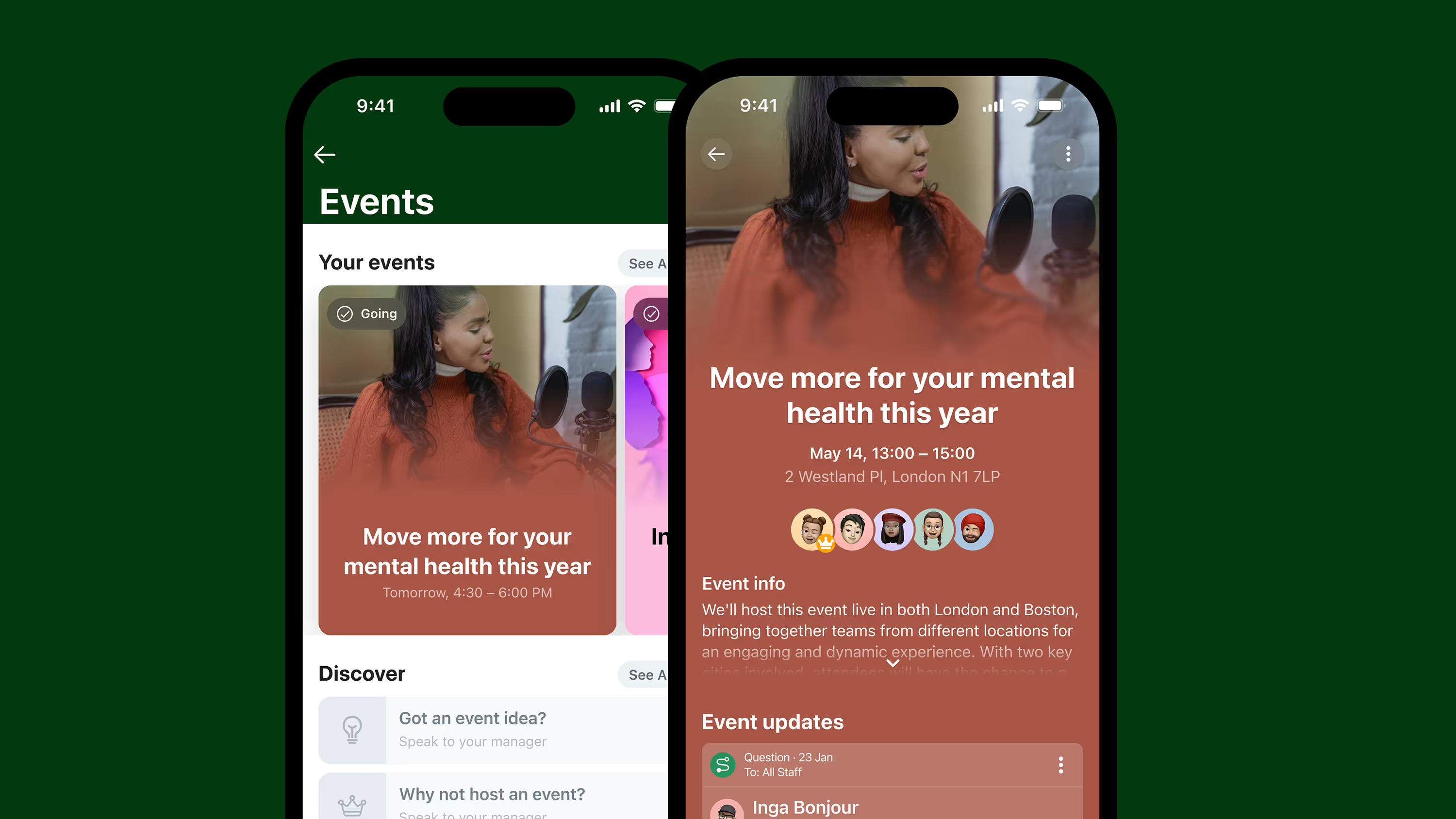
A shout-out to celebrate an employee's birthday in the news feed.
A manager checking in to ask how you’re feeling this week over instant messaging.
A quick story post from the CEO that gives a little insight into their day.
These micro-moments bridge the gap between corporate messaging and real workplace experience. They take that dusty company culture document and turn it into a living, breathing reality.
{{mobile-main="/image"}}
Why micro-moments matter in today’s workplace
These small moments might not seem all that significant on their own. But together — with all the hundreds of other micro-moments employees experience — they form the foundations of your culture. They shape how employees feel, interact, and show up.
Here’s what they do for your workplace:
They keep the conversation flowing. Silence breeds uncertainty. Gaps in communication leave room for rumor, misunderstanding, and disengagement. But micro-moments, in the form of regular internal communication touchpoints, keep employees connected and informed.
The compounding effect. One “good job” message might seem insignificant — but repeated, positive micro-moments create trust and belonging. And each one builds on the last. A few words of encouragement today make it easier for someone else to speak up tomorrow.
Connection in a dispersed workplace. When your team is dispersed, micro-moments replace the hallway chat or the catch-up over coffee. They act as a digital water cooler, bringing frontline, remote, and office-based teams together, and keeping culture alive across time zones and shifts.
It’s what employees expect. Outside of work, we routinely connect over micro-moments. A video story. A WhatsApp message. A voice note. We’re used to short-form, snackable content. Which is why, in the workplace, a simple 10-second video can do more for morale and engagement than a 10-page strategy doc ever could.
They fit into your workflow. Employees — particularly those on the frontlines of your organization — are busy. So culture-building efforts shouldn’t pull them away from their day. Micro-moments integrate seamlessly into the flow of work, making connection quick and easy for everyone.
They signal care and attention. Finally, micro-moments show employees that leaders and peers are paying attention, noticing effort, and valuing contributions. They help to build a culture of open communication and recognition, where employees feel appreciated and encouraged to take part.
{{mobile-recognition-post="/image"}}
How to achieve macro-impact with micro-moments
So how do you harness the potential of micro-moments for your organization? Here are a few practical ways to make the smallest of interactions deliver the biggest possible impact.
Empower managers to create daily connection rituals
Managers are the ones who bring your culture to life. But they’re also sandwiched between employees and the C-suite, juggling expectations and tasks from all sides. That’s why creating small, repeatable rituals is key to micro-moment success. Think:
A quick message to ask “How’s your day going?”
A public thank you when someone goes the extra mile
A follow-up on feedback shared in last week’s meeting
These interactions take seconds but their impact is long-lasting. They show empathy and accountability, which helps managers (and by extension the organization) build trust with employees.
Even better? Make these micro-moments visible. Give recognition and conduct check-ins over shared digital channels to amplify their impact. You’ll spread positivity across the organization and reinforce the culture you want to build.
Balance top-down messages with peer-to-peer moments
The best cultures are built through connection and participation. And that means going beyond traditional top-down messaging to involve everyone in the company conversation. So encourage peer-to-peer connection. Let employees react to posts, respond to news feed questions, add their congratulations to co-worker recognition, and even create their own culture-building content.
By appointing employees as co-creators of your culture, you sprinkle micro-moments throughout the workday. And you ease the load for your comms team, too. Everyone helps keep the conversation going.
Another benefit of this approach? Peer-led moments feel lighter, more organic, and more genuine. They have an energy that draws people in, so they help to build a real sense of community within your organization.
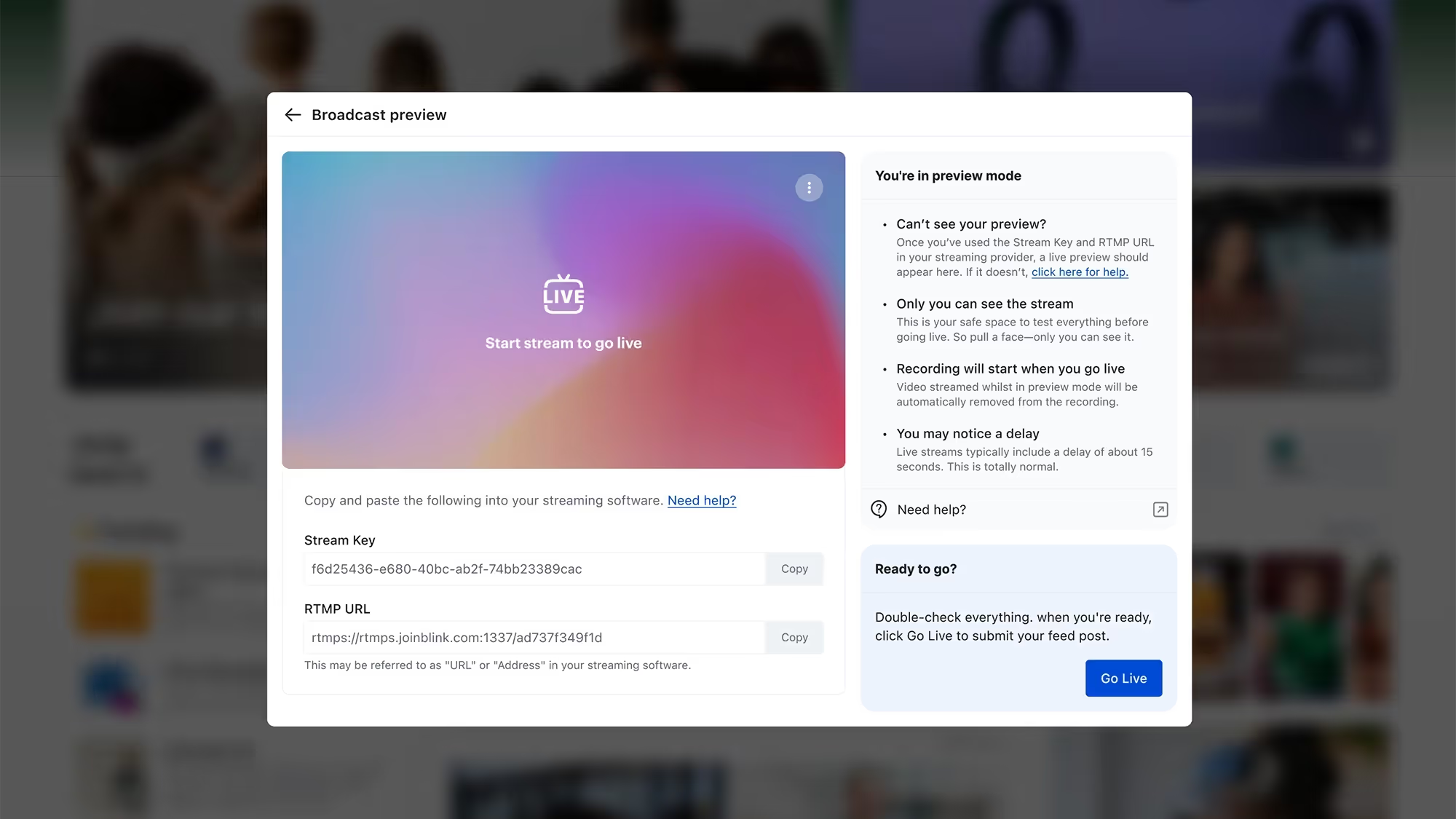
{{mobile-live-stream-poll="/image"}}
Encourage the C-suite to go beyond corporate comms
When the C-suite speaks, everyone tends to listen. So you can create truly impactful micro-moments by getting leaders involved. Of course, a lengthy email newsletter or a polished corporate video isn’t the kind of thing you’re looking for.
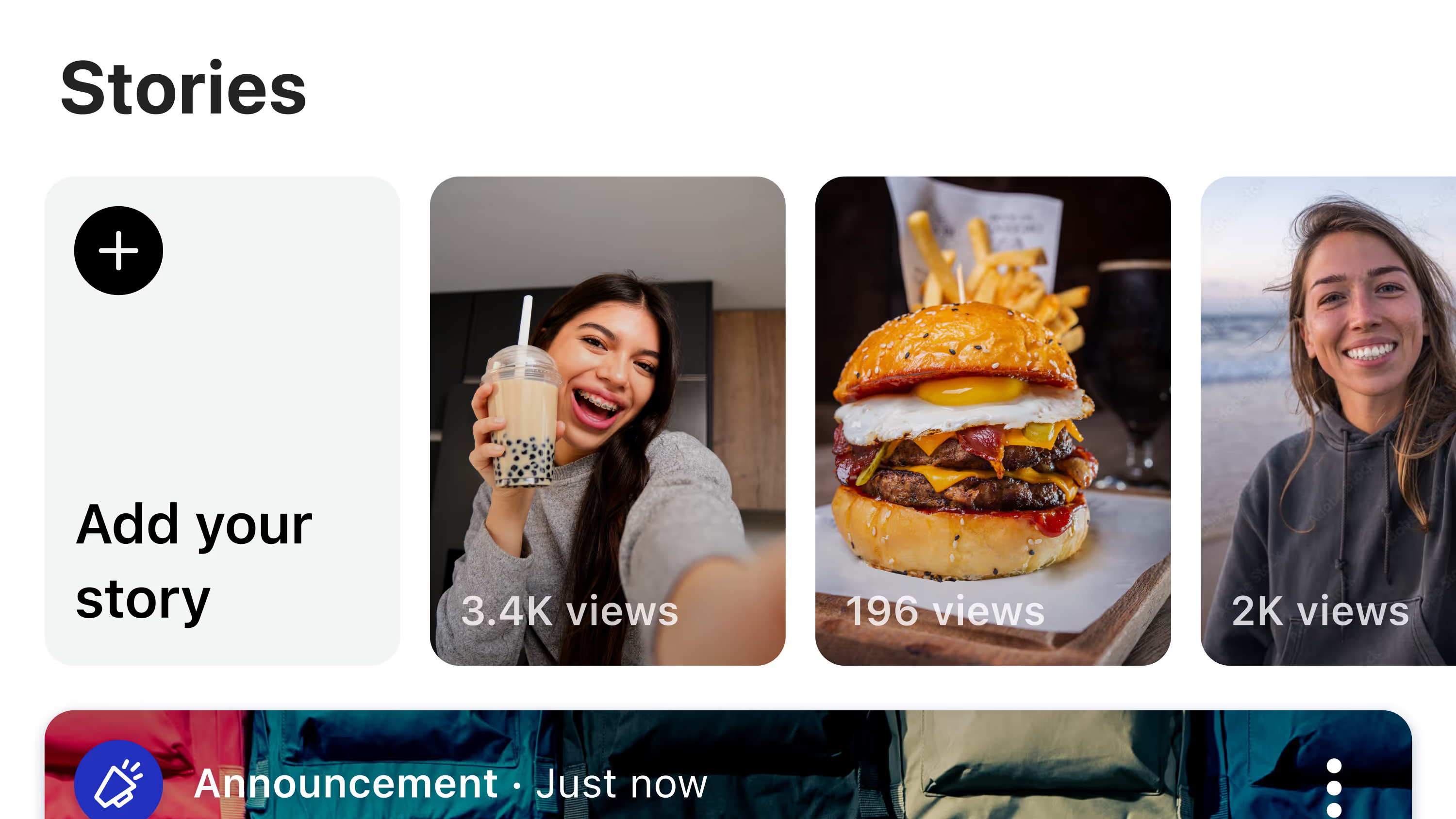
Instead, you want leaders to share short, relatable moments in real time. A selfie from a site visit. A post sharing what inspired them that week. A quick note to highlight customer success and the team behind it.
This content shows accessibility and warmth. It tells employees: I see you and I’m part of this too. It’s especially powerful for frontline teams who rarely see leaders face-to-face.
Leaders may need a little coaching in how to deliver these kinds of moments. And you may need to experiment with the formats they feel most comfortable with. But — with the right support from comms — the C-suite can create micro-moments that really resonate.
Prioritize authenticity over polish
The beauty of micro-moments? They don’t need to be overly rehearsed or perfectly produced. In fact, working to get a piece of internal content “just right” can actually dilute its cultural impact.
Use micro-moments to respond to what’s happening right now — a big client win, a project milestone, or even the trending topic that’s on everyone’s lips. Quick, relevant interactions land far better than polished-but-stale content.
That’s because authentic micro-moments show employees that the company is human and that leaders notice what’s happening on the ground. Workers appreciate the authenticity — and they’re far more likely to believe the message.
And for your employee communications team? Removing the pressure to polish every post means content can go out fast, keeping conversations alive, building momentum, and weaving cultural values into every day.
{{mobile-stories="/image"}}
Create digital spaces for every kind of comms
You can only make a success of micro-moments when you have the right ecosystem in place. That means giving employees multiple, connected communication channels where they can share, react, and respond in real time.
Think recognition, polls, team chat, video updates, live streams — each touchpoint surfacing a different side of your company culture. When these channels are available across mobile-first tools, micro-moments reach every member of your workforce, including hard-to-reach frontline employees.
The result? A culture with the power to create positive employee experiences and better employee engagement across the board.
Use analytics to spot engagement opportunities
With intranet analytics, you can spot the times, places, and teams where micro-moments stand to make the most impact.
If participation on the employee intranet drops, if certain teams aren’t responding to updates, or if sentiment in comments starts to shift, these are the early warning signs you need to pay attention to.
By tracking engagement and feedback in real time, you can see what works, spot gaps, and fine-tune your micro-moment strategy. The data helps you step in at the right time — and keep doing more of what actually connects with employees.
{{mobile-activation="/image"}}
Incorporating micro-moments into your organization
The challenge for most organizations isn’t understanding the value of micro-moments.
It’s creating the environment where they happen naturally.
A check-in from a manager. A poll to gauge employee opinion. A quick live stream update. These micro-moments drive trust, belonging, and a sense of purpose. They show employees that yours is a place where open communication and connection are the norm.
So what next? To incorporate micro-moments into your comms strategy, go beyond polished, corporate messaging. And — to make your strategy sustainable — encourage people from across the company to share and amplify micro-moments.
Digital employee experience platforms like Blink makes it easy. You can send a recognition post, launch a poll, share a video story, and even go live with your audience, in just a couple of clicks.
And — because Blink is a mobile-first intranet platform — everyone can take part. From the comms team to the C-suite, your office team to your frontline workers, everyone has the tools they need to access and contribute to workplace culture.
Welcome to the February 2026 edition of the Quarterly Unlock — your inside look at what’s new in Blink and how it helps teams move faster, communicate more clearly, and unlock more value across the employee experience.
As organizations scale, systems multiply and communication noise increases. Blink should get smarter, more connected, and easier to manage — without adding complexity.
Here’s what’s new.
#1. Smarter, more relevant communication
When employees see too much content, important updates get buried. When connectivity drops, access disappears. When engagement dips, comms teams feel it first.
This quarter, we’re making sure the right people see the right content at the right time — wherever they are.
Smart Feed
We’re introducing a recommended Feed experience that prioritizes relevance — not just publish time.
Surface the most important content first
Reduce manual pinning and featuring
Adapt the Feed as organizations grow
Improve visibility without extra admin effort
Instead of a strictly chronological stream, Blink becomes intelligent — helping important messages cut through the noise. Designed for large organizations and high-volume Feeds, Smart Feed is built to evolve alongside your communication goals.
{{offline-mode="/image"}}
Offline Mode
Frontline work doesn’t always come with reliable signal. Now, Blink doesn’t require it.
Save hub content and Feed posts for offline access on mobile
Access saved items centrally
Automatically sync updates when reconnected
Retain control over sensitive hub items with protected content settings
The result? Critical documents and updates remain accessible — even in low-signal environments like aviation, healthcare, logistics, manufacturing, and field operations.
Email delivery of Feed posts
Multi-channel delivery — without duplicating work. Admins can now send a published Feed post as an email to:
Everyone in a group
Or only those who haven’t read it
Each email includes a preview and a direct CTA back into Blink — helping re-engage inactive users and strengthen visibility for critical communications.
For most customers, this feature will be included at no additional cost. For large enterprises with high-volume usage, it may be considered on a case-by-case basis.
{{email="/image"}}
#2. Deeper interoperability across enterprise systems
Employees rely on multiple systems to get work done. But switching between them slows everything down.
This release brings core HR workflows into Blink — turning it from a communication tool into an action hub.
Actionable Workday Nudges
Managers can now approve or deny leave requests directly inside the Blink Feed.
Faster leave request approval turnaround
Reduced friction for frontline managers
Less logging in and navigating systems for employees
Improved visibility into HR processes
{{workday-payslip="/image"}}
Workday Digests
Daily or weekly summaries highlight open Workday tasks that require attention. Instead of relying on employees to monitor their HR inbox, Blink brings reminders into their everyday workflow — reducing missed deadlines and improving task completion.
SAP SuccessFactors daily Digest
For customers using SAP SuccessFactors, Blink now delivers a configurable daily digest when new tasks are waiting.
Task count surfaced directly in the Feed
Link-through to complete tasks in SuccessFactors
Custom branding supported
{{image-sap="/image"}}
#3. Safer, more confident Communities at scale
As Communities grow, governance becomes critical.
This quarter introduces new controls that allow organizations to scale engagement — without sacrificing oversight.
Request to join a Community
Community admins can now require approval before new members join.
Communities can be set to Open or Closed
Admins receive join requests and approve on web or mobile
Settings take effect immediately
{{community-request="/image"}}
Request to create a Community
Employees can suggest new Communities — subject to admin approval — supporting organic growth while preventing uncontrolled group sprawl.
Automated Keyword Blocking
Organizations can now define an organization-wide keyword blocklist that prevents specific words or phrases from being sent in chats and comments.
Immediate, private feedback to users
Managed via moderation tools
Works across web, iOS, and Android
This privacy-conscious safety layer helps reduce compliance risk and maintain professional standards — particularly in regulated industries.
{{automated-keyword="/image"}}
What this Unlock means for your team
For employees
A more relevant Feed
Reliable access to content
Critical updates delivered more consistently
For leaders and comms teams
Greater confidence that key messages are seen
Intelligent distribution at scale
Safer, better-governed Communities
For IT and operations
Stronger integration with enterprise systems
Reduced context switching
More control as usage scales
If you’re a customer, reach out to your customer success manager to discuss participation and enablement options.
If you’re exploring Blink, book a demo to see how the February 2026 Unlock brings communication and action into one seamless experience.
Staffbase has become a popular internal communications platform, particularly for large organizations looking to modernize their intranet. It offers personalization, branded employee apps, and strong publishing tools. But many companies — especially those with distributed or deskless workforces — are starting to feel the platform’s limitations.
If your goal is to engage every employee, not just those behind a desk, you may need more than what Staffbase can offer. Common reasons teams start exploring Staffbase alternatives include:
Low adoption among frontline workers or non-desk employees
Limited functionality beyond comms and content publishing
Slow rollout times and high implementation costs
Dependence on corporate emails or M365 environments
Lack of integrated workflows, like scheduling, surveys, or task management
In short, if you're looking for more than just a modern intranet — if you need a platform that drives action, not just communication — it’s worth exploring alternatives built for today’s workforces.
What to look for in a Staffbase alternative
Not every internal comms platform is built the same. When searching for a Staffbase alternative, it’s important to evaluate tools that prioritize ease of use, adoption, and flexibility — not just content publishing.
Here are the key features and traits to look for:
#1. Mobile-first design
Choose a platform designed for mobile from the ground up — not just one that adapts desktop intranets into an app. This ensures frontline, field, and shift-based workers are truly included.
{{mobile-main="/image"}}
#2. No email required
Many of today’s employees don’t have a company email. Platforms like Blink eliminate this barrier, allowing you to onboard and engage your entire workforce seamlessly.
#3. Unified employee experience
Look for more than just comms. The best platforms integrate communication with operational tools like schedules, task lists, surveys, HR links, and document access — all in one place.
#4. High adoption & engagement rates
Adoption is everything. A Staffbase alternative should show real-world data that proves high usage — not just licenses sold.
#5. Quick implementation
Complex rollouts kill momentum. Favor platforms that offer plug-and-play setups, pre-built templates, and fast deployment (especially for time-sensitive initiatives).
#6. Integrations with key systems
Ensure the platform integrates easily with your HRIS, payroll, scheduling tools, Microsoft 365 or Google Workspace, and other core systems to avoid silos and duplicated work.
{{mobile-hub="/image"}}
#7. Analytics, insights & feedback loops
It’s not enough to send messages — you need to know who saw them, how they responded, and what’s working. Built-in analytics and pulse survey tools help you improve continuously.
Best for: Companies prioritizing adoption and utility.
Blink is the most comprehensive Staffbase alternative, designed to connect every employee — whether they work behind a desk, behind a counter, or out in the field. Unlike Staffbase, which often centers around publishing and personalization for office workers, Blink unifies communication, engagement, and productivity into one mobile-first app.
For organizations seeking a comprehensive and intuitive employee platform, Blink delivers. It offers rich features like content sharing, forms, chat, and analytics, all within an easy-to-use mobile and desktop experience that scales across departments.
Why organizations switch from Staffbase to Blink:
No company email required — reach 100% of your people
Combines communication and action: from news to tasks and HR tools
Market-leading usage and adoption rates
Quick rollout and self-serve administration
Loved by global brands like McDonald’s, Shake Shack, Elara Caring, and Stagecoach
Pricing: Custom pricing Gartner Rating: 4.8/5
Blink goes beyond engagement — it delivers true connection, across every role and region.
{{watch-video="/callouts"}}
#2. LumApps – Best for Google Workspace & Microsoft 365 integration
LumApps offers a personalized digital workplace experience and integrates well with Google and Microsoft ecosystems. It's strong in content delivery and social sharing, but its frontline functionality is limited.
Pros: Deep Google/Microsoft integrations, personalization Cons: Less effective for non-desk workers Pricing: Custom pricing Gartner Rating: 4.3/5
#3. Connecteam – Best for operational frontline use cases
Connecteam is a mobile-first app that includes scheduling, time tracking, and forms — making it ideal for operations-heavy teams. However, it lacks richer communication or storytelling tools found in Blink or Staffbase.
Pros: Operations tools like checklists and timesheets Cons: Basic internal comms capabilities Pricing: Starts at $29/month for 30 users Gartner Rating: 4.4/5
#4. Workvivo – Best for culture sharing
Workvivo focuses on building community and culture through its social intranet experience. With features like activity feeds and shout-outs, it helps employees stay connected and recognized.
Pros: Social feed, culture-first messaging Cons: Limited in tasks, shift planning, or document handling Pricing: Starts at $20k/year Gartner Rating: 4.7/5
#5. Interact – Best for traditional intranet buyers
Interact enables top-down and bottom-up communication with its mix of content publishing, document management, and collaboration tools. It is designed to adapt to a wide range of industries and team structures.
Pros: Policy management, advanced intranet architecture Cons: Less dynamic for mobile teams Pricing: Contact for quote Gartner Rating: 4.3/5
#6. Simpplr – Best for modern intranets
Simpplr offers an elegant, personalized intranet experience. It’s visually engaging and great for corporate comms, but may fall short on engaging field teams.
#7. Haiilo – Best for content planning & analytics
Haiilo excels in structured comms workflows — ideal for campaign-based content teams. It performs well in content scheduling and measurement, but lacks deeper interaction features.
Pros: Editorial planning, analytics, targeting Cons: Feels like a CMS, not a people-first app Pricing: Custom Gartner Rating: 4.1/5
#8. Unily – Best for enterprise customization
Unily is a feature-rich platform best suited for global organizations needing tailored experiences. It comes with powerful multilingual support and personalization but requires more setup and resources.
Pros: Deep customization, localization Cons: Slower implementation, high complexity Pricing: Custom Gartner Rating: 4.3/5
#9. Beekeeper – Best for shift-based comms
Beekeeper focuses on messaging, forms, and workflows for shift-based teams. While great for ops, it may lack strategic communication depth.
MangoApps offers everything from messaging to LMS to file storage. It’s ideal for companies looking to replace several internal tools at once — but may require significant configuration.
Pros: Versatile, broad feature set Cons: Can feel cluttered or complex Pricing: Custom Gartner Rating: 4.4/5
Final thoughts: Move beyond the intranet
The internal communications landscape is shifting — and fast. Traditional intranet-style platforms like Staffbase, while once a step forward, are struggling to meet the needs of today’s increasingly mobile, distributed, and deskless workforces. If your platform only reaches office-based employees or requires complex setup to stay relevant, it may be time to move on.
The best Staffbase alternatives go beyond publishing news and announcements. They connect your people to what matters — whether that’s critical updates, shift schedules, HR tools, or each other. They simplify access, streamline workflows, and actually get used every day.
Blink leads the way as the all-in-one employee experience platform built for real-world teams — from the breakroom to the boardroom. It delivers unmatched adoption, mobile-first utility, and a unified experience your entire workforce can rely on.
If you’re ready to:
Replace your intranet with something employees actually use
Reach 100% of your workforce — not just the ones with email
Bring communication, tasks, schedules, and engagement into one platform
Workplace burnout is at a record high. More than half of Americans feel dissatisfied at work, and younger people feel it the most. Now more than ever, employees across the US—from new graduates to those in established careers—are putting work-life balance at a premium. A healthy workplace culture, strong communication, and employee engagement can make all the difference, which is why Blink helps businesses create environments where workers feel more connected, valued, and motivated.
With this in mind, we explored not only the industries with the happiest workers but also airports, specifically to better understand where frontline transit employees report the strongest overall workplace experiences, especially in one of the most chaotic environments. Money isn't always happiness, so we also researched employees' well-being, including job satisfaction, stress levels, workplace meaning, and overall employee sentiment, to identify the industries where workers appear to thrive most.
The top five happiest industries:
Airline pilots and flight engineers
Marketing managers
Financial managers
Pharmacists
Computer hardware engineers
1. Airline pilots and flight engineers
Securing the top spot, airline pilots and flight engineers rank as the happiest workers throughout any industry, earning the highest total score of 94.84. Pilots and engineers reported feeling pretty satisfied with their jobs, with a score of 72.0. A meaningfulness rating of 65.5 also indicates that workers feel accomplished in both their personal and professional lives. Employee sentiment also remained exceptionally strong at 92.3%, reinforcing the idea that workers are very satisfied with their careers.
Beyond emotional satisfaction, working as an airline pilot or flight engineer offers financial perks, with pilots and flight engineers earning the highest average annual salary on the list at $219,140. Of course, given the demanding nature of the career, it makes sense that these roles come with higher stress and pain scores of 63.6 and 72.5, respectively. Professionals in this field continue to report the highest overall satisfaction levels, underscoring that the benefits definitely outweigh the challenges in this industry.
2. Marketing managers
Marketing managers earn an impressive total score of 86.298, ranking them second-happiest across industries. Workers in professional and business services reported a happiness score of 62.1, with meaningfulness averaging even higher at 69.0, indicating that many professionals in this field truly believe their creativity and strategic thinking have a significant impact on their work. Marketing managers' employee sentiment is one of the highest recorded scores at 99.1%—meaning almost every single person is happy at work.
The role also offers strong financial incentives, with marketing managers earning an average annual salary of $157,620. Like every industry, this profession also has high demands, as reflected in stress and pain scores of 55.8 and 83.8, respectively. Still, many people report high overall satisfaction, indicating that the fast-paced nature of marketing is often balanced by career growth, influence, and compensation.
3. Financial managers
Financial managers achieved an overall score of 84.99, indicating strong job satisfaction. Professionals in financial activities reported a happiness score of 66.3 and a meaningfulness rating of 68.0, indicating that many workers believe they find their greatest purpose by simply overseeing financial strategy, investments, and overall growth. Once again, workers' sentiment in the financial sector was 99.1%, one of the highest among all jobs, signaling positivity across the profession.
The field also offers highly competitive compensation, with average annual salaries reaching $156,100. Despite the expected responsibility and pressure, reflected in stress and pain scores of 58.0 and 90.1, financial managers continue to report high career satisfaction, showing that the rewards of leadership, expertise, and long-term advancement often outweigh the demands of the role.
4. Pharmacists
Pharmacists earned a strong total score of 84.13, ranking them among the most fulfilled professions in healthcare. Workers in educational and health services reported a happiness score of 61.5. At the same time, meaningfulness reached an impressive 73.6, ranking among the highest across all professions, underscoring the vital role pharmacists play in patient care and community well-being. Employee sentiment also remained exceptionally high at 97.0%, reflecting strong morale throughout their work.
In addition, the profession offers a strong financial cushion, with pharmacists' average salary being $136,030. Working in healthcare, this job, of course, comes with demanding responsibilities, shown by their stress and pain scores of 54.6 and 86.7. Despite the reports, pharmacists continue to share high levels of overall fulfillment, showing that helping improve patient outcomes remains one of the profession’s greatest rewards.
5. Computer hardware engineers
Computer hardware engineers earned a strong total score of 83.39, ranking them among the top five most fulfilled professionals in the workforce. Workers in this side of professional and business services reported a happiness score of 62.1 and a meaningfulness score of 69.0, suggesting that these engineers feel a sense of accomplishment when performing tasks such as designing and improving the technology that gets us through everyday life. Employee sentiment also remained high at 92.3%, reflecting positive attitudes toward career opportunities and innovation within the field.
The profession also offers substantial financial rewards, with average annual salaries reaching $138,080. While the role can involve demanding workloads and pressure, reflected in stress and pain scores of 55.8 and 83.8, computer hardware engineers continue to report high overall fulfillment, indicating that the opportunity to innovate and shape the future of technology often outweighs the job's challenges.
Swipe to see all columns
Rank
Job Title
Industry
Job Satisfaction: Happiness
Job Satisfaction: Meaningfulness
Salary Satisfaction
Employee Sentiment
Job Satisfaction: Stress
Job Satisfaction: Pain
Total Rank
1
Airline Pilots and Flight Engineers
Transportation & utilities
72
65.53
219,140
92.3
63.62
72.51
94.84
2
Marketing Managers
Professional & business services
62.06
68.99
157,620
99.1
55.75
83.75
86.3
3
Financial Managers
Financial activities
66.26
67.98
156,100
99.1
57.99
90.14
84.99
4
Pharmacists
Educational & health services
61.45
73.56
136,030
97
54.61
86.66
84.14
5
Computer Hardware Engineers
Professional & business services
62.06
68.99
138,080
92.3
55.75
83.75
83.39
6
Human Resources Managers
Professional & business services
62.06
68.99
136,350
92.3
55.75
83.75
83.19
7
Software Developers
Professional & business services
62.06
68.99
127,260
93.1
55.75
83.75
82.23
8
Postmasters and Mail Superintendents
Transportation & utilities
72
65.53
107,360
92.3
63.62
72.51
82.09
9
Lawyers
Professional & business services
62.06
68.99
145,760
68.77
55.75
83.75
81.91
10
Petroleum Engineers
Professional & business services
62.06
68.99
135,690
74.5
55.75
83.75
81.34
The airports with the happiest workers
1. Salt Lake City International Airport - Salt Lake City, UT
Salt Lake City International Airport has made a name for itself as the airport with the happiest workers, with an impressive overall score of 88.7, backed by a standout job satisfaction score of 115. Employees say they feel valued both professionally and financially, with a salary satisfaction score of 91% showing compensation closely matches expectations. Workplace morale also remains high, with staff giving the airport an average rating of 3.9 out of 5, a sign of a positive culture in an area best known for stress and long hours.
That positive energy extends far beyond airport staff and into the passenger experience. Salt Lake City International earned a passenger satisfaction score of 665 out of 1,000 while maintaining strong operational performance, with only 15.17% of flights delayed and just 0.51% canceled. The airport’s ability to balance employee well-being, efficient operations, and traveler satisfaction sets it apart from other major hubs, creating an environment where both workers and passengers can enjoy a smoother, more positive journey.
2. William P. Hobby - Houston, TX
Heading south, we have Houston’s William P. Hobby Airport earning a score of 86.7 for airports with the happiest workers, possibly because of its impressive overall job satisfaction score of 115. Employees reported feeling especially valued on the finance side, with a near-perfect salary satisfaction score of 99%, suggesting that compensation closely aligns with the role's demands. Workplace morale was even more remarkable, with staff awarding the airport a near-perfect score of 4.8 out of 5 rating, one of the highest employee satisfaction scores among major U.S. airports.
That strong internal culture appears to influence the traveler experience positively as well. William P. Hobby Airport earned a passenger satisfaction score of 643 out of 1,000, showing travelers continue to enjoy the airport despite the pressures of a busy flight schedule. While operational challenges remain — with 20.12% of flights delayed and 1.14% canceled — the airport has maintained high employee morale and a supportive workplace environment. The results highlight how competitive compensation and a positive culture can help workers thrive, even in one of the country's fastest-paced industries.
3. Hartsfield-Jackson Atlanta International - Atlanta, GA
At the world’s busiest airport, keeping employees happy may sound impossible, yet Hartsfield-Jackson Atlanta International Airport continues to soar. Earning a high overall score of 86.0, Atlanta International also shared an impressive job satisfaction score of 115. Employees reported strong workplace satisfaction, as evidenced by a salary satisfaction score of 90%, suggesting that compensation generally meets expectations in a demanding, high-pressure environment. Staff morale also remained positive, with workers giving the airport a rating of 3.9 out of 5, highlighting a steady workplace culture despite the activity.
That balance between pressure and performance extends to the traveler experience as well. Hartsfield-Jackson earned a passenger satisfaction score of 590 out of 1,000; only 10.98% of flights were delayed, although cancellations reached 1.45%. All of these numbers paint a picture of an airport that has learned to manage passenger traffic while still supporting employee well-being, creating a more stable and reliable experience for both workers and travelers.
4. Honolulu International - Honolulu, HI
Honolulu International Airport proves that paradise isn’t just for travelers; employees are enjoying the experience too. Ranking among the airports with the happiest workers, the airport earned a strong overall score of 85.8, along with an impressive job satisfaction score of 115. Employees reported positive workplace experiences and steady satisfaction with compensation, with a salary satisfaction score of 79%, indicating that pay generally aligns with expectations. Workplace morale was especially high, with staff giving the airport an impressive 4.4 out of 5 rating, reflecting a supportive culture and upbeat atmosphere in one of the country’s most scenic travel hubs.
That positive environment carries over to passengers as well. Honolulu International earned a passenger satisfaction score of 617 out of 1,000 while maintaining relatively stable operations, with 16.13% of flights delayed and only 0.77% canceled. Together, these figures highlight the airport’s ability to balance employee happiness, traveler satisfaction, and operational reliability — creating a smoother, more enjoyable experience for everyone passing through Hawaii’s gateway to the world.
5. Portland International - Portland, OR
Portland International Airport is proving that a positive workplace culture can go a long way, even in the fast-moving world of air travel. Ranking among airports with the happiest workers, PDX earned a strong overall score of 85.7, along with an impressive job satisfaction score of 115. Employees reported positive workplace experiences, as evidenced by a salary satisfaction score of 80%, suggesting that compensation generally meets expectations. Morale was especially high among staff, who awarded the airport an outstanding 4.5 out of 5 rating, highlighting a workplace culture employees genuinely enjoy being part of.
Employee satisfaction appears to translate directly into the traveler experience as well. Portland International earned one of the highest passenger satisfaction scores among major U.S. airports, with a score of 683 out of 1,000, reinforcing its reputation as a traveler-friendly hub. While operational challenges persist, with 18.05% of flights delayed and 0.78% canceled, the airport continues to strike a strong balance between employee well-being, operational performance, and passenger convenience, creating a smoother, more enjoyable environment for everyone passing through its terminals.
Salary Satisfaction Score (closer to, or over, 1 means employees are happier)
Employee Sentiment (Average Star Rating out of 5)
Passenger Satisfaction Score (1,000 point scale)
Operational Stress (% Delayed Flights)
Operational Stress (% Canceled Flights)
Total Rank
1
Salt Lake City International
Salt Lake City, UT
115
0.91
3.9
665
15.17
0.51
88.7
2
William P Hobby
Houston, TX
115
0.99
4.8
643
20.12
1.14
86.7
3
Hartsfield-Jackson Atlanta International
Atlanta, GA
115
0.9
3.9
590
10.98
1.45
86
4
Honolulu International
Honolulu, HI
115
0.79
4.4
617
16.13
0.77
85.8
5
Portland International
Portland, OR
115
0.8
4.5
683
18.05
0.78
85.7
6
Louis Armstrong New Orleans International
New Orleans, LA
115
1.06
5
664
22.37
1.54
85.4
7
John Wayne Airport-Orange County
Santa Ana, CA
115
0.8
4.4
730
18.17
0.91
85.3
8
Minneapolis-St Paul International
Minneapolis, MN
115
0.87
3.3
660
13.21
0.84
85.3
9
Phoenix Sky Harbor International
Phoenix, AZ
115
0.91
4.2
634
19.22
0.78
85.1
10
George Bush Intercontinental/Houston
Houston, TX
115
0.99
4.5
606
19.35
1.5
83.8
11
Harry Reid International
Las Vegas, NV
115
0.98
3.7
619
20.5
0.76
83.4
12
San Antonio International
San Antonio, TX
115
1.06
3.9
650
22.26
1.07
83.3
13
Sacramento International
Sacramento, CA
115
0.79
4.1
662
19.64
0.63
83.1
14
Los Angeles International
Los Angeles, CA
115
0.8
4.1
589
18.59
0.75
82.7
15
Detroit Metro Wayne County
Detroit, MI
115
0.97
3.6
649
19.32
1.1
82.4
16
Dallas Love Field
Dallas, TX
115
0.94
4
705
20.3
1.45
81.7
17
Pittsburgh International
Pittsburgh, PA
115
0.99
4.3
639
22.07
1.47
81.6
18
Lambert-St. Louis International
St. Louis, MO
115
1
3.7
602
20.05
1.3
81.2
19
Kansas City International
Kansas City, MO
115
0.96
4.1
691
22.44
1.46
80.7
20
Miami International
Miami, FL
115
0.92
4.3
615
22.95
1.21
80.6
21
Austin - Bergstrom International
Austin, TX
115
0.92
3.7
643
22.36
0.87
80.6
22
Southwest Florida International
Fort Myers, FL
115
0.96
3.8
683
22.91
1.2
80.3
23
Orlando International
Orlando, FL
115
0.96
4
618
23.74
1.06
80.3
24
Charlotte Douglas International
Charlotte, NC
115
0.94
4
581
18.92
1.64
80.3
25
Seattle/Tacoma International
Seattle, WA
115
0.73
4.5
583
20.67
0.99
80.1
26
Cleveland-Hopkins International
Cleveland, OH
115
1.01
4.2
611
22.47
1.72
79.6
27
Indianapolis International
Indianapolis, IN
115
0.98
3.8
713
22.28
1.62
79.4
28
Nashville International
Nashville, TN
115
0.94
3.5
676
21.82
1.2
79.4
29
Washington Dulles International
Washington, DC
115
0.73
4.4
612
19.25
1.38
79.3
30
John Glenn Columbus International
Columbus, OH
115
0.97
3.6
639
22.72
1.41
78.3
31
Denver International
Denver, CO
115
0.79
3.8
596
22.63
0.82
78
32
Raleigh-Durham International
Raleigh/Durham, NC
115
0.91
3.9
688
22.63
1.64
77.8
33
Norman Y. Mineta San Jose International
San Jose, CA
115
0.58
3.4
650
17.67
0.68
77.5
34
Chicago Midway International
Chicago, IL
115
0.89
2.8
631
19.55
1.09
77.3
35
Cincinnati/Northern Kentucky International
Cincinnati, OH
115
1.01
3.7
660
24.44
1.7
76.9
36
Metropolitan Oakland International
Oakland, CA
115
0.65
3.2
618
18.27
0.73
76.9
37
Tampa International
Tampa, FL
115
0.95
3
709
24.03
1.11
76.9
38
Baltimore/Washington International Thurgood Marshall
Baltimore, MD
115
0.86
2.9
650
19.37
1.3
76.6
39
Chicago O'Hare International
Chicago, IL
115
0.89
4.5
586
24.72
1.75
76.4
40
Fort Lauderdale-Hollywood International
Fort Lauderdale, FL
115
0.92
3.4
606
24.22
1.26
75.6
41
Philadelphia International
Philadelphia, PA
115
0.9
4.2
570
23.64
1.86
75.4
42
San Diego International
San Diego, CA
115
0.76
3.8
645
24.33
1.19
74.9
43
San Francisco International
San Francisco, CA
115
0.65
3.9
613
24.05
0.86
74.6
44
Palm Beach International
West Palm Beach, FL
115
0.92
3.4
688
27.71
1.39
73.5
45
Logan International
Boston, MA
115
0.71
3.9
608
25.48
1.64
70.8
46
Dallas/Fort Worth International
Dallas/Fort Worth, TX
115
0.94
3.8
620
23.83
2.78
70.6
47
John F. Kennedy International
New York, NY
115
0.74
3.6
618
22.07
2.26
70
48
LaGuardia
New York, NY
115
0.74
3.5
637
24.54
2.92
64.8
49
Newark Liberty International
Newark, NJ
115
0.74
3.3
565
26.88
2.65
62.6
50
Ronald Reagan Washington National
Washington, DC
115
0.73
4
623
30.77
3.62
58.3
Happy workers, better workplaces
No matter what industry you work in, there are bound to be both positives and negatives. What everyone strives for, no matter their position, is to work in an environment that makes work enjoyable. Many of the industries displayed are where people feel happiest. Whether you work in healthcare, marketing, or even in airports from Utah to Hawaii, the right work environment can lead to happier, more satisfied employees.
Every industry offers its own advantages, whether it’s strong employee sentiment, competitive salaries, operational efficiency, or even positive, supportive experiences.
Together, these factors help to create workplaces where engaged employees thrive despite the fast-paced demands of each industry.
Methodology
To find out the professions with the happiest workers in the U.S., we analyzed 100 of the most in-demand jobs using the U.S. Bureau of Labor Statistics' American Time Use Survey, where Americans rate how they actually feel at work from being happy, fulfilled, stressed, or in pain — on a 0–6 scale. Responses were adjusted to a 0–100 scale (with stress and pain flipped so the lower values indicate better outcomes), and combined into a single Happiness Score weighted toward happiness, followed by meaning, stress, and pain. Industries with insufficient responses (fewer than 50) were excluded. We then included employee sentiment metrics — Happiness (40%), Compensation (25%), and Leadership (20%) — from the top three companies for each profession on Comparably. The letter grades for each metric were converted to percentage scores (A+ = 97, A= 93, A-=90, B+=87, B=83, B-=80, C+=77, C=73, C-=70, D+=67, D=63, D-=60, F=50) and averaged together to produce a final sentiment score.
For the airport workers ranking, we identified the 50 busiest U.S. airports using Bureau of Transportation Statistics data, then built a job satisfaction score for common airport roles (retail, food service, flight attendants, TSA agents, customer service, baggage handlers) using O*NET metrics including stress tolerance, time pressure, dealing with difficult people, time spent standing or walking, accuracy demands, achievement, relationships, and caring for others. These were grouped into proxy categories — happiness, meaningfulness, stress, and tiredness — to create a final job satisfaction score.
We also built a salary satisfaction score by combining median wages from the Bureau of Labor Statistics with cost-of-living data from MIT's Living Wage Calculator, averaging a living wage coverage score (airport worker wages vs. single-person living wage) and a living wage competitiveness score (airport worker wages vs. metro-area median).
Finally, we measured employee sentiment via Indeed star ratings, passenger satisfaction via J.D. Power scores, and operational stress via BTS data on delayed and canceled flights — using passenger satisfaction and operational stress as proxies, since happier travelers mean less strain on airport staff. Data accurate as of May 15th, 2026.
Employee retention is the art of holding onto your staff once you’ve hired them.
And, in 202w, it’s more important than ever.
Why?
Because companies are finally waking up to the competitive advantages of being a "people" company. A "churn and burn" approach to hiring results in poor customer service.
This is an issue, because customers are placing increasing value on good service. With smartphones, it’s easier than ever to find a competitor company to buy from. Or in the case of consumer goods, to avoid the shop altogether and order online.
Before we start.
You can hold onto employees (more or less) by treating them well. Listening to their concerns, and providing them with a few incentives to stay put.
If you’re an HR professional or a CEO, you don’t need us to tell you that. What you might find useful is an in-depth guide to employee retention in the modern workforce.
How to maximize your employee engagement efforts. And make sure there were no stones left unturned in creating the most comprehensive guide... we asked some industry-leading experts to contribute. We’ll cover:
Detail on the importance of employee retention today.
How to build effective employee retention strategies.
The exit interview, and how to turn it into your secret employee retention weapon.
Let’s begin...
Why is employee retention important?
Employee retention means "treating your employees right"; it’s an end in itself, not just the means.
From an ethical standpoint, no company should mistreat their employees. Meeting your colleagues’ basic needs and providing them with a safe and stimulating workplace? It's the right thing to do for its own sake.
But it’s more than that.
Attracting talent to your company—and keeping it once you’ve found it—has so many advantages. According to Herzberg's famous Two-Factory Theory, employee retention and employee motivation are interdependent. You can find out more about this in the Vantage Circle HR blog. A strong employee retention strategy will:
Reduce operating costs.
Improve customer service levels.
Allow you to out-compete your competitors for the best people.
The cost of high employee turnover
Hiring and firing is expensive.
Eye-wateringly expensive, to be precise. Think six to nine months salary as a conservative estimate.
Then you need to consider the impact of not having someone there to do that person’s work. That could slow down a massive project. Cause higher overtime costs as existing staff pick up their work. Or just lead to a reduction in staff morale as they struggle with increased workloads.
Companies tend to get the importance of this for salaried positions and execs. but there’s often a bit of a blind spot when it comes to their non-desk workforce and the real cost of losing an employee.
Sure, replacing a senior-level manager is more expensive than replacing a bus driver. But what happens if your bus drivers’ morale becomes so low that two or three quit per month?
It all adds up.
"Losing talented staff can also have emotional consequences on those who stay. Effectively reducing productivity by decreasing morality and motivation," says Rochelle van Rensburg of the Ezzely Blog.
"Maintaining essential talent is therefore mission-critical to organizational effectiveness for all these reasons. Staff retention puts companies ahead of their competitors, by reducing recruiting and re-skilling costs. But more importantly, by keeping the top performers, which results in all of their specialized knowledge and expertise remaining in-house."
Your mobile workforce interacts most with customers. They are the public face of your company. So, their happiness will reflect in the level of service they give your customers.
Happier, more engaged employees deliver better customer service. They also build up a bank of operational knowledge over time. This helps them respond to queries quicker and more effectively than a steady stream of new hires ever could.
The importance of employee retention in 2020
An active employee retention strategy is more important than ever. There are two key reasons for this:
Firstly, it's never been easier for customers to look elsewhere if they feel that your levels of service don’t match their expectations. We live in an age where any information you want is available via a few taps of a smartphone screen.
Dissatisfied with a hotel stay? Booking.com can recommend thousands of others.
Bad experience in a taxi? A quick Google gets you all the phone numbers of other local firms.
Poor customer experience at a theme park? TripAdvisor lists other attractions.
You get the idea.
Despite this, customers still want to be loyal. Millennials want to stick around if your brand fits in with their personal values. Don’t throw away this loyal market.
Secondly, it's never been easier to browse jobs via online jobs boards. If your workforce isn’t happy they will move. Don’t assume that they will sit in their job miserable because there aren’t any other options.
Reasons why employees leave and reasons why managers leave aren't always the same.
Your competitors may be waking up to the benefits of being a "people company." They'll more than happily snap up the staff you can't keep.
The best employee retention strategies
A strong employee retention rate is crucial to remain competitive. How you go about doing this is worth examining in some depth.
Remember - you are an employee too! As you create your employee retention strategies, keep asking yourself, "would I be happy with this?" or, "does this seem reasonable to me?"
Here are a few points you’ll need to cover when creating an employee engagement plan. Remember, the employee experience starts before the first day at the interviewing stage. To set each new starter up for success, getting the onboarding right is crucial. Want to learn more? Check out the Definitive Guide to Onboarding.
Let's quickly touch on the foundation of any working relationship: trust. As Kayla Lopez from the recruitment firm Viqtory.com reminds us. "If your employees trust you and the organization they tend to embrace the workplace; this begins before the employee is even hired. Transparency is something that we need to willingly support to gain trust. A workforce that trusts you will be engaged, a workforce that is engaged will retain. Trust is the foundation of all strong partnerships."
Now for the details...
Pay well
We’ll start with the basics.
If your pay rates don’t match with your competitors’, you’re going to have a bad time keeping hold of your high achievers.
Take a quick look at what your competitors pay for equal positions. Try and build a league table of what similar companies to you pay, and where you rank. Glassdoor is a good starting point.
Aiming for the absolute top is ideal if you can afford it, but you don’t have to offer the best salary offer out there. There are plenty of other ways to encourage your staff to stay put (more on that below), as long as you can land in the middle of the table. For someone working in a frontline job, it is difficult to give your best at work knowing you could get $5.00 per hour more for the same job elsewhere. (Even if there’s free pizza every Friday).
It’s also worth noting that even a generous wage packet won’t persuade your employees to stay if you’re otherwise a nightmare to work for. Consider this step the cornerstone of all your employee engagement efforts. Not enough by itself, but essential in building something lasting and meaningful.
Give competitive benefits
You might not be able to take it to Silicon Valley levels. (Free three-course meals for breakfast, lunch and dinner, unlimited holidays, and puppy creches).
You can offer a benefits package or a performance bonus scheme tailored to the size of your business, your budget, and your business objectives. The key is to prioritize benefits that would have a tangible difference to the lives of your employees. Add the fancy stuff on if you have money to spare.
Think about:
Childcare vouchers: we’re all aware of the struggle to find affordable childcare. Help your workforce with their work-life balance (and keep it diverse—most of the people who end up quitting jobs for childcare reasons tend to be women) by offering vouchers to help with the cost.
Health coverfor employees and dependents: an absolute must if you're US-based, although even if you live in a country which has some form of universal health care, giving employees the opportunity to go private is very appealing.
Flexible working: if the type of work you do accommodates it, flexible working is like gold dust to your staff. A "work your hours however you want" policy helps people manage childcare commitments, fit in dentist appointments, and reduce the stress of trying to juggle work and life commitments.
Lunch program: Most of the lunch break is spent buying, prepping or reheating food. Offering a tasty and healthy in-house solution, such as the online canteen Smunch, allows your employees to capitalize on their break time and share a meal together. Ultimately, this will improve your company culture and cross-departmental communication as well.
Once you’ve got the basics sorted, some nice-to-have options include:
Above average PTO allowances
Free gym memberships and cycle to work programs
Personal development funds
Develop a feedback culture to empower employees
Your employees know their workplace better than anyone else. Make the most of it.
If your employees feel involved in shaping their workplace and consulted on major decisions then they will be reluctant to leave it.
The key to this is to carry regular, easy-to-complete employee engagement surveys so you know exactly what the mood on the ground is and how to improve it.
Employees will hold an enormous amount of goodwill towards a workplace that listens to their concerns and acts on them. Equally, they will reserve a special sort of resentment for those that send out survey after survey, only to ignore the results.
It’s essential to have a solid plan in place for your employee engagement surveys, or they will backfire spectacularly.
Key pointers
Small, regular surveys are better than long, annual ones. Only giving your employees one chance per year to raise issues will result in bottled up frustrations spewing out come survey time. Not only does this result in surveys that skew unhelpfully negative, but it also means that your HR team will face an uphill struggle
Another point about designing surveys that you can respond to effectively: keep it targeted. Focus each of your quick-answer surveys on a specific area—facilities onsite, for example, or about relationships with line managers.
Use short answer questions: "yes/no" or "on a scale of 1-5" formats make it easier for people to respond immediately. Long-form feedback can be helpful, but having lots of long-answer text boxes on your survey will put people off completing it. A good compromise is to have an optional "any specific comments" box at the end of the survey.
When you’ve processed the surveys, share the results and shout about what you’re doing to act on feedback. Employees will appreciate the transparency, and it’s important to signpost what you’re doing to address the concerns they raise—or they won’t bother to participate in future surveys.
Try and create a "feedback culture" in your company by encouraging people to come forward with suggestions for improvements any time they want. Surveys highlight pain points as they are reactive; an anonymous suggestions box (either digital or real-life), on the other hand, will bring out the more innovative side of your workforce.
These suggestions might be small—a new way of organizing the break room fridge, or the introduction of free coffee Mondays—but the opportunity to improve the workplace in this way will work wonders for your wider staff’s sense of allegiance to it.
Make your workplace a fun place to work
If your coworkers are your friends, spending time at work doesn’t seem so taxing.
This is where the fun stuff comes in—the away days, lunchtime yoga, the free breakfast bar, the Christmas party...
If you have a mobile workforce, don’t forget to include them, too! They might not be in the office that often, so having regular get-togethers or breakfast clubs when shifts change is a great way to build a sense of belonging.
Obviously, base these activities on what your own workforce would like, but some ideas include:
Regular lunchtime sports clubs (running, yoga, five-a-side, badminton are good starting points)
Away days and team-building weekends.
Semi-regular opportunities for free food. Depending on the size of your team, you could offer lunch on the company each Friday, pizza parties when teams hit their targets or just because
Big events like Christmas parties and family fun days. If you run awareness weeks for things like diversity, mental health and stress, why not run some exciting events for these too?
Recognition of key milestones. If there are particularly busy periods throughout the year (like the Christmas rush for anyone working in retail or hospitality), put on an event to recognize the hard work your employees put in. This could be a full-on party, or simply just giving your staff the nod to take off after lunch on a quiet day.
This step does, however, come with a big flashing warning sign that says: don’t bother doing any of these without doing the steps listed above first.
Because these are fun and exciting, and sound super trendy when you put them on your Careers page, people often use them in place of paying a decent wage, or offering flexible working hours, or acting on employee feedback.
The exit interview - your employee retention secret weapon
One of the best ways of figuring out what’s going wrong with your employee retention efforts is asking your colleagues when they leave.
Seems counter-intuitive, and rather frustrating, doesn’t it?
And in some ways, it is. No amount of collecting and aggregating exit interview data, tweaking your employee engagement plan and making changes in your company to reduce employee turnover will change the fact that, for that particular employee, your efforts weren’t enough. For HR people and line managers, that stings sometimes.
Still, if you can take your losses on the chin, this is a real opportunity to do better for your colleagues, and identify and fix any major issues that push people to leave.
There are three main reasons why exit interviews are so effective at flagging up things that need to change:
The employee is leaving so won't hold back
Regardless of how many times you reassure your colleagues that your pulse surveys are anonymous and that helpful suggestions are encouraged, they will still be a little suspicious.
The worry that surveys aren’t really anonymous, or that speaking out about a key workplace bugbear will get them labelled as a troublemaker, will be a constant thorn in the side of your employee retention efforts.
(As a side note, if this attitude is pervasive then it might be time to take a look at your workplace culture. A little reticence is natural. An all-encompassing dread of speaking up might indicate something a little more sinister).
The exit interview is a different kettle of fish. They’re leaving. There are no raises or opportunities for promotion in the pipeline. This is their opportunity to "tell it like it really is."
Listen, even if you think they’re being unfair and bitter.
Problems brought up during exit interviews tend to have weighed heavily on an employee’s decision to leave. In other words, they’re big issues you need to address urgently.
Get the whole picture
Multiple exit interviews help build up a better picture of life on the ground.
Of course, there’s always the chance that one particular employee just, for whatever reason, didn’t have a good time.
That’s where keeping data from previous exit interviews comes in.
For example, if an employee complains about their line manager being unbearable, it might just be a clash of personalities. Equally it could be because that line manager is difficult to work for and too demanding. It’s difficult to say without further info.
So. Run some analytics.
How many other employees from that line manager’s team have left over the past year?
Did they say anything in their exit interviews?
Have they been flagged to HR for anything previously?
If so, you might want to investigate further.
This is why it’s important to conduct an exit interview for every single person that leaves the business. If you restrict it to management positions, people based in HQ, or full-time workers, you’re missing key sets of data that could be useful in improving your employee retention strategy.
Find out what went wrong
An exit interview, conducted well, helps you identify wrong turns in your employee journey map.
You’ll probably have some sort of employee journey map already.
You might call it something different. We’re referring to the plan you make that starts at the hire phase and ends with the offboarding phase when the employee leaves. This normally includes guidelines for each stage they go through with your company. For example:
Hiring:
Offer letter and contract sent
Start date agreed two weeks in advance
Onboarding:
First day: tour of premises, fire safety, welcome coffee or lunch
First six weeks: all e-learning to be completed
You get the idea. Here's a basic template you could expand on:
The exit interview provides an excellent opportunity to ask your employees about various stages in this plan, to see whether they’ve been carried out to your expectations.
Ask specifically, and don’t be afraid to go right back to the start of their employment. Whether they felt welcomed in their first weeks, for example. If they were given clear and regular feedback on their performance, and compare that to your notes on how your employee journey should pan out.
It could be that, despite your meticulous efforts in planning it, your employee journey map isn’t being adhered to by managers in the wider organisation. This could be why your employees are leaving - this map provides guidelines on how to make sure people feel safe, supported and included at work. If people don’t follow it you’re going to have problems.
Your employee journey map is important. If it isn’t being followed, you need to correct that as soon as you can. Exit interviews are the best way to do this.
How to conduct an employee retention interview
Be flexible around your employees needs
If a lot of your workforce are remote or mobile, don’t insist on a face-to-face interview at HQ.
There are several free video calling apps available, so why not make use of them? An employee is more likely to feel comfortable talking to you if you’ve made accommodations for their situation.
If they’re more comfortable talking to you, they’re more likely to be honest with you, and that’s exactly what you want.
Don’t make it overly formal
Go for a relaxed vibe. Making things too formal will only stifle conversation.
If you’re conducting a face-to-face interview, it’s a nice touch to provide some sort of refreshments; hot drinks and a pastry, maybe. The employee will appreciate the gesture, and it will encourage a more conversational feel, which is exactly what will get them to open up.
Identify the specifics to touch on
You will know, from previous exit interviews if there are any particular pain points in your employee experience.
Ask about them. You’ll then be able to establish:
Whether these are still issues
What progress you’ve made on them, and how effective your efforts to tackle them have been.
...But allow them to express their opinion too
If the structure of the interview is entirely created by you, you could miss something important.
By allowing employees space to expand on their own concerns, you give yourself the opportunity to pick up on potential issues that aren’t on your radar. Sure, a lot of this could be specific to that particular individual, but you should investigate nonetheless—otherwise you’ll never know whether it’s the iceberg tip of something bigger.
Remember: your relationship with the employee isn't over
People leave for all sorts of reasons—not all of them negative.
You might want to leave the door open for talented employees, in case they want to return at some point. Also consider that talented former employees can be great source of referrals.
These can be your company’s cheerleaders, even after they’ve left. A good exit interview can make this relationship. A poor one can ruin it.
Of course, there’s also the possibility that the employee leaving has been less than stellar. In this case you should see the exit interview as a chance to smooth things over, and divert potentially negative Glassdoor reviews or social media mentions.
Final thoughts
To summarize:
An employee retention strategy is important because it makes your employees happier. Happier, more engaged employees perform better in general, and deliver better customer service.
The cost of employee turnover is measured in increased operational costs and decreased institutional knowledge.
Bearing this in mind, the question you should be asking yourself isn’t "can we afford to expand our employee retention efforts?"
It’s "can we afford not to?"
An engaged, happy workforce with a low churn rate isn’t just a nice thing to have.
It’s not just something you can boast about on your Careers page.
It’s a competitive advantage—and people are only just waking up to this fact. Because now more than ever, people value good customer service. If you can provide that, you’ll have a serious head start on your competitors.
Blink is an internal communications tool that’s does everything your intranet does, but better. Try it out today! Request a free demo to get started.