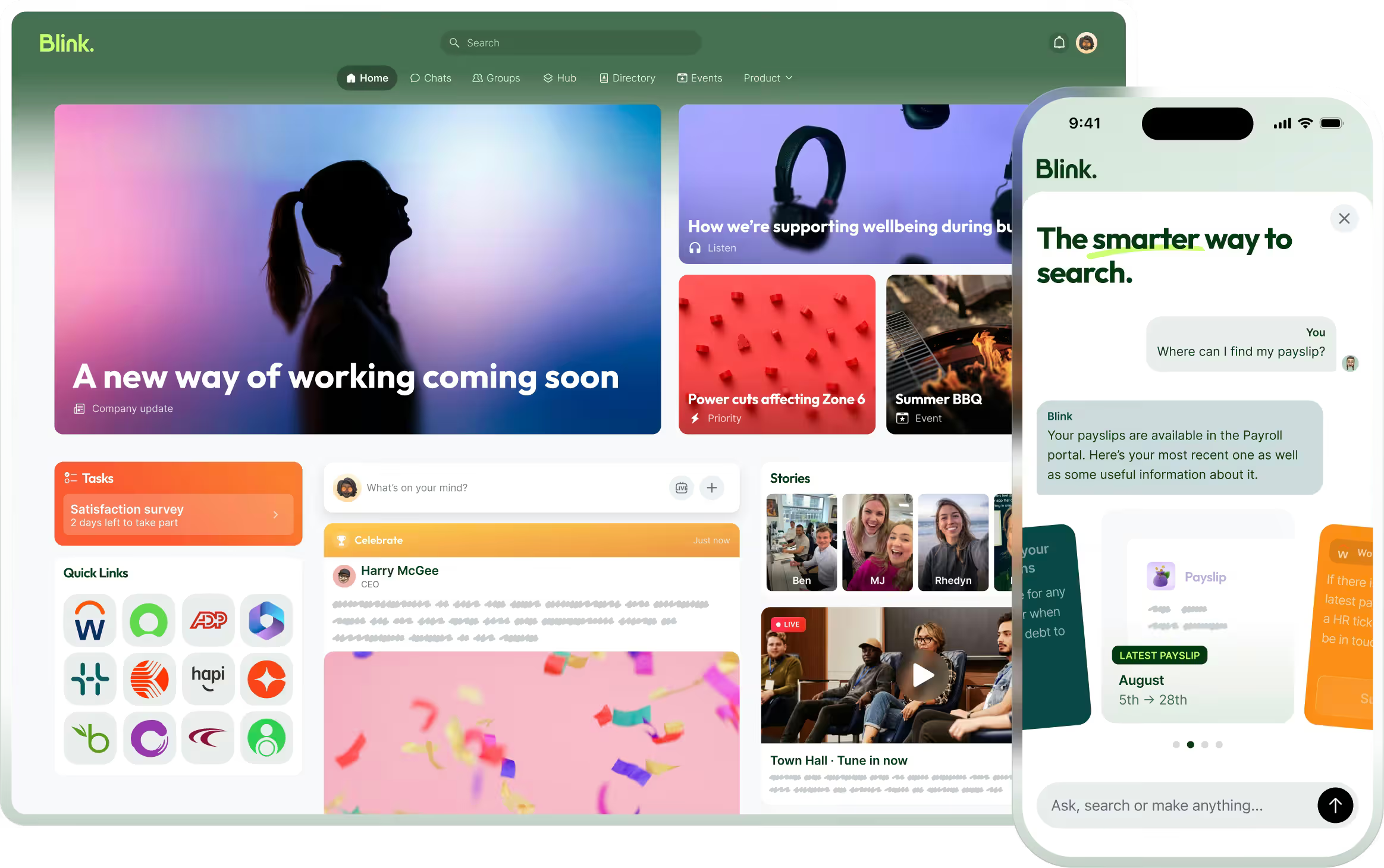
Speakap has been a popular choice for employee communication — but it’s not the only option. As teams look for more intuitive, mobile-first platforms that unify communications, documents, and workflows in one place, many are re-evaluating their tools.
Whether you’re looking to improve engagement, simplify comms, or replace legacy tools with a single, modern solution, this guide covers the best Speakap alternatives for 2025.
What to look for in a Speakap alternative
When choosing a replacement for Speakap, consider:
Ease of use across all employee types — from HQ to frontline
Real-time, targeted communication tools for better reach and relevance
Built-in analytics to measure impact and adoption
Integrations with your HRIS, payroll, LMS, and productivity tools
{{mobile-hub="/image"}}
Scalability and support for growing teams
Top 12 Speakap alternatives
#1. Blink – The #1 Speakap alternative
Best for: All-in-one internal comms with a consumer-grade experience
Blink is the top-rated employee experience platform for organizations looking to simplify internal communication and drive employee engagement. Unlike Speakap, which focuses mainly on messaging and social-style feeds, Blink combines communication, documents, surveys, scheduling, and HR integrations into a single mobile-first app. It delivers targeted updates, real-time alerts, and measurable campaigns—making it easy to engage employees, no matter where or how they work.
With adoption rates of over 90%, Blink helps unify your culture, simplify operations, and cut through the noise. It’s trusted by global enterprises like Domino’s, RATP Dev, and Nokia—and it’s consistently rated as a leader on G2 and Gartner Peer Insights.
Mobile-first design with high adoption across all roles
Deep integrations with HR, payroll, LMS, and intranet tools
Advanced targeting, campaign analytics, and compliance features
Cons:
May offer more features than needed for very small teams
Full functionality best experienced in Business or Enterprise plan
{{watch-video="/callouts"}}
#2. Beekeeper
Best for: Messaging-first frontline communication Beekeeper focuses on real-time messaging and mobile access for non-desk teams. It includes operational checklists, announcements, and a central hub for HR documents.
Pros:
Strong real-time messaging experience
Workflow automation for task tracking
Offline functionality
Cons:
Limited analytics and targeting capabilities
Less robust for desk-based or hybrid teams
#3. Interact
Best for: Intranet and knowledge management Interact offers a robust intranet experience with strong search, content targeting, and employee directory features. It’s ideal for knowledge-heavy organizations looking to organize content effectively.
Pros:
Powerful intranet functionality
Smart search and personalized content feeds
Workflow automation tools
Cons:
Less mobile-optimized compared to modern platforms
Not as interactive or social
#4. Staffbase
Best for: Larger enterprises needing branded employee apps Staffbase is a customizable internal communications platform that supports intranets, employee newsletters, and branded mobile apps. It’s well-suited for global teams with complex needs.
Pros:
Flexible branding and customization
Good for corporate messaging and publishing
Multilingual support
Cons:
Complex setup for smaller organizations
Requires more IT involvement for integrations
#5. Workvivo
Best for: Social-style employee engagement Workvivo blends social media features with traditional internal comms. It encourages peer recognition and interaction through posts, likes, and comments, while offering newsfeeds and employee directories.
Pros:
Strong focus on culture and recognition
Familiar social interface
Integrates with Viva and MS Teams
Cons:
Lacks built-in productivity and operational tools
May feel less intuitive for operational comms
#6. Haiilo
Best for: Content-focused internal comms Formerly COYO, Haiilo is a modern intranet and employee app focused on publishing, surveys, and performance insights. It’s designed for enterprise-level internal communications teams.
Pros:
Enterprise-grade publishing tools
Employee feedback and survey capabilities
GDPR-compliant
Cons:
Higher learning curve for admins
May require additional tools for full collaboration
#7. Unily
Best for: Enterprise intranet with rich content design Unily is a feature-rich digital workplace and intranet solution. It offers advanced branding, personalization, and collaboration features—ideal for global teams.
Pros:
Sophisticated design tools and templates
Supports global content targeting
Microsoft and Azure integrations
Cons:
Complex admin dashboard
Higher upfront cost
#8. Jive
Best for: Complex, enterprise-wide collaboration Jive is a legacy digital workplace platform with deep collaboration tools, often used by enterprises needing complex access controls and organizational structure.
Pros:
Supports structured collaboration and document sharing
Flexible for enterprise-scale customization
Cons:
Outdated UI compared to newer platforms
Requires significant IT support
#9. MangoApps
Best for: All-in-one intranet and collaboration hub MangoApps combines intranet features with chat, project management, and employee engagement. It works well for organizations that want flexibility in how tools are deployed.
Pros:
Modular and customizable
Offers both communication and productivity tools
Good mobile and desktop support
Cons:
Feature complexity can lead to adoption issues
UI may feel cluttered
#10. LumApps
Best for: Google Workspace and Microsoft 365 organizations LumApps provides a modern intranet with strong integrations for Google and Microsoft environments. It focuses on content personalization and knowledge sharing.
Pros:
Seamless G Suite and Microsoft integration
Personalized content and targeting
Secure and scalable
Cons:
Limited native chat or messaging features
Premium pricing
#11. Firstup
Best for: Campaign-based employee communications Firstup helps internal comms teams deliver personalized, measurable campaigns. It’s especially good for organizations that want to orchestrate multi-channel content delivery.
Pros:
Strong targeting and campaign analytics
Multi-channel delivery (email, push, SMS, more)
Cons:
Less interactive for employee-to-employee engagement
Expensive for smaller organizations
#12. Connecteam
Best for: Mobile task management for frontline teams Connecteam is designed for deskless teams and includes checklists, time tracking, shift scheduling, and basic communication tools.
Pros:
Great for task-based frontline use cases
Strong scheduling and time tracking tools
Simple mobile UX
Cons:
Communication features are limited
Less useful for hybrid or corporate workers
Final thoughts: Find the right Speakap alternative for 2025
Speakap helped many companies get started with mobile communication—but as your organization grows, you may need more than just messaging. Whether you're focused on boosting engagement, unifying internal systems, or simplifying employee access to key resources, it's worth exploring modern alternatives.
Blink leads the pack for organizations ready to scale their impact—offering an intuitive, mobile-first platform that does more than Speakap ever could. From surveys to scheduling, chat to HR integrations, Blink brings everything into one place.
Speakap has been a popular choice for employee communication — but it’s not the only option. As teams look for more intuitive, mobile-first platforms that unify communications, documents, and workflows in one place, many are re-evaluating their tools.
Whether you’re looking to improve engagement, simplify comms, or replace legacy tools with a single, modern solution, this guide covers the best Speakap alternatives for 2025.
What to look for in a Speakap alternative
When choosing a replacement for Speakap, consider:
Ease of use across all employee types — from HQ to frontline
Real-time, targeted communication tools for better reach and relevance
Built-in analytics to measure impact and adoption
Integrations with your HRIS, payroll, LMS, and productivity tools
{{mobile-hub="/image"}}
Scalability and support for growing teams
Top 12 Speakap alternatives
#1. Blink – The #1 Speakap alternative
Best for: All-in-one internal comms with a consumer-grade experience
Blink is the top-rated employee experience platform for organizations looking to simplify internal communication and drive employee engagement. Unlike Speakap, which focuses mainly on messaging and social-style feeds, Blink combines communication, documents, surveys, scheduling, and HR integrations into a single mobile-first app. It delivers targeted updates, real-time alerts, and measurable campaigns—making it easy to engage employees, no matter where or how they work.
With adoption rates of over 90%, Blink helps unify your culture, simplify operations, and cut through the noise. It’s trusted by global enterprises like Domino’s, RATP Dev, and Nokia—and it’s consistently rated as a leader on G2 and Gartner Peer Insights.
Mobile-first design with high adoption across all roles
Deep integrations with HR, payroll, LMS, and intranet tools
Advanced targeting, campaign analytics, and compliance features
Cons:
May offer more features than needed for very small teams
Full functionality best experienced in Business or Enterprise plan
{{watch-video="/callouts"}}
#2. Beekeeper
Best for: Messaging-first frontline communication Beekeeper focuses on real-time messaging and mobile access for non-desk teams. It includes operational checklists, announcements, and a central hub for HR documents.
Pros:
Strong real-time messaging experience
Workflow automation for task tracking
Offline functionality
Cons:
Limited analytics and targeting capabilities
Less robust for desk-based or hybrid teams
#3. Interact
Best for: Intranet and knowledge management Interact offers a robust intranet experience with strong search, content targeting, and employee directory features. It’s ideal for knowledge-heavy organizations looking to organize content effectively.
Pros:
Powerful intranet functionality
Smart search and personalized content feeds
Workflow automation tools
Cons:
Less mobile-optimized compared to modern platforms
Not as interactive or social
#4. Staffbase
Best for: Larger enterprises needing branded employee apps Staffbase is a customizable internal communications platform that supports intranets, employee newsletters, and branded mobile apps. It’s well-suited for global teams with complex needs.
Pros:
Flexible branding and customization
Good for corporate messaging and publishing
Multilingual support
Cons:
Complex setup for smaller organizations
Requires more IT involvement for integrations
#5. Workvivo
Best for: Social-style employee engagement Workvivo blends social media features with traditional internal comms. It encourages peer recognition and interaction through posts, likes, and comments, while offering newsfeeds and employee directories.
Pros:
Strong focus on culture and recognition
Familiar social interface
Integrates with Viva and MS Teams
Cons:
Lacks built-in productivity and operational tools
May feel less intuitive for operational comms
#6. Haiilo
Best for: Content-focused internal comms Formerly COYO, Haiilo is a modern intranet and employee app focused on publishing, surveys, and performance insights. It’s designed for enterprise-level internal communications teams.
Pros:
Enterprise-grade publishing tools
Employee feedback and survey capabilities
GDPR-compliant
Cons:
Higher learning curve for admins
May require additional tools for full collaboration
#7. Unily
Best for: Enterprise intranet with rich content design Unily is a feature-rich digital workplace and intranet solution. It offers advanced branding, personalization, and collaboration features—ideal for global teams.
Pros:
Sophisticated design tools and templates
Supports global content targeting
Microsoft and Azure integrations
Cons:
Complex admin dashboard
Higher upfront cost
#8. Jive
Best for: Complex, enterprise-wide collaboration Jive is a legacy digital workplace platform with deep collaboration tools, often used by enterprises needing complex access controls and organizational structure.
Pros:
Supports structured collaboration and document sharing
Flexible for enterprise-scale customization
Cons:
Outdated UI compared to newer platforms
Requires significant IT support
#9. MangoApps
Best for: All-in-one intranet and collaboration hub MangoApps combines intranet features with chat, project management, and employee engagement. It works well for organizations that want flexibility in how tools are deployed.
Pros:
Modular and customizable
Offers both communication and productivity tools
Good mobile and desktop support
Cons:
Feature complexity can lead to adoption issues
UI may feel cluttered
#10. LumApps
Best for: Google Workspace and Microsoft 365 organizations LumApps provides a modern intranet with strong integrations for Google and Microsoft environments. It focuses on content personalization and knowledge sharing.
Pros:
Seamless G Suite and Microsoft integration
Personalized content and targeting
Secure and scalable
Cons:
Limited native chat or messaging features
Premium pricing
#11. Firstup
Best for: Campaign-based employee communications Firstup helps internal comms teams deliver personalized, measurable campaigns. It’s especially good for organizations that want to orchestrate multi-channel content delivery.
Pros:
Strong targeting and campaign analytics
Multi-channel delivery (email, push, SMS, more)
Cons:
Less interactive for employee-to-employee engagement
Expensive for smaller organizations
#12. Connecteam
Best for: Mobile task management for frontline teams Connecteam is designed for deskless teams and includes checklists, time tracking, shift scheduling, and basic communication tools.
Pros:
Great for task-based frontline use cases
Strong scheduling and time tracking tools
Simple mobile UX
Cons:
Communication features are limited
Less useful for hybrid or corporate workers
Final thoughts: Find the right Speakap alternative for 2025
Speakap helped many companies get started with mobile communication—but as your organization grows, you may need more than just messaging. Whether you're focused on boosting engagement, unifying internal systems, or simplifying employee access to key resources, it's worth exploring modern alternatives.
Blink leads the pack for organizations ready to scale their impact—offering an intuitive, mobile-first platform that does more than Speakap ever could. From surveys to scheduling, chat to HR integrations, Blink brings everything into one place.
Employee retention is the art of holding onto your staff once you’ve hired them.
And, in 202w, it’s more important than ever.
Why?
Because companies are finally waking up to the competitive advantages of being a "people" company. A "churn and burn" approach to hiring results in poor customer service.
This is an issue, because customers are placing increasing value on good service. With smartphones, it’s easier than ever to find a competitor company to buy from. Or in the case of consumer goods, to avoid the shop altogether and order online.
Before we start.
You can hold onto employees (more or less) by treating them well. Listening to their concerns, and providing them with a few incentives to stay put.
If you’re an HR professional or a CEO, you don’t need us to tell you that. What you might find useful is an in-depth guide to employee retention in the modern workforce.
How to maximize your employee engagement efforts. And make sure there were no stones left unturned in creating the most comprehensive guide... we asked some industry-leading experts to contribute. We’ll cover:
Detail on the importance of employee retention today.
How to build effective employee retention strategies.
The exit interview, and how to turn it into your secret employee retention weapon.
Let’s begin...
Why is employee retention important?
Employee retention means "treating your employees right"; it’s an end in itself, not just the means.
From an ethical standpoint, no company should mistreat their employees. Meeting your colleagues’ basic needs and providing them with a safe and stimulating workplace? It's the right thing to do for its own sake.
But it’s more than that.
Attracting talent to your company—and keeping it once you’ve found it—has so many advantages. According to Herzberg's famous Two-Factory Theory, employee retention and employee motivation are interdependent. You can find out more about this in the Vantage Circle HR blog. A strong employee retention strategy will:
Reduce operating costs.
Improve customer service levels.
Allow you to out-compete your competitors for the best people.
The cost of high employee turnover
Hiring and firing is expensive.
Eye-wateringly expensive, to be precise. Think six to nine months salary as a conservative estimate.
Then you need to consider the impact of not having someone there to do that person’s work. That could slow down a massive project. Cause higher overtime costs as existing staff pick up their work. Or just lead to a reduction in staff morale as they struggle with increased workloads.
Companies tend to get the importance of this for salaried positions and execs. but there’s often a bit of a blind spot when it comes to their non-desk workforce and the real cost of losing an employee.
Sure, replacing a senior-level manager is more expensive than replacing a bus driver. But what happens if your bus drivers’ morale becomes so low that two or three quit per month?
It all adds up.
"Losing talented staff can also have emotional consequences on those who stay. Effectively reducing productivity by decreasing morality and motivation," says Rochelle van Rensburg of the Ezzely Blog.
"Maintaining essential talent is therefore mission-critical to organizational effectiveness for all these reasons. Staff retention puts companies ahead of their competitors, by reducing recruiting and re-skilling costs. But more importantly, by keeping the top performers, which results in all of their specialized knowledge and expertise remaining in-house."
Your mobile workforce interacts most with customers. They are the public face of your company. So, their happiness will reflect in the level of service they give your customers.
Happier, more engaged employees deliver better customer service. They also build up a bank of operational knowledge over time. This helps them respond to queries quicker and more effectively than a steady stream of new hires ever could.
The importance of employee retention in 2020
An active employee retention strategy is more important than ever. There are two key reasons for this:
Firstly, it's never been easier for customers to look elsewhere if they feel that your levels of service don’t match their expectations. We live in an age where any information you want is available via a few taps of a smartphone screen.
Dissatisfied with a hotel stay? Booking.com can recommend thousands of others.
Bad experience in a taxi? A quick Google gets you all the phone numbers of other local firms.
Poor customer experience at a theme park? TripAdvisor lists other attractions.
You get the idea.
Despite this, customers still want to be loyal. Millennials want to stick around if your brand fits in with their personal values. Don’t throw away this loyal market.
Secondly, it's never been easier to browse jobs via online jobs boards. If your workforce isn’t happy they will move. Don’t assume that they will sit in their job miserable because there aren’t any other options.
Reasons why employees leave and reasons why managers leave aren't always the same.
Your competitors may be waking up to the benefits of being a "people company." They'll more than happily snap up the staff you can't keep.
The best employee retention strategies
A strong employee retention rate is crucial to remain competitive. How you go about doing this is worth examining in some depth.
Remember - you are an employee too! As you create your employee retention strategies, keep asking yourself, "would I be happy with this?" or, "does this seem reasonable to me?"
Here are a few points you’ll need to cover when creating an employee engagement plan. Remember, the employee experience starts before the first day at the interviewing stage. To set each new starter up for success, getting the onboarding right is crucial. Want to learn more? Check out the Definitive Guide to Onboarding.
Let's quickly touch on the foundation of any working relationship: trust. As Kayla Lopez from the recruitment firm Viqtory.com reminds us. "If your employees trust you and the organization they tend to embrace the workplace; this begins before the employee is even hired. Transparency is something that we need to willingly support to gain trust. A workforce that trusts you will be engaged, a workforce that is engaged will retain. Trust is the foundation of all strong partnerships."
Now for the details...
Pay well
We’ll start with the basics.
If your pay rates don’t match with your competitors’, you’re going to have a bad time keeping hold of your high achievers.
Take a quick look at what your competitors pay for equal positions. Try and build a league table of what similar companies to you pay, and where you rank. Glassdoor is a good starting point.
Aiming for the absolute top is ideal if you can afford it, but you don’t have to offer the best salary offer out there. There are plenty of other ways to encourage your staff to stay put (more on that below), as long as you can land in the middle of the table. For someone working in a frontline job, it is difficult to give your best at work knowing you could get $5.00 per hour more for the same job elsewhere. (Even if there’s free pizza every Friday).
It’s also worth noting that even a generous wage packet won’t persuade your employees to stay if you’re otherwise a nightmare to work for. Consider this step the cornerstone of all your employee engagement efforts. Not enough by itself, but essential in building something lasting and meaningful.
Give competitive benefits
You might not be able to take it to Silicon Valley levels. (Free three-course meals for breakfast, lunch and dinner, unlimited holidays, and puppy creches).
You can offer a benefits package or a performance bonus scheme tailored to the size of your business, your budget, and your business objectives. The key is to prioritize benefits that would have a tangible difference to the lives of your employees. Add the fancy stuff on if you have money to spare.
Think about:
Childcare vouchers: we’re all aware of the struggle to find affordable childcare. Help your workforce with their work-life balance (and keep it diverse—most of the people who end up quitting jobs for childcare reasons tend to be women) by offering vouchers to help with the cost.
Health coverfor employees and dependents: an absolute must if you're US-based, although even if you live in a country which has some form of universal health care, giving employees the opportunity to go private is very appealing.
Flexible working: if the type of work you do accommodates it, flexible working is like gold dust to your staff. A "work your hours however you want" policy helps people manage childcare commitments, fit in dentist appointments, and reduce the stress of trying to juggle work and life commitments.
Lunch program: Most of the lunch break is spent buying, prepping or reheating food. Offering a tasty and healthy in-house solution, such as the online canteen Smunch, allows your employees to capitalize on their break time and share a meal together. Ultimately, this will improve your company culture and cross-departmental communication as well.
Once you’ve got the basics sorted, some nice-to-have options include:
Above average PTO allowances
Free gym memberships and cycle to work programs
Personal development funds
Develop a feedback culture to empower employees
Your employees know their workplace better than anyone else. Make the most of it.
If your employees feel involved in shaping their workplace and consulted on major decisions then they will be reluctant to leave it.
The key to this is to carry regular, easy-to-complete employee engagement surveys so you know exactly what the mood on the ground is and how to improve it.
Employees will hold an enormous amount of goodwill towards a workplace that listens to their concerns and acts on them. Equally, they will reserve a special sort of resentment for those that send out survey after survey, only to ignore the results.
It’s essential to have a solid plan in place for your employee engagement surveys, or they will backfire spectacularly.
Key pointers
Small, regular surveys are better than long, annual ones. Only giving your employees one chance per year to raise issues will result in bottled up frustrations spewing out come survey time. Not only does this result in surveys that skew unhelpfully negative, but it also means that your HR team will face an uphill struggle
Another point about designing surveys that you can respond to effectively: keep it targeted. Focus each of your quick-answer surveys on a specific area—facilities onsite, for example, or about relationships with line managers.
Use short answer questions: "yes/no" or "on a scale of 1-5" formats make it easier for people to respond immediately. Long-form feedback can be helpful, but having lots of long-answer text boxes on your survey will put people off completing it. A good compromise is to have an optional "any specific comments" box at the end of the survey.
When you’ve processed the surveys, share the results and shout about what you’re doing to act on feedback. Employees will appreciate the transparency, and it’s important to signpost what you’re doing to address the concerns they raise—or they won’t bother to participate in future surveys.
Try and create a "feedback culture" in your company by encouraging people to come forward with suggestions for improvements any time they want. Surveys highlight pain points as they are reactive; an anonymous suggestions box (either digital or real-life), on the other hand, will bring out the more innovative side of your workforce.
These suggestions might be small—a new way of organizing the break room fridge, or the introduction of free coffee Mondays—but the opportunity to improve the workplace in this way will work wonders for your wider staff’s sense of allegiance to it.
Make your workplace a fun place to work
If your coworkers are your friends, spending time at work doesn’t seem so taxing.
This is where the fun stuff comes in—the away days, lunchtime yoga, the free breakfast bar, the Christmas party...
If you have a mobile workforce, don’t forget to include them, too! They might not be in the office that often, so having regular get-togethers or breakfast clubs when shifts change is a great way to build a sense of belonging.
Obviously, base these activities on what your own workforce would like, but some ideas include:
Regular lunchtime sports clubs (running, yoga, five-a-side, badminton are good starting points)
Away days and team-building weekends.
Semi-regular opportunities for free food. Depending on the size of your team, you could offer lunch on the company each Friday, pizza parties when teams hit their targets or just because
Big events like Christmas parties and family fun days. If you run awareness weeks for things like diversity, mental health and stress, why not run some exciting events for these too?
Recognition of key milestones. If there are particularly busy periods throughout the year (like the Christmas rush for anyone working in retail or hospitality), put on an event to recognize the hard work your employees put in. This could be a full-on party, or simply just giving your staff the nod to take off after lunch on a quiet day.
This step does, however, come with a big flashing warning sign that says: don’t bother doing any of these without doing the steps listed above first.
Because these are fun and exciting, and sound super trendy when you put them on your Careers page, people often use them in place of paying a decent wage, or offering flexible working hours, or acting on employee feedback.
The exit interview - your employee retention secret weapon
One of the best ways of figuring out what’s going wrong with your employee retention efforts is asking your colleagues when they leave.
Seems counter-intuitive, and rather frustrating, doesn’t it?
And in some ways, it is. No amount of collecting and aggregating exit interview data, tweaking your employee engagement plan and making changes in your company to reduce employee turnover will change the fact that, for that particular employee, your efforts weren’t enough. For HR people and line managers, that stings sometimes.
Still, if you can take your losses on the chin, this is a real opportunity to do better for your colleagues, and identify and fix any major issues that push people to leave.
There are three main reasons why exit interviews are so effective at flagging up things that need to change:
The employee is leaving so won't hold back
Regardless of how many times you reassure your colleagues that your pulse surveys are anonymous and that helpful suggestions are encouraged, they will still be a little suspicious.
The worry that surveys aren’t really anonymous, or that speaking out about a key workplace bugbear will get them labelled as a troublemaker, will be a constant thorn in the side of your employee retention efforts.
(As a side note, if this attitude is pervasive then it might be time to take a look at your workplace culture. A little reticence is natural. An all-encompassing dread of speaking up might indicate something a little more sinister).
The exit interview is a different kettle of fish. They’re leaving. There are no raises or opportunities for promotion in the pipeline. This is their opportunity to "tell it like it really is."
Listen, even if you think they’re being unfair and bitter.
Problems brought up during exit interviews tend to have weighed heavily on an employee’s decision to leave. In other words, they’re big issues you need to address urgently.
Get the whole picture
Multiple exit interviews help build up a better picture of life on the ground.
Of course, there’s always the chance that one particular employee just, for whatever reason, didn’t have a good time.
That’s where keeping data from previous exit interviews comes in.
For example, if an employee complains about their line manager being unbearable, it might just be a clash of personalities. Equally it could be because that line manager is difficult to work for and too demanding. It’s difficult to say without further info.
So. Run some analytics.
How many other employees from that line manager’s team have left over the past year?
Did they say anything in their exit interviews?
Have they been flagged to HR for anything previously?
If so, you might want to investigate further.
This is why it’s important to conduct an exit interview for every single person that leaves the business. If you restrict it to management positions, people based in HQ, or full-time workers, you’re missing key sets of data that could be useful in improving your employee retention strategy.
Find out what went wrong
An exit interview, conducted well, helps you identify wrong turns in your employee journey map.
You’ll probably have some sort of employee journey map already.
You might call it something different. We’re referring to the plan you make that starts at the hire phase and ends with the offboarding phase when the employee leaves. This normally includes guidelines for each stage they go through with your company. For example:
Hiring:
Offer letter and contract sent
Start date agreed two weeks in advance
Onboarding:
First day: tour of premises, fire safety, welcome coffee or lunch
First six weeks: all e-learning to be completed
You get the idea. Here's a basic template you could expand on:
The exit interview provides an excellent opportunity to ask your employees about various stages in this plan, to see whether they’ve been carried out to your expectations.
Ask specifically, and don’t be afraid to go right back to the start of their employment. Whether they felt welcomed in their first weeks, for example. If they were given clear and regular feedback on their performance, and compare that to your notes on how your employee journey should pan out.
It could be that, despite your meticulous efforts in planning it, your employee journey map isn’t being adhered to by managers in the wider organisation. This could be why your employees are leaving - this map provides guidelines on how to make sure people feel safe, supported and included at work. If people don’t follow it you’re going to have problems.
Your employee journey map is important. If it isn’t being followed, you need to correct that as soon as you can. Exit interviews are the best way to do this.
How to conduct an employee retention interview
Be flexible around your employees needs
If a lot of your workforce are remote or mobile, don’t insist on a face-to-face interview at HQ.
There are several free video calling apps available, so why not make use of them? An employee is more likely to feel comfortable talking to you if you’ve made accommodations for their situation.
If they’re more comfortable talking to you, they’re more likely to be honest with you, and that’s exactly what you want.
Don’t make it overly formal
Go for a relaxed vibe. Making things too formal will only stifle conversation.
If you’re conducting a face-to-face interview, it’s a nice touch to provide some sort of refreshments; hot drinks and a pastry, maybe. The employee will appreciate the gesture, and it will encourage a more conversational feel, which is exactly what will get them to open up.
Identify the specifics to touch on
You will know, from previous exit interviews if there are any particular pain points in your employee experience.
Ask about them. You’ll then be able to establish:
Whether these are still issues
What progress you’ve made on them, and how effective your efforts to tackle them have been.
...But allow them to express their opinion too
If the structure of the interview is entirely created by you, you could miss something important.
By allowing employees space to expand on their own concerns, you give yourself the opportunity to pick up on potential issues that aren’t on your radar. Sure, a lot of this could be specific to that particular individual, but you should investigate nonetheless—otherwise you’ll never know whether it’s the iceberg tip of something bigger.
Remember: your relationship with the employee isn't over
People leave for all sorts of reasons—not all of them negative.
You might want to leave the door open for talented employees, in case they want to return at some point. Also consider that talented former employees can be great source of referrals.
These can be your company’s cheerleaders, even after they’ve left. A good exit interview can make this relationship. A poor one can ruin it.
Of course, there’s also the possibility that the employee leaving has been less than stellar. In this case you should see the exit interview as a chance to smooth things over, and divert potentially negative Glassdoor reviews or social media mentions.
Final thoughts
To summarize:
An employee retention strategy is important because it makes your employees happier. Happier, more engaged employees perform better in general, and deliver better customer service.
The cost of employee turnover is measured in increased operational costs and decreased institutional knowledge.
Bearing this in mind, the question you should be asking yourself isn’t "can we afford to expand our employee retention efforts?"
It’s "can we afford not to?"
An engaged, happy workforce with a low churn rate isn’t just a nice thing to have.
It’s not just something you can boast about on your Careers page.
It’s a competitive advantage—and people are only just waking up to this fact. Because now more than ever, people value good customer service. If you can provide that, you’ll have a serious head start on your competitors.
Blink is an internal communications tool that’s does everything your intranet does, but better. Try it out today! Request a free demo to get started.
Simpplr is often seen as a go-to modern intranet solution — but it's not the only option. As organizations evolve, many are searching for alternatives that offer greater flexibility, better engagement, and a more holistic approach to internal communication.
Whether you're looking to replace your intranet entirely or just upgrade to a more dynamic employee experience platform, there’s a growing ecosystem of tools designed to meet the needs of today’s hybrid, remote, and global workforces. From AI-powered internal communication tools to modern intranet software that integrates seamlessly with your existing tech stack, this guide breaks down the best Simpplr alternatives available in 2025.
We’ve reviewed 15 top platforms, each with their own strengths — from company-wide engagement to streamlined communication — so you can find the workplace communication platform that fits your culture and goals.
If you're looking for a solution that combines the best of modern intranet software with real-time communication, analytics, and usability, start with Blink.
Top 15 Simpplr alternatives in 2025
#1. Blink: The all-in-one employee experience platform
Best for: Organizations seeking high engagement, intuitive UX, and centralized internal communications.
Why it's a top Simpplr alternative: Blink goes beyond basic communication by creating a digital home for your entire workforce. It combines powerful communication features with easy access to tools, making it ideal for improving retention, productivity, and employee connection. It’s known for exceptionally high adoption rates and offers a streamlined experience that works across every team and device—no training required. Unlike Simpplr, Blink focuses on delivering measurable impact across your entire workforce, not just pushing content.
Pros:
Unified comms, surveys, task management, and integrations in one platform
Exceptionally high adoption rates
Easy to deploy and scale
Intuitive, mobile-friendly experience
Cons:
Not positioned as a traditional intranet (which may not suit organizations looking for a classic homepage-style hub)
{{watch-video="/callouts"}}
#2. Staffbase
Staffbase is a communications platform designed for large enterprises with dispersed teams. It offers content publishing, multilingual support, and strong mobile access. However, it focuses primarily on top-down communications.
Pros:
Strong mobile capabilities and multilingual support
Deep editorial publishing features
Cons:
Complexity and pricing can be barriers for mid-size orgs
Limited functionality beyond communications
#3. FirstUp
Firstup uses AI and behavioral data to personalize internal communications at scale. It's well suited for organizations wanting to optimize campaigns and target specific employee segments. However, it can be overpowered for teams that just want streamlined comms.
Pros:
AI-driven content targeting
Campaign-level analytics
Cons:
Learning curve for less technical teams High cost and enterprise-heavy approach may not suit leaner teams
#4. Beekeeper
With its strong mobile foundation, BeeKeeper enables companies to connect field teams, streamline workflows, and ensure compliance across distributed locations. It includes tools for shift scheduling and quick updates. It’s not ideal for strategic comms or company-wide engagement.
Pros:
Lightweight and easy to use
Built-in shift communications and checklist tools
Cons:
Not ideal for HQ communications or knowledge management
Limited brand customizations
#5. Haiilo (formerly Smarp)
Haiilo blends internal communications with employee advocacy tools. It’s helpful for promoting company content externally and keeping teams aligned internally. However, it's not a complete employee experience platform.
Pros:
Strong content sharing and social media integration
Advocacy analytics included
Cons:
Less of a comprehensive platform—missing many intranet or HRIS features
Mobile UX could be improved
#6. Interact
Interact is a structured intranet platform focused on knowledge management and content governance. It’s great for compliance-heavy industries that need tight control over documents and approvals. Real-time engagement features are more limited.
Pros:
Strong content governance and compliance features
Enterprise-grade search
Cons:
Dated UI in some areas
Less suited to real-time communication or engagement use cases
#7. Unily
Unily is a Microsoft-friendly intranet solution with a focus on design flexibility and content targeting. It works well for companies heavily invested in Microsoft 365. However, it can be resource-intensive to launch and maintain.
Pros:
Powerful integration with Microsoft tools
Custom branding and theming
Cons:
Can be resource-intensive to launch
Some users report sluggish performance
#8. Workvivo
Known for its user-friendly design, Workvivo blends social engagement with traditional intranet tools. It’s often chosen by organizations looking to foster transparency and a sense of belonging.
Pros:
Strong social feed and employee recognition tools
Now owned by Zoom, with potential future integrations
Cons:
Limited task management and productivity tools
UX can feel cluttered with too many social features for some users
#9. LumApps
LumApps integrates deeply with Google Workspace and offers tools for onboarding, employee journeys, and targeted communications. It's particularly appealing to companies that rely on G Suite. Admin UX can be complex for smaller teams.
Pros:
Strong G Suite integration
Useful for creating targeted employee journeys
Cons:
Less intuitive UX for non-technical admins
Pricing not transparent
#10. Igloo
Igloo is a modular intranet that helps teams build a centralized knowledge base and communications hub. It offers drag-and-drop widgets and customizable layouts. However, it lacks more modern employee experience capabilities like feedback and real-time messaging.
Pros:
Modular intranet features
Knowledge management tools included
Cons:
Feels more like a traditional intranet than a modern EX platform
UI hasn’t evolved as quickly as competitors
#11. Jive (by Aurea)
Jive offers a feature-rich collaboration and knowledge-sharing platform geared toward larger enterprises. It includes deep analytics and social-style engagement. The product has evolved slowly in recent years.
Pros:
Deep collaboration and social functionality
Rich analytics
Cons:
Outdated UI
Acquisition history has slowed innovation
#12. Axero
Axero is a cost-effective intranet platform aimed at mid-sized organizations. It includes core features like document sharing, discussions, and directories. However, the interface can feel dated and the app ecosystem is limited.
Pros:
Offers intranet, collaboration, and HR portal tools
Affordable for mid-market orgs
Cons:
Dated visuals
Limited native integrations
#13. Claromentis
Claromentis offers a modular platform that combines intranet features with workflow apps and e-forms. It’s useful for companies that want to digitize internal processes. Setup requires hands-on customization.
Pros:
Modular platform with customizable apps
Document management included
Cons:
Requires time and resources to configure
UX not as modern as others
#14. Oak Engage
Oak Engage offers a user-friendly internal comms platform with fast onboarding and smart content targeting. It’s ideal for companies looking to modernize without overhauling everything. However, it lacks the breadth of features found in larger platforms.
Pros:
Friendly UI and fast implementation
Content targeting and engagement tracking
Cons:
Smaller partner and integration ecosystem
Not as well known globally
#15. Zoho Connect
Zoho Connect is part of the larger Zoho suite and offers basic internal communication features. It’s best for small businesses already using other Zoho apps. Larger companies may outgrow it quickly.
Pros:
Easy setup and low cost
Works seamlessly with other Zoho apps
Cons:
Limited customization
Less suitable for larger or global organizations
Final thoughts
If Simpplr isn’t meeting your expectations — whether due to limited engagement, lack of flexibility, or just the need for more intuitive tools — there are plenty of powerful alternatives available. Among them, Blink stands out for its modern UX, holistic capabilities, and consistent employee adoption. While many platforms focus on features, Blink focuses on real impact.
Unfortunately for C-suite execs at frontline organizations, unless decisive action is taken quickly, things will only get worse.
While the problem of frontline turnover has many contributing factors, from salary competition to changing workforce demographics, one important part of the solution remains constant: employee engagement.
And here lies the problem: most of the time, it doesn’t work.
“If you build it...they won’t actually come”
Frontline businesses have invested in engagement solutions and projects before, but regardless of the type of organization, these are generally met with tepid responses.
The list of fallen soldiers here is considerable: town halls, employee surveys, intranets, ERGs. And often, the response sounds something like this:
“Great, another thing to remember”
“It’s not a natural part of my day”
“It’s a one-off thing”
“It’s too hard to use”
Hours of time from leadership, People teams, Internal Comms functions and supervisors go into projects that rarely succeed in their mission. This is like the birthday party where the decorations are up, the cake is ready and the music’s on – but nobody’s showed up.
The result? Frontline workers aren’t sustainably engaged, the cycle of attrition continues and there’s little meaningful data in order to understand exactly what to do to fix it.
The solution: chips and dips
Turning this around warrants changing the way we think about employee engagement. For most businesses, employee engagement is a thing that we ‘do’ - it’s a project, an initiative, even a tool or an app. But this is where we’re going wrong.
The solution lies in approaching frontline engagement as something that we ‘earn’ - it’s an outcome, not an output.
To illustrate this, let’s return to our party. Anyone who’s ever been to a house party will be able to tell you exactly where most people end up: the kitchen. And why are they in the kitchen? Because that’s where the drinks, the mixers, the snacks and the ice is. There’s useful stuff there, and so they gravitate there, and the good times start rolling.
So to return to frontline engagement: put out the ‘chips and dips’. In other words, focus on providing frontline workers with services and tools that not only fit into their busy days, but make them better – and use that space to invite engagement.
How it works: chips, dips and paystubs
Blink is a new type of frontline engagement app that the average worker opens ten times per day! Blink brings the processes that frontline workers and their managers need all into one place – from payslips to scheduling and critical documents, all with one login. This is our ‘chips and dip’.
For leaders and managers looking for engagement, this is the time to swoop. The whole of the frontline’s eyeballs are on the app, which means that surveys get seen, important messages from the CEO and HQ are read, and the work being done to improve the working day gets cut-through.
If a once-yearly employee engagement survey is the equivalent of putting out samples at Costco in the hope that a nameless stranger will take a drive-by snack, this is the equivalent of the work cafeteria – the place where the whole companies gathers, day after day.
How to be a good frontline host: Elara Caring’s story
Elara Caring – one of the largest US-based providers of personal care, home health and hospice care – had a frontline engagement problem when we first met them last year. With a 62% turnover rate of their more than 32,000 personal care attendants (PCAs), the leadership team needed sustainable engagement badly.
In adopting Blink, Elara looked to empower its PCAs and make their lives easier – and get engagement and loyalty in return.
They used Blink to remove the burden of paper-based admin: Elara’s PCAs had to constantly fill out expenses and other forms on paper. Blink’s solution was to integrate these manual processes and systems into a single app. Payslips, expenses and mileage reporting, key information from Sharepoint, schedules and rotas were all suddenly available to Elara’s PCAs at their fingertips.
The benefits for Elara’s PCAs? Time savings, with more attention devoted to their “real jobs” than ever before.
The benefits for Elara Caring? Sustainable engagement, with 95% of employees saying that they now feel more connected to the company. PCAs have begun to use Blink to create a community – and sub-communities – within the organization, creating the connection and cohesion that makes them stay.
https://www.youtube.com/watch?v=dINw_Y7CjWQ
In conclusion: good parties don’t skimp on the guac
In a war for a diminishing talent pool, the need to directly address frontline engagement has never been more acute. But it’s also shown where there are failings in trying to get engagement from the activities and programs that work for desk-based, white-collar workers. The key to success for the frontline is to not only fit into frontline life, but to make frontline life better and easier – and use that digital space you’ve created to finally connect your people.
13 ways to quickly improve internal communications
Internal communications joins the dots. It connects every member of an organization and helps keep everyone up to speed. But it’s not without its challenges.
Comms leaders have to quiet the noise while amplifying key messages. They need to share updates consistently. And find tech tools that make communication engaging for employees.
In frontline organizations, there are additional communication challenges to tackle.
Frontline teams often work disparately. Employees can’t rely on in-person meetings for the latest updates. Nor do they have access to a desktop computer or even a company email address.
Finding reliable ways to reach these employees – that go beyond a messy noticeboard – is vital for business success.
With these challenges in mind, we’re going to look at the ways comms leaders can quickly and effectively improve internal communications. Let’s dive right in.
Why is it important to improve your internal comms?
Poor internal communication harms your business and its bottom line. When leaders, teams, and individuals fail to communicate well, every area of operations is affected.
Poor communication also has an effect on employees. Staff want to feel part of the organization they work for, and the first step to achieving that is keeping them in the loop.
Ultimately, when you improve internal communication, you:
Boost workplace trust. Over 40% of workers say that poor communication is reducing the trust they have in leadership and their teams. This is making them more stressed and less loyal to their organization.
Engage employees. Informed employees are 2.8 times more likely to be engaged. Employee engagement is linked to higher productivity, profitability, and employee retention rates.
Get better at what you do. When you improve internal communication, you improve decision-making, teamwork, and collaboration. Everyone pulls in the same direction, which spells bigger and better business results.
The benefit of good internal communication in frontline organizations is even more pronounced.
Safety concerns. Equipment failures. Product or service updates. A shift you need to cover. Inclement weather. These critical communications need to travel between frontline staff and managers quickly and reliably. It’s how you limit downtime and ensure the very best customer service.
But if your communication culture, communication skills, or communication tools are lacking, you’ll find it hard to connect the various teams that make up your organization.
13 ideas to quickly improve internal communication
With so much to be gained from good internal communications, time is of the essence. Every day you continue doing things the old way, you’re missing out.
So here are some internal communication ideas that you can put in place quickly, for maximum impact. Weave these ideas into your internal communication strategy and start making improvements right away.
1. Start with the leadership team
Leaders set the tone of an organization. So if your leadership team isn’t sold on your bid to improve internal communication, your employees won’t be either.
It’s up to leaders to drive comms throughout the company. It’s also on them to engage with comms. That way, employees see that your internal communication channels are a valued resource for people at all levels – and they’re much more likely to engage with them, too.
To prove to your workforce that it isn’t one rule for them – and another for their managers – get the leadership team on board right at the start. Involve leaders in the launch of your internal communications plan and encourage them to be positive promoters of it.
2. Ask questions & launch surveys
To avoid time-consuming missteps, get employee insight early on in the process. Employee input informs your strategy and improves your chances of getting things right the first time.
You can get input by asking informal questions and launching surveys. Find out what employees want from internal communications – and what aspects of current comms they struggle with.
With Blink’s super-app, you can launch surveys that reach your whole workforce. A user-friendly interface makes it easy for employees to respond. And a clear dashboard helps you to draw conclusions from their answers.
Surveys help you make informed internal communication decisions. But there’s another benefit, too. By involving employees in this part of the process, you set an important precedent.
You show employees that you value their input – and that their voices are heard. This raises trust in the process. It also helps employees see what they stand to gain by engaging with internal communications going forward.
3. Streamline your communication channels
Well-established companies often have history with lots of different internal communication tools. In frontline organizations, there tends to be a mix of tech solutions and old-school communication channels – like posters and notice boards.
If you’ve inherited a complicated system of communication channels, it’s worth stepping back and assessing their impact on company communication.
Is a noticeboard crammed with memos an efficient and reliable way to communicate with your teams? Are multiple communication channels helping you to clarify the message – or are they muddying it?
Less is usually more. So streamlining your comms channels is a great way to improve internal communication. Employees are much more likely to engage with a single source of reliable info.
That’s exactly what happened at Domino’s. The pizza delivery company was using word of mouth, posters, and WhatsApp groups to communicate with its frontline. But by switching to Blink, Domino’s put all internal communication in one place and now everyone gets the same need-to-know updates.
4. Personalize your comms
Think of all the marketing emails that land in your inbox every day. The ones that personalize their message stand out. They’re much more likely to resonate. The rest is like white noise. It becomes very easy to ignore stuff that doesn’t feel relevant to you.
The same goes for company comms. When you make your message more relevant to your audience, they sit up and take notice. When employees are inundated with comms that have nothing to do with their role, they tend to start ignoring the noise - and before you know it even the most relevant and critical messages are missed.
You can quickly make a change by segmenting your audience. Divide your organization by department, team, location, and stage in the employee life cycle.
Then, craft personalized comms. And only send mass communications when they really are relevant to the whole organization. Intentional, personalized communication is much harder to ignore.
5. Run company-wide stand ups
A standup meeting is a short but regular opportunity for teams to share progress and identify blockers. It’s a way to get everyone on the same page and clarify what they should be doing.
A company-wide standup is the easiest way to communicate your current priorities and action plan to everyone. But you can also run stand ups within teams, departments, or locations.
Of course, if you’re a frontline organization, getting everyone together for this type of meeting isn’t always practical. Employees work different shifts and in different locations, or maybe even work on the road.
But don’t dismiss the idea of company stand ups outright. Create stand ups for different shift swaps, or locations, or smaller groups of people. And for the times you can’t be together in real life, tech can help.
Employees can join a meeting via video conference. Or you can record your company-wide stand ups and post them as video content to your primary internal communication channel.
6. Implement an employee app
In today’s technological world, you can find incredible tools designed to improve internal communication, fast.
An employee app is a great example. It works well because you meet employees where they already spend their time – on their smartphones. And because it incorporates features that employees are familiar with, like instant messaging, group chats, and a newsfeed.
Take Stagecoach, a UK-based bus company. When Stagecoach implemented an employee app, 84% of their workforce started using it within just one week. Because they chose a communication tool that employees could use intuitively, they got better and faster uptake.
An employee app also streamlines your employee communications because employees can access everything via a single, user-friendly interface. And it provides channels for both top-down and bottom-up comms. Anyone can read and share information.
Blink’s employee app ticks all these boxes. Designed for frontline organizations, it helps bridge the gap between your frontline and desk-based teams.
7. Reward & recognize your employees
Another way to quickly improve internal communication is by rewarding and recognizing employees. Shout out those employees who hit their goals or reach a personal milestone. Highlight the times when a member of staff goes above and beyond.
A culture of recognition helps to build engagement. It also boosts morale and encourages other employees to do their best work.
Using internal communication channels in this positive way encourages employees to communicate more frequently, too. When an employee feels acknowledged, they’re more likely to acknowledge others, share successes, and communicate constructively with peers.
You can put the wheels in motion by encouraging managers to send regular messages of acknowledgment. But to amplify the effect, go further.
Build recognition into your internal comms strategy by using Blink’s recognition feature. Via the app, you can send messages of public praise with the power to inspire everyone.
8. Conduct regular 121 meetings
If your managers only run 121 meetings with employees once or twice a year, this is an area ripe for improvement.
A lot can happen over the space of a year or six months. Internal communication might be missed or misinterpreted. Regular 121s are an opportunity to realign goals and understanding.
Regular 121s help you to:
Build a personal connection with employees
Address concerns in real-time
Improve employee engagement
It also makes the act of discussion and feedback more familiar. Employees get used to sitting down and sharing their work experiences with managers. So managers are much more likely to get candid (and therefore useful) insight from their staff.
Advise your managers on how often they should conduct 121s. Monthly, bi-weekly, or even weekly sessions create an open feedback loop.
Also, remember that a public communication forum can never replace 121s. While employees are often happy to share some ideas publicly, they also need the opportunity to share their thoughts privately and confidentially.
9. Encourage content creation
Leave content creation to management and you run into two key problems:
1.Your internal communication is unengaging because there’s lots of top-down communication but not enough bottom-up or peer-to-peer communication.
2.Managers find it hard to balance content creation alongside their usual workload. This means more managerial stress and/or less quality content.
There’s a quick and easy solution. Give everyone a turn at content creation. Use guidelines and templates if you think they’re needed. Then, let employees start threads, post blogs, upload videos, and recognize their peers.
In doing so, you strengthen your company network. Employees build new relationships. They find people with whom they have things in common. They chat about non-work-related topics.
This type of water cooler chat may seem irrelevant to your business objectives. But trust us when we say it’s hugely important to the quality of communication that takes place within your organization.
This is particularly true in frontline firms where workers don’t always get the opportunity for informal chats with co-workers.
10. Take a data-driven approach to internal communications
How do you measure the success of an internal communications initiative? You need reliable, accessible data you can track over time.
This is another reason why having the right communication tech is vital. Pick communication tools with analytics built in and it’s easy to view and act upon insights.
You can see which type of content your employees do and don’t interact with. You can see which posts get the most comments and likes. This helps you to hone your internal communication going forward.
Similarly, analytics functions help you to see the bigger impact that your communication strategy is having. Perhaps it’s helping you to reduce staff turnover or increase staff satisfaction.
When you have access to the data, it’s easy to demonstrate the value and effectiveness of internal communication improvements. You’ll also find it easier to make informed, targeted changes that make your initiative even more successful.
11. Be consistent
Good internal communication is all about consistency. You can’t promise employees a weekly update or a monthly webinar and then fail to deliver.
They’ll stop seeing your communication as reliable and trustworthy – and they’ll stop checking in for new content. This is the point at which the wheels fall off your strategy and you have a much harder job pushing that new initiative uphill.
To show employees that your new internal communication strategy is here to stay, make sure it’s sustainable.
At the outset, you may like to err on the side of caution, only committing to a content schedule you know is manageable for the people delivering it. You can always add more items to your content calendar once it’s up and running.
Also, as we mentioned earlier, enlisting the support of employees in content creation helps to create an internal communications ecosystem that doesn’t rely on a handful of time-stretched managers. With all hands on deck, it’s much easier to create and post content consistently.
12. Be transparent
Internal communication is most successful when communication is transparent. That means:
Including everyone in communications
Creating an open connection between leadership and employees
Clearly communicating business changes and decision-making processes
Acknowledging both successes and mistakes
Transparent communication is important because it helps to build trust between all members of your organization. It prevents secondary channels of communication – in the form of rumors and speculation – from emerging. And it helps to boost employee engagement.
If you don’t already have a culture of open communication, getting there is likely to take time. You need to develop communication skills throughout your organization and set new norms of behavior.
However, one of the things you can do to improve internal communication quickly is to involve employees in your internal communication strategy. Be open about the changes you’re trying to implement – and why.
When employees feel like part of the process, they’re much more likely to feel invested in its outcome.
13. Report back on changes you are making
So you’re planning to make big changes to the way you communicate internally. Don’t forget to involve employees from the beginning and throughout the process.
After launching employee surveys and conducting 121s, communicate your findings. Let workers know what you’ve learned, what changes you plan to make, and what you hope to gain.
This shows that you’re committed to transparent communication, not just paying lip service. And that you’re putting employees at the center of decision-making.
Take this tack and employee engagement, morale, trust, and the success of your internal communication strategy all stand to benefit.
Final thoughts
Improving internal communications takes time and strategy. It’s a long-term commitment. But there are quick wins to be had.
Gather insights. Involve all members of your organization. Find the right tools. Start fostering a culture of open, honest communication, right now, today.
By doing so, you’ll create change in the here and now. And lay the groundwork for future internal comms improvements, too.
It’s well worth the investment, particularly for frontline organizations. With strong internal communication, you build teams who are more connected, informed, and engaged - which leads to widespread benefits for your employees, customers, and business.
Want to make internal communication a priority for 2024? Then put internal comms in the palm of every employee with Blink’s employee app.
Our mobile-first app supports two-way communication, critical messages, employee recognition, and workforce surveys. It also integrates with the business tools you already use. So employees can access all resources from one user-friendly interface.
Accessed via mobile or desktop and with speedy, sky-high adoption rates, Blink provides a quick and easy way to improve your internal communications in 2024.
AI isn’t exactly the new kid on the block, but 2024 was the year it truly hit its stride. Businesses that embraced it didn’t just dip their toes in — they’re already seeing big wins.
According to Boston Consulting Group, businesses that are leading the way with AI have achieved 1.5x the revenue growth than those that lag behind.
So could 2025 be the year when AI becomes commonplace in internal communications and HR? HR leaders seem to think so. 3 in 4 say that failing to adopt and implement AI in the next 12 to 24 months will harm organizational success.
AI is becoming a necessity rather than a nice-to-have — and the employee intranet is the perfect place to put it to use. AI has the power — not just to enhance intranets — but to reinvent them for the modern workforce.
Let's take a closer look at the essential features and benefits that an AI-powered intranet can bring to your employees and organization.
{{mobile-blink-assist="/image"}}
Why employee intranets are stuck in the past
Traditional employee intranets — we’re talking those clunky, desktop-based platforms — rarely meet the needs of today’s modern workforce.
Typically used as a content management hub on a private network, they serve up static documents that tend to quickly go out of date, like company policies. Interfaces are usually hard to navigate. There are few (if any) employee engagement features built into the system.
The result? Employees actively avoid your intranet solution. Adoption and usage rates drop. It gets even harder to streamline workflows and share important employee communications.
In recent years, modern intranets and employee apps have been rectifying some of the problems created by traditional intranets — and AI is taking the digital workplace to a whole new level.
How AI is turning corporate intranets into must-have tools
The talk about AI isn’t just hype. Incorporate this tech into your intranet software and you can finally create a social intranet that serves as a single source of truth for your employees.
Imagine logging into your intranet and seeing everything you need in one central location — no digging, no guesswork. Thanks to AI, your intranet can serve up personalized internal communication, relevant content, and digital tools in a company news feed that’s designed to feel custom-built just for you.
{{mobile-desktop-main="/image"}}
Enhanced search capabilities
Natural language processing (NLP) means we can speak to AI as we would a person — and it understands what we’re saying. This enables intuitive and conversational intranet search functions. Also, AI may soon be able to answer employee questions using its knowledge of intranet resources, rather than simply serving a list of resource links.
Proactive assistance
AI can be integrated into your employee intranet as a chatbot. It can answer employee FAQs and guide onboarding for new hires. It can help employees find the intranet content and tools they need. This frees your HR, IT, and comms teams to focus on higher-level tasks.
Real-time recommendations
Your intranet could become your employees’ personal assistant, predicting what they need before they even realize it. Need a document? It’s already highlighted. Looking for a collaborator? AI’s got a suggestion. It’s like having an intranet that reads minds.
Voice and chat integration
Employees can enjoy seamless intranet interactions through virtual assistants and voice commands. Employees don’t even need to type. They can get answers to questions like, “What are my tasks for the day?” or “show me the latest HR policy,” without having to navigate the intranet interface. This is great for accessibility and for employees who want to access your intranet on the go.
Task automation
AI can automate a wide range of routine tasks, including PTO requests, compliance training reminders, and IT support tickets. It can search for and flag outdated intranet content, automatically generate content tags, and launch pulse surveys as per your schedule. It can become the home for easy-to-find collaboration tools that help employees connect and work with one another. Managers and employees can also use AI to compose intranet content.
{{mobile-survey="/image"}}
Easy analytics
AI can help you make the most of your intranet by analyzing data on usage patterns, features that aren’t used very often, and your most popular content. You can also use AI to analyze employee sentiment and identify employee engagement red flags. This gives you time to make changes before dissatisfaction impacts productivity and retention.
Why an AI-powered intranet is a win-win
AI transformation can feel daunting. But the benefits it brings for both employees and organizations can’t be ignored.
Benefits for employees
An AI intranet improves the employee experience. Automation and proactive AI support make work quicker and easier, so employees can focus on more meaningful and strategic tasks. AI can optimize the collaborative parts of a unified platform — like enabling an easy-to-navigate employee directory, or quick-to-use instant messaging — that make or break a great experience on a daily basis.
An AI-powered intranet also reduces friction and frustration because employees are presented with relevant information at every turn. Every employee — from the desk-based employee to the frontline worker — gets a user-friendly, personalized intranet experience that improves their engagement and motivation.
{{mobile-workday-feed="/image"}}
Benefits for organizations
AI improves your intranet solution, driving higher employee adoption rates and ensuring you get the best possible ROI from your intranet investment.
Your new and improved intranet can also become a key part of the company culture, supporting employee engagement, productivity, collaboration, and retention. And with easy data analysis, it’s much easier to track success relating to all these business objectives.
AI roadblocks — and how to power through them
An AI-powered intranet can transform your digital workplace, making it more engaging, efficient, and collaborative. But — as with any big change in the workplace — you need to give careful consideration to potential pitfalls.
Here are some of the challenges of incorporating AI into your intranet software and what you can do to overcome them.
Data privacy concerns
AI systems process vast amounts of personal and organizational data. So preventing data breaches and the associated loss of employee trust is imperative. You should only use encrypted intranet platforms and work to establish clear data privacy policies.
Change management
Introducing AI to your traditional intranet is like rolling out the red carpet for innovation — but not everyone might feel like a VIP right away. Some employees may hesitate, wondering, “How do I even use this?” That’s where effective communication and training come in to save the day.
Balancing AI and a human touch
Use AI to augment, rather than replace, human connection. AI can handle repetitive tasks and help with data analysis. But when it comes to tasks that require decision-making, emotional intelligence, creative collaboration, and relationship-building, ensure that employees — not bots — take the lead.
How to make AI intranet adoption seamless
If, like us, you’re convinced that AI is going to be an intranet game-changer, here’s what you need to do next.
#1. Conduct a needs assessment to determine what features matter most
To find an AI intranet that meets all your organizational needs, start with a needs assessment. Consult with stakeholders at all levels to find out which intranet and AI features they’d like to see. Then, put features in order of priority before you go vendor shopping.
#2. Partner with a tech vendor specializing in AI-powered intranets
There are lots of tech vendors out there — but not all of them specialize in AI-powered intranets. Work with an AI intranet specialist and your partner can guide you seamlessly through the intranet upgrade process. You can also count on platform reliability, time and cost efficiency, and access to the most advanced AI features. Check out our recommendations of top intranet software providers here.
#3. Prioritize mobile-first design to align with employee expectations
Like the rest of your modern employee intranet, any AI tools should be available to all employees across all devices. Employees — from your office-based knowledge workers to your remote workers and frontline workers in the field — should get the same great intranet experience. So prioritize user-friendly, mobile-first intranet software that meets employees’ high expectations.
{{mobile-desktop-main="/image"}}
#4. Roll out AI capabilities in phases to avoid overwhelming users
When rolling out any new intranet feature, it’s best to do so in stages, getting employees used to one new feature at a time. This reduces staff overwhelm and helps you sustain intranet engagement. A phased approach also takes the pressure off your IT team, who are less likely to be swamped with training and support requests.
Incorporate AI and take your employee intranet to the next level
Let’s face it: AI isn’t just the future — it’s here. And it’s reshaping the company intranet into something your workforce will actually want to use. With the help of AI, organizations are enhancing the digital employee experience, boosting workplace productivity, and fostering corporate culture — ultimately improving outcomes across the entire company.
The question is: Are you ready to make the leap?
By making the shift to a modern intranet solution now and preparing your platform, employees, and organization for the future, you can stay ahead of the curve — and start to reap AI’s benefits sooner rather than later.
Blink. And discover how an AI-powered intranet can reimagine your organization.
Silencing our nightly wind-down reminders and ignoring the unopened book on our nightstand as we endlessly scroll through increasingly negative news articles and social media posts — only to feel worse afterward.
It’s called doomscrolling, and it’s not just a buzzword. It’s a real problem.
Coined — and escalated — during the Covid pandemic, doomscrolling is the growing habit of constantly consuming negative articles on news sites or social media. What may begin as a well-intended desire to stay informed on world events can quickly devolve into a downward spiral of distressing content. For instance, searching for updates on the economic market can lead to a flood of articles on recessions and layoffs, and looking up the latest on a local election can unearth politically divisive headlines. It’s an especially easy trap to fall into on smartphones, as our social media apps algorithmically learn how to keep us scrolling for more.
The unending cycle of stress caused by doomscrolling has the power to infiltrate not just our personal lives, but our professional ones, too. It exacerbates feelings of anxiety and pessimism that people can inadvertently bring to work with them, hindering workplace satisfaction, focus, and productivity.
And if you don’t think your workforce is impacted by the doomscrolling dilemma, you may be surprised: A recent survey revealed that nearly 1 in 3 U.S. adults who use social media — and, generationally, a whopping half of Gen Z adults (53%) and millennials (46%) — said they occasionally or frequently doomscroll.
The good news? Employers can help to reverse this trend and improve employee well-being.
Enter: The power of positive internal comms
If we consider the average 8-hour workday, employees spend a third of their day — or more — at work and on workplace tech platforms. This means that internal communications leaders have an opportunity to make a meaningful difference in mitigating the damage of doomscrolling and creating corporate content that uplifts the workforce.
Let’s explore four ways that internal comms teams can help their workforce detox from doomscrolling and boost employee spirit — whether they’re on the frontline or in the front office.
1. Gauge the mindset of your employees
Doomscrolling, and overall negativity, can be detrimental to an individual’s mindset, focus, and overall well-being — making it a priority for HR and people-facing leaders.
To lift up employees, an important first step is acknowledging the challenges that people may be facing and understanding the state of the workforce. In addition to having open conversations with employees in team meetings or one-on-one check-ins, internal comms teams should consider conducting company-wide outreach.
Short-form polls, which people can respond to anonymously, can be a great way to gauge how employees are feeling across the organization. By conducting a quick poll or pulse survey on how stressed people are feeling outside of work, or how supported they feel by their manager or employer, organizations can establish a baseline for employee morale and track sentiment over time with follow-up check-ins.
{{mobile-survey="/image"}}
This is also an excellent chance to see what employees are looking for in their company’s internal comms. Employees can share their thoughts on the frequency, formats, themes, and channels they prefer the most when it comes to receiving information from their company, helping internal comms to ensure their important company updates and culture-building messages aren’t lost in the noise.
2. Create a positive communications culture
Long gone are the days of internal comms being just corporate news-sharing and policy updates. Today’s most successful comms plans include telling uplifting stories from across the organization as part of a broader effort to improve employee engagement and retention.
By regularly celebrating company wins (like the opening of a new facility), recognizing employee contributions, and celebrating big milestones (such as birthdays and work-iverseries), internal comms teams can establish a rhythm of lighthearted and positive content. Not only can this help to counterbalance negativity outside of work, it’s a good step toward humanizing and strengthening internal storytelling overall.
For employers who have a significant population of frontline workers, the risk of disconnect and isolation can be much greater, given the very nature of how and where they work. These team members may want more frequent and engaging updates — think personal shout-outs from coworkers or short-form videos from people leaders — that highlight their hard work and the positive impact they’re having on the organization.
Bonus points if all of this employee celebration and recognition is happening on a mobile platform where everyone can engage and chime in with their own comments of appreciation.
3. Encourage connection over isolation
Employers of any size and scope — and especially those who have a combination of office-based, frontline, and remote workers — know how difficult it can be to build a cohesive sense of community. When not all employees have a company email address or access to a work computer, how can you reach everyone where they are? And, maybe even more importantly, how can they connect with one another?
This is where a mobile-first internal comms platform can be a game-changer. Virtual chats and communities give employees a dedicated place to communicate with each other. By mimicking the most collaborative parts of social networking apps like Facebook, internal comms leaders can facilitate social connection and create a unifying and fulfilling employee experience.
{{mobile-community="/image"}}
And with easy photo- and video-sharing capabilities, employees can be not just consumers of internal comms content, but creators as well. Consider encouraging employees to generate and share their own content — giving coworkers visibility into their day-to-day roles, for example, or virtually checking in from their current worksite. This can be a great way to incorporate more voices and bring a new level of authenticity and personalization to your internal comms strategy.
4. Promote a digital peace of mind
Even when it comes to uplifting internal comms, it’s possible to have too much of a good thing.
Part of the appeal of doomscrolling is that it’s easy to mindlessly scroll on and on — the last thing we want workplace platforms to do is encourage the same behavior. Internal comms teams can mitigate the endless scroll by keeping their messages positive, avoiding information overload, and making their digital workplace super relevant.
Sharing content based on team, role, or region, for example, can minimize potential information overflow. Likewise, labeling critical company updates as mandatory reads can help internal comms ensure their must-read messages are being seen, while providing flexibility to employees to engage with or dismiss other posts as they see fit. And organizations that offer employee well-being solutions, such as a mindfulness app, can create an internal resource hub that quick-links to helpful employee benefits where they’re easy to find and use.
Finally, as a rule of thumb, internal comms should serve as external eyes and keep a pulse on what’s happening outside of work. Be sure to stay up to date on current social conversations that may be causing distress, as well as upcoming events that may cause heightened anxiety. By factoring these concerns into monthly or quarterly plans, internal comms teams can more proactively create content that’s timely and helpful to employees across the organization.
Don’t let doomscrolling get your employees down.
Detoxing from doomscrolling is about more than just unplugging from technology, which is often difficult or — for some employees — outright impossible. It’s about thoughtfully using workplace platforms to create an encouraging and supportive environment at work.
By taking a more strategic approach to employee morale and implementing these uplifting communications strategies, internal comms teams can help their people stay positive, connected, and resilient — even during the most uncertain times.
Learn how you can uplift your workforce with an inclusive and interactive internal communications platform. Discover Blink today.