Why frontline engagement projects are just another empty party
We all know why we’re here. Frontline workers are quitting en masse: more than 55% of the US frontline left their posts in 2021. With many contributing factors, employee engagement remains an important part of the solution.
Unfortunately for C-suite execs at frontline organizations, unless decisive action is taken quickly, things will only get worse.
While the problem of frontline turnover has many contributing factors, from salary competition to changing workforce demographics, one important part of the solution remains constant: employee engagement.
And here lies the problem: most of the time, it doesn’t work.
“If you build it...they won’t actually come”

Frontline businesses have invested in engagement solutions and projects before, but regardless of the type of organization, these are generally met with tepid responses.
The list of fallen soldiers here is considerable: town halls, employee surveys, intranets, ERGs. And often, the response sounds something like this:
“Great, another thing to remember”
“It’s not a natural part of my day”
“It’s a one-off thing”
“It’s too hard to use”
Hours of time from leadership, People teams, Internal Comms functions and supervisors go into projects that rarely succeed in their mission. This is like the birthday party where the decorations are up, the cake is ready and the music’s on – but nobody’s showed up.
The result? Frontline workers aren’t sustainably engaged, the cycle of attrition continues and there’s little meaningful data in order to understand exactly what to do to fix it.
The solution: chips and dips
Turning this around warrants changing the way we think about employee engagement. For most businesses, employee engagement is a thing that we ‘do’ - it’s a project, an initiative, even a tool or an app. But this is where we’re going wrong.
The solution lies in approaching frontline engagement as something that we ‘earn’ - it’s an outcome, not an output.
To illustrate this, let’s return to our party. Anyone who’s ever been to a house party will be able to tell you exactly where most people end up: the kitchen. And why are they in the kitchen? Because that’s where the drinks, the mixers, the snacks and the ice is. There’s useful stuff there, and so they gravitate there, and the good times start rolling.
So to return to frontline engagement: put out the ‘chips and dips’. In other words, focus on providing frontline workers with services and tools that not only fit into their busy days, but make them better – and use that space to invite engagement.

How it works: chips, dips and paystubs
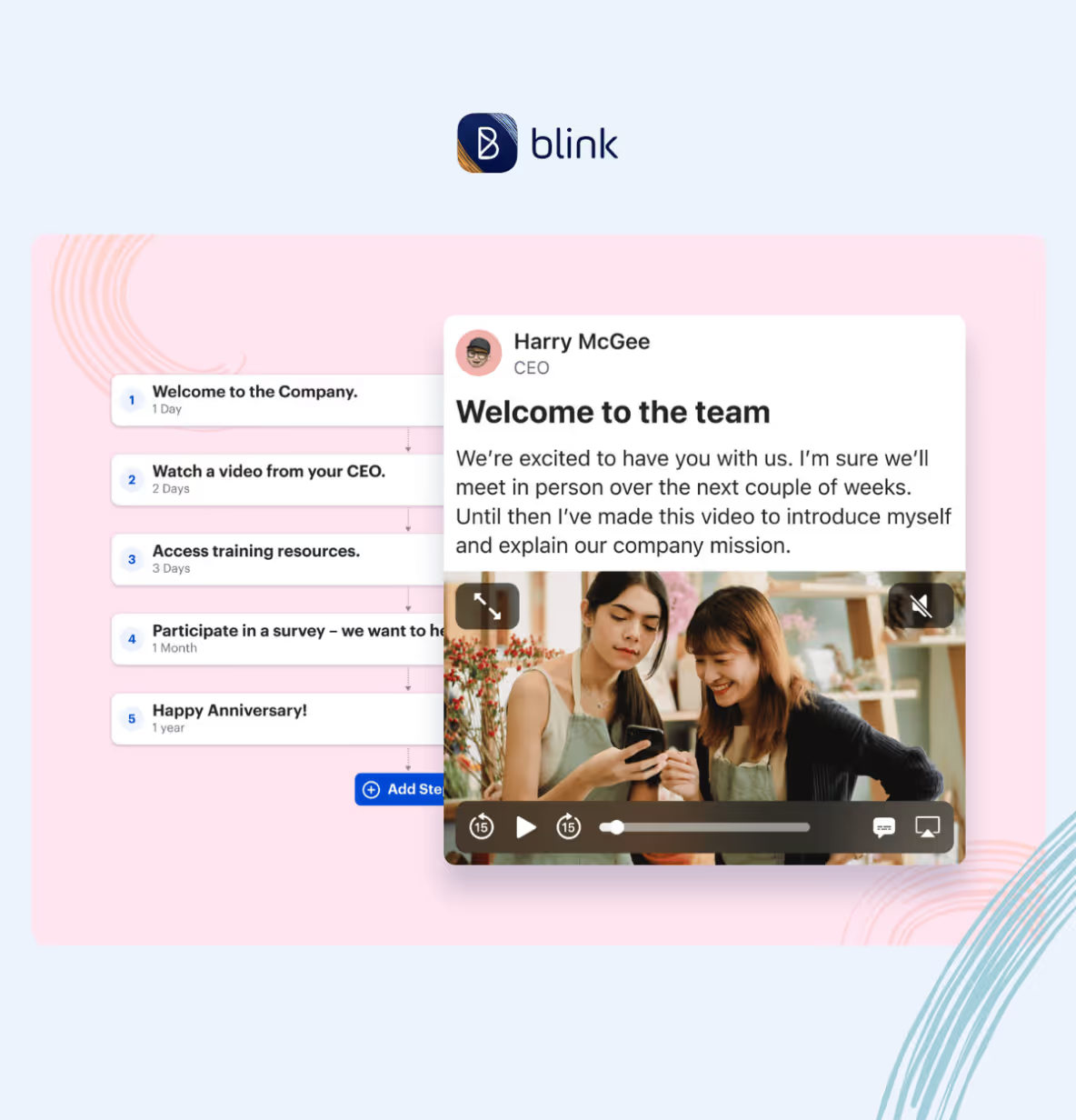
Blink is a new type of frontline engagement app that the average worker opens ten times per day! Blink brings the processes that frontline workers and their managers need all into one place – from payslips to scheduling and critical documents, all with one login. This is our ‘chips and dip’.
For leaders and managers looking for engagement, this is the time to swoop. The whole of the frontline’s eyeballs are on the app, which means that surveys get seen, important messages from the CEO and HQ are read, and the work being done to improve the working day gets cut-through.
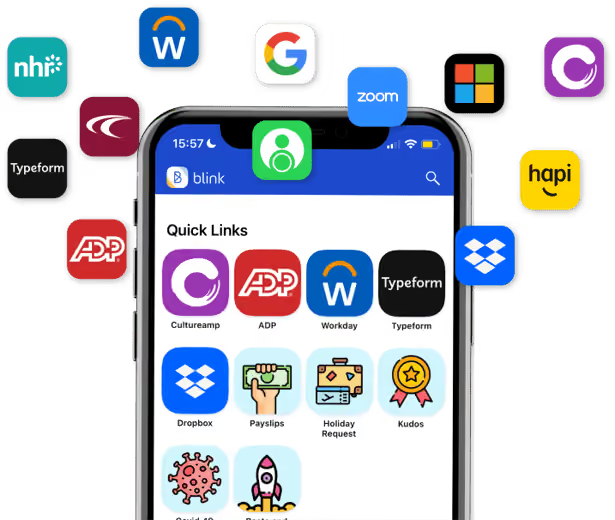
If a once-yearly employee engagement survey is the equivalent of putting out samples at Costco in the hope that a nameless stranger will take a drive-by snack, this is the equivalent of the work cafeteria – the place where the whole companies gathers, day after day.
How to be a good frontline host: Elara Caring’s story

Elara Caring – one of the largest US-based providers of personal care, home health and hospice care – had a frontline engagement problem when we first met them last year. With a 62% turnover rate of their more than 32,000 personal care attendants (PCAs), the leadership team needed sustainable engagement badly.
In adopting Blink, Elara looked to empower its PCAs and make their lives easier – and get engagement and loyalty in return.
They used Blink to remove the burden of paper-based admin: Elara’s PCAs had to constantly fill out expenses and other forms on paper. Blink’s solution was to integrate these manual processes and systems into a single app. Payslips, expenses and mileage reporting, key information from Sharepoint, schedules and rotas were all suddenly available to Elara’s PCAs at their fingertips.
The benefits for Elara’s PCAs? Time savings, with more attention devoted to their “real jobs” than ever before.
The benefits for Elara Caring? Sustainable engagement, with 95% of employees saying that they now feel more connected to the company. PCAs have begun to use Blink to create a community – and sub-communities – within the organization, creating the connection and cohesion that makes them stay.
https://www.youtube.com/watch?v=dINw_Y7CjWQ
In conclusion: good parties don’t skimp on the guac
In a war for a diminishing talent pool, the need to directly address frontline engagement has never been more acute. But it’s also shown where there are failings in trying to get engagement from the activities and programs that work for desk-based, white-collar workers. The key to success for the frontline is to not only fit into frontline life, but to make frontline life better and easier – and use that digital space you’ve created to finally connect your people.

Unfortunately for C-suite execs at frontline organizations, unless decisive action is taken quickly, things will only get worse.
While the problem of frontline turnover has many contributing factors, from salary competition to changing workforce demographics, one important part of the solution remains constant: employee engagement.
And here lies the problem: most of the time, it doesn’t work.
“If you build it...they won’t actually come”
Frontline businesses have invested in engagement solutions and projects before, but regardless of the type of organization, these are generally met with tepid responses.
The list of fallen soldiers here is considerable: town halls, employee surveys, intranets, ERGs. And often, the response sounds something like this:
“Great, another thing to remember”
“It’s not a natural part of my day”
“It’s a one-off thing”
“It’s too hard to use”
Hours of time from leadership, People teams, Internal Comms functions and supervisors go into projects that rarely succeed in their mission. This is like the birthday party where the decorations are up, the cake is ready and the music’s on – but nobody’s showed up.
The result? Frontline workers aren’t sustainably engaged, the cycle of attrition continues and there’s little meaningful data in order to understand exactly what to do to fix it.
The solution: chips and dips
Turning this around warrants changing the way we think about employee engagement. For most businesses, employee engagement is a thing that we ‘do’ - it’s a project, an initiative, even a tool or an app. But this is where we’re going wrong.
The solution lies in approaching frontline engagement as something that we ‘earn’ - it’s an outcome, not an output.
To illustrate this, let’s return to our party. Anyone who’s ever been to a house party will be able to tell you exactly where most people end up: the kitchen. And why are they in the kitchen? Because that’s where the drinks, the mixers, the snacks and the ice is. There’s useful stuff there, and so they gravitate there, and the good times start rolling.
So to return to frontline engagement: put out the ‘chips and dips’. In other words, focus on providing frontline workers with services and tools that not only fit into their busy days, but make them better – and use that space to invite engagement.
How it works: chips, dips and paystubs
Blink is a new type of frontline engagement app that the average worker opens ten times per day! Blink brings the processes that frontline workers and their managers need all into one place – from payslips to scheduling and critical documents, all with one login. This is our ‘chips and dip’.
For leaders and managers looking for engagement, this is the time to swoop. The whole of the frontline’s eyeballs are on the app, which means that surveys get seen, important messages from the CEO and HQ are read, and the work being done to improve the working day gets cut-through.
If a once-yearly employee engagement survey is the equivalent of putting out samples at Costco in the hope that a nameless stranger will take a drive-by snack, this is the equivalent of the work cafeteria – the place where the whole companies gathers, day after day.
How to be a good frontline host: Elara Caring’s story
Elara Caring – one of the largest US-based providers of personal care, home health and hospice care – had a frontline engagement problem when we first met them last year. With a 62% turnover rate of their more than 32,000 personal care attendants (PCAs), the leadership team needed sustainable engagement badly.
In adopting Blink, Elara looked to empower its PCAs and make their lives easier – and get engagement and loyalty in return.
They used Blink to remove the burden of paper-based admin: Elara’s PCAs had to constantly fill out expenses and other forms on paper. Blink’s solution was to integrate these manual processes and systems into a single app. Payslips, expenses and mileage reporting, key information from Sharepoint, schedules and rotas were all suddenly available to Elara’s PCAs at their fingertips.
The benefits for Elara’s PCAs? Time savings, with more attention devoted to their “real jobs” than ever before.
The benefits for Elara Caring? Sustainable engagement, with 95% of employees saying that they now feel more connected to the company. PCAs have begun to use Blink to create a community – and sub-communities – within the organization, creating the connection and cohesion that makes them stay.
https://www.youtube.com/watch?v=dINw_Y7CjWQ
In conclusion: good parties don’t skimp on the guac
In a war for a diminishing talent pool, the need to directly address frontline engagement has never been more acute. But it’s also shown where there are failings in trying to get engagement from the activities and programs that work for desk-based, white-collar workers. The key to success for the frontline is to not only fit into frontline life, but to make frontline life better and easier – and use that digital space you’ve created to finally connect your people.

What we'll cover
Start your free trial today
See how Blink helps frontline teams stay connected, informed, and engaged.
Blink, the leading employee super-app, today announced a strategic partnership with LineZero, a leading provider of workplace community and culture solutions, and the largest Meta Workplace partner globally. This collaboration leverages the existing relationship between both companies, offering Meta Workplace customers a seamless transition and upgrade to Blink’s employee experience platform following Meta’s announcement to close its Workplace operations.
Meta’s decision to close operations of Meta Workplace by Q3 2025 has left many companies challenged in finding a modern solution that enables a smooth transition of their workforce and data while offering a more innovative approach to deepen employee engagement and strengthen ties between employees and their companies.
“Our goal is to support the thousands of Meta Workplace customers seeking new solutions to drive employee engagement through a great internal comms tool,” said Sloan Kendall, head of global partnerships, Blink. “Partnering with LineZero provides customers with an easy migration of workforce data and technology applications into Blink’s platform. With LineZero’s expertise and Blink’s proven track record, we are excited to empower companies to migrate smoothly from Workplace and upgrade to Blink to enhance their employee engagement experience.”
Blink is a mobile-first, all-in-one communication and collaboration platform designed specifically for frontline workers. It allows companies to connect their entire workforce, regardless of location or device, through a single unified platform. With Blink, employees can stay updated with company news, chat with colleagues, access essential tools, send personalized kudos, complete surveys, and much more. Blink boasts industry-leading adoption rates, reaching up to 95% of employees and decreasing employee turnover by 26% in some cases.
“Blink’s platform is an ideal Workplace replacement for customers looking to modernize the way they engage their people,” said Greg Sugar, president, LineZero. “While organizations valued the similarity between Workplace and Facebook, we often heard there was a need to engage workforces with a tool that better represents how they interact with technology today. Blink approaches the frontline with an employee experience that meets them where they are. We are so excited to help organizations smoothly transition from Workplace to Blink’s platform. This partnership reflects our shared commitment to creating better employee experiences and shaping the future of work.”
The partnership highlights both companies’ commitment to enhancing employee engagement and creating a positive work environment. The collaboration ensures that Meta Workplace customers can migrate easily to Blink’s platform that enhances their engagement strategies and aligns with their long-term goals.
For more details on working with LineZero and Blink for a migration or implementation, visit LineZero’s blog.
Find and fix pain points to build an employee intranet that everyone wants to use.
Let’s be real here. The word “intranet” doesn’t exactly spark joy in employees.
For many, it’s synonymous with clunky logins, endless scrolling, and outdated information. It’s the digital equivalent of a dusty bulletin board. It’s just there — not doing anything to help the employee experience.
In fact, just 13% of employees say they use their intranet daily — and 31% said they never do.
Here for the work? Let’s unpack what employees hate about your intranet experience and what you can do to fix it.
Employee intranet pain points — and what you can do to address them
#1. “It’s too hard to find anything”
Your intranet is packed with employee handbooks, policies, HR forms, org charts, benefits info, and company news. But can anyone actually find what they’re looking for?
If your intranet software is the digital black hole where documents go to die, employees will soon realize that searching through files in search of the resource they need simply isn’t worth their time.
The fix: Tidy things up
Make your company intranet easy to navigate. You can do this by:
Improving search functionality. Allow for misspellings and synonyms, ensure results are relevant, and support employees with autocomplete and filter functions.
Grouping content logically. Think like a user — or run focus groups — asking where you would expect to find each piece of content.
Cleaning up your navigation. Simplify dashboards and use clear, intuitive labels that make sense to everyone.
{{mobile-hub="/image"}}
#2. “It’s only updated once a quarter”
If your intranet is only updated once in a blue moon, it’s no wonder employees aren’t logging in. There’s nothing new to see — and no reason to trust that the internal communications and resources they do find are up-to-date.
The result? Your intranet becomes a ghost town, with fewer and fewer employees bothering to pay a visit.
The fix: Keep it fresh
When your intranet is relevant and up-to-date, employee engagement follows. Your intranet becomes a place worth visiting, which means employees are more likely to see critical messages.
Don’t wait for “big news.” Celebrate small wins. Share behind-the-scenes moments. Post real-time updates. And take a look at these intranet content ideas if you need a little inspiration.
Internal communications team already stretched too thin? Then add employee-generated content (EGC) into the mix. Allow your entire workforce to interact with intranet content — and post content of their own — and there’s always something new and exciting for your audience to engage with.
#3. “It wasn’t built for people like me”
This is a common problem for frontline employees and more remote teams. Just 10% of frontline workers say they have high access to the tools, tech, and opportunities they need to connect and advance in their workplace.
Imagine a retail assistant who spends their days in a store serving and supporting customers. Unlike the team at HQ, they only have access to a desktop computer in the breakroom at lunchtime. And they don’t have a company email address.
It’s then difficult — if not impossible — for them to access vital workplace documents and updates via the intranet. They feel disconnected from the company and frontline employee engagement suffers.
Use frontline-friendly login methods that don’t require a corporate email address
Design for mobile devices — don’t just squeeze the desktop experience onto a smaller screen
Make your employee intranet accessible to frontline workers and you ditch the two-tier experience, where office staff feel connected to company culture and each other — and where frontline workers are left behind. You create an enjoyable intranet experience that works for everyone.
{{mobile-chat="/image"}}
#4.“It’s all corporate fluff”
Does your content feel like it’s gone through five rounds of legal, then taken a trip via the buzzword bus stop before finally landing on the employee intranet? Then your audience is likely to scroll right past it.
Formal, corporate language is unengaging. It’s also difficult to read. Long words, long sentences, long paragraphs. They don’t reflect the way people speak to one another in the real world. And they get in the way of meaningful employee communication and connection.
Likewise, if you only use your intranet to talk about high-level corporate happenings, employees will struggle to relate. If they can’t see themselves in the story, they’ll tune out.
The fix: Make it human
Yes, company news matters. But it doesn’t need to sound robotic and overly formal.
Write like a human. Use plain language, short sentences, and a conversational tone — just like you would talking to someone face-to-face.
And don’t forget to share stuff that your people really care about. Use your employee intranet to celebrate employee stories and customer stories. Put people at the center of each piece of content.
One final tip for ditching the corporate speak? Play around with content formats. Swap dry text-based documents for dynamic images, videos, polls, GIFs, and infographics. You’ll make the intranet feel less like a bulletin board and more like a digital community.
{{mobile-stories="/image"}}
#5. “It’s ugly and feels like 2009”
Still working with your parent’s intranet? Today’s employees get super-slick experiences on the tech tools they use at home. So they have increasingly high expectations for the tech they use at work.
They want minimal friction. Intuitive dashboards. Easy navigation. And then there’s personalization.
A one-size-fits-all approach to the intranet is outdated. Because most of today’s software experiences are tailored to the preferences and behaviors of each individual user.
Up against consumer-grade digital tools, a traditional intranet feels like a lumbering dinosaur. It’s hard to use and fails to delight employees.
The fix: Upgrade intranet UX
A modern intranet should look and feel like the tools employees already love using. We’re talking:
Clean, mobile-responsive design, available via desktop and smartphone app
Intuitive navigation and integrations, so everything employees need is just a couple of clicks away
Personalized dashboards, based on role, location, team, and tenure
Social features, like chats, forums, emojis, and news feeds — and lots of engaging visuals
Modern intranet features like these are no longer nice-to-haves. They’re essential if you want to meet employee expectations and keep them coming back to your social intranet for more.
#6. “No one ever showed me how to use it”
For some employees, it’s not resistance. It’s simply a lack of intranet know-how.
They don’t know how to log into the intranet or download it to their device. They’re unaware of how the intranet can support their work and don’t know how to use specific features.
Without clear training or support, they never give your intranet a try — and never discover all the amazing things it can do for them.
The fix: Support employees to get started
A good intranet should feel intuitive from the get-go. There’s a minimal learning curve and better employee adoption because the platform has a familiar and user-friendly interface.
But, beyond choosing the right intranet platform, there are a few other things you can do to support employees to use it:
Create intranet ambassadors. Offer intranet training to a select band of employees who can share their knowledge with teammates.
Offer how-to tips within the intranet. Add pop-ups and quick tips on relevant pages so employees get support when and where they need it.
Bake it into onboarding. As new hires start work at your company, make an intranet walk-through an integral part of the employee onboarding process.
#7. “It doesn’t help me do my job”
Too many corporate intranets are built around what the organization wants to share — not what employees actually need. So what happens?
People work around it. They ping their manager for shift information, share documents by email, and complete HR forms by hand. They don’t see the value in your employee intranet so they don’t choose to hang out there.
The fix: Build it around employee needs
Start by asking employees what they want the intranet to do. Ask which tools they’d find useful. Then shape the user experience around that.
Some essential features that tend to be popular?
Integrations. Link your intranet to the other workplace software you use, so employees can access the tools they need from their intranet dashboard.
HR self-service. Support employees to request PTO, swap shifts, leave feedback, access benefits, and submit expenses — right within your intranet platform.
Employee directory. Make it easy for employees to find and connect with colleagues across locations, teams, and shifts — even without a corporate email.
Interactivity. Turn your intranet into a digital water cooler by providing channels for peer-to-peer connection, team collaboration, and the sharing of company culture.
From ignored to adored — your intranet makeover starts here
Let’s recap.
Most employees don’t hate the idea of the employee intranet — they just hate the version they’ve been stuck with. Outdated, clunky, hard to use, irrelevant…
But that doesn’t mean you have to scrap it and start over.
You can build a better digital employee experience by listening to your people, modernizing the experience, and meeting them where they are. On mobile — with real stories, useful tools, and relevant content that actually reflects their day-to-day work.
Build a modern intranet and your platform can become a digital home for internal communications, community, and culture — and an app that employees across your entire company enjoy opening every day.
Retention rate is a ratio of the total current employees and the employees at a previous point in time in the same positions at your company. You can calculate it annually or quarterly.
It provides a snapshot of how satisfied your employees are at your company.
A high retention rate indicates your employees enjoy the work they’re doing, fit in with your culture, and receive fair pay.
Conversely, a low retention rate means that one or more of those elements are less than ideal. Since retention rate is inversely related to employee turnover rate, low retention means high turnover.
Knowing your employee retention rate’s status, you can evaluate and adjust your employee retention strategies. When your employee retention rate improves, you know your retention efforts are paying off.
Measuring employee retention rate
To find your organization’s employee retention rate, you need data on the total number of employees with your organization at the beginning of a period and the number of employees who remain at the end. From there, you can quickly calculate your retention rate.
How to calculate employee retention rate
Find how many employees left your company in a period. Subtract that number from your total headcount at the start of the period. Divide the remaining number of employees by the initial headcount. The result should be a decimal. Multiply that number by 100 to find the retention rate in percentage.
Here’s what that looks like in the employee retention formula:
For example, let’s say you want to calculate your annual retention rate.
You started the year with 56 employees and ended with 50 employees. Here’s how you can find the retention rate:
56 - 6 = 50
50/56 = 0.8928
0.89 x 100 = 89
So in this scenario, the retention rate is 89%
Employee retention rate vs. employee turnover rate
Whenever we talk about staff retention rate, it’s also common to hear staff turnover rate. We use them interchangeably because they’re two sides of the same coin.
While retention rate measures how many people stayed, turnover is the measure of how many people left.
Similarly, you might be confused about attrition rate and employee churn rate. They are just other names for turnover rate.
How to calculate employee turnover rate
You can do so by:
Sum the total employees at the beginning and end of the time interval.
Divide by two to get the average number of employees.
Divide the total number of separations for a given time by the average number of employees.
For monthly turnover, you will work with this:
Suppose a company begins the month with 32 employees. Four employees leave, and six new employees join. So the company ends the month with 34 employees.
The average number of employees is:
(32+34)/2 = 33
Next, we find the turnover:
4/33 = 0.1212
Multiplying by 100, the turnover rate is 12%.
What is a good employee retention rate?
A good employee retention rate varies from industry to industry.
Retail and restaurants tend to have lower industry average retention rates than other sectors, while government and federal sectors have the highest retention rates.
The overall market and economy also affect your retention rate. During times of high uncertainty or in a strong talent market, retention may decrease for every industry. For example, turnover in 2020 was 57.3%, making it 20% higher than the previous year.
According to Built In, average retention rates range from 70-90%.
Following this logic, a good retention rate is somewhere above 75%. But for frontline organizations that deal with restaurant and retail, a retention rate above 50% is also decent.
Final thoughts: how to find your employee retention rate
Calculating your employee retention is an important metric while running your business. It can tell you a lot about how your employees feel at your company.
The same is true for turnover rate as that lets you know where the fault lies.
Use both metrics to get a complete picture of your business and employ retention strategies to keep your top talent around.
If you’re looking for a new way to keep your employees engaged, Blink is an all-in-one employee communications app that can help you stay connected to your employees and boost retention.
Team building activities get a bad rap. While the intention behind such exercises is to break the ice, they are often seen as embarrassing and awkward.
Leaders are so enthusiastic when conducting these games that they don’t even notice workers looking for the nearest exit.
That’s not to say you shouldn’t conduct team-building exercises. Building collaboration skills in your team is essential, and team-building games can really help you achieve that.
The problem usually lies with the team-building activities managers pick. A quick search for team-building ideas will show you that the web is filled with hundreds of them. But many are unfeasible, difficult, or uncomfortable for workers. They look good on paper but you can’t really implement them in an actual workplace.
So in this post, we are going to solve this problem. Instead of giving you a huge directory of endless activities, we’ve handpicked a few team-building activities that are easy, effective, and enjoyable.
Types of team building activities
Some team-building ideas are more suited for your company than others. Your choices will depend on several factors, such as team size and function.
But you also need to consider where you’re going to conduct the team-building exercises and how the location impacts the mindset of your team members. Based on the location of the team-building games, they can be split into three main categories.
Indoor team building activities
Indoor games take place in the office or another work location. And you’ll likely conduct them during regular work hours. For this reason, indoor activities have a serious, formal overall vibe. If your whole team works from a single location, then choosing indoor team-building exercises is your best bet.
Outdoor team building activities
At a team retreat, you need team-building games that can be played outdoors. Plus, the overall mood is more relaxed and casual than indoor exercises. So the team-building activities you pick should be more fun and energetic.
Virtual/online team building activities
More and more people are working remotely, and many teams are spread out in different locations these days. If that applies to your team too, you need remote team-building activities that can be conducted via web conferencing.
The good news is we’ve covered all the three types in the list below. In fact, some of our team-building ideas belong to multiple categories. For example, you’ll also find exercises that can be run indoors as well as online.
For each team-building activity, we’ve also mentioned its best-suited environments. So without further ado, let’s jump in.
Quick and easy team building activities
Campfire stories
Suitable environments: indoor, online, outdoor
Number of team members: 5-25
Objective: Foster informal communication by encouraging team members to share and identify common experiences
This is one of the evergreen team-building activities. It improves team bonding via inspired storytelling. Team members gather in a circle, as people do in a fireside chat when camping. They share workplace experiences, get to know each other better, and refresh memories.
What makes it great: Storytelling is a time-tested way to pass information informally and shape communities. So a storytelling session with work-related stories can get your team members to loosen up, learn some useful lessons, and feel closer to one another. You can also confine the stories to train people around a certain theme.
How it works: Come up with a list of words that can trigger your employees’ memories and remind them of a previous experience. For example, these could be “demo day,” "on-site trip," "side project,” and so on.
Find a way to display all the words to your team members. If you are conducting the activity indoors, for example, you can use a whiteboard.
Have team members take turns to pick a trigger word and share an experience related to it. Once a trigger word has been taken by a participant, move it to a separate area so it can’t be repeated.
You can also ask workers to share more trigger words that come to mind after they have heard a story. So you won’t run out of ideas for stories.
Blind draw
Suitable environments: indoor, outdoor
Number of team members: 10-25
Objective: Improve delegation skills, communication, and teamwork among participants
This team-building exercise involves drawing an object with just spoken instructions. You can use this team-building exercise as a fun, light activity between two intense sessions.
What makes it great: It looks simple on the surface. But to win this team-building game, team members will have to get many things right. For example, they’ll have to pick the right person to draw, and to give instructions. Plus, they’ll need to communicate well. So the activity teaches them both delegation and collaboration.
How it works: Gather some everyday objects, signs, or shapes. You can print them on sheets of paper, or search for photos on a free stock photography website.
Divide employees into teams of five people. Have each team choose the “artist” who will draw the shape. Assign a different object to each team and give them a time limit of 3-5 minutes.
Each team will then guide the artist on drawing the object. But they can’t say the name of the object. While the artist is drawing, he couldn’t know what the object is, nor can his team know what he is drawing until he’s done. The team with the drawing most similar to their object wins.
You know who
Suitable environments: indoor, online
Number of participants: 10-50
Objective: Introduce team members to one another and establish connections
In this team-building game, employees will map the connections between one another on a whiteboard. Teams can choose their “avatars”, and then draw arrows to map how they are connected to other workers. It’s a great way to break the ice when team members don’t know each other well.
What makes it great: This team-building activity lets you build a small, social-media-style network, but without the technology. It will not just help as a standalone activity, but also allow team members to keep mingling throughout the whole day or event.
How it works: Provide participants with index cards, markers, and tape. Each worker will then write their name, add their job title, and draw an "avatar" on their index card, like how there’s a profile photo on a social network.
Then gather all the index cards and stick them on a whiteboard, with plenty of space between every two cards. Participants will then draw arrows from their card to others who they already know in some capacity.
Plus, they’ll also mention how they know the person. For example, maybe they went to the same university or were part of the same team in the past.
Cross-functional jigsaw
Suitable environments: indoor
Number of team members: 10-20
Objective: Build cross-functional collaboration, communication, and problem-solving skills
This team-building activity divides a group of employees into two teams, both of which are asked to solve a jigsaw puzzle in the time limit specified.
But there’s a twist. Some of the pieces required by each team belong to the other team. So both the teams need to work together.
What makes it great: This is a great exercise in improvisation, problem-solving, and collaboration. When the teams start putting the pieces together, they don’t know about the catch. They are surprised by the realization that their success depends on working with the other team, and this lesson remains with them for a long time.
How it works: Simple! Take two puzzles. Replace some pieces in one puzzle with those of the other. Make two teams and give them the puzzles to solve. Ask them to keep communicating with each other while they’re on the task. But don’t tell them that you have interchanged some pieces. Let them figure it out on their own. Also, declare another rule that teams can exchange only one puzzle piece at a time.
Survival priorities
Suitable environments: indoor, outdoor
Number of team members: 5-30
Objective: Inspire participants to solve problems together, demonstrate leadership, and practice negotiation.
Imagine your plane has crashed on an island in the middle of nowhere, and it’s burning. There are only a few minutes to salvage some items from the wreckage. What will you take and what will you leave? That’s what this team-building exercise is about.
What makes it great: This team-building game is great for giving your team a taste of a high-stress situation, and honing their ability to work together under pressure. Their success will depend on negotiating calmly, picking a leader, and planning the whole thing carefully.
How it works: Set up a space with several survival items such as various foods, water, knives, weapons, flares, tarp, matches, and so on. You don't even need to have the actual items. You can use their pictures too.
The quantity of each item should be limited so teams will be forced to trade and collaborate. Divide employees into two or more teams. And they have 30 minutes to rank what they need the most and get survival items from the space.
Coffee standup
Suitable environments: indoor, online
Number of team members: 2-8
Objective: Build rapport and improve team communication
Countless professionals across the globe start their work with daily standup meetings and coffee. So there’s no reason you can’t combine the two. This team-building activity involves daily standups that can be conducted indoors or online. Participants talk about what’s on their to-do list for the day while enjoying a nice, hot beverage.
What makes it great: This team-building exercise is best-suited for remote teams in which workers don’t get to see their team members on a daily basis. Having a light chat while doing something casual can help build camaraderie, improve communication, and know what everyone’s doing.
How it works: Ask workers to grab a cup of coffee from the cafeteria, a coffee shop, or make one at home. Then all the employees in the team join a stand-up chat for 10-15 minutes. Each team member talks about what they intend to do, and if there’s anything they need help with.
Shark tank mania
Suitable environments: indoor, online
Number of team members: Up to 30, split into teams of five
Objective: Encourage innovation, collaboration, and skills to sell your ideas
This activity is inspired by the popular TV series — Shark Tank. In this team-building game, participants create a product pitch for investors. The product and the investors both don’t need to be real. Your team will just create a mock version of the show.
What makes it great: Getting your team members to participate in their own version of Shark Tank goes a long way to instill entrepreneurship, innovation, and the ability to think big. Since there can be multiple cofounders and others behind a startup, this activity also promotes teamwork.
How it works: Divide employees into teams of 3-5 people, and ask each team to prepare their pitch for an imaginary product. The pitch could include product name, brand tagline, marketing plan, financial projections, and so on.
Choose some people to be the investors with an imaginary pool of money. You can also give them fake backgrounds. Every team will then present their pitch to these “Sharks.” The team that gets the most funding wins.
Over to you: team building activities to engage your workforce
Running an organization is not easy. It’s hard to get hundreds of workers on the same page, let alone get them to take collective action towards business goals.
Hard, but not impossible. With the right collaboration strategies and team-building activities, you can build an atmosphere of camaraderie and open communication at work. Plus, these exercises also teach your team valuable soft skills such as leadership, negotiation, and problem-solving.
They might take some time and effort to execute in the beginning, but the results will convince you to keep going. So start putting them into practice and reap the benefits of improved culture and collaboration at your workplace.
Also, the right technology can turbocharge your efforts to build a culture of open communication and collaboration. This is where Blink can help. Consider booking a free Blink demo today.
During their first month, employees spend an average of 12.7 hours per week asking coworkers for help. And it doesn’t get much better after the first month. Most workers spend an average of five hours per week waiting to connect with people with the information they need.
If you want to maximize productivity, you need to make information accessible.
That's where knowledge-sharing platforms come in. They facilitate the flow of information and expertise across the board.
What is a knowledge-sharing platform?
A knowledge-sharing platform is a software that enables employees to interact with each other and exchange information. It helps subject matter experts contribute guides, policies, and documents to develop a company's internal knowledge base.
Key features knowledge-sharing tools should have
With many knowledge-sharing tools available, knowing which one to choose depends on your company's goals, budget, size and your workers' specific needs.
Here are four features to look for when choosing a knowledge management system for your organization:
Cross-platform access
Most of your employees use their smartphones even during working hours. Reviews.org shares that Americans spend an average of 2 hours 54 minutes on their phones daily. Even more important is to remember that 80% of the workforce is in frontline roles - in other words, they rarely have access to a desktop computer at all, and are entirely reliant on smartphones.
It's therefore critical that you opt for a knowledge-sharing solution that employees can access from a smartphone, laptop, tablet, or workstation. That'll help your staff perform their tasks efficiently whether they’re in the office or on the move.
Smart search
Panopto shares that 60% of employees find it difficult to get the information they need. To ensure that a knowledge-sharing solution truly solves this, you need a platform that provides intelligent search options.
The platform should enable your employees to organize the shared content by labels and tags, so both your remote and deskless employees can find the relevant information quickly.
Integrations
The right knowledge-sharing tool allows you to deliver access to information without having to uproot your existing systems. Most businesses already have their critical documents housed in multiple areas - a good knowledge management tool will allow you to integrate with those systems to draw those documents through rather than having to move them.
Equally important to consider is how user access is controlled - creating another set of sign-ons for users to have to remember (and invariably, request support and resets for) can potentially be more trouble than it's worth. Explore solutions with Single Sign-On (SSO) capabilities, integrating seamlessly with your existing stack.
Reports and analytics
To know that adoption is going well and that your investment in your new tool was worthwhile, you need ways to measure engagement. That’s even more true if you’ve got deskless and remote workers.
Your knowledge-sharing tool should have reporting features to track how much information is being shared, which content is more popular, and which employees contribute the most. All this data can help you identify knowledge gaps and create strategies to mitigate those gaps.
Best knowledge-sharing platforms
1. Blink
2. Notion
3. Bloomfire
4. Microsoft SharePoint
5. Nuclino
6. Confluence
7. Helpjuice
Here are the six best knowledge-sharing tools to facilitate the flow of information and expertise in your organization:
1. Blink
Blink is an employee experience app that gives frontline and remote workers access to the people, communications, and applications they need to do their job on their personal phone.
You benefit from increased productivity, employee retention, and two-way conversations that bridge the gap between executives, management, and employees.
Blink is ideal for executive teams committed to giving more to their frontline workers. It is flexible, feels like the apps employees use daily, and can be launched in days or weeks.
Key Features:
Powerful Hub dashboard with quick access to policies, rosters, payslips, and apps
Secure group, team, or one-to-one chats for real-time two-way communication
Newsfeed with a personalized stream of bottom-up and top-down multimedia content including news, videos, and pictures
Seamless integration with the apps you already love such as Microsoft 365, Workday, and ADP.
Single Sign On (SSO) — log in to any app without your password
Frontline intelligence — gain powerful insight into what makes your organization tick, from turnover to engagement and sentiment, to stop problems before they start and create a close-knit community.
Micro-apps — get powerful branded apps personalized for your company
Best for:Companies with a large distributed frontline or remote workforce.
Pricing: Starts at $3.40 per person per month (when billed annually).
2. Notion
Notion is a knowledge-sharing platform that combines your internal wiki, projects, and notes in one tool. You can create pages, lists, databases, and tables and interlink them to help your colleagues understand the company-wide web of information.
Many teams and companies globally use Notion to keep their staff informed and collaborate in one place.
Notion creates transparency by centralizing all knowledge and work and making it highly customizable. As a result, it saves time and increases productivity for teams of all sizes.
Key Features:
Content blocks — present information as you want it
Clean, custom, and easy-to-use text editor
Easy linking between documents and pages
Support for multimedia — make your knowledge pages as detailed as possible
Best for:Small technology businesses that manage many documents and projects and want to collaborate easily.
Pricing:Free with limited features. Premium plans start at $8 per user per month (when billed annually).
3. Bloomfire
Bloomfire connects individuals and teams with the information they need to excel at work. It stores relevant information and makes it easily searchable.
This platform powers all departments — from customer support to sales and marketing — with the right information. Your employees can always find the desired information at the right time to make informed decisions that propel them to success.
Bloomfire also uses artificial intelligence (AI) to spark engagement and help your team grow collective intelligence efficiently.
Key Features:
AI-driven search for quick access to information
Flexible user roles and permissions
Custom integrations with open API
Best for:Mid-sized teams, departments, and organizations looking to share knowledge in a meaningful and collaborative way.
Pricing:Premium plans start at $25 per user per month.
4. Microsoft SharePoint
Microsoft SharePoint is a knowledge-sharing platform designed around a traditional intranet structure. It helps teams collaborate effectively by letting them share content, applications, and knowledge.
You can use blocks — including text, videos, forms, and images — to customize page layouts without complex coding. You can also add announcement feeds and news to knowledge pages to ensure they're constantly updated with current information.
Since it’s a Microsoft platform, SharePoint integrates best with other Microsoft tools.
Key Features:
Code-free content customization
News and announcement feeds
Solid integrations with other Microsoft tools
AI-powered content suggestions
Best for:Office-focused companies integrated into the Microsoft ecosystem.
Pricing: Starts at $5 per user per month.
5. Nuclino
Nuclino is a user-friendly, lightweight knowledge management software that empowers teams to collaborate without the chaos of context switching, files and folders, or silos. You can use its simple editor to create rich wiki pages — with text, videos, and images.
You can opt to view data as graphs, lists, or boards to ensure you understand how everything works together. You can also collaborate on every page with team members in real-time, with comments letting you exchange feedback on the spot.
Key Features:
User-friendly interface
Minimal setup time
Real-time content collaboration
Fast and reliable search
Best for:Startups and small teams looking for a lightweight wiki solution.
Pricing:Free with limited features. Premium plans start at $5 per user per month.
6. Confluence
Confluence is a knowledge-sharing solution and intranet owned by Atlassian. The platform lets users create and manage workflows efficiently.
You can use Confluence to capture, organize, and preserve your most valuable assets — project plans, company updates, or other vital information.
The platform’s page tree view and powerful search function make it easy to find the exact file you're looking for.
Key Features
Multiple integrations
Customizable templates for all business needs
Real-time collaborative editing
Real-time notifications and comments
Best for:Mid-size technology companies looking to improve information exchange in functional departments such as project management groups, technical teams, marketing, finance, HR, and legal.
Pricing: Free with limited features. Premium plans start at $5.50 per user per month.
7. Helpjuice
Helpjuice knowledge base software streamlines the process of knowledge sharing for both your team and your customers. The platform is easy to use, with an editor that's straightforward making content creation fast and simple. Their intelligent search feature is designed to allow your customers and team to find the information they need, when they need it.
One notable feature is their decision tree logic which allows you to build step-by-step guides that help direct users to the information or solutions they need, based on their specific circumstances. This can improve the user experience and reduce time spent searching for relevant content.
Helpjuice's platform is also designed to be flexible. You can customize the look of your knowledge base to reflect your brand, making it easy for customers and team members to navigate. The goal is to provide a platform where information is readily accessible, promoting better customer service and efficient internal knowledge sharing.
Key Features:
Intelligent, Google-like instant search
Real-time collaboration features
Easy-to-use editor with multi-language support and decision-tree logic
Fully customizable
Best for: Companies that want an easy-to-use, yet comprehensive knowledge base software solution that’s fully customizable, and capable of fostering effective internal knowledge sharing as well as providing comprehensive external customer support resources.Pricing: Pricing begins at $120 per month, which includes all features and supports up to 4 users.
76% of workers say they enjoy working collaboratively. But workplace collaboration isn’t just good for team members. It’s also good for your organization.
That’s because, when your teams are pulling in the same direction, there’s less wasted effort, greater productivity, and better business results.
These days, collaboration is a little more complicated than it used to be. Many employees work remotely or on a hybrid schedule. There are also hard-to-reach frontline employees to consider.
In 2024, organizations are having to be more intentional about employee collaboration — and they’re turning to tech tools to bring dispersed teams together.
Collaboration in the workplace may be changing. But it’s still as important as ever. Here, we take a look at the benefits of workplace collaboration, along with the role tech can play in creating a collaborative ecosystem.
What does collaboration look like in the workplace?
Workplace collaboration involves team members working together to achieve a common goal. It relies on empathy, active listening, conflict resolution, and accountability.
But it’s not just about team members working together on a big project. Or giving the standard monthly update on company developments. Collaboration is much, much more than that.
The most collaborative organizations make collaboration part of their company culture. It’s a mindset of openness and transparency. A place where all employees engage in effective communication and are ready and willing to help one another.
Employee collaboration might mean liaising with engineering, marketing, and sales teams to launch a ground-breaking new product. Or simply helping your co-worker get the photocopier working again.
In any form, collaboration is about sharing information and knowledge. About willingly offering support. And about combining employee strengths to get the best results each and every day.
Nowadays, there’s another key element to collaboration in the workplace — technology. In the wake of remote working and higher employee expectations with regard to tech, collaboration has gone digital.
Organizations use digital tools to facilitate employee collaboration even when teams don’t work face-to-face. They use tech, like project management software, employee apps, and real-time communication tools.
This is helping to maintain collaboration among desk-based teams, at home and in the office. It’s also supporting dispersed frontline workers to collaborate at work, too.
Collaboration is good for business. It ensures that your employees, like cogs in a well-oiled machine, are all working together. There’s more momentum and less friction. So you find it easier to achieve organizational goals.
Collaboration within teams helps those teams to function more effectively. Cross-functional collaboration is important too. Team-working across different departments helps to remove workplace silos and get all teams on the same page.
Workplace collaboration is also good for employee motivation and morale.
With easy and effective communication, the workplace becomes a happier place to be. And when employees operate as a team, helping each other to achieve tasks, the workplace becomes more caring and supportive.
Collaboration clearly makes a difference to employees. A 2022 Corel report into team-working revealed that:
41% of employees have left their job or would consider leaving their job due to poor collaboration at work
64% of employees say that poor collaboration costs them at least three hours per week in productivity
78% of employees say that leadership could be doing more to promote collaboration within the organization
Collaboration ties in with employee engagement, the employee experience, productivity, and employee retention, making it a really crucial component of any workplace.
8 benefits of collaboration in the workplace
Let’s take a closer look at what workplace collaboration can do for your employees and organization. Here’s what you can expect when your employees routinely collaborate with one another.
Improved employee engagement
Employees who feel they belong within an organization are 5.3 times more likely to feel empowered to perform their best work. And employees who get enough information to do their job well are 2.8 times more likely to be engaged.
Workplace collaboration brings employees together. It gives them need-to-know information, and aligns everyone behind company goals.
This creates a sense of community and purpose, which fuels employee engagement. Collaboration leads employees to feel more satisfied in their work and more loyal to your company.
Increased efficiency
When teams collaborate, they share information. Teams pool resources and people power. Employees who work together closely can share workloads and responsibilities.This enables teams to complete tasks more quickly. It also reduces the chance of duplicated work.
This efficiency frees up time in the workday. It helps managers to make workloads more manageable, while creating the time and employee headspace for even more creativity and collaboration.
Knowledge sharing
Imagine a company that fails to share its collective knowledge effectively.
Teams spend their time researching topics that other teams understand in depth. Employees repeat the same mistakes because there’s no one sharing their hard-earned insights. You fail to establish best practices. And employees are in a constant state of catch-up.
Now imagine the opposite. A company where knowledge is shared seamlessly between co-workers, teams, and departments. There’s no gatekeeper and collective knowledge is easy for everyone to access.
The latter scenario makes for a more successful organization. It helps you build a more knowledgeable workforce. And it saves a heap of time — because your people aren’t separately pursuing the same lines of research.
Stronger relationships
Good employee collaboration relies on strong workplace relationships. And it helps to develop them, too.
When teams collaborate, they communicate regularly. They work together towards a shared goal. They also develop trust and mutual respect as they share ideas and rely on each other’s support.
By developing these strong relationships, your organization gets better at collaboration going forward. You create a culture of psychological safety, where people feel comfortable speaking up about their ideas, mistakes, and concerns.
Strong workplace connections also improve the employee experience. With Gallup’s State of the Global Workplace 2024 report revealing that 20% of employees experience a lot of loneliness at work, nurturing workplace relationships has never been more important.
Better decision-making
When you make decisions as part of a team, you leverage the knowledge, perspective, and experience of each team member. You involve the people who are directly affected by the decision — and those who are responsible for implementing it.
Making decisions as part of a team means assumptions are challenged and everyone has a sense of buy-in. You make informed and balanced decisions that are more likely to garner company-wide support.
For example, in a recent webinar, we heard from the team at the Capital District Transport Authority (CDTA) in New York. They realized they needed new tech to improve internal communication at the organization.
When deciding on the right tech solution, they took a cross-functional approach. They involved communications, IT, and HR teams, along with leadership. They also consulted the workers who’d be using the new tech.
By collaborating in this way, the CDTA was able to choose a modern intranet that met everyone’s needs and enjoyed excellent levels of adoption.
Enhanced problem-solving
We all know the proverb. “Two heads are better than one.” And when it comes to problem-solving, you’re much more likely to come up with creative and effective solutions when working as part of a team.
Collaboration brings people with different viewpoints together. This diversity helps teams to approach a problem from multiple angles — and come up with a variety of potential solutions.
It also minimizes blind spots. Because there are people with lots of different perspectives involved, it’s less likely that some element of the problem or its solution is overlooked.
Stronger employee development
The practice of collaboration helps to develop employee soft skills, like decision-making, problem-solving, communication, conflict resolution, and creative thinking
When you have a culture of knowledge sharing, co-workers can also learn from one another. They can pick up new skills and information from the people they work with. Employees are organically coached by more experienced members of the team.
This informal learning can take place within teams and across departments. Successful cross-departmental collaboration enables workers to get a better understanding of different areas of the business.
Boosted productivity
As we’ve already seen, good teamwork is linked to:
All of these things support workplace productivity. Employees have access to the resources, skills, knowledge, and relationships that help them perform at their best.
Collaboration also improves accountability. When employees are involved in planning, decision-making, and problem-solving, they’re more motivated to work hard and make a success of the initiative or project.
The role of technology in workplace collaboration
It used to be that collaboration could take place informally in the office.
Co-workers could share ideas as they made coffee in the break room. Or as they walked to the elevator together. There were plenty of face-to-face meetings where people could work together to solve problems and make decisions.
But things have changed. In recent years, technology has played a much bigger role in team working.
Firstly, thanks to the pandemic, remote working became much more widespread. While some organizations are encouraging people back to the office, a sizable proportion of employees still spend part of their working week working remotely.
In the UK, figures for 2024 show that 40% of workers spend at least some time working from home. In the US, 41% of employees whose jobs can be done remotely work a hybrid schedule.
Secondly, employee expectations around workplace tech have increased. With intuitive tech at home making life easier and more convenient, employees now expect the same digital experiences in the workplace. This goes for frontline employees, too.
Frontline employees — working shifts, in isolation, or on a busy shop floor — haven’t always had the same opportunities for teamwork as their desk-based peers. But with organizations now focusing on frontline employee engagement and retention, this is something that employers are looking to rectify.
To involve all employees in workplace collaboration — no matter their location or schedules — we have to be intentional. We also have to use the right technology.
Here are a few tools that support collaboration in the modern, digital workplace.
Real-time communication tools
When teams are working away from the office, real-time communication tools are an employee collaboration essential. You need a way for co-workers to communicate seamlessly, sharing information as if face to face.
We know that many deskless workers conduct conversations on personal apps. But this type of shadow IT poses security risks. It also fails to enhance collaboration and employee engagement as successfully as a dedicated communication tool, run with the oversight of your managers.
So providing employees with messaging and video conferencing tools is a must. You need software that facilitates 1:1, group, and company-wide chat.
Project management software
Projects have lots of moving parts. And — particularly for non-office-based teams — it can be hard to visualize project tasks and progress without project management software.
This type of software acts as a centralized platform for planning and executing projects. It keeps all files, discussions, and tasks in the same place, ensuring nothing gets lost and everyone is aware of their responsibilities.
Project management software is particularly useful for remote and hybrid teams. But it can still come in useful for purely office-based teams.
Streamlined communication, workflow automation features, file organization, task visibility, and real-time updates are useful for teams wherever they may be working.
Employee apps
For employees who don’t spend their day at a desk, an employee app is another vital workplace collaboration tool.
As Ian Gordon of Elara Caring said to us in an interview:
“Being a frontline worker can feel like you're on an island by yourself, and the solutions that you need must be quicker and more succinct. You can't spend a lot of time signing in and navigating. You need to get to your answer now.”
Apps, like Blink, fit Gordon’s description. They’re intuitive to use and available on employee smartphones. They also make it quick and easy for employees to complete tasks, whether that’s sending a message to a co-worker, checking the latest policy documents, or filling in a safety report.
Employee apps support collaboration for time-poor frontline workers. They help them build connections with co-workers, share their frontline insights, and keep up to date with company news, improving the employee experience in the process.
A resource hub
Whether it’s on your company intranet or an employee app, a digital resource hub is another useful tech tool for employee collaboration.
A resource hub allows co-workers to share files and work together on them. It also acts as an internal knowledge base.
Here, employees can find best practices, company policies, and FAQs. If they have the appropriate permissions, they can also add their own insights to the hub, tagging documents so employees can find them easily.
AI and automation
AI and automation tools are also playing a role in employee collaboration. They’re providing time savings that give team members more opportunities for collaboration. And they’re supporting collaboration in other ways, too.
Companies are using this tech to automatically tag resource hub documents so users can find what they’re looking for more easily. AI is producing better resource hub search results.
AI is also supporting employees in their use of data. With automated data analysis and predictive analysis, AI is giving employees a sound basis for their collaborative problem-solving and decision-making efforts.
Some organizations are also using AI to facilitate communication between different departments. For example, technical teams are using it to translate complicated documents for non-technical co-workers.
This is helping to close the communication gap between departments and ensure that everyone has the information they need to collaborate effectively.
In summary
Workplace collaboration has changed dramatically over the past decade. But it’s still a key indicator of business success.
Collaboration supports workplace productivity, communication, and business results. It leads to better problem-solving and decision-making.
It also supports your employee retention and engagement efforts by making your workplace an open and supportive place to be, improving the employee experience.
Face-to-face collaboration is trickier than it used to be. But with the right tech solutions, you can champion collaboration in your organization, no matter where your employees spend their work days.
Blink has everything you need to bring collaboration to your desk-based, remote-working, and frontline employees. Our mobile-first employee app provides:
Real-time communication via 1:1 and group chats, plus the company news feed
A resource hub, where employees can access company documents and forms
Deep integrations with the project management tools you already use
AI support that supports better workplace communication