The once clunky, desktop-bound relic has been making a comeback in the era of remote work and mobile design with modern intranet features.
Workers need access to the documentation as they step away from the desk. They require a way to communicate with their coworkers securely. To meet the demands of their growing mobile workforce, companies are taking another look at intranets.
While modern intranet features several quality-of-life improvements and productivity hacks, they aren’t always used to their fullest. A recent survey found 57% of employees saw no point in their company intranet.
It doesn’t have to be like this.
Let’s go over the best features a modern intranet design offers and how you can use them to increase engagement and boost productivity.
What does a modern intranet look like?
Modern intranets are mobile.
Instead of the old-fashioned office-bound software of yesterday, we have sleek, multipurpose apps. Workers can benefit from these systems on the frontlines or at a desk.
Despite being more accessible than ever, these intranets are more secure. Each employee can be granted access to only the materials they need. Each person has their feed, showing them the information and updates relevant to them.
The design is simple, and the emphasis is on easy-to-navigate, uncluttered browsing. You want your workers to find the required content quickly, so using the app doesn’t feel like a chore.
Finally, a modern intranet isn’t just top-down. Employees can communicate with each other and with supervisors. They can generate content, engage with others’ posts, and develop personal connections.
The 8 best modern intranet features
Newsfeed
CMS
Integrations and micro apps
Single sign-on to integrations
Employee directory
Multi-way conversations
Mobile-first
Analytics
Modern intranet platforms should help you engage your employees and improve your company’s productivity. Here are the key features of a modern intranet.
1. Newsfeed
A company-wide feed lets your employees learn about important issues and share achievements with others. You can configure stories to be shared with all workers or only those affected by a problem.
2. CMS
A content management system (CMS) lets workers access the documents and files they need. Workers can easily find the files and even share the files with others.
3. Integrations and micro apps
A modern intranet isn’t an isolated software system. Your intranet should integrate with the apps and programs you use every day.
You should be able to connect with programs like Microsoft 365 and Slack.
Besides the integrations, your employees will also benefit from micro-apps. Micro-apps are customized programs that let users request time off or provide anonymous feedback, all from the intranet itself.
4. Single sign-on to integrations
Juggling multiple passwords can cause huge delays for employees. 60% of workers surveyed reported that passwords prevent them from doing their job.
Remembering multiple passwords is hard. Single sing-on prevents this issue.
5. Employee directory
Finding the right person to connect with saves time for everyone. With an employee directory, you can find up-to-date contact information for every employee or only the employees you have access to.
6. Multi-way conversations
Communication should be a two-way street. Instead of a constant flow of information from managers, let your employees provide feedback and chat securely with individuals and groups.
7. Mobile-first content
If your intranet is optimized for desktops only, it’ll only help desked employees.
Statista expects the mobile workforce in the United States to grow by 15 million between 2020 and 2024. These workers need a mobile-friendly design to work effectively.
8. Analytics
Using analytics, you can check how each post in your feed performs, how engaged your employees are and compare these levels to previous periods.
You should be able to track individual and group engagement and even see the active periods when your workers use the app.
Final thoughts: 8 modern intranet features your organization needs
A mobile intranet can make a huge difference in how your workers engage.
Sharing information they need and letting them have a platform to connect with others is no longer a luxury. It’s a necessity.
You need a platform your workers can access from anywhere to communicate with coworkers and catch up on the news from the head office.
Blink has all of these features and more. Sign up for a free trial today to see just how big a difference a modern intranet can make for you.
The once clunky, desktop-bound relic has been making a comeback in the era of remote work and mobile design with modern intranet features.
Workers need access to the documentation as they step away from the desk. They require a way to communicate with their coworkers securely. To meet the demands of their growing mobile workforce, companies are taking another look at intranets.
While modern intranet features several quality-of-life improvements and productivity hacks, they aren’t always used to their fullest. A recent survey found 57% of employees saw no point in their company intranet.
It doesn’t have to be like this.
Let’s go over the best features a modern intranet design offers and how you can use them to increase engagement and boost productivity.
What does a modern intranet look like?
Modern intranets are mobile.
Instead of the old-fashioned office-bound software of yesterday, we have sleek, multipurpose apps. Workers can benefit from these systems on the frontlines or at a desk.
Despite being more accessible than ever, these intranets are more secure. Each employee can be granted access to only the materials they need. Each person has their feed, showing them the information and updates relevant to them.
The design is simple, and the emphasis is on easy-to-navigate, uncluttered browsing. You want your workers to find the required content quickly, so using the app doesn’t feel like a chore.
Finally, a modern intranet isn’t just top-down. Employees can communicate with each other and with supervisors. They can generate content, engage with others’ posts, and develop personal connections.
The 8 best modern intranet features
Newsfeed
CMS
Integrations and micro apps
Single sign-on to integrations
Employee directory
Multi-way conversations
Mobile-first
Analytics
Modern intranet platforms should help you engage your employees and improve your company’s productivity. Here are the key features of a modern intranet.
1. Newsfeed
A company-wide feed lets your employees learn about important issues and share achievements with others. You can configure stories to be shared with all workers or only those affected by a problem.
2. CMS
A content management system (CMS) lets workers access the documents and files they need. Workers can easily find the files and even share the files with others.
3. Integrations and micro apps
A modern intranet isn’t an isolated software system. Your intranet should integrate with the apps and programs you use every day.
You should be able to connect with programs like Microsoft 365 and Slack.
Besides the integrations, your employees will also benefit from micro-apps. Micro-apps are customized programs that let users request time off or provide anonymous feedback, all from the intranet itself.
4. Single sign-on to integrations
Juggling multiple passwords can cause huge delays for employees. 60% of workers surveyed reported that passwords prevent them from doing their job.
Remembering multiple passwords is hard. Single sing-on prevents this issue.
5. Employee directory
Finding the right person to connect with saves time for everyone. With an employee directory, you can find up-to-date contact information for every employee or only the employees you have access to.
6. Multi-way conversations
Communication should be a two-way street. Instead of a constant flow of information from managers, let your employees provide feedback and chat securely with individuals and groups.
7. Mobile-first content
If your intranet is optimized for desktops only, it’ll only help desked employees.
Statista expects the mobile workforce in the United States to grow by 15 million between 2020 and 2024. These workers need a mobile-friendly design to work effectively.
8. Analytics
Using analytics, you can check how each post in your feed performs, how engaged your employees are and compare these levels to previous periods.
You should be able to track individual and group engagement and even see the active periods when your workers use the app.
Final thoughts: 8 modern intranet features your organization needs
A mobile intranet can make a huge difference in how your workers engage.
Sharing information they need and letting them have a platform to connect with others is no longer a luxury. It’s a necessity.
You need a platform your workers can access from anywhere to communicate with coworkers and catch up on the news from the head office.
Blink has all of these features and more. Sign up for a free trial today to see just how big a difference a modern intranet can make for you.
What we'll cover
Start your free trial today
See how Blink helps frontline teams stay connected, informed, and engaged.
Internal communication isn’t just about messages — it’s about impact
Too often, internal comms teams focus on sending the right messages through the right channels. But what if that’s not enough?
With workplace expectations evolving — especially among Gen Z and Millennial employees — internal communications leaders need to do more than inform. They need to engage. Influence. Inspire action.
That’s where the 3 C’s of internal communication come in: Curiosity, courage, and catalyst.
“We know that with younger generations, it’s so much more important for them to feel that they are a part of things. Old fogies like myself, you just get your head down, do the work, hope that you get a paycheck… It’s so different these days.”
This framework, developed by author and keynote speaker Shola Kaye, transforms internal comms teams from messengers into strategic influencers. In a recent podcast, the Blink team sat down with Shola to explore the 3 C’s — why they matter and how comms leaders can put them into action.
Let’s break it down.
Curiosity: Don’t make assumptions right off the bat
The first C you need in your internal communications toolkit is curiosity.
Curiosity prevents us from making assumptions, which get in the way of empathy. By being curious, we get to know and understand the people around us.
“If you want to engage people, you’ve got to really know who you’re speaking to. What is on their minds? Where are they coming from? Because otherwise, how will you know how to pitch your content?”
That means listening before you speak. And creating a company culture of psychological safety where employees feel confident that their thoughts and opinions will be taken on board.
Why it matters:
Too often, comms teams assume they know what employees want or need — but a strong company culture of employee engagement starts with listening.
It’s also worth remembering that internal comms trends and employee expectations are always evolving. What worked last year might not work today. So it pays to stay curious, listening to the voices of your target audience on a continuous basis.
How to apply it:
Use pulse surveys and real-time employee feedback loops. Uncover what’s resonating and implement two-way communication practices. Be sure to acknowledge and act upon employee input or employees will start to doubt the process.
Let employees shape your internal communication strategy. Ask them: What’s missing? What do they need? How do they like to receive company communications? You can then craft more effective and engaging messages.
Create conversational hooks. Ask informal questions. For example: What did you do on the weekend? What’s a great movie you watched recently? This creates conversational hooks, which lead to connection, trust, and collaboration within the workplace.
Go beyond small talk. Ask “big talk” questions. Instead of simply asking “How are you?” try asking, “How are you feeling about these changes?” These deeper-level questions encourage meaningful dialogue and bottom-up communication.
{{mobile-survey="/image"}}
Courage: Own your voice so people can’t help but listen
Internal communications teams are the unsung heroes of the workplace. It takes real courage to be the voice of a company — sharing tough news, listening to hard feedback, and taking bold risks to build a better employee experience.
“To be empathetic, you’ve got to open yourself up to what is going on for someone else. That can press buttons. It can be triggering. It can be exhausting. So it takes some courage to develop empathy and this level of communication in the workplace.”
Courage means having difficult conversations in the knowledge that you’ll come out the other side “stronger, better, more confident at communication.” It means taking your comms beyond the internal communication tools, styles, and channels you’ve used traditionally to deliver something more engaging and authentic.
Why it matters:
Internal comms teams often walk a tightrope between corporate messaging and employee advocacy.
But great communicators don’t just share what’s safe — they push for transparency, honesty, and authenticity. They speak in an open, human way that sets the tone for the whole organization.
How to apply it:
Advocate for direct, no-BS communication. Employees respect transparency over corporate jargon so don’t be afraid to speak honestly, as long as you approach tricky subjects with tact and sensitivity.
Take a stand on employee well-being and inclusion. Don’t sit on the fence. If it matters to your workforce, it should matter to senior management. Clearly communicate your business goals and what your company stands for.
Encourage business leaders to be real and visible. Align your internal communication plan to where senior leaders are on the “audacity scale.” For one C-suite member, that might mean recording a video message or running a listening tour, while the more gregarious may be happy to run a Q&A session with employees.
Be open to new channels and formats. For comms leaders, courage can mean experimenting with new internal communication channels and formats. Video updates. Mobile-first and social tools. Insta-grade storytelling. You don’t always know how these changes will go down with employees. But the reward may be worth the risk.
Catalyst: Make change happen
Being a catalyst for change is easier than you might think. Asking the right questions at the right time — and directing employees toward the collaboration tools and resources they need — can be all it takes.
However, to be an effective catalyst, inspiring others to do and be more, you need to put the other C’s — curiosity and courage — into action first.
“If we’re being empathetic and truly listening to others, we start to learn what they need to grow, to move forward… So then we can step into this role of catalyst to help facilitate that growth.”
Why it matters:
Internal comms isn’t just about informing employees. Done right, your internal communication strategy can inspire action. It can cultivate a motivated and engaged workforce. It can drive cultural change.
Effective communications help employees feel more connected and valued — and engaged in the company’s mission. And when employees understand how they contribute to organizational goals, they become more invested in their own growth and development, too.
{{mobile-main="/image"}}
How to apply it:
Turn communication into action. Don’t just inform. Invite employees to share ideas in town hall meetings or employee surveys. Provide clear steps and resources that make it easy for them to shape company culture.
Set an inspiring example. Leverage storytelling to highlight employee success stories, frontline employee contributions, and company impact. Show, don’t tell — using formats like short videos, photos, and quotes — how individuals are driving change.
Amplify unheard voices. Actively seek out perspectives from underrepresented teams, then amplify their contributions and elevate them as internal influencers so they reach a wider audience.
Champion new digital tools. Be the change you want to see. Advocate for technology that makes internal communication more accessible and inclusive. Think mobile-first apps, AI-powered chat tools, and one-stop digital hubs.
{{future-of-internal-comms-2025="/callouts"}}
Put the three C’s into action for next-level internal comms
Curiosity, courage, catalyst — three simple words that provide a blueprint for next-level internal communications. The 3 C’s can help you take your internal communications strategy from a function to a force for connection and change.
By staying curious, you uncover what truly matters to your workforce, across all generations. By leading with courage, you create space for honest, impactful conversations. And by stepping up as a catalyst, you empower employees to shape their futures — and that of the organization.
Blink and Workvivo have a lot of similar features. So how do these employee communication platforms stack up against each other? And which is the best choice for your organization?
With so many employee communications platforms out there, finding the right fit for your team can be a daunting task.
Today, we’ll take a closer look at two industry frontrunners: Blink and Workvivo. Both of these platforms are designed to enhance collaboration, streamline communication, and foster a sense of community within organizations. They also act as a digital hub, giving employees access to all of the tools and resources they need to do their jobs well.
But which of these modern intranet solutions best supports your business to meet its needs and goals? Let’s take a closer look at key features, functionalities, and more to help you make an informed decision.
What is Blink?
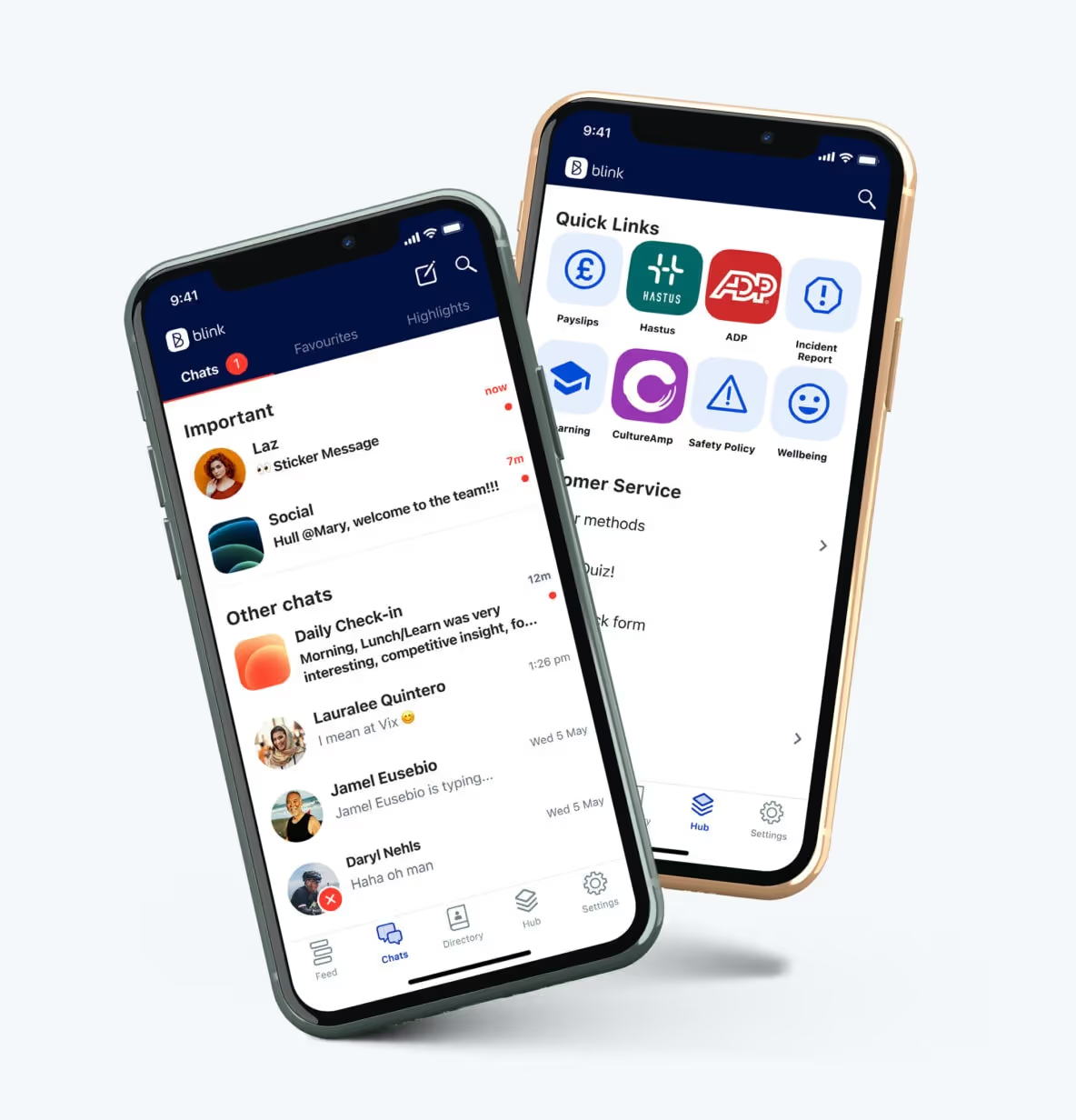
Blink is the leading mobile-first employee experience platform, designed for frontline organizations. It’s a modern intranet, where employees can access company comms and essential workplace resources from their smartphones.
Chatting with colleagues. Signing up for shifts. Responding to the latest poll. Viewing pay stubs. Celebrating a coworker’s company anniversary. Employees can do all this and more with Blink’s comprehensive employee app.
With a range of communication, recognition, engagement, and social features — all available via a user-friendly interface — Blink helps employees feel closer to company culture and one another.
What is Workvivo?
Like Blink, Workvivo is an employee communications app. The company was established in 2017 and was acquired by Zoom in 2023.
Workvivo is an all-in-one tool for workplace communication and collaboration. Social media-style functionalities, such as podcasting, keeps employees engaged.
Blink vs. Workvivo: What are the similarities?
Internal communications
Communication channels
Both Blink and Workvivo help to streamline company communications. Messages from management. Co-worker conversations. Leadership updates. All types of communication are supported thanks to a variety of channels, including a newsfeed, mobile notifications, videos, and livestreams. Workvivo customers can also create articles, newsletters, and podcasts from within the platform.
News feed
A news feed is another thing these platforms have in common. Admins can personalize Blink’s News Feed, which serves as users’ homepage, based on each employee’s team, interests, and role. This ensures employees only see relevant comms. Because employees can also filter the news feed, it’s easy for them to find the information they’re looking for.
Chat functions
Both platforms have similar chat features that are useful for teamwork and project management. Employees can chat and share files, GIFs, images, and videos. In Blink, chat functions are a core pillar of the platform. Workvivo, on the other hand, relies on integrations with Microsoft Teams and Slack. A chat add-on is available but this comes at an additional cost.
Video conferencing
When only face-to-face communication will do, Blink and Workvivo both provide useful video conferencing tools. Teams working on either platform can start a video call right from their chat group. Workvivo does this through its Zoom video app. Blink integrates with Zoom, Google Meet, and Microsoft Teams, giving customers the option to use their preferred video conferencing software.
AI comms support
With Blink Assist, users get AI support when creating and sharing content. Your AI assistant can automatically generate and improve posts, helping you to better connect with your audience. Users can also use AI to summarize posts that have appeared in the news feed. This means you can stay up to date without having to read every single post. Workvivo, working with Zoom, is beginning to introduce generative AI features.
Blink and Workvivo both support employee engagement. They provide two-way communication tools and support employee recognition with milestone celebrations and appreciation shout-outs. Both platforms also aid the onboarding process, with employee directories, a resource hub, and new starter video introductions.
These solutions provide tools for feedback collection, like pulse survey check-ins and employee NPS (net promoter score) surveys. Blink, in particular, provides rich survey functionality. Compared to Workvivo, Blink provides a greater variety of surveys and question types. This allows you to collect in-depth data and then use feedback analysis tools to examine that data on a granular level.
When it comes to encouraging employee engagement on the Blink platform, Blink’s customer success managers (CSMs) are on hand. Clients work with a dedicated CSM to optimize adoption and engagement.
A digital hub
Workvivo serves as a digital hub where companies can store and share documents and resources. This hub integrates with other tools in an organization’s tech stack. It’s possible to create wiki pages for collaboration and to launch other apps from within the platform.
Similarly, Blink offers a modern intranet, accessible on both desktop and mobile. Users can access important tools, documents, forms, and information, directly from the app. They can also launch other apps from within the platform thanks to a secure single sign-on. This encourages user adoption of existing software and streamlines the employee experience (EX).
Blink was purpose-built from the ground up to enhance internal communications and improve the employee experience, and that has always been our sole mission.
For companies impacted by Meta’s recent decision to sunset Workplace, this is a crucial distinction. Meta’s shift in focus away from Workplace to other business areas highlights the risk of relying on platforms that are not core to a company’s strategic direction.
Organizations partnering with Blink are choosing a vendor whose entire focus is dedicated to success in employee engagement and communication. We continuously invest in our platform, ensuring that it remains a leading solution for internal comms and employee experience.
Unlike Workvivo, which — like Workplace — is just one part of a much larger parent company’s diverse offerings, Blink’s platform isn’t just a feature among many — it’s the heartbeat of our business.
Frontline-first
Both Blink and Workvivo have a mobile app that employees can access from their smartphones. These are user-friendly spaces that employees find easy to navigate. And these apps are comprehensive, offering many of the same features on desktop and mobile versions of the platform.
However, Blink offers some features and services that particularly benefit a frontline workforce. These frontline-focused features and services include the following:
Feeds and chats are cached for offline reading so a poor or non-existent internet connection doesn’t prevent employees from engaging with the app
Workers can select a “do not disturb” setting so they’re not bothered by notifications when they’re at home or trying to rest after a night shift
Blink’s Open Shifts micro-app allows managers to advertise empty shifts and employees to volunteer for them
Blink’s rollout team offers unparalleled support during the launch period, providing branded materials and visiting sites to help people gain access to the app
While Workvivo may be a better fit for a desk-based organization, Blink’s deep understanding of frontline teams and their needs makes this platform an excellent choice for frontline businesses.
Analytics
Workvivo offers robust analytics capabilities to track and measure employee usage data. Organizations can gain insight into platform usage and then make data-driven decisions to manage platform performance. This functionality is available for an additional fee.
Like Workvivo, Blink’s enhanced workforce analytics feature provides comprehensive usage data. But Blink goes beyond usage.
Blink analytics collate and correlate from multiple data points to provide a breadth of insight into your workforce. You can drill down into the data, examining results by department, manager, and location to get deeper, actionable insight.
Your dedicated CSM can then help you turn actionable insights into action plans. These can be distributed automatically via Blink comms channels, helping you to implement your plan and track results.
Customization
Both Blink and Workvivo allow you to add your own branding to the platform. But Blink offers more in terms of customization.
Blink provides a white-label app for full brand personalization. For larger, multinational organizations, you can also create a federated platform, with personalized branding for each region. You can compartmentalize other features, like the news feed and user directory, too. In Workvivo, colors, icons, and logos are set globally.
While the offering of out-of-the-box integrations is comparable across both products, Blink also provides deeper integrations through customized micro-apps scoped and built for each customer.
These micro-apps allow you to add functionality to the platform as you need it. You can use Blink’s pre-built digital forms to digitize and streamline processes for employees. For example, employees can use the app to request leave, view their pay stubs, or report an incident. And if you don’t see a form that quite fits your needs, you can count on the Blink team to custom-make one.
Content management
Both Workvivo and Blink offer useful content management features. It’s easy for admins to set permissions and for content creators to create and publish new content. On Blink’s app, creators can protect sensitive content so readers have to authenticate before accessing it. Blink can also integrate with design tools like Canva, which helps users create effective page layouts.
In comparison, Workvivo offers a variety of content management tools. For example, users can auto-archive content by setting an expiration date for each type of content. Publishers can also opt to receive notifications when content has expired.
Translation capabilities are also a little more robust on Workvivo. In Blink, users can set their language and choose to auto-translate comments, posts, and pages so that other users can read them in their native language. In Workvivo, content creators can take this a step further by writing content in their own language and then select the languages it should be automatically translated into. This can come in particularly handy for large, multilingual teams.
Blink and Workvivo both support organizations in their internal communication and employee engagement efforts. They act as a modern intranet, with both desktop and mobile app versions that help companies reach all members of the workforce, no matter where they’re based.
Workvivo has the edge when it comes to certain capabilities, like translation. But Blink makes a great Workvivo alternative, particularly when it comes to personalization, analytics, and custom functionality.
Blink is also the go-to platform for frontline organizations. Built specifically to improve the work lives of deskless employees, Blink makes it easy for companies to encourage app adoption and engagement. It helps frontline workers feel more connected to their coworkers and company culture. It also puts all essential tools at their fingertips, improving efficiency and safety.
Want to find out what Blink could do for your frontline organization? Book your free demo today to see for yourself.
Digital tools are transforming the way organizations build and sustain employee engagement. Platforms like Blink, Workvivo, Staffbase, and Reward Gateway are helping teams stay connected, improve communication, and bring company culture to life — wherever employees work.
But with so many employee engagement tools on the market, choosing the right one can be tricky. The wrong platform can waste time, hurt adoption, and even reduce engagement.
Getting it right matters. Companies with highly engaged teams are more productive and see up to 23% higher profitability. The best employee engagement software goes beyond simple communication — it connects people, recognizes great work, and supports a shared sense of purpose.
Every organization is different. The tools that work for a remote or office-based workforce may not suit a frontline team. That’s why it’s important to align your engagement goals with the right platform.
You’ll find software built for:
Frontline employees — mobile-first apps like Blink that keep workers connected on the go
Remote teams — tools such as Asana and Slack that combine communication and project management
Office-based teams — platforms like Culture Amp and OfficeVibe that measure engagement and feedback
And others that specialize in areas such as:
Communication and collaboration
Feedback and performance
Wellbeing and productivity
Rewards and recognition
Choosing the right solution depends on your people and your priorities — because engagement software only works when it works for everyone.
For frontline organizations, this is especially true. Most engagement platforms are still built with desk-based employees in mind. Only 1 in 10 frontline workers says they have access to the tools and technology they need to connect and advance at work — even though they make up 82% of the global workforce.
Without easy access to company updates, communication, and recognition, frontline employees can quickly feel disconnected and undervalued.
That’s why your employee engagement solution needs to work for all employees — wherever and however they work.
In the next section, we’ll look at the best employee engagement software for 2026 — from all-in-one employee apps like Blink to specialized tools for communication, wellbeing, and recognition.
Let’s take a closer look.
Best employee engagement app for frontline organizations
Frontline employees are the backbone of many industries — from transportation and retail to healthcare and hospitality. But engaging this workforce comes with unique challenges. Many frontline employees don’t have regular access to company systems, email, or desktop devices, making it harder for them to stay informed and connected.
That’s why mobile-first employee engagement software has become essential. The best platforms for frontline teams combine communication, recognition, and real-time updates in one easy-to-use app.
These tools close the gap between head office and the field, helping every employee — regardless of location — feel included in company culture.
Below are some of the best employee engagement tools for frontline workers in 2026, starting with Blink, a leading all-in-one platform designed specifically for deskless and distributed teams.
Best employee engagement software for frontline workers
Blink
When it comes to engaging a dispersed, frontline workforce, few tools match what Blink delivers.
Blink is a mobile-first employee engagement platform built to help organizations connect with every worker — whether they’re in the field, on the factory floor, or on the move. Used by teams across industries such as transport, healthcare, logistics, and construction, Blink turns everyday communication into connection.
Employees can easily chat with colleagues, access company updates, view schedules, and complete essential tasks all in one place. The result: better communication, stronger engagement, and a more unified culture.
Managers benefit, too. Blink’s analytics dashboard helps leaders track engagement and performance trends, identify communication gaps, and celebrate wins through built-in recognition tools.
Key features include:
All-in-one communication: Peer-to-peer chat, team groups, and company-wide updates keep everyone aligned.
Employee recognition: Built-in recognition features highlight great work and reinforce culture.
Engagement surveys: Pulse surveys provide quick, actionable insights into morale and satisfaction.
Analytics and insights: Track usage, engagement, and content performance to inform strategy.
Seamless integrations: Connect scheduling, HR, and project management tools for a single digital workspace.
Mobile-first design: Works on any smartphone — no corporate email required.
With Blink, your entire workforce can access the same tools and information, creating a seamless digital experience that keeps everyone connected, informed, and motivated.
Request a demo today to see how Blink can transform engagement across your frontline teams.
Best employee engagement software for desk-based remote workers
If you're looking for employee engagement software platforms suited to desk-based remote workers, here are some excellent options.
Google Chat
Source: Google Chat Capterra Reviews
Google Chat is a communication platform that includes features like video and voice calls, and group chat. It's a great option for workplace communication and it's free to use.
As you’d expect, this tool integrates with the rest of the Google suite, including Google Calendar, Drive, Groups, and Gmail. But it lacks some of the advanced features you tend to get with paid tools.
Reviews from Capterra note that Google Chat is easy to use. It also provides good collaboration tools. However, the interface can be frustrating, message delivery can be an issue, and notifications can be challenging to navigate.
Pricing: Monthly pricing for Google Chat for business starts at $6 per user.
Discord
Discord is a chat app designed for gamers. But it’s recently been used for workplace communication, too. It includes features like voice and video chat, so you can easily connect and communicate with colleagues.
You can use Discord for free, making it a basic but cost-effective tool for internal communications, especially in a remote working environment.
Pricing: Many of Discord’s features are free to use. For businesses that want to invest in extra perks, Discord’s premium tier, “Nitro,” is available for $99 per year.
Asana
Asana is a popular project management tool that can also be used for employee engagement. With Asana, you can easily create and assign tasks, track task progress, and set team priorities. You can also use Asana to create custom projects for easy employee collaboration.
Source: Asana Capterra reviews
Asana makes a great option for remote teams, in part because it offers a mobile app for easy access to tasks and progress data. This helps to ensure that employees are working cohesively and effectively wherever they’re based.
Reviews from Capterra note that while Asana offers a clean, intuitive, and integrated interface, notifications are often missed, automatic opt-in to email notifications can be annoying, and the different projects and access features can be confusing.
Pricing: Monthly pricing for Asana starts at a basic free plan. A business plan costs $24.99 per user per month when billed annually.
ClickUp
ClickUp is a cloud-based collaboration and project management tool and it’s a good option for those looking to improve remote employee engagement.
Key features include task assignments and statuses, alerts, and a task toolbar. But while ClickUp does well in terms of task management, it doesn’t offer a full range of employee engagement tools.
This platform lacks features relating to real-time communication, employee recognition, and social interaction. So you’re likely to need additional software.
Pricing: ClickUp offers a free version. Monthly pricing for a Business plan costs $12 per user per month.
WorkTango
WorkTango is an employee experience platform with a number of solutions for employee engagement. It provides tools like employee surveys, real-time analytics, rewards, and recognition.
You can also see how your engagement scores rank against other WorkTango customers to get a better sense of how you’re doing.
On Capterra, users say that anonymous feedback and anonymous employee chat allow for truly honest conversations. Clients also praise recognition features. However, some users would like better reporting tools and easier platform navigation.
Leapsome is a good employee engagement tool for goal setting and employee development.
It’s designed to support organizations to create high-performing teams. You can use Leapsome to track and collaborate on goals, run 360-degree reviews, and create personalized learning pathways.
With lots of tools for remote teams, Leapsome helps maintain employee progress even when employees aren’t in the office. The software also offers video conferencing tools, which make it easy to collaborate on agendas and align action plans.
Pricing: Pricing starts at $8 per user per month, with the option to add on the extra features you need.
Slack
Source: Slack Capterra Reviews
Slack is a great productivity tool for remote office workers. It helps you to organize teams and their work, with the help of channels, huddles, and a workflow builder.
However, it's worth noting that Slack doesn't provide much in the way of scheduling, performance tracking, or survey features. If these tools are essential to your organization, you’ll need to use Slack plus another employee engagement platform.
Reviews from Capterra note that Slack’s user interface is easy to use. They like channel and plugin features. They also appreciate having all work conversations in one place.
However, reviews also note that it can be a confusing platform to use, with lots of channels across different teams. Adoption can also be difficult if people are not familiar with the software.
Pricing: For multiple employees, monthly pricing for Slack starts at $6.67 per user.
Best employee engagement software for desk-based office workers
Now, let’s take a look at the tech tools best suited to office worker engagement.
OfficeVibe
Source: OfficeVibe Capterra Reviews
OfficeVibe is a “people-first” employee experience platform, with a number of employee engagement features designed for the office.
It helps employers to assess and improve employee engagement levels with robust measurement tools. It also provides an app so you can track progress on the go if needed.
Reviews from Capterra note that OfficeVibe is an innovative tool that helps organizations better understand employee happiness. The company also provides strong customer service.
However, managers complain that survey questions can’t be customized and that insights don’t go deep enough. They also say that the Slack integration doesn’t work too well and that setup can be confusing.
Pricing: Monthly pricing for OfficeVibe ranges from a free version to a $5 per user Pro Plan.
SurveyMonkey
By using employee satisfaction survey tools like SurveyMonkey, you can collect regular feedback from employees on their engagement levels. This real-time feedback can help you to identify problem areas and take steps to improve employee engagement in your organization.
As well as survey templates, SurveyMonkey offers reporting and analytics features that help you spot data trends and insights. It also uses AI to reveal employee sentiment.
Pricing: For over three users, monthly pricing for SurveyMonkey starts at $31.83 per user.
Doodle
Employee polls are a quick and easy way to collect anonymous feedback from employees on a range of topics. You can use employee poll tools from Doodle to gather feedback on everything from engagement levels to job satisfaction.
But Doodle does more than polls. It also provides meeting, video conferencing, and scheduling tools. You can even poll meeting attendees to find a time that works for everyone and improve attendance.
Pricing: Monthly pricing for Doodle Professional starts at $6.95 per user.
Monday.com
Monday.com is a project management tool that can also be used for employee engagement.
With Monday.com, you can create and assign tasks, track progress, and more. You can also use it to create performance tracking templates for employees. This can help you to identify areas where employees need improvement and take steps to address them.
On Capterra, Monday.com users say that the platform’s project management tools are excellent. But others complain that the backend of the platform is complicated and involves a steep learning curve.
Pricing: For more than two employees, monthly pricing for Monday.com starts at $8 per user per month.
Culture Amp
Culture Amp’s employee engagement platform provides over 40 science-backed survey templates. You can use these surveys to find out how employees feel about engagement, belonging, inclusion, and more.
The platform also uses AI-powered insights to summarize employee engagement findings, supporting your business to make data-backed decisions.
Reviews from Capterra say that Culture Amp has a user-friendly user interface. They also praise the platform’s ready-to-go survey templates.
But users don’t like having to rely on the Culture Amp support team to update some parts of the platform. They also say that — while survey features are strong — features like the objective and key results (OKR) module aren’t as well-developed.
The following tools specialize in one area of employee engagement. As such, they make a great add-on to your chosen staff engagement tool.
At Blink, our App Marketplace integrates all the tools you need to manage your employee engagement in one place. If we don't already integrate with your app, just ask!
Kudos
Kudos is an add-on app that allows employees to give and receive recognition in real time. With Kudos, you can create a culture of recognition where employees feel appreciated for their hard work.
Pricing: Monthly pricing for Kudos starts at $3.25 per user.
Friday
Friday is an app that makes it easy to give employees recognition for a job well done. With Friday, you can give employees badges, points, and rewards to show your appreciation.
Pricing: Friday has a free version. Monthly pricing goes up to $100+ for company plans.
Bonusly
Bonusly is another dedicated employee recognition tool. Bonusly supports peer recognition, allowing employees to give each other bonuses in the form of points that can be redeemed for rewards. By using Bonusly, you can create a culture of appreciation and recognition throughout your workforce.
Pricing: Monthly pricing options for Bonusly starts at $2.70 per user.
Limeade Wellbeing
Employee wellbeing programs, like those on offer from Limeade, go hand in hand with employee engagement programs. Because when employees feel healthier, happier, and less stressed, they have the headspace they need to engage with their work.
Limeade provides customized employee wellness programs. These programs encourage participation and deliver essential wellbeing resources via one handy tool.
With this tool, you can also listen and respond to your workforce in real time through anonymous surveys, polls, and quizzes. All that’s really missing from this system is strong employee communication tools.
WeThrive is an employee engagement tool designed to support the mental health of desk-based workers. With this platform, you can create surveys to assess employee wellbeing and then take action to improve it.
WeThrive analytics allow you to segment survey results by team, tenure, location, department, and manager. This makes it easy to identify the root causes of poor wellbeing and identify areas for improvement.
Reward Gateway is an employee engagement solution that offers employee discounts, employee rewards and recognition, and tools for employee communications.
This combined platform is a great tool for office-based employers looking to boost employee recognition, with features such as discounts and rewards accessible in one place.
Reviews from Capterra note that Reward Gateway is flexible and easy to use. But it can be glitchy, with reporting features sometimes not running properly and some features failing to run as smoothly as others.
Pricing: Monthly pricing for Reward Gateway starts at $10.19 per user.
Weekdone
For structured goal setting, Weekdone is an excellent choice. It’s a top-rated OKR platform that allows you to track weekly plans and progress, provide feedback, and get everyone pulling in the same direction.
OKR software can also be used to ensure that remote employees have clear objectives, with performance reviews and goal tracking.
Pricing: For more than three employees, monthly pricing for Weekdone is $8 per user.
Awardco
Awardco is another bonus tool that makes recognizing and rewarding people easier and more effective.
With Awardco, employers can set up reward and recognition programs that their employees can access from any device. You can tailor incentives to your teams, ensuring the prizes on offer act as real motivation.
This tool is a good option for office-based companies of all sizes looking to increase employee satisfaction and engage with their workforce to boost productivity.
Pricing: Pricing for Awardco ranges from $2,500 to $4,000 per year.
QuizBreaker
QuizBreaker is a virtual team-building tool. It works well for both office-based and dispersed teams, bringing a bit of gamification to the work day.
Key features of QuizBreaker include:
a scheduled icebreaker quiz that helps employees get to know each other better
escape games and 1,000+ trivia quizzes for fun team-building events
employee profiles that reveal work style, unique strengths, and fun facts
pulse surveys to help you get regular feedback from employees
QuizBreaker isn’t an all-in-one employee engagement tool. But this platform helps teams to bond and brings a little fun to your workplace culture.
Capterra score: Not found in Capterra database. Pricing: Monthly pricing for QuizBreaker starts at $3 per user.
Motivosity
Motivosity is employee recognition software that makes it easy for managers to give recognition and rewards.
Motivosity’s “Thanks Matters” card is an innovative way of rewarding employees. Like Bonusly, you assign points for great performance. These points directly translate into cash, which employees can access via a special Visa debit card.
They can choose from hundreds of reward options. You can even add your own gifts such as branded swag or lunch with the CEO. Employees can also choose to forgo cash rewards in order to make charitable donations.
Key employee engagement software features to prioritize in 2026
When choosing the right employee engagement software for your organization, focus on the features that will help you overcome your biggest engagement challenges. The right combination of tools can improve communication, morale, and productivity across every level of your workforce.
Channels and chats
Communication is the foundation of engagement. Real-time chat features — including group channels, private messages, and announcements — ensure employees stay in the loop and can collaborate quickly, wherever they work.
Surveys, polls, and content analytics
Platforms with built-in surveys, polls, and analytics help you measure engagement levels, gather employee sentiment, and identify emerging issues before they become major problems. This data ensures every employee has a voice and helps leaders take action with confidence.
Employee recognition
Recognition tools — such as kudos, badges, or points systems — make it easy to celebrate achievements and highlight great work. This simple feature goes a long way toward strengthening motivation, morale, and a sense of belonging.
Analytics and dashboards
For organizations managing distributed or frontline teams, analytics functions are essential. They allow you to measure engagement, retention, and satisfaction while uncovering insights into how employees interact with leadership and one another. These insights drive continuous improvement in your employee experience strategy.
A main feed or hub
A centralized hub — or main company feed — brings all updates, videos, documents, and announcements together in one place. This consolidation creates a single source of truth, keeping employees informed and aligned with your company’s goals.
At Blink, our frontline employee app brings all of these features together. With tools for chat, recognition, surveys, analytics, and communication, Blink helps you overcome common engagement challenges and connect every employee — from the frontline to the office.
The business benefits of digital employee engagement tools
Digital engagement tools require an upfront investment — both financially and in time. But the return on that investment is substantial. The right software encourages participation, builds connection, and creates a culture employees want to be part of.
Below are the five key business benefits of using digital employee engagement software.
#1. Reduce employee turnover and save on recruitment costs
Engaged employees are more likely to stay with your organization, reducing the cost of recruitment and training. According to SHRM, hiring a new employee can cost three to four times the position’s salary, making engagement one of the most effective retention strategies available.
Digital tools strengthen this connection by amplifying company culture and ensuring all employees can participate fully — leading to a happier, more loyal workforce.
#2. Strengthen company culture through digital engagement platforms
In today’s competitive labor market, salary alone isn’t enough to retain top talent. Engaged employees are motivated by purpose, belonging, and appreciation.
Digital engagement tools help reinforce these pillars by improving communication, supporting growth, and enabling public recognition. The right platform makes culture tangible — connecting leadership, values, and everyday work.
#3. Improve internal communication with employee engagement software
Two-way communication is critical for engagement. Modern tools help you deliver the right message to the right people — whether through audience segmentation, targeted updates, or role-based notifications.
These platforms also make it easier to track the effectiveness of communication. With built-in analytics, you can see how employees interact with content and refine your messaging to increase engagement and clarity across the organization.
#4. Use analytics to understand and improve employee engagement
Feedback is the backbone of a strong employee engagement strategy. Without it, leaders can’t identify what’s working or where improvements are needed.
Employee engagement software with advanced reporting provides actionable insights. You can see how satisfied employees are, how frequently they engage with company updates, and where there are communication or experience gaps.
With Blink, for example, you can access detailed data on engagement, satisfaction, and retention — helping you identify frontline challenges early and respond faster.
#5. Boost productivity with connected employee engagement platforms
Disconnected tools slow teams down. Employees lose valuable time switching between apps, searching for information, and handling repetitive admin tasks.
A unified engagement platform streamlines these processes. By digitizing workflows, automating basic tasks, and connecting every workplace app in one place, you free up employees to focus on meaningful, high-impact work.
Blink’s connected platform helps teams stay organized and productive — from digitized HR processes to mobile-friendly task management — improving both individual and organizational performance.
Blink, the leading employee engagement super-app, announced that The Learning Experience, a premier early childhood education provider, has successfully implemented Blink’s employee engagement platform as part of its strategic initiative to improve frontline staff communication, engagement, and retention across its 350 locations.
As The Learning Experience continues its significant growth, finding innovative ways to enhance company culture and ensure effective communication across all locations has become increasingly important. Due to the nature of the work, traditional communication methods aren’t accessible, as most staff members are teachers who do not use email during the day and need a more flexible solution. To address these needs, the organization launched a strategic initiative called Operation Blue Elephant, utilizing Blink’s platform to enhance engagement and streamline internal communication. This effort focuses on unifying the experience for the company’s 10,000 employees, 90% of whom work in franchise-operated centers with limited direct connection to the corporate team.
Blink’s platform, known as the "Happy Hub" within The Learning Experience, has become a key component of its employee engagement strategy. This centralized communication tool offers employees timely access to essential information, core tools, and a platform for feedback, thus enhancing overall engagement and connectivity.
“Blink has been a game-changer on how we communicate and engage with our employees,” said Traci Wilk, Chief People Officer, of The Learning Experience. “By providing a unified platform, we’ve ensured that every team member, from corporate staff to frontline franchise employees, feels connected and valued. This initiative is not just about improving communication-it’s about building a culture where every employee thrives.”
Key highlights of the Happy Hub
Comprehensive benefits program - The Learning Experience introduced "TLE Cares," an affordable benefits package for franchisees to offer their employees.
Reimagined teacher onboarding program - Through the platform, new teachers have the tools they need to succeed from day one, leveraging new technology and resources.
Happiness index -The Learning Experience began running both parent and employee engagement surveys. Viewing these results together gave the organization and franchisees a clearer idea of their performance and how Happiness index scores relate to employee engagement, retention, and family enrollment at centers.
Results
Since the launch of the Happy Hub, there has been a notable improvement in employee retention rates. The streamlined onboarding process has also contributed to this success by boosting new hires' confidence and readiness to lead classes effectively. In addition, the positive reception of the platform, with 99% of franchisees actively participating, highlights its effectiveness in enhancing staff engagement and creating a more supportive work environment.
Sean Nolan, CEO and co-founder of Blink said, “The success of The Learning Experience’s Happy Hub showcases the profound impact of effective frontline connection. In today's competitive market, fostering a strong organizational culture and ensuring employees feel supported is crucial for retention and growth. Other organizations can look to The Learning Experience as a model on how to leverage technology to achieve these goals.”
Amelia has spent the last two years bringing energy, creativity, and a spark of marketing magic to Blink’s Boston office. As a Senior Marketing Associate, she’s helped shape our presence at events across the US, from high-profile conferences to intimate dinners — and even found time to turn our beloved mascot, Blinkie, into plush toys and Legos.
We sat down with Amelia to talk about what brought her to Blink, the milestones she’s proud of, and what makes the culture in Boston so special.
1. What is your role at Blink?
I am the Senior Marketing Associate at Blink and am based out of the Boston office. I have been here a little over two years.
2. What initially attracted you to join Blink?
I’ve always been drawn to the fast-paced, creative energy of tech startups, and when my former colleague Courtney Hayes joined Blink, she couldn’t stop talking about the mission, the buzz around the product, and how great the team was. That instantly piqued my interest.
At the time, I was still early in my career and looking for a place where I could grow — and Blink offered that in a really exciting way. It felt like a no-brainer. Once I learned more about the technology and how it was solving real problems for frontline teams, I knew I wanted to be part of it.
3. What's a project you are proud of during your time at Blink?
Because I run our events in the US, no two days ever look the same. Every event — whether it’s a major conference, a global webinar, or an intimate dinner — comes with its own unique set of challenges and rewards, so it’s hard to pick just one project. But I’m incredibly proud of how we’ve grown our event presence over the last couple of years. People now expect to see Blink at major industry shows, and they expect us to bring a level of excitement and creativity — and we’ve been delivering on that. From how we look to the quality of conversations we’re having, it’s been a huge leap forward.
On another note, I also somehow became a toy manufacturer on the side! Over the past year, I’ve worked with third-party partners to bring our mascot Blinkie to life as both plush toys and Legos. It’s been a long but fun process, from design to production, and now that they’re in our hands, it’s incredibly rewarding. They’re playful and memorable, and they bring so much joy to our customers, prospects, and the whole Blink team.
4. How would you describe the company culture at Blink in three words?
Supportive, upbeat, and collaborative.
The Boston office has such a special vibe. Everyone genuinely supports one another, no matter their title or role. We help each other grow, hold one another to high standards, and always find ways to bring energy and fun into the day. That kind of culture makes it easy to stay motivated and feel confident in the work you’re doing.
5. What's one thing you're excited about for the future of Blink?
Definitely our global growth. It’s exciting to see new customers coming on board — whether they’re small teams or massive enterprises. Even in just the few years we’ve been in the US market, we’ve seen incredible momentum. Every new logo is a reminder that there’s a real need for what we’re building.
I’m especially excited to see where we go in industries like EMS and retail. We’ve already made an impact, and I think there’s still so much opportunity. Some of the brands we’ve signed recently weren’t even on my radar when I first joined — and now they’re some of our biggest wins. It makes the next few years feel full of possibility.
6. Can you tell us about a recent initiative or program launched at Blink that you found particularly exciting?
I’m really excited about the new voice and video feature we launched. I’m someone who sends voice notes all the time and prefers face-to-face conversations, so this update felt like it was made for people like me. It’s not just convenient, it adds a whole new dimension to how people communicate on Blink. Sometimes a message just doesn’t capture tone or emotion the right way, and this makes interactions feel more human and real. I think it’s going to be a game-changer for our customers.
7. Why do you work for Blink?
The product, the mission, and the people. Blink is solving a real need connecting frontline workers who have been left out of digital transformation. That in itself is meaningful work. But what makes it special is the people behind it. Everyone here is passionate about the mission and genuinely wants to make a difference.
There was actually a moment early on in my first year, during an all-hands meeting. Sean gave a really inspiring update about our progress, and I remember looking around the Boston office and seeing how proud people were. That was when it really hit me that I was part of something important.
New employee journey maps can take time to develop. But when adding more smiley faces isn’t enough, how do you get an employee journey map to work better for your organization?
The concept of employee experience maps has been gaining traction as a way to boost employee engagement and improve your onboarding process.
The template follows a pretty straightforward path from hiring, through training, and eventually exiting, but it’s the way you use these maps that makes them valuable.
You know your workers will have training at a particular stage, but how helpful is it? Do you see an increase in turnover at any stage? These are the types of questions your employee journey maps should help you answer.
Why use an employee journey map?
An employee journey map can be a helpful tool for improving the employee lifecycle. This concept visualizes the entire employee experience through your organization, from onboarding until their last day.
There are a few different ways to name each stage of the journey, but every employee experience map follows the same basic flow:
Recruitment and hiring
Onboarding
Engaging and training
Development
Progress and performance
Exit or offboarding
These employee journey touchpoints describe the main stages a worker might be at within the company.
You can track the average time it takes to complete each step, assign different training and feedback for different stages, and look for patterns within your journey maps.
An employee journey map can help with engagement as you can better address the needs and concerns a worker will have by knowing where they stand in the organization.
Making the most of this tool will help you actually get some use from it.
How to make a better employee experience journey map
Don’t worry. Not all good employee experience journey maps lead to Manchester. They just have to lead to happier workers.
Whether you already use an employee journey map template or are just starting to look into the idea, there are some steps you can take to make your maps work better.
They are the following:
Create different maps for different roles. The map for a frontline manager will look different from a warehouse worker, with different training and onboarding for each position. Depending on your organization, you may need a few maps or a few dozen.
Analyze your employee journey maps and look for patterns. Do many employees have trouble at the same part of the training? That may become more obvious when you compare maps and visualize the issue at hand.
The latest report from the Bureau of Labor Statistics shows an average tenure of 4.1 years, and 22% of workers had been with their current employer for a year or less.
Looking up industry-specific numbers can help you further pinpoint areas to focus on when planning out your journey maps.
Time feedback to the stage in the journey your employee is at. Look for onboarding feedback while the process is still fresh in their mind.
Provide appropriate feedback to your employees as well. Let them know how they’ve improved after training, or likewise what they could concentrate a bit more on.
Remember, journey maps are a tool that can help predict how an employee’s experience will look, but it’s not set in stone. There can be unexpected events that change their journey map.
Like a global pandemic that reduced working hours by 17.3% in 2020. Most of us are still trying to get back on track after that one.
Make sure your organization learns from the tool. These aren’t coloring book pages for employees to fill in while HR processes their paperwork. Learn from them.
Did you know only 12% of employees strongly agree their company did a good job at onboarding?
Using an employee journey map, you can analyze your new hires at this stage and see why they might feel that way.
Wrapping up — Making employee journey maps better for your workers
Employee journey mapping is one of those tools with lots of potential. It can help you improve different processes in your organization, increase employee engagement, and create an easy-to-follow workflow for various roles.
Or you can spend an entire quarter making everyone fill these in and then promptly lose them in a subfolder that was last opened three years ago.
Just keep in mind that creating an employee journey map is the first step. You also need to make it easy to access for employees and have them provide feedback.